10 Best OBD2 Scanner Under $150 for 2026: Clear Diagnostics Without Overspending
The best OBD2 scanner under $150 right now is BlueDriver Bluetooth Pro, with full OBD2 diagnostics, live data, and repair reports in its app. We compared 10 scanners on value for money, diagnostic coverage, and ease of use. Most budget scanners look similar on paper but miss the systems or live data you actually need. Whether you need basic code reading, deeper DIY diagnostics, or a phone-based tool, this guide gives you one clear answer.
Quick Comparison: All 10 Products Ranked
| # | Product | Best For | Rating | Badge | |
|---|---|---|---|---|---|
| 1 | BlueDriver Bluetooth Pro OBDII Scan Tool | Phone-based diagnostics | 4.8/5 | Best Overall | Buy → |
| 2 | Autel AutoLink AL519 | Standalone handheld use | 4.7/5 | Best Handheld Value | Buy → |
| 3 | FOXWELL NT301 | Clear colour-screen reading | 4.6/5 | Best Screen Reader | Buy → |
| 4 | Innova 5210 | Repair guidance in app | 4.6/5 | Best for Repair Guidance | Buy → |
| 5 | TOPDON TopScan | App-based DIY diagnostics | 4.5/5 | Best App-Based Value | Buy → |
| 6 | OBDLink MX+ | Advanced Bluetooth use | 4.5/5 | Best Advanced Adapter | Buy → |
| 7 | Veepeak OBDCheck BLE+ | Budget Bluetooth use | 4.4/5 | Best Budget Adapter | Buy → |
| 8 | Autel AutoLink AL319 | Simple code reading | 4.4/5 | Best Simple Reader | Buy → |
| 9 | Ancel AD310 | First-time code readers | 4.3/5 | Best Starter Pick | Buy → |
| 10 | LAUNCH Creader 3001 | Basic live-data checks | 4.3/5 | Best Basic Handheld | Buy → |
How We Chose These Scanners
What we compared
Manufacturer specifications, documented OBD2 modes, live-data and freeze-frame support, connection type, app requirements, and stated vehicle compatibility for 10 scanners positioned for this budget roundup.
Our 3 scoring criteria
Value for money, diagnostic coverage, and ease of use. Each score is out of 5 and reflects the documented specification, not a hands-on test result.
Limits of this comparison
This is a specification comparison. No hands-on testing, workshop trial, or expert consultation is claimed, and app features or compatibility can change after publication.
What we cut — and why
Professional scan tools and tools whose core diagnostics clearly sit outside this budget scope were excluded, as were scanners with only a vague specification and no clear OBD2 mode list.
What to Look for When Buying an OBD2 Scanner
Start with the job, not the feature list. A scanner that only reads engine codes is enough for a warning light, but not for ABS, airbag, or deeper live-data work. Read how to choose an OBD2 scanner before you narrow the list, then match the tool to your car and your comfort level.
1. Vehicle Compatibility and Protocols
Most gasoline cars sold in the United States from 1996 onward use OBD2, but protocol, connector, and manufacturer-specific coverage still vary. Always check your vehicle OBD2 compatibility for model year, fuel type, and any system beyond basic engine codes. A tool that cannot talk to your car is useless, however good its screen looks.
2. Diagnostic Depth
Look beyond code reading. Freeze frame, live data, readiness monitors, and code definitions turn a code into a useful next step. The features an OBD2 scanner should have depend on whether you only want to clear a light or actually trace an intermittent fault. Deeper tools help more, but only if you will use the extra data.
3. Connection Type and App Costs
Handheld scanners work without a phone and are simple in a garage. Bluetooth adapters are compact and use a phone screen, but the app matters as much as the hardware. Check whether core features are free, whether advanced features need a subscription, and whether all OBD2 adapters are the same before assuming any adapter gives the same result.
4. Screen, Build, and Updates
A readable screen, a firm connector, and a cable or adapter that stays put matter in real use. For handheld tools, check screen size, button layout, and update method. For adapters, check firmware updates and whether the maker still supports the app. A budget tool with no updates can age faster than a slightly better-supported one.
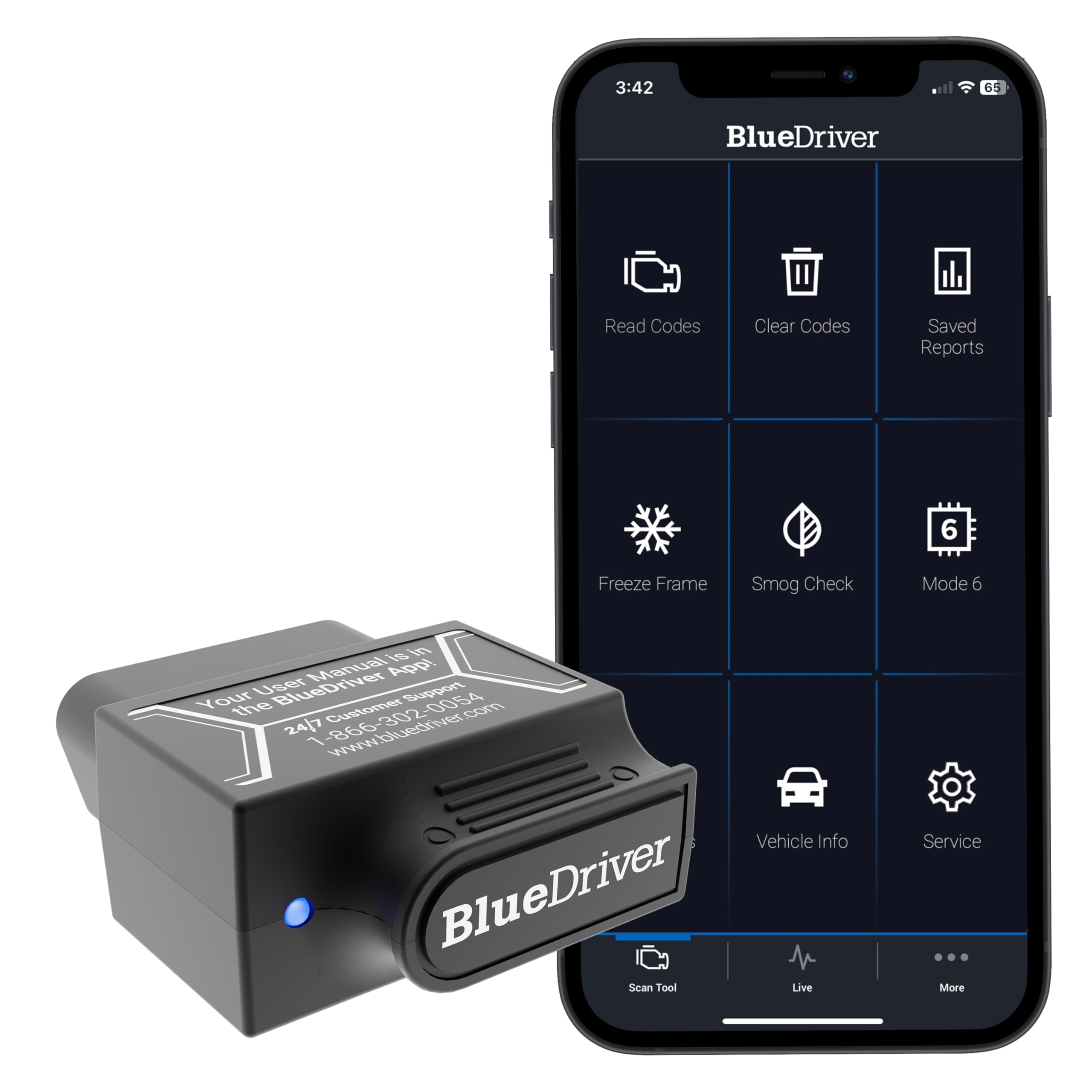
BlueDriver Bluetooth Pro OBDII Scan Tool — Best phone-based all-rounder
Best for: Everyday drivers who want phone-based diagnostics
BlueDriver suits drivers who want more than a code number without carrying a separate handheld unit. It plugs into the OBD2 port, connects by Bluetooth, and presents codes, live data, freeze frame, and repair reports through its phone app. That phone-first design makes results easier to read, save, and discuss with a mechanic. Its main trade-off is dependence on a compatible phone and app, so it is less ideal if you prefer a standalone tool. It also helps you decide whether a fault needs urgent attention, a planned repair, or a professional inspection.
- Broad OBD2 coverage with live data
- Clear repair reports in the app
- Compact adapter, no handheld screen needed
- Needs a compatible phone and app
- Not a standalone garage tool
4.7/5
4.9/5
4.8/5

Autel AutoLink AL519 — Standalone tool, no phone needed
Best for: Drivers who want a standalone handheld without a phone
Autel AL519 suits drivers who want to plug in, read a code, and move on without pairing a phone. Its colour screen shows codes, definitions, live data, and readiness status, which helps a quick garage check feel less like guesswork. It also supports freeze frame and basic code clearing, making it a practical everyday tool. Its main limitation is that it is not a phone-app system, so reports and graphs are more limited than app-based rivals. That makes it a reliable glovebox tool for quick checks, second cars, and drivers who dislike app setup.
- Standalone use, no phone pairing
- Colour screen with code definitions
- Live data and readiness status
- Limited app-style reports and graphs
- Check advanced system coverage first
4.8/5
4.6/5
4.7/5

FOXWELL NT301 — Clear screen for first checks
Best for: Beginners who want a clear colour screen
FOXWELL NT301 is a straightforward handheld for drivers who want a readable result without learning an app. Its colour display shows trouble codes, definitions, live data, and readiness information in a layout that is easy to follow at the car. It also supports freeze frame, which helps connect a code to the conditions when it appeared. The trade-off is a narrower, engine-focused scope than some app-based tools, so advanced system coverage should be checked before purchase. That clarity makes it a good first handheld for new DIY users, family cars, and quick pre-trip checks.
- Readable colour display at the car
- Codes with plain definitions included
- Live data and freeze frame
- Engine-focused scope, check advanced systems
- No phone-app report sharing
4.7/5
4.5/5
4.7/5
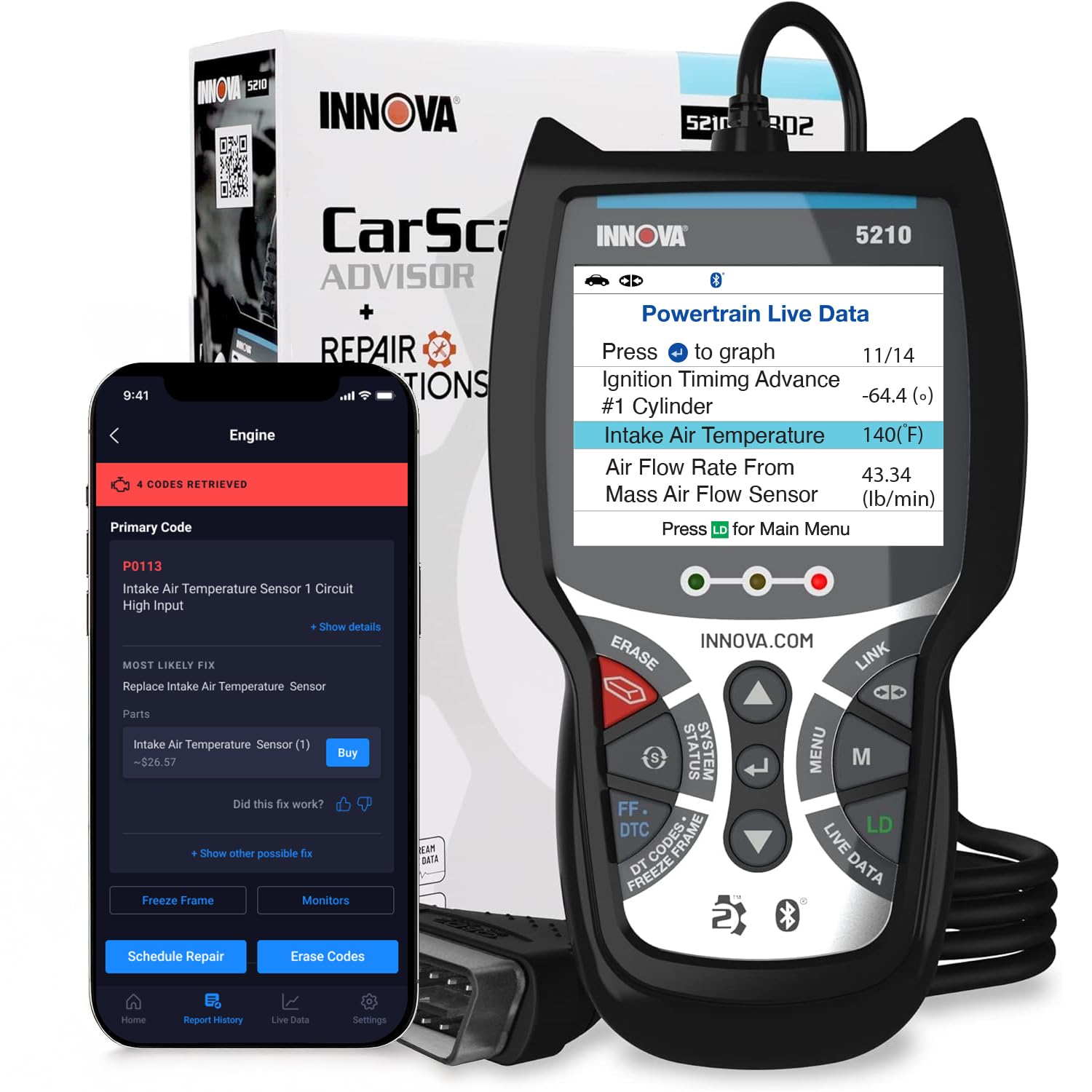
Innova 5210 — Guidance after the code
Best for: DIY owners who want repair guidance in the app
Innova 5210 suits DIY owners who want guidance after the code, not just the code itself. It pairs a handheld reader with an app that links verified fixes, parts, and repair information to the fault found. That combination helps a home mechanic decide whether a job is simple, needs parts, or should go to a shop. It also covers live data, freeze frame, and readiness checks for everyday diagnostics. The main trade-off is that deeper repair guidance depends on the app and vehicle coverage, so check compatibility before buying.
- Repair guidance linked to fault codes
- Live data and readiness checks
- Handheld plus app combination
- Guidance depends on app coverage
- Two-part setup for some users
4.5/5
4.7/5
4.6/5

TOPDON TopScan — App diagnostics without bulk
Best for: Phone users who want app-based DIY diagnostics
TOPDON TopScan suits phone-first DIY users who want a small adapter and a modern app interface. It is designed for code reading, live data, and broader diagnostic functions through the companion app, which makes it useful for regular checks and fault tracing. The compact adapter also stays out of the way under the dashboard. Its main trade-off is app dependence: feature availability and phone compatibility matter more here than with a standalone handheld, so confirm both before buying. It is a practical choice for drivers who check codes regularly and want phone convenience.
- Compact Bluetooth adapter design
- App-based live data and diagnostics
- Good value for DIY use
- Features depend on companion app
- Check phone compatibility first
4.6/5
4.5/5
4.5/5

OBDLink MX+ — Advanced adapter, higher ceiling
Best for: Advanced users who need fast Bluetooth diagnostics
OBDLink MX+ suits advanced users who want a capable Bluetooth adapter and are comfortable choosing their own diagnostic app. It is built for faster communication, secure Bluetooth pairing, and broader manufacturer-enhanced diagnostics through compatible apps. That flexibility makes it a strong choice for multi-vehicle households and deeper DIY work. Its main trade-off is value in this budget list: it sits near the top of the range, and its full benefit depends on the app you pair with it. That makes it suitable for enthusiasts who already use diagnostic apps and want room to grow.
- Fast, secure Bluetooth connection
- Works with compatible third-party apps
- Enhanced diagnostics via supported apps
- Near the top of this budget
- Full benefit depends on chosen app
4.2/5
4.8/5
4.5/5

Veepeak OBDCheck BLE+ — Low-cost Bluetooth entry
Best for: Budget Bluetooth users with iOS and Android
Veepeak OBDCheck BLE+ suits drivers who want a low-cost way to read codes and watch live data on a phone. Its Bluetooth Low Energy design works with both iOS and Android apps, which removes the usual iPhone pairing problem found with older Bluetooth adapters. The adapter itself is small, draws power from the port, and is easy to leave plugged in for occasional checks. Its main limitation is diagnostic depth: it is an adapter, not a full diagnostic platform, so results depend on the app you choose.
- Bluetooth Low Energy, iOS friendly
- Small, leave-in adapter design
- Works with popular third-party apps
- Depth depends on chosen app
- No built-in screen or reports
4.8/5
4.2/5
4.6/5

Autel AutoLink AL319 — Simple code reading
Best for: Simple code reading and clearing on a tight budget
Autel AL319 suits drivers who want the simplest possible answer to a check-engine light. It reads and clears codes, shows definitions on its screen, and covers live data and readiness checks for basic diagnostics. There is no phone pairing, app subscription, or complex menu to learn, which makes it easy to keep in a glovebox. Its main limitation is scope: it is a basic reader, so it will not replace a deeper diagnostic tool for advanced systems or detailed fault tracing. It is also useful as a backup tool for households with more than one car.
- Very simple plug-and-read use
- On-screen code definitions included
- No phone or app needed
- Basic scope, not advanced diagnostics
- Small screen for live data
4.7/5
4.1/5
4.8/5

Ancel AD310 — First scanner, minimal fuss
Best for: First-time code readers who want plug-and-read simplicity
Ancel AD310 suits first-time buyers who want a no-fuss introduction to OBD2 scanning. It reads and clears engine codes, shows live data and freeze frame, and displays readiness status on a simple screen. That makes it a sensible glovebox tool for deciding whether a warning light needs urgent attention or a planned garage visit. Its main limitation is the same as its strength: simplicity. It is not designed for advanced system diagnostics, detailed graphs, or app-based reporting. For many first-time buyers, that simple scope is exactly the point, not a drawback.
- Simple starter-friendly operation
- Live data and freeze frame
- Compact glovebox-friendly size
- Not for advanced system diagnostics
- No app-based reporting
4.7/5
4.0/5
4.8/5

LAUNCH Creader 3001 — Basic handheld backup
Best for: Basic live-data checks without a phone
LAUNCH Creader 3001 suits drivers who want a compact handheld for basic code reading and live-data checks. It shows codes, definitions, live data, and readiness information without phone pairing, which keeps the workflow simple in the garage. It is also easy to store and carry as a second tool. Its main limitation is basic scope: it is not a substitute for a deeper scanner when a fault involves advanced systems, manufacturer-specific data, or detailed graphing. It is a sensible backup if your main tool is an app adapter, or if a phone is unavailable.
- Compact handheld, easy to store
- Codes with definitions and live data
- No phone pairing needed
- Basic scope, not deep diagnostics
- Limited graphing and reporting
4.6/5
4.1/5
4.7/5
Top 3 Head-to-Head: BlueDriver vs Autel AL519 vs FOXWELL NT301
These three are the most common final choices because they cover the three main buying styles: phone-based, standalone handheld, and simple screen reading.
| Feature | #1 BlueDriver | #2 Autel AL519 | #3 FOXWELL NT301 |
|---|---|---|---|
| Value for money | 4.7/5 | 4.8/5 — Best | 4.7/5 |
| Diagnostic coverage | 4.9/5 — Best | 4.6/5 | 4.5/5 |
| Ease of use | 4.8/5 — Best | 4.7/5 | 4.7/5 |
| Choose if… | You want phone reports and live data | You want a standalone handheld | You want the simplest readable screen |
Who These Scanners Are NOT For
A budget scanner is a good first diagnostic step, but it is not a professional workshop tool.
They are also not a substitute for a physical inspection. A code points to a system, not always to a failed part, so wiring, leaks, and mechanical wear still need checking.
Common Mistakes to Avoid
Most budget scanner regrets come from buying the wrong type, not the wrong brand.
Frequently Asked Questions About OBD2 Scanners
What is the best OBD2 scanner under $150?
For most buyers in this specification comparison, BlueDriver Bluetooth Pro is the best overall choice because it combines broad OBD2 coverage, live data, freeze frame, and app-based repair reports. If you prefer a standalone tool, Autel AL519 is the stronger handheld pick, while FOXWELL NT301 is best for simple screen reading.
Can a budget OBD2 scanner read ABS and airbag codes?
Some can, but many budget scanners read engine codes only. ABS, SRS, transmission, and other systems need specific coverage, which varies by tool and vehicle. Always check the stated system list for your model before buying, and do not assume a tool that reads engine codes will also read every other system.
Do OBD2 scanners work on all cars?
No. OBD2 is standard on most gasoline cars sold in the United States from 1996 onward, but older cars, some diesels, and vehicles in other markets may differ. Protocol and manufacturer-specific coverage also vary. Check your model year, market, and the scanner compatibility list before purchase, especially for systems beyond engine codes.
Should I buy a Bluetooth adapter or a handheld scanner?
Choose a Bluetooth adapter if you want a compact tool, a large phone screen, and app-based reports. Choose a handheld scanner if you want a standalone tool that works without pairing, charging a phone, or learning an app. The right choice depends on where you work and whether you value a screen in your hand or data on your phone.
Do OBD2 scanner apps require a subscription?
Not always. Many apps include basic code reading and live data without a subscription, while advanced reports, enhanced diagnostics, or extra vehicle brands may need payment. Check what is included free, what is locked behind a subscription, and whether that cost changes the value of an otherwise low-cost adapter before you buy.
Can an OBD2 scanner clear the check engine light?
Yes, most OBD2 scanners can clear codes and turn off the light, but clearing does not repair the fault. If the underlying problem remains, the code and light can return. Record the code and freeze frame first, address the cause, and use readiness monitors to confirm the repair before an emissions or inspection test.
Our Final Verdict
For most buyers under this budget, a phone-based tool gives the clearest result, while a handheld remains best for simple garage use. BlueDriver is the safest overall specification pick because it balances coverage, live data, and readable reports without a separate screen.

I’m Alex Rahman, a car enthusiast and automotive writer focused on practical solutions, car tools, and real-world driving advice. I share simple and honest content to help everyday drivers make better decisions.
