
Can You Get a Completely Wireless Dash Cam That Actually Works?
No, a completely wireless dash cam does not exist today. Every dash cam needs power, which usually comes from your car. Some models reduce visible wires using batteries or compact designs, but they still require charging or connection at some point.
I once tried to set up a dash cam in my car without any wires. It sounded simple. No cables. No mess. Just stick it on and go.
But reality hit fast. Even the most “wireless” models still needed power. That is where confusion starts.
I’m Alex Rahman, and I test car tech and dash cams for everyday drivers. Brands like Garmin and Nextbase promise simple setups, but the truth hides in the details.
So, can you really go fully wireless? Or is it just clever marketing? Let’s break it down.
- All dash cams need power, so full wireless is not possible.
- “Wireless” often means no visible data cables, not no power cable.
- Battery-powered dash cams work for short use only.
- Semi-wireless setups offer the best balance today.
What Does a “Completely Wireless Dash Cam” Really Mean?
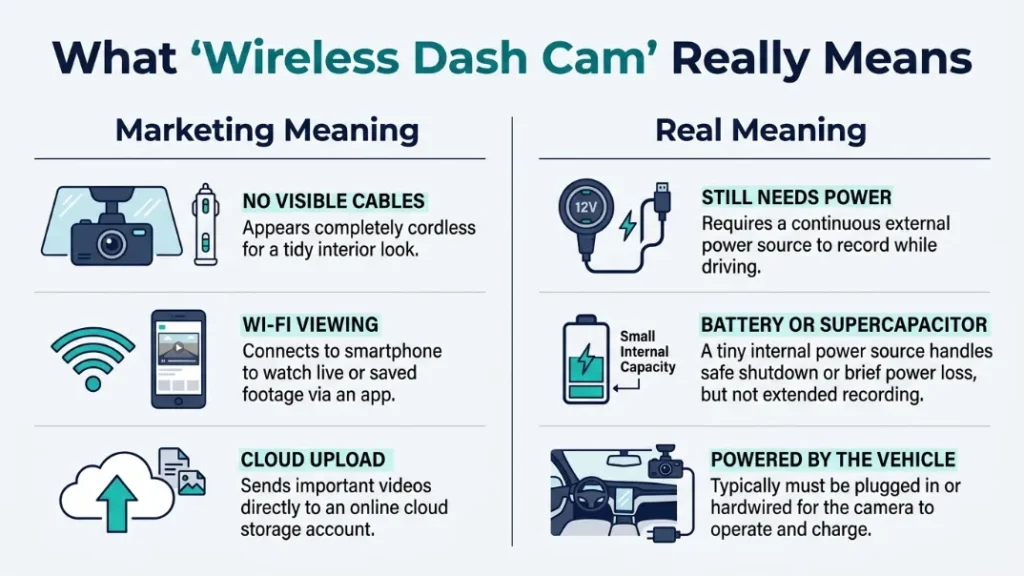
A completely wireless dash cam means a camera with no cables for power or data, but in reality, most “wireless” dash cams only remove visible data wires while still relying on a power source like a battery or car connection.
Here is what that means in simple terms. “Wireless” often refers to Wi-Fi. That lets you view videos on your phone.
But Wi-Fi does not power the camera. Power still comes from somewhere.
Key insight: Wireless data does not equal wireless power.
If you want a clean setup, look for models with hidden cables or small designs. That gives a near-wireless feel.
Now let’s answer the big question directly.
Do Fully Wireless Dash Cams Actually Exist Today?
No, fully wireless dash cams do not exist today because every dash cam needs continuous power to record video, and current battery technology cannot support long-term recording without recharging.
Even brands like Garmin and Thinkware rely on power cables or hardwiring kits.
Some dash cams include small batteries. These help save footage during power loss. They do not support long recording sessions.
Rule: If a dash cam records for hours, it must connect to power.
If you see “wireless” on a product page, check what it really means.
Many brands use “wireless” to describe app connectivity, not power. Always check battery life before buying.
Let’s look at how these devices actually work.
How Do Wireless Dash Cams Work Without Visible Cables?
Wireless dash cams work by combining internal batteries, compact power connections, and Wi-Fi features, allowing them to reduce visible wiring while still relying on a hidden or temporary power source.
They feel wireless because they hide complexity. But power still flows behind the scenes.
Battery-powered vs capacitor-powered systems
Battery-powered dash cams store energy inside the device. Capacitor-based models store small charges for short bursts.
Brands like Vantrue often use batteries for flexibility. Thinkware uses capacitors for safety in heat.
- Battery: portable but limited runtime
- Capacitor: durable but needs constant power
Key insight: Batteries give freedom, capacitors give reliability.
If you drive in hot climates, capacitors last longer.
Wi-Fi and app connectivity explained
Wi-Fi lets your dash cam connect to your phone. You can view, download, and share footage instantly.
Nextbase builds apps that make this easy for beginners.
But again, Wi-Fi only handles data. It does not power the device.
Choose a dash cam with fast Wi-Fi if you transfer videos often. It saves time daily.
Now let’s weigh the benefits and downsides.
What Are the Pros and Cons of Wireless Dash Cams?
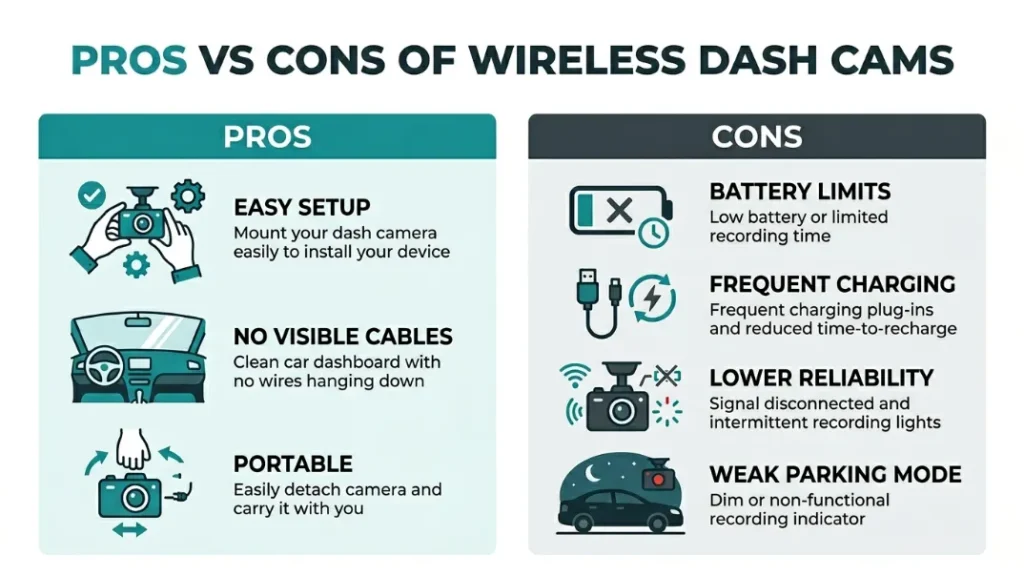
Wireless dash cams offer easier installation and cleaner setups, but they come with limits like short battery life, frequent charging, and reduced reliability compared to wired systems.
| Pros | Cons |
|---|---|
| Quick setup | Limited battery life |
| No messy cables | Needs frequent charging |
| Portable between cars | Less reliable for long trips |
| Easy removal | Weak parking mode support |
Rule: Convenience increases, but reliability drops.
If you drive daily, you may get tired of charging often.
Wireless dash cams look simple and clean, but they need trade-offs. You gain easy setup but lose long recording reliability.
So why not build a fully wireless one?
Why Don’t Manufacturers Make Fully Wireless Dash Cams?
Manufacturers avoid fully wireless dash cams because current battery technology cannot support continuous video recording for long periods, especially under heat and high resolution demands like 4K recording.
Recording video uses a lot of power. A 4K camera drains batteries fast.
Heat adds another problem. Cars get hot in the sun. Batteries degrade quickly.
Key insight: Safety and reliability matter more than convenience.
Companies like Garmin and Nextbase focus on stable power instead.
This leads to smart alternatives.
What Is the Best Alternative to a Completely Wireless Setup?
The best alternative to a completely wireless dash cam is a semi-wireless setup that uses minimal or hidden wiring while keeping a constant power connection for reliable recording.
This gives you the best of both worlds. Clean look and steady performance.
Plug-and-play dash cams
Plug-and-play models connect to your car’s USB or cigarette port. They start recording instantly.
Garmin offers compact units that fit this style well.
Fix: Use short cables to reduce clutter.
Magnetic mount systems
Magnetic mounts let you remove the dash cam easily. This works great for shared cars.
Some Nextbase models include this feature.
Benefit: Quick install and removal in seconds.
Hidden wiring solutions
Hidden wiring routes cables through your car trim. You barely see them.
Professional installers often use this method.
A well-hidden wired setup looks cleaner than most “wireless” dash cams and works far better every day.
Want to set one up fast? Here is how.
How to Set Up a Nearly Wireless Dash Cam in Minutes
You can set up a nearly wireless dash cam by using a compact camera, short cable, and smart mounting position to hide wires and keep the setup clean and simple.
- Choose a compact dash cam with Wi-Fi support
- Mount it behind your rearview mirror
- Use a short USB cable for power
- Hide the cable along the windshield edge
- Connect to your phone app for control
Result: Clean setup with minimal visible wiring.
Mount your dash cam high on the windshield for better view and cleaner look.
Now let’s decide if it is worth it.
Are Wireless Dash Cams Worth It for Everyday Drivers?
Wireless dash cams are worth it for drivers who want quick setup and portability, but they are not ideal for long-term daily recording due to battery limits and reliability concerns.
If you switch cars often, they work well.
If you drive daily for long hours, wired setups win.
Rule: Match the dash cam to your driving habits.
Think about your routine before buying.
What Should You Look for Before Buying One?
Before buying a wireless dash cam, you should check battery life, video quality, mounting system, storage options, and app connectivity to ensure it fits your daily use and recording needs.
- Battery runtime in minutes or hours
- Video quality like 1080p or 4K
- Wi-Fi speed and app usability
- Mount type and ease of removal
- Storage support (SD card or cloud)
Key insight: Features matter more than “wireless” labels.
Always compare real specs, not marketing terms.
For safety standards, you can review guidelines from vehicle safety recommendations by NHTSA.
For video storage basics, check dash cam advice from Consumer Reports.
Curious about the future? Let’s look ahead.
Future of Wireless Dash Cams: Are We Close?
We are getting closer to wireless dash cams with better batteries and smart power systems, but fully wireless models remain unlikely in the near future due to power demands and safety concerns.
Battery tech improves every year. But video still drains power fast.
Some companies explore solar add-ons. These are not reliable yet.
Trend: Semi-wireless setups will dominate for now.
The future looks cleaner, not fully cable-free.
Final Verdict: Should You Go Wireless or Not?
You should choose a wireless-style dash cam if you want easy setup and portability, but a wired or semi-wireless setup is the better choice for reliability, long trips, and daily driving.
Here is the simple truth. Fully wireless sounds great. But it does not work yet.
A clean wired setup often looks just as good. It works better too.
I’m Alex Rahman, and after testing many setups, I always recommend balance over hype.
Choose what fits your routine, not just what sounds modern.
Frequently Asked Questions
Can a dash cam run only on battery?
Yes, but only for a short time. Most battery-powered dash cams last minutes to a few hours.
Do wireless dash cams need charging?
Yes, they need regular charging. Without power, they cannot record continuously.
Is a wireless dash cam good for parking mode?
No, parking mode needs constant power. Wireless models struggle with long monitoring.
Are wireless dash cams easy to install?
Yes, they install faster than wired ones. Most use simple mounts and minimal cables.
What is the best setup for no visible wires?
A semi-wireless setup with hidden cables works best. It keeps your car clean and reliable.
Will fully wireless dash cams exist in the future?
Maybe, but not soon. Battery limits still prevent long-term recording without power.

I’m Alex Rahman, a car enthusiast and automotive writer focused on practical solutions, car tools, and real-world driving advice. I share simple and honest content to help everyday drivers make better decisions.
