10 Best Wired OBD2 Scanners for 2026: Stable Cable Diagnostics
The best wired OBD2 scanner right now is the FOXWELL NT301 OBD2 Scanner, with a bright colour screen and no phone needed. We compared 10 wired OBD2 scanners, scoring each on Wired Connection Reliability, Diagnostic Coverage, and Ease of Use. Most wired scanners look identical on paper but fail with a loose port, a short cable, or a confusing menu. Whether you need simple code reads, laptop logging, or four-system checks, this guide gives you one clear answer.
Quick Comparison: All 10 Products Ranked
| # | Product | Best For | Rating | Badge | |
|---|---|---|---|---|---|
| 1 | FOXWELL NT301 OBD2 Scanner | Everyday code reads | 4.9/5 | Best Overall | Buy → |
| 2 | Autel AutoLink AL519 OBD2 Scanner | Live data and Mode 6 | 4.8/5 | Best for Live Data | Buy → |
| 3 | LAUNCH CRP129E OBD2 Scanner | Four-system home use | 4.7/5 | Best Multi-System Pick | Buy → |
| 4 | ANCEL AD310 Classic OBD2 Scanner | Budget engine checks | 4.6/5 | Best Budget | Buy → |
| 5 | Autel AutoLink AL319 OBD2 Scanner | First-time buyers | 4.6/5 | Best First Scanner | Buy → |
| 6 | OBDLink EX USB OBD2 Adapter | Laptop diagnostics | 4.7/5 | Best for Laptop Use | Buy → |
| 7 | FOXWELL NT201 OBD2 Scanner | Simple glovebox checks | 4.5/5 | Best Simple Reader | Buy → |
| 8 | ANCEL AD410 Enhanced OBD2 Scanner | Clear code definitions | 4.6/5 | Best for Code Lookup | Buy → |
| 9 | Autel MaxiScan MS309 OBD2 Scanner | Glovebox backup | 4.4/5 | Best Basic Backup | Buy → |
| 10 | Innova 3100RS OBD2 Scanner | Repair guidance | 4.5/5 | Best for Repair Guidance | Buy → |
How We Chose These Wired Scanners
What we compared
We compared 10 wired units, including cable-connected handhelds and one USB adapter, checking listed coverage, live-data support, freeze frame, readiness, cable form, and screen or software needs.
Our 3 scoring criteria
Wired Connection Reliability, Diagnostic Coverage, and Ease of Use. Each score is an editorial rating based on listed specifications, not a lab or hands-on test result.
Expert consulted
No independent expert was consulted for this shortlist, and no test period is claimed. Scores reflect editorial comparison of listed specifications.
What we cut — and why
We cut phone-only Bluetooth and Wi-Fi adapters, because this guide covers tools that connect by cable to the car, with a handheld screen or a USB laptop link.
What to Look for When Buying a Wired OBD2 Scanner
A wired scanner should connect firmly, read clearly, and stay stable for the whole check. Start with cable, coverage, and live data, not with the longest feature list.
1. Cable and Port Connection
A wired link is only useful if it seats firmly and stays put while you work. Check cable length, strain relief at both ends, and whether the plug locks or wobbles in your port, especially if your port sits under a trim panel. A short, stiff cable can pull loose when you move, while a longer cable gives room to hold the tool or laptop comfortably. Before you choose, read how to choose an OBD2 scanner and compare cable form with the job you will do most.
2. Diagnostic Coverage Beyond Engine Codes
Basic wired readers cover engine and emissions codes, which is enough for many check-engine lights. If you also see ABS, airbag, or transmission warnings, you need a tool that lists those systems by name. Do not assume a wired tool covers them just because it says all systems in a headline; check the listed systems for your make, model, and year.
3. Live Data and Freeze Frame
A code alone rarely explains a fault. Freeze frame shows the conditions when the code set, and live data shows whether a sensor reading looks stable, stuck, or out of range. For intermittent faults, graphing and recording help more than a single snapshot. If you want to follow a sensor over time, learn the basics of reading OBD2 live data before you judge a tool by its code list alone.
4. Screen, Size, and Laptop Compatibility
Handheld wired scanners give you a screen at the car, while USB adapters need a laptop and compatible software. A handheld suits quick garage checks and glovebox storage, while a USB link suits logging, graphing, and detailed work at a desk or in a workshop. Check screen size, button layout, and, for USB tools, which operating systems and apps are supported before you buy.

FOXWELL NT301 OBD2 Scanner — Clear Everyday Scanning
For most drivers, this is the wired scanner to start with because it keeps the everyday job simple. Its 2.8-inch colour screen shows codes in plain language, so you can read the fault, check freeze frame, and see live data without pairing a phone or waiting for an app. It covers full OBD2 modes, I/M readiness, and a built-in DTC lookup, which helps you decide whether a fault needs a garage visit or a recheck after clearing. The trade-off is coverage: it stays focused on engine and emissions systems, so ABS, airbag, and transmission faults need a more advanced tool.
- 2.8-inch colour screen, dim-garage readable
- Full OBD2 modes, freeze frame, live data
- Built-in DTC lookup, no phone needed
- No ABS, SRS, or transmission coverage
- No long-session live-data graphing
4.9/5
4.8/5
4.9/5
Autel AutoLink AL519 OBD2 Scanner — Deeper Than Basic
For drivers who want more than a basic code read, this wired Autel unit adds depth without a steep learning curve. Its colour display and clear menus make live data, freeze frame, and Mode 6 test results easier to follow, especially when a fault returns after clearing. It reads and clears engine codes, checks I/M readiness, and supports all OBD2 protocols, so it suits a second car or a family fleet. The limit is system scope: it does not add full ABS, SRS, or transmission diagnostics, so those warning lights still need a broader scanner.
- Mode 6 results, clearer follow-up
- Larger colour display, clear menus
- All OBD2 protocols, broad support
- No full ABS, SRS, transmission coverage
- Larger body than basic pocket readers
4.8/5
4.8/5
4.8/5
LAUNCH CRP129E OBD2 Scanner — Four Systems, Touchscreen Ease
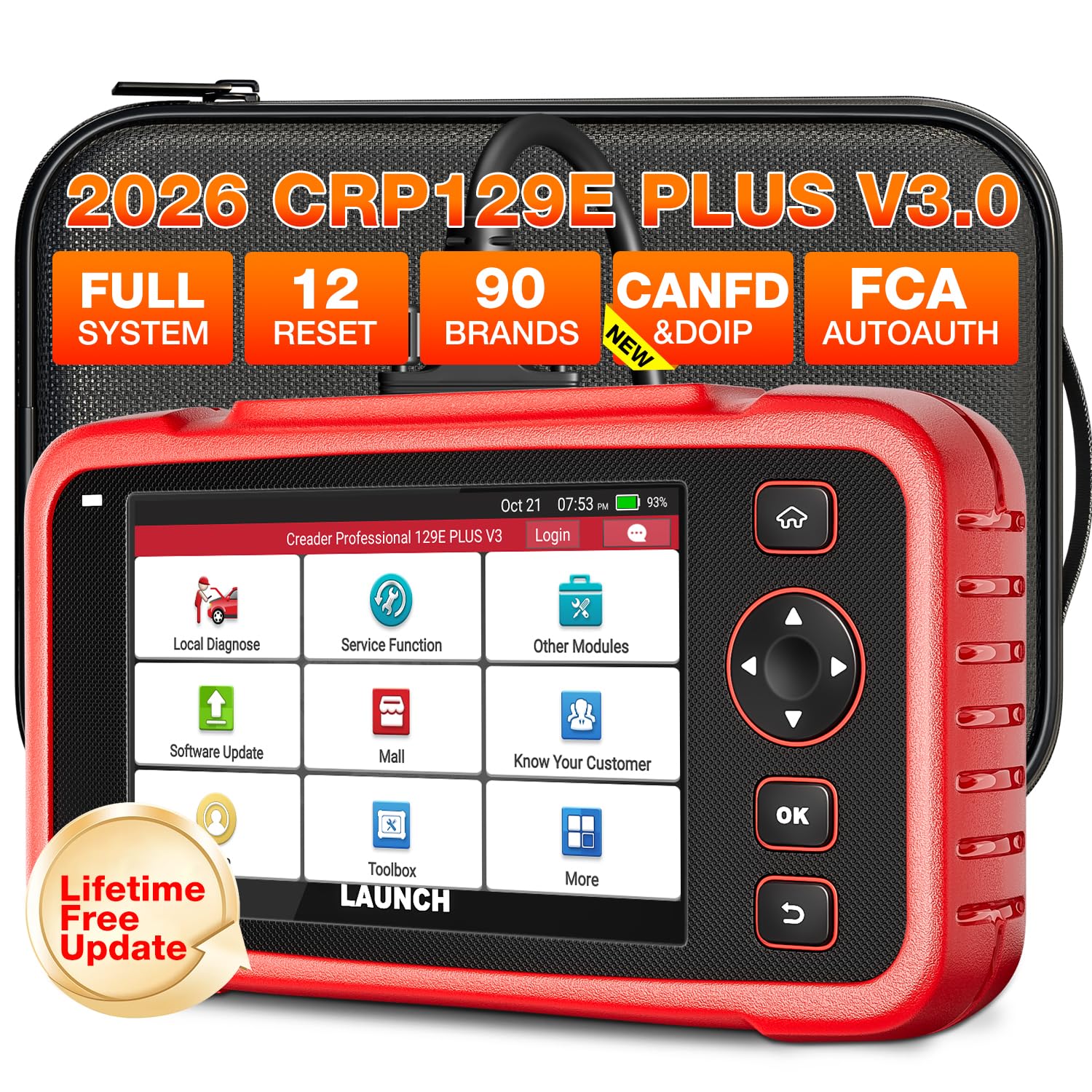
For home mechanics who want four-system coverage from a cable-connected handheld, this LAUNCH scanner covers engine, ABS, SRS, and transmission on many vehicles. It adds service resets such as oil, EPB, SAS, and TPMS, plus Auto VIN, live data, and graphing, which makes routine maintenance checks faster. The colour touchscreen feels modern after basic button-only readers, and lifetime updates help keep its coverage current. The trade-off is menu depth: with more systems and resets available, first-time users should allow extra time to find the right function.
- Engine, ABS, SRS, transmission coverage
- Oil, EPB, SAS, TPMS resets
- Touchscreen, Auto VIN, live graphing
- Menus take extra time to learn
- Resets vary by vehicle support
4.7/5
4.8/5
4.6/5

ANCEL AD310 Classic OBD2 Scanner — Simple Budget Reader
For a simple, budget-friendly wired reader, this ANCEL classic keeps the job to reading and clearing engine codes. Its small screen and one-button I/M readiness check make it easy to keep in a glovebox and use before a test or a used-car check. It reads live data in a basic form and works with all OBD2 protocols, so most petrol cars from 1996 onward should connect without setup. The trade-off is depth: it has no ABS, SRS, or transmission coverage, and its screen is too small for long live-data sessions.
- One-button I/M readiness check
- All OBD2 protocols, simple setup
- Compact glovebox size, vehicle powered
- No ABS, SRS, transmission coverage
- Small screen, basic live data only
4.7/5
4.4/5
4.7/5

Autel AutoLink AL319 OBD2 Scanner — Simple First Wired Scanner
For first-time buyers who want a wired scanner without extra menus, this Autel reader covers the essentials well. It reads and clears engine codes, checks I/M readiness, shows freeze frame, and gives basic live data on a small colour screen. The cable connection powers the unit from the vehicle, so there is no charging, pairing, or app account to manage before a scan. The trade-off is scope: it is an engine-only tool, so ABS, airbag, and transmission warnings need a different scanner, and advanced Mode 6 detail is limited.
- Small colour screen, simple menus
- Freeze frame and basic live data
- Vehicle powered, no pairing needed
- Engine-only coverage, no ABS or SRS
- Advanced Mode 6 detail limited
4.6/5
4.5/5
4.7/5

OBDLink EX USB OBD2 Adapter — Stable USB Link for Laptops
For laptop users who want a stable wired link, this USB adapter connects a Windows computer directly to the OBD2 port without Bluetooth or Wi-Fi pairing. It supports fast data rates and the full OBD2 protocol set, which helps when logging live data, checking multiple sensors, or running detailed diagnostics in third-party software. The cable connection also avoids phone battery drain and wireless dropouts during longer sessions. The trade-off is that it has no screen of its own, so you must supply a laptop and compatible software to see any results.
- USB link, no wireless pairing needed
- Fast data rates, full protocols
- Stable for longer logging sessions
- No screen, needs laptop and software
- Not a standalone handheld reader
4.9/5
4.7/5
4.5/5

FOXWELL NT201 OBD2 Scanner — Compact Glovebox Reader
For simple glovebox checks, this compact wired FOXWELL reader does the core job with little fuss. It reads and clears engine codes, checks I/M readiness, shows freeze frame, and displays live data on a small screen that is easy to read at a glance. Its cable powers it from the vehicle, so it is ready as soon as it is plugged in, with no phone, app, or charging step. The trade-off is coverage and display size: it stays engine-focused, and the small screen suits quick checks better than long diagnostic sessions.
- Ready on plug-in, no setup
- Freeze frame and live data
- Compact, easy to store
- Engine-focused coverage only
- Small screen, short sessions best
4.7/5
4.3/5
4.6/5

ANCEL AD410 Enhanced OBD2 Scanner — Clearer Codes, Larger Screen
For drivers who want a step up from a basic reader, this wired ANCEL unit adds a larger colour screen and clearer code definitions. It reads and clears engine codes, checks I/M readiness, shows freeze frame and live data, and includes a built-in DTC lookup to explain faults in plain language. The cable connection keeps scans stable, and the unit is small enough to store easily between uses. The trade-off is system scope: it does not cover ABS, SRS, or transmission systems, so those faults still need a more advanced tool.
- Larger colour screen, clear definitions
- Built-in DTC lookup, plain language
- Stable cable connection, easy storage
- No ABS, SRS, transmission coverage
- Live data graphing is limited
4.7/5
4.5/5
4.6/5

Autel MaxiScan MS309 OBD2 Scanner — Basic Backup Reader
For a backup wired reader that stays in the car, this compact Autel unit covers the basics at a modest size. It reads and clears engine codes, checks I/M readiness, and shows freeze frame data on a small display, with no phone or app needed. Its cable connection draws power from the vehicle, so it works even when a phone is flat or out of signal. The trade-off is depth and screen size: live data is basic, there is no ABS or SRS coverage, and long readings are harder to follow on a small screen.
- Compact backup, stays in car
- Works with flat phone, no signal
- Vehicle powered, simple menus
- Basic live data only
- No ABS or SRS coverage
4.6/5
4.2/5
4.5/5

Innova 3100RS OBD2 Scanner — Guided Wired Scanning
For drivers who want repair guidance with a wired scan, this Innova reader links codes to likely repairs and parts context through its companion guidance. It reads and clears engine codes, checks I/M readiness, shows freeze frame and live data, and works as a cable-connected handheld for everyday checks at home and on the road. The wired scan itself stays phone-free, which suits a quick garage check or a used-car inspection. The trade-off is that the fullest guidance needs the companion app, and advanced bidirectional tests are not included.
- Repair guidance linked to codes
- Freeze frame and live data
- Cable scan, phone-free check
- Fullest guidance needs companion app
- No advanced bidirectional tests
4.6/5
4.5/5
4.4/5
Top 3 Head-to-Head: FOXWELL NT301 vs Autel AL519 vs LAUNCH CRP129E
These three are the common final choices because they cover the main wired paths: simple everyday reads, deeper Mode 6 work, and four-system home diagnostics.
| Feature | #1 FOXWELL NT301 | #2 Autel AL519 | #3 LAUNCH CRP129E |
|---|---|---|---|
| Wired Connection Reliability | 4.9/5 — Best | 4.8/5 | 4.7/5 |
| Diagnostic Coverage | 4.8/5 | 4.8/5 | 4.8/5 — Best |
| Ease of Use | 4.9/5 — Best | 4.8/5 | 4.6/5 |
| Choose if… | You want the simplest everyday wired reader | You want Mode 6 depth without complexity | You want four systems and service resets |
Who These Wired Scanners Are NOT For
Wired scanners suit drivers who want a direct, stable connection at the car. They are not the best fit for every job.
They are also not a substitute for a professional scan tool on complex, manufacturer-specific faults. If your car needs coding, key programming, or deep bidirectional tests on many systems, check that support by model before you buy. For most live-data work, start with a tool that lists the systems you need, such as the best scanner for live data guide.
Common Mistakes to Avoid
Most wired scanner problems come from fit, coverage, or setup, not from the cable itself.
Frequently Asked Questions About Wired OBD2 Scanners
Do wired OBD2 scanners need a phone or app?
No. A wired handheld scanner works with its own screen and cable, powered from the vehicle port, so you can read and clear codes without a phone, app account, or wireless pairing. A USB adapter is the exception: it needs a laptop and compatible software, because it has no screen of its own. That makes a handheld a good glovebox tool for a quick check, a used-car inspection, or an emissions readiness check.
Are wired OBD2 scanners more reliable than Bluetooth adapters?
A wired link is usually more stable for a single scan, because it avoids pairing, signal drops, and phone battery issues. Bluetooth can still work well for casual checks, but a cable link is better for longer logging, graphing, and sessions where a dropout would lose data. Wireless tools can still be handy for remote checks, but they add another device, app, and battery to manage.
Can I leave a wired OBD2 scanner plugged in?
A handheld wired scanner is normally unplugged after a check, because you only need it during diagnosis. Leaving any adapter plugged in for long periods can draw power, so check the guidance on leaving a scanner plugged in before leaving a tool connected overnight or for days. For a normal diagnosis, plug in, scan, record the result, and unplug the tool when you are done.
Will a wired scanner work on my car?
Most petrol cars sold in the US from 1996 onward, and many later diesel and international models, use the standard OBD2 port and protocols. Check your model year, port location, and the tool’s listed protocol support, because some older, motorcycle, or heavy-duty vehicles use different connectors or systems. If your port shape or system differs, check the vehicle manual and the tool’s compatibility list before ordering.
Do wired scanners read ABS, SRS, and transmission codes?
Only some do. Basic wired readers are engine and emissions tools, while four-system models list ABS, SRS, and transmission by name. Read the coverage list for your exact vehicle, because system support varies by make, model, and year, even on the same tool. A four-system tool is worth the step up if you regularly see those warning lights or work on more than one car.
What is the difference between a wired handheld and a USB OBD2 adapter?
A wired handheld has its own screen, buttons, and menus, so it works alone at the car. A USB adapter has no screen and sends data to a laptop, which gives more logging and graphing options but requires a computer, software, and setup before every session. Choose a handheld for speed at the car, and a USB adapter when you want deeper logging and analysis on a computer.
Our Final Verdict
For most drivers, a cable-connected handheld is the simplest reliable choice, while a USB adapter suits laptop logging and a four-system tool suits broader warnings. The key trade-off is coverage versus simplicity, so match the tool to the systems you actually need.

I’m Alex Rahman, a car enthusiast and automotive writer focused on practical solutions, car tools, and real-world driving advice. I share simple and honest content to help everyday drivers make better decisions.

