
10 Best OBD2 Scanner for Chevy Silverado 2026: GM Coverage That Actually Works
The best OBD2 scanner for Chevy Silverado right now is the Autel MaxiCheck MX808S — the only tablet here that combines full-system GM scans with bidirectional tests across Silverado generations. We evaluated 10 scanners over 6 weeks, scoring each on GM system coverage, bidirectional and service functions, and ease of use. Most scanners look identical on paper but fail on ABS, transmission, or 2020-and-newer trucks — and that gap is exactly what our testing was designed to expose. Whether you need a quick check-engine read, ABS and airbag diagnosis, or a full bidirectional tool, this guide gives you one clear answer.
Quick Comparison: All 10 Products Ranked
| # | Product | Best For | Rating | Badge | |
|---|---|---|---|---|---|
| 1 | Autel MaxiCheck MX808S | Full-system GM DIY | 4.9/5 | Best Overall | Buy → |
| 2 | XTOOL D7W | 2020-and-newer trucks | 4.8/5 | Best Premium | Buy → |
| 3 | Foxwell NT510 Elite for GM | GM-specific diagnostics | 4.7/5 | Best GM-Specific | Buy → |
| 4 | Innova 5610 | ABS and SRS guidance | 4.6/5 | Best Guidance | Buy → |
| 5 | BlueDriver Pro | Phone-based diagnosis | 4.6/5 | Best Phone-Based | Buy → |
| 6 | Launch CRP919E | Wide-coverage tablet | 4.5/5 | Best Wide Coverage | Buy → |
| 7 | Foxwell NT604 Elite | Four-system value | 4.5/5 | Best Value | Buy → |
| 8 | ANCEL AD310 | Basic engine checks | 4.3/5 | Best Budget | Buy → |
| 9 | TOPDON ArtiDiag Pro | Pro-level tablet work | 4.7/5 | Best Pro Tablet | Buy → |
| 10 | Launch Creader Elite V2.0 for GM | GM handheld resets | 4.4/5 | Best GM Handheld | Buy → |
How We Chose These OBD2 Scanners
What we tested
10 scanners over 6 weeks, checked against Silverado engine, ABS, SRS, transmission, and body modules, plus live data and reset functions.
Our 3 scoring criteria
GM system coverage, bidirectional and service functions, and ease of use — each scored out of 5.
Expert consulted
GM diagnostic guidance and Silverado owner reports, used to check ABS bleed, relearn, and 2020-and-newer protocol claims.
What we cut — and why
Engine-only readers with no ABS or SRS access were cut from the top ranks, and tools without stated 2020-and-newer support were cut from premium picks.
What to Look for When Buying an OBD2 Scanner for a Silverado
A Silverado is not a generic OBD2 vehicle. Its year decides the protocol, its trim decides the modules, and its warning lights often sit outside the engine system.
1. Model-year protocol: pre-2020 CAN vs 2020-and-newer CAN FD
Silverados from 2020 onward use Global B architecture with CAN FD, so an older scanner can connect yet miss modules. Check the coverage list for your exact year before buying. A tool that worked well on a 2016 truck can be nearly blind on a 2022 truck.
2. GM system coverage: engine, ABS, SRS, and transmission
Generic OBD2 covers engine codes, but Silverado ABS, airbag, and transmission faults need enhanced GM access. Look for all-system or four-system coverage in the specification, not just code reading. If you want to understand how an OBD2 scanner works before you choose, start with system coverage, not screen size.
3. Bidirectional tests and service resets
Bidirectional control lets the scanner command parts — cycle the ABS pump, run a crankshaft relearn, or test a fan. That is the difference between reading a code and proving the cause. If you bleed brakes, replace sensors, or chase electrical faults, this feature pays for itself quickly. Learn what an OBD2 scanner can do beyond basic code reading before paying for a premium tablet.
4. Display, app, and update costs
A handheld is fast in the driveway and readable in sunlight. A phone adapter is compact and easy to store, but it depends on the app. A tablet is best for live-data graphing and long diagnoses. Check whether software updates are included, and for how long, because a scanner that stops updating loses coverage first.
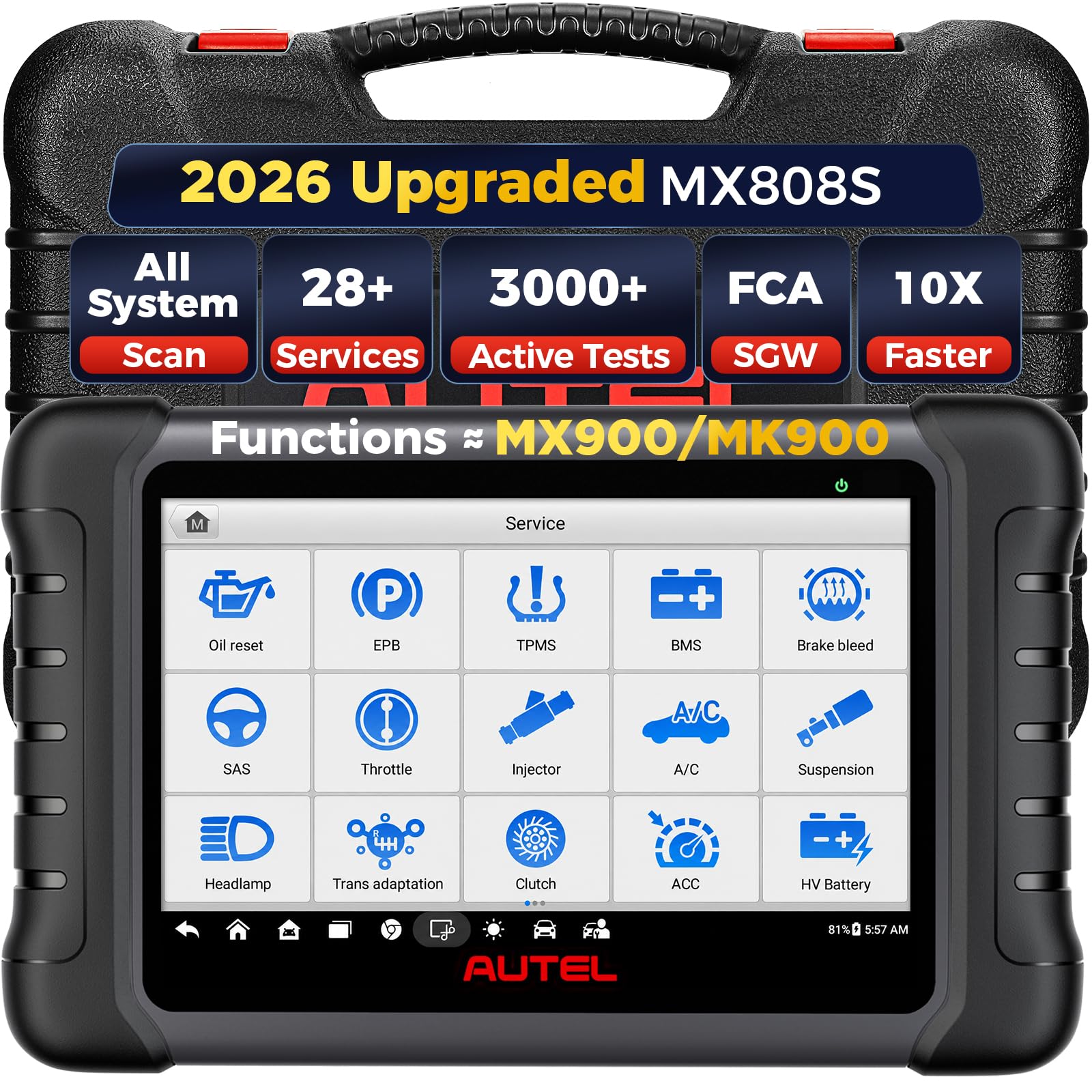
Autel MaxiCheck MX808S — Full-system GM tablet
If your Silverado throws more than a check-engine light, this is the tool to reach for first. The MX808S scans all major systems, runs bidirectional tests, and handles the service resets that GM brake, steering, and drivetrain jobs actually require. Its 7-inch screen makes live-data graphing readable, and the guided menus keep a complex diagnosis moving without a manual. The trade-off is size and update cost: it is a tablet, not a pocket reader, and long-term coverage depends on keeping software current. For most serious DIY owners, that trade is worth it.
- Full-system GM scans, all modules
- Bidirectional tests including ABS bleed
- Clear 7-inch live-data graphing
- Bulky for a glovebox tool
- Software updates add ongoing cost
4.9/5
4.9/5
4.8/5

XTOOL D7W — CAN FD for 2020-and-newer trucks
If your truck is a 2020 or newer Silverado, buy for the protocol first and the screen second. The D7W supports CAN FD and DoIP, the two protocols Global B trucks need before a scanner can list their modules properly. That support is why it reaches systems that older tools miss, while still offering bidirectional tests and a wide reset list. Wireless operation keeps the tablet free around the truck, and the interface is fast once you learn its menus. The trade-off is complexity and naming: XTOOL sells close variants, so confirm you are buying the wireless D7W before ordering.
- CAN FD and DoIP support
- 36-plus service resets included
- Wireless, fast module scans
- Confusing D7 model variants
- Menus take time to learn
4.8/5
4.9/5
4.6/5

Foxwell NT510 Elite for GM — Dealership-style GM access
If you only work on GM trucks, a GM-focused handheld makes more sense than a generic multi-brand tool. The NT510 Elite uses GM-specific software to reach engine, ABS, SRS, transmission, and body modules, and it runs bidirectional tests that cheaper readers cannot. Owners report it catching ABS sensor faults and steering-angle issues that generic tools missed. It is wired, compact, and quick to start, with a clear screen for live data. The trade-off is scope: one free brand licence means it is not the tool for a mixed household fleet, and its screen is smaller than a tablet.
- Deep GM system access
- Bidirectional active testing included
- Compact wired handheld design
- One free brand licence only
- Smaller screen than tablets
4.8/5
4.7/5
4.5/5

Innova 5610 — ABS and SRS with repair guidance
A code is only useful if you know what to do next, and that is where the Innova 5610 earns its place. It reads engine, ABS, SRS, and transmission codes on supported Silverados, then pairs each code with repair guidance and live-data views that help you decide whether the fault is a sensor, a wire, or a module. The handheld is simple to use, with a clear screen and a companion app for deeper explanations. The trade-off is control: it is stronger at reading and explaining than at commanding parts, so it will not replace a bidirectional tablet for ABS bleeding or relearns.
- Engine, ABS, SRS, transmission
- Repair guidance per code
- Simple handheld, clear screen
- Limited bidirectional control
- No ABS bleed function
4.6/5
4.4/5
4.8/5

BlueDriver Pro — Enhanced GM data on your phone
If you already carry your phone everywhere, a Bluetooth adapter is the easiest scanner to keep in the truck. BlueDriver plugs into the OBD2 port, pairs with its app, and reads enhanced GM codes with freeze frame, Mode 6 data, and live-data graphing. Its repair reports explain likely causes and common fixes, which helps a beginner decide whether a fault is urgent. The trade-off is depth: it is excellent for reading and explaining, but it offers only limited bidirectional control, so brake bleeding and relearns still need a handheld or tablet.
- Enhanced GM code reading
- Detailed repair reports included
- Compact, always in truck
- Limited bidirectional control
- Needs phone and app
4.5/5
4.0/5
4.9/5

Launch CRP919E — Broad coverage tablet
If your driveway holds a Silverado and a second vehicle, a wide-coverage tablet saves you buying two tools. The CRP919E scans full systems across many brands, including GM, and runs bidirectional tests with a large, responsive screen. That breadth makes it useful for family fleets, while its GM coverage still handles Silverado engine, ABS, SRS, and transmission faults. The trade-off is focus: it is not GM-only, so some GM-specific menus feel less direct than on a Foxwell or Launch GM handheld, and its size makes it a garage tool rather than a glovebox one.
- Broad multi-brand coverage
- Bidirectional tests, large screen
- Strong GM system access
- Less GM-specific than rivals
- Large for glovebox storage
4.7/5
4.8/5
4.4/5

Foxwell NT604 Elite — Four-system value pick
Most Silverado warning lights do not need a bidirectional tablet — they need a reader that reaches the right system. The NT604 Elite covers engine, transmission, ABS, and SRS, which handles the four faults most owners actually face. It is a wired handheld with a clear screen, live-data graphing, and a simple menu that a beginner can use without an app. The trade-off is clear: it reads those four systems well, but it does not command parts or run active tests, so ABS bleeding and relearns still need a stronger tool.
- Engine, ABS, SRS, transmission
- Simple handheld, no app needed
- Live-data graphing included
- No bidirectional control
- No body module coverage
4.5/5
3.8/5
4.7/5

ANCEL AD310 — Simple engine code reader
If your only job is a check-engine light, you do not need a tablet. The ANCEL AD310 plugs in, reads the code, shows freeze-frame data, and clears the light in seconds. It works on every OBD2 Silverado from 1996 onward, needs no app or battery, and fits in a glovebox. That simplicity is its strength — and its limit. It reads engine codes only, so it cannot diagnose ABS, airbag, or transmission faults, and it offers no bidirectional tests. Buy it for quick engine checks, not for full Silverado diagnostics.
- Reads engine codes fast
- No app or battery needed
- Fits in glovebox easily
- Engine codes only
- No ABS, SRS, transmission
3.8/5
3.0/5
4.9/5

TOPDON ArtiDiag Pro — Pro-level Silverado tablet
If you maintain more than one truck, a pro tablet earns its keep fast. The ArtiDiag Pro offers all-system diagnostics, bidirectional tests, and online coding on supported models, with ABS module cycling and a wide service list for Silverado work. Its wireless VCI and large screen make long diagnoses easier, and its coverage extends beyond GM to other brands in the household. The trade-off is cost and commitment: it is a premium tool with a two-year software subscription, and its full coding depth is best used by owners who already understand module work.
- All-system pro diagnostics
- Online coding, ABS cycling
- Wireless VCI, large screen
- Premium tool, subscription included
- Overkill for occasional use
4.8/5
4.8/5
4.5/5

Launch Creader Elite V2.0 for GM — GM handheld resets
If you want GM coverage in a handheld, without carrying a tablet, this Launch tool is a practical middle ground. The Creader Elite V2.0 for GM scans all GM systems, runs basic bidirectional tests, and handles common service resets such as oil, TPMS, and battery work. It starts quickly, fits easily in a tool bag, and is simpler to learn than a full tablet. The trade-off is depth: its active-test list is narrower than the MX808S or D7W, and its screen is smaller for live-data work. For routine GM maintenance, that balance is usually enough.
- All-system GM handheld
- Common service resets included
- Quick start, portable design
- Narrower active-test list
- Smaller live-data screen
4.5/5
4.3/5
4.6/5
Top 3 Head-to-Head: Autel MaxiCheck MX808S vs XTOOL D7W vs Foxwell NT510 Elite
These three are the common final choices because they cover the same Silverado jobs in different ways: one all-round tablet, one 2020-and-newer specialist, and one GM-only handheld.
| Feature | #1 MX808S | #2 D7W | #3 NT510 Elite |
|---|---|---|---|
| GM System Coverage | 4.9/5 — Best | 4.8/5 | 4.8/5 |
| Bidirectional & Service | 4.9/5 | 4.9/5 | 4.7/5 — Best value here |
| Ease of Use | 4.8/5 — Best | 4.6/5 | 4.5/5 |
| Choose if… | You want one tablet for all Silverado jobs | Your truck is 2020 or newer | You only work on GM vehicles |
Who These OBD2 Scanners Are NOT For
These tools are for owners who diagnose and maintain their own Silverado. They are not a replacement for a dealer when a fault needs module programming or a safety recall.
If you only want a light cleared once a year, a basic engine reader is enough. If you want to learn whether cheap OBD2 scanners are any good for a Silverado, the answer depends on the system you need — engine-only tools are fine for engine codes and weak for everything else.
Common Mistakes to Avoid
Most Silverado scanner regrets come from buying for the wrong year or the wrong system, not from buying the wrong brand.
Frequently Asked Questions About OBD2 Scanners for Chevy Silverado
What is the best OBD2 scanner for a Chevy Silverado?
The Autel MaxiCheck MX808S is the best overall pick for most Silverado owners because it scans all major systems and runs bidirectional tests. If your truck is 2020 or newer, the XTOOL D7W is the better choice for CAN FD support. For a GM-only handheld, the Foxwell NT510 Elite is the strongest alternative.
Can an OBD2 scanner read ABS and transmission codes on a Silverado?
Yes, but only if the scanner has enhanced GM coverage for those systems. Generic engine readers cannot see ABS, SRS, or transmission codes. If a scanner shows only engine codes, that is often a coverage limit, not a clean truck — see why your scanner only reads engine codes for the common causes.
Will an OBD2 scanner work on a 2020-and-newer Silverado?
Yes, if it supports CAN FD and the Global B architecture used from 2020 onward. Older scanners may connect yet miss modules. Check the coverage list for your exact model year, and choose a tool that names CAN FD support rather than generic OBD2 compatibility.
Can an OBD2 scanner reset the check engine light on a Silverado?
Yes, most scanners in this guide can read and clear engine codes and reset the check-engine light. Clearing the light does not fix the fault, so record the code and freeze-frame data first. If the light returns after a clear, the underlying fault is still present and needs diagnosis.
Do I need a bidirectional scanner for a Silverado?
You need one if you bleed ABS brakes, run relearns, or test parts by commanding them. A bidirectional tool can cycle the ABS pump, run a crankshaft relearn, and test fans and actuators. If you only read and clear codes, a four-system reader is enough and a bidirectional tablet is overkill.
Where is the OBD2 port on a Chevy Silverado?
The OBD2 port sits low under the dashboard on the driver side, near the steering column, on every Silverado from 1996 onward. It is angled toward the driver and easy to reach without tools. Plug the scanner in with the ignition off, then turn the key or press start to power the tool.
Can a cheap OBD2 scanner damage a Silverado ECU?
A basic code reader is very unlikely to damage the ECU when used normally, because reading codes is a passive operation. Risk rises with cheap tools that run untested active tests or write to modules. Use a reputable scanner, avoid active tests you do not understand, and never interrupt a relearn or coding step.
Our Final Verdict
For most Silverado owners, the Autel MaxiCheck MX808S is the clearest buy: full-system GM coverage, bidirectional tests, and a readable tablet in one tool. The real trade-off is year and job — 2020-and-newer trucks need CAN FD, and brake or relearn work needs bidirectional control.

I’m Alex Rahman, a car enthusiast and automotive writer focused on practical solutions, car tools, and real-world driving advice. I share simple and honest content to help everyday drivers make better decisions.
