Is There a Dash Cam That Constantly Records — And How Long Does It Keep Footage?
Yes — dash cams with loop recording constantly record by automatically overwriting the oldest footage when the memory card fills up. Most quality dash cams from brands like Vantrue, BlackVue, and Garmin do this by default. With a 128GB card, you can keep 10–20 hours of continuous footage depending on resolution.
I was rear-ended at a red light two years ago. The other driver swore I reversed into him. I knew I didn’t — but I had no proof. That moment changed how I think about car cameras completely.
I’m Alex Rahman, and I’ve been testing and reviewing dash cams for over five years. The question I get more than any other is this: is there a dash cam that records all the time, without stopping?
The answer is yes — but the way it works surprises most people. It’s not like a security camera with unlimited storage. It’s smarter than that. And once you understand the system, you’ll never worry about missing footage again.
Let’s break down exactly how continuous recording works, which dash cams do it best, and what you actually need to set yours up correctly.
- All quality dash cams use loop recording — they record non-stop and overwrite the oldest clips automatically.
- A G-sensor locks important clips during impacts so they don’t get overwritten — but over-sensitivity can stop continuous recording.
- Parking mode lets your dash cam record even when your engine is off, but you need a hardwire kit for true 24/7 coverage.
- A 128GB card at 1080p gives you roughly 15–20 hours of continuous footage before it loops back.
- Always use a dash cam-rated endurance card like the Samsung PRO Endurance or SanDisk High Endurance to avoid card failure.
What Does “Constantly Records” Actually Mean for a Dash Cam?
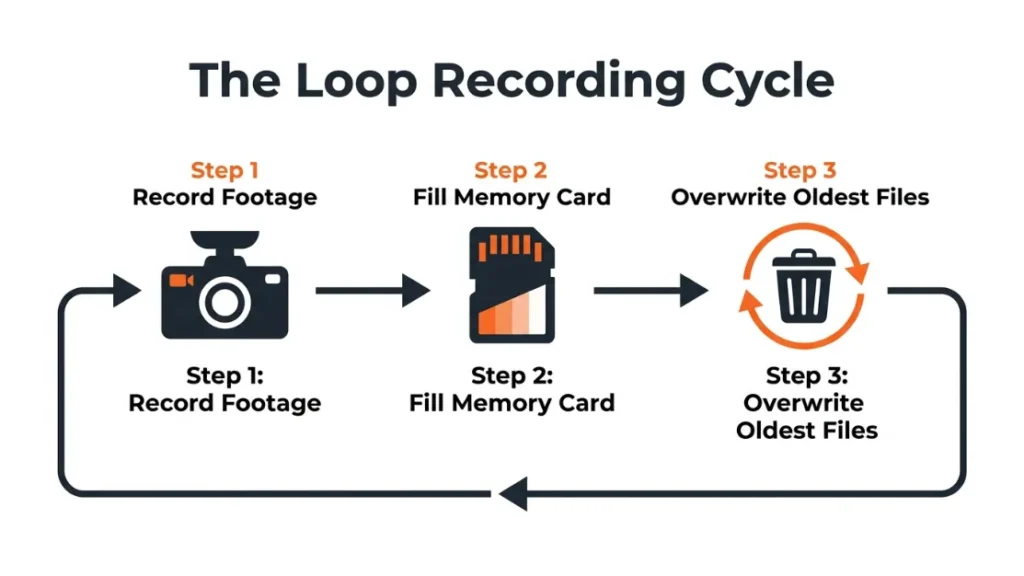
A dash cam that constantly records uses loop recording — a system where the camera records continuously in short clips, and automatically deletes the oldest footage when the storage card fills up. You never need to manually clear the card. The camera just keeps rolling.
This is the standard on virtually every dash cam sold today. Whether it’s a $40 budget unit or a $300 premium model, loop recording is built in by default.
Here’s the key thing to understand: you’re not getting unlimited storage. You’re getting a rolling window of footage. Think of it like a conveyor belt — new footage comes in at one end, and old footage falls off the other end when the belt is full.
The size of your window depends on your memory card size and your recording resolution. We’ll cover exactly how long that window is in a later section.
How Loop Recording Works and Why It Never Really Stops
Loop recording splits your continuous footage into small segments — usually 1, 3, or 5-minute clips. When the memory card is full, the camera automatically overwrites the oldest segment with new footage.
Most dash cams let you choose your clip length. Shorter clips (1 minute) give the camera more flexibility when overwriting. Longer clips (5 minutes) make it easier to find a specific moment later.
The genius of this system is that it runs completely in the background. You plug in your dash cam, and from that point forward, it records every second you drive — without you ever touching it.
Set your loop recording clips to 1 or 3 minutes. This gives the camera more overwrite flexibility and makes it easier to locate a specific incident in your footage library.
What Happens When Your Memory Card Gets Full?
When the card fills up, the camera overwrites the oldest unprotected clip with new footage. The word “unprotected” matters here — locked event files are never overwritten automatically.
This is where most people run into their first problem. If your camera locks too many clips (through G-sensor triggers or manual saves), the overwritable space shrinks. Eventually, the camera can’t overwrite anything — and recording stops entirely.
This is the most common reason a dash cam appears to “stop recording.” It’s not broken. It just has nowhere to write new footage.
The fix is simple: regularly check and delete locked files you don’t need. Or reduce your G-sensor sensitivity so it locks fewer clips automatically.
Why Does My Dash Cam Sometimes Stop Recording Mid-Drive?
Your dash cam stops recording mid-drive because the memory card is full of locked event files, or the card itself has failed. Loop recording can only continue if there are unprotected clips it can overwrite — when all available space is taken by locked footage, the camera halts.
This surprises a lot of drivers. They assume the dash cam is always running, then check the footage after an incident and find a gap. It’s one of the most frustrating dash cam problems — and one of the most preventable.
The G-Sensor Problem Most Drivers Don’t Know About
The G-sensor (also called an accelerometer) inside your dash cam detects sudden movement — hard braking, sharp turns, or a collision. When it triggers, the camera automatically locks the current clip so it can’t be overwritten.
This is a safety feature. But it becomes a problem when the sensitivity is set too high.
On high sensitivity, your G-sensor can trigger from a speed bump, a pothole, or even a rough road surface. Each trigger locks a clip. Over a long drive, your card fills up with locked clips of nothing important — and the camera stops recording.
If you drive on rough roads or live in a city with heavy traffic and speed bumps, set your G-sensor to medium or low sensitivity. High sensitivity will fill your card with locked clips and stop continuous recording faster than you expect.
How a Full Locked-File Folder Kills Continuous Recording
Most dash cams reserve a dedicated portion of the memory card for locked/event files — typically 25–30% of total capacity. When that portion fills up, the camera stops saving new event files and, depending on the model, may stop recording entirely.
The regular loop recording space and the event file space are separate. You can have plenty of free loop space but zero free event space — and the camera will still freeze.
Check your locked files folder once a month. Delete anything you don’t need. This one habit keeps your dash cam recording without interruption.
Which Dash Cams Record Continuously Without Stopping?
The best dash cams for continuous recording combine reliable loop recording, adjustable G-sensor settings, large storage support, and stable long-term performance. Brands like Vantrue, BlackVue, Thinkware, Garmin, and Nextbase all offer strong continuous recording options at different price points.
Here’s what each level gets you:
Best Budget Option for Continuous Recording
The Garmin Dash Cam Mini 2 is the best entry point for true continuous recording. It’s compact, supports up to 256GB cards, and loops reliably without freezing or skipping.
Garmin’s loop recording implementation is one of the most stable in the budget category. The camera supports 1080p at 30fps, which keeps file sizes manageable and gives you longer recording windows per GB of storage.
It lacks a screen, which keeps the price low and the form factor minimal. You manage everything through the Garmin Drive app. At around $50–$60, it’s the most reliable no-frills continuously recording dash cam available.
Best Mid-Range Continuous Recording Dash Cam
The Vantrue E1 Lite or Vantrue N2S hit the sweet spot for drivers who want front-and-rear continuous recording. Vantrue (a brand popular across North America and Europe) builds all their cameras around uninterrupted loop recording as a core feature, not an afterthought.
The N2S records front at 4K and rear at 1080p simultaneously — and does it in a continuous loop with adjustable G-sensor sensitivity. It supports 256GB cards, giving you roughly 15–18 hours of dual-channel footage before looping.
Vantrue also includes a dedicated parking mode with a low-voltage cutoff — a critical safety feature that prevents the camera from draining your car battery while parked.
Best Premium 24/7 Dash Cam With Cloud Backup
The BlackVue DR970X-2CH is the best continuous recording dash cam for drivers who want cloud-connected 24/7 coverage. BlackVue (a Korean brand known for premium build quality) lets you live-stream footage, receive push notifications, and access a cloud storage library from anywhere.
This means your footage isn’t limited to what fits on the local card. Incidents upload automatically to BlackVue’s cloud platform, giving you a backup copy that loop recording can’t overwrite.
For rideshare drivers, fleet managers, and anyone who parks in high-risk areas, the BlackVue cloud system is genuinely worth the premium price.
The bottom line on brands: Vantrue and Garmin lead for reliable continuous loop recording. BlackVue and Thinkware lead for cloud-connected 24/7 coverage. Nextbase offers the most beginner-friendly setup experience for drivers new to continuous recording.
What Size Memory Card Do You Need to Record All the Time?
For continuous recording, use at least a 64GB card — but 128GB is the practical sweet spot for most drivers. A 64GB card gives you roughly 6–8 hours of loop footage at 1080p. A 128GB card doubles that to 12–16 hours, covering most real-world use cases.
If you drive long distances or want longer coverage windows, 256GB gives you 24+ hours of footage at 1080p before looping starts.
How Long Does 64GB, 128GB, and 256GB Actually Last?
| Card Size | 1080p (Single Channel) | 1440p (Single Channel) | 4K (Single Channel) | 1080p (Dual Channel) |
|---|---|---|---|---|
| 64GB | 6–8 hours | 4–5 hours | 2–3 hours | 3–4 hours |
| 128GB | 12–16 hours | 8–10 hours | 5–6 hours | 6–8 hours |
| 256GB | 24–30 hours | 16–20 hours | 10–12 hours | 12–15 hours |
These are approximate figures. Actual recording time depends on your specific camera’s bitrate, scene complexity, and whether features like HDR or GPS logging are active. Higher bitrate = better quality but shorter loop window.
Should You Use a Regular SD Card or a Dash Cam-Specific Card?
Always use a dash cam-rated endurance card. Regular SD cards are designed for intermittent use — burst photos, short video clips. A dash cam writes continuously, 8–12 hours a day. Standard cards fail under that workload, often within a few months.
Endurance-rated cards like the Samsung PRO Endurance or SanDisk High Endurance are built for exactly this kind of sustained write cycle. The Samsung PRO Endurance 128GB is rated for up to 16,000 hours of recording — roughly 18 months of daily use.
Replace your memory card once a year even if it seems fine. Continuous write cycles degrade flash memory silently. A card that looks healthy can corrupt suddenly — often at the worst possible moment.
Can a Dash Cam Record Constantly While the Car Is Parked?
Yes — a dash cam can record while your car is parked using parking mode. Parking mode keeps the camera active after you turn off the ignition, either recording continuously at low resolution or triggering on motion and impact. To use parking mode, you need either a hardwire kit or a large-capacity battery pack.
This is where “constantly records” gets its full meaning. Without parking mode, your dash cam only records while you drive. With parking mode properly set up, it records around the clock — parked or moving.
What Is Parking Mode and How Does It Work?
Parking mode is a feature that keeps your dash cam powered and recording after the ignition is off. There are three types:
- Buffered parking mode: The camera monitors constantly but only saves footage when motion or impact is detected. Saves storage. Best for overnight use.
- Continuous low-bitrate recording: The camera records all the time at reduced resolution to save storage. Best for high-risk parking situations.
- Time-lapse parking mode: The camera captures one frame per second to create a compressed record of the parking period. Very storage-efficient.
Brands like Thinkware and BlackVue offer all three modes. Vantrue and Nextbase offer buffered and time-lapse parking modes on most mid-range models.
Hardwire Kit vs. OBD Port — Which One Should You Use?
A hardwire kit connects your dash cam directly to your car’s fuse box, giving it a constant low-level power supply even when the ignition is off. An OBD port adapter draws power from the OBD-II diagnostic port under your dashboard. Both work — but they’re not equal.
| Feature | Hardwire Kit | OBD Port Adapter |
|---|---|---|
| Installation | Professional or DIY (moderate) | Plug in yourself (easy) |
| Low-voltage cutoff | Built into most kits | Varies by product |
| Parking mode support | Full support | Limited on some cars |
| Cable management | Hidden in trim | Visible cable run |
| Cost | $15–$30 kit + install time | $15–$25 |
| Best for | Long-term 24/7 setup | Testing or temporary use |
For true 24/7 continuous recording, a hardwire kit is the better long-term solution. The OBD port works well for getting started — but not every car’s OBD port stays powered when the ignition is off.
Does Constantly Recording Drain Your Car Battery?
A continuously recording dash cam can drain your car battery if it runs without a low-voltage cutoff feature. Most quality dash cams include a low-voltage cutoff that automatically shuts the camera off when your battery drops below a safe threshold — typically 11.8V to 12.2V — protecting your ability to start the car.
Battery drain is the number one concern I hear from drivers considering parking mode. It’s a real risk — but a manageable one if your setup is correct.
Low-Voltage Cutoff — How Dash Cams Protect Your Battery
Low-voltage cutoff (also called battery protection mode) monitors your car battery voltage in real time. When voltage drops to the configured threshold, the dash cam shuts itself off completely.
Most hardwire kits include this feature built in. Vantrue, Thinkware, and BlackVue all let you set the cutoff voltage manually — usually choosing between 11.8V, 12.0V, and 12.2V. A higher cutoff voltage means the camera shuts off sooner, giving your battery more protection.
Never run a dash cam in parking mode without a low-voltage cutoff on an older car battery. A battery over three years old holds less charge and can be drained to a dead start in under six hours of continuous recording.
How Long Can a Parked Dash Cam Record Before Draining the Battery?
A healthy, fully charged car battery (typically 45–60Ah) can power a dash cam in parking mode for 10–24 hours before reaching the low-voltage cutoff. The exact time depends on your camera’s power draw, your battery capacity, and your cutoff voltage setting.
Most dash cams draw 200–400mA in parking mode — much less than during active driving. Continuous parking mode at full resolution draws more than buffered/motion-only parking mode. If you’re parking for longer than 12 hours regularly, a capacitor-type battery pack designed for dash cams gives you extra buffer without touching your car battery at all.
Top 5 Dash Cams That Constantly Record — Compared Side by Side
| Dash Cam | Resolution | Max Card | Parking Mode | Cloud | Best For |
|---|---|---|---|---|---|
| Garmin Dash Cam Mini 2 | 1080p | 256GB | Yes (with hardwire) | No | Budget / minimalist |
| Nextbase 622GW | 4K | 256GB | Yes (with module) | No | Beginners wanting quality |
| Vantrue N4 Pro | 4K + 1080p (3 ch) | 256GB | Yes (built-in) | No | 3-channel coverage |
| Thinkware U1000 | 4K + 2K | 256GB | Yes (3 modes) | Optional | Advanced users / fleets |
| BlackVue DR970X-2CH | 4K + 2K | 256GB | Yes (3 modes) | Yes (built-in) | 24/7 cloud + rideshare |
The Vantrue N4 Pro is my personal recommendation for most drivers. Three-channel recording (front, interior, rear) with built-in parking mode and 256GB support covers virtually every scenario without needing add-ons. You can read more about Vantrue’s full dash cam lineup on their official site.
For cloud-connected continuous recording, BlackVue has no real competition. Their platform lets you pull footage remotely from anywhere — which matters if your car is broken into while you’re away.
How to Set Up Your Dash Cam for True Continuous Recording
Setting up continuous recording correctly takes about 10 minutes and makes a real difference in how reliably your camera captures footage. Follow these steps once and you won’t need to touch it again.
- Format your memory card inside the dash cam (not on your computer) — this sets the correct file structure.
- Enable loop recording in your camera settings — confirm it’s set to ON (default on most cameras).
- Set loop clip length to 1 or 3 minutes for maximum overwrite flexibility.
- Set G-sensor sensitivity to medium — not high — unless you’re on smooth roads only.
- If using parking mode, connect a hardwire kit and set low-voltage cutoff to 12.0V or higher.
- Test record for 30 minutes, then check that clips are saving and overwriting correctly.
- Schedule a monthly check: delete unneeded locked files and verify card health.
True continuous recording needs four things working together: loop recording enabled, correct G-sensor sensitivity, a quality endurance SD card, and a hardwire kit for parking coverage. Get all four right and your dash cam will record every second — parked or moving — without you ever needing to manage it manually.
For detailed installation guides on hardwire kits, Dash Cam Talk is one of the best community resources for step-by-step vehicle-specific instructions.
Final Thoughts From Alex
I wish I had all of this set up correctly on the day I got rear-ended. A properly configured continuous recording dash cam would have saved me weeks of stress and an insurance dispute.
Here’s the short version of everything we covered: yes, dash cams constantly record through loop recording. The footage window depends on your card size and resolution. Parking mode extends that coverage to when you’re parked. And the system only fails when G-sensor sensitivity is too high or your card fills with locked files.
Pick a camera from Vantrue, BlackVue, Garmin, or Thinkware. Use a Samsung PRO Endurance or SanDisk High Endurance card. Hardwire it for parking coverage. Set your G-sensor to medium. And check your locked files once a month.
Do that, and you’ll have a dash cam that truly never stops recording — which is exactly the point.
Frequently Asked Questions
Is there a dash cam that records 24 hours a day?
Yes — any dash cam with parking mode and a hardwire kit can record 24 hours a day. During driving, loop recording handles it automatically. While parked, parking mode keeps the camera active. Brands like BlackVue and Thinkware specialize in true 24/7 recording setups with cloud backup.
How long does a dash cam keep footage before it overwrites?
The footage window depends on card size and resolution. A 128GB card at 1080p single channel holds roughly 12–16 hours before loop recording overwrites the oldest clips. At 4K, the same card holds 5–6 hours. Locked event files are never overwritten automatically.
Why does my dash cam stop recording on its own?
Your dash cam most likely stops recording because the memory card is full of locked event files that can’t be overwritten. This usually happens when the G-sensor sensitivity is set too high, locking clips on every bump or braking event. Reduce G-sensor sensitivity and delete unneeded locked files to fix it.
Does a dash cam drain your battery if it records all the time?
A dash cam in parking mode will draw power from your car battery but should not drain it flat if the low-voltage cutoff feature is enabled. Most quality hardwire kits include this protection and shut the camera off before the battery drops below a safe starting voltage — typically around 12.0V.
What is the best memory card for continuous dash cam recording?
The Samsung PRO Endurance and SanDisk High Endurance cards are the best choices for continuous recording. Both are designed for sustained write cycles — the Samsung PRO Endurance 128GB is rated for up to 16,000 hours of recording. Standard SD cards are not built for this workload and often fail within months.
Can a dash cam record while the car is off and parked?
Yes — but it requires parking mode and a continuous power source. Most dash cams need a hardwire kit connected to the car’s fuse box to power parking mode. Some cameras also work with an OBD port adapter, though that option is less reliable depending on the vehicle. Without continuous power, the dash cam turns off when the ignition does.

I’m Alex Rahman, a car enthusiast and automotive writer focused on practical solutions, car tools, and real-world driving advice. I share simple and honest content to help everyday drivers make better decisions.
