Is It Safe to Use a Bluetooth OBD2 Adapter Continuously?
Quick Answer
Yes, for many drivers — but only if the adapter has a real low-power sleep mode and your car is driven regularly. If the adapter stays awake, the car sits unused for weeks, or you use a cheap adapter with no published sleep current, continuous use can drain the battery and leave a wireless entry point switched on. When in doubt, unplug it after use.
“Continuously” can mean leaving the dongle plugged in, while you connect only when you want a reading, or keeping it connected for live data on every drive. The first is usually low-risk with the right adapter. The second still depends on sleep behaviour when the engine stops, when an unused adapter does its damage slowly, in the background.
The key point is whether the adapter knows when to go quiet. A good one drops to a tiny sleep current after the car is off and wakes when you start the car or open the app. A poor one may stay fully awake and discoverable.
Why the OBD2 port makes this question tricky
The diagnostic port under the dashboard is not like a charger that switches off with the ignition. Pin 16 of the OBD2 connector supplies battery voltage, and on many cars that supply stays live even with the key out. That design is useful, because a scan tool needs no battery of its own. It also means “off” for the car does not automatically mean “off” for the adapter.
Some cars cut power to the port, or cut it after a short delay. Others keep it powered much longer, and some hybrids keep systems in a low-power state that can keep an adapter awake. So the same adapter can be harmless in one car and a slow drain in another.
How much power does an adapter actually draw?
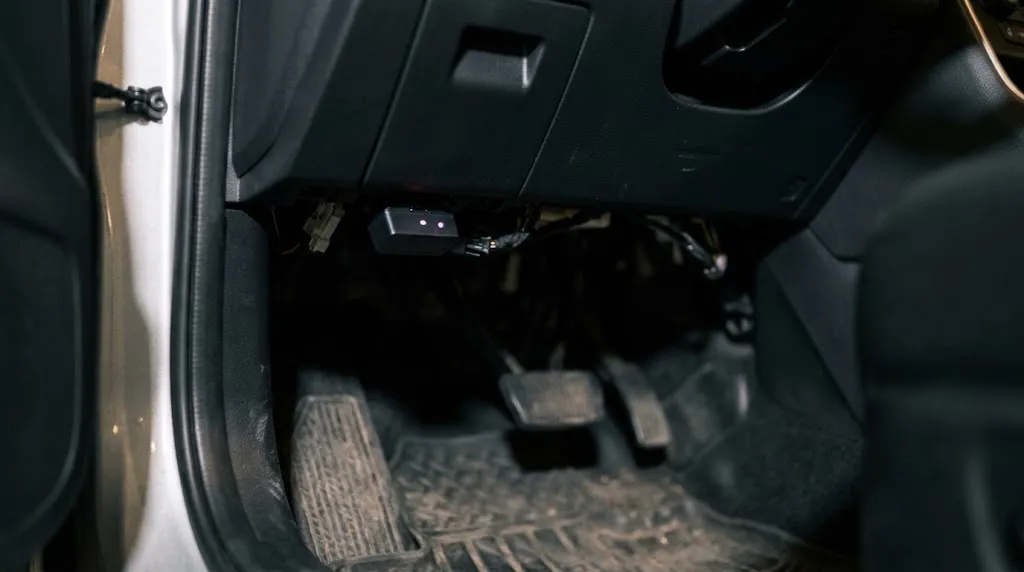
Draw depends on state, not just on brand. When active, a Bluetooth adapter typically draws tens of milliamps. When properly asleep, a well-designed one should draw only a few milliamps. That gap is the whole story.
Published maker figures illustrate the range, so check your own manual rather than assuming one number applies to every dongle. OBDLink publishes 62 mA operating current and a 2 mA low-power mode for the MX+, while a Vgate vLinker FD manual lists 51 mA operating and 3 mA in sleep mode. Vgate also describes its iCar Pro Bluetooth adapter as entering sleep about 30 minutes after the engine stops. Those are manufacturer-published specifications, not a guarantee for a clone that copies the shape but not the firmware.
| Adapter state | Typical published draw | Parked effect |
|---|---|---|
| Proper sleep mode | About 1–3 mA | Very small drain for a healthy, regularly driven car. |
| Awake, no app connected | Roughly 40–80 mA | Noticeable over days; risky over one to two weeks parked. |
If your manual gives no sleep current, treat that as a warning sign. “Auto sleep” with no number is weaker evidence than a named sleep current and delay. A healthy 12-volt battery is often rated around 40–70 amp-hours, but usable capacity falls with age, cold, and partial charge.
When continuous use is usually reasonable
Continuous plugging makes most sense when you have a clear reason to keep it in place and the conditions below are true. Daily driving, a published sleep current of a few milliamps, a car that lets the adapter sleep cleanly, and a healthy battery together make the risk small.
- You drive most days, so the battery is regularly recharged.
- The adapter has a named sleep mode and a low sleep current, ideally under 5 mA.
- It wakes reliably when you start the car or open the app, without needing to be unplugged and reseated.
- You use it for trip logging, a recurring fault, or monitoring that you actually check.
When you should unplug it
Unplug the adapter if the car will sit for more than about two weeks, if you drive only once or twice a month, if the battery is already weak, or if cold weather is already making starts sluggish. Unplug it as well if you cannot confirm sleep behaviour: an LED that stays brightly lit long after shutdown, a phone that can still connect hours after parking, or a battery that drops noticeably between drives.
A no-name ELM327 clone deserves extra caution here. The ELM327 adapter design is widely copied, and copies do not always copy the power management. Also unplug it before long-term storage and if a mechanic asks you to remove aftermarket devices before diagnostic work, to avoid a second device confusing a fault trace.
Warning
Do not leave an adapter plugged in to “keep the battery topped up.” An OBD2 adapter draws power; it does not charge the battery. For storage, a proper battery maintainer is the right tool, not a diagnostic dongle.
Does leaving it plugged in damage the car or cause fault codes?
A properly working read-only adapter is unlikely to damage the engine or electronics simply by being present. Reading codes and live data is what the port is for, and using an OBD2 scanner in the normal way does not rewrite the car’s software. The realistic problems are narrower: a faulty adapter, an app that sends commands it should not, or a device that keeps vehicle networks awake.
If a code appears only while the adapter is fitted and clears after removal, note that pattern, but do not assume the adapter “broke” the car. A loose connection or low voltage can also trigger codes. If the light stays on, remove the adapter and diagnose the car without it first.
Bluetooth security: the risk most people underrate
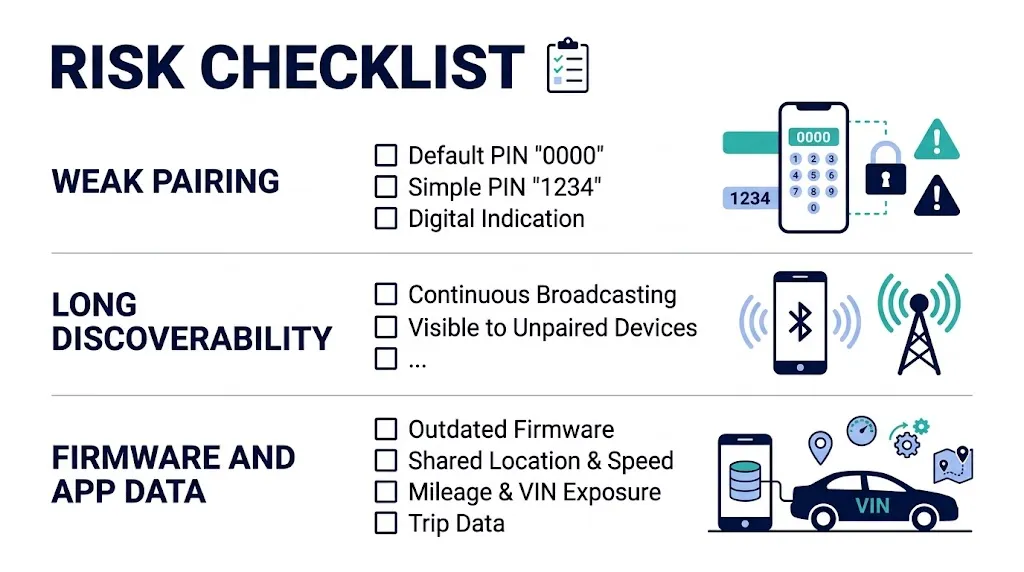
Leaving a Bluetooth adapter plugged in also leaves a wireless interface switched on, at least until it sleeps properly. That does not mean a stranger can instantly drive your car away. Most cars do not allow safety-critical control through the diagnostic port while the ignition is off, and the vehicle network is largely quiet when parked. But the risk is not zero, and it is higher for cheap adapters than for reputable ones.
The weak points are usually pairing and firmware, not Bluetooth encryption alone. Some low-cost dongles still use a fixed PIN such as 0000 or 1234, stay discoverable for a long time, or accept raw commands with little checking. Bluetooth OBD security research has repeatedly found weak pairing, missing connection checks, and firmware that is rarely updated in wireless dongles. If a nearby device can connect, it may read vehicle data or change adapter settings, and in worse cases send diagnostic commands once the car is on.
Privacy matters too. An app can collect location, speed, mileage, VIN, and trip data, and continuous use can mean continuous collection. Check what it stores and whether cloud sync can be turned off, and choose a maker that publishes firmware updates.
How to check your own adapter before you trust it

You do not need specialist equipment for a useful first check. You need one week of normal use and attention to three signs: the LED, the phone, and the start.
- Check the manual first. Look for a sleep current, a sleep delay, and how it wakes. If none are stated, do not assume sleep works well.
- Watch the LED after shutdown. Many sleeping adapters dim or flash briefly at intervals. An LED that stays fully lit an hour later suggests it has not slept.
- Check phone visibility. An hour after parking, see whether the adapter still appears as available to pair. A sleeping adapter should be much harder to reach.
- Note the first start. Slow cranking or a battery warning after a few days parked are reasons to remove the adapter and test the battery separately.
- Test the wake-up. Start the car and open the app. If you must unplug and reseat the adapter every time, its sleep design does not suit continuous use.
For leaving a scanner plugged in, the same logic applies, but Bluetooth adds the wireless and app-data points above. A mechanic can also measure parasitic draw with the adapter fitted and removed.
If you do leave it in: a simple setup routine
Confirm the adapter is seated firmly and not pressing against trim or your foot. Pair it once, following the maker’s steps for connecting a Bluetooth OBD2 scanner, and remove any old or duplicate pairings from your phone. Turn off app features you do not need, especially continuous cloud upload or automatic code clearing.
Then check the car after the first week. If starts are normal, the adapter wakes cleanly, and no new warnings appear, continuous use is reasonable for your setup.
Tip
If the adapter must come out often, use a short OBD2 extension cable and leave the extension in place. You then unplug the dongle from the extension, not from the car’s port, which reduces wear on the port itself.
Key Insight
The question is not “Bluetooth: safe or unsafe?” It is “Does this adapter sleep properly in this car, and is this car driven often enough for that sleep current not to matter?” Answer those two, and the rest follows.
Related Product
Bluetooth OBD2 Adapter
If you plan to leave an adapter fitted, choose one with a published low-power sleep mode and a maker that provides firmware updates.
As an Amazon Associate, we earn from qualifying purchases.
Frequently Asked Questions
Can I leave a Bluetooth OBD2 adapter plugged in overnight?
Usually yes, if it has a proper sleep mode and the car is driven regularly. One night is a low-risk test for most healthy batteries. If the car will sit for weeks, or the adapter shows no sign of sleeping, remove it for the longer park instead.
Will a Bluetooth adapter drain the battery if the car is not driven for a month?
It can, even at a low sleep current, because a month is a long time for any small drain plus the car’s own standby systems. For a month parked, unplug the adapter and, if possible, use a battery maintainer.
How do I know if my adapter has sleep mode?
Check the manual for a sleep current, sleep delay, and wake method. Then watch the LED and phone visibility an hour after shutdown, and check whether it reconnects cleanly on the next start. No published figure and a constantly lit LED point to poor sleep behaviour.
Is a Bluetooth OBD2 adapter a security risk when parked?
The risk is lower than many headlines suggest, because the car’s network is largely inactive when off, but it is higher for adapters with fixed PINs, long discoverability, or no firmware updates. A reputable adapter that sleeps properly and is kept updated is a much smaller risk than a cheap clone left awake.
Does continuous use wear out the OBD2 port?
Leaving a good adapter in place usually wears the port less than plugging and unplugging it daily. The main risks are a protruding dongle being kicked or bent. A low-profile adapter or extension cable helps.
Should I unplug the adapter before a service visit?
Yes, unless the garage asks you to leave it in to show a recurring fault. Removing it avoids confusion during their own diagnostics and avoids the adapter being blamed for a drain or code. Refit it afterwards and check that it still pairs and wakes normally.
Conclusion
Continuous use is safe for many setups, but it is not automatically safe for every adapter in every car. A published sleep current of a few milliamps, reliable wake-up, regular driving, and a healthy battery make leaving it in a reasonable choice. A missing sleep specification, long parking, a weak battery, or a cheap clone left discoverable tips the balance the other way. Check sleep behaviour in the first week, unplug it for storage and service visits, and keep pairing and app data under your control.

I’m Alex Rahman, a car enthusiast and automotive writer focused on practical solutions, car tools, and real-world driving advice. I share simple and honest content to help everyday drivers make better decisions.
