10 Best Handheld OBD Scanners for 2026: Clear Codes Without a Phone
The best handheld OBD scanner right now is the FOXWELL NT301 OBD2 Scanner, with a bright colour screen and no phone needed. We compared 10 handheld OBD2 scanners, scoring each on Diagnostic Coverage, Ease of Use, and Value for Money. Most handheld scanners look identical on paper but fail in a dim garage, with gloves on, or on a first scan. Whether you need simple code reads, live data, or ABS coverage, this guide gives one clear answer.
Quick Comparison: All 10 Products Ranked
| # | Product | Best For | Rating | Badge | |
|---|---|---|---|---|---|
| 1 | FOXWELL NT301 OBD2 Scanner | Everyday code reads | 4.9/5 | Best Overall | Buy → |
| 2 | Autel AutoLink AL519 OBD2 Scanner | Live data and Mode 6 | 4.8/5 | Best for Live Data | Buy → |
| 3 | Innova 5610 Bidirectional OBD2 Scanner | ABS, SRS and active tests | 4.8/5 | Best for ABS and SRS | Buy → |
| 4 | LAUNCH CRP129E OBD2 Scanner | Four-system home use | 4.7/5 | Best Multi-System Pick | Buy → |
| 5 | FOXWELL NT201 OBD2 Scanner | Simple glovebox checks | 4.7/5 | Best Simple Reader | Buy → |
| 6 | ANCEL AD310 Classic OBD2 Scanner | Budget engine checks | 4.6/5 | Best Budget | Buy → |
| 7 | Autel AutoLink AL319 OBD2 Scanner | First-time buyers | 4.6/5 | Best First Scanner | Buy → |
| 8 | Innova 3100RS OBD2 Scanner | Repair guidance | 4.5/5 | Best for Repair Guidance | Buy → |
| 9 | ANCEL FX2000 OBD2 Scanner | Four-system DIY checks | 4.5/5 | Best for Four Systems | Buy → |
| 10 | Autel MaxiScan MS309 OBD2 Scanner | Glovebox backup | 4.4/5 | Best Basic Backup | Buy → |
How We Chose These Handheld Scanners
What we compared
We compared 10 handheld units with their own screen and controls, checking listed coverage, live-data support, freeze frame, readiness, updates, and screen size.
Our 3 scoring criteria
Diagnostic Coverage, Ease of Use, and Value for Money. Each score is an editorial rating based on listed specifications, not a lab or hands-on test result.
Expert consulted
No independent expert was consulted for this shortlist, and no test period is claimed. Scores reflect editorial comparison of listed specifications.
What we cut — and why
We cut phone-only Bluetooth adapters and laptop-only software, because this guide covers handheld units with their own screen and controls.
What to Look for When Buying a Handheld OBD Scanner
A handheld scanner should answer one question fast: what is wrong, and how urgent is it? Start with screen, coverage, and live data, not with the longest feature list.
1. Screen and One-Hand Use
You will often use a scanner in a dim garage, with one hand on the tool and the other holding a torch. A colour screen with large text, clear buttons, and a simple menu matters more than a long spec sheet. Before you choose, read how to choose an OBD2 scanner and check screen size, button layout, and whether the unit powers from the vehicle port.
2. Diagnostic Coverage Beyond Engine Codes
Basic readers cover engine and emissions codes, which is enough for many check-engine lights. If you also see ABS, airbag, or transmission warnings, you need a tool that lists those systems by name. Do not assume a handheld covers them just because it says “all systems” in a headline; check the listed systems for your make, model, and year.
3. Live Data and Freeze Frame
A code alone rarely explains a fault. Freeze frame shows the conditions when the code set, and live data shows whether a sensor reading looks stable, stuck, or out of range. For intermittent faults, graphing and recording help more than a single snapshot. If you want to follow a sensor over time, learn the basics of reading OBD2 live data before you judge a tool by its code list alone.
4. Updates and Vehicle Compatibility
Vehicle coverage changes, so update support matters for a tool you plan to keep. Free lifetime updates are useful, but only if the update process is simple and the tool still supports your vehicle after an update. Check OBD2 protocol support, model-year range, and whether advanced resets are listed for your car, not just for cars in general.

FOXWELL NT301 OBD2 Scanner — Clear Everyday Scanning
Best for: Everyday code reads
For most drivers, this is the handheld to start with because it keeps the everyday job simple. Its 2.8-inch colour screen shows codes in plain language, so you can read the fault, check freeze frame, and see live data without opening a phone app. It covers full OBD2 modes, I/M readiness, and a built-in DTC lookup, which helps you decide whether a fault needs a garage visit or a simple recheck after clearing. The trade-off is coverage: it stays focused on engine and emissions systems, so ABS, airbag, and transmission faults need a more advanced tool.
- 2.8-inch colour screen, readable in dim garages
- Full OBD2 modes, freeze frame, live data
- Built-in DTC lookup, no phone needed
- No ABS, SRS, or transmission coverage
- No graphing for long live-data sessions
4.9/5
4.9/5
4.8/5

Autel AutoLink AL519 OBD2 Scanner — Deeper Than Basic
Best for: Live data and Mode 6
For drivers who want more than a code read, this Autel unit adds depth without a steep learning curve. Its larger colour display and clear menus make live data, freeze frame, and Mode 6 test results easier to follow, especially when a fault returns after clearing. It reads and clears engine codes, checks I/M readiness, and supports all OBD2 protocols, so it suits a second car or a family fleet. The limit is system scope: it does not add full ABS, SRS, or transmission diagnostics, so those warning lights still need a broader scanner.
- Mode 6 results, clearer fault follow-up
- Larger colour display, clear menus
- All OBD2 protocols, broad vehicle support
- No full ABS, SRS, transmission coverage
- Larger body than basic pocket readers
4.8/5
4.8/5
4.8/5

Innova 5610 Bidirectional OBD2 Scanner — Beyond Engine Codes
Best for: ABS, SRS and active tests
For drivers facing ABS, SRS, or transmission warnings, this Innova tool goes beyond a basic engine reader. It adds bidirectional controls and active tests on supported vehicles, plus live data, freeze frame, and RepairSolutions2 guidance that links a code to likely repairs and parts. That extra context helps you judge whether a job is DIY-friendly or better left to a workshop. The trade-off is complexity and size: menus take longer to learn, and some advanced functions depend on vehicle support, so check compatibility before you rely on a specific test.
- ABS, SRS, transmission, bidirectional tests
- RepairSolutions2 links codes to repairs
- Live data, freeze frame, active tests
- Menus take longer to learn
- Advanced tests depend on vehicle support
4.9/5
4.6/5
4.8/5
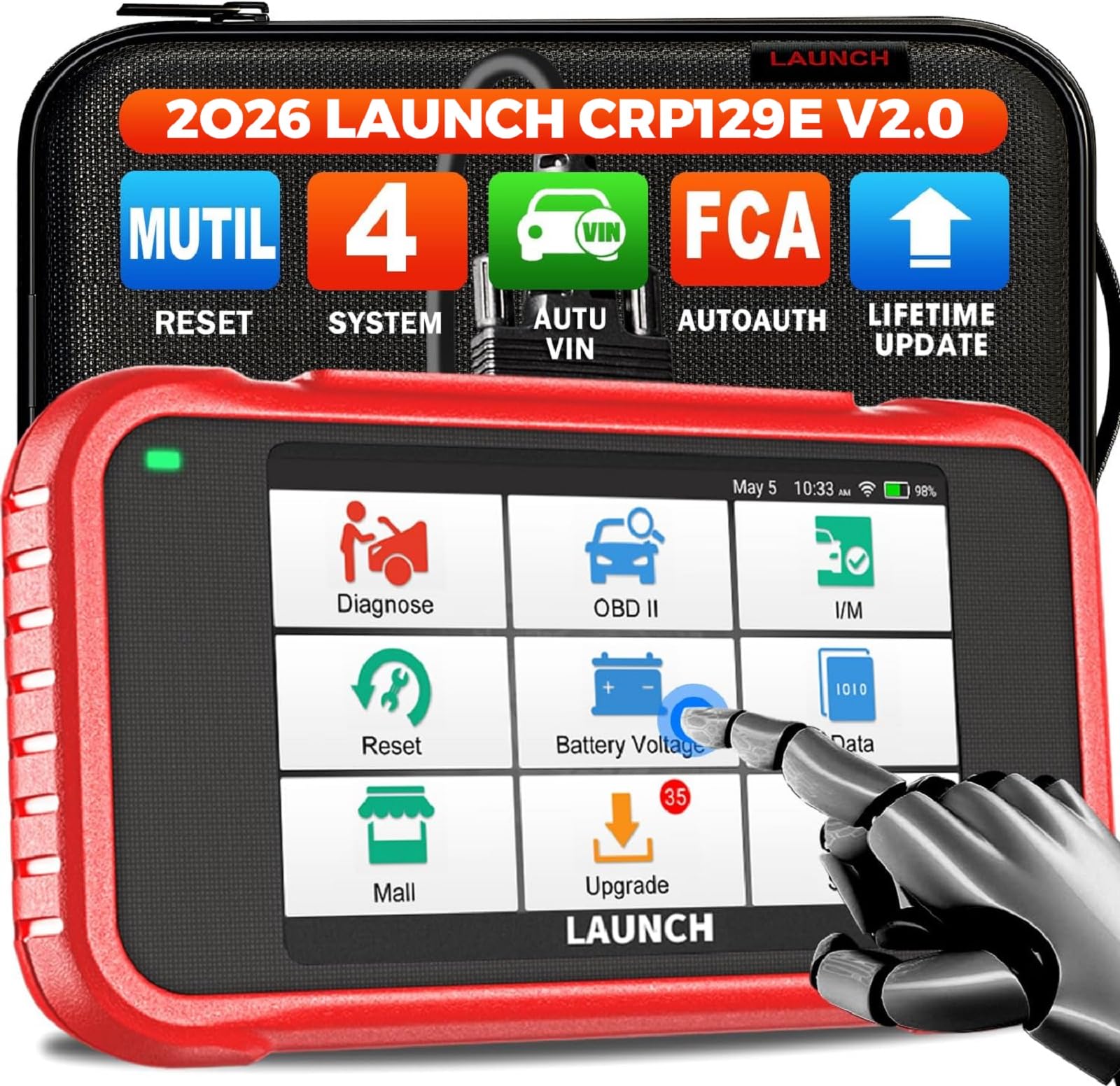
LAUNCH CRP129E OBD2 Scanner — Four Systems, Touchscreen Ease
Best for: Four-system home use
For home mechanics who want four-system coverage in one handheld, this LAUNCH scanner covers engine, ABS, SRS, and transmission on many vehicles. It adds service resets such as oil, EPB, SAS, and TPMS, plus Auto VIN, live data, and graphing, which makes routine maintenance checks faster. The colour touchscreen feels modern after basic button-only readers, and lifetime updates keep its coverage current. The trade-off is menu depth: with more systems and resets available, first-time users should allow extra time to find the right function for a specific vehicle.
- Engine, ABS, SRS, transmission coverage
- Oil, EPB, SAS, TPMS resets
- Touchscreen, Auto VIN, live graphing
- Menus take extra time to learn
- Resets vary by vehicle support
4.8/5
4.6/5
4.7/5

FOXWELL NT201 OBD2 Scanner — Simple, Compact, Ready
Best for: Simple glovebox checks
For drivers who want a simple, no-fuss code reader, this FOXWELL unit does the core job well. It reads and clears engine codes, shows freeze frame and I/M readiness, and displays live data in a compact handheld form that fits a glovebox. The red and green LEDs give a quick emissions-ready signal, which is useful before an inspection. The trade-off is screen size and depth: the smaller display shows less live data at once, and it does not cover ABS, SRS, or transmission systems for most cars.
- Compact glovebox size, simple menus
- Red and green readiness LEDs
- Freeze frame, live data, code clearing
- Smaller screen, less live data shown
- No ABS, SRS, transmission coverage
4.5/5
4.8/5
4.8/5

ANCEL AD310 Classic OBD2 Scanner — Budget Basics Done Well
Best for: Budget engine checks
For budget buyers who only need engine codes, this ANCEL reader is hard to beat for simplicity. It plugs in, powers from the vehicle, and shows codes, freeze frame, and I/M readiness on a clear, compact screen with no app, battery, or setup to manage. It is a good glovebox tool for a first check before calling a garage. The trade-off is scope: it reads engine codes only, shows limited live data, and cannot diagnose ABS, SRS, or transmission faults, so buy it for basic checks, not full-system work.
- No app, battery, or setup needed
- Clear compact screen, simple buttons
- Freeze frame and I/M readiness included
- Engine codes only, limited live data
- No ABS, SRS, transmission coverage
4.2/5
4.9/5
4.8/5

Autel AutoLink AL319 OBD2 Scanner — Trusted First Step
Best for: First-time buyers
For first-time buyers who want a trusted brand without extra menus, this Autel reader keeps scanning simple. It reads and clears engine codes, checks I/M readiness, shows freeze frame, and displays live data on a compact screen that works straight from the vehicle port. There is no phone pairing or subscription to manage, which suits occasional use. The trade-off is depth: it lacks Mode 6 detail, ABS and SRS coverage, and graphing found on larger Autel models, so it is best as a first scanner, not a workshop replacement.
- Simple menus, no phone pairing
- Freeze frame and I/M readiness
- Compact, vehicle-powered, easy storage
- No Mode 6 detail or graphing
- No ABS, SRS coverage included
4.3/5
4.8/5
4.7/5

Innova 3100RS OBD2 Scanner — Code to Repair Plan
Best for: Repair guidance
For drivers who want repair guidance with their scan, this Innova tool pairs ABS and SRS coverage with live-data graphing and recording. It can stream and record data, reset oil and airbag lights on supported vehicles, and link codes to RepairSolutions2 advice through a phone app when you want extra context. That guidance helps you move from a code to a plan. The trade-off is the hybrid workflow: the handheld works alone for basic scans, but the deepest repair advice needs the app, so it suits drivers comfortable with both.
- ABS, SRS, live-data graphing
- Stream, record, replay live data
- RepairSolutions2 code-to-repair links
- Deepest advice needs phone app
- Resets depend on vehicle support
4.6/5
4.4/5
4.5/5

ANCEL FX2000 OBD2 Scanner — Four Systems Without Tablet Size
Best for: Four-system DIY checks
For DIYers who need four-system checks without a tablet-sized tool, this ANCEL scanner covers engine, ABS, SRS, and transmission, plus oil, SAS, and EPB resets on supported vehicles. Its larger screen and live-data graphing make intermittent faults easier to follow than a basic code reader. It also supports Auto VIN and lifetime updates, which helps with a multi-car household. The trade-off is vehicle coverage: advanced resets vary by make and model, so confirm support for your car and year before buying for a specific service function.
- Engine, ABS, SRS, transmission coverage
- Larger screen, live-data graphing
- Auto VIN, lifetime updates listed
- Resets vary by make and model
- Larger than basic pocket readers
4.7/5
4.4/5
4.5/5

Autel MaxiScan MS309 OBD2 Scanner — Basic Backup Reader
Best for: Glovebox backup
For a second car, a student, or a glovebox backup, this Autel reader covers the basics at a simple level. It reads and clears engine codes, checks I/M readiness, shows freeze frame, and displays live data on a small screen powered by the vehicle itself. There is nothing to charge, pair, or update, which keeps occasional use painless. The trade-off is the small screen and basic feature set: live data is harder to follow, and there is no ABS, SRS, or Mode 6 depth for harder faults.
- Nothing to charge, pair, update
- Freeze frame and I/M readiness
- Simple backup for second cars
- Small screen, hard live-data reading
- No ABS, SRS, Mode 6 depth
4.2/5
4.6/5
4.4/5
Top 3 Head-to-Head: FOXWELL NT301 vs Autel AL519 vs Innova 5610
These three are the common final choices because they cover the main split in this guide: simple everyday use, deeper engine data, and broader system coverage.
| Feature | #1 FOXWELL NT301 | #2 Autel AL519 | #3 Innova 5610 |
|---|---|---|---|
| Diagnostic Coverage | Full OBD2, freeze frame | Full OBD2, Mode 6 | OBD2 + ABS/SRS, bidirectional — Best |
| Ease of Use | Colour screen, simple menus — Best | Clear menus, larger display | More menus, steeper learning |
| Value for Money | Strong everyday value | Good value for Mode 6 — Best | Higher value for advanced coverage |
| Choose if… | You want the simplest everyday reader | You want Mode 6 follow-up depth | You need ABS or SRS tests |
Who These Handheld Scanners Are NOT For
A handheld scanner is a strong first check, not a workshop replacement for every job.
If you need manufacturer-level programming, dealer-only resets, or heavy-duty truck coverage, these handhelds will fall short. A workshop tool, or a garage visit, is the safer choice for those jobs.
Common Mistakes to Avoid
Most handheld scanner regrets come from coverage, not from brand choice.
Frequently Asked Questions About Handheld OBD Scanners
What is a handheld OBD scanner, and how is it different from a phone adapter?
A handheld OBD scanner is a standalone tool with its own screen, buttons, and cable, so you plug it into the diagnostic port and read codes without a phone. A phone adapter, by contrast, sends data to an app, which can add pairing steps, subscriptions, or phone compatibility limits. Handheld units suit drivers who want a quick, self-contained check in the garage. They also suit shared cars, because the tool holds the scan workflow.
Will a handheld OBD2 scanner work on my car?
A handheld OBD2 scanner works on most petrol cars from 1996 and diesel cars from later model years, but the exact year varies by market. Check your diagnostic port, usually under the dashboard, and confirm OBD2 support for your make, model, and year before buying. Older cars, some motorcycles, and some electric vehicles may use a different connector or protocol. When in doubt, check the vehicle manual or the scanner listing for your exact model.
Can a handheld scanner clear a check engine light?
Yes, most handheld scanners can clear an engine fault code and turn off the check engine light after you read the code. Clearing only removes the code and light; it does not repair the fault that caused it. If the fault is still present, the code and light will return after a drive cycle. Always note the code and freeze frame, fix or investigate the cause, and then clear and recheck to confirm the repair.
Can a handheld scanner diagnose ABS or airbag faults?
Only some handheld scanners can diagnose ABS or airbag faults, and a basic engine-only reader will report no codes for those lights. You need a tool that lists ABS and SRS in its system coverage, not OBD2 engine modes. Check the listing for your vehicle, because support varies by make, model, and year. If a light is red, or brakes feel unsafe, stop driving and get professional help instead of relying on a scan alone.
Do handheld scanners need internet or updates?
No, a basic handheld scan does not need internet, because the tool reads the vehicle directly through its cable and shows codes on its own screen. Internet is useful for updates, repair guidance, or app-linked features on some models. A handheld that needs an app for its advice will need a phone and connection for that feature only. For a garage check, choose a unit that scans, reads, and clears codes without online step.
Is a handheld scanner worth buying for occasional use?
Yes, for many drivers, because a handheld scanner turns a warning light into a code you can research before visiting a garage. It helps you avoid guessing, check whether a fault returns after clearing, and judge urgency from the code and symptoms. It is less useful if you prefer a garage to handle every warning. To decide, read whether an OBD2 scanner is worth buying before you buy.
Our Final Verdict
Handheld scanners range from simple code readers to four-system tools, and the right choice depends on the warnings you actually face. For most drivers, a clear screen and full OBD2 coverage matter more than extra menus. Start with the NT301, step up only for ABS, SRS, or Mode 6 needs, and check vehicle support first.

I’m Alex Rahman, a car enthusiast and automotive writer focused on practical solutions, car tools, and real-world driving advice. I share simple and honest content to help everyday drivers make better decisions.
