10 Best OBD2 Scanners Under $200 for 2026: Smart DIY Picks
The best obd2 scanner under $200 right now is BlueDriver Bluetooth Pro — it combines live data, code reading, and published repair guidance. We compared 10 scanners on published specifications, scoring each on value for money, diagnostic depth, and ease of use. Most scanners look identical on paper but differ in system coverage — and that gap is what this comparison is designed to expose. Whether you need a simple reader, a phone tool, or a deeper DIY scanner, this guide gives a clear answer.
Quick Comparison: All 10 Products Ranked
| # | Product | Best For | Rating | Badge | |
|---|---|---|---|---|---|
| 1 | BlueDriver Bluetooth Pro OBDII Scan Tool | Phone-based diagnostics | 4.9/5 | Best Overall | Buy → |
| 2 | OBDLink MX+ Bluetooth OBD2 Scanner | Third-party apps | 4.8/5 | Best for Apps | Buy → |
| 3 | Autel AutoLink AL519 | Handheld everyday use | 4.7/5 | Best Handheld Value | Buy → |
| 4 | Innova 5210 | First-time buyers | 4.7/5 | Best for Beginners | Buy → |
| 5 | FOXWELL NT604 Elite | ABS, SRS and transmission checks | 4.6/5 | Best for ABS and SRS | Buy → |
| 6 | Autel MaxiAP AP200 | App-based full-system checks | 4.6/5 | Best App Full-System | Buy → |
| 7 | Launch CRP129E | Four-system handheld checks | 4.6/5 | Best 4-System Handheld | Buy → |
| 8 | Autel ML629 | Mid-range ABS and SRS | 4.5/5 | Best Mid-Range ABS/SRS | Buy → |
| 9 | FOXWELL NT301 | Simple engine code reading | 4.5/5 | Best Budget Handheld | Buy → |
| 10 | ANCEL AD310 | Basic check-engine checks | 4.4/5 | Best Ultra-Budget | Buy → |
How We Chose These Scanners
What we compared
Published specifications for 10 scanners: system coverage, live data, freeze frame, readiness, display or app type, and update terms.
Our 3 scoring criteria
Value for money, diagnostic depth, and ease of use, applied identically to every product as editorial judgments from specifications.
Expert consulted
No expert consultation is claimed for this specification comparison.
What we cut — and why
Professional all-system tablets above the brief threshold were left out because they fall outside the under-200 scope.
What to Look for When Buying an OBD2 Scanner
Start with the fault you actually need to diagnose. Engine-only readers solve a check-engine light, but ABS, airbag, and transmission faults need wider coverage.
1. Diagnostic Coverage
Check whether the scanner lists engine codes only, or also covers ABS, SRS, transmission, and readiness monitors. Wider coverage helps when the warning light is not engine-related, but it also adds cost and complexity. Choose the best type of OBD2 scanner for DIY use for your skill level, not the longest feature list.
2. Handheld or Phone-Based
Handheld tools work without a phone and are easy to keep in a glovebox. Bluetooth adapters use a phone screen for larger graphs and clearer explanations, but they depend on app compatibility and phone battery. If you dislike app setup, a dedicated screen is usually the calmer choice.
3. Vehicle Compatibility
Most modern petrol cars use standard OBD2, but system coverage still varies by make, model, and year. Confirm the protocols and enhanced functions for your vehicle before buying, especially for ABS or transmission data. Use a guide to check your vehicle OBD2 compatibility before you order.
4. Live Data, Updates, and Ongoing Costs
Live data helps you see sensor readings in real time, while freeze frame shows conditions when a fault was stored. Some tools include lifetime updates, while others charge for advanced app features, so read the update terms carefully. Remember that adapters are not all equal, so check whether all OBD2 adapters are the same before assuming one will do everything.
BlueDriver Bluetooth Pro OBDII Scan Tool — Best phone-first pick
Best for: Drivers who want clear explanations on a phone
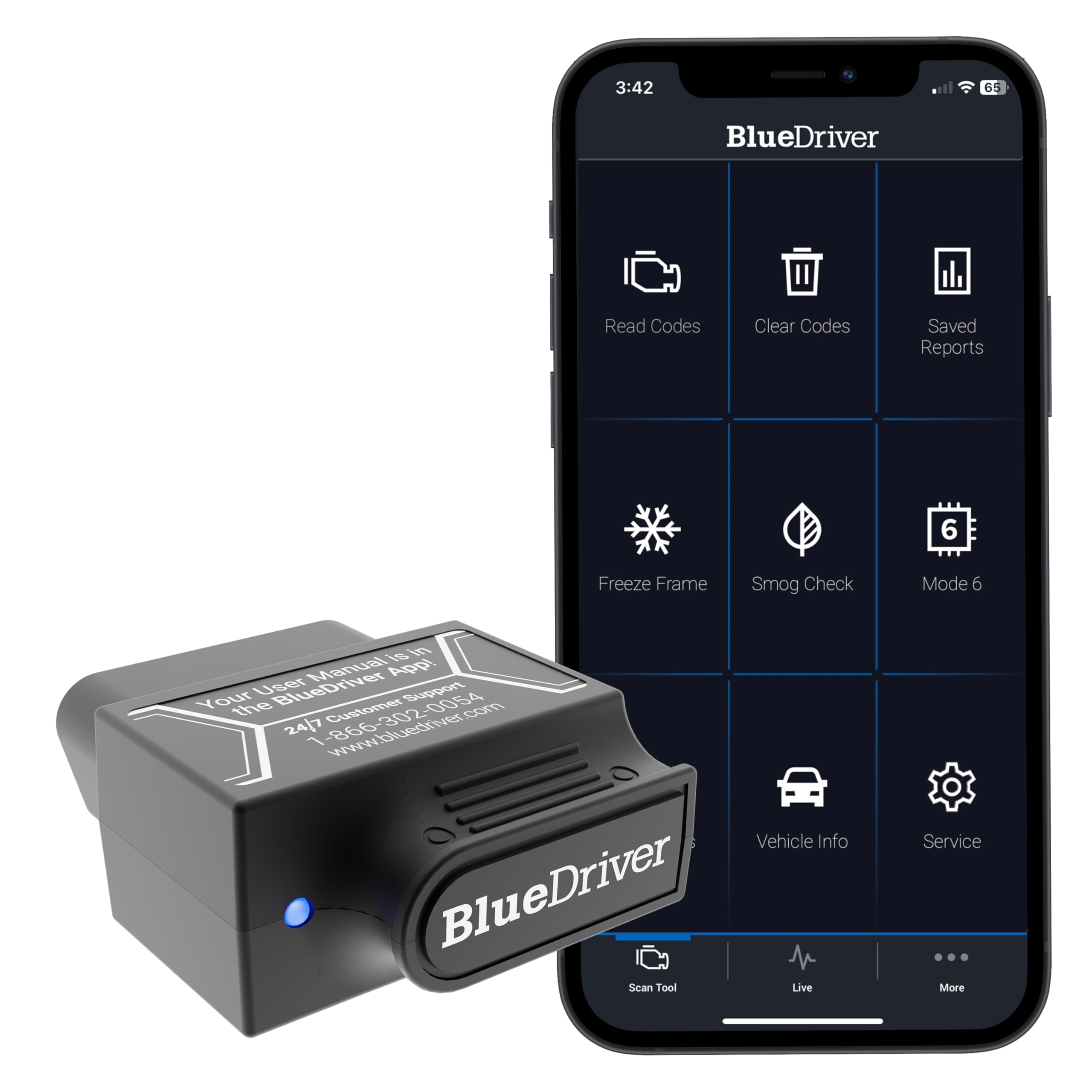
BlueDriver is best for drivers who want a check-engine answer without learning diagnostic jargon. Its Bluetooth adapter sends codes, live data, and freeze-frame information to a phone app, which then explains the fault and lists published repair guidance. That phone-first design also keeps the hardware small and easy to store. The trade-off is clear: you need a compatible phone and app, and it cannot replace a professional tool for advanced bi-directional work.
- Plain-language code explanations in app
- Live data and freeze frame
- Compact Bluetooth adapter, no screen needed
- Needs compatible phone and app
- No built-in handheld display
| Type | Bluetooth adapter, phone app |
| Coverage | Engine, ABS, SRS, TPMS on supported vehicles |
| Live data | Yes, with freeze frame |
| Readiness | I/M readiness supported |
| Updates | App-based, no subscription stated |
4.8/5
4.9/5
5.0/5

OBDLink MX+ Bluetooth OBD2 Scanner — Best app-flexible adapter
Best for: Drivers who already use a diagnostic app
OBDLink MX+ is best for drivers who want to choose their own app rather than being locked into one interface. Its Bluetooth adapter works with popular third-party diagnostic apps, giving access to live data, codes, and enhanced functions on supported vehicles. That flexibility is valuable if you already use Torque, FORScan, or a similar tool. The trade-off is that the final experience depends heavily on the app you pair it with, so setup takes more care than a single-app system.
- Works with multiple third-party apps
- Enhanced functions on supported vehicles
- Battery-saver sleep mode stated
- Experience varies by chosen app
- No built-in display or explanations
| Type | Bluetooth adapter, third-party apps |
| Coverage | Full OBD2, enhanced on supported vehicles |
| Live data | Yes, app-dependent |
| Connection | Bluetooth, iOS and Android apps |
| Power | Vehicle OBD2 port |
4.7/5
4.9/5
4.7/5

Autel AutoLink AL519 — Best no-phone handheld
Best for: Drivers who want a standalone screen
Autel AutoLink AL519 is best for drivers who want to plug in, read a code, and clear it without opening an app. Its handheld design provides a colour display, live data, freeze frame, and readiness information in one self-contained tool. That simplicity makes it a strong garage or glovebox option, especially for households with more than one driver. The trade-off is that it does not offer the same app-based repair explanations as phone tools, and its coverage stays closer to core OBD2 functions.
- Self-contained colour display
- Live data and freeze frame
- No phone or app required
- Limited app-style repair guidance
- Core OBD2 focus, not all-system
| Type | Handheld code reader |
| Display | Colour screen |
| Live data | Yes, with freeze frame |
| Readiness | I/M readiness supported |
| Power | Vehicle OBD2 port |
4.8/5
4.6/5
4.8/5
Innova 5210 — Best beginner-friendly handheld
Best for: First-time scanner buyers
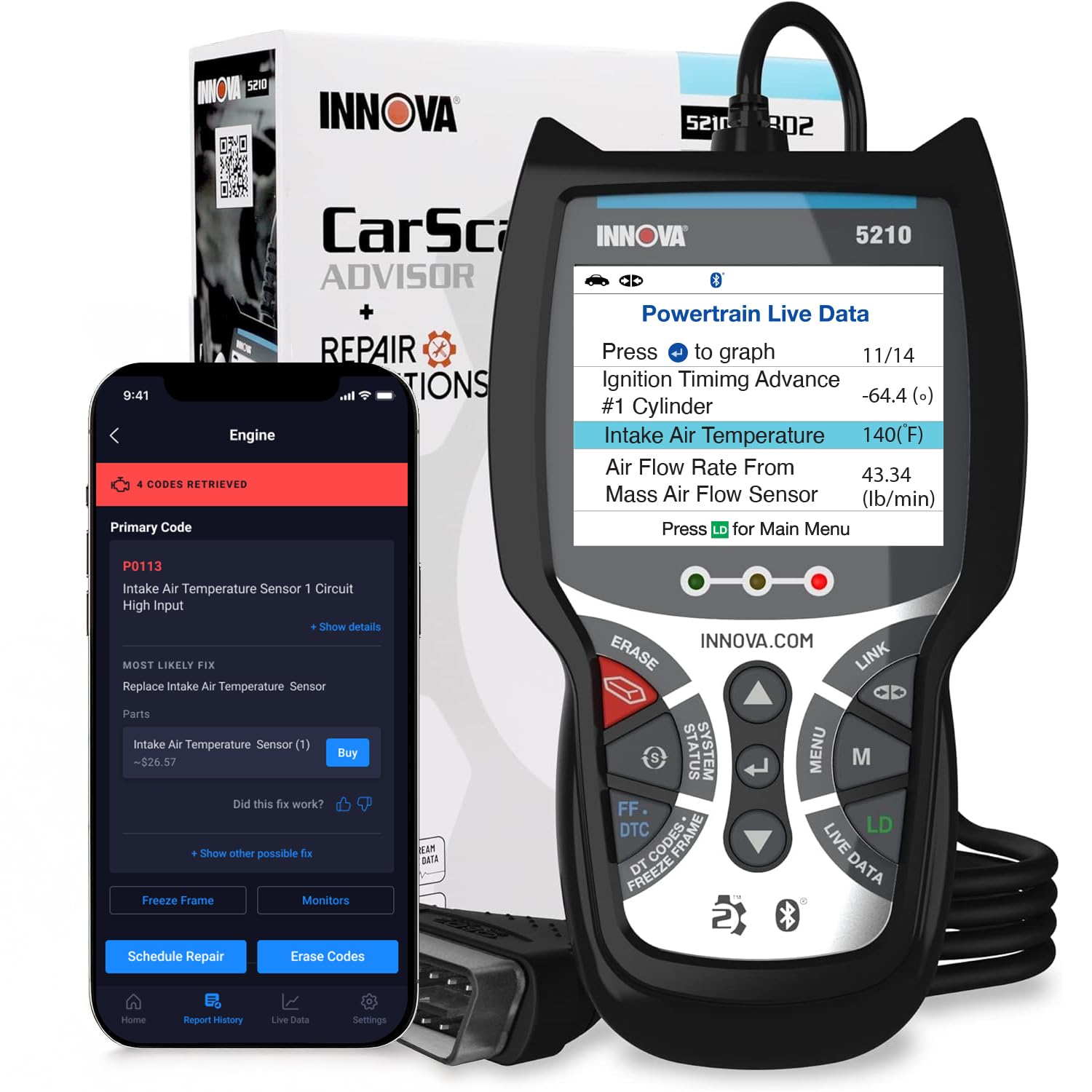
Innova 5210 is best for first-time buyers who want guidance built into the tool itself. Its colour screen, code-severity indicator, and app-linked repair information help a new user judge whether a fault needs urgent attention. It also covers live data, battery checks, and readiness information for everyday checks. The trade-off is that it is not a deep all-system professional tool, so owners chasing complex ABS or transmission faults may still need a wider-coverage model.
- Code severity indicator
- Colour screen, simple menus
- Battery and readiness checks
- Not a full professional system tool
- App features vary by vehicle
| Type | Handheld, app-linked |
| Display | Colour screen |
| Live data | Yes |
| Extra checks | Battery, I/M readiness |
| Power | Vehicle OBD2 port |
4.7/5
4.6/5
4.8/5

FOXWELL NT604 Elite — Best multi-system handheld
Best for: ABS, SRS, and transmission checks
FOXWELL NT604 Elite is best for DIY owners who keep hitting non-engine warning lights. Its published coverage spans engine, ABS, SRS, and transmission systems, plus full OBD2 functions, live data, and freeze frame. That wider scope makes it a useful step up from a basic code reader without moving into professional tablet territory. The trade-off is a larger, more menu-heavy tool, and exact enhanced coverage still depends on the vehicle, so check compatibility before buying.
- Engine, ABS, SRS, transmission coverage
- Full OBD2 functions included
- Lifetime free updates stated
- Menus feel busier than basic readers
- Enhanced coverage varies by vehicle
| Type | Handheld multi-system scanner |
| Systems | Engine, ABS, SRS, transmission |
| Live data | Yes, with freeze frame |
| VIN scan | Automatic VIN scan stated |
| Updates | Lifetime free updates stated |
4.6/5
4.8/5
4.5/5

Autel MaxiAP AP200 — Best app-based system tool
Best for: Phone users wanting wider system coverage
Autel MaxiAP AP200 is best for phone users who want more than a basic engine reader without carrying a handheld tablet. Its Bluetooth adapter connects to the MaxiAP app for full OBD2 functions and wider system diagnostics on supported vehicles, plus service functions where available. That combination suits owners who already diagnose with a phone and want a compact adapter. The trade-off is app and vehicle dependence: some advanced functions require the right app version or vehicle support, so results vary.
- Compact Bluetooth adapter
- Wider system coverage, app-dependent
- Service functions where supported
- Advanced access varies by vehicle
- Needs phone, app, and pairing
| Type | Bluetooth adapter, MaxiAP app |
| Coverage | Full OBD2, wider systems supported |
| Live data | Yes, app-dependent |
| Service | Service functions where supported |
| Power | Vehicle OBD2 port |
4.7/5
4.7/5
4.5/5

Launch CRP129E — Best four-system handheld
Best for: Four-system checks without a phone
Launch CRP129E is best for owners who want four-system diagnostics in a handheld tool. Its published coverage includes engine, transmission, ABS, and SRS, along with live data, graphing, and full OBD2 functions. That makes it a practical choice for common warning lights beyond the engine alone. The trade-off is that it is not a full all-system tool, and some service functions and enhanced data still depend on vehicle support, so it suits confident DIY users more than complete beginners.
- Engine, transmission, ABS, SRS
- Live data with graphing
- Standalone handheld design
- Not a full all-system tool
- Coverage varies by vehicle
| Type | Handheld four-system scanner |
| Systems | Engine, transmission, ABS, SRS |
| Live data | Yes, with graphing |
| OBD2 | Full OBD2 functions |
| Power | Vehicle OBD2 port |
4.6/5
4.7/5
4.5/5

Autel ML629 — Best mid-range ABS tool
Best for: ABS and airbag checks on a budget
Autel ML629 is best for owners who mainly need ABS and SRS coverage without buying a large diagnostic tablet. Its handheld design adds those systems to core OBD2 reading, live data, and freeze frame, plus common service functions such as oil reset on supported vehicles. That focus makes it a clear mid-range step up from basic readers. The trade-off is that it is not a full all-system tool, and service coverage still depends on vehicle support, so it is best for targeted faults.
- ABS and SRS coverage
- Live data and freeze frame
- Oil reset where supported
- Not a full all-system tool
- Service coverage varies by vehicle
| Type | Handheld ABS/SRS scanner |
| Systems | Engine, ABS, SRS |
| Live data | Yes, with freeze frame |
| Service | Oil reset where supported |
| Power | Vehicle OBD2 port |
4.7/5
4.6/5
4.4/5

FOXWELL NT301 — Best simple budget reader
Best for: Simple engine code checks
FOXWELL NT301 is best for owners who only need a reliable engine code reader with a clear colour screen. It reads and clears codes, shows live data, freeze frame, and readiness information, and it works without a phone or subscription for core functions. That focus keeps it simple and easy to use in the driveway. The trade-off is that it does not cover ABS, SRS, or transmission systems, so it cannot diagnose warning lights outside the engine and emissions scope.
- Clear colour display
- Live data and freeze frame
- Simple, no-phone operation
- No ABS or SRS coverage
- No transmission system coverage
| Type | Handheld OBD2 code reader |
| Display | Colour screen |
| Live data | Yes, with freeze frame |
| Readiness | I/M readiness supported |
| Power | Vehicle OBD2 port |
4.9/5
4.2/5
4.8/5

ANCEL AD310 — Best basic starter reader
Best for: Occasional check-engine checks
ANCEL AD310 is best for owners who only need to read a check-engine code now and then. Its simple handheld design reads and clears codes, shows live data, freeze frame, and readiness information, and it draws power from the vehicle port. That makes it easy to keep as a backup tool. The trade-off is its basic scope: it does not cover ABS, SRS, or transmission systems, and its small screen is less comfortable for long live-data sessions.
- Very simple one-touch operation
- Live data and freeze frame
- Powered by vehicle port
- No ABS or SRS coverage
- Small screen for live data
| Type | Handheld basic code reader |
| Display | LCD screen |
| Live data | Yes, with freeze frame |
| Readiness | I/M readiness supported |
| Power | Vehicle OBD2 port |
4.9/5
4.0/5
4.7/5
Top 3 Head-to-Head: BlueDriver vs OBDLink MX+ vs Autel AL519
These three are the common final choices because they cover the three main styles: phone-first, app-flexible, and standalone handheld.
| Feature | #1 BlueDriver | #2 OBDLink MX+ | #3 AL519 |
|---|---|---|---|
| Value for money | 4.8/5 — Best, tied | 4.7/5 | 4.8/5 — Best, tied |
| Diagnostic depth | 4.9/5 — Best, tied | 4.9/5 — Best, tied | 4.6/5 |
| Ease of use | 5.0/5 — Best | 4.7/5 | 4.8/5 |
| Choose if… | You want plain explanations | You want app choice | You want no phone |
Who These Scanners Are NOT For
These tools are for everyday diagnosis, not professional workshop work.
They also cannot fix a fault by clearing a code. Clearing only removes the stored code and warning light until the fault returns.
Common Mistakes to Avoid
Most scanner regret comes from a coverage mismatch, not a faulty tool.
Frequently Asked Questions About OBD2 Scanners
Will an OBD2 scanner work on my car?
Most petrol cars sold in the US from 1996 onward have an OBD2 port, but system coverage still varies by make and year. Engine codes are widely supported, while ABS, SRS, and transmission data depend on the vehicle and tool. Always confirm compatibility for your exact model before buying.
What is the difference between a code reader and a scan tool?
A code reader mainly reads and clears engine codes, while a scan tool usually adds live data, freeze frame, and wider system coverage. The distinction is not strict, so compare the listed functions rather than the product label. For deeper work, look for system coverage, graphing, and service functions.
Can a cheap OBD2 scanner read ABS and airbag codes?
No, most basic readers cannot read ABS or SRS codes. Those systems need a scanner that explicitly lists ABS and SRS coverage for your vehicle. If an ABS or airbag light is your main problem, choose a multi-system model such as the NT604 Elite or ML629 rather than a basic engine reader.
Should I choose a handheld scanner or a Bluetooth adapter?
Choose a handheld scanner if you want a standalone screen and no phone setup. Choose a Bluetooth adapter if you prefer a large phone display, graphs, and app explanations. This choice also affects portability, since adapters are smaller but depend on phone battery and app compatibility.
Does clearing a code fix the problem?
No, clearing a code only removes the stored fault and warning light. If the underlying fault remains, the code will return after the system runs its checks again. Use clearing after a repair, or to test whether a fault was temporary, not as a repair itself.
Do OBD2 scanners need a subscription?
Many core functions do not need a subscription, but some apps charge for advanced features or extra vehicle brands. Before buying, check whether updates, repair guidance, and enhanced functions are included or paid. A tool with clear update terms is easier to own long term, especially for a first-time buyer.
How do I choose the right OBD2 scanner?
Start with the systems you need, then choose handheld or phone-based, then check vehicle compatibility and update terms. A simple engine reader suits a check-engine light, while ABS or transmission faults need wider coverage. For a structured starting point, read how to choose an OBD2 scanner before narrowing the list.
Our Final Verdict
The under-200 range covers everything from basic engine readers to useful multi-system tools, but the key trade-off is coverage versus simplicity. For most drivers, a phone-based tool with clear explanations is the easiest everyday choice.

I’m Alex Rahman, a car enthusiast and automotive writer focused on practical solutions, car tools, and real-world driving advice. I share simple and honest content to help everyday drivers make better decisions.
