10 Best OBD2 Scanners for FORScan 2026: Stable Ford Coding Picks
The best OBD2 scanner for FORScan right now is OBDLink EX — the wired USB adapter built for stable Ford module configuration. We evaluated 10 FORScan adapters, scoring each on FORScan compatibility, coding stability, and ease of setup. Most adapters look identical on paper but fail on MS-CAN access, and that gap is exactly what this comparison is designed to expose. Whether you need wired coding, wireless diagnostics, or a budget entry point, this guide gives you one clear answer.
Quick Comparison: All 10 Products Ranked
| # | Product | Best For | Rating | Badge | |
|---|---|---|---|---|---|
| 1 | OBDLink EX FORScan OBD Adapter | Wired Ford module coding on Windows | 4.9/5 | Best Overall | Buy → |
| 2 | OBDLink MX+ Bluetooth OBD2 Scanner | Wireless diagnostics on iPhone and Android | 4.8/5 | Best Bluetooth | Buy → |
| 3 | Vgate vLinker FS USB Adapter for FORScan | Wired FORScan use on a budget | 4.7/5 | Best Value | Buy → |
| 4 | Vgate vLinker FS Bluetooth Adapter for FORScan | Wireless FORScan Lite and daily diagnostics | 4.6/5 | Best Wireless Value | Buy → |
| 5 | Vgate vLinker FD+ Bluetooth OBD2 Adapter | Bluetooth diagnostics across several apps | 4.5/5 | Best Multi-Protocol | Buy → |
| 6 | OHP ELM327 FORScan Edition USB Adapter | Budget Windows coding and code reading | 4.1/5 | Best Budget | Buy → |
| 7 | OBDResource FORD327 ELM327 FORScan Adapter | Older Ford, Mazda, and Lincoln models | 3.9/5 | Best for Older Fords | Buy → |
| 8 | ELS27 FORScan OBD2 Adapter | Advanced DIY configuration with a wired setup | 3.8/5 | Best Advanced DIY | Buy → |
| 9 | Modified ELM327 USB Adapter with HS/MS-CAN Switch | Lowest-cost entry to HS/MS-CAN access | 3.6/5 | Cheapest Entry | Buy → |
| 10 | OBDMONSTER FORScan OBD2 USB Adapter | Backup wired adapter for basic FORScan jobs | 3.5/5 | Lowest-Cost Backup | Buy → |
How We Chose These Adapters
What we compared
Published FORScan compatibility guidance, connection type, HS/MS-CAN switching method, supported platforms, and stated programming support for 10 adapters.
Our 3 scoring criteria
FORScan compatibility, coding stability, and ease of setup. Scores are editorial judgments from those published factors, not measured test results.
What we did not claim
No hands-on testing, test duration, laboratory result, or expert consultation is claimed in this comparison. Check your vehicle and FORScan version before a module write.
What we cut — and why
Generic Bluetooth dongles without stated MS-CAN access and standalone handheld scanners without a FORScan adapter role were cut, because they cannot reliably reach the modules FORScan users need.
What to Look for When Buying a FORScan Adapter
FORScan is not a generic code reader, so the adapter matters more than the app icon. The right adapter reaches the modules you need, stays connected during a write, and matches the device you actually own.
1. HS-CAN and MS-CAN Access
Many Fords use HS-CAN for powertrain modules and MS-CAN for body modules, and an adapter that only sees HS-CAN will miss the second group. Automatic switching is easier than a manual toggle, because you cannot forget to flip it mid-job. This is why not all OBD2 adapters are the same for FORScan work.
2. Wired vs Wireless Connection
A wired USB adapter is the safer choice for module configuration, because it avoids Bluetooth pairing drops and phone sleep interruptions. Wireless adapters are better for quick checks, live data, and working around the car without a laptop cable. Choose wired if you plan to write settings, and wireless if you mainly read codes and monitor data.
3. Device and FORScan Version
Full FORScan on Windows supports configuration and programming, while FORScan Lite on phones is mainly for diagnostics and monitoring. iOS does not support USB ELM327 adapters in the same way, so iPhone owners usually need a Bluetooth adapter. Match the adapter to your device first, or you may own the right hardware for the wrong platform.
4. Coding, License, and Backup
Reading codes is not the same as changing a module setting, and configuration usually needs the correct FORScan license and a saved backup of the original values. Before any change, record the original AsBuilt data and change one setting at a time. A cheaper adapter can still read codes well, but it is not automatically suitable for programming.
If you are unsure whether a job counts as coding, read whether a scan tool can perform ECU coding before you start.

OBDLink EX FORScan OBD Adapter — Best for Wired Coding
Best for: Wired Ford module coding on Windows
For a Ford owner who wants to change module settings without worrying about a dropped connection, this wired adapter is the safest starting point. It connects by USB to a Windows laptop, switches automatically between HS-CAN and MS-CAN, and is the adapter FORScan recommends for configuration and programming. That stability matters most during module writes, where a Bluetooth dropout can interrupt the job. It is not the pick for phone-only use, since it needs a Windows laptop, but for serious coding it removes the most common adapter variable.
- Automatic HS/MS-CAN switching, no manual toggle
- Wired USB stability for module writes
- FORScan-recommended for configuration and programming
- Needs a Windows laptop, not phone-only
- Cable limits movement around the car
4.9/5
4.9/5
4.7/5

OBDLink MX+ Bluetooth OBD2 Scanner — Best Wireless Pick
Best for: Wireless diagnostics on iPhone and Android
For a driver who wants FORScan Lite on a phone without a laptop cable, this Bluetooth adapter is the most flexible choice in this list. It works with Windows, Android, and iOS, reaches both HS-CAN and MS-CAN automatically, and also covers other brands for general diagnostics. That breadth makes it useful beyond a single Ford, especially in a mixed-brand household. The trade-off is clear: phone apps cannot configure or program like full Windows FORScan, so keep serious module writes for a wired Windows setup.
- Works with iOS, Android, and Windows
- Automatic HS/MS-CAN switching, no toggle
- Useful beyond Ford for general diagnostics
- Phone apps cannot program like Windows FORScan
- Wireless link less stable for module writes
4.8/5
4.6/5
4.8/5
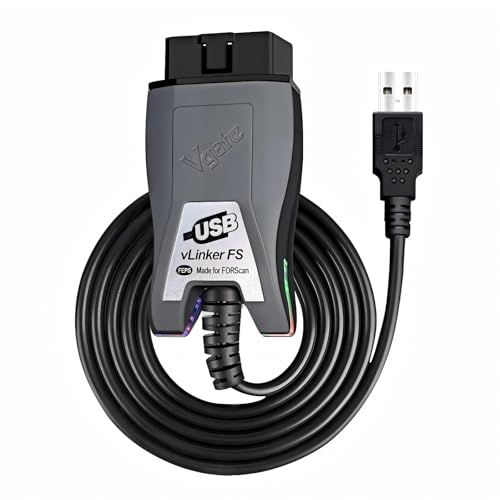
Vgate vLinker FS USB Adapter for FORScan — Best Value Wired
Best for: Wired FORScan use on a budget
For a Windows user who wants wired stability without paying for the top adapter, this USB version of the vLinker FS is a strong middle choice. It is designed for FORScan, switches electronically between HS-CAN and MS-CAN, and supports firmware updates, which helps it stay useful as software changes. It still needs a Windows laptop and a cable, so it is not a phone-first pick. For coding, diagnostics, and regular module checks on a budget, however, it covers the core FORScan needs well.
- Automatic electronic HS/MS-CAN switching
- Wired USB stability for FORScan jobs
- Firmware update support for future use
- Needs a Windows laptop and cable
- Less brand support history than OBDLink
4.7/5
4.7/5
4.6/5

Vgate vLinker FS Bluetooth Adapter for FORScan — Wireless Value
Best for: Wireless FORScan Lite and daily diagnostics
For a driver who wants the vLinker FS approach without a cable, this Bluetooth version keeps the FORScan focus and adds phone convenience. It supports HS/MS-CAN switching, works with iOS, Android, and Windows, and suits FORScan Lite checks, live data, and routine diagnostics. It is not the best choice for a long module write, because wireless links can still drop at the wrong moment. For daily checks and quick troubleshooting, however, it is a practical and lower-cost wireless option.
- FORScan-focused HS/MS-CAN Bluetooth adapter
- Works with iOS, Android, and Windows
- Good for daily checks and live data
- Not ideal for long module writes
- Bluetooth pairing can vary by phone
4.6/5
4.4/5
4.7/5

Vgate vLinker FD+ Bluetooth OBD2 Adapter — Multi-App Pick
Best for: Bluetooth diagnostics across several apps
For a driver who uses more than one diagnostic app, this Bluetooth adapter is a flexible general-purpose choice with MS-CAN support. It works with iOS, Android, and Windows, supports ELM327-compatible apps, and suits code reading, live data, and routine checks. It is broader than a FORScan-only adapter, which is useful if you also scan other cars, but that breadth means it is not the first pick for a dedicated FORScan coding job. Choose it for app flexibility, not for a single high-stakes module write.
- MS-CAN support for Ford diagnostics
- Works across several diagnostic apps
- Wireless convenience for routine checks
- Not a dedicated FORScan coding adapter
- Wireless link less stable for writes
4.5/5
4.3/5
4.6/5

OHP ELM327 FORScan Edition USB Adapter — Budget Pick
Best for: Budget Windows coding and code reading
For a Windows owner who wants to try FORScan without a premium adapter, this ELM327 edition is the lowest-risk budget route. It uses a manual HS/MS-CAN switch, works for codes, live data, and many simple configuration jobs, and connects by USB for a stable wired session. The limit must be stated plainly: it is not presented as a full-function equivalent to the recommended adapters above. For learning FORScan, reading codes, and occasional simple changes, however, it is a sensible and affordable starting point.
- Low-cost entry to FORScan on Windows
- Manual HS/MS-CAN switch included
- Good for codes and live data
- Not full-function for all programming jobs
- Manual switch can be forgotten mid-job
4.2/5
3.9/5
4.0/5

OBDResource FORD327 ELM327 FORScan Adapter — Older Ford Pick
Best for: Older Ford, Mazda, and Lincoln models
For an owner of an older Ford-family vehicle who needs basic FORScan access, this toggle-switch ELM327 adapter is a practical budget option. It is marketed for Ford, Mazda, Lincoln, and Mercury models built since 1996, supports the main OBD2 protocols, and lets you switch between MS-CAN and HS-CAN to reach more modules. It is not a premium coding adapter, and clone quality can vary, so keep expectations modest. For reading and clearing codes, checking modules, and simple configuration on an older car, it does the job.
- Toggle switch for MS/HS-CAN access
- Suits older Ford-family models
- Good for reading and clearing codes
- Manual switch adds a step
- Not a premium programming adapter
4.1/5
3.8/5
3.9/5

ELS27 FORScan OBD2 Adapter — Advanced DIY Pick
Best for: Advanced DIY configuration with a wired setup
For an experienced DIY owner who already knows FORScan and related Ford tools, this wired adapter is a niche alternative to the mainstream picks. It is used for deeper configuration work, supports HS/MS-CAN access, and suits a Windows laptop workflow. It is not a beginner-friendly choice, and setup can be less polished than the top adapters. Choose it only if you are comfortable with manual setup and driver checks, and keep a backup before any change.
- Wired setup for deeper configuration
- HS/MS-CAN access for Ford tools
- Useful for experienced DIY owners
- Less beginner-friendly than top picks
- Setup can need manual driver checks
4.0/5
3.7/5
3.6/5

Modified ELM327 USB Adapter with HS/MS-CAN Switch — Cheapest Entry
Best for: Lowest-cost entry to HS/MS-CAN access
For a buyer who only wants to test FORScan basics at the lowest cost, a modified ELM327 USB adapter with a physical HS/MS-CAN switch can work for codes and live data. The switch lets a Windows laptop reach both CAN networks, which a plain generic dongle often cannot do. The risk is real, however, because clone quality varies widely and some units only partly implement the ELM327 command set. Use it for learning and reading codes, not for a module write you cannot afford to interrupt.
- Lowest cost way to try FORScan
- Physical HS/MS-CAN switch included
- Good for codes and live data
- Clone quality varies widely by seller
- Not reliable for module programming
- Manual switch can be forgotten
3.8/5
3.4/5
3.5/5

OBDMONSTER FORScan OBD2 USB Adapter — Backup Pick
Best for: Backup wired adapter for basic FORScan jobs
For a buyer who wants a spare wired adapter for basic FORScan checks, this USB adapter with an MS/HS-CAN switch is a low-cost backup option. It is marketed for Ford, Lincoln, Mazda, and Mercury vehicles, supports code reading and basic diagnostics, and keeps a wired connection for stability. It should not be your only adapter for a serious coding job, because budget switch adapters vary in quality. As a second adapter or a simple backup, however, it is cheap insurance for routine checks.
- Low-cost backup wired adapter
- MS/HS-CAN switch for Ford vehicles
- Good for basic code reading
- Not for serious coding jobs
- Budget build quality can vary
3.7/5
3.3/5
3.6/5
Top 3 Head-to-Head: OBDLink EX vs OBDLink MX+ vs Vgate vLinker FS USB
These three are the common final choices because they cover wired coding, wireless phone use, and wired value. The wired versus wireless trade-off is the main decision, and a corded versus Bluetooth OBD2 scanner comparison helps clarify that choice before you buy.
| Feature | #1 OBDLink EX | #2 OBDLink MX+ | #3 vLinker FS USB |
|---|---|---|---|
| FORScan compatibility | 4.9/5 — Best | 4.8/5 | 4.7/5 |
| Coding stability | 4.9/5 — Best | 4.6/5 | 4.7/5 |
| Ease of setup | 4.7/5 | 4.8/5 — Best | 4.6/5 |
| Choose if… | You code modules on Windows | You diagnose mainly on a phone | You want wired value on Windows |
Who These Adapters Are NOT For
FORScan adapters are specialist tools, and they are a poor fit if you do not own a Ford-family vehicle or do not want to learn the software.
They are also not for anyone who wants a one-tap fix without reading module data first. FORScan rewards careful backup and one-change-at-a-time testing, not rushed setting changes.
Common Mistakes to Avoid
Most FORScan frustration comes from the adapter or the setup, not from the software itself.
Frequently Asked Questions About FORScan Adapters
Can any OBD2 scanner work with FORScan?
No, not every OBD2 scanner works well with FORScan. FORScan needs an adapter that can reach Ford-specific modules, including MS-CAN body modules on many models. A generic engine-code reader may connect and show basic data, yet miss the modules you need. Check FORScan compatibility, HS/MS-CAN access, and platform support before buying, rather than assuming any OBD2 label is enough.
Do I need HS-CAN and MS-CAN access for FORScan?
Yes, for most Ford models you need both networks for full FORScan access. HS-CAN usually carries powertrain modules, while MS-CAN often carries body and comfort modules on non-standard pins. An adapter without MS-CAN access can appear to work, then fail to show the module you want. Automatic switching is the easiest option, because it removes the risk of leaving a manual switch in the wrong position.
Can FORScan Lite on iPhone do module coding?
No, FORScan Lite on iPhone and Android is mainly for diagnostics, live data, and monitoring, not for full module configuration and programming. That is a platform limit, not an adapter fault. If you need to change module settings, use full FORScan on Windows with a suitable wired adapter and the correct license. Use a phone adapter for checks, then move to Windows for any write.
Is OBDLink EX better than OBDLink MX+ for FORScan?
For Windows coding, yes, the EX is the better choice because its wired USB connection is more stable during module writes. For phone diagnostics, the MX+ is better because it works wirelessly with iOS and Android. The right answer depends on your device and job, not on one adapter being better for every use. Choose wired for coding, and wireless for convenient phone diagnostics.
Do I need a FORScan Extended License for configuration?
Yes, configuration and programming features in full FORScan generally require an Extended License, while basic diagnostics may work without it. The free trial and paid license terms can change, so check the current FORScan licensing page for your version before a coding job. Do not start a module write until you have confirmed that your license covers the feature you plan to use.
Is a cheap modified ELM327 safe for FORScan coding?
A cheap modified ELM327 can be useful for codes and live data, but it is not the safest choice for coding. Clone quality varies, some units only partly implement the ELM327 command set, and a dropped or incomplete write can cause problems. If you use one, limit it to reading and learning, back up original values, and use a recommended wired adapter for any module change you cannot easily reverse.
What should I check before buying a FORScan adapter for my vehicle?
Check your vehicle year and brand, your device and operating system, HS/MS-CAN support, and whether you need diagnostics only or full coding. A Ford-family vehicle, a Windows laptop, and a wired recommended adapter suit coding best, while a phone owner needs a Bluetooth adapter for FORScan Lite. Also check vehicle OBD2 compatibility before ordering, to avoid buying the right adapter for the wrong setup.
Our Final Verdict
The FORScan choice comes down to connection and job: wired adapters are safest for coding, wireless adapters are best for phone diagnostics, and budget switch adapters suit learning and basic checks. For most Ford owners who plan to change settings, the wired top pick below is the simplest safe decision.

I’m Alex Rahman, a car enthusiast and automotive writer focused on practical solutions, car tools, and real-world driving advice. I share simple and honest content to help everyday drivers make better decisions.
