How to Identify a Genuine ELM327 Adapter
Quick Answer
No single label proves an ELM327 is genuine. Check the claimed version with AT commands, run a full command-support scan, and test it on a car. Trust an adapter only when its claimed version, supported commands, and on-car behaviour agree. A claimed version alone, especially “v2.1,” proves almost nothing.
“Genuine ELM327” is used in two different ways, and that confusion causes most buying mistakes. Strictly, it means an adapter built around an original ELM327 chip from Elm Electronics. Practically, buyers usually mean an adapter that does what its label promises, supports the commands for its claimed version, and works reliably on real cars.
What “Genuine” Actually Means Here
The ELM327 began as a specific OBD-to-serial interpreter chip from Elm Electronics, designed to translate between a vehicle diagnostic port and a phone or computer. It was not originally a complete scanner, a brand of adapter, or a generic name for every Bluetooth OBD2 dongle.
That distinction matters because many adapters now use other microcontrollers imitating the ELM327 command set. Some are capable and stable; others support only basic code reading, fail on older protocols, or collapse under fast live data.
So the useful question is also “does this adapter behave like the version it claims to be?” If it cannot, the label is misleading even if it sometimes reads a code.
Why the Version Number Alone Proves Almost Nothing
A version string is easy to fake. Firmware can reply “ELM327 v2.1” or “ELM327 v1.5” regardless of which commands it really supports. Treat a quick version reply as a claim to test, not as proof.
The “v2.1” label deserves extra caution. Many low-cost adapters sold as v2.1 are, in command-support terms, closer to v1.4-level implementations, or stripped-down versions missing older-protocol support and advanced commands. The opposite also happens: an adapter sold as v1.5 may support commands up to v1.4 consistently and work well for ordinary engine diagnostics.
In marketplace language, “v1.5” often means a PIC-based implementation, not a guarantee of original silicon. Do not chase the number, and do not treat a higher price as proof either.
Check 1: Ask the Adapter Directly With AT Commands

AT commands are instructions to the adapter itself, not requests to the car. They move you from a marketing claim to observable behaviour. Use terminal mode in an OBD app or a serial terminal app, with the adapter powered and connected, before you rely on any scan result.
Start with these three:
- AT Z — resets the adapter. A responsive adapter should restart and print its identification string again, followed by its prompt.
- AT@1 — displays the device description. Look for a clear “ELM327” identification and version, not a generic “OBD2” label or a blank reply.
- ATI — displays version information. Record exactly what it returns, so you can compare it with the deeper scan below.
Next, probe commands that limited clones commonly miss, such as AT AL, which allows long messages, and AT PPS, which relates to programmable parameters. A “?” reply or no reply does not automatically mean the adapter is useless, because some commands need a vehicle connection or a particular protocol, but a pattern of missing commands for the claimed version is a strong warning sign.
Also watch how it fails. A genuine-behaving adapter answers promptly and consistently. Slow or changing answers to the same command suggest weak firmware. For background, see how an ELM327 communicates with a car.
Check 2: Run a Full Command-Support Scan
A single version reply can be faked. A full scan is much harder to fake convincingly, because it tests many commands and reports which ones actually work. The widely used Android tool for this is ELM327 Identifier, which sends almost all available AT commands and compares support against the official ELM327 datasheet, up to firmware v2.2 with some v2.3 experimental commands.
Plug in the adapter, switch the ignition on, connect by Bluetooth or Wi-Fi, and run the scan. The result shows both the version the adapter claims and the version its supported commands actually reach. Green bars mean a command is supported; red bars mean it is not supported at that level.
Read the result in three parts. Does the supported level match the claimed level? An adapter claiming v2.1 but supporting commands only to v1.4 is mislabelled, even if it reads basic codes. Are the gaps scattered or systematic? A few protocol-specific commands may be untestable without the right car, but broad gaps across a whole version level point to a stripped implementation. Does the scan stay consistent if you run it again? Changing results suggest unstable firmware.
Check 3: Test It on a Car, Not Just on a Bench
Some adapters pass a bench check and still fail where it matters: talking to a real vehicle, holding a session, and returning complete data. Test on a car you can access, with the ignition on and, where the app requires it, the engine running.
- Let the adapter detect the protocol automatically. Repeated “unable to connect” errors, or success only after forcing one protocol, point to limited support.
- Read stored codes and live data together. A good adapter should return both, not only a code list.
- Watch live data at a steady rate. RPM, coolant temperature, and fuel trims should update smoothly, without long freezes or repeated dropouts.
- Try a longer session. A weak clone may work for a minute, then disconnect or stop responding when the app asks for several parameters in quick succession.
Protocol coverage is part of this test. See what OBD2 protocols are used, and note multi-frame handling on CAN cars: a clone that drops frames can show partial data. Failing an older car, explained in what ISO 9141 OBD2 is and what ISO 15765 OBD2 is, proves narrower coverage than a full claim implies.
Tip
Test the adapter on the car and app you will actually use. Protocol, app, and phone Bluetooth behaviour can each change the result, so a pass on one combination is not a pass for every combination.
Check 4: Inspect the Hardware Only If You Can Do It Safely
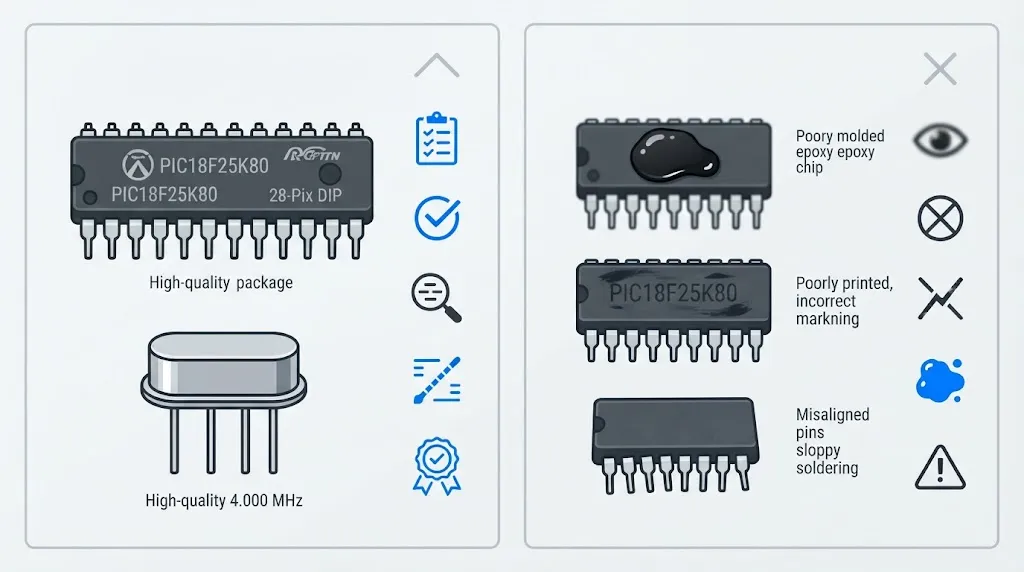
Opening an adapter is optional and should never be the first check. Do not open a sealed unit you may need to return, do not probe a powered board, and do not judge a unit by its case: good and bad adapters often share the same housing.
If the unit is already open, look for consistency rather than a single magic mark. Community guides on capable PIC-based v1.5-style adapters describe a Microchip PIC18F25K80 chip with a sharp Microchip logo and a 4 MHz crystal. Reported signs of a poor fake include a blurred or relabelled chip marking, a chip hidden under a black blob of coating, an unrelated low-cost microcontroller, or a 16 MHz crystal where the expected design uses 4 MHz.
Treat those clues as supporting evidence, not proof alone. Markings can be relabelled, and when hardware disagrees with the command scan and on-car test, trust behaviour over appearance.
How to Read the Combined Result
A strong result is clear: the claimed version matches the supported command level, the adapter connects automatically, live data stays stable, and it handles the protocol your car needs. A weak result is also clear: the version string says one thing and the scan says another, basic code reading works but live data stalls, or the adapter disconnects during a longer session.
There is a middle result: a compatible adapter that openly behaves like a v1.4-level implementation and gives stable basic data. That is not an original ELM327, but it may suit simple code reading. The problem is a clone sold as something it is not, used for a job it cannot do.
| Signal | What it usually means |
|---|---|
| Claimed and supported versions match | Honest labelling; keep testing on a car. |
| Claims v2.1, supports only to v1.4 | Mislabelled or stripped implementation. |
| Stable codes, unstable live data | Limited firmware; risky for diagnosis. |
| Fails older protocols only | Narrow coverage; may still suit one modern car. |
Buying Clues That Help Before You Order
Before buying, ask the seller a specific question rather than accepting “genuine ELM327” in the title: which microcontroller is inside, what crystal frequency does it use, and does it support AT AL and AT PPS? A vague answer, a refusal to name the chip, or a listing that only repeats “v2.1 latest version” is a reason to choose another seller.
Buy from a seller you can return to, test promptly, and keep the adapter only if its behaviour matches its claim. If you cannot connect at all, first rule out the usual causes in why an OBD2 scanner will not connect.
Warning
Do not use an unverified adapter to clear codes or judge a repair until it has passed a stable live-data test. A clone that drops frames or disconnects can hide a returning fault or make a good repair look like a failure.
For authoritative background, the Elm Electronics ELM327L datasheet describes the original chip as an OBD-to-serial interpreter and lists its supported protocol families. Use it to understand what a full implementation should do, then judge your adapter by whether it actually does those things.
Related Product
ELM327 OBD2 Bluetooth Adapter
A well-supported ELM327-style adapter makes the AT and on-car checks in this article possible, so choose one you can test and return if its behaviour does not match its claim.
As an Amazon Associate, we earn from qualifying purchases.
Frequently Asked Questions
Does “ELM327 v2.1” mean the adapter is genuine?
No. The version string is only a claim, and many adapters labelled v2.1 support commands only to a lower level or miss older protocols. Run a command-support scan and test live data before accepting the label.
What is the quickest reliable check?
Send ATI and AT@1 in terminal mode, then run ELM327 Identifier. If the claimed version, the description, and the supported command level all agree, you have a good first pass. If they disagree, treat it as mislabelled until an on-car test proves otherwise.
Can a clone still be good enough?
Yes, for some jobs. A compatible adapter that honestly supports its claimed command level, connects reliably, and streams stable live data can handle basic code reading and monitoring. It becomes a problem when sold as a higher version or used for advanced work it cannot sustain.
Why does my adapter work on one car but not another?
Protocol coverage is the usual reason. An adapter may handle modern CAN well but lack proper support for an older ISO or J1850 protocol, or an app may request data the firmware handles poorly. Test on the car you need, and check connection causes before blaming the chip alone.
Does opening the adapter prove it is genuine?
Not on its own. A sharp PIC18F25K80 marking and a 4 MHz crystal support a capable PIC-based design, while a blurred relabel, black blob coating, or unrelated microcontroller points the other way. Markings can be faked, so use hardware clues together with command and on-car results.
Should I return an adapter that only reads codes?
If it was sold as a full ELM327 implementation and it fails command, live-data, or stability tests, yes, especially if you need it for diagnosis rather than a one-time code read. If you only need basic code reading and it does that reliably, keep it only with that limit clearly understood.
Conclusion
A genuine-behaving ELM327 is proved by behaviour, not by a box label. Check the version claim with AT commands, compare it with a command-support scan, and confirm stable live data on your own car. When those three agree, trust it for ordinary diagnosis. When they disagree, return it or limit it to basic code reading.

I’m Alex Rahman, a car enthusiast and automotive writer focused on practical solutions, car tools, and real-world driving advice. I share simple and honest content to help everyday drivers make better decisions.
