REXING V1 – 4K Ultra HD Car Dash Cam: Honest 2026 Review
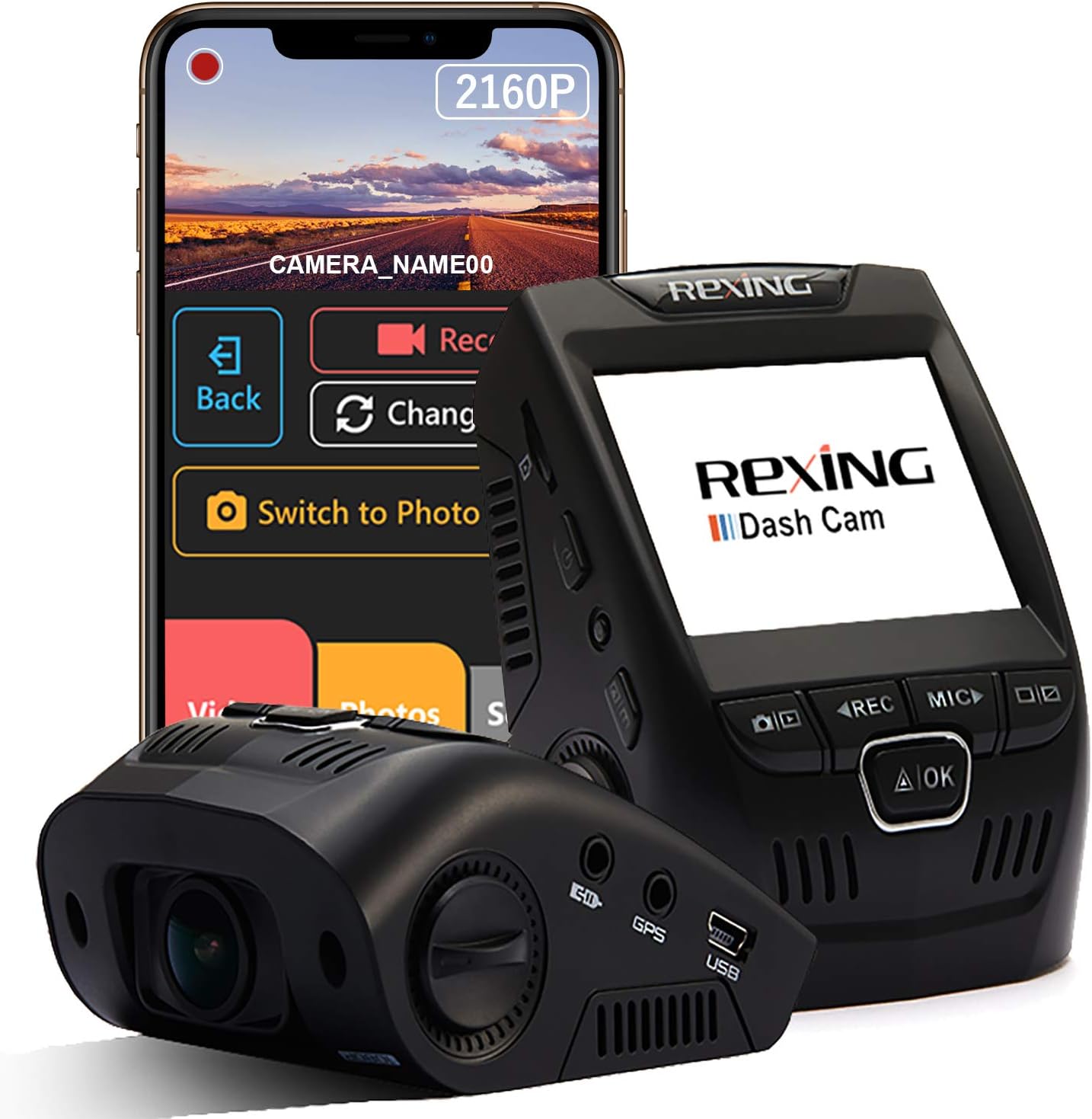
The REXING V1 – 4K Ultra HD Car Dash Cam 2.4″ LCD Screen, Wi-Fi, 170° Wide Angle Dashboard Camera Recorder with G-Sensor, WDR, Loop Recording, Supercapacitor, Mobile App, 256GB Supported is aimed at drivers who want a simple front-facing camera without paying premium prices. Its main appeal is clear 4K recording, a wide view, Wi-Fi access, and a heat-tolerant supercapacitor.
For everyday commuting, it covers the basics well. The trade-offs are just as clear: GPS costs extra, parking mode needs a separate hardwire kit, and the app workflow is more useful for quick clips than large transfers.
Quick Verdict on the REXING V1
| Overall: 4.2/5 | Performance: 4.2/5 |
| Value: 4.4/5 | Design: 4.1/5 |
✅ Best For: Commuters wanting a front-only 4K dash cam with Wi-Fi.
❌ Not Ideal For: Drivers who need built-in GPS or rear-camera coverage.
Price: About $100 on Amazon.
What You Get in the Box
The package is practical rather than fancy. Rexing lists the V1-4K camera, a 12-foot in-car power cable, two 3M adhesive mounts, a USB computer cable, cable-management pieces, and printed guides. That long power lead helps when routing the wire around the windshield instead of leaving it hanging down the center.
The camera uses an adhesive mount by default. A suction mount is optional, so placement deserves a little thought before pressing the 3M pad into place. The 2.4-inch screen is small, but it is large enough for checking framing and changing settings without using the phone app every time.
How the REXING V1 Performs
The V1-4K records the front view at listed 4K HDR, 2160p at 30fps. Its 170-degree field of view captures a broad slice of the road, while WDR is meant to balance bright and dark areas. Those specs make the most sense when judged in normal driving situations.
Daytime City Driving
In daylight, 4K resolution gives the camera its strongest advantage. Road signs, lane markings, nearby vehicles, and plate details have more room to stay readable than on a basic 1080p unit. The very wide lens also helps at intersections, though objects near the edges naturally look smaller than they would through a narrower lens.
Highway and Fast Motion
At highway speed, the 30fps frame rate is adequate for normal evidence capture, but it is not the same as a high-frame-rate action camera. Fast closing speeds can still make small plate text hard to freeze in one perfect frame. The G-sensor is useful here because an impact can flag important footage instead of leaving it to normal loop recording.
Night and Low-Light Roads
Rexing pairs the wide lens with WDR and night-vision processing. Street-lit roads are the easier case. On darker roads, expect the camera to preserve the scene better than tiny details at long range. Headlight glare and reflective plates can still challenge any dash cam, so the useful evidence is often vehicle position, movement, and close-range detail rather than a guaranteed plate read.
Rain and Changing Light
Rain, wet glass, sunrise, and sunset create rapid exposure changes. WDR helps keep bright sky and shaded road areas from separating too harshly. A clean windshield matters just as much. Water spots or haze in front of the lens can soften 4K footage quickly, especially after dark.
Loop Recording and Impacts
Loop recording automatically overwrites the oldest unlocked files when the card fills. That keeps the camera recording without constant card cleanup. The practical habit is to save or copy any important incident clip soon after it happens, because ordinary footage is designed to cycle.
Living With It Every Day
Daily use is mostly automatic once power and framing are sorted. Start the car, the camera powers up, and normal recording becomes a background task. Wi-Fi and the mobile app are handy when you want to preview a clip or adjust settings without pulling the card.
For a large batch of 4K files, removing the microSD card or using the computer cable is usually the cleaner workflow. This guide to retrieving dash cam recordings explains the common transfer methods. One small ownership habit matters: check the lens, date, and card status now and then instead of assuming everything is still perfect.
Compact Design, Simple Controls
The V1-4K keeps a traditional wedge-style dash cam shape with a 2.4-inch LCD and physical controls. It is not as tiny as screenless cameras, but it can still sit high on the windshield without taking over the driver’s view.
| Part | Practical Take |
| Mount | 3M adhesive included |
| Screen | 2.4-inch LCD |
| Power | Supercapacitor |
| GPS | Optional accessory |
The supercapacitor is a better fit for hot parked cars than relying on a large internal battery. The trade-off is that it is not meant to run the camera by itself for normal recording. Rexing says the unit should remain connected to external power.
Video Quality After Dark
Daylight is where the V1-4K should look its sharpest. At night, WDR helps with mixed lighting, but darkness reduces fine detail and increases the importance of clean glass and correct camera angle. Nearby plates may be usable; distant or reflective plates are less predictable.
During dusk, rain, or poorly lit parking areas, treat 4K as extra detail rather than a guarantee of perfect evidence. The broad 170-degree view is useful for context, while close-range objects remain the easiest to identify.
Card Care and Maintenance
Maintenance is simple, but skipping it can ruin the one clip you actually need. Wipe the lens with a soft microfiber cloth, keep the windshield clean around the camera, and inspect the power cable where it bends near trim panels.
| Task | Good Habit |
| Lens | Clean when hazy |
| microSD | Format in camera |
| Cable | Check for pinching |
| Mount | Check adhesion |
There is one spec detail worth checking before buying storage. The Amazon title for ASIN B00X528FNE says 256GB support, while Rexing’s current V1-4K page says up to 512GB with Class 10/UHS-I or faster cards. If you already own a 256GB card, this 256GB 4K dash cam storage guide gives useful context. For larger cards, confirm support for your exact hardware and firmware first.
REXING V1 Pros and Cons
The strengths are straightforward: strong front-camera resolution, a wide view, and useful basic connectivity. The weak points mostly come from features that require extra hardware or a different camera class.
✅ Pros
| ❌ Cons
|
How It Compares
The V1-4K sits in a crowded budget-to-midrange space. Two useful reference points are the ROVE R2-4K and Garmin Dash Cam 67W. They solve the same front-camera problem in different ways.
ROVE R2-4K vs Garmin 67W
The ROVE is the closer spec rival because it also records 4K at 30fps and includes built-in GPS. Garmin gives up 4K for 1440p but adds a very wide 180-degree view, GPS, strong app integration, and a compact magnetic-mount design.
| Model | Key Difference | Best Fit |
| REXING V1-4K | 4K, GPS optional | Simple 4K value |
| ROVE R2-4K | 4K, GPS built in | More features |
| Garmin 67W | 1440p, 180° | Polished ecosystem |
If brand-level differences matter more than one spec, this dash cam brand comparison helps frame the trade-offs. The Rexing makes the most sense when 4K front footage and price matter more than built-in GPS or a broader connected ecosystem.
Who Should Buy the REXING V1?
Buy this if:
- You want front-only 4K recording.
- You value a wide 170° view.
- You prefer a supercapacitor for heat.
Avoid this if:
- You need built-in GPS.
- You want a rear camera.
- You need cloud-style remote access.
Long-Term Durability Expectations
The supercapacitor is the biggest durability advantage because it is designed for temperature swings better than a typical lithium battery. Over time, the parts more likely to need attention are the adhesive mount, power cable, and microSD card rather than the camera body itself.
Storage cards are wear items because loop recording writes to them constantly. High-endurance cards are the sensible choice. Recheck the mount after hot summers, replace a card that starts producing errors, and keep firmware current when Rexing releases updates.
Power and Parking Setup
Normal driving is straightforward: Rexing includes a 12-foot in-car power cable. Parking surveillance is different. Rexing says the V1-4K needs its smart or intelligent hardwire kit for parking mode, so the supercapacitor alone is not a parked-car power source.
If overnight recording matters, read how dash cam parking mode works and how to reduce dash cam battery drain. Cable routing is easy enough for many DIY installs, but fuse-box hardwiring deserves care and a low-voltage cutoff.
REXING V1 FAQ
These are the practical questions most likely to matter before setup or during the first few weeks of ownership.
Does the REXING V1 record in true 4K?
Rexing currently lists the V1-4K at 2160p, 30fps for the front camera. That gives it more recorded detail than a standard 1080p dash cam, though plate readability still depends on speed, distance, glare, and lighting.
Does the REXING V1 have GPS?
GPS is optional on the V1-4K. Rexing sells a compatible GPS logger separately, so do not assume speed and location tracking are built into the base camera.
Can the REXING V1 record while parked?
Yes, but parking mode requires constant power. Rexing specifies a compatible smart or intelligent hardwire kit, sold separately, to keep the camera powered while the vehicle is off.
What microSD card does the REXING V1 use?
Rexing currently recommends Class 10/UHS-I or faster microSD cards and says cards should be formatted in the camera. The Amazon title says 256GB support, while Rexing’s current product page says up to 512GB, so verify your exact unit before buying the largest size.
Can I view REXING V1 videos on my phone?
Yes. The camera has built-in Wi-Fi and supports a mobile app for viewing and managing footage. For many large 4K files, direct card transfer is still more convenient.
Verdict reminder: A solid value if you want simple front-only 4K coverage with Wi-Fi.
Price: About $100 on Amazon. Amazon rating: 4.1/5 from about 6,000 ratings.
Check Current Price & Availability
Final Verdict on the REXING V1
The REXING V1-4K is easy to understand. It gives daily drivers a 4K front camera, a broad 170-degree view, Wi-Fi, loop recording, impact detection, and a supercapacitor at roughly the $100 mark. That is a useful feature mix without pushing into premium dash cam pricing.
Its limits are equally important. GPS is optional, rear coverage is absent, and parking mode needs extra hardwiring. I would recommend it to commuters who mainly want dependable front-road recording and easy phone access. If built-in GPS, multi-camera coverage, or richer parking features are priorities, a more advanced model will fit better.

I’m Alex Rahman, a car enthusiast and automotive writer focused on practical solutions, car tools, and real-world driving advice. I share simple and honest content to help everyday drivers make better decisions.
