
Are Bluetooth OBD2 Scanners Any Good? Honest Answer
Quick Answer
Yes, Bluetooth OBD2 scanners are good for reading check engine codes, clearing codes after a repair, and watching live engine data on a phone. They give drivers a clear first step before a shop visit. They fall short for airbag, ABS, and transmission work on many cars. The app, the adapter, and the car decide how far one can go.
- Reads and clears engine codes, and shows freeze frame data.
- Shows live data such as RPM, coolant temperature, and fuel trim.
- Works through a phone app, with no cable to a laptop.
- Covers less on many cars for ABS, airbag, and transmission systems.
Your check engine light is on, and you want a plain answer before you pay for a repair. A Bluetooth OBD2 scanner plugs into the port under the dash and sends data to your phone. This guide explains what it reads well, what it misses, and how to pick one that fits your car and your phone.
In this article
- What Is a Bluetooth OBD2 Scanner?
- What Can a Bluetooth OBD2 Scanner Do Well?
- Where Do Bluetooth OBD2 Scanners Fall Short?
- Bluetooth OBD2 Scanner vs Handheld Scanner
- How Accurate Are Codes and Live Data?
- Does the App Matter More Than the Adapter?
- How to Use a Bluetooth OBD2 Scanner
- Who Should Choose One, and Who Should Skip It?
- Common Mistakes That Waste Money
- Frequently Asked Questions
- Conclusion
What Is a Bluetooth OBD2 Scanner?
A Bluetooth OBD2 scanner is a small adapter that plugs into the diagnostic port under the dash and links to a phone app by Bluetooth.
The port is a 16 pin socket, and the car computer uses it to share codes and live data. The adapter turns that data into a Bluetooth signal, and the app turns the signal into words and graphs you can read.
The EPA guide to OBD explains that the system monitors engine, transmission, and emissions parts and turns on the check engine light when it finds a fault.
Some tools are bare adapters, and they need a third party app to show codes. Other tools ship with a maker app, and that app is part of the tool. The chip inside the adapter, the app, and the car all shape what you can see.
Bluetooth Classic adapters often work with Android, while Bluetooth Low Energy adapters work with many iPhone and Android apps. A higher Bluetooth number does not by itself make a scanner read more codes. Check the adapter listing for your phone system before you buy.
What Can a Bluetooth OBD2 Scanner Do Well?
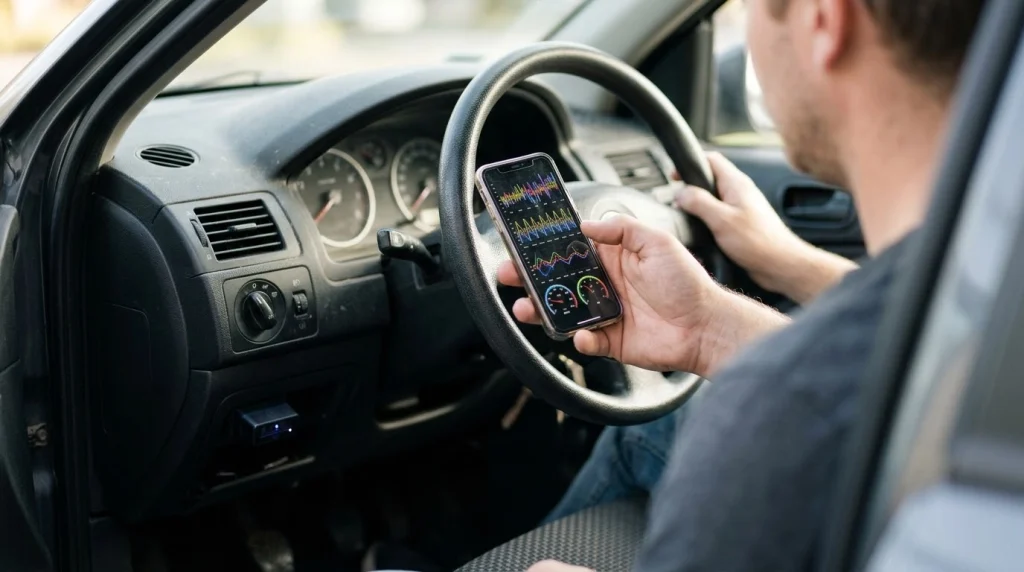
A Bluetooth OBD2 scanner shows its strength on engine and emissions codes, live data, and readiness checks.
It handles the jobs most drivers need first. A phone screen makes those jobs easy to read, and the app can save a scan for a shop visit.
- Read and clear engine codes
- Show freeze frame data from the time a code was set
- Graph live data such as RPM, coolant temperature, and fuel trim
- Check emissions readiness before a test
- Track trips, fuel use, and drive data in some apps
OBD can spot a loose gas cap or a misfire, and that first clue can save a wasted shop trip. For a wider view, read what scanners do in plain terms.
Live data helps you watch a fault as it happens. A fuel trim that drifts, a coolant temperature that climbs, or an RPM signal that drops can point to a cause. The app graphs those values, so you can see a pattern and not just a single number.
Where Do Bluetooth OBD2 Scanners Fall Short?
A Bluetooth OBD2 scanner falls short when a fault sits outside the engine system or needs a command sent to a part.
Many low cost adapters read engine codes only. They may show no code for an ABS light, an airbag light, or a transmission fault, even when a fault is present in that system. That gap is the most common surprise for a first time buyer.
Manufacturer codes add a second gap. A generic code follows a shared format, while a maker code can need a maker app or a stronger tool to read in full. A code that looks plain in one app can carry more detail in another.
Some faults set no code at all. A worn part, a small leak, a noise, or a weak battery can cause a symptom with no stored fault. The scanner reports what the car computer has stored, and it cannot test a part by touch or sound.
Warning
A flashing check engine light can mean a misfire that harms the catalytic converter. Stop driving hard, ease off the gas, and get help soon.
Clearing a code also has a limit. Clearing removes the stored code and turns off the light, but it does not repair the fault. The light returns if the car computer spots the same fault again.
Bluetooth OBD2 Scanner vs Handheld Scanner
A Bluetooth scanner and a handheld scanner can read the same engine code, but they suit different drivers.
This table compares a Bluetooth scanner with a handheld scanner on the points that matter most to a driver.
| Feature | Bluetooth Scanner | Handheld Scanner |
|---|---|---|
| Screen | Phone screen | Built in screen |
| Setup | Pair in app | Plug in and read |
| Engine codes | Reads and clears | Reads and clears |
| Live data | Phone graphs, can lag | Direct display, often steadier |
| ABS and airbag | Depends on model and app | Depends on model |
| Power | Phone battery and car port | Car port only |
A Bluetooth scanner wins on phone display and ease of use, while a handheld scanner wins on a direct screen and a simple start.
In Bluetooth scanner testing, reviewers found that phone apps make code reading simple, while wired tools can feel more steady for live monitoring.
How Accurate Are Codes and Live Data?
Codes and live data are as accurate as the car sensors, the adapter chip, and the app that turns raw data into words.
The scanner does not invent a code. It reads the code the car computer stored, and it shows the live values the car sensors report. If a sensor is faulty, the live data can look wrong even when the scanner reads it right.
Adapter quality shapes the link. A clone chip can drop its link, show a stale value, or fail to pair at all. A stable adapter holds its link through a scan and a drive, and it shows values that move with the engine.
Tip
Read the freeze frame before you clear a code. It shows engine speed, load, and coolant temperature at the moment the fault was stored.
Freeze frame adds context to a code. It shows engine speed, load, and coolant temperature at the moment the fault was stored. That snapshot can tell you if a fault struck at idle, at speed, or on a cold start.
A code is a start, not a verdict. Match the code to the symptom, check the part or wire that the code names, and test before you buy a part. A P0171 code can point to a leak, a sensor, or fuel pressure, and each cause needs a different check.
Does the App Matter More Than the Adapter?
The app often matters more than the adapter, because the app explains codes, graphs live data, and locks features behind a paywall or leaves them free.
A dedicated app locks you to one maker, but it can give plain code words, repair hints, and service tools in one place. A third party app can work with many adapters, and it can open maker tools such as Ford or BMW apps when the adapter allows it.
A phone as OBD2 scanner needs the right adapter, app, and Bluetooth type. Check the phone system, the app store page, and the adapter listing before you buy, so the three parts match.
Android users can compare Android OBD2 apps before they pick a free or paid app. Some apps read codes for free, while others charge a subscription for live graphs, service tools, or repair data.
A Bluetooth and WiFi comparison shows that Bluetooth keeps phone WiFi free for repair lookups. WiFi can suit a laptop or a set app, but it can take over the phone WiFi link while you scan.
How to Use a Bluetooth OBD2 Scanner
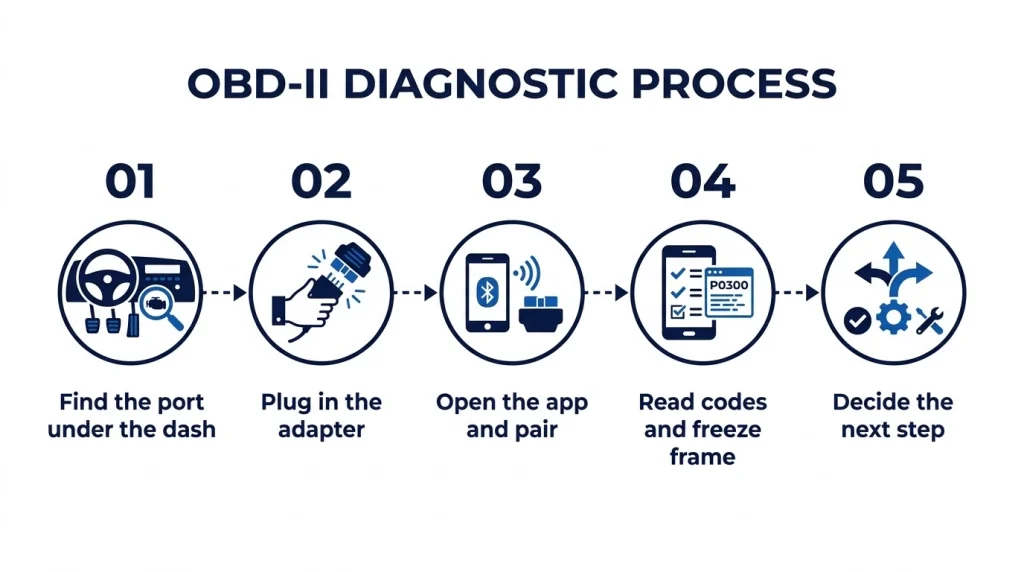
A Bluetooth OBD2 scanner works in a short sequence, and each step cuts a common failure. Follow the order, and note the code before you clear it.
Step 1
Find the port under the dash
Look under the driver side dash, near the steering column. The port is a 16 pin socket that fits the adapter one way.
Step 2
Plug in the adapter
Plug the adapter in with the ignition off. Turn the key to on, or press start without the engine, so the car computer wakes.
Step 3
Open the app and pair
Open the app, pick the adapter inside the app, and wait for a link. For Bluetooth Low Energy, pair inside the app and not in phone settings.
Step 4
Read codes and freeze frame
Tap scan, note each code, and open the freeze frame. Note pending codes too, because they show faults that have not set a firm code yet.
Step 5
Decide the next step
Check the gas cap, note noise, smoke, and drive feel, and plan a repair. Clear a code only after a repair, so the light can show if the fault returns.
Who Should Choose One, and Who Should Skip It?
The right choice depends on your car, your phone, and how often you will scan.
If you
Check a light a few times a year and want a phone tool
Choose a Bluetooth scanner, because it reads engine codes fast and uses a phone you already own.
If you
Need airbag, ABS, or transmission codes on a regular basis
Choose an advanced scanner or a shop visit, because a plain Bluetooth adapter may not reach those systems.
If you
Dislike phone apps and want a tool with its own screen
Choose a handheld scanner, because it boots fast and needs no phone, app, or pairing.
A driver who scans for a used car check, a road trip, or a first fault can get real value from a Bluetooth tool. A driver who needs service resets, part tests, or deep system access should look past a plain adapter.
Common Mistakes That Waste Money
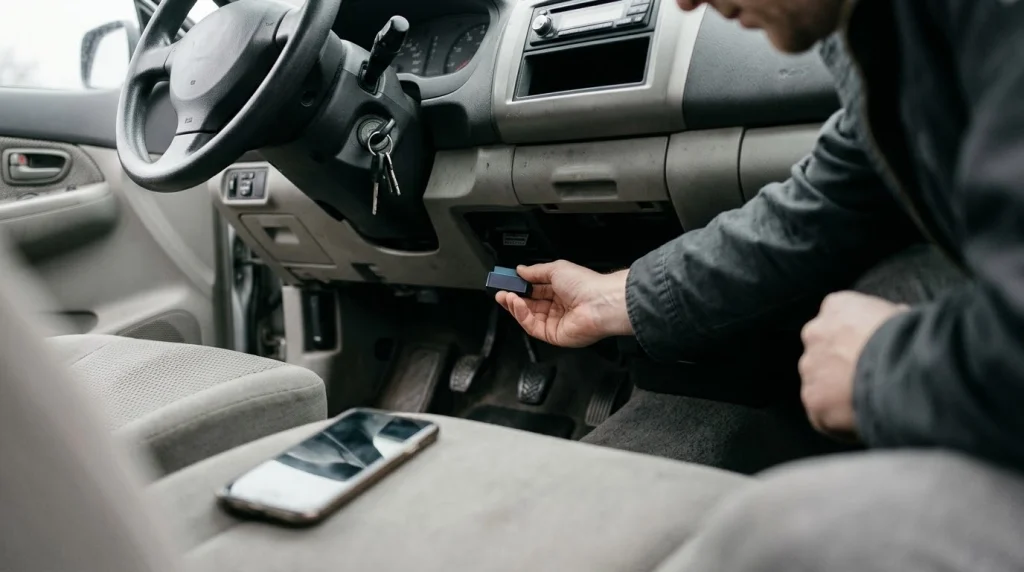
Most Bluetooth OBD2 scanner problems come from a mismatch, not from a broken car.
- Buying a Classic adapter for an iPhone
- Buying a clone chip with no support or updates
- Leaving an adapter plugged in with no sleep mode
- Clearing a code before noting it and the freeze frame
- Buying a part from a code alone, with no test
- Paying for a subscription you do not need
An adapter with no sleep mode can draw power from the port while the car sits. Unplug the adapter after use unless the maker states it is made to stay plugged in. That habit also cuts the chance of a dead battery after days of parking.
If the app finds no car, read why a scanner will not connect before you buy a new adapter. The cause can be a blown fuse, a dead port, a wrong app setting, or a pairing step that needs a fix in the app.
Bluetooth OBD2 Scanner
A Bluetooth OBD2 scanner helps you read engine codes and live data with the phone you already carry.
Frequently Asked Questions
Are Bluetooth OBD2 scanners good for beginners?
A Bluetooth OBD2 scanner is a good first tool for a beginner who wants to read a check engine code and see live engine data. The phone screen shows the code in plain words, and the setup takes a few minutes. A beginner should still note the code and the symptoms before clearing it or buying a part.
Can a Bluetooth OBD2 scanner read ABS and airbag codes?
A Bluetooth OBD2 scanner can read ABS and airbag codes only when the adapter, the app, and the car all support that system. Many low cost adapters read engine codes only, so the app shows no fault for a brake or airbag light. Check the coverage list for your car before you buy the adapter.
Do Bluetooth OBD2 scanners work on iPhone?
A Bluetooth OBD2 scanner works on an iPhone when it uses Bluetooth Low Energy or a supported accessory path. A Bluetooth Classic adapter made for Android may not pair with an iPhone app. Check the adapter listing for iPhone support and for the exact app it needs.
Can I leave a Bluetooth OBD2 scanner plugged in?
A Bluetooth OBD2 scanner can stay plugged in only when it has a sleep mode that cuts power use when the car is off. An adapter with no sleep mode can draw power from the port and drain a battery over days of parking. Unplug the adapter after use unless the maker states it is made for long term use.
Why does my Bluetooth OBD2 scanner keep disconnecting?
A Bluetooth OBD2 scanner keeps disconnecting when pairing fails, the app closes in the background, or a low quality adapter loses its link. A weak phone battery, wireless interference, and an old adapter chip can add to the fault. Restart the app, pair the adapter inside the app, and test the link with the engine on.
Does clearing a code with a Bluetooth scanner fix the car?
Clearing a code with a Bluetooth OBD2 scanner does not fix the car, because the code is a report of a fault and not the fault itself. The light can return when the car computer spots the same fault again on a drive. Note the code, check the cause, and clear the code only after the repair.
Conclusion
Are Bluetooth OBD2 scanners any good? They are good for engine codes, live data, and a clear first check, but they are not a full shop tool for every system. If you want that first check, pick one with the right app support for your car and phone.

I’m Alex Rahman, a car enthusiast and automotive writer focused on practical solutions, car tools, and real-world driving advice. I share simple and honest content to help everyday drivers make better decisions.
