Why Does ELM327 Say NO DATA? OBD2 Connection Fixes
Quick Answer
An ELM327 OBD2 scanner says “NO DATA” when it successfully connects to the scanning app or software, but fails to receive a response from the vehicle’s electronic control unit (ECU). This is usually caused by an incorrect OBD protocol setting in your diagnostic software, a loose or poorly seated adapter connection in the OBD2 port, ignition power issues (such as a blown cigarette lighter or ECU fuse), or an incompatible/faulty generic ELM327 clone chip.
Plugging an ELM327 OBD2 adapter into your car’s diagnostic port is usually the first step toward figuring out why a check engine light is illuminated or monitoring live sensor data. However, seeing a persistent “NO DATA,” “ERR”, or communication error message can quickly halt any troubleshooting progress. Because the ELM327 is a bridge between your vehicle’s onboard computer network and your diagnostic app (such as Torque, Car Scanner, or FORScan), a “NO DATA” error indicates a breakdown in communication somewhere along that chain.
Understanding How ELM327 Communication Works
To fix a communication error, it helps to understand what happens when you open a diagnostic app. The ELM327 microcontroller chip handles low-level protocol translation between your car’s OBD2 bus architecture—such as CAN, ISO 9141-2, KWP2000, or J1850—and your phone or computer via Bluetooth, Wi-Fi, or USB.
When the app initializes, it sends a series of “AT” commands to wake up the adapter and probe the vehicle’s network for supported protocols. If the ELM327 lights up and connects to your phone, your hardware link to the device is working. The “NO DATA” message specifically means your phone is talking to the adapter, but the adapter is getting no response back from the car’s computer network.
1. Incorrect OBD Protocol Settings in the App
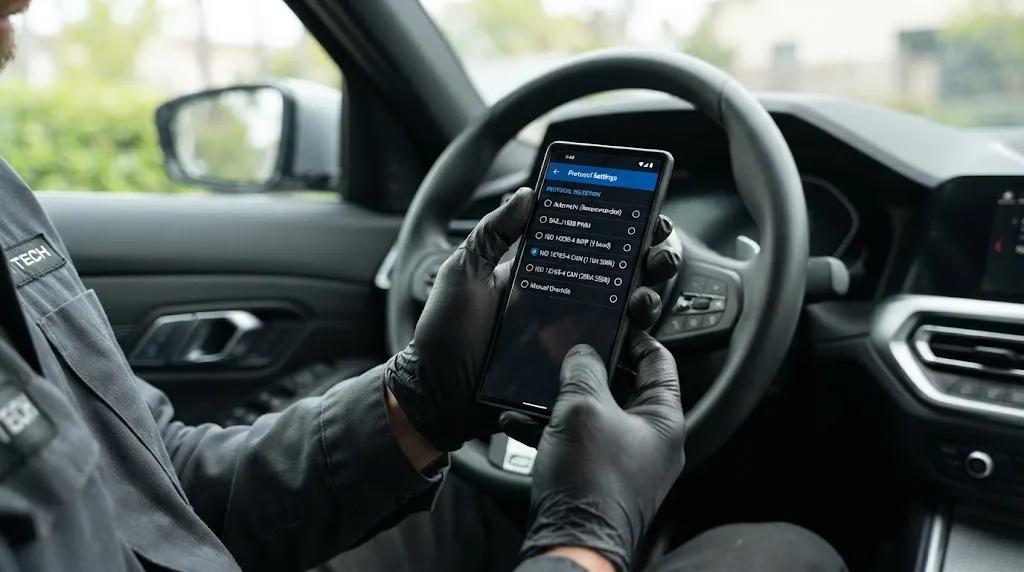
Most modern diagnostic apps use an “Automatic” protocol detection setting. When this works, the software cycles through various communication standards until it finds the correct one for your specific vehicle make and model. However, automatic detection can fail, especially on older vehicles, niche imports, or when using budget ELM327 clone adapters.
If the app defaults to or gets stuck on the wrong protocol, it will query the vehicle using a language the car’s computer does not recognize or listen to, resulting in a “NO DATA” response. For example, a 2008+ vehicle utilizing standard 11-bit or 29-bit CAN will fail to communicate if the app forces an older ISO or PWM protocol.
What to check: Go into your diagnostic app’s settings menu under connection or OBD adapter settings. Look for the protocol selection option. If it is set to automatic, try manually selecting the specific protocol your vehicle uses (such as ISO 15765-4 CAN for most post-2008 vehicles) and attempt to connect again.
2. Poor Physical Connection and Port Seating
The OBD2 diagnostic port under your dashboard relies on precise metal pin contact to transmit power, ground, and data signals (pins 6 and 14 for High-Speed CAN, pins 2 and 10 for J1850, etc.). Over time, dust, debris, or loose port terminals can prevent solid electrical contact.
Furthermore, many budget ELM327 adapters are built with outer casings that are slightly too thick or bulky. This prevents them from pushing completely into recessed OBD2 ports, meaning power pins might make contact while data pins do not.
What to check: Unplug the ELM327 adapter and inspect the pins for bent leads or corrosion. Ensure that when you plug it back in, you push it firmly until it seats completely. If your vehicle has a lower dash panel that crowds the port, a short OBD2 extension cable can help achieve a flush, secure connection.
3. Blown Fuses Affecting the OBD2 Port or ECU
The OBD2 port requires constant or switched 12V power (typically supplied via Pin 16) to power the adapter. However, data communication relies on the vehicle’s computer systems and data bus being fully powered and functional.
In many vehicles, the OBD2 port power circuit shares a fuse with the cigarette lighter, accessory power outlet, or interior lighting. If that fuse blows—often caused by a coin falling into a 12V socket or a failing phone charger—the OBD2 port may lose power or experience ground reference issues.
Similarly, if the engine control module (ECM) or powertrain control module (PCM) fuse is blown, the vehicle’s computer will be offline entirely, causing the scanner to return “NO DATA.”
Warning
Never check or replace vehicle fuses while the ignition is turned on or while diagnostic equipment is actively communicating with the vehicle data bus, as voltage spikes can damage sensitive control modules.
4. Faulty, Damaged, or Incompatible ELM327 Clones
The market is flooded with inexpensive ELM327 adapters manufactured with counterfeit or cut-rate microcontroller chips. While authentic ELM327 chips (and higher-end alternatives like STN1110 or OBDLink chips) support advanced AT command sets and robust multi-protocol handshakes, cheap clones often lack crucial hardware components.
Some low-grade clones cannot handle specific extended addressing formats or multi-frame CAN transmissions required by certain vehicle makes (such as Ford MS-CAN networks or GM Class 2 data buses). If your adapter lacks internal multi-protocol multiplexing hardware, it will connect to your phone but fail when trying to read specific vehicle modules.
What to check: Test the ELM327 adapter on a different vehicle. If the adapter gives a “NO DATA” error across multiple different makes and models, the internal hardware of the adapter is likely defective or fundamentally incompatible.
5. Aftermarket Radio, Alarm, or CAN Bus Interference
The vehicle’s diagnostic communication runs on a shared serial data bus. If an aftermarket accessory—such as an improperly wired aftermarket head unit, a poorly installed remote start system, or a malfunctioning GPS tracker—is shorting out the CAN High or CAN Low lines, it can disrupt communication across the entire network.
When the CAN bus is pulled high or low by a failing module or rogue aftermarket wiring, the ELM327 cannot receive a clean packet stream from the ECU, leading directly to a communication timeout and a “NO DATA” error.
Tip
If you recently installed an aftermarket stereo or electrical accessory and noticed communication issues immediately afterward, disconnect the accessory harness to verify whether it was interfering with the data bus.
Step-by-Step Troubleshooting Checklist
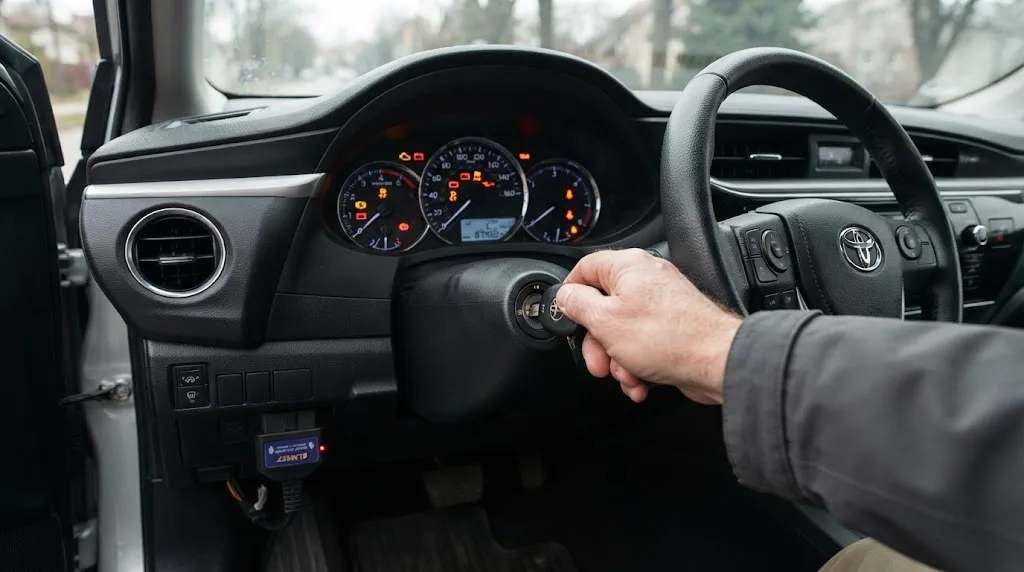
To resolve the issue efficiently, follow a structured troubleshooting sequence from easiest to most complex:
- Verify ignition power: Ensure your vehicle’s ignition is turned to the “ON” position (engine off) or that the engine is running. Many vehicles do not supply power or bus activity to the OBD2 port in the accessory (“ACC”) position.
- Reseat the adapter: Unplug the ELM327, wait 10 seconds, and plug it back in firmly to ensure all diagnostic pins make secure contact.
- Restart app and device: Close your diagnostic app completely, turn off your phone’s Bluetooth/Wi-Fi, toggle it back on, and restart the app to clear connection cache issues.
- Change connection settings: Enter your app’s adapter settings, switch the connection profile from automatic protocol detection to a specific manual protocol (like ISO 15765-4 CAN), and retry.
- Check vehicle fuses: Consult your owner’s manual to locate and inspect the fuses responsible for the cigarette lighter, interior accessories, and engine control unit.
- Test on another vehicle: Plug the adapter into a completely different car to rule out a defective scanning tool.
Related Product
OBD2 Diagnostic Scanner Tool
A reliable, high-compatibility OBD2 code reader with stable protocol support helps bypass connection timeouts and communication errors common with cheap adapter clones.
As an Amazon Associate, we earn from qualifying purchases.
Frequently Asked Questions
Why does my ELM327 connect to my phone via Bluetooth but still show NO DATA?
Bluetooth pairing links your smartphone to the adapter’s wireless transceiver chip. “NO DATA” means that wireless link is working, but the adapter cannot exchange messages with your car’s computer network. This points to protocol mismatches, loose data pins in the OBD port, or unpowered vehicle modules.
Can a dead car battery cause an ELM327 NO DATA error?
Yes. If your vehicle battery voltage is severely low, control modules may enter a low-power sleep state, drop off the communication network, or fail to boot up properly when the ignition is turned on, preventing the scanner from reading data.
Do cheap ELM327 adapters work on all car models?
No. Extremely cheap clone adapters often lack support for proprietary or specialized data buses—such as Ford’s MS-CAN or GM’s Class 2 networks. While they may connect to standard OBD2 emissions parameters on generic vehicles, they frequently return errors on specialized or non-standard vehicle architectures.
What ignition position should I use when scanning for codes?
You should turn the key to the “ON” position (where all dashboard warning lights illuminate, just before cranking the starter), or start the engine. The “ACC” (Accessory) position powers the radio and cigarette lighter but typically does not energize the vehicle’s engine control computer or data bus.
How can I tell if my ELM327 adapter is defective?
The most definitive way to test an adapter is to plug it into a known working vehicle of a different make and model. If it successfully reads live data on that vehicle but fails consistently on your primary vehicle, the issue lies with your car’s port, fuses, or network wiring rather than the adapter.
Can a blown cigarette lighter fuse stop an OBD2 scanner from working?
In many vehicle makes and models, the 12V power supply pin on the OBD2 diagnostic connector shares a circuit and fuse with the cigarette lighter or auxiliary power outlet. If that fuse blows, the ELM327 adapter will not receive power, or it may light up via backfed signal voltage without having enough current to operate its internal transmitter.
Conclusion
Encountering a “NO DATA” message with an ELM327 scanner can be frustrating, but it is almost always traceable to a communication breakdown between your device and the car’s computer. By verifying that your ignition is properly turned on, checking port connections, inspecting fuses, and ensuring your diagnostic app uses the correct protocol settings, you can quickly isolate the root cause and restore normal diagnostic communication.

I’m Alex Rahman, a car enthusiast and automotive writer focused on practical solutions, car tools, and real-world driving advice. I share simple and honest content to help everyday drivers make better decisions.
