Can I Use OBD2 While Driving? Safety, Risks & Tips
Quick Answer
Yes, you can use an OBD2 scanner while driving to record live engine data, provided the scanner and vehicle support it. However, you should never operate the scanner or study its screen while driving. Set up OBD2 live data monitoring before moving, then use automatic logging or have a passenger monitor the readings.
How to use OBD2 safely while driving
- Park first: Connect and configure the scanner before starting your trip.
- Enable recording: Use automatic data logging when your scanner supports it.
- Check clearance: Keep adapters and cables away from pedals and steering controls.
- Avoid distractions: Never scroll through data, change settings, or clear codes while moving.
- Review afterward: Examine recorded information once the vehicle is safely parked.
Important safety reminder
- Driving with a scanner connected is different from actively using its controls. Always follow your vehicle manufacturer’s instructions and local distracted-driving laws.
Have you ever noticed an engine problem that disappears as soon as you park? An OBD2 scanner can help capture what happens during the drive.
I prefer recording sensor information instead of watching changing numbers behind the wheel. This guide explains how to collect useful diagnostic data without compromising safety.
What Does Using an OBD2 Scanner While Driving Mean?
Using OBD2 while driving means connecting a diagnostic device to your vehicle’s onboard computer and collecting information while the vehicle moves. The scanner can request supported sensor readings, trouble codes, and operating information.
OBD2 stands for On-Board Diagnostics, Second Generation. It provides a standardized way for compatible diagnostic tools to communicate with vehicle systems.
Most compatible vehicles have a 16-pin diagnostic connector beneath the dashboard. A scanner connects through this port to retrieve available data.
What Information Can an OBD2 Scanner Collect?
Depending on your vehicle and scanner, you may be able to record several useful parameters.
- Engine RPM: Shows crankshaft speed in revolutions per minute.
- Vehicle speed: Reports speed information supplied by the vehicle’s control module.
- Engine coolant temperature: Helps monitor temperature changes under different operating conditions.
- Short-term fuel trim: Shows immediate fuel delivery adjustments.
- Long-term fuel trim: Shows learned fuel correction over time.
- Throttle position: Reports the throttle opening or related calculated position.
- Oxygen sensor data: Helps evaluate supported exhaust feedback measurements.
- Intake manifold pressure: Shows pressure readings on vehicles supporting this parameter.
Not every scanner supports every measurement. Manufacturer-specific information may require more capable diagnostic software.
Is It Safe to Leave an OBD2 Scanner Connected While Driving?
Usually, a compatible scanner can remain connected during an intended road-data recording session. However, compatibility, connector placement, manufacturer restrictions, and device quality matter.
Reading diagnostic information is generally less intrusive than programming modules or running active component tests. Even so, connected aftermarket devices are not automatically risk-free.
1. Driver Distraction Is the Biggest Immediate Concern
A constantly changing scanner display can draw attention away from traffic. Looking down at a phone or handheld device also takes your eyes off the road.
The National Highway Traffic Safety Administration explains that distracting activities increase crash risk. Diagnostic monitoring should never interfere with driving.
My practical rule: If a diagnostic task requires reading, tapping, or adjusting a screen, complete it while parked.
2. Loose Cables Can Interfere With Pedals
Many OBD2 connectors sit near the driver’s knees. A bulky adapter or hanging cable may interfere with foot movement.
Before driving, check these potential hazards:
- Cables hanging near the accelerator or brake pedal.
- Adapters extending into the driver’s legroom.
- Devices that may become loose over bumps.
- Phone mounts blocking visibility or vehicle controls.
Secure the equipment without covering airbags or interfering with any controls. If the connector position creates a hazard, do not conduct the driving test.
3. Poorly Designed Adapters May Create Problems
Not all diagnostic adapters have the same electrical design or communication behavior. An incompatible or defective device may cause communication errors or interfere with vehicle electronics.
Some manufacturers specifically warn against certain aftermarket devices connected during normal driving. Check your owner’s manual before conducting a road test.
For a detailed explanation of electronic risks, see my guide on whether an OBD2 scanner can damage an ECU.
How Can You Use an OBD2 Scanner Safely During a Road Test?
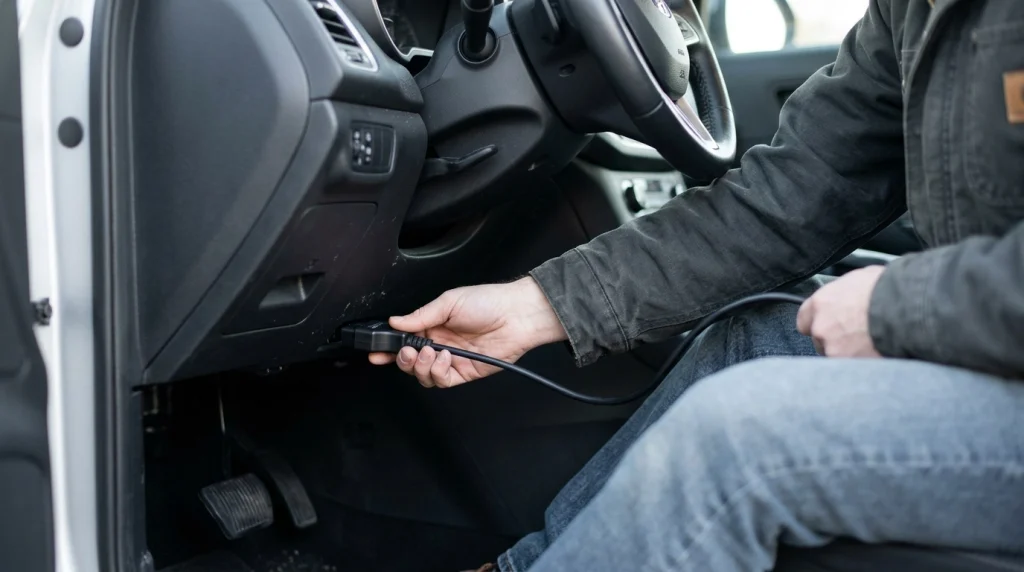
The safest method is to configure the scanner while parked and record data automatically during the drive. You can analyze the results afterward without looking away from traffic.
Step 1: Confirm Vehicle and Scanner Compatibility
Check your vehicle’s owner’s manual and the scanner manufacturer’s compatibility information. Make sure the device supports live data and recording.
If your vehicle manufacturer restricts aftermarket diagnostic devices during operation, follow that guidance.
Step 2: Connect the Scanner While Parked
Park in a safe location and apply the parking brake. Follow your tool’s instructions for the correct ignition position before connecting it.
Insert the scanner gently into the diagnostic connector. Never force a plug or use equipment with damaged pins.
For the basic connection procedure, read how to use an OBD2 scanner correctly.
Step 3: Select the Data You Need
Choose a small group of relevant parameters before moving. A focused recording is easier to review than dozens of unrelated readings.
For example, an intermittent hesitation problem might justify recording:
- Engine RPM.
- Throttle position.
- Calculated engine load.
- Mass airflow or manifold pressure, if supported.
- Short-term and long-term fuel trims.
Choose parameters based on the symptoms and vehicle system. More data does not automatically mean a better diagnosis.
Step 4: Start Automatic Recording
Enable the scanner’s data-logging function while the vehicle remains parked. Confirm that the recording has started successfully.
If your scanner lacks automatic logging, have a passenger operate it or complete the relevant stationary tests instead.
Step 5: Drive Normally Without Touching the Scanner
Keep your attention on traffic and vehicle control. Do not attempt to reproduce dangerous symptoms or perform aggressive driving maneuvers for diagnostic purposes.
If severe shaking, overheating, significant power loss, or a flashing check-engine light occurs, prioritize safety. Stop driving when safe and obtain appropriate assistance.
Step 6: Stop and Review the Recording
Pull into a safe parking location before accessing the device. Stop the recording and save the data according to the app’s instructions.
Compare sensor readings with the symptoms you experienced. Look for meaningful changes rather than assuming one unusual number proves a component has failed.
Bluetooth OBD2 Scanner vs. Wired Scanner: Which Is Better for Driving?
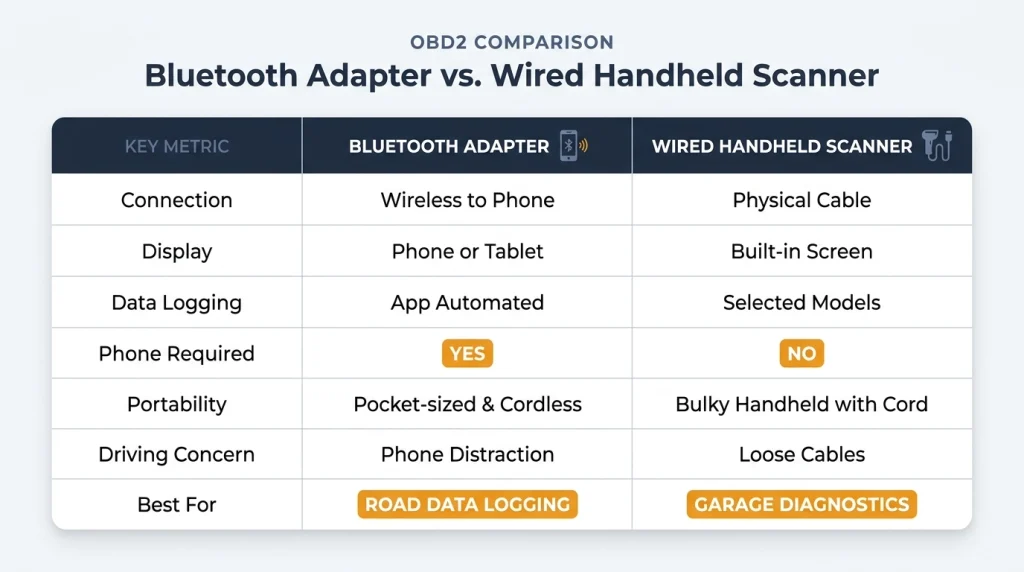
Bluetooth adapters are often convenient for automatic road-data recording because they avoid a cable running to a separate handheld display. Wired scanners can also work well when they support recording and the cable is secured.
The comparison below focuses on typical capabilities rather than promising features on every model.
| Feature | Bluetooth adapter | Wired handheld scanner |
|---|---|---|
| Connection | Wireless connection to a compatible phone | Physical cable to the diagnostic port |
| Display | Phone or tablet screen | Built-in scanner display |
| Live data | Model and app dependent | Model dependent |
| Data logging | Often available through supported apps | Available on selected models |
| Phone required | Yes, for typical app-based setups | No |
| Driving concern | Phone distraction and wireless connection | Loose cables and screen distraction |
| Practical choice | App-based automatic logging | Standalone diagnosis and supported recording |
For road-data collection, I generally favor a compact adapter with reliable automatic logging. For garage troubleshooting, a standalone scanner can be simpler.
My comparison of handheld scanners versus phone apps explains which setup suits different diagnostic needs.
What Engine Problems Can OBD2 Detect While Driving?
OBD2 recordings can help investigate problems that occur only under certain driving conditions. However, sensor data rarely identifies a failed component without additional testing.
Intermittent Engine Hesitation
Acceleration hesitation may involve air intake, fuel delivery, ignition, or electronic throttle control. Recording engine load, RPM, and available airflow measurements can help narrow the possibilities.
Compare the data before and during the symptom. One unexpected reading should lead to further diagnosis, not immediate parts replacement.
Engine Misfires Under Load
Some misfires appear only during acceleration or while climbing hills. A capable diagnostic tool may record relevant trouble codes or manufacturer-specific misfire information.
Generic scanners do not always provide individual-cylinder misfire counters. Check your scanner’s coverage before relying on that feature.
Fuel Trim Changes
Fuel trims describe how the engine computer adjusts fuel delivery. Comparing readings at idle and under load can reveal patterns worth investigating.
For example, a large positive correction at idle that decreases under load may suggest an unmetered-air problem. The pattern still requires confirmation with appropriate testing.
Cooling System Performance
Coolant temperature data may help investigate temperature changes during sustained driving. This can be useful when an overheating concern does not appear during a short idle test.
Never continue driving simply to collect data if the engine is overheating. Stop safely and address the condition before more damage occurs.
Can an OBD2 Scanner Damage Your Car While Driving?
A properly functioning, compatible scanner normally presents little risk during basic diagnostic reading. However, a defective adapter, unsupported function, or vehicle-specific restriction can change that assessment.
The SAE J1978 OBD-II scan tool standard defines standardized diagnostic functions. It also addresses the responsibility to design additional functions without adversely affecting equipment or vehicles.
Diagnostic Reading vs. Changing Vehicle Settings
Not every scanner function is equally safe to perform while a vehicle moves. The distinction between reading information and commanding a system is important.
- Reading live data: Generally suitable for compatible diagnostic equipment when properly configured.
- Recording sensor readings: Useful when the scanner supports automatic logging.
- Clearing codes: Should wait until the vehicle is parked and the fault information is saved.
- Active component tests: Require vehicle-specific procedures and appropriate safety conditions.
- ECU programming: Should never be attempted during ordinary driving.
Some sophisticated scan tools offer actuator commands and module programming. Do not confuse these functions with ordinary OBD2 monitoring.
Is It Legal to Use an OBD2 Scanner While Driving?
There is no single universal law covering every OBD2 scanner use. The applicable rules depend on your location, driver behavior, and the kind of electronic device involved.
Simply having diagnostic equipment connected is not necessarily the same as handling a phone or reading a screen. However, interacting with a diagnostic display may violate distracted-driving restrictions.
The CDC’s distracted-driving guidance identifies visual, manual, and cognitive distractions as safety concerns.
The U.S. Department of Transportation’s driver-distraction guidance also addresses potentially distracting in-vehicle electronic tasks.
Check current state or local laws before using a diagnostic display on public roads. Where restrictions apply, having a passenger manage the tool is usually the better arrangement.
When Should You Avoid Using OBD2 While Driving?
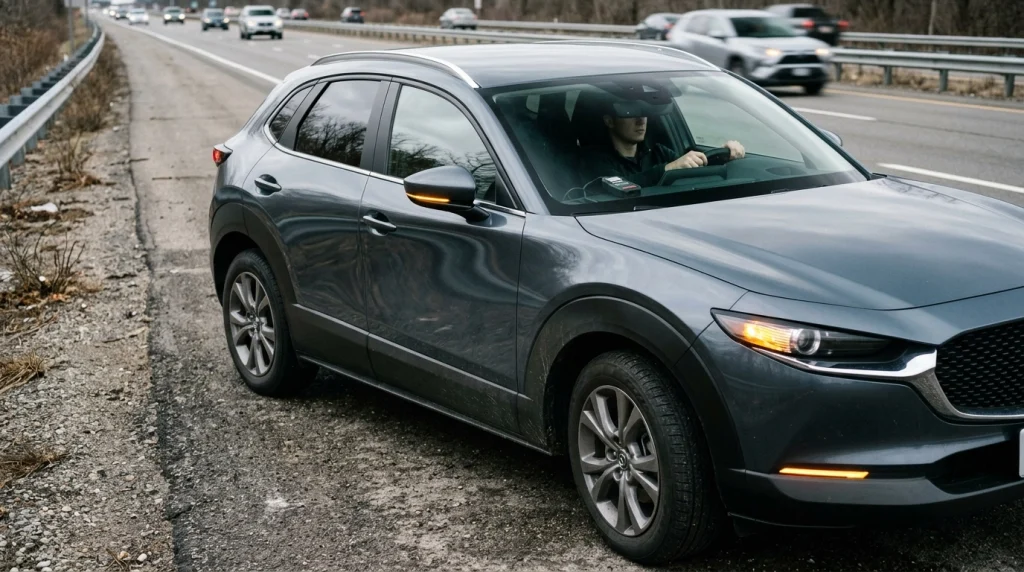
Skip road-data recording when the equipment or vehicle condition makes the test unsafe. A diagnostic recording is never worth increasing crash risk.
Stop or postpone testing under these conditions:
- Flashing check-engine light: A serious misfire may cause rapid catalytic converter damage.
- Severe overheating: Continuing to drive can damage the engine.
- Brake or steering problems: Vehicle control takes priority over collecting diagnostic data.
- Unsecured equipment: Loose cables or adapters may interfere with safe operation.
- Connection instability: Repeated scanner disconnections require investigation while parked.
- Unfamiliar advanced functions: Avoid module coding and actuator testing during routine driving.
If a problem affects safe vehicle operation, seek professional assistance rather than conducting an improvised road test.
Common Mistakes When Using an OBD2 Scanner on the Road
Most road-testing mistakes involve poor preparation rather than complicated diagnostics. Preventing them starts before the vehicle moves.
- Watching live graphs: Use saved recordings rather than examining graphs while driving.
- Selecting too many parameters: Focus on measurements relevant to the symptom.
- Clearing codes too early: Save diagnostic trouble codes and freeze-frame information first.
- Ignoring scanner compatibility: Check supported protocols, devices, and diagnostic functions.
- Leaving cables unsecured: Inspect the driver’s footwell and control clearance.
- Assuming every reading is accurate: Evaluate sensor information in context and verify suspicious results.
Another common mistake is interpreting a single unusual reading as proof of a failed sensor. A scanner provides evidence, not a complete mechanical diagnosis.
Best OBD2 Scanners for Live Data Recording
If you’re choosing equipment for road-data collection, prioritize automatic logging, verified compatibility, and reliable communication. Here are three established scanner options worth considering.
Affiliate disclosure: As an Amazon Associate, we earn from qualifying purchases.
🏆 Best for App-Based Logging
OBDLink MX+ Bluetooth OBD2 Adapter
★★★★½
The OBDLink MX+ is a compact wireless adapter that supports live diagnostic data with compatible software. I favor this type of setup for hands-free data collection because it reduces dashboard cable clutter. Verify the app’s logging features and your vehicle’s compatibility.
📱 Best for Guided Diagnostics
BlueDriver Bluetooth Pro OBDII Scan Tool
★★★★☆
BlueDriver combines a wireless adapter with a dedicated diagnostic app and supported live data features. I’d consider it for drivers who also want code explanations and diagnostic reports. Confirm recording capabilities before buying specifically for road logging.
🔧 Best Standalone Option
Autel AutoLink AL519 OBD2 Scanner
★★★½☆
The Autel AL519 is a handheld code reader with live data and graphing capabilities. I prefer its standalone design for stationary troubleshooting when a phone is inconvenient. Check its recording and playback limitations before selecting it for driving tests.
Star scores reflect editorial suitability for the stated use cases, not verified customer-review averages. Product features and compatibility should be checked with the manufacturer before purchase.
Frequently Asked Questions
Can I leave my Bluetooth OBD2 scanner plugged in while driving?
Yes, a compatible Bluetooth OBD2 adapter can often remain connected during a diagnostic drive. However, some vehicle manufacturers restrict aftermarket devices. Confirm compatibility, secure the adapter, and configure automatic recording before moving. Do not interact with your phone while driving.
Can I read OBD2 codes while the car is moving?
Some scanners can retrieve codes while the engine runs or the vehicle moves. However, the driver should not operate the scanner during a trip. Reading codes while safely parked is usually more practical. A passenger can assist when information must be collected during driving.
Can using OBD2 while driving drain my car battery?
A scanner draws electrical power, but a healthy vehicle’s charging system normally supplies power during engine operation. Battery drain becomes more relevant when an adapter remains connected after the vehicle is turned off. Devices differ in their sleep and standby behavior.
Can an OBD2 scanner affect engine performance?
Routine diagnostic reading with a compatible scanner should not normally change engine performance. However, defective or incompatible equipment can create electrical or communication concerns. Advanced functions that command components or change settings present different risks and should not be used casually.
What is the safest way to record OBD2 data while driving?
Set up a compatible scanner while parked, select the necessary parameters, and enable automatic logging. Drive without touching or watching the device. After reaching a safe parking location, stop the recording and review the results. A qualified passenger can also manage the diagnostic equipment.
Final Verdict: Should You Use OBD2 While Driving?
Yes, collecting OBD2 information during driving can be useful for diagnosing problems that appear only under load or at certain speeds. The key is to collect information without distracting the driver.
My recommendation is simple: Use a compatible scanner with automatic logging, prepare everything while parked, and review the data afterward.
Never sacrifice road safety to capture another sensor reading. When a vehicle develops symptoms that make driving unsafe, stop testing and seek professional diagnosis.
Before your next road test, check your scanner’s recording capabilities, confirm your vehicle’s compatibility, and plan a safe diagnostic procedure.

I’m Alex Rahman, a car enthusiast and automotive writer focused on practical solutions, car tools, and real-world driving advice. I share simple and honest content to help everyday drivers make better decisions.
