Can a Scan Tool Perform Injector Coding? What to Know
Quick Answer
Yes, a scan tool can perform injector coding, but only if it has an injector-coding or adaptation function and supports your exact vehicle, engine, and ECU. Basic code readers cannot do it. Check the tool’s coverage for your make, model, and year before you replace an injector.
Replacing a fuel injector is only half the job on many modern cars. The new injector still has to be introduced to the engine computer. If the tool and the vehicle match, coding takes minutes. If they do not match, the menu may be missing or rejected, even on an otherwise capable scanner.
What Injector Coding Actually Is
Injector coding is the process of entering a new injector’s calibration code into the engine control unit, or ECU. Each injector leaves the factory with small differences in flow rate, spray pattern, and opening time, even when injectors share the same part number.
To compensate, the manufacturer bench-tests each injector and prints a unique code on its body or packaging. That code tells the ECU how much to adjust the injection pulse for that cylinder, so every cylinder receives a balanced amount of fuel. Bosch and Siemens systems often use an IMA code, short for Injector Quantity Adjustment, while Delphi systems use C2i or C3i codes. The EngineerFix explanation of injector coding describes these codes as a correction factor that lets the ECU fine-tune pulse width for each cylinder.
Do not confuse the calibration code with the part number. The part number identifies the design; the calibration code identifies the individual injector. Coding is also not cleaning or testing. It is a write operation: the scan tool stores new calibration data in the ECU for a specific cylinder.
Which Scan Tools Can Do It, and Which Cannot
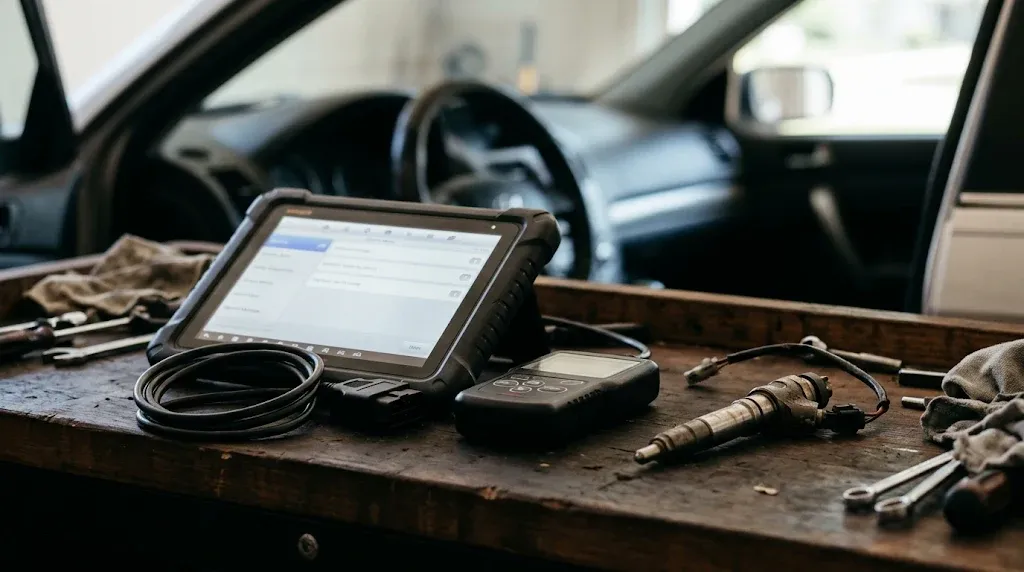
The deciding factor is not price alone. It is whether the tool can communicate with the engine ECU beyond generic fault-code reading, and whether it includes injector coding for your vehicle.
Basic handheld code readers and most cheap Bluetooth adapters can read and clear engine codes and show live data. They cannot write injector codes, a function usually absent from entry-level tools.
Mid-range and professional tablets are the usual starting point. Many Autel MaxiCOM, Launch X431, TOPDON, and Thinkcar platforms list injector coding as a service function, but coverage still varies by brand, model, year, and engine. OEM software, such as BMW ISTA, Mercedes-Benz Xentry, Ford FDRS, and Toyota Techstream, generally offers the widest coverage for its own brand.
| Tool type | Injector coding | Typical limit |
|---|---|---|
| Basic code reader | No | Reads and clears codes only |
| Generic Bluetooth adapter | Usually no | Lacks security access and coding menu |
| Mid-range tablet | Sometimes | Depends on coverage and software version |
| Professional tablet | Often yes | Some brands or secure systems excluded |
| OEM dealer software | Usually yes, for its brand | Brand-specific, often needs subscription |
Bidirectional control is a useful clue: injector coding usually sits alongside other bidirectional and service functions, so a tool without that level of access is unlikely to offer it.
Tip
Before buying a tool for this job, search its official coverage list with your exact year, make, model, and engine. A general claim of injector coding support does not prove your vehicle is included.
Diesel vs Petrol: When Coding Is Required
Injector coding is most often associated with diesel engines. Modern common-rail diesels run at very high fuel pressure and rely on precise injection timing and quantity. On many diesel models from BMW, Volkswagen, Mercedes-Benz, Ford, and Peugeot, coding is mandatory after an injector is replaced.
Petrol engines can need it too. Many late-model petrol direct-injection engines use coded injectors, while some older port-injection engines need no coding at all. If the new injector has a calibration code, assume coding is required unless the service information says otherwise. A scan tool that works on diesel cars may still lack injector coding for a particular diesel engine, so check both separately.
How Injector Coding Works, Step by Step
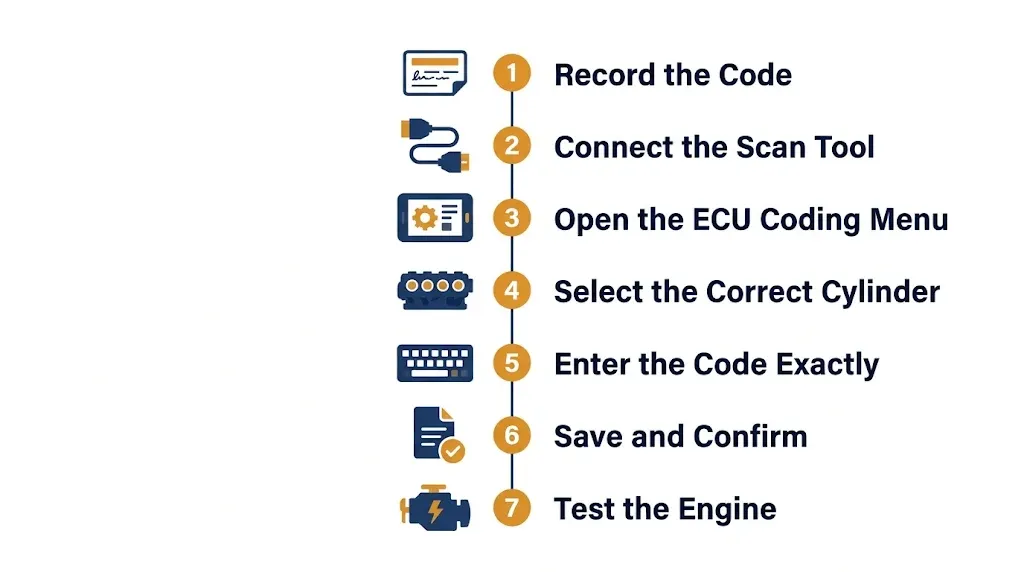
The exact menu names vary by tool and vehicle, but the sequence is broadly the same. Always follow the vehicle service information and the tool’s on-screen prompts for your model.
- Record the code before fitting the injector. Read it from the body or box, note the cylinder, and photograph it. It can be hard to read once installed.
- Fit the injector and connect the scan tool. Connect to the OBD2 port, switch the ignition on, and select the correct vehicle. Avoid starting with a weak battery, because stable voltage matters during a write.
- Open the engine ECU, then the coding menu. Look for Injector Coding, Injector Programming, or Injector Adaptation under special functions. The YOUCANIC injector-coding walkthrough shows this route as Diagnostic, Control Modules, Engine, Special Functions, and Control Unit Adaptations on the tool it describes.
- Select the correct cylinder. This is where most mistakes happen. The code must go to the cylinder where the new injector was fitted.
- Enter the code exactly as printed. Check every character. Many tools validate the format and will reject an entry that does not fit the expected length.
- Save the value and confirm it. Write the code to the ECU, then read the stored values back and check that it appears against the correct cylinder.
- Clear related codes and test the engine. Start the engine, watch for warning lights, and check idle quality. Some vehicles also need a pilot-injection relearn after coding.
What Happens If You Skip Coding or Enter the Wrong Code
Skipping coding does not always stop the engine immediately. On some older systems, the car may start and drive, but with the ECU still using the old injector’s calibration. That mismatch can cause rough idle, misfires, higher fuel consumption, black smoke, and a check engine light.
On newer systems, the engine may run very roughly, refuse to start, or enter a reduced-power mode. Clearing the fault code will not fix the underlying mismatch. Entering the wrong code, or the right code against the wrong cylinder, has a similar effect: two cylinders are then fuelled with the wrong correction values, and the symptoms can look like a faulty injector or a fuel-pressure problem.
If symptoms appear after a replacement, checking whether the scan tool can diagnose the diesel engine properly is a useful next step. Live data such as injector correction values and cylinder balance can show whether one cylinder is behaving differently from the others.
Warning
Do not guess a calibration code, copy a code from another injector, or reuse the old injector’s code for a new injector. Each code belongs to one physical injector. A wrong entry can make the engine run worse than it did with no coding at all.
What to Check Before You Buy a Tool or Start Coding
- Vehicle coverage: Confirm coding for your exact year, make, model, engine code, and ECU type, not just for the brand.
- Software and subscription: Check that the software is up to date and any required subscription is active.
- Security access: Some vehicles need secure gateway access, a PIN, or online authorisation before the ECU will accept a write.
- Code legibility: Make sure every character is readable. If the code is worn or missing, contact the supplier before fitting the injector.
- Cylinder numbering: Confirm how your engine numbers its cylinders. Numbering is not the same on every engine.
- Battery condition: Keep voltage stable during the write. A voltage drop midway is a common cause of a failed attempt.
- Extra relearn: Check whether your vehicle needs a pilot-injection relearn after coding.
Injector Coding vs ECU Coding vs ECU Programming
These three terms are often used as if they mean the same thing. They do not, and the difference decides which tool you need.
Injector coding writes calibration data for one component into the existing ECU software. It does not change the ECU’s program. ECU coding is broader: it changes configuration settings in a control unit, such as enabling a feature or matching a replacement module.
ECU programming goes further still. It usually means flashing or updating the ECU’s software itself, which often needs a J2534 pass-thru device, OEM software, and sometimes online access. A tool that can code injectors may not be able to program an ECU, and the reverse is also true. Adaptation is the separate step by which the ECU learns new values after a repair.
Common Problems and What They Usually Mean

Function not supported. The tool usually lacks injector coding for that vehicle or ECU. Check coverage, update the software, and confirm you selected the correct engine variant.
Code rejected. This usually points to a typing error or a code in the wrong format. Re-read the code from the injector itself, not from an earlier note.
Security access denied. Some ECUs need a gateway login, an online session, or a different adapter before accepting a write.
Coding succeeds, but the engine still runs roughly. Recheck the cylinder assignment first, then look for a separate fault, such as a loose connector, a fuel leak, or a missed relearn step. Coding fixes calibration, not a mechanical fault.
The menu is missing. On some vehicles, it lives under adaptation or special functions. On others, it is genuinely absent, and the vehicle needs OEM software or a dealer visit.
Related Product
OBD2 Scan Tool With Injector Coding
A diagnostic tablet with injector coding and bidirectional control can handle this job on supported vehicles, where a basic code reader cannot.
As an Amazon Associate, we earn from qualifying purchases.
Frequently Asked Questions
Can any OBD2 scanner perform injector coding?
No. Basic code readers and most generic Bluetooth adapters cannot write injector codes. You need a diagnostic tool with an injector-coding or adaptation function, plus coverage for your exact vehicle and ECU.
Do I need to code injectors on a petrol car?
Sometimes. Many late-model petrol direct-injection engines use coded injectors, while many older port-injection engines do not. If the new injector has a calibration code printed on it, treat coding as required unless the service information says otherwise.
Can I code injectors myself at home?
Yes, on supported vehicles, if you have a compatible tool, the correct code, and the service procedure for your model. The main risks are entering the code against the wrong cylinder and using a tool without coverage for your vehicle, so check both before you start.
Where do I find the injector code?
On the injector body, usually near the top or the electrical connector, and often on the box or label supplied with the new injector. Record it before fitting the injector, because it can be difficult to read once installed.
What happens if I drive without coding new injectors?
The engine may run roughly, misfire, use more fuel, produce black smoke, or trigger a check engine light. On some newer systems, it may refuse to start or enter reduced-power mode. The exact result depends on the vehicle and how far the new injector differs from the old one.
Is injector coding the same as ECU programming?
No. Injector coding writes calibration data for a specific injector into the existing ECU software. ECU programming flashes or updates the ECU software itself and usually needs different equipment, software, and access.
Conclusion
A scan tool can perform injector coding when it has the right function and the right coverage for your vehicle. That combination matters more than the tool’s price or brand name. Record the code before fitting the injector, confirm the cylinder, enter the code exactly, and check whether a relearn step follows. When those checks pass, coding is a short, practical part of the repair. When they do not, confirming coverage first is faster than diagnosing a rough-running engine afterward.

I’m Alex Rahman, a car enthusiast and automotive writer focused on practical solutions, car tools, and real-world driving advice. I share simple and honest content to help everyday drivers make better decisions.
