10 Best OBD2 Scanner for Smog Check 2026: Clear Readiness Before Test Day
The best obd2 scanner for smog check right now is BlueDriver Bluetooth Pro, with clear I/M readiness reporting. This specification comparison covers 10 scanners, scored on I/M readiness reporting, diagnostic depth, and ease of use. Most scanners hide incomplete monitors until test day, and that gap is what this guide checks. Whether you need a pre-test check, a garage handheld, or an app tool, this guide gives one clear answer.
Quick Comparison: All 10 Products Ranked
| # | Product | Best For | Rating | Badge | |
|---|---|---|---|---|---|
| 1 | BlueDriver Bluetooth Pro | Pre-test readiness on phone | 4.9/5 | Best Overall | Buy → |
| 2 | Innova CarScan Pro 5610 | Detailed smog readiness reports | 4.8/5 | Best Smog Readiness | Buy → |
| 3 | Autel AutoLink AL519 | Simple handheld pre-test checks | 4.7/5 | Best Handheld | Buy → |
| 4 | FOXWELL NT301 | First-time buyers on a budget | 4.6/5 | Best Budget | Buy → |
| 5 | Launch CRP129X | Live-data checks before retest | 4.6/5 | Best Live Data | Buy → |
| 6 | ANCEL AD310 | Simple code and readiness checks | 4.4/5 | Best Simple Pick | Buy → |
| 7 | TOPDON TopScan | Phone-based guided reports | 4.5/5 | Best App-Based | Buy → |
| 8 | Autel MaxiAP AP200 | Compact phone scanning | 4.4/5 | Best Compact | Buy → |
| 9 | Veepeak OBDCheck BLE+ | Low-cost Bluetooth readiness checks | 4.3/5 | Best Bluetooth Value | Buy → |
| 10 | OBDLink MX+ | Advanced live-data users | 4.5/5 | Best Advanced | Buy → |
How We Chose These Scanners
What we compared
10 scanners, compared on published specifications: I/M readiness display, code and live-data coverage, connection type, and OBD2 compatibility. This is a specification comparison, not road testing.
Our 3 scoring criteria
I/M readiness reporting, diagnostic depth, and ease of use. Every product uses the same three criteria and the same 5-point scale.
Expert consulted
None was used for this specification comparison. Scores reflect published specifications and smog-check relevance, not hands-on testing.
What we cut — and why
Tools without a clear I/M readiness display, and tools where basic readiness is hidden behind a paid tier, were ranked lower or excluded from the top list.
What to Look for When Buying OBD2 Scanners for Smog Checks
A smog check is mainly a readiness and emissions question, not a general code question. The right scanner answers that question before you pay for a test.
1. I/M Readiness Display
Look for a clear ready, incomplete, or not-ready list for each monitor, not just a single pass or fail icon. You can check emissions readiness with a scanner before a test, and that check is most useful when it names the incomplete monitor. A scanner that hides monitor detail forces you to guess what still needs a drive cycle.
2. Monitor Status and Drive Cycle
After a repair, battery disconnect, or code clear, monitors need normal driving to complete. A good scanner shows which monitors are still pending, so you can drive and recheck instead of failing early. Learning how readiness monitors work helps you understand why a car can look fixed but still be unready. Do not clear codes right before a test, because clearing usually resets monitors too.
3. Vehicle Compatibility
Most 1996 and newer light-duty vehicles in the United States use OBD2, but protocols, app support, and enhanced data vary by make and year. Check compatibility for your exact vehicle before you buy, especially for Bluetooth adapters that depend on a phone app. A scanner that cannot talk to your car cleanly is useless for a smog decision, no matter how many features it lists. Compatibility should be confirmed, not assumed from a generic OBD2 label.
4. Live Data and Freeze Frame
Live data helps when a fault is intermittent, and freeze frame shows conditions when a code was set. For emissions work, oxygen sensor readings, fuel trim, and coolant temperature are often more useful than the code alone. A scanner with graphing makes trends easier to spot than a single snapshot value. If you only need a readiness answer, basic live data is enough, but repair work benefits from deeper data.
BlueDriver Bluetooth Pro OBDII Scan Tool for iPhone and Android — Clearest Pre-Test Readiness
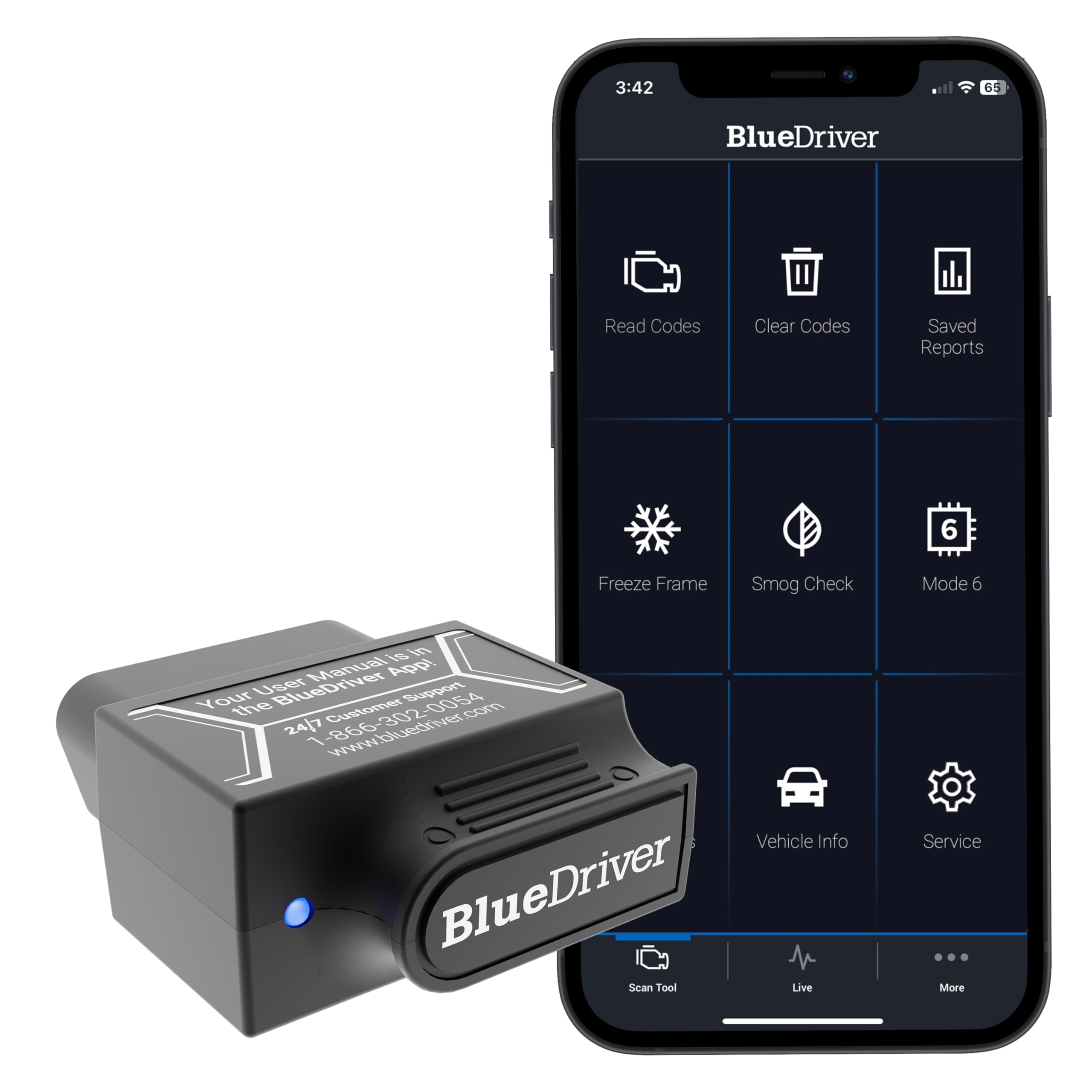
If a smog test is coming up, the last thing you want is a surprise at the station. BlueDriver is built for that pre-test moment, with a phone app that shows I/M readiness, trouble codes, and live data in plain language. It connects by Bluetooth, so there is no cable to route and no small handheld screen to squint at. For most drivers, that clarity is the point: you can see which monitors are ready, which are incomplete, and whether a code needs attention first. The trade-off is that it depends on your phone, so it is less ideal if you want a standalone tool that works without an app.
- Clear I/M readiness display before test
- Bluetooth connection, no handheld screen needed
- Live data and code definitions in app
- Requires phone and compatible app
- No standalone screen for garage use
4.9/5
4.8/5
4.9/5

Innova CarScan Pro 5610 — Detailed Readiness and Repair Help
Drivers who want more than a green or red readiness light will like the extra detail here. The Innova CarScan Pro 5610 is a handheld scanner with a colour screen, smog-check readiness reporting, and repair guidance that helps explain what a code may mean. It also reads live data and freeze-frame information, which matters when an emissions fault is intermittent rather than constant. That makes it a strong choice for a home garage, especially before a retest after a repair. Its size and menu depth are the trade-offs, because it takes a little longer to learn than a basic code reader.
- Detailed smog readiness reporting
- Repair guidance for trouble codes
- Live data and freeze-frame records
- Larger than basic handheld readers
- Menu takes time to learn
4.9/5
4.8/5
4.6/5

Autel AutoLink AL519 — Simple Handheld Pre-Test Check
For a no-fuss handheld check, the Autel AutoLink AL519 keeps the focus on the essentials. It reads and clears codes, shows I/M readiness, and displays live data and freeze-frame records without needing a phone or app. That simplicity is useful in a garage, at a used-car inspection, or just before a smog appointment. Its colour screen is easy to read, and its one-click readiness key saves time when you only need a pass-or-wait answer. It is not the deepest diagnostic tool here, so drivers chasing complex intermittent faults may want more live-data depth.
- One-click I/M readiness check
- No phone or app required
- Colour screen, easy to read
- Less live-data depth than tablets
- Wired handheld, not wireless
4.8/5
4.6/5
4.7/5

FOXWELL NT301 OBD2 Scanner — Budget Pre-Test Essential
Budget buyers still need a trustworthy readiness answer, and the FOXWELL NT301 delivers that core job well. This handheld scanner reads codes, checks I/M readiness, and shows live data on a colour screen, without app subscriptions for basic scanning. It is easy to carry, simple to plug in, and clear enough for a first-time user to understand. That makes it a sensible pre-test tool if you mainly want to know whether monitors are ready. Its limits show in deeper diagnostics, where it offers less graphing and less vehicle-specific detail than higher-ranked models.
- Clear I/M readiness check
- Simple plug-in handheld design
- Colour screen, easy for beginners
- Limited graphing for live data
- Less vehicle-specific detail
4.6/5
4.5/5
4.8/5

Launch CRP129X OBD2 Scanner — Live Data Before Retest
When a smog failure is not explained by a single code, live data becomes the deciding factor. The Launch CRP129X adds a larger touchscreen, live-data graphing, and broader system coverage than a basic reader, while still showing I/M readiness clearly. That combination helps you spot a sensor that drifts, a monitor that stays incomplete, or a fault that only appears under load. It suits drivers who do their own repairs and want evidence before a retest. The trade-off is a busier menu, so complete beginners may prefer a simpler handheld first.
- Live-data graphing for trends
- Larger touchscreen display
- Clear I/M readiness display
- Busier menu for beginners
- Larger than pocket readers
4.5/5
4.7/5
4.5/5

ANCEL AD310 Classic Enhanced Universal OBD II Scanner — Simple Glovebox Check
Simplicity is the whole appeal of the ANCEL AD310. This compact handheld plugs into the OBD2 port, reads codes, and shows I/M readiness without apps, pairing, or a learning curve. It is a good glovebox tool for a quick check before a test, a used-car viewing, or after a battery disconnect. Its screen is small and its live data is basic, so it will not replace a deeper scanner for tricky faults. For a clear, low-friction readiness check, however, it does the essential job well.
- No app or pairing needed
- Compact glovebox size
- Clear I/M readiness display
- Small screen for live data
- Basic diagnostic depth only
4.4/5
4.2/5
4.8/5

TOPDON TopScan Bluetooth OBD2 Scanner — Guided Phone Reports
Phone-based scanning suits drivers who want guided reports rather than raw codes alone. TOPDON TopScan connects by Bluetooth and uses an app to present I/M readiness, live data, and diagnostic reports in a structured way. That format helps when you need to understand a fault, save a report, or check readiness after a repair. It also works across many OBD2 vehicles, which is useful for households with more than one car. The trade-off is app dependence, and some advanced features may require the app’s paid tier, so check that before buying.
- Structured diagnostic reports in app
- Clear I/M readiness display
- Works across many OBD2 vehicles
- Requires phone and app
- Some advanced features need paid tier
4.5/5
4.6/5
4.4/5

Autel MaxiAP AP200 — Compact Phone Scanning
A pocket-sized Bluetooth adapter can be enough if your phone is already your main tool. The Autel MaxiAP AP200 pairs with an app to read codes, show I/M readiness, and display live data, without carrying a separate handheld unit. Its compact size makes it easy to keep in a car, and its interface is straightforward for routine checks. That makes it a practical choice for drivers who want occasional pre-test checks rather than daily garage use. Its small adapter form means it relies entirely on the phone, and its depth is below full tablet scanners.
- Very compact, easy to carry
- Clear I/M readiness display
- Simple routine phone checks
- Relies entirely on phone app
- Below full tablet scanner depth
4.4/5
4.5/5
4.3/5

Veepeak OBDCheck BLE+ Bluetooth OBD2 Scanner — Low-Cost Bluetooth Readiness
Low-cost Bluetooth scanning still needs a clear readiness display, and the Veepeak OBDCheck BLE+ focuses on that basic need. It pairs with compatible third-party apps to read codes, show live data, and check I/M readiness on many OBD2 vehicles. Its small adapter stays plugged in without getting in the way, and setup is usually quick for drivers already comfortable with phone apps. The trade-off is variability, because the experience depends on the app you choose. Drivers who want a single guided app may prefer a bundled-app model instead.
- Small adapter, stays plugged in
- Works with compatible third-party apps
- Quick setup for app users
- Experience varies by chosen app
- No single guided app included
4.3/5
4.2/5
4.5/5

OBDLink MX+ Bluetooth OBD2 Scanner — Fast Advanced Adapter
Advanced users often want speed, stable Bluetooth, and richer live data, and the OBDLink MX+ is aimed at that use. It is a fast Bluetooth adapter that works with compatible apps to show I/M readiness, live data, and enhanced data on supported vehicles. That speed matters when you are watching several parameters during a drive cycle or checking a monitor that keeps resetting. Its battery-saving sleep mode also helps if the adapter stays plugged in. The trade-off is that it is an adapter, not a complete handheld system, so the final experience depends on your chosen app.
- Fast, stable Bluetooth connection
- Richer live data on supported vehicles
- Battery-saving sleep mode
- Adapter only, not handheld system
- Experience depends on chosen app
4.4/5
4.8/5
4.2/5
Top 3 Head-to-Head: BlueDriver vs Innova 5610 vs Autel AL519
These three are the common final choices because they cover the main smog-check styles: phone-based, detailed handheld, and simple handheld. The tie below is real, not a rounding error.
| Feature | #1 BlueDriver | #2 Innova 5610 | #3 Autel AL519 |
|---|---|---|---|
| I/M Readiness Reporting | 4.9/5 — Best, tied | 4.9/5 — Best, tied | 4.8/5 |
| Diagnostic Depth | 4.8/5 — Best, tied | 4.8/5 — Best, tied | 4.6/5 |
| Ease of Use | 4.9/5 — Best | 4.6/5 | 4.7/5 |
| Choose if… | You want phone-based readiness clarity | You want detailed handheld repair help | You want the simplest handheld check |
Who These Scanners Are NOT For
These scanners do not guarantee a smog pass, and they do not replace a repair when an emissions fault is real.
They are also not a substitute for professional diagnosis on heavy-duty diesel, pre-1996 vehicles, or complex intermittent faults. First, check your vehicle OBD2 compatibility for your exact year and model, because a generic OBD2 label does not prove full app or enhanced-data support.
Common Mistakes to Avoid
Most smog failures that a scanner could have prevented come from timing, not from the tool itself.
Frequently Asked Questions About OBD2 Scanners for Smog Checks
Can an OBD2 scanner tell me if my car will pass a smog check?
No, a scanner cannot guarantee a pass, but it can show whether your car is ready to be tested. It reports trouble codes and I/M readiness monitors, which are the main signals a smog station checks. If codes are present or monitors are incomplete, you should fix the issue and drive normally before testing. A clean readiness report greatly improves your chances, but local rules still apply.
What does I/M readiness mean on an OBD2 scanner?
I/M readiness means your car’s self-tests for emissions systems have completed. Each monitor, such as catalyst, oxygen sensor, or evaporative system, shows ready, incomplete, or not supported. A smog station often requires most monitors to be ready before it can pass a car. If a monitor is incomplete, the system has not finished its check yet, even if no warning light is on.
How many readiness monitors can be incomplete and still pass?
It depends on your state and vehicle year, so there is no single national answer. Many programs allow one incomplete monitor on newer vehicles and two on some older vehicles, but others are stricter. You should check how many monitors can be incomplete for your local rule, then confirm your scanner shows each monitor clearly. When in doubt, wait until all supported monitors are ready.
Why are my OBD2 monitors not ready after clearing codes?
Clearing codes usually resets readiness monitors, so they must complete again through normal driving. This is normal after a repair, code clear, or battery disconnect, and it does not always mean a new fault exists. You can learn why monitors show not ready and then drive a mix of city and highway cycles. Recheck with your scanner before booking a test, rather than assuming the car is ready.
Do I need a specific scanner for a smog check, or will any OBD2 scanner work?
Any OBD2 scanner that clearly shows I/M readiness can help, but not every scanner shows it well. Some basic readers only show codes, while others list each monitor separately. For smog preparation, choose a model with a clear readiness display, live data, and freeze frame if you may need repair help. Compatibility with your vehicle and app, for Bluetooth models, matters as much as the feature list.
Should I clear codes before a smog check?
No, you should not clear codes just before a smog check. Clearing codes can hide a fault temporarily, but it also resets readiness monitors and can make a car look untested. Smog stations can see incomplete monitors, and some may treat that as a fail. Fix the underlying fault first, drive normally until monitors complete, then scan again to confirm readiness before you test.
Can an OBD2 scanner check emissions readiness on older cars?
Yes, on most 1996 and newer light-duty vehicles, an OBD2 scanner can check emissions readiness. Older OBD1 vehicles use different connectors and protocols, so a standard OBD2 scanner will not work the same way. Even on OBD2 cars, monitor support varies by year, engine, and emissions system. Check your vehicle compatibility and monitor list first, so you know which monitors should appear as supported.
Our Final Verdict
For most drivers, the choice is simple: check readiness first, then choose the form factor you will actually use. BlueDriver gives the clearest phone-based readiness answer, Innova gives the deepest handheld detail, and Autel gives the simplest handheld check.

I’m Alex Rahman, a car enthusiast and automotive writer focused on practical solutions, car tools, and real-world driving advice. I share simple and honest content to help everyday drivers make better decisions.
