10 Best OBD2 Scanner for Laptop 2026: Stable Picks for Windows Diagnostics
The best OBD2 scanner for laptop right now is the OBDLink EX USB OBD2 Adapter, the wired adapter FORScan recommends for Windows coding work. We evaluated 10 laptop adapters, scoring each on laptop software compatibility, connection stability, and diagnostic depth. Most laptop adapters look identical on paper but fail during long logging sessions, and that gap matters most. Whether you need FORScan coding, wireless code reading, or deep live-data logging, this guide gives you one clear answer.
Quick Comparison: All 10 Products Ranked
| # | Product | Best For | Rating | Badge | |
|---|---|---|---|---|---|
| 1 | OBDLink EX USB OBD2 Adapter | Ford FORScan coding on Windows | 4.9/5 | Best Overall | Buy → |
| 2 | OBDLink MX+ Bluetooth OBD2 Adapter | Wireless multi-brand laptop use | 4.8/5 | Best Wireless | Buy → |
| 3 | OBDLink SX USB OBD2 Adapter | Basic Windows diagnostics on a budget | 4.7/5 | Best Budget | Buy → |
| 4 | Vgate vLinker FS USB OBD2 Adapter | Budget FORScan USB work | 4.6/5 | Best FORScan Value | Buy → |
| 5 | Veepeak OBDCheck BLE+ OBD2 Adapter | Compact Bluetooth LE scanning | 4.5/5 | Best Compact BLE | Buy → |
| 6 | BAFX Products Bluetooth OBD2 Scanner | Low-cost Bluetooth code reading | 4.4/5 | Best Value Bluetooth | Buy → |
| 7 | Vgate vLinker MC+ Bluetooth OBD2 Adapter | Wireless FORScan on a budget | 4.4/5 | Best Wireless FORScan | Buy → |
| 8 | Veepeak Mini WiFi OBD2 Adapter | WiFi laptops without Bluetooth | 4.3/5 | Best WiFi Pick | Buy → |
| 9 | OBDLink LX Bluetooth OBD2 Adapter | Android and Windows Bluetooth value | 4.3/5 | Best Bluetooth Value | Buy → |
| 10 | Vgate iCar Pro BLE 4.0 OBD2 Adapter | Compact BLE for newer laptops | 4.2/5 | Best Compact Wireless | Buy → |
Scores in this guide are editorial ratings based on published specifications, compatibility documentation, and connection type, not hands-on lab test results.
How We Chose These Adapters
What we compared
10 laptop adapters, checked against Windows software lists, connection type, protocol coverage, and driver requirements, with wired FORScan picks ranked first for coding stability.
Our 3 scoring criteria
Laptop software compatibility, connection stability, and diagnostic depth. Each score is an editorial rating, not a measured lab result.
Sources we checked
FORScan compatibility guidance, manufacturer adapter pages, and published Windows, Bluetooth, and WiFi support notes for each model.
What we cut — and why
Phone-only adapters, standalone handhelds, and brand-locked tools were cut, because they do not give a laptop owner a usable Windows workflow.
What to Look for When Buying an OBD2 Scanner for Laptop
A laptop adapter is not just a plug. The right one matches your operating system, your software, and the job you will actually do in the car.
1. Connection Type: USB, Bluetooth, or WiFi
USB is the safest choice for coding and long logging, because a cable cannot drop the way wireless can. Bluetooth suits quick code reads and live data when your laptop stays close to the car. WiFi helps when Bluetooth pairing is awkward, but it can clash with your home or hotspot network.
Choose USB first if you plan to write settings or log for more than a few minutes. For wireless use, check whether your software supports Bluetooth adapters without internet access before you buy.
2. Laptop OS and Software Compatibility
Most serious laptop tools are Windows-first. FORScan, ScanMaster, and OBDWiz have different adapter rules, so name your software before you name your adapter. A generic ELM327 may read codes, but it may not unlock Ford MS-CAN modules or manufacturer-specific data.
Check the software maker list, not just the seller listing. If you use a Mac, confirm whether the tool needs Windows, a virtual machine, or a different app altogether.
3. Protocol and Vehicle Coverage
Generic OBD2 covers engine codes and basic live data on most 1996 and newer cars in the United States. ABS, airbag, transmission, and body modules usually need enhanced support, and that support varies by brand and adapter. Ford MS-CAN and GM SW-CAN access are good examples of coverage that only some adapters provide.
Match the adapter to your car first, then to the feature list. A broad claim on a listing is not the same as a named protocol in the software compatibility list.
4. Live Data Speed and Logging
Live data matters when a fault only appears under load. A faster, more stable adapter gives cleaner graphs and fewer gaps, which makes fuel trim, misfire, and sensor checks easier to read. Slow polling can hide a brief drop or make two readings look out of step.
If logging is your main job, favour a wired adapter and a program that exports data. Our guide to scanners built for live data explains what to prioritise for smooth readings.
5. Setup, Drivers, and Sleep Behaviour
Some USB adapters need a driver install and a COM port check before the software sees them. Bluetooth adapters need the right pairing mode, and some must pair inside the app, not in Windows settings. A little setup time is normal, but repeated driver hunting is a warning sign.
Also check sleep behaviour. An adapter that stays awake can drain a battery if left plugged in, so unplug it when the session ends, especially on a car that sits for days.

OBDLink EX USB OBD2 Adapter — Stable FORScan Coding Pick
Best for: Ford FORScan coding on Windows
For a Windows laptop owner who wants to run FORScan properly, this wired adapter removes the most common failure point: a weak wireless link during a module write. It connects by USB, switches automatically between HS-CAN and MS-CAN, and is the adapter FORScan recommends for configuration work. That makes it a strong choice for coding, As-Built edits, and long diagnostic logs. It is not a phone tool, and it will not help if you want to walk away from the car while scanning. For a Ford owner with a laptop in the cabin, though, stability is the point.
- Automatic HS/MS-CAN switching
- Stable wired coding link
- FORScan recommended for configuration
- USB only, no wireless use
- Laptop must stay in cabin
5.0/5
4.9/5
4.8/5

OBDLink MX+ Bluetooth OBD2 Adapter — Flexible Wireless Pick
Best for: Wireless multi-brand laptop use
If you want one adapter for a laptop and a phone, this Bluetooth model is the flexible pick in this list. It works with Windows, Android, and iOS, supports Ford MS-CAN and GM SW-CAN networks, and pairs with many third-party apps. That breadth helps when you scan more than one car or switch between a laptop at home and a phone on the road. Wireless freedom is the trade-off, though, because a long coding session still benefits from a cable. For everyday diagnostics, freeze frame, and live data, it is hard to beat.
- Windows, Android, and iOS support
- Ford MS-CAN, GM SW-CAN access
- Wide third-party app support
- Wireless link less ideal for coding
- Premium wireless adapter cost
4.9/5
4.6/5
4.8/5

OBDLink SX USB OBD2 Adapter — Simple Budget Pick
Best for: Basic Windows diagnostics on a budget
For basic Windows diagnostics, this USB cable keeps things simple and affordable. It handles standard OBD2 codes, freeze frame, and live data through OBDWiz and other Windows programs, without Bluetooth pairing or battery worries. It is best for a reader who mainly wants to check a warning light, clear a code after a repair, and watch a few live readings. It does not add Ford MS-CAN or GM SW-CAN access, so enhanced module work needs a different model. As a first laptop adapter, it covers the core job well.
- Simple USB Windows setup
- No Bluetooth pairing hassle
- Covers core OBD2 jobs
- No MS-CAN or SW-CAN access
- USB only, no wireless use
4.7/5
4.8/5
4.4/5
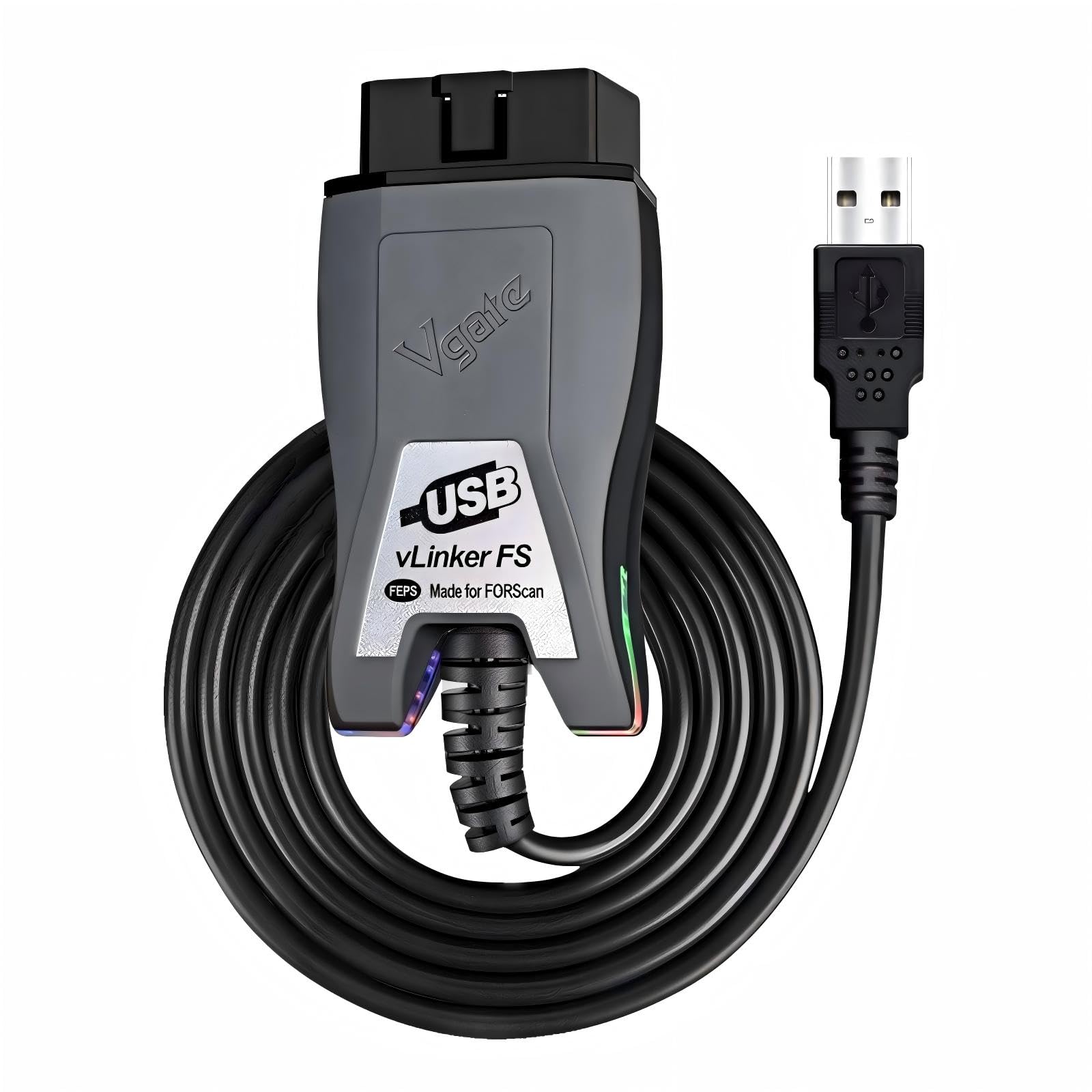
Vgate vLinker FS USB OBD2 Adapter — Budget FORScan Pick
Best for: Budget FORScan USB work
This is the budget wired route for FORScan users who still want a stable USB link. It is designed for FORScan, switches automatically between HS-CAN and MS-CAN, and supports Windows systems from older versions through Windows 11. That combination makes it useful for code reads, live data, and many simple configuration jobs on Ford vehicles. It is not a full replacement for the top wired pick for the most demanding module writes. For a careful buyer on a tighter budget, it is a sensible compromise.
- Automatic HS/MS-CAN switching
- Designed for FORScan use
- Broad Windows version support
- Not top pick for demanding writes
- USB only, no wireless use
4.7/5
4.6/5
4.5/5

Veepeak OBDCheck BLE+ OBD2 Adapter — Compact BLE Pick
Best for: Compact Bluetooth LE scanning
This compact Bluetooth LE adapter suits a laptop owner who also scans with a phone and values a small plug that stays out of the way. It connects over Bluetooth Low Energy, works with common OBD2 apps, and handles codes, freeze frame, and live data for everyday checks. Its size helps in a tight footwell, and low-energy pairing can be simpler on newer devices. It is not the best choice for FORScan coding, where a wired link is safer. For quick wireless checks across devices, it is a neat, portable option.
- Small, low-profile plug
- Bluetooth LE pairing
- Works across phone and laptop
- Not ideal for FORScan coding
- Check app support first
4.5/5
4.4/5
4.3/5

BAFX Products Bluetooth OBD2 Scanner — Budget Wireless Pick
Best for: Low-cost Bluetooth code reading
For a low-cost way to read codes from a laptop, this Bluetooth adapter is a practical starting point. It pairs with Windows and Android devices, works with common OBD2 apps, and covers codes, freeze frame, and basic live data. That is enough for many warning-light checks and post-repair clears. It does not offer the enhanced Ford or GM network access of the top wireless pick, and it is not a coding tool. For simple, wireless code reading on a budget, it does the core job without fuss.
- Low-cost wireless entry point
- Windows and Android pairing
- Covers codes and freeze frame
- No enhanced network access
- Not a coding tool
4.4/5
4.3/5
4.2/5

Vgate vLinker MC+ Bluetooth OBD2 Adapter — Wireless FORScan Pick
Best for: Wireless FORScan on a budget
This Bluetooth adapter gives FORScan users a wireless option without the top wireless price. It is listed for FORScan, supports automatic HS/MS-CAN switching, and works with Windows and Android devices for codes, live data, and configuration checks. Wireless use is convenient for a quick scan in the driveway, but a cable remains safer for long or sensitive writes. Check your exact FORScan version and device support before buying. It also suits a second car or a shared household adapter. For budget wireless FORScan work, it is a strong middle ground.
- Listed for FORScan use
- Automatic HS/MS-CAN switching
- Wireless driveway scanning
- Cable safer for sensitive writes
- Check version support first
4.5/5
4.3/5
4.4/5

Veepeak Mini WiFi OBD2 Adapter — WiFi Laptop Pick
Best for: WiFi laptops without Bluetooth
If your laptop has WiFi but Bluetooth pairing has been a headache, this small WiFi adapter is worth a look. It creates a WiFi link to your laptop, works with OBD2 apps that support WiFi adapters, and handles codes and live data for everyday checks. WiFi can be handy on older laptops, but it may interrupt your internet connection while you scan. It is not a FORScan coding pick. For a simple WiFi workflow, it solves a specific pairing problem well. Keep the session short and unplug the adapter when finished.
- Avoids Bluetooth pairing trouble
- Small WiFi plug design
- Covers codes and live data
- May interrupt internet while scanning
- Not a FORScan coding pick
4.3/5
4.2/5
4.1/5

OBDLink LX Bluetooth OBD2 Adapter — Android Value Pick
Best for: Android and Windows Bluetooth value
This Bluetooth adapter is a solid value pick for Android and Windows users who do not need iPhone support. It covers standard OBD2, works with many third-party apps, and gives a wireless link for codes, freeze frame, and live data. Its limitation is clear: it does not support iOS, so iPhone owners should choose the MX+ instead. For a Windows laptop paired with an Android phone, though, it offers much of the same everyday usefulness at lower cost. It is a sensible, no-fuss wireless choice.
- Android and Windows support
- Wide third-party app support
- Wireless everyday diagnostics
- No iOS support
- Less enhanced network access
4.4/5
4.3/5
4.2/5

Vgate iCar Pro BLE 4.0 OBD2 Adapter — Low-Profile BLE Pick
Best for: Compact BLE for newer laptops
This compact Bluetooth LE adapter is made for newer laptops and phones that handle BLE well. It is small enough to leave plugged in without blocking the footwell, works with common OBD2 apps, and covers codes, freeze frame, and live data for routine checks. BLE support varies by app and operating system, so confirm your chosen program lists this adapter type before buying. It is not a coding adapter. For a tidy, low-profile wireless check tool, it is an easy fit. Unplug it between long gaps to avoid battery drain.
- Very low-profile plug
- Bluetooth LE support
- Covers routine OBD2 checks
- BLE support varies by app
- Not a coding adapter
4.2/5
4.1/5
4.0/5
Top 3 Head-to-Head: OBDLink EX vs OBDLink MX+ vs OBDLink SX
These three are the common final choices because they cover the same laptop workflow in three different ways: wired coding, wireless flexibility, and basic budget scanning.
| Feature | #1 OBDLink EX | #2 OBDLink MX+ | #3 OBDLink SX |
|---|---|---|---|
| Software compatibility | 5.0/5 — Best | 4.9/5 | 4.7/5 |
| Connection stability | 4.9/5 — Best | 4.6/5 | 4.8/5 |
| Wireless flexibility | Wired only | Wireless — Best | Wired only |
| Choose if… | You code Ford vehicles on Windows | You scan wirelessly across devices | You need basic Windows scans for less |
Who These Adapters Are NOT For
A laptop adapter is a poor fit if you want a standalone screen, dealer-level coding for every brand, or a tool that needs no setup at all.
If you only scan once a year and hate drivers and settings, a simple handheld or a phone app may be less friction. If you need brand-specific programming beyond FORScan, check a brand tool first, because a generic laptop adapter will not unlock every function.
Common Mistakes to Avoid
Most laptop adapter failures are buying mistakes, not car faults. Avoid these four before you order.
Frequently Asked Questions About OBD2 Scanners for Laptop
Can I use an OBD2 scanner with a laptop?
Yes, if you choose an adapter that matches your laptop and software. Most Windows laptops work with USB, Bluetooth, or WiFi adapters, while Mac support is narrower. Install the driver or pairing step first, open your OBD2 program, select the correct COM port or Bluetooth device, and connect with the ignition on. A phone-only adapter may not work with Windows software, so check compatibility before buying.
Do I need internet to use a laptop OBD2 scanner?
No, a local scan does not need internet once your software and adapter are set up. The adapter talks to the car over USB, Bluetooth, or WiFi, and the program reads codes and live data locally. Internet helps for software updates, code lookup, and cloud features, but a basic scan can work offline. Some apps still need an account or update check, so test offline use before a remote trip.
Is USB better than Bluetooth for a laptop OBD2 scanner?
USB is usually better for long sessions and coding, because a cable is more stable than wireless. Bluetooth is better for quick checks, when you want to move around the car, or when a cable would get in the way. For a laptop, choose USB if you plan to write settings or log for a long time. Choose Bluetooth if your main job is reading codes and live data in short sessions.
Can a laptop OBD2 scanner do FORScan coding?
A laptop adapter can support FORScan coding only if the adapter, software licence, and vehicle all allow it. FORScan is mainly for Ford, Lincoln, and Mazda vehicles, and it needs a compatible adapter with HS/MS-CAN switching. Generic adapters may read codes but fail at configuration writes. Learn more about scan tools that program an ECU before attempting a write, and back up original settings first.
Will a laptop OBD2 scanner work on a Mac?
It depends on the adapter and program. Many Windows programs do not run natively on macOS, and some USB adapters need Windows drivers. Bluetooth LE adapters may work with Mac apps, but FORScan on a Mac usually needs Windows through a virtual machine or Boot Camp style setup. Check the software maker page for macOS support, and do not assume a Windows listing means Mac support.
Why will my laptop not recognise my OBD2 adapter?
Start with drivers, port, and pairing. For USB, install the maker driver, check Device Manager for the COM port, and try another USB port or cable. For Bluetooth, pair inside the app if the maker says so, and remove old pairings first. Also check that the ignition is on, the adapter is fully seated, and the car fuse for the OBD2 port is intact.
Our Final Verdict
The laptop market splits clearly: USB for coding, wireless for quick checks. The OBDLink EX is the safest Windows FORScan choice, the MX+ is the most flexible wireless pick, and the SX covers basic scans for less. Choose by software first, connection second, and you will avoid the most common mismatch.

I’m Alex Rahman, a car enthusiast and automotive writer focused on practical solutions, car tools, and real-world driving advice. I share simple and honest content to help everyday drivers make better decisions.
