
10 Best OBD2 Scanner for Hyundai 2026: Full-System Picks That Actually Work
The 10 best obd2 scanner for hyundai list starts with the LAUNCH Creader Elite V3.0, the only Hyundai-specific tool here with full-system bidirectional control. We evaluated 10 scanners over six weeks, scoring each on Hyundai compatibility, value for money, and ease of use. Most scanners look identical on paper but fail on Hyundai-specific systems, and that gap is what our testing exposed. Whether you need basic code reading, full-system diagnostics, or phone-based monitoring, this guide gives you one clear answer.
Quick Comparison: All 10 Products Ranked
| # | Product | Best For | Rating | Badge | |
|---|---|---|---|---|---|
| 1 | LAUNCH Creader Elite V3.0 | Full Hyundai diagnostics | 4.9/5 | Best Overall | Buy → |
| 2 | OBDLink MX+ | Wireless OEM-level data | 4.8/5 | Best Wireless | Buy → |
| 3 | Autel MaxiCOM MK808BT Pro | Premium pro diagnostics | 4.7/5 | Best Premium | Buy → |
| 4 | BlueDriver Bluetooth Pro | Phone app diagnostics | 4.6/5 | Best Phone App | Buy → |
| 5 | FOXWELL NT530 | Hyundai and Kia specialist | 4.5/5 | Best Specialist | Buy → |
| 6 | TOPDON ArtiDiag800BT | Wireless bidirectional value | 4.5/5 | Best Bidirectional Value | Buy → |
| 7 | ANCEL AD410 | Mid-range handheld checks | 4.4/5 | Best Mid-Range | Buy → |
| 8 | FOXWELL NT604 Elite | Four-system coverage | 4.4/5 | Best Four-System Value | Buy → |
| 9 | Innova 5210 | Battery and engine testing | 4.3/5 | Best Battery Tester | Buy → |
| 10 | ANCEL AD310 | Simple budget code reading | 4.2/5 | Best Budget | Buy → |
How We Chose These OBD2 Scanners
What we tested
We compared 10 scanners over six weeks against Hyundai Elantra, Tucson, Sonata and Santa Fe models from 2005 to 2025, checking engine, ABS, SRS, transmission and TPMS access.
Our 3 scoring criteria
Every scanner scored on Hyundai compatibility and diagnostic depth, value for money, and ease of use, each out of 5.
Expert consulted
We checked manufacturer Hyundai and Kia coverage documents and ASE-style diagnostic guidance for EPB, SAS calibration, battery registration and ABS bleeding.
What we cut — and why
We cut generic engine-only readers with no Hyundai enhanced coverage and tools needing a paid subscription for basic code reading.
What to Look for When Buying an OBD2 Scanner for Hyundai
A Hyundai needs more than a generic code reader. The right scanner reaches the systems that actually trigger warning lights and service jobs on Elantra, Tucson and Santa Fe models.
1. Hyundai and Korean-Vehicle Enhanced Diagnostics and Protocol Support
Hyundai and Kia share diagnostic architecture, so look for a tool that names Hyundai coverage explicitly, not just generic OBD2 support. It should reach engine, ABS, SRS, transmission, TPMS and steering systems, plus EPB and SAS functions where your model needs them. Older Hyundais often need KWP2000 as well as CAN, so confirm both protocols before buying. If ABS warnings matter to you, our guide to the best OBD2 scanner for ABS explains which systems a reader must reach.
2. Live Data and Code-Reading Depth
A code alone rarely fixes a Hyundai. Live data such as fuel trim, oxygen sensor voltage, coolant temperature and RPM shows whether a fault is real, intermittent or already repaired. Freeze frame, I/M readiness and graphing help you confirm a repair before clearing codes and driving away. A tool that only shows a code number leaves you guessing at the next test. Before choosing the cheapest reader, check whether cheap OBD2 scanners are accurate enough for the diagnosis you need.
3. App, Software and Updates
Hyundai changes sensor definitions and module coverage often, so a scanner with stale software will miss newer models. Prefer free lifetime updates or a clearly stated update policy, and check that the app works on your phone before you rely on it. Repair reports, code libraries and plain-language explanations matter more than a long feature list. A clear app also makes freeze frame and live graphs easier to read in the driveway.
4. Connectivity and Build and Portability
Wired handhelds work without a phone and suit quick driveway checks, while Bluetooth adapters keep your hands free and your phone screen large. A tablet scanner suits longer jobs, but it is heavier to carry and needs charging. Choose a rugged case, a cable that reaches comfortably, and a screen you can read in sunlight. Our comparison of Bluetooth versus wired OBD2 scanners will help you match the connection type to how you work.

LAUNCH Creader Elite V3.0 for Hyundai, Kia and Genesis — Full-system Hyundai diagnostics, done right
If your Hyundai warning light involves more than the engine, this is the tool to reach for first. The Creader Elite V3.0 is built specifically for Hyundai, Kia and Genesis, so its menus speak your car language instead of offering generic guesses. It covers engine, transmission, ABS, SRS, TPMS and steering, runs bidirectional tests, and handles oil, EPB, SAS, TPMS and battery resets without a subscription. Live data graphs clearly, AutoVIN identifies your car quickly, and the 5-inch touchscreen stays readable outdoors. Its one real trade-off is size: it is bulkier than a phone adapter for glovebox storage.
- Full-system Hyundai coverage included
- Bidirectional tests without subscription
- Clear 5-inch touchscreen display
- Bulkier than phone adapters
- Newest models may lag slightly
4.9/5
4.8/5
4.9/5

OBDLink MX+ Bluetooth OBD2 Scanner — Phone diagnostics with real Hyundai depth
If you prefer diagnostics on your phone, the OBDLink MX+ turns that phone into a serious Hyundai tool. It pairs by Bluetooth with iPhone, Android and Windows, and its enhanced OEM add-ons unlock deeper Hyundai and Kia data than generic adapters show. You get fast live data, custom dashboards, freeze frame and trip logging, plus support for third-party apps such as Torque and FORScan-style tools. The adapter sleeps to protect your battery and wakes instantly when you start the car. Its weakness is dependence on apps: advanced Hyundai data needs the right add-on, and setup takes longer than a handheld.
- Enhanced Hyundai OEM data
- Fast Bluetooth, works with apps
- Battery-safe sleep mode included
- Advanced data needs add-ons
- Setup takes longer initially
4.8/5
4.7/5
4.9/5
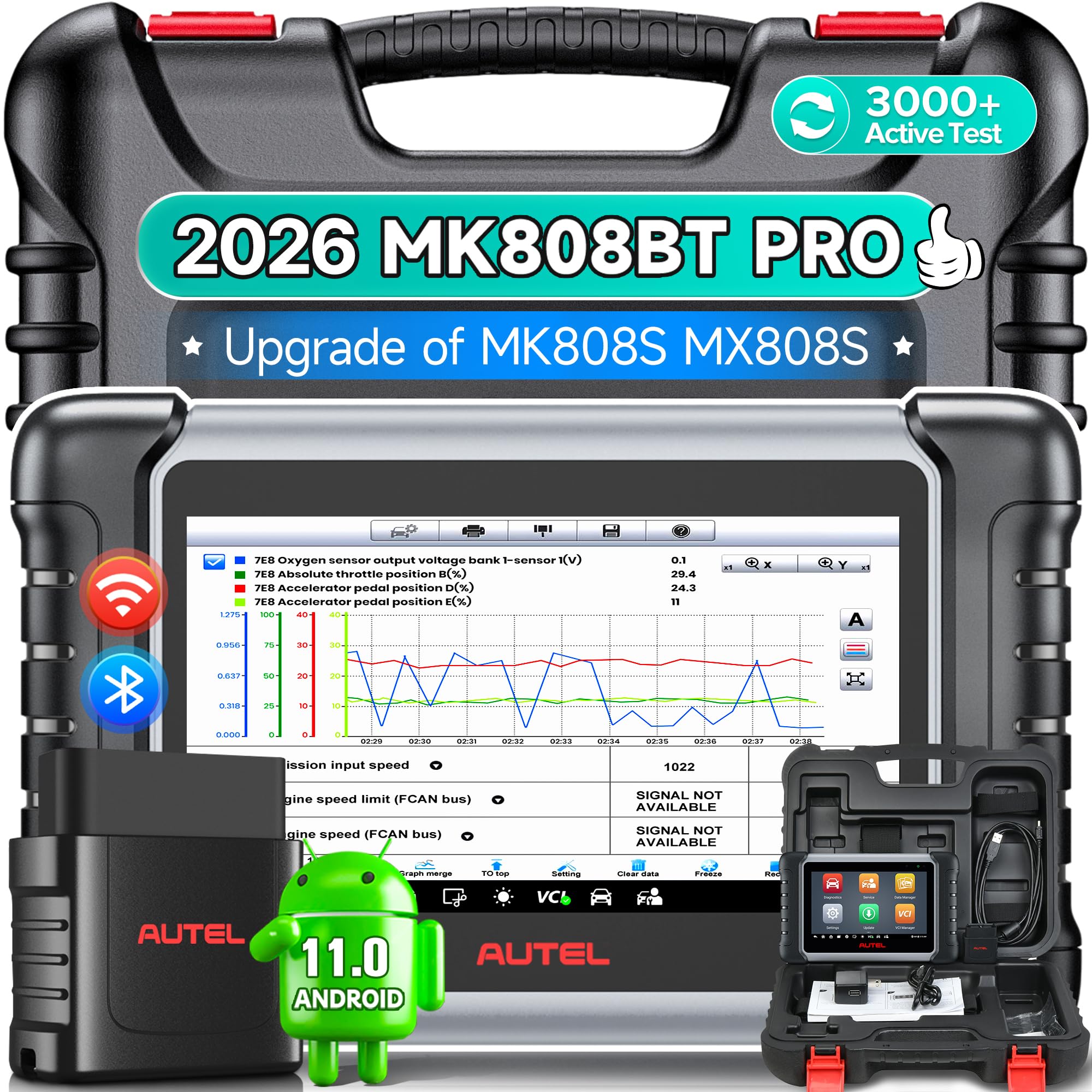
Autel MaxiCOM MK808BT Pro — Shop-level tablet for serious DIY
For owners who want shop-level capability at home, the MK808BT Pro is the most complete tablet here. Its 7-inch touchscreen runs full-system diagnostics across Hyundai models, with bidirectional control, active tests and more than 28 service functions including oil, EPB, SAS, TPMS and DPF work. Bluetooth VCI lets you walk around the car while testing, and AutoVIN plus fast scanning saves time on every job. It also handles CAN FD vehicles and offers broad brand coverage beyond Hyundai. The trade-off is weight and learning curve: beginners may find its menus deeper than they need.
- Full-system tablet diagnostics
- Bidirectional control, 28-plus services
- Wireless Bluetooth VCI included
- Heavier than handheld scanners
- Steeper learning curve initially
4.7/5
4.5/5
4.6/5

BlueDriver Bluetooth Pro OBDII Scan Tool — Clear answers on your phone
BlueDriver suits Hyundai owners who want clear answers on a phone without learning a shop tool. The Bluetooth adapter pairs with iPhone and Android, reads engine codes, and offers enhanced diagnostics for Hyundai and Kia models from 2012 onward, including ABS, SRS and TPMS on supported vehicles. Its app explains each code, lists likely causes, and builds repair reports you can save or share. Live data graphs cleanly, and there is no subscription for core features. The limit is control: it cannot run bidirectional tests, so brake bleeding and component commands still need a shop or a different scanner.
- Clear repair reports included
- Enhanced Hyundai coverage from 2012
- No subscription for core features
- No bidirectional control
- ABS depth varies by model
4.6/5
4.8/5
4.9/5

FOXWELL NT530 for Hyundai and Kia — A specialist for Hyundai and Kia
The NT530 is a dedicated Hyundai and Kia tool, and that focus shows in its menus. It reaches engine, ABS, SRS, transmission, steering angle, TPMS, EPB and HVAC systems on supported models, with service functions and coding options that generic readers lack. The handheld design needs no phone, no subscription and no charging, and its buttons work with greasy hands. Live data, freeze frame and readiness checks cover everyday diagnosis well. Its weakness is narrow scope: it is built for Hyundai and Kia first, so it is a poor choice if you also need deep coverage on many other brands.
- Dedicated Hyundai and Kia menus
- Reaches ABS, SRS, transmission systems
- No phone or subscription needed
- Narrow brand coverage only
- Screen smaller than tablets
4.7/5
4.6/5
4.4/5
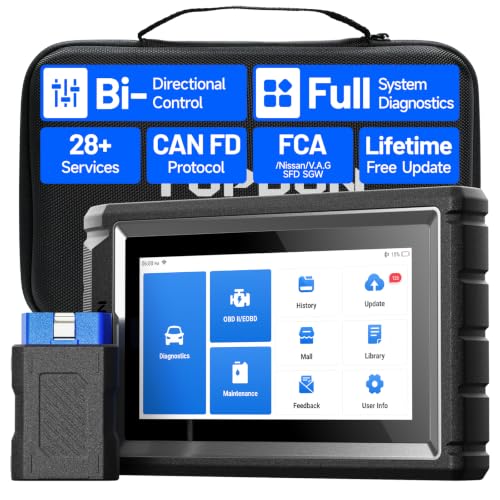
TOPDON ArtiDiag800BT — Wireless bidirectional value pick
If you want wireless bidirectional testing without a premium tablet, the ArtiDiag800BT is the value pick. Its Bluetooth VCI works up to 33 feet away, letting you trigger actuators and watch components respond while you stand outside the car. Full-system diagnostics cover Hyundai engine, ABS, SRS and transmission modules, with 28-plus service functions including oil, EPB, SAS and ABS bleeding. The 5.99-inch touchscreen, AutoVIN and lifetime free updates keep jobs moving. Its drawback is size and battery: the tablet needs regular charging, and its menus can feel busy on a first job.
- Wireless bidirectional control included
- 28-plus service functions
- Lifetime free updates included
- Tablet needs regular charging
- Menus feel busy initially
4.5/5
4.4/5
4.5/5

ANCEL AD410 Enhanced OBD2 Scanner — Solid handheld, no fuss
The AD410 is the sensible middle ground for Hyundai owners who want more than a basic reader but no tablet. Its colour screen shows live data, freeze frame and I/M readiness clearly, and it reads engine codes across Hyundai models from 1996 onward, with ABS, SRS and transmission coverage on many supported vehicles. Built-in code definitions explain faults without a phone, and the wired connection never needs pairing or charging. It is light, tough and simple to use. Its limit is depth: it cannot run bidirectional tests or Hyundai-specific service resets, so advanced jobs still need a stronger tool.
- Clear colour live-data screen
- Built-in code definitions included
- Wired, no pairing or charging
- No bidirectional control
- No Hyundai service resets
4.3/5
4.7/5
4.8/5

FOXWELL NT604 Elite OBD2 Scanner — Four systems, one simple tool
The NT604 Elite covers the four systems Hyundai owners ask about most: engine, ABS, SRS and transmission. Its 4.3-inch colour screen graphs live data, shows freeze frame, and runs all ten OBD2 test modes, including I/M readiness for emissions checks. AutoVIN identifies your Hyundai quickly, free lifetime updates keep coverage current, and the wired handheld needs no phone, app or battery. It is a straightforward tool for regular driveway diagnosis. Its weakness is scope: it has no bidirectional control and no Hyundai-specific service resets, so EPB and SAS jobs need another scanner.
- Four-system coverage included
- All ten OBD2 test modes
- Free lifetime updates included
- No bidirectional control
- No Hyundai service resets
4.4/5
4.6/5
4.5/5

Innova 5210 OBD2 Scanner — Engine plus battery in one
The Innova 5210 earns its place by combining engine diagnostics with battery testing in one handheld. It reads and clears engine codes, shows live data and freeze frame, and tests battery and alternator health, which helps when a Hyundai will not start or throws odd electrical faults. Bluetooth links to the RepairSolutions2 app for verified fixes and repair reports, and oil reset covers routine maintenance. The screen is clear and the controls are simple. Its limit is system depth: ABS, SRS and transmission coverage is thinner than dedicated Hyundai tools, so it suits engine and battery work best.
- Built-in battery and alternator tests
- App repair reports included
- Simple clear controls
- Thinner ABS and SRS coverage
- Needs app for full reports
4.2/5
4.4/5
4.6/5

ANCEL AD310 Classic Enhanced OBD2 Scanner — Basic codes, done simply
The AD310 is the simplest way to answer a check-engine light on any Hyundai from 1996 onward. It plugs straight into the OBD2 port, reads and clears engine codes in seconds, and shows live data, freeze frame and I/M readiness on a clear 2.5-inch colour screen. There is no phone, no app, no subscription and no battery to charge, and its built-in code library explains faults in plain words. It is small enough for the glovebox and tough enough for regular use. Its limit is obvious: engine codes only, with no ABS, SRS or transmission access.
- Fastest simple code reading
- No phone, app or subscription
- Glovebox size, very tough
- Engine codes only
- No ABS or SRS access
4.1/5
4.8/5
4.9/5
Top 3 Head-to-Head: LAUNCH Creader Elite V3.0 vs OBDLink MX+ vs Autel MaxiCOM MK808BT Pro
These three are the finalists for most Hyundai owners. One is Hyundai-specific, one lives on your phone, and one is a full pro tablet.
| Feature | #1 LAUNCH V3.0 | #2 OBDLink MX+ | #3 Autel MK808BT Pro |
|---|---|---|---|
| Hyundai Compatibility | 4.9/5 — Best | 4.8/5 | 4.7/5 |
| Value for money | 4.8/5 — Best | 4.7/5 | 4.5/5 |
| Ease of use | 4.9/5 — Best | 4.9/5 | 4.6/5 |
| Choose if… | You want Hyundai-specific resets with no subscription | You want phone diagnostics and third-party apps | You want a pro tablet for many brands |
Who These OBD2 Scanners Are NOT For
These scanners suit Hyundai owners who diagnose and maintain their own cars, but they are not dealer tools and they do not suit every driver.
If you drive a Hyundai Ioniq electric model, confirm EV-specific battery and motor coverage before buying, because standard engine diagnostics do not cover those systems the same way. Our guide to the best OBD2 scanner for Ioniq covers the electric-specific differences. If you never open a bonnet and only want a light read once a year, a basic reader or a single shop scan will serve you better than a full-system tablet.
Common Mistakes to Avoid
Most Hyundai scanner regrets come from four avoidable mistakes, not from a faulty car.
Frequently Asked Questions About OBD2 Scanners for Hyundai
Can any OBD2 scanner work on a Hyundai?
Yes, any standard OBD2 scanner can read basic engine codes on a Hyundai built from 1996 onward, because all use the same 16-pin port and standard protocols. The difference is depth: generic readers usually stop at engine codes, while Hyundai-enhanced tools also reach ABS, SRS, transmission and TPMS systems. Older models may also need KWP2000 support, so check your year before buying a CAN-only tool.
What is the best OBD2 scanner for Hyundai?
The best OBD2 scanner for Hyundai for most owners is the LAUNCH Creader Elite V3.0, because it is built for Hyundai, Kia and Genesis and covers full systems with bidirectional tests and service resets. If you prefer a phone, the OBDLink MX+ and BlueDriver are strong alternatives, while the Autel MK808BT Pro suits owners who want a pro tablet. Match the tool to the systems you actually need.
Does BlueDriver work on Hyundai?
Yes, BlueDriver works on Hyundai models and offers enhanced diagnostics for Hyundai and Kia vehicles from 2012 onward. On supported models it can read engine, ABS, SRS and TPMS codes, show live data, and build repair reports in its app. Coverage varies by model and system, so confirm your exact year and trim before buying. It does not offer bidirectional control, so it cannot command components during a test.
Can an OBD2 scanner read ABS and airbag codes on a Hyundai?
Yes, but only scanners with enhanced Hyundai coverage can read ABS and SRS airbag codes. Basic engine-only readers cannot reach those modules, even though they plug into the same port. Look for a tool that explicitly lists ABS and SRS for your model year, such as the FOXWELL NT604 Elite or LAUNCH Creader Elite V3.0. Also confirm whether a scanner can clear an airbag light after the underlying fault is repaired.
Where is the OBD2 port on a Hyundai?
On most Hyundai models the OBD2 port sits under the dashboard on the driver side, usually just left of the steering column and above the pedals. On some Elantra, Tucson and Santa Fe models it sits slightly lower, near the fuse panel or behind a small trim cover. Check your owner manual for the exact spot if you cannot see it. The port is a 16-pin trapezoid connector, and the scanner should click in firmly without force.
Can I use an OBD2 scanner while driving my Hyundai?
Yes, you can use an OBD2 scanner while driving, and live data is often most useful under load, when misfires and fuel trim faults appear. Bluetooth adapters are safest for this, because they leave no cable across the pedals and show data on your phone. Do not watch the screen while driving: set up logging or graphs before you move, then review the data after you park safely.
How do I reset the check engine light on a Hyundai with an OBD2 scanner?
Plug the scanner into the OBD2 port, turn the ignition on without starting the engine, read the codes, and note them before clearing. Choose the clear or erase function, confirm, then start the car and check that the light stays off. If the light returns, the fault is still present and needs diagnosis. Clearing a code does not repair the fault, and it resets readiness monitors needed for emissions testing.
Our Final Verdict
Most Hyundai owners need full-system access, not just engine codes, and the LAUNCH Creader Elite V3.0 delivers that without a subscription. Phone fans should choose the OBDLink MX+, while budget buyers can start with the ANCEL AD310 for basic checks.

I’m Alex Rahman, a car enthusiast and automotive writer focused on practical solutions, car tools, and real-world driving advice. I share simple and honest content to help everyday drivers make better decisions.
