10 Best OBD2 Scanner Computer Software for 2026: Clear PC Diagnostics
The best OBD2 scanner computer software right now is FORScan for Windows, with deep Ford, Mazda, and Lincoln module access. We evaluated 10 PC diagnostic programs, scoring each on diagnostic depth, vehicle compatibility, and ease of use. Most scan tools look identical on paper but fail on manufacturer-specific modules, and that gap is what this exposes. Whether you need basic code reading, live-data graphing, or deeper module diagnostics, this guide gives you one clear answer.
Quick Comparison: All 10 Products Ranked
| # | Product | Best For | Rating | Badge | |
|---|---|---|---|---|---|
| 1 | FORScan for Windows | Ford, Lincoln, and Mazda owners | 4.9/5 | Best Overall | Buy → |
| 2 | TOAD Pro OBD2 Diagnostic Software | DIY repairs across brands | 4.8/5 | Best for DIY Repairs | Buy → |
| 3 | OBD Auto Doctor | Beginners | 4.7/5 | Best for Beginners | Buy → |
| 4 | AutoEnginuity ScanTool | Advanced multi-system work | 4.6/5 | Best Professional | Buy → |
| 5 | OBDwiz | ScanTool.net adapter owners | 4.6/5 | Best Budget | Buy → |
| 6 | TouchScan | Clear live-data displays | 4.5/5 | Best Live Data | Buy → |
| 7 | EOBD Facile | European / EOBD vehicles | 4.5/5 | Best for European Vehicles | Buy → |
| 8 | ScanMaster-ELM | Generic ELM327 adapters | 4.4/5 | Best for Custom Monitoring | Buy → |
| 9 | DashCommand | In-car dashboards | 4.4/5 | Best Dashboard Display | Buy → |
| 10 | PCMScan | Simple code checks | 4.3/5 | Best Simple Code Reader | Buy → |
Scores below are editorial ratings based on listed specifications, not laboratory or hands-on test results.
How We Chose These Programs
What we compared
We compared published specifications, adapter requirements, platform support, and listed diagnostic functions for 10 programs. Scores are editorial ratings, not measured test results.
Our 3 scoring criteria
Diagnostic depth, vehicle compatibility, and ease of use. Each program was scored on the same three criteria, out of 5.
Expert consulted
No outside expert is named for this editorial comparison. Rankings rest on published specifications and stated adapter and platform limits.
What we cut — and why
We left out phone-only apps, hardware-only handheld scanners, and dealer tools needing proprietary hardware, because this list focuses on PC software for a standard OBD2 adapter.
What to Look for When Buying OBD2 Scanner Computer Software
The software is only half the setup. Your adapter, operating system, and vehicle determine which features actually work, so check those first. For a broader checklist, see what to look for in an OBD2 scanner before you choose.
1. Adapter Compatibility
Most PC programs need an ELM327-compatible adapter, but some need a specific brand, USB connection, or CAN-switching adapter. A generic Bluetooth adapter may connect for codes yet fail on advanced modules. Before buying software, learn how to identify a genuine ELM327 adapter and confirm the exact adapter model the program lists.
2. Operating System Support
Almost every program here is Windows-first, while only some support macOS. Check the current version, not an old download page, and confirm whether the program needs Windows 10 or 11, .NET, or a specific driver. If your household uses a Mac, shortlist multi-platform programs before falling for a Windows-only feature list.
3. Vehicle Coverage and Manufacturer-Specific Access
Generic OBD2 covers engine codes, readiness, and basic live data on most 1996-and-later vehicles. Manufacturer-specific access is different: it can reach ABS, airbag, body, and transmission modules, but only for supported makes, models, and years. If you need those systems, choose software that names your vehicle family, not software that only promises broad coverage.
4. Live Data, Graphing, and Logging
A code alone rarely proves a fault. Good PC software graphs sensors over time, records a drive, and lets you compare readings before and after a repair. If you chase intermittent faults, graphing and logging matter more than a long PID list. To judge this feature, first understand what OBD2 live data actually shows and which sensors your car actually supports.
5. Licensing, Updates, and Support
Some programs are one-time purchases, some use subscriptions, and some charge extra for vehicle packages. Check what the base license includes, whether updates are included, and whether support covers adapter setup. A low upfront cost can become expensive if every useful module or vehicle family needs a separate add-on.

FORScan for Windows — Deepest Ford-Family Diagnostics
Best for: Ford, Lincoln, and Mazda owners
FORScan for Windows is the strongest choice for Ford, Lincoln, and Mazda owners who want more than generic engine codes. It reaches manufacturer-specific modules, including body, ABS, airbag, and transmission systems on supported models, so a warning light does not end at a vague engine fault. The interface rewards patience, with detailed PID lists, logging, and service functions that suit owners who maintain their own vehicles. Its main trade-off is narrow brand focus, because other makes get only generic coverage. If you own a supported Ford-family vehicle, FORScan gives the deepest PC diagnostics in this list without professional-tool complexity.
- Deep Ford, Mazda, Lincoln module access
- Clear code definitions and freeze-frame data
- Logging and service functions included
- Narrow focus outside Ford-family vehicles
- Setup rewards patience and adapter care
4.9/5
4.4/5
4.6/5

TOAD Pro OBD2 Diagnostic Software — Broad DIY Toolkit
Best for: DIY repairs across brands
TOAD Pro is a Windows package for DIY owners who want one program covering code reading, live data, and repair guidance across many OBD2 vehicles. It reads and clears codes, shows freeze-frame data, and presents sensor readings in graphs that help you spot a failing sensor before replacing parts blindly. The bundled repair information is useful when a code points to several possible causes, especially for owners who work on older or mixed-brand cars. Its trade-off is uneven depth, because manufacturer-specific systems vary by model and adapter. For broad, practical home diagnostics, TOAD Pro remains a capable, approachable choice.
- Broad OBD2 vehicle coverage
- Graphs for live sensor data
- Bundled repair guidance included
- Manufacturer depth varies by model
- Windows only for PC use
4.7/5
4.8/5
4.7/5

OBD Auto Doctor — Cleanest First PC Scan
Best for: Beginners
OBD Auto Doctor suits beginners who want a clean PC dashboard without learning diagnostic jargon first. It reads and clears trouble codes, explains them in plain language, and shows live sensor data, fuel consumption, and emissions readiness in a layout that is easy to follow during a short drive. The program supports Windows, macOS, and other common platforms, which helps households with more than one computer. Its trade-off is limited depth, because it focuses on generic OBD2 data rather than manufacturer-specific modules. For first-time users, it turns a check-engine light into a clear next step.
- Plain-language code explanations
- Clean live-data dashboard
- Windows and macOS support
- Limited manufacturer-specific module depth
- Advanced users may outgrow it
4.3/5
4.8/5
4.9/5
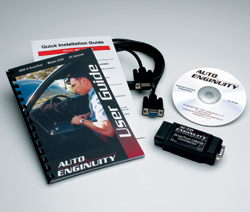
AutoEnginuity ScanTool — Professional Multi-System Choice
Best for: Advanced multi-system work
AutoEnginuity ScanTool is built for advanced users and small shops that need deeper, model-specific diagnostics on a laptop. With the right vehicle package, it can reach systems beyond generic engine codes, including ABS, airbag, transmission, and other modules, depending on make and model. The interface is data-rich, with graphing, logging, and detailed PID coverage that supports careful fault tracing rather than quick code clearing. Its trade-off is cost and complexity, because full coverage often requires separate vehicle packages and setup time. For serious multi-system work, it offers the most professional PC workflow here.
- Deep multi-system module coverage
- Detailed graphing and logging
- Suits careful fault tracing
- Full coverage needs separate packages
- Steeper setup than beginner tools
4.9/5
4.6/5
4.2/5

OBDwiz — Focused ScanTool.net Companion
Best for: ScanTool.net adapter owners
OBDwiz is a practical Windows program for owners who already use a ScanTool.net adapter and want dependable generic diagnostics. It reads and clears codes, plots live PID data, records sessions for later review, and displays fuel economy, VIN, and calibration information in a straightforward layout. The customizable dashboard and data-logging tools help owners compare readings before and after a repair. Its trade-off is hardware dependence, because full compatibility is tied to ScanTool.net PC adapters rather than every generic adapter. For that setup, OBDwiz is a simple, focused, budget-friendly choice.
- Customizable live-data dashboards
- Data logging to CSV format
- Over 90 supported PIDs
- Tied to ScanTool.net PC adapters
- No ECU programming function
4.4/5
4.5/5
4.8/5

TouchScan — Clearest Live-Data View
Best for: Clear live-data displays
TouchScan is a Windows program for owners who want live data presented clearly, without a steep learning curve. It reads and clears codes, monitors more than 90 sensor parameters, and displays them as gauges, graphs, and digital readouts that make a changing value easier to notice. Fuel-economy tracking, oxygen-sensor tests, and onboard monitoring add useful context for routine maintenance. Its trade-off is generic scope, because it does not retrieve manufacturer-specific ABS or airbag codes on most vehicles. For clear, everyday engine diagnostics, TouchScan balances simplicity with genuinely useful live-data tools.
- Over 90 monitored sensor parameters
- Customizable gauge dashboard
- Fuel-economy tracking included
- No most ABS or SRS codes
- Generic scope only
4.3/5
4.7/5
4.7/5

EOBD Facile — Guided EOBD Diagnostics
Best for: European / EOBD vehicles
EOBD Facile is a good fit for European and other EOBD vehicles, especially owners who want a guided, multilingual diagnostic program on Windows or Mac. It reads and clears fault codes, explains them with a large code database, and shows live sensor data, graphs, and vehicle information in a structured layout. The trial version helps you check basic compatibility before committing, which is useful when you are unsure about adapter support. Its trade-off is that the fullest features require a paid edition and a compatible adapter. For EOBD-focused owners, it is a clear, accessible diagnostic companion.
- Large fault-code database
- Multilingual guided interface
- Trial checks basic compatibility
- Full features need paid edition
- Adapter compatibility must be checked
4.4/5
4.6/5
4.6/5

ScanMaster-ELM — Adapter-Flexible Protocol Coverage
Best for: Generic ELM327 adapters
ScanMaster-ELM suits owners who use a generic ELM327 adapter and want broad protocol support on a Windows PC. It reads and clears codes, displays live data in tables and graphs, and supports the standard OBD2 protocols found on most 1996-and-later vehicles. The program also offers data recording and custom views, which help you track an intermittent fault over several drives. Its trade-off is a more technical interface, because setup and PID selection assume some familiarity with diagnostic terms. For adapter-flexible, protocol-wide diagnostics, ScanMaster-ELM is a dependable, no-frills option.
- Broad standard protocol support
- Custom views and data recording
- Works with generic ELM327 adapters
- More technical interface
- Assumes some diagnostic familiarity
4.4/5
4.8/5
4.0/5

DashCommand — Visual In-Car Dashboard
Best for: In-car dashboards
DashCommand turns a PC or in-car computer into a visual dashboard, making it a strong choice for drivers who monitor data while driving. It displays gauges, graphs, and trip information in a touch-friendly layout, and supports custom PIDs and data logging for owners who want to follow a specific sensor. The program works with ELM327-compatible adapters, so it fits many existing setups. Its trade-off is diagnostic depth, because the focus is monitoring and presentation rather than deep manufacturer-specific fault tracing. For drivers who want live data at a glance, DashCommand is engaging and practical.
- Touch-friendly gauge layout
- Custom PIDs and data logging
- Trip information at a glance
- Monitoring focus, not deep tracing
- Limited manufacturer-specific fault depth
4.0/5
4.6/5
4.7/5

PCMScan — Simple Core PC Checks
Best for: Simple code checks
PCMScan is a straightforward Windows option for owners who mainly want to read codes, check readiness, and view live data without extra complexity. It supports generic OBD2 functions, including code reading and clearing, freeze-frame data, and sensor monitoring, in a compact interface that is easy to learn. The program is useful as a first PC tool, especially for owners who already have a compatible ELM327 adapter. Its trade-off is limited advanced coverage, because it does not replace manufacturer-specific software for ABS, airbag, or other modules. For simple, reliable checks, PCMScan does the core job well.
- Compact, easy-to-learn interface
- Core codes and readiness checks
- Freeze-frame data included
- Limited advanced module coverage
- Not a manufacturer-specific replacement
4.0/5
4.5/5
4.6/5
Top 3 Head-to-Head: FORScan vs TOAD Pro vs OBD Auto Doctor
These three are the common final choices because they cover the three main buyer types: Ford-family depth, broad DIY work, and simple first scans.
| Feature | #1 FORScan | #2 TOAD Pro | #3 OBD Auto Doctor |
|---|---|---|---|
| Diagnostic Depth | Deep Ford-family modules — Best | Broad generic plus repair guidance | Generic engine data |
| Vehicle Compatibility | Ford-family deep; generic elsewhere | Broad OBD2 brands — Best | Broad OBD2; multi-platform |
| Ease of Use | Detailed, rewards patience | Approachable DIY layout | Cleanest beginner layout — Best |
| Choose if… | You own a Ford-family vehicle | You repair many brands at home | You want the simplest first scan |
Who These Programs Are NOT For
PC OBD2 software is not the right tool for every job, even when the feature list looks impressive.
If you mainly want a quick phone check in the driveway, a PC program may be overkill. Compare a handheld scanner versus a phone app before setting up a laptop, because a simpler tool may fit that job better. PC software also falls short if you need high-voltage EV diagnostics on most models.
Common Mistakes to Avoid
Most PC scan failures come from setup choices, not from the car itself.
Frequently Asked Questions About OBD2 Scanner Computer Software
Do I need an adapter to use OBD2 scanner computer software?
Yes, you need a compatible OBD2 adapter to connect your computer to your car. The software alone cannot read the vehicle, because the adapter translates the car’s diagnostic signals into data your PC can display. Most programs use an ELM327-compatible adapter, connected by USB, Bluetooth, or Wi-Fi, depending on the program. Check the software’s adapter list before buying, because some programs need a specific adapter for advanced modules.
Can PC OBD2 software read ABS and airbag codes?
It depends on the program and vehicle, because generic OBD2 software usually covers engine codes only. ABS and airbag systems use manufacturer-specific data, so a generic program may show no codes even when a warning light is on. Programs with supported manufacturer packages, such as FORScan for Ford-family vehicles or AutoEnginuity with the right package, can reach more systems. Always check the program’s coverage for your exact make, model, and year.
What is the best free OBD2 software for Windows?
For Ford, Lincoln, and Mazda owners, FORScan’s free version is the strongest starting point, because it offers deeper module access than most generic free programs. For other makes, a trial version or a program bundled with your adapter, such as OBDwiz with a ScanTool.net adapter, is often the best free route. Free versions usually limit advanced features, so check which functions are included before relying on them for a repair decision.
Does OBD2 computer software work on Mac?
Some PC OBD2 programs support macOS, but many are Windows-only, so you must check the current download page. OBD Auto Doctor and EOBD Facile list Mac support, while FORScan, TOAD Pro, and most others in this list are Windows-first. Running Windows software on a Mac through virtualization can work, but adapter drivers and USB connections may cause problems. Choose a native Mac program if you do not want to troubleshoot drivers.
Can OBD2 software work without internet?
Yes, most PC OBD2 software can read codes and live data without internet once it is installed and your adapter is connected. The diagnostic connection runs between your computer, adapter, and car, not through a cloud service. Internet is usually needed only for downloading software, updates, license activation, or looking up repair information. If you work offline, download updates and code definitions before you start, and keep your adapter connection local.
Can OBD2 PC software diagnose electric vehicles?
Usually only partly, because generic OBD2 software is built around combustion-engine diagnostics and standard emissions data. It may read basic vehicle information on some electric vehicles, but it will not reliably diagnose high-voltage battery, motor, or charging systems. For those systems, you usually need manufacturer-specific tools or software. Before buying, check whether an OBD2 scanner works on electric vehicles and confirm your exact model is supported.
Our Final Verdict
PC OBD2 software works best when it matches your car, adapter, and computer. FORScan leads for Ford-family owners, while TOAD Pro and OBD Auto Doctor cover broader, simpler needs. Check adapter and module coverage first, then choose the program you will actually use.

I’m Alex Rahman, a car enthusiast and automotive writer focused on practical solutions, car tools, and real-world driving advice. I share simple and honest content to help everyday drivers make better decisions.
