10 Best Bidirectional OBD2 Scanners for 2026: Command Tests, Not Just Codes
The best bidirectional OBD2 scanner right now is Autel MaxiSys MS906 Pro, with broad active-test coverage in one tablet. We compared 10 bidirectional scanners, scoring each on Bidirectional Coverage, Diagnostic Depth, and Ease of Use. Most scanners look strong on paper but miss the exact active test your car needs. Whether you need engine tests, system-wide checks, or service resets, this guide gives you one clear answer.
Quick Comparison: All 10 Products Ranked
| # | Product | Best For | Rating | Badge | |
|---|---|---|---|---|---|
| 1 | Autel MaxiSys MS906 Pro | Workshops and serious DIYers needing broad active tests | 4.9/5 | Best Overall | Buy → |
| 2 | Launch X431 V+ | Multi-brand shops needing wide vehicle coverage | 4.8/5 | Best Professional Pick | Buy → |
| 3 | Autel MaxiCOM MK808S | Home mechanics wanting tablet diagnostics without workshop size | 4.7/5 | Best Mid-Range Pick | Buy → |
| 4 | FOXWELL NT809 | DIYers who want many service resets in a handheld | 4.6/5 | Best Handheld Pick | Buy → |
| 5 | Launch X431 CRP919E | Small workshops wanting wide coverage in a travel-ready tablet | 4.6/5 | Best Small Workshop Pick | Buy → |
| 6 | Autel MaxiDAS DS808S | Mechanics wanting Autel coverage in a portable tablet | 4.5/5 | Best Compact Tablet | Buy → |
| 7 | THINKCAR ThinkDiag 2 | Phone users wanting portable bidirectional tests | 4.5/5 | Best Bluetooth Adapter | Buy → |
| 8 | Autel MaxiSys Elite II | Technicians needing speed and depth all day | 4.4/5 | Best Heavy Workshop Pick | Buy → |
| 9 | Launch X431 ProS V5.0 | Owners who like a familiar touchscreen workflow | 4.4/5 | Best Phone-Style Tablet | Buy → |
| 10 | FOXWELL NT710 | Single-car owners with a known job list | 4.3/5 | Best Budget Pick | Buy → |
How We Chose These Scanners
What we compared
We compared 10 bidirectional scanners on listed specifications, system coverage, active-test menus, and service functions, with no hands-on workshop testing claimed.
Our 3 scoring criteria
Bidirectional Coverage, Diagnostic Depth, and Ease of Use were applied in the same way to every product, using listed specifications.
What specs we checked
Active-test lists, system coverage, service menus, connection type, screen form, and update and access terms were checked from listed specifications.
What we cut — and why
Basic code readers without listed active tests, and adapters without listed bidirectional support, were cut because they cannot command a component.
What to Look for When Buying a Bidirectional OBD2 Scanner
A bidirectional scanner is only useful if it can run the exact command your car needs. Start with that job, then check system coverage, service functions, and access terms before comparing screens or feature counts.
1. Active Test Coverage for Your Vehicle
Bidirectional control means the tool can send a supported command to a module, such as running a fan, cycling a solenoid, or operating a pump. Before buying, learn what bidirectional control actually means for your system, then check the tool maker list for your exact make, model, year, and module. A general active-test claim is not proof that your car supports that command.
2. System Coverage Beyond the Engine
Engine codes are only the start. A useful bidirectional tool should reach the systems you actually troubleshoot, such as ABS, airbag, transmission, and body modules, where supported. Live data helps here too, because a commanded test is easier to judge when you can watch the response. See how to judge live-data scanners for diagnostics before choosing a screen size or graphing layout.
3. Service Functions and Resets
Many buyers need bidirectional control for a service job, not just a test. Throttle relearns, battery registration, steering-angle calibration, and parking-brake service are separate functions, and each must be listed for your vehicle. For one common example, check whether a tool can handle a throttle relearn with a scan tool before you clean a throttle body or replace a sensor. Do not assume a service menu on one brand works the same way on another.
4. Updates, Access, and Total Cost
Bidirectional depth can change with software, brand access, and security permissions, so check update terms and any ongoing access requirements in writing. A tool that works today may lose a brand function after an update lapse, and some procedures need a security login or a specific software version. Battery work shows the same caution: confirm whether a tool can handle battery registration for your vehicle rather than assuming a BMS menu means full registration support.

Autel MaxiSys MS906 Pro — Broadest Active-Test Choice
The Autel MaxiSys MS906 Pro suits a workshop or a serious home garage where a code alone rarely ends the job. Its tablet format gives a large, readable screen for live data, graphs, and active-test menus, while all-system coverage reaches engine, transmission, ABS, airbag, and body modules on many supported vehicles. Service functions for oil resets, steering-angle calibration, and other routine jobs sit alongside the active tests, so fewer jobs need a second tool. The trade-off is size and setup time: it is larger than a pocket reader, and advanced functions still depend on exact vehicle coverage.
- Broad active-test menu across major systems
- All-system scans in one tablet
- Clear live-data graphs and menus
- Larger than a pocket reader
- Advanced tests need exact vehicle coverage
4.9/5
4.8/5
4.9/5

Launch X431 V+ — Wide Multi-Brand Coverage
The Launch X431 V+ is built for multi-brand work, where the next car in the bay is rarely the same as the last. Its tablet interface organises system scans, live data, and active tests by vehicle, which helps when moving between brands without relearning a new layout each time. Broad service coverage supports routine resets and calibrations on many supported models, and the wireless vehicle connector keeps the tablet free to move around the car. Its main limit is the same as any multi-brand tool: a listed function needs checking against model, year, and module before a job is promised.
- Strong multi-brand vehicle coverage
- Wireless connector for bay mobility
- Organised system and test menus
- Listed tests vary by model
- Setup takes longer than handhelds
4.8/5
4.8/5
4.7/5

Autel MaxiCOM MK808S — Capable Tablet, Smaller Footprint
The Autel MaxiCOM MK808S fits a home mechanic who wants tablet diagnostics without a full workshop trolley. It scans multiple systems, shows live data in clear graphs, and offers active tests and service functions on many supported vehicles, which covers most routine troubleshooting beyond a basic engine code. The smaller tablet is easier to store and carry than larger workshop units, and the menu layout stays familiar across jobs. Its limit is depth: the most specialised manufacturer procedures may still sit above this tier, so check the exact active test before buying for one specific repair.
- Tablet diagnostics without workshop bulk
- Clear live-data graphs
- Familiar menu across jobs
- Most specialised procedures may be absent
- Tests vary by vehicle
4.7/5
4.6/5
4.8/5

FOXWELL NT809 — Handheld With Service Depth
The FOXWELL NT809 is a handheld-first choice for owners who prefer a dedicated tool over a phone or tablet. It offers all-system scanning, live data, and active tests in a rugged-feeling unit with physical controls, which suits greasy hands and a busy garage better than a touchscreen alone. Service functions cover many routine resets, and the built-in screen keeps the whole job on one device. Its smaller screen makes long live-data graphs harder to read than on a tablet, and some brand-specific tests remain limited, so confirm the exact function for your vehicle first.
- Dedicated handheld, no phone needed
- Physical controls suit garage use
- Many routine service functions
- Smaller screen for long graphs
- Some brand tests are limited
4.6/5
4.5/5
4.6/5
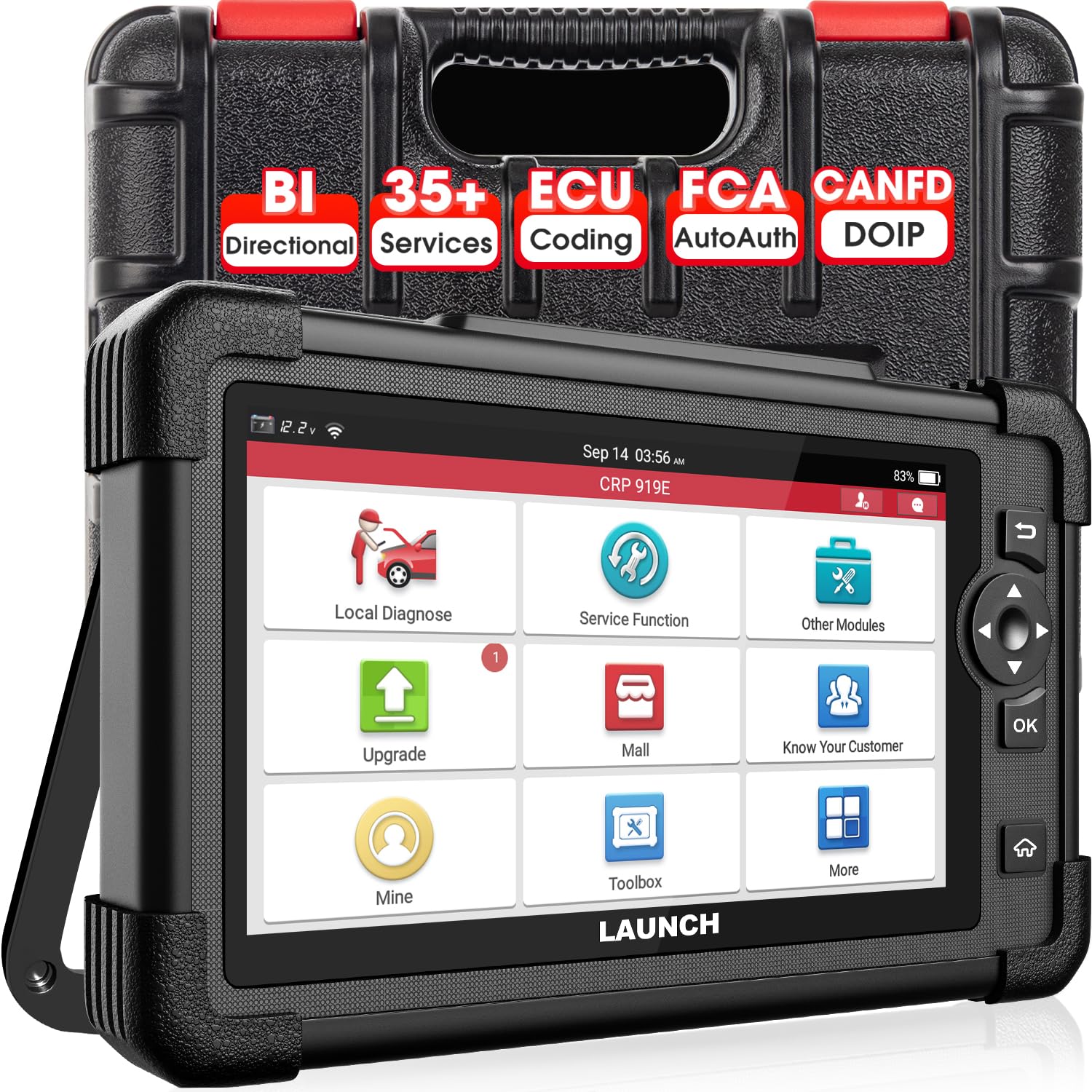
Launch X431 CRP919E — Wide Coverage, Travel-Ready Tablet
The Launch X431 CRP919E suits a small workshop or an advanced DIYer who wants wide system coverage in a tablet that travels well. It scans engine, transmission, ABS, airbag, and other supported systems, pairs live data with active tests, and includes service functions for common maintenance jobs. The interface is designed for quick system selection, which helps when a fault spans more than one module. Its trade-off is software scope: coverage and available tests vary by brand and model, and the tool rewards owners who verify the exact vehicle list before relying on it for a specialised job.
- Wide multi-system tablet coverage
- Quick system selection menus
- Live data paired with active tests
- Coverage varies by brand
- Specialised jobs need prior checking
4.6/5
4.6/5
4.5/5

Autel MaxiDAS DS808S — Portable Autel Tablet Option
The Autel MaxiDAS DS808S is a compact tablet for mechanics who want Autel system coverage in a smaller, more portable package. It handles all-system scans, live data, active tests, and service functions on many supported vehicles, without the bulk of a full workshop tablet. That balance makes it practical for mobile work, a second bay, or a home garage with limited bench space. Its smaller screen and more modest processing headroom can feel tight during long graphing sessions, and the deepest manufacturer procedures may still require a higher-tier tool.
- Portable tablet, full system scans
- Good for mobile or second-bay work
- Active tests plus service functions
- Screen feels tight for long graphs
- Deepest procedures may need higher tier
4.5/5
4.5/5
4.6/5

THINKCAR ThinkDiag 2 — Portable Phone-Based Active Tests
The THINKCAR ThinkDiag 2 is the most portable bidirectional option here, pairing a small Bluetooth adapter with a phone app. For owners who already diagnose from a phone, it can run active tests and service functions on supported vehicles without carrying a tablet, and the app interface makes live data easy to view and share. Portability is also its limit: bidirectional depth depends heavily on the app, the vehicle, and any brand access in use, and a phone battery or connection drop can interrupt a longer session. Check the exact supported tests before buying.
- Smallest bidirectional setup here
- Phone app for live data
- No tablet to carry
- Depth depends on app access
- Phone drops can interrupt sessions
4.5/5
4.4/5
4.6/5

Autel MaxiSys Elite II — Workshop-Grade Speed and Depth
The Autel MaxiSys Elite II is aimed at heavy workshop use, where speed, screen size, and broad coverage matter across a full day of vehicles. Its large tablet, fast navigation, and wide system and service coverage suit technicians who move between brands and need active tests, coding support, and detailed live data in one place. The docking and larger form factor also suit a fixed bay better than a pocket tool. Its trade-off is practical: it is the bulkiest and most complex tool here, and owners who only need occasional active tests may find its depth more than they use.
- Large screen for detailed data
- Fast navigation across brands
- Wide service and coding support
- Bulkiest tool in this list
- More complex than occasional users need
4.4/5
4.5/5
4.3/5

Launch X431 ProS V5.0 — Familiar Touchscreen Diagnostics
The Launch X431 ProS V5.0 brings a phone-style tablet to multi-system diagnostics, which suits owners who like a familiar touchscreen workflow. It scans supported systems, displays live data, runs active tests, and covers many service functions, while the wireless connector lets the tablet move freely around the vehicle. That layout helps during tests that need watching a component while operating it from the tablet. Its limit is the usual multi-brand caution: the exact active test, system, and model must be confirmed, because a broad feature list does not guarantee every command on every car.
- Familiar phone-style touchscreen
- Wireless tablet for component watching
- Multi-system scans and tests
- Every command needs model checking
- Not the deepest workshop tool
4.4/5
4.4/5
4.5/5

FOXWELL NT710 — Budget Entry to Active Tests
The FOXWELL NT710 is the budget-friendly entry point for owners who mainly need bidirectional tests on a limited set of systems. It offers active tests, live data, and service functions in a handheld unit that is easy to store, carry, and use for routine jobs. For a single-car owner, that focus can be enough: common actuator tests and resets are covered without paying for workshop-wide depth. Its limit is scope, with narrower system coverage and fewer specialised procedures than the tablets above, so it suits a known job list better than open-ended multi-brand work.
- Simplest entry to active tests
- Easy to store and carry
- Covers common actuator tests
- Narrower system coverage
- Fewer specialised procedures
4.3/5
4.2/5
4.5/5
Top 3 Head-to-Head: Autel MaxiSys MS906 Pro vs Launch X431 V+ vs Autel MaxiCOM MK808S
These three are the most common final choices because they cover active tests, multiple systems, and service functions without jumping to a fixed workshop platform.
| Feature | #1 Autel MS906 Pro | #2 Launch X431 V+ | #3 Autel MK808S |
|---|---|---|---|
| Bidirectional Coverage | 4.9/5 — Best | 4.8/5 | 4.7/5 |
| Diagnostic Depth | 4.8/5 | 4.8/5 | 4.6/5 |
| Ease of Use | 4.9/5 — Best | 4.7/5 | 4.8/5 — Best |
| Choose if… | You want the broadest active-test starting point | You work across many brands | You want a smaller tablet for home use |
Who These Bidirectional Scanners Are NOT For
A bidirectional tool is overkill if you only need an occasional engine code, and it is the wrong tool if you need dealer-only access for a protected module.
If you are unsure which type fits your jobs, start with a practical guide on how to choose an OBD2 scanner before spending on bidirectional depth. If your car needs a protected or dealer-only procedure, no general tool on this list should be assumed to unlock it.
Common Mistakes to Avoid
Bidirectional tools reward careful checking. These four mistakes cause most wasted purchases and failed tests.
Frequently Asked Questions About Bidirectional OBD2 Scanners
What is a bidirectional OBD2 scanner?
A bidirectional OBD2 scanner can send supported commands to a vehicle module, not just read codes and live data. For example, it may run a cooling fan, cycle a solenoid, or operate a pump when that test is supported for your exact vehicle. Coverage varies by make, model, year, and module, so check the tool maker list before buying for a specific test.
Can a bidirectional scanner damage my car?
A supported test used correctly should not damage a healthy system, but active tests do operate real components, so conditions and safety matter. Follow the vehicle and tool instructions, keep people away from moving parts, and do not run a test on a system you do not understand. If a procedure involves fuel, brakes, or steering, use the correct service information and stop if the instructions are unclear.
Do all bidirectional scanners work on all cars?
No, bidirectional coverage is not universal, even on tools with broad vehicle lists. A scanner may support an active test on one model and lack it on another, or support it for the engine module but not for ABS or body modules. Always confirm the exact test, system, make, model, and year in the manufacturer coverage information before relying on a general compatibility claim.
What is the difference between bidirectional control and a service reset?
Bidirectional control sends a command to test a component, such as running a fan or cycling a valve, while a service reset completes a maintenance procedure, such as an oil reset or a throttle relearn. A tool may support one without supporting the other, and both depend on vehicle coverage. Check each function separately for your vehicle instead of assuming one capability proves the other.
Do I need a subscription for bidirectional functions?
It depends on the tool, the brand, and the function. Some tools include listed functions with software updates, while others need brand access, a software licence, or a subscription for certain vehicles or procedures. Check update terms, access requirements, and any ongoing costs in writing before buying, because a function available today may change after an update lapse.
Can a Bluetooth adapter do bidirectional tests?
Some Bluetooth adapters can, but Bluetooth alone does not prove bidirectional support. The adapter, the app, and the vehicle must all support the exact active test, and some app features need brand access or a licence. Check the app test list for your vehicle before buying, and prefer a tool whose bidirectional menu is documented rather than implied by wireless connectivity.
Our Final Verdict
For most buyers, the choice comes down to breadth versus portability: the MS906 Pro gives the broadest active-test base, while smaller tablets and the Bluetooth adapter suit narrower, known job lists. Pick the exact test first, then the tool that lists it for your car.

I’m Alex Rahman, a car enthusiast and automotive writer focused on practical solutions, car tools, and real-world driving advice. I share simple and honest content to help everyday drivers make better decisions.
