Can an OBD2 Scanner Work on Trucks? The Honest Answer
Quick Answer
Yes, on most light-duty pickup trucks, but often no — or only partly — on medium- and heavy-duty trucks. The deciding factors are the truck’s weight rating, its diagnostic port, and whether it speaks OBD2 or a heavy-duty protocol such as J1939.
The word “truck” covers everything from a half-ton pickup to a Class 8 tractor. A scanner that works perfectly on the first can show nothing useful on the second, so the useful question is whether your truck’s port and software match the scanner in your hand.
What Kind of Truck Do You Have?
Start with the gross vehicle weight rating, or GVWR. This is the maximum loaded weight the manufacturer rates the vehicle for, and it is usually on the door jamb label, not a measure of what the truck happens to weigh on a given day.
As a practical guide, light-duty trucks are the familiar pickups and vans most people drive every day. Medium-duty trucks include larger box trucks and heavier chassis cabs. Heavy-duty trucks include large commercial trucks, buses, and tractor-trailers used for freight.
The boundary that matters most in the United States is around 14,000 pounds GVWR. Vehicles at or below that weight have a much stronger link to car-style OBD2, while vehicles above it fall under a separate heavy-duty diagnostic system.
Year and market matter too. A truck sold in the United States may follow different rules from a similar truck sold elsewhere, and an older truck may predate the standard a newer truck follows.
How Can You Tell Which System Your Truck Uses?
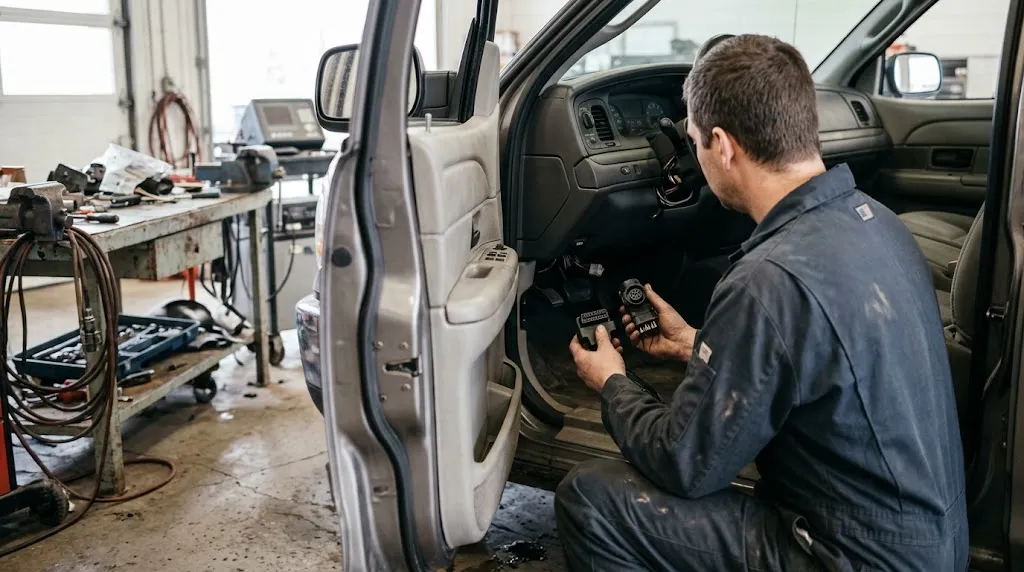
Look at the port first. A flat, trapezoid-shaped 16-pin socket is the familiar OBD2 connector. A round 9-pin connector, often under or beside the dash, points to heavy-duty J1939 diagnostics. A round 6-pin connector usually points to the older J1708 system.
Some trucks have more than one port, or a 16-pin port that still does not behave like a car port. Physical fit is a clue, not proof: a plug that fits can still fail to communicate if the scanner does not speak the truck’s protocol.
Next, check the door label for GVWR and the manual for the diagnostic standard. If the manual names J1939, HD-OBD, or a manufacturer-specific heavy-duty system, a basic car scanner is unlikely to give full coverage, even if it powers on.
| Truck type | Likely port | Likely system |
|---|---|---|
| Light-duty pickup or van | 16-pin OBD2 | OBD2 |
| Medium-duty truck | 16-pin OBD2, sometimes another port | OBD2 or heavy-duty, by year and model |
| Heavy-duty truck or bus | Round 9-pin, sometimes 16-pin as well | J1939, older J1708, or HD-OBD |
This table is a starting point for identification. The exact port and protocol for a single truck should be confirmed from its manual, because manufacturers and model years vary.
Will a Normal OBD2 Scanner Work on a Light-Duty Truck?
For most 1996-or-newer light-duty trucks sold in the United States, yes. The U.S. Environmental Protection Agency describes full OBD compliance for light-duty vehicles from model year 1996, after earlier waivers for 1994 and 1995 models. That is the same basic system used on cars, so a standard scanner should be able to read generic powertrain codes, freeze-frame data, live data, and readiness monitors, subject to what that scanner itself supports.
Diesel does not automatically break this rule. A light-duty diesel pickup that is OBD2 compliant can still be scanned for generic emissions-related information, but diesel-specific or manufacturer-specific data, such as detailed aftertreatment or transmission information, depends on the tool’s coverage. See what OBD2 can diagnose on a diesel engine for that limit.
The port is usually under the dash on the driver’s side, but the exact spot varies by make and model. If you cannot find it, check where the OBD2 port is usually located before assuming the truck has no OBD2 port.
What About Medium-Duty Trucks?
Medium-duty trucks are the grey area. In the United States, California required OBD II for vehicles up to 14,000 pounds GVWR earlier than the federal program applied the same breadth, and federal medium-duty compliance was phased in during the 2000s. That is why two trucks of similar size, but different years and markets, can behave differently.
A medium-duty truck with a genuine 16-pin OBD2 port may work with a standard scanner for generic codes, but it may still need enhanced software for manufacturer-specific systems. For these trucks, port shape, model year, and manual matter more than size alone.
Why Do Most Heavy-Duty Trucks Need a Different Tool?
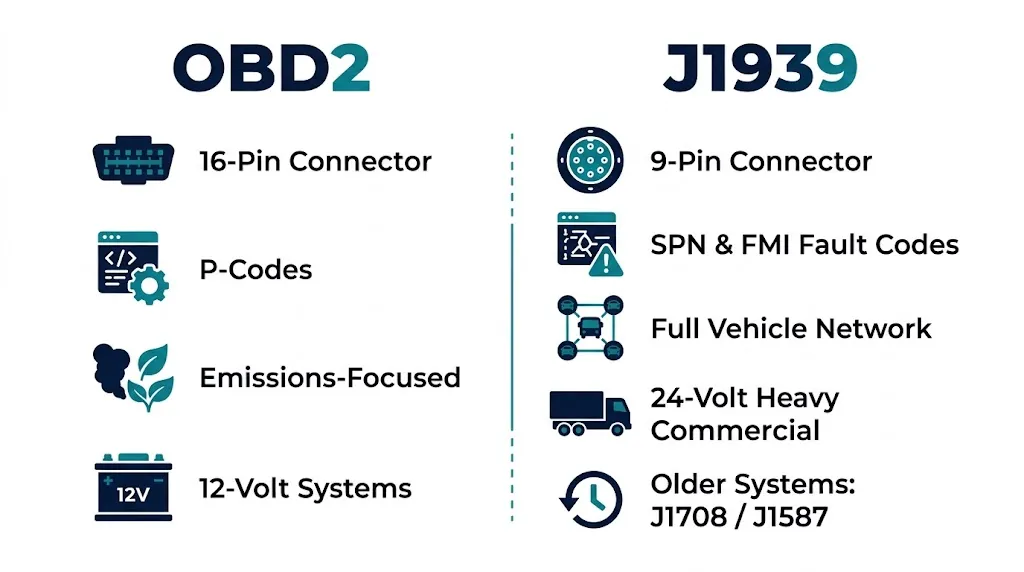
Heavy-duty trucks were not built around car-style OBD2. They use a vehicle network that coordinates the engine, transmission, brakes, body systems, and aftertreatment at the same time. The main modern standard for that network is SAE J1939, a CAN-based protocol. Older trucks may use SAE J1708 and J1587, a slower serial system.
The federal heavy-duty OBD rule for engines over 14,000 pounds GVWR sets a separate heavy-duty OBD system, rather than simply extending car OBD2 to larger trucks. Heavy-duty trucks made after 2010 may support OBD diagnostics through the J1939-13 round connector, a different physical and protocol path from a car’s 16-pin connector.
Fault information also looks different. Car OBD2 uses letter-and-number codes, such as P-codes. J1939 uses parameter group numbers, suspect parameter numbers, and failure mode identifiers — SPN and FMI pairs. A car scanner that only understands P-codes cannot simply translate a J1939 fault into a useful car code.
Voltage is another practical difference. Many heavy trucks use a 24-volt system, while most car scanners are built for 12-volt cars. Check the scanner’s rating, not just the connector shape. The guide to OBD2 protocols explains the car protocols a heavy-duty network is not limited to.
What Can a Regular Scanner Read on a Heavy Truck?
Sometimes, a limited amount. If a heavy truck also exposes a car-style OBD2 or HD-OBD emissions interface, a compatible scanner may read some generic emissions data, but that does not mean it can read the whole truck.
| Area | Basic car OBD2 scanner |
|---|---|
| Generic emissions codes, where exposed | Sometimes |
| Full J1939 SPN and FMI faults | Usually no |
| Transmission, ABS, body, and chassis systems | Usually no |
| DPF regeneration, calibrations, and bi-directional tests | Usually no |
A heavy-duty scanner, by contrast, is built to speak J1939 and, where needed, J1708, to handle the truck’s voltage, and to reach more than the engine controller. It is not just a stronger car scanner; it is a tool for a different network.
Will a 9-Pin to 16-Pin Adapter Fix the Problem?
An adapter can fix the physical connection, but it does not by itself translate the protocol. If your scanner’s software cannot read J1939, plugging it into a heavy truck through an adapter will still leave it unable to understand the data.
Adapters are useful when the scanner already supports J1939 and only needs the right plug, or for telematics devices built for the truck network. They do not turn a car-only code reader into a heavy-duty tool, and a claim of broad truck support on the box is not the same as support for your truck’s year, engine maker, and protocol.
What Should You Check Before You Buy or Borrow a Scanner?
Work through these checks in order. A scanner that fails an early check will not be saved by a later feature.
- Find the GVWR on the door label and note whether the truck is light-, medium-, or heavy-duty.
- Identify the port: 16-pin, round 9-pin, round 6-pin, or more than one port.
- Check the manual for J1939, J1708, HD-OBD, or OBD2, and note the engine maker where relevant.
- Confirm the scanner lists that exact protocol, not just “truck” or “diesel” in general.
- Confirm the scanner is rated for the truck’s voltage, especially on a 24-volt heavy truck.
- Decide what you actually need: generic codes only, or full-system, aftertreatment, and service functions.
Tip
If you own one light-duty pickup, a good OBD2 scanner is usually enough. If you work on a mixed fleet, look for dual-protocol coverage that explicitly lists OBD2 and J1939, rather than assuming one tool covers both.
What If the Scanner Will Not Connect?
Do not start by buying an adapter. First confirm the ignition state the scanner needs, the port is clean and undamaged, and the scanner is set to the right protocol where it allows a manual choice. A loose plug or a bent pin can look like a protocol problem.
Next, confirm you are on the right port. On a dual-port truck, the 9-pin port may give engine data while the 16-pin port gives wider access, depending on the maker. Try the other port only if the tool and manual support it.
If the tool powers on but reports no communication, the most likely causes are a protocol mismatch, a voltage mismatch, or a tool that does not support that truck’s system. See the guide for when a scanner will not connect for a fuller check order.
Warning
Do not clear heavy-duty aftertreatment or safety-related faults just to turn a light off, and do not run a regeneration or calibration unless the tool, the truck, and the conditions support it. A cleared code does not fix the underlying fault.
A final distinction helps avoid a costly mistake. The history of when OBD2 became standard explains the car and light-truck timeline. Heavy trucks followed a different regulatory and technical path, so a date that applies to cars should not be applied to a semi-truck without checking.
Related Product
Heavy-Duty Truck Scanner Category
If your truck uses J1939, a scanner built for heavy-duty trucks is the practical next step after confirming the port and protocol.
As an Amazon Associate, we earn from qualifying purchases.
Frequently Asked Questions
Can I use my car OBD2 scanner on a semi-truck?
Usually not for full diagnostics. Most semi-trucks use J1939 over a 9-pin connector, or an older J1708 system, and a car-only scanner does not speak those protocols or reach the truck’s other systems, even with a physical adapter.
Does a diesel pickup need a special scanner?
Not necessarily for generic codes. A light-duty diesel pickup that is OBD2 compliant should work with a normal OBD2 scanner for generic powertrain information, but diesel-specific and manufacturer-specific systems may need a more capable tool.
What is the difference between OBD2 and J1939?
OBD2 is a standardized, mainly emissions-focused diagnostic system for cars and light trucks, using a 16-pin connector and P-codes. J1939 is a CAN-based vehicle network for heavy trucks and buses, using parameter groups and SPN and FMI fault pairs across many controllers.
Can a 9-pin to 16-pin adapter make a car scanner work on a heavy truck?
No, not by itself. The adapter changes the plug shape, but the scanner software must still support J1939 and the truck’s voltage. If it does not, the adapter will not create that support.
Is a 24-volt truck a problem for a 12-volt scanner?
Yes, it can be. Many heavy trucks use 24-volt systems, and a scanner rated only for 12 volts should not be assumed safe or compatible. Check the scanner’s voltage rating before connecting it.
How do I know if my truck is OBD2 compliant?
Check the GVWR on the door label, the diagnostic port shape, the model year and market, and the owner’s manual. A 16-pin port plus a manual reference to OBD2 is a strong sign, while a 9-pin port or a J1939 reference points to heavy-duty diagnostics instead.
Conclusion
An OBD2 scanner works on trucks when the truck itself is built around OBD2, which is most often true for light-duty pickups and vans. It stops being a safe assumption as trucks get larger, older, or more commercial, because the port, protocol, voltage, and fault format can all change.
Before you scan, identify the GVWR, the port, and the protocol, then match the tool to that system. That one check saves the most common disappointment: a scanner that fits, powers on, and still tells you nothing useful.

I’m Alex Rahman, a car enthusiast and automotive writer focused on practical solutions, car tools, and real-world driving advice. I share simple and honest content to help everyday drivers make better decisions.
