How Much Should You Pay for a Decent Dash Cam? (A Buyer’s Honest Guide)
A decent dash cam costs between $50 and $150 for most drivers. Budget models ($20–$50) work for basic recording. Mid-range cameras ($50–$150) give you reliable 1080p or 1440p footage, night vision, and G-sensor protection. Premium models ($150–$400+) add 4K, GPS, cloud connectivity, and parking mode — useful if you park in high-risk areas or drive for work.
I bought my first dash cam for $18. It lasted four months before it stopped recording mid-loop — right after a fender bender that I had zero footage of.
That mistake cost me a lot more than the $18 I saved.
I’m Alex Rahman, and I’ve been testing and writing about car tech for over seven years. I’ve personally used more than a dozen dash cams across every price tier — from throwaway Amazon specials to flagship BlackVue systems that cost more than some phones.
The question “how much should I pay for a dash cam?” sounds simple. But the real answer depends on what you’re actually trying to protect against. And a lot of buyers get it wrong — spending either too little and getting burned, or too much and paying for features they’ll never use.
Let me break it all down for you — honestly and clearly.
- Most drivers get the best value spending $50–$150 on a dash cam.
- Budget cameras under $50 often have poor night vision and unreliable loop recording.
- The Sony STARVIS sensor — common in mid-range and premium cams — makes a bigger real-world difference than resolution alone.
- Front-and-rear setups typically cost $30–$60 more than front-only, and are worth it for most drivers.
- A microSD card and optional hardwire kit add $20–$50 to your total cost — factor this in from the start.
What Does a Dash Cam Actually Do — and Why Does Price Even Matter?
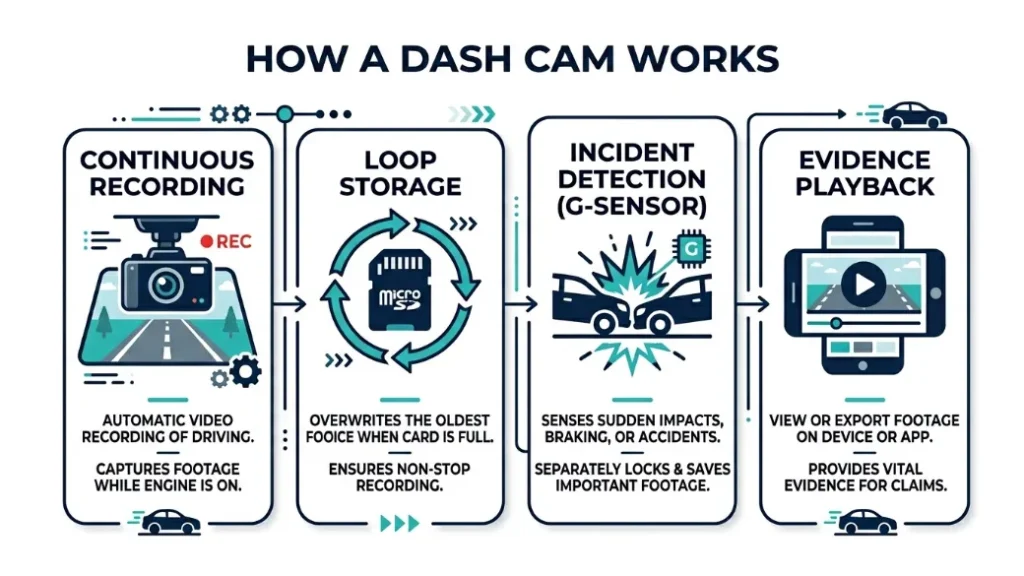
A dash cam is a small camera that mounts to your windshield and records video of the road continuously while your car runs. It loops over old footage automatically, keeping the last few hours of your drive on file at all times.
When something goes wrong — an accident, a near-miss, a pothole claim — that footage becomes your evidence.
Price matters because the quality of that evidence depends entirely on the camera that captured it. A blurry, overexposed clip of a license plate helps no one. A sharp, correctly exposed recording with a readable plate, a timestamp, and GPS coordinates? That’s what wins insurance disputes.
How a Dash Cam Protects You When Accidents Happen
Dash cam footage gives you a factual, time-stamped record of exactly what happened. Insurance adjusters and police officers can use it to determine fault. In countries like the UK and Australia — and increasingly in the US — insurers accept dash cam video as primary evidence in claims.
A 2022 survey by Aviva Insurance found that over 40% of UK drivers with dash cams said their footage had directly resolved a dispute in their favor. That number is rising every year.
The value isn’t just in accidents either. Staged accident fraud — where drivers deliberately cause collisions to claim insurance payouts — is a growing problem. A visible dash cam is often enough of a deterrent. And if it isn’t, your footage exposes the fraud instantly.
Why Cheap Cameras Can Fail When You Need Them Most
Here’s the part most buyers don’t think about until it’s too late.
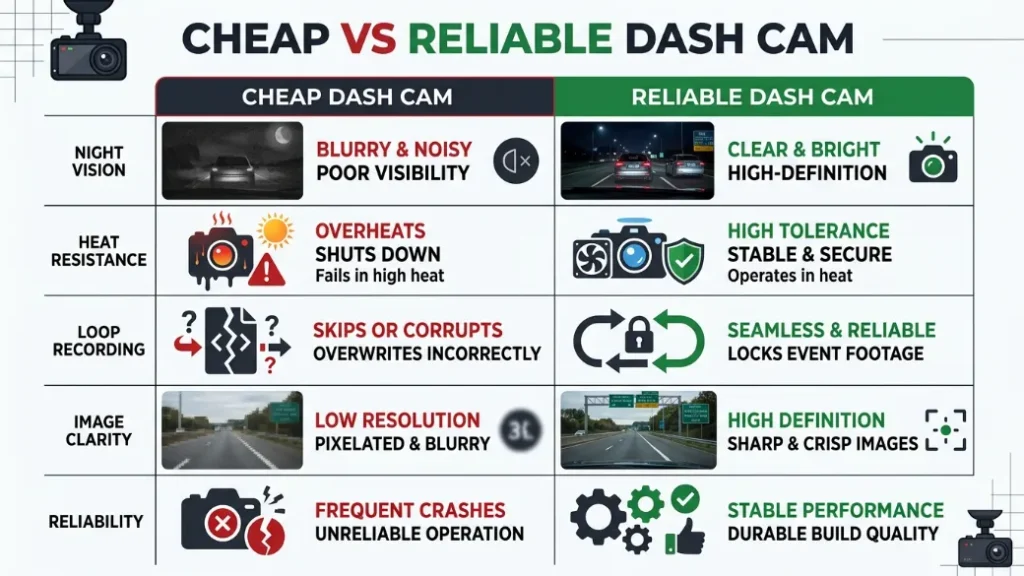
A $25 dash cam might record fine in clear daylight. But at night, in rain, or at highway speed, the footage from a cheap sensor becomes a blurry mess. License plates disappear. Details vanish. And the one time you actually need clear evidence — the camera gives you nothing useful.
Beyond image quality, cheap cameras often use low-quality capacitors or batteries that fail in heat. Parked in a summer sun with a cheap cam? There’s a real chance it shuts down, corrupts your SD card, or stops recording entirely.
Dash cams using cheap lithium-ion batteries can swell or fail in hot cars. Look for cameras that use supercapacitors instead — they handle heat far better and last much longer in parked-car conditions.
What Are the Dash Cam Price Tiers — and What Do You Get at Each Level?
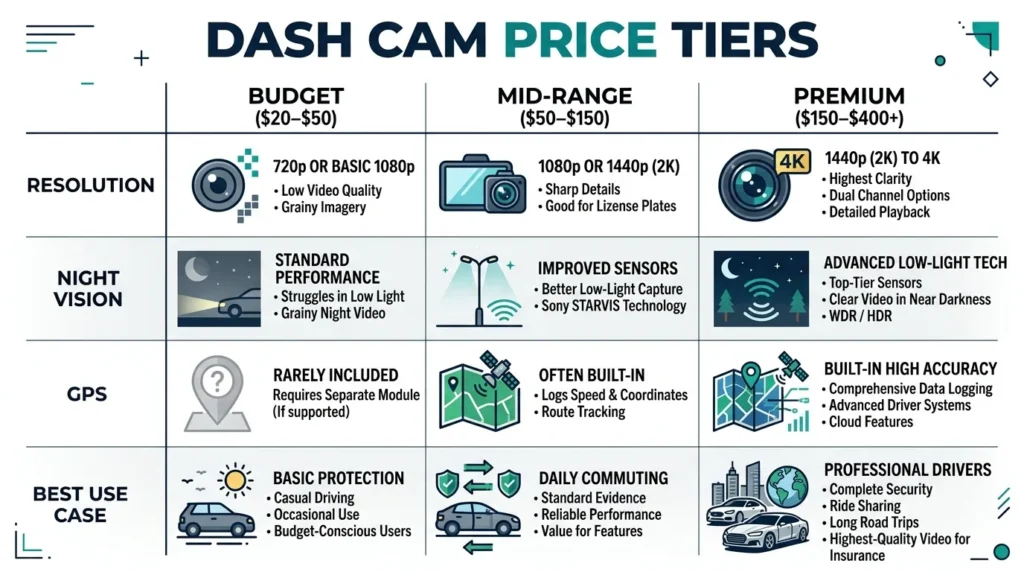
Dash cams fall into three clear price tiers, and each tier gives you a meaningfully different level of protection. Here’s exactly what you’re buying at each price point.
Budget Dash Cams ($20–$50): When Are They Good Enough?
Budget dash cams record basic 1080p video in daylight and offer loop recording and a simple G-sensor. They work — but with real limitations you need to understand before buying.
At this price, you get cameras from brands like Rexing, Vantrue’s entry-level line, and various unbranded Amazon options. Most record at 1080p, which sounds reasonable. But the sensor quality and lens glass behind that resolution are where corners get cut.
Nighttime footage from a $30 camera often looks washed out or grainy. Oncoming headlights can blow out the entire frame. License plates in low light — the most critical detail in an insurance claim — are frequently unreadable.
A budget cam is acceptable if:
- You drive mostly in daylight
- You want basic documentation for short commutes
- You’re testing whether you actually use a dash cam before investing more
A budget cam is not enough if:
- You drive at night regularly
- You park in public lots or on busy streets
- You need footage that will hold up in an insurance or legal dispute
Mid-Range Dash Cams ($50–$150): The Sweet Spot for Most Drivers
Mid-range dash cams give you genuinely reliable footage, better sensors, and features that make a real difference in evidence quality. For the vast majority of drivers, this is exactly where to spend your money.
At $50–$150, you start seeing cameras with the Sony STARVIS sensor — a low-light imaging sensor that dramatically improves night recording. You get proper 1080p and often 1440p resolution, wider dynamic range so license plates stay readable in mixed lighting, and more reliable build quality.
Brands like Viofo (a Chinese manufacturer beloved by enthusiasts for outstanding value), Nextbase (the UK’s best-selling dash cam brand, trusted by over 2 million drivers), and Garmin all have strong offerings in this tier.
The Viofo A119 Mini 2, for example, packs a Sony STARVIS 2 sensor into a $70 body. It punches well above its price point in low-light conditions and has a strong track record for reliability.
If you’re buying in this tier, look specifically for cameras that mention the Sony STARVIS or Sony STARVIS 2 sensor. It’s the single biggest indicator of good night performance at a fair price.
Premium Dash Cams ($150–$400+): Who Actually Needs to Spend This Much?
Premium dash cams offer 4K recording, built-in GPS, cloud connectivity, and robust parking mode — and they’re genuinely excellent cameras. But most everyday drivers don’t need to spend this much.
At the premium tier, you’re looking at brands like BlackVue (a South Korean brand known for always-on cloud connectivity), Vantrue‘s top-end dual systems, and Garmin Dash Cam Mini 3 series. These cameras are built for people who park in high-risk areas, drive for rideshare platforms like Uber or Lyft, manage small fleets, or simply want the best available.
BlackVue’s DR970X-2CH, for instance, records front 4K and rear 1080p simultaneously, streams live to an app, and logs GPS data for every journey. It costs around $350 — and it earns it. But it’s complete overkill for someone doing a suburban school run.
| Price Tier | Typical Cost | Resolution | Night Vision | GPS | Best For |
|---|---|---|---|---|---|
| Budget | $20–$50 | 1080p | Basic | Rarely included | Daytime-only, casual use |
| Mid-Range | $50–$150 | 1080p–1440p | Good (Sony STARVIS) | Sometimes | Most everyday drivers |
| Premium | $150–$400+ | 1440p–4K | Excellent | Always included | Rideshare, high-risk parking, fleet |
What Dash Cam Features Are Worth Paying For — and Which Are Just Marketing?
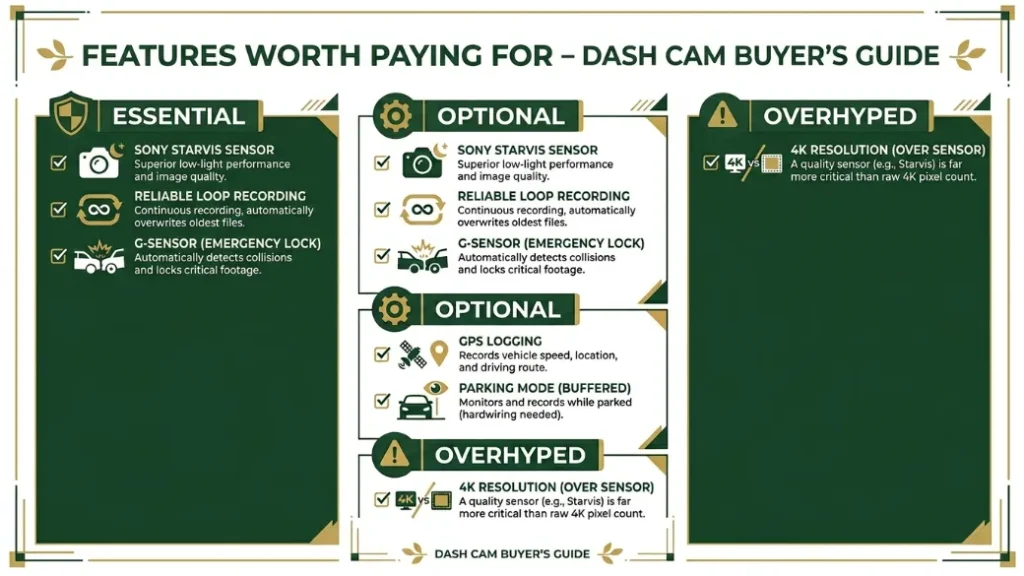
Not every feature on a dash cam spec sheet justifies its price bump. Some matter enormously in real-world use. Others are there to make the box look impressive on an Amazon listing. Here’s how to tell the difference.
Video Resolution: Does 4K Really Make a Difference on the Road?
Resolution matters — but only up to a point. Going from 720p to 1080p makes a real, meaningful difference in plate readability. Going from 1080p to 1440p offers a clear improvement, especially at distance. Going from 1440p to 4K? The gains are smaller than most people expect.
Here’s why: dash cams have tiny lenses. A 4K sensor squeezed behind a small lens in variable road lighting doesn’t produce the same result as a 4K cinema camera. For most insurance and legal purposes, sharp 1080p or 1440p footage is fully sufficient.
4K is genuinely useful if you want to digitally zoom into footage after the fact — to catch a distant plate, for example. But chasing resolution over sensor quality is one of the most common dash cam buying mistakes.
Night Vision and the Sony STARVIS Sensor: Why This Matters More Than Resolution
The Sony STARVIS sensor is the single most important feature to look for in a dash cam — and it matters far more than resolution for real-world evidence quality.
STARVIS is a back-illuminated CMOS sensor that excels in low-light environments. It captures more light per pixel, which means headlights don’t blow out the frame, dark roads stay detailed, and license plates remain readable at night. Most accidents happen in low-light conditions — early morning, evening, rain — so this is exactly when your camera needs to perform.
Cameras with STARVIS typically start around $60–$80. Cameras without it — even at similar resolutions — produce noticeably worse footage in anything other than bright daylight. If I had to pick one spec to prioritize, this is it.
GPS Logging: Is It Worth the Extra Cost?
GPS adds $10–$30 to the price of a dash cam and records your exact speed and location alongside the video. For insurance claims and legal disputes, this data is powerful — it proves you weren’t speeding, confirms your location, and makes your footage far more credible as evidence.
For most drivers, GPS is worth having. It’s especially valuable if you drive frequently in areas with aggressive drivers or staged accident risk. Brands like Garmin build GPS directly into the camera hardware and integrate it cleanly with their companion apps.
If budget is tight and you have to choose between GPS and a better sensor, prioritize the sensor. But if you can afford a mid-range camera with both — get both.
Parking Mode: When Do You Need It and What Does It Add to the Price?
Parking mode keeps your dash cam recording (or on standby with motion detection) while your car is parked and turned off. It captures hit-and-runs, vandalism, and break-in attempts. It’s one of the most genuinely useful features a dash cam can have.
The catch: parking mode requires a constant power supply. Most dash cams don’t draw enough current from a standard plug to run for hours when the engine is off without draining your battery. A hardwire kit — which connects your cam directly to the car’s fuse box — costs an extra $15–$30 and is usually necessary for reliable parking mode.
Some premium cameras (like the BlackVue DR series) include a built-in voltage cutoff that stops recording before your battery drains flat. Budget cameras typically don’t. Add parking mode value when you park on busy streets, in city lots, or anywhere with a history of car crime.
If you want parking mode, budget for the hardwire kit from day one. A professional installation typically costs $50–$80 if you don’t want to do it yourself — but it’s a one-time cost that dramatically increases your camera’s usefulness.
Front Camera Only vs. Front and Rear: How Much More Should You Pay?
A dual-channel dash cam (front and rear) costs roughly $30–$70 more than a front-only model and gives you coverage for rear-end collisions, which account for around 29% of all crashes in the US according to the NHTSA.
Rear cameras matter because the most common type of accident — being rear-ended — happens behind you. Without rear footage, you’re relying on the other driver admitting fault, witness accounts, or your word against theirs. A rear camera removes all that uncertainty instantly.
For rideshare drivers, a rear-facing interior camera is almost non-negotiable. It protects against false passenger complaints — something that can cost you your account if you can’t disprove it.
| Setup | Typical Price | What It Covers | Best For |
|---|---|---|---|
| Front only | $50–$150 | Forward collisions, road incidents ahead | Tight budget, low-risk driving |
| Front + Rear | $80–$220 | Front + rear-end collisions, parking | Most drivers, highway commuters |
| Front + Interior (cabin) | $100–$250 | Passenger cabin, rideshare protection | Uber/Lyft drivers, taxi drivers |
My recommendation: if you spend more than $80 on a dash cam, make it a dual-channel system. The extra coverage is worth every dollar.
What Are the Hidden Costs of a Dash Cam Most Buyers Forget?
The sticker price of a dash cam is never your total cost. Most buyers forget at least one of the following extras — and some forget all of them.
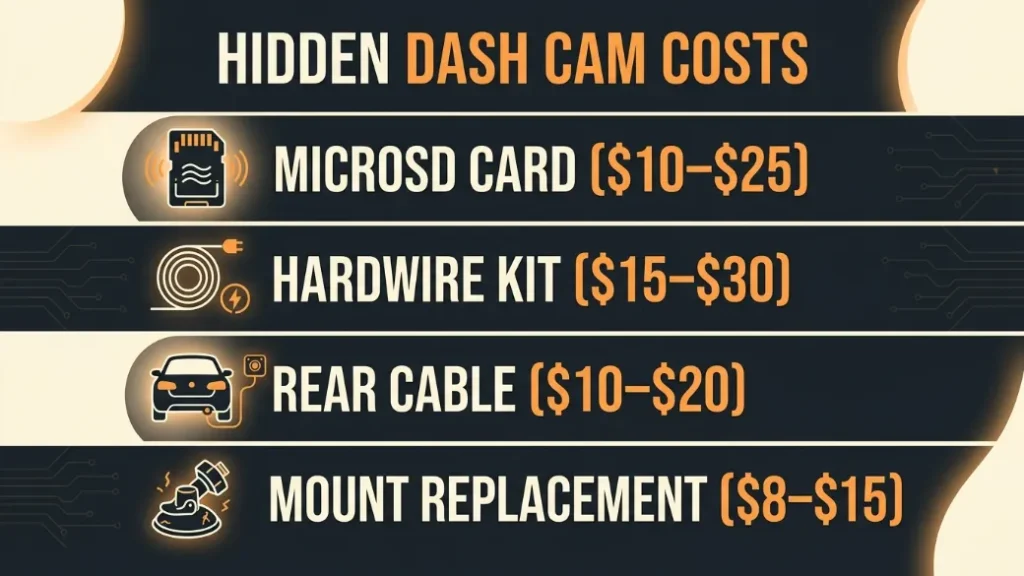
- MicroSD card ($10–$25): Most dash cams don’t include one. Use a card rated for continuous write cycles — Sandisk High Endurance or Samsung PRO Endurance are the reliable options. Regular cards fail faster and can corrupt footage.
- Hardwire kit ($15–$30): Needed for parking mode. Usually sold separately. Add installation labor if you’re not doing it yourself.
- Rear camera cable ($10–$20): Dual-channel systems sometimes require a longer cable routed through your headliner, and some manufacturers charge extra for it.
- Mount replacement ($8–$15): Suction cup mounts fail over time, especially in heat. Budget for a replacement adhesive mount eventually.
A $100 dash cam with a quality SD card, a hardwire kit, and a spare mount can easily total $150–$160. Plan for this upfront and you won’t feel burned later.
The real cost of a good dash cam setup is typically $100–$200 all-in for most drivers. That’s camera + SD card + basic mounting. Add $30–$80 more if you want parking mode with a hardwire kit. Think in total cost, not just camera price.
Which Dash Cam Brand Is Worth Your Money at Each Price Point?
Brand matters — not for logo prestige, but for build reliability, firmware updates, and customer support when something goes wrong. Here’s where each major brand sits and what they do best.
- Viofo — Best value per dollar in the mid-range. Their A-series cameras consistently outperform their price. A great choice for buyers who want enthusiast-grade specs without flagship prices. Popular on Reddit’s r/dashcam community for good reason.
- Nextbase — UK market leader with the most user-friendly setup experience. Their Alexa-integrated models (like the 622GW) are ideal for tech-comfortable drivers who want a polished, app-driven experience. Find their full lineup at nextbase.com.
- Garmin — Trusted name with excellent GPS integration, clean design, and long warranties. Their Dash Cam Mini 3 ($100–$130) is one of the most discreet and reliable options in the mid-range.
- Vantrue — Best for dual and triple-channel systems. Their E-series cameras are among the best front-and-rear options available. Pricier, but the build quality justifies it.
- BlackVue — Premium cloud-connected cameras for power users, rideshare drivers, and small fleets. Expensive, but the always-on connectivity and remote viewing are genuinely useful for professional use. More detail at blackvue.com.
- Rexing — The most accessible budget brand in the US market. Fine for casual daylight use, but don’t rely on their low-end models for nighttime evidence quality.
For unbiased, community-tested rankings, the r/Dashcam wiki is one of the most thorough buyer resources available — updated regularly by real-world users.
For reliability at a fair price: Viofo or Garmin. For user-friendly app experience: Nextbase. For professional or rideshare use: Vantrue or BlackVue. For tight budgets with basic needs: Rexing, but understand the limitations.
Which Dash Cam Price Tier Is Right for You? (Simple Decision Guide)
Your ideal price tier depends on how you drive, where you park, and what you need that footage to do. Use this guide to find your answer in under a minute.
- You drive short local trips mostly in daylight, park in a private driveway, and have a very tight budget: A $40–$60 camera is workable. Just confirm it has a G-sensor and decent daylight reviews.
- You commute daily, drive in all weather, and occasionally park in public: Spend $70–$130 on a mid-range camera with a Sony STARVIS sensor. Add a quality SD card. This is the right tier for most readers.
- You drive at night frequently, park on city streets or in lots regularly, or have had a previous insurance dispute: Go mid-to-premium ($120–$180), add a hardwire kit, and choose a dual-channel setup.
- You drive for rideshare, manage a small fleet, or park in genuinely high-risk areas: A premium camera with parking mode and cloud connectivity ($200–$350) is a business expense and worth every cent.
Avoid buying the cheapest possible option “just to try a dash cam.” If it fails during the one incident where you needed it, the false sense of security is worse than having no camera at all. Set a realistic minimum of $50 for your first purchase.
Putting It All Together: What Should You Actually Spend?
After testing cameras at every price point, my honest answer is this: spend $70–$130 on your dash cam, add a $15 Sony or Sandisk High Endurance microSD card, and go dual-channel if your budget reaches $100.
That’s a total spend of $85–$150 all-in. For most drivers, that range gets you everything that matters — clear night footage, reliable loop recording, G-sensor protection, and footage that holds up when it counts.
Skip the temptation to go cheaper. And unless you’re a rideshare driver or park in genuinely high-risk areas, you probably don’t need to go above $200.
The goal isn’t the most impressive dash cam. It’s the one that works every single time you need it.
Frequently Asked Questions
Is a $30 dash cam good enough for insurance claims?
A $30 dash cam can capture basic daytime footage, but it often fails in low-light conditions — which is when many accidents happen. License plates may be unreadable at night, making the footage less useful as insurance evidence. For reliable claims support, spend at least $60–$80 on a camera with a quality sensor.
What is the best dash cam price range for everyday drivers?
The $70–$130 range is the sweet spot for most everyday drivers. At this price, you get a reliable Sony STARVIS sensor, solid 1080p or 1440p recording, and a G-sensor for impact detection. Add a quality microSD card and your total setup cost stays under $150.
Do I need to spend more for a front and rear dash cam?
A dual-channel setup typically costs $30–$70 more than front-only. Rear-end collisions account for roughly 29% of US crashes, so having rear coverage is genuinely valuable. If your budget reaches $100 total, a front-and-rear system is the better choice over a more expensive front-only camera.
Does a more expensive dash cam record better at night?
Yes — significantly. Premium sensors like the Sony STARVIS handle low-light far better than cheap alternatives, keeping license plates readable and reducing overexposure from headlights. Night vision quality is directly tied to sensor quality, which improves meaningfully at mid-range and premium prices.
What hidden costs should I budget for with a dash cam?
Budget for a quality microSD card ($10–$25), a hardwire kit if you want parking mode ($15–$30), and potentially a rear camera cable for dual setups ($10–$20). Your all-in cost is typically $30–$80 more than the camera price alone — plan for this from the start.
Is a dash cam worth it if I’ve never had an accident?
Yes — especially because you can’t predict when an incident will happen. A dash cam protects you against fraud, false fault claims, and hit-and-runs that could cost thousands without evidence. The camera pays for itself the first time it prevents a disputed claim from going the wrong way.

I’m Alex Rahman, a car enthusiast and automotive writer focused on practical solutions, car tools, and real-world driving advice. I share simple and honest content to help everyday drivers make better decisions.
