5 Dashcam Mistakes to Avoid (And How to Fix Them)
The five most common dashcam mistakes are using a cheap or wrong SD card, mounting the camera in the wrong spot, misconfiguring loop recording, running parking mode without a proper power source, and never checking footage until after an incident. Each mistake is easy to fix once you know what to look for.
I pulled into a petrol station last year, and a van reversed straight into my front bumper. No witnesses. The driver denied everything. I reached for my dashcam footage — and got nothing. Corrupted files. A cheap SD card had quietly failed two weeks earlier, and I had no idea.
I’m Alex Rahman, and I’ve been testing and writing about dashcams and in-car tech for years. That incident taught me more than any spec sheet ever could. Most dashcam problems aren’t hardware failures — they’re user mistakes. Simple ones. And almost all of them are preventable.
Here are the five mistakes I see most often, why they happen, and exactly how to fix each one.
- Always use a dashcam-rated endurance SD card — standard cards fail fast under constant loop recording.
- Mount your dashcam behind the rearview mirror to avoid obstructing your view and stay within legal limits.
- Loop recording must be turned on and configured — it does not manage itself automatically on all models.
- Parking mode needs a hardwire kit or dedicated power source to avoid draining your car battery.
- Check and back up your dashcam footage at least once a month — do not wait for an incident to discover a problem.
What Makes a Dashcam Setup Go Wrong From Day One?
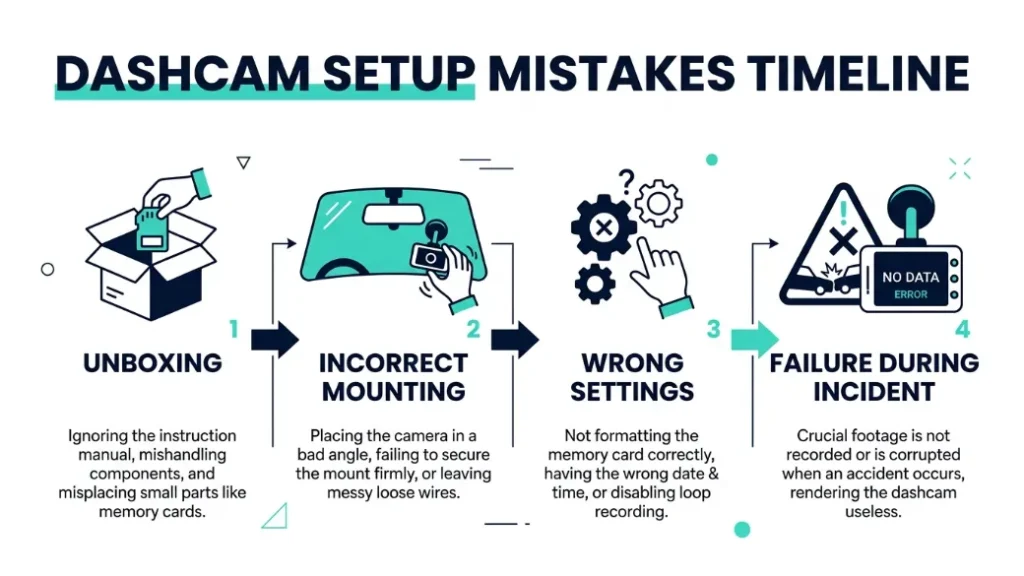
Most dashcam problems start at the moment of installation. Drivers unbox the camera, mount it, plug it in, and assume it works. That assumption causes most of the mistakes on this list.
A dashcam is not a plug-and-play device in the way a phone charger is. It records continuously, rewrites data constantly, and operates in extreme heat and cold. Each of those conditions demands specific settings and the right supporting hardware.
The good news is that once you understand how a dashcam actually works, fixing these mistakes takes less than 30 minutes.
Why Most Drivers Install Their Dashcam Incorrectly
The instruction manuals that come with dashcams — even from quality brands like Nextbase and Vantrue — are often brief. They cover the physical installation but gloss over critical settings. Drivers end up with a camera that looks like it is working but is actually recording corrupted or incomplete footage.
Let’s go through each mistake one by one.
Mistake 1 — Using the Wrong SD Card and Losing All Your Footage
This is the most damaging mistake — and the most common. A standard SD card is not built for dashcam use. It will fail within weeks or months, and it will often fail silently, giving you no warning until you need the footage most.
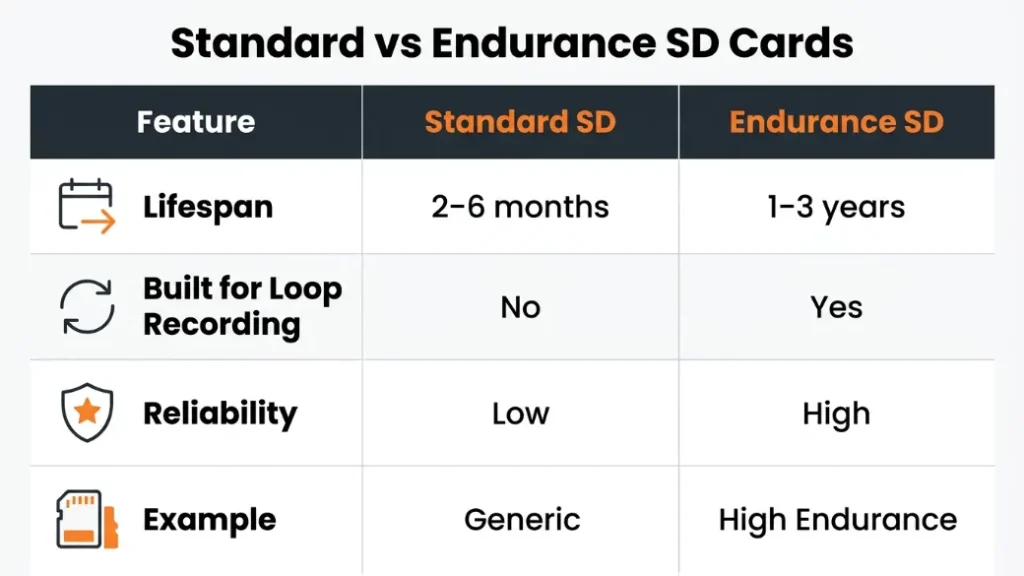
Dashcams use loop recording, which means the camera constantly overwrites old footage with new footage. Standard SD cards — the kind you buy for a camera or phone — are built for occasional reads and writes. Dashcam loop recording performs hundreds of write cycles per day. A standard card degrades fast under that load.
A failing SD card rarely gives obvious signs. Your dashcam may appear to record normally while saving corrupted or empty files. Always check your footage manually — do not assume recording means saving.
What Type of SD Card Does a Dashcam Actually Need?
You need an endurance-rated SD card — specifically designed for devices that write data continuously. The two most trusted options are the SanDisk High Endurance and the Samsung PRO Endurance. Both brands engineer these cards for surveillance cameras and dashcams specifically.
Look for these specs when choosing a card:
- Class 10 or U3 speed rating — needed for smooth 1080p or 4K recording
- Endurance rating — measured in total terabytes written (TBW)
- Capacity of 32GB to 128GB — larger cards give you more footage before overwriting
- MLC or TLC NAND flash — more durable than cheap QLC-based cards
| SD Card Type | Built for Dashcam? | Typical Lifespan | Example |
|---|---|---|---|
| Standard SD | No | 2–6 months | Generic brand cards |
| Endurance SD | Yes | 1–3 years | SanDisk High Endurance |
| Industrial SD | Yes (overkill) | 3–5 years | Kingston Industrial |
How Often Should You Replace Your Dashcam SD Card?
Even endurance cards wear out. Replace your dashcam SD card every 12 to 18 months if you drive daily. If you drive less frequently — say, under 10 hours per week — every 24 months is reasonable. Many dashcam brands, including BlackVue, now display card health status in their companion apps, which makes this much easier to track.
Format your SD card inside the dashcam itself — not on your computer. Formatting in-camera ensures the correct file system structure for loop recording. Do this every 3 months to keep the card healthy.
Mistake 2 — Mounting Your Dashcam in the Wrong Spot on the Windshield
Where you place your dashcam matters more than most drivers realise. A poor mounting position can block your line of sight, reduce recording coverage, and — in some regions — land you a fine for windshield obstruction.
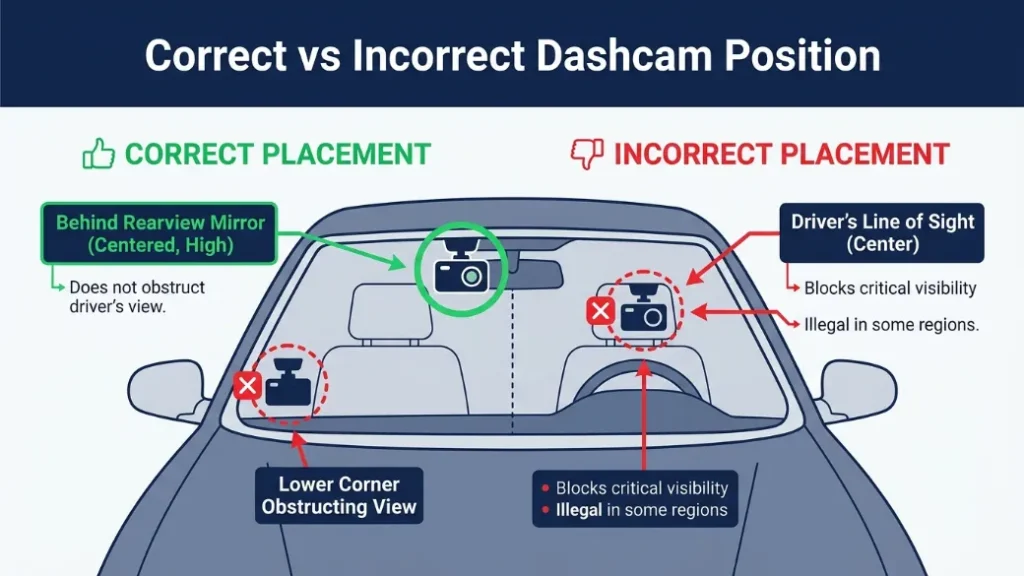
The most common bad placement is dead centre on the windshield at eye level. It feels natural, but it sits right in your primary sightline and creates a blind spot. It also catches more glare from the sun, which degrades night vision performance.
Where Is the Best Place to Mount a Dashcam for Full Coverage?
The ideal position is directly behind the rearview mirror, near the top centre of the windshield. This placement offers three key advantages: it stays out of your direct line of sight, it is hidden from the outside so it deters theft, and it captures the same wide road view your eyes use when driving.
- Clean the windshield with an alcohol wipe and let it dry fully.
- Position the mount directly behind the rearview mirror at the top of the glass.
- Check that the camera lens sits below the tinted sun strip if your car has one.
- Angle the camera slightly downward — aim to capture one-third sky and two-thirds road.
- Run the power cable along the headliner and down the A-pillar to the 12V socket.
- Check the live view in the dashcam app or screen to confirm correct framing before driving.
Does Dashcam Placement Affect Legality in Your Country?
Yes — and this surprises many drivers. In the United States, most states require dashcams to be mounted in a specific zone to avoid obstructing the driver’s view. California law, for example, restricts dashcam placement to a 5-inch square in the lower driver’s corner or a 7-inch square in the lower passenger corner of the windshield.
In the United Kingdom, the Highway Code states that nothing should obstruct the driver’s view. The European Union adds a GDPR layer — if your dashcam records pedestrians or public spaces, you may have data privacy obligations depending on your country. Check your local road authority for exact rules before you mount.
In some EU countries, sharing dashcam footage publicly — on social media or video platforms — without blurring faces and licence plates may violate GDPR regulations. Always anonymise footage before publishing online.
Mistake 3 — Ignoring Loop Recording Settings and Filling Up Storage Fast
Loop recording is the core feature that makes dashcams practical — it automatically overwrites the oldest footage when storage fills up, so the camera never stops recording. But many drivers either leave it misconfigured or do not realise they need to set it up at all.
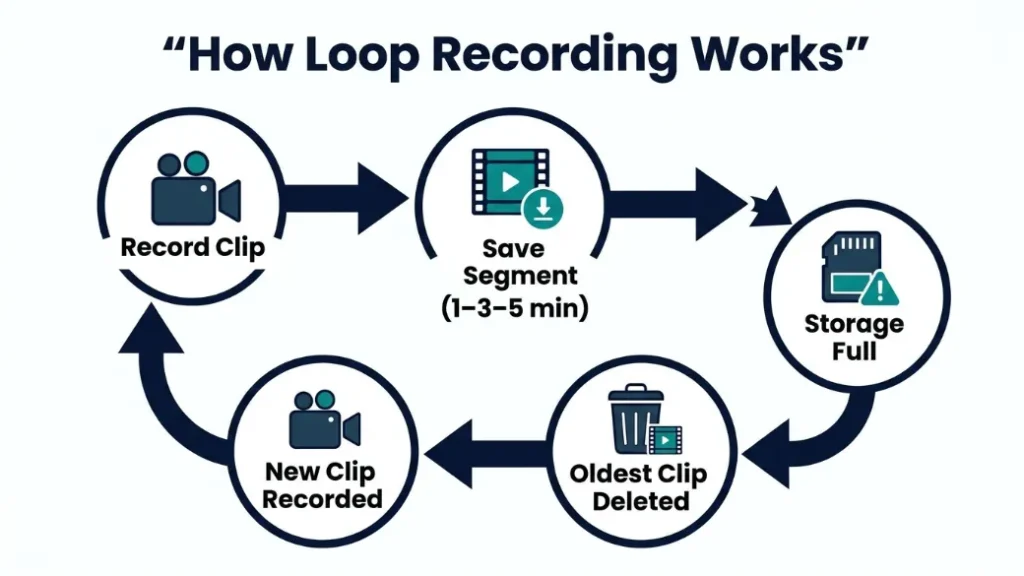
Without correct loop recording settings, one of two things happens: the card fills up and the camera stops recording entirely, or the camera saves footage in files too large to manage, making it nearly impossible to find a specific moment later.
How Does Loop Recording Work and Why Should You Configure It?
Loop recording splits footage into short clip segments — typically 1, 3, or 5 minutes long. When the SD card is full, the oldest clip is deleted and replaced with a new one. This cycle continues indefinitely, so you always have the most recent footage available.
The key configuration decision is clip length. Shorter clips (1 minute) make it easier to find a specific moment. Longer clips (5 minutes) reduce the number of file splits but take longer to review. Most dashcam experts recommend 3-minute clips as the right balance.
Enable the emergency lock or event recording feature on your dashcam. When triggered by a sudden impact (via the G-sensor), it saves that clip in a protected folder that loop recording cannot overwrite. This is critical for preserving accident footage automatically.
Also check that loop recording is actually enabled in your dashcam’s settings menu. Some models ship with it turned on by default — but not all. Nextbase models, for instance, prompt you to configure this during first setup, while budget models may not.
Mistake 4 — Running Parking Mode Without the Right Power Setup
Parking mode is one of the most valuable dashcam features — it keeps the camera recording or on standby while your car is parked, capturing hit-and-runs, vandalism, or break-in attempts. But used incorrectly, it will drain your car battery flat overnight.
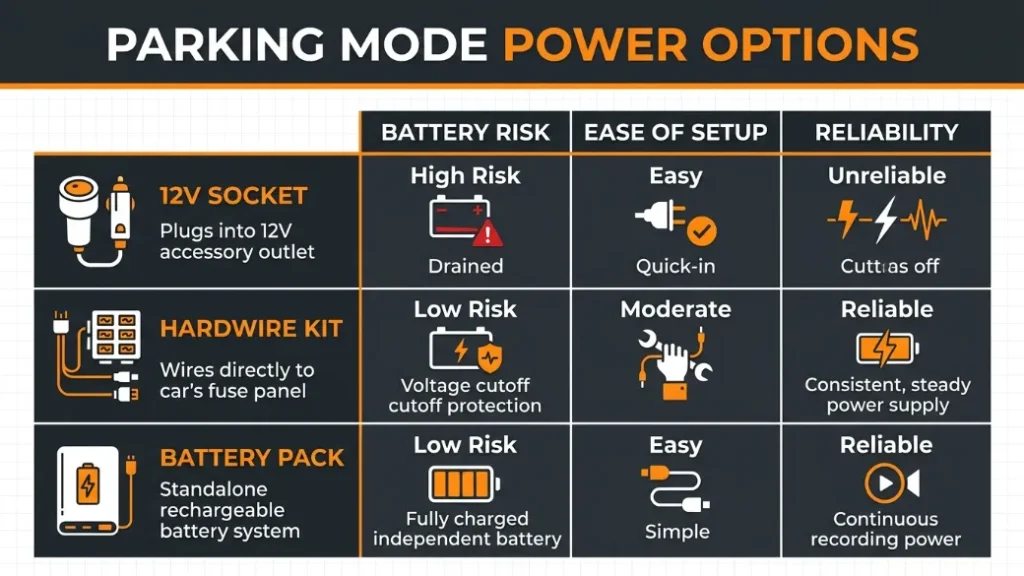
Most dashcams draw power from the 12V cigarette lighter socket. When you turn off your engine, that socket loses power on most modern vehicles — meaning parking mode does not actually work unless you have an alternative power source set up.
Does Dashcam Parking Mode Drain Your Car Battery?
Yes — if connected incorrectly, it absolutely can. A dashcam in active parking mode draws between 200mA and 500mA of current. Left running for 10 to 12 hours, that is enough to drain a standard car battery from full to flat, particularly in cold weather when battery capacity drops.
The key fact: Parking mode only protects your car if your dashcam has a reliable, regulated power source that cuts off before the battery drops below safe voltage — typically 11.8V to 12.0V. Without a voltage cutoff, you risk a dead battery every morning.
What Is a Hardwire Kit and Do You Actually Need One?
A hardwire kit connects your dashcam directly to your car’s fuse box instead of the 12V socket. It taps into an “accessory” or “always-on” fuse circuit and includes a built-in voltage cutoff that automatically shuts the dashcam off when battery voltage drops too low.
If you want parking mode to work reliably, a hardwire kit is not optional — it is essential. Vantrue, Nextbase, and BlackVue all sell brand-matched hardwire kits for their models. Professional installation costs around $30 to $60 at most auto shops if you are not comfortable working with fuse boxes yourself.
An alternative for those who do not want to hardwire is a dashcam battery pack — a separate lithium battery that powers the camera independently. Brands like Cellink make dashcam-specific packs with built-in voltage protection. They are easier to install but need recharging every few days.
To run parking mode safely: use a hardwire kit with a voltage cutoff, or a dedicated dashcam battery pack. Never rely on your standard 12V socket for overnight parking mode — it will drain your battery.
Mistake 5 — Never Checking Your Footage Until It Is Too Late
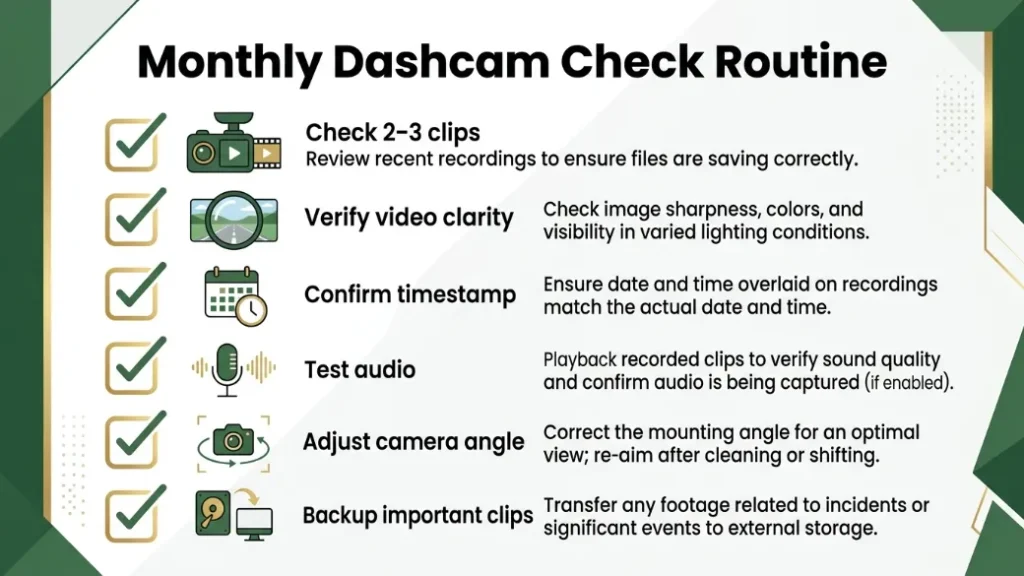
This mistake is invisible right up until the moment it costs you — usually after an accident, a dispute, or a break-in. Drivers assume their dashcam is recording correctly and never verify until they desperately need the footage. By then, they discover a corrupted card, a mis-aimed lens, or a settings error that has been there for months.
Your dashcam is only as useful as the footage it actually saves. If you never check it, you have no idea whether it is working correctly.
How Often Should You Review and Back Up Dashcam Footage?
Check your dashcam footage at minimum once per month. You do not need to watch hours of driving — just open two or three recent clips on your phone or computer and confirm the video is clear, the timestamp is correct, the audio is working, and the frame covers the road properly.
Back up any footage you may need — near-misses, unusual incidents, or anything that might become relevant — immediately after it happens. Copy those files off the SD card before loop recording has a chance to overwrite them. Most modern dashcams, including the BlackVue DR970X, offer cloud backup so clips upload automatically over Wi-Fi without you needing to remove the card.
Set a recurring monthly calendar reminder to check your dashcam footage. Five minutes of review every month could save you thousands in disputed insurance claims.
Bonus: Are You Breaking the Law With Your Dashcam Without Knowing It?
Dashcam laws vary significantly by country — and many drivers are unaware their setup may not be fully legal. In most countries, using a dashcam for personal driving records is permitted. The issues arise around how footage is stored, shared, and used.
Here is a quick overview of dashcam legality in key regions:
- United Kingdom: Dashcams are legal. Footage can be submitted to police. GDPR applies if you share footage publicly.
- United States: Legal in all 50 states, but windshield placement laws vary by state. Audio recording laws vary — some states require two-party consent.
- European Union: Legal for personal use in most countries. GDPR requires you to handle footage responsibly. Austria has historically had stricter rules.
- Australia: Legal and commonly used by insurance companies. Some states have audio recording restrictions.
- UAE and Gulf States: Generally permitted, but check local regulations before use, as rules differ by emirate.
For the most current guidance in your region, check your national road authority or consult this up-to-date dashcam legality guide for a country-by-country breakdown.
Quick Comparison — Capacitor vs. Battery Dashcams: Which One Handles Extreme Weather Better?
If you live in a region with extreme summer heat or winter cold, the power unit inside your dashcam matters as much as its lens quality. Most dashcams use either an internal battery or a supercapacitor for short-term power storage — and they behave very differently in temperature extremes.
| Feature | Battery Dashcam | Capacitor Dashcam |
|---|---|---|
| Heat tolerance | Degrades above 60°C | Handles up to 85°C |
| Cold tolerance | Reduced capacity below 0°C | Unaffected by cold |
| Lifespan | 2–3 years typical | 5–10 years typical |
| Best for | Mild climates | Hot or cold extremes |
| Example models | Nextbase 622GW | Vantrue E1 Lite, BlackVue DR970X |
If you park outdoors in summer heat regularly, a capacitor-based dashcam is a significantly more reliable long-term choice. Batteries swell and fail in sustained heat above 60°C — a temperature a car interior reaches easily on a sunny day. You can read more about dashcam temperature ratings at BlackVue’s official guide on capacitors vs. batteries.
Conclusion
Most dashcam problems come down to five fixable mistakes: the wrong SD card, a poor mounting position, misconfigured loop recording, an inadequate parking mode power setup, and never checking your footage. None of these are complicated to fix — they just require knowing what to look for.
As someone who learned the hard way — watching a valid insurance claim fall apart because of a failed SD card — I can tell you that 30 minutes of correct setup is worth more than months of false security.
Grab an endurance-rated SD card, mount your camera behind the mirror, set your loop recording to 3-minute clips, wire in a hardwire kit if you use parking mode, and check your footage once a month. Do those five things, and your dashcam will actually do its job when you need it most.
If you found this helpful, share it with a friend who just bought their first dashcam — they will thank you for it.
Frequently Asked Questions
Why is my dashcam footage always corrupted?
Corrupted dashcam footage is almost always caused by a failing or incompatible SD card. Standard SD cards are not built for the constant rewrite cycles of loop recording. Switch to an endurance-rated card such as the SanDisk High Endurance or Samsung PRO Endurance, and format it inside the dashcam every three months.
Can I use any SD card in my dashcam?
No — a standard SD card will degrade quickly under dashcam loop recording. You need a Class 10 or U3 endurance-rated card specifically designed for continuous write cycles. Check your dashcam manufacturer’s recommended card list before buying.
Does leaving a dashcam plugged in drain the car battery?
Yes, it can — especially if you use parking mode through the standard 12V cigarette lighter socket. Use a hardwire kit with a built-in voltage cutoff to prevent battery drain. This automatically shuts the dashcam off before the battery drops below a safe voltage level.
Where is the best place to mount a dashcam on the windshield?
The best position is directly behind the rearview mirror at the top centre of the windshield. This keeps the camera out of your line of sight, hides it from outside view, and gives the widest, most unobstructed road coverage. Always check your local laws for windshield placement restrictions.
How often should I check my dashcam footage?
Check at least once a month. Open two or three recent clips and verify the video is clear, the timestamp is correct, and the frame captures the road properly. Back up any clips from near-misses or incidents immediately — loop recording will overwrite them automatically if you wait too long.
Is a dashcam legal in my country?
Dashcams are legal for personal use in most countries including the UK, US, Australia, and most of the EU. The key restrictions relate to windshield placement, audio recording consent, and how footage is shared publicly under privacy laws like GDPR. Always check your national road authority for the current rules in your specific country or state.

I’m Alex Rahman, a car enthusiast and automotive writer focused on practical solutions, car tools, and real-world driving advice. I share simple and honest content to help everyday drivers make better decisions.
