Do Dash Cams Record Audio? What Every Driver Must Know
Yes, most dash cams record audio by default using a built-in microphone. The microphone captures sounds inside the cabin — voices, music, and road noise. You can disable this in the dash cam’s settings menu. Audio recording legality depends on your country or state’s consent laws.
I bought my first dash cam after a fender bender that could have gone either way. No witnesses, two conflicting stories, and one frustrated insurance agent. I got lucky. The other driver backed down. But I kept thinking — what if the dash cam had captured what he actually said at the scene?
That question sent me deep into the world of dash cam audio. I’m Alex Rahman, and I’ve been reviewing automotive tech for over eight years. What I found surprised me. Most drivers have no idea their dash cam is recording every word they say in the car. And fewer still know when that recording helps — and when it backfires.
This guide covers everything: what your dash cam actually picks up, whether it’s legal where you live, how to turn it off, and whether you should.
- Most dash cams include a built-in microphone and record audio by default.
- Audio recording captures cabin sounds — voices, music, phone calls, and arguments.
- Recording audio without consent is illegal in some US states, parts of Europe, and Australia.
- You can disable audio recording in your dash cam’s settings without affecting video.
- Dash cam audio can help or hurt you in a legal dispute — know which before you decide.
What Does a Dash Cam Microphone Actually Capture Inside Your Car?
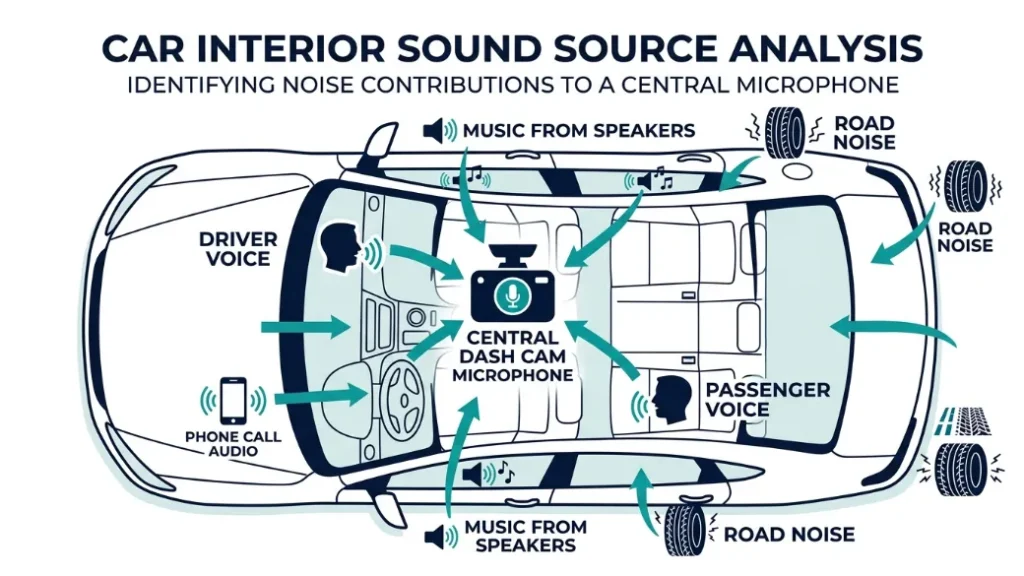
A dash cam microphone records everything it can hear from its position on the windshield — voices, music, phone calls, road noise, and any sounds from inside the cabin. The mic points inward toward the driver, so in-cabin sound is the primary capture zone, not external traffic.
Most built-in dash cam mics are omnidirectional. That means they pick up sound from all directions within a certain radius. At highway speed with the windows up, expect to capture clear voices from the front seats and muffled sound from the rear.
The audio syncs directly with the video file. When you review footage in your dash cam’s companion app — such as the Nextbase MyDashCam app or the Thinkware Cloud app — you’ll hear exactly what happened at each timestamp. That precision is what makes audio useful as evidence.
Does the Microphone Record Both Cabin and Road Sound?
The microphone captures both — but cabin sound dominates. Road noise (wind, tire rumble, engine) forms a background layer. Voices from inside the vehicle come through clearly at normal conversation volume. External sounds like horns, collisions, or screeching tires can also register if loud enough.
Dual-channel dash cams, like the Vantrue E1 Lite, place one camera facing the road and one facing the cabin. Each channel may have its own audio source, giving you even richer sound context during an incident.
How Clearly Can a Dash Cam Pick Up Voices?
Clarity depends on the microphone quality and your vehicle’s noise profile. Budget dash cams under $50 often use basic mono mics with noticeable background hiss. Mid-range models like the Garmin Dash Cam 57 and Nextbase 422GW produce clear, intelligible speech at normal conversation levels.
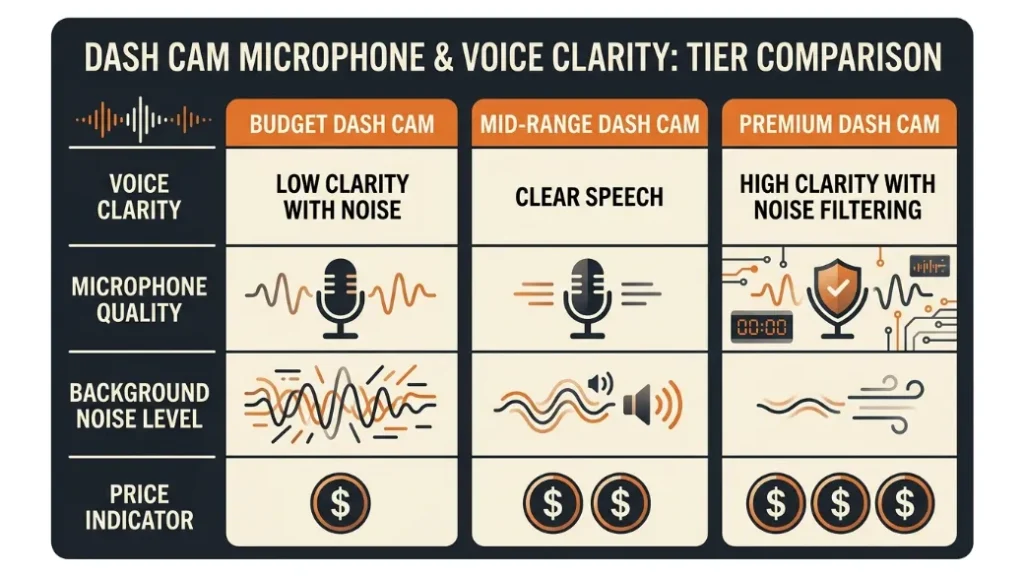
High-end models, including the Blackvue DR970X, use noise-filtering microphones that reduce road noise and sharpen voice capture. If audio quality matters for your use case — such as rideshare driving — pay attention to mic specs before buying.
To test your dash cam’s audio quality, record a short clip, then play it back through the companion app. Speak clearly at a normal volume and check if voices are intelligible over road noise. This takes two minutes and tells you everything.
Do All Dash Cams Record Audio by Default When You Drive?
The majority of dash cams ship with audio recording enabled out of the box. Manufacturers treat it as a default-on feature. Unless you’ve actively gone into the settings and turned it off, your dash cam is almost certainly recording every sound in your cabin right now.
A small number of dash cams — usually budget models or older firmware versions — do not include a microphone at all. But in 2024 and beyond, built-in audio is standard across almost every category from $40 entry-level units to $300 premium models.
Which Popular Dash Cam Brands Include Audio Recording?
| Brand & Model | Audio Recording | Mute Option | Audio Control Method |
|---|---|---|---|
| Nextbase 622GW | Yes | Yes | Settings menu + quick button |
| Garmin Dash Cam 67W | Yes | Yes | Settings menu |
| Vantrue E1 Lite | Yes | Yes | App or hardware button |
| Blackvue DR970X | Yes | Yes | BlackVue app or settings |
| Thinkware U3000 | Yes | Yes | Thinkware Cloud app |
How Do You Know If Your Dash Cam Is Currently Recording Audio?
Most dash cams display a microphone icon on the screen when audio is active. If your unit shows a mic icon with no strikethrough, audio is on. A mic icon with a line through it means audio is muted.
No screen on your dash cam? Open the companion app and review a recent clip. If you can hear sounds from inside the car during playback, audio recording is active. Check your device settings under “Audio” or “Microphone” to confirm the current state.
Is It Legal to Record Audio in Your Car With a Dash Cam?
Dash cam audio recording is legal in many places but restricted in others. The key factor is consent law — specifically, whether everyone being recorded needs to know about it. Getting this wrong can expose you to civil liability, even if your video footage is completely legal.
This is the most misunderstood part of dash cam ownership. Most drivers assume that because they own the vehicle, they can record whatever they want inside it. That’s not always true once you add audio to the equation.
How Do One-Party and Two-Party Consent Laws Affect You?
One-party consent means only one person in a conversation needs to agree to the recording — and that person can be you, the driver. Two-party (or all-party) consent means every person in the recording must know and agree to it.
Under one-party consent laws, you can record audio in your car without telling your passengers. Under two-party consent laws, you must inform anyone in the vehicle that audio is being captured. Failure to do so could violate wiretapping statutes — a serious legal risk.
The safest rule: If you drive with passengers regularly and live in a two-party consent state or country, either inform passengers that audio is recording — or simply turn it off.
What Are the Audio Recording Rules in the US, UK, and Australia?
| Location | Consent Law | Audio Recording Status | Notes |
|---|---|---|---|
| Most US states | One-party | Generally legal | Driver consent alone is sufficient |
| California, Florida, Illinois, Washington | Two-party | Inform all passengers | Violation may constitute wiretapping |
| United Kingdom | ICO / GDPR framework | Legal with conditions | Cannot share footage that identifies others without justification |
| Australia | Varies by state | Often one-party, some restrictions | Check state-level laws |
| European Union | GDPR | Restricted | Personal data rules apply; audio of others requires legal basis |
For US drivers, the National Conference of State Legislatures maintains an updated breakdown of state-by-state recording consent laws. Worth bookmarking.
In California, Florida, Illinois, Michigan, Montana, Oregon, Pennsylvania, and Washington, recording audio without all parties’ consent can be treated as a criminal wiretapping offense — not just a civil matter. If you live or regularly drive in these states, disable audio recording or verbally inform passengers before each trip.
How to Turn Off Audio Recording on Your Dash Cam in 3 Steps
Turning off dash cam audio is quick and doesn’t affect video recording at all. The steps vary slightly by brand, but the process follows the same general path on almost every model.
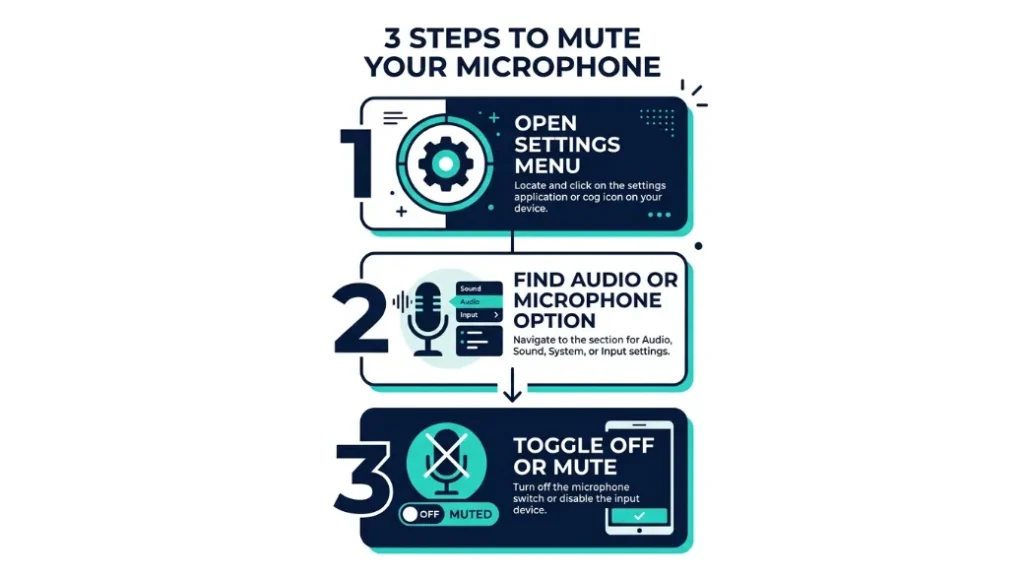
- Power on your dash cam and access the main menu or settings screen.
- Look for an option labeled “Audio,” “Microphone,” “Record Sound,” or “Voice Recording.”
- Toggle the setting to “Off” or “Mute,” then save and exit. The mic icon should now show a strikethrough.
How to Disable Audio on Nextbase, Garmin, Vantrue, and Blackvue
Nextbase (622GW, 522GW, 422GW): Tap the settings icon on the touchscreen, select “Audio Settings,” and toggle “Record Audio” to off. Some Nextbase models also have a physical mute button on the side of the unit.
Garmin Dash Cam (67W, 57, Mini 2): Go to Settings > Camera Settings > Microphone and set it to off. The Garmin Drive app also allows remote audio control from your phone.
Vantrue (E1, N4, E2): Hold the menu button to enter settings. Navigate to “Sound Settings” and disable the microphone. Some models support this through the Vantrue app.
Blackvue (DR970X, DR750X): Open the BlackVue app, connect to your camera via Wi-Fi, go to Settings > Record Settings > Microphone, and toggle it off. You can also access this in the camera’s on-device settings menu.
Can’t find the audio setting? Download your dash cam’s official manual from the manufacturer’s website and search for “microphone” or “audio.” Manuals are usually free PDFs and cover every menu in detail.
Should You Keep Dash Cam Audio On or Turn It Off for Good?
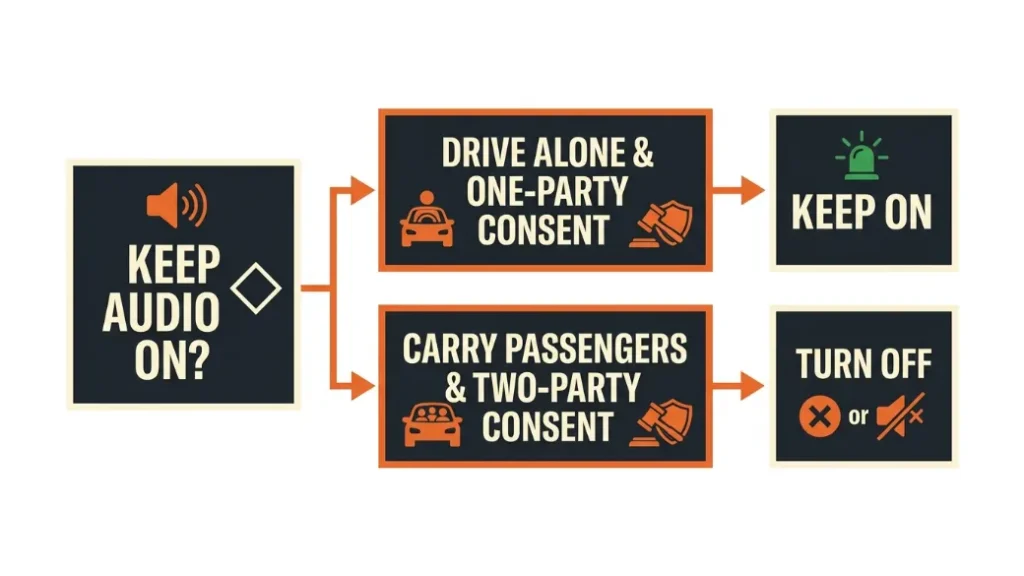
Whether to keep audio on comes down to your driving situation, your location’s consent laws, and an honest look at how audio might affect any future claim you make. There is no single right answer — but there are clear situations where each choice makes sense.
When Dash Cam Audio Helps You After an Accident
Audio can capture a verbal admission of fault at the scene. If another driver says “I didn’t see you” or “my brakes have been bad lately,” that audio timestamp becomes powerful evidence. Insurance adjusters and attorneys pay attention to these statements.
Audio also captures witness statements made at the scene before anyone knows there’s a camera. In a hit-and-run, a bystander’s voice describing the fleeing vehicle can give investigators details that camera angle alone might miss.
When Dash Cam Audio Can Actually Work Against You
This is the part most guides skip. Your own words get recorded too. If you say something at the scene — an apology, an admission, a frustrated outburst — that audio is in the file that could be shared with insurers or courts.
Audio also captures your driving behavior in a more human way. Speeding while singing along to music, making calls without a hands-free kit, or joking about a near-miss are all things you probably don’t want timestamped in an evidence file.
Keep audio on if: you drive alone most of the time, live in a one-party consent area, and want maximum evidence in case of an incident. Turn audio off if: you regularly carry passengers who haven’t consented, live in a two-party consent state, or are concerned about recording your own statements.
Can Dash Cam Audio Be Used as Evidence in Court or for Insurance?
Dash cam audio can be used as evidence — but it isn’t automatically accepted. Courts and insurers weigh several factors before treating it as reliable proof. The recording needs to be authentic, unaltered, and legally obtained.
Insurance companies began formally accepting dash cam evidence around 2018 in the UK, where insurers like Aviva and Direct Line created processes for submitting footage after accidents. In the US, most major insurers now accept dash cam video and audio as supporting documentation during claim review.
What Makes Dash Cam Audio Admissible in Legal Proceedings?
Four factors determine admissibility. First, the recording must have been legal to make — which brings consent laws back into focus. Second, the file must show no signs of tampering. Third, the timestamp must be accurate and verifiable. Fourth, the chain of custody (who has had access to the file) must be clean.
Courts have accepted dash cam audio in personal injury cases, road rage prosecutions, and insurance fraud investigations. In a 2023 UK case, dash cam audio captured a passenger in another vehicle shouting instructions to stage a crash — a recording that contributed to a conviction for insurance fraud.
After an incident, copy your dash cam footage to a second storage device immediately. Do not let the loop recording overwrite the file. Label the copy with the date and time. This protects the chain of custody if you later need it for a claim or legal proceeding.
Does Recording Audio Affect Your Dash Cam’s Storage or Performance?
Audio recording adds a small amount of data to each video file, but the impact on storage is minimal. A typical dash cam records video at 60–150 MB per minute. Adding audio increases that by roughly 1–3 MB per minute — a difference you’ll rarely notice in practice.
Loop recording — where the camera continuously overwrites the oldest footage — still works normally with audio enabled. The audio is embedded directly in the video file using standard formats like AAC or PCM, so it overwrites on the same loop cycle.
Battery and performance are not affected by audio recording. The microphone draws negligible power. If your dash cam is heating up or draining quickly, audio is not the cause — check your mounting position and direct sunlight exposure instead.
Special Cases — Rideshare Drivers, Rental Cars, and Company Vehicles
Rideshare drivers, rental car users, and employees using company vehicles each face unique audio recording considerations that go beyond standard driver-passenger situations.
Rideshare drivers (Uber, Lyft, and similar platforms) often install dash cams for passenger safety documentation. Both Uber and Lyft permit dash cam use but recommend informing riders. In two-party consent states, this isn’t optional — it’s legally required. Several rideshare drivers have successfully used audio recordings to dispute false passenger complaints about driver behavior.
Rental car users should check whether the rental vehicle already has a dash cam installed. Some newer fleet vehicles include built-in cameras that record audio. If you’re unsure, ask the rental company directly and request a written answer.
Company vehicle drivers fall under employer policy as well as local law. If your employer installs a dash cam in a company car, they may be monitoring both video and audio. Check your employment agreement and your company’s vehicle monitoring policy. In the EU, GDPR rules require employers to inform employees about any audio recording in company vehicles — and to justify it under a legal basis such as legitimate interest.
For further reading on GDPR and in-vehicle recording, the UK Information Commissioner’s Office (ICO) publishes clear guidance for both personal and commercial dash cam use.
If you’re a rideshare driver in California, Florida, or another two-party consent state, a verbal notification to each passenger is legally safer than relying on a sticker alone. Some courts have ruled that a small printed notice isn’t sufficient to establish informed consent for audio recording.
Frequently Asked Questions
Do all dash cams record audio, or only some models?
Most modern dash cams include a built-in microphone and record audio by default. A small number of budget or older models lack a microphone entirely and record video only. Check your model’s product specifications for a “built-in microphone” listing to confirm.
Can I turn off audio recording without turning off the camera?
Yes. Disabling audio on your dash cam does not affect video recording. The camera continues to capture footage normally — only the microphone goes silent. You can toggle audio back on at any time through the settings menu.
Is dash cam audio recording legal in California?
California is a two-party (all-party) consent state. Recording audio of conversations without informing all parties is illegal under California Penal Code 632. If you drive with passengers in California, disable audio recording or verbally inform each passenger before the trip begins.
Can dash cam audio be used in a car insurance claim?
Yes. Most major insurers accept dash cam audio as supporting evidence during a claim review. The recording should be unaltered, timestamped, and legally obtained to carry the most weight. Submit a copy rather than the original SD card.
Does leaving audio recording on drain my dash cam’s battery faster?
No. The microphone uses negligible power — well under 1% of your dash cam’s total consumption. Audio recording has no meaningful impact on battery life or card write speeds.
Can a passenger demand that I turn off dash cam audio?
A passenger can ask, but in one-party consent states they cannot legally compel you to stop recording in your own vehicle. In two-party consent states, their refusal to consent to recording means you are legally required to disable audio. When in doubt, muting is the simplest way to avoid a conflict.
Dash cam audio is one of those features that most drivers either ignore completely or misunderstand entirely. I’ve been there. After eight years of reviewing automotive tech, the honest answer is this: audio recording is a genuinely useful tool — but only when you understand the consent laws in your area and know how to use the footage properly.
Leave audio on if you drive solo and want maximum evidence from every trip. Turn it off if you carry passengers regularly and live somewhere with strict consent rules. Either way, now you know exactly what your dash cam captures — and what to do with it. — Alex Rahman

I’m Alex Rahman, a car enthusiast and automotive writer focused on practical solutions, car tools, and real-world driving advice. I share simple and honest content to help everyday drivers make better decisions.
