Can an ELM327 Read ABS Codes? Compatibility Guide
Quick Answer
An ELM327 adapter can read ABS codes on some vehicles when paired with compatible diagnostic software, but a basic ELM327 setup usually cannot access the ABS module. Standard OBD2 functions primarily cover engine and emissions diagnostics. Reading ABS faults requires support for your specific vehicle, adapter, and app.
If your ABS warning light is on and your ELM327 app reports “No Codes Found,” the adapter may be working correctly but checking only the engine computer. Before replacing a wheel-speed sensor or buying another Bluetooth dongle, determine whether your current setup can communicate with the anti-lock braking system.
Why Doesn’t a Basic ELM327 Read ABS Codes?
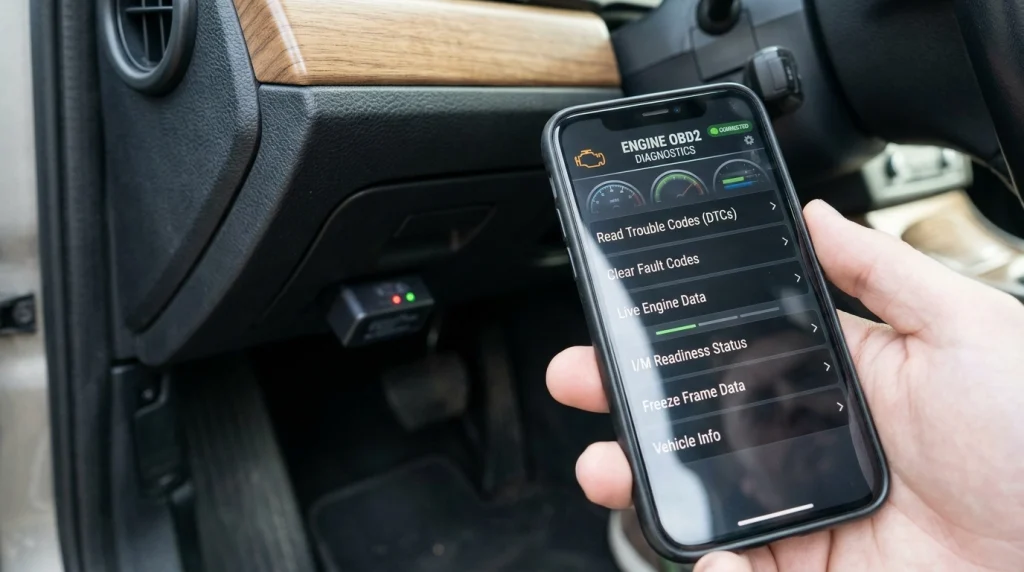
A basic ELM327 setup often cannot read ABS codes because standard OBD2 diagnostics do not provide universal access to every control module in a vehicle. The ELM327 is a communication interface that translates diagnostic commands between software and a vehicle’s diagnostic network; it is not, by itself, a complete all-system scanner.
Most basic OBD2 apps focus on the engine control module and standardized emissions-related information. The ABS controller may use manufacturer-specific diagnostic commands, data formats, or communication procedures that the app does not support.
That creates three separate requirements for ABS diagnosis:
- Adapter capability: The ELM327 hardware must support the necessary communication protocol and commands.
- Software capability: The app must know how to request and interpret ABS diagnostic information.
- Vehicle coverage: The diagnostic functions must support the vehicle’s make, model, year, and relevant ABS module.
All three must work together. An app connecting successfully to an ELM327 does not prove that it can access the ABS controller.
For a broader explanation of this limitation, see our guide to whether OBD2 scanners can read ABS codes.
Can an ELM327 Read ABS Codes With the Right App?
Yes, some ELM327-based adapters can be used for ABS diagnostics when the software and vehicle support the required functions. However, installing a different app does not automatically give a generic adapter access to every vehicle module.
Some diagnostic applications support enhanced, manufacturer-specific functions through compatible interfaces. Others are limited to standardized powertrain diagnostics, even if their menus display multiple diagnostic options.
Before relying on an app, check whether its documentation explicitly confirms all of the following:
- ABS or electronic brake control module access for your vehicle.
- Compatibility with your particular ELM327 adapter or interface.
- Reading manufacturer-specific ABS diagnostic trouble codes (DTCs).
- Any additional software package, subscription, or connection requirements.
Also distinguish reading codes from clearing them. An application might display certain ABS information without supporting fault clearing, live wheel-speed data, actuator tests, or other advanced functions.
For example, an app that reads engine codes on a compatible vehicle may still be unable to enter the ABS module. A different app can help only if it supports both the interface and that vehicle’s diagnostic system.
What Determines Whether Your ELM327 Can Access ABS?
ABS compatibility depends on more than whether the vehicle has a standard 16-pin diagnostic socket. Check the following factors before assuming the adapter is suitable.
1. Vehicle make, model, and year
Different manufacturers use different diagnostic arrangements, and coverage can vary between models and production years from the same manufacturer. A feature supported on one vehicle is not proof that it will work on another.
Confirm compatibility using the app developer’s vehicle coverage list or the diagnostic tool manufacturer’s documentation. If ABS support is listed only for selected models, verify your exact vehicle rather than relying on a general compatibility statement.
2. ELM327 adapter hardware
Adapters sold as ELM327 devices vary in hardware quality, firmware, and implementation. Some inexpensive units may not reliably support every command or communication feature expected by a diagnostic app.
A successful connection to the engine computer proves only that the adapter can communicate with that system under the current conditions. It does not establish complete ABS compatibility.
3. Diagnostic app and protocol support
The app needs the correct manufacturer-specific diagnostic logic as well as support for the vehicle’s communication protocol. An ELM327 interface cannot independently supply software functions that the app does not implement.
Some enhanced diagnostic systems require a supported proprietary adapter rather than a generic ELM327 clone. Check the exact hardware requirements before paying for an app or additional diagnostic package.
How Can You Check Whether Your ELM327 Reads ABS Codes?
Use this sequence to establish whether your current setup supports ABS diagnostics before purchasing replacement equipment.
- Identify the vehicle. Record its make, model, model year, and, if requested by the software, engine or market configuration.
- Check the app’s supported functions. Look specifically for ABS or brake control module diagnostics, not merely generic OBD2 compatibility.
- Verify adapter compatibility. Confirm that the app supports your actual ELM327 interface and its connection type.
- Connect according to the instructions. Park safely, secure the vehicle, and use the ignition position specified by the vehicle or diagnostic software instructions.
- Select the correct module. Open ABS, Brake System, or the equivalent electronic brake control module option if it is available.
- Read and record the results. Save the complete fault codes and descriptions before attempting any clearing procedure.
If the app offers only an engine or generic OBD2 scan, the result does not establish whether ABS codes are present. You need an ABS-capable diagnostic function to make that determination.
Tip
Before buying another adapter, verify the exact vehicle coverage and supported diagnostic functions. This can prevent you from purchasing a second interface that has the same ABS-access limitation.
Why Does Your ELM327 Show No Codes When the ABS Light Is On?

A “No Codes Found” message does not prove that the ABS system is fault-free. It may simply mean the app did not retrieve diagnostic information from the relevant controller.
Check these possible explanations in order:
- Only the engine module was scanned. Repeat the diagnostic process with an explicitly supported ABS function or a suitable all-system scanner.
- The app does not support your vehicle. Confirm that the specific ABS module is included in its coverage.
- The adapter cannot perform the required communication. The interface may connect to the engine module but fail when accessing a different controller.
- The ABS module is not communicating. A power supply, ground, wiring, network, or controller problem can prevent communication. This requires diagnosis rather than simply trying more apps.
- The fault is not currently stored or is intermittent. The available code information depends on the vehicle, the module, and the fault history.
Pay attention to the exact error. “No codes found” after a successful engine scan is different from “ABS module not supported” or “Communication failed.” These messages indicate different limitations and should not be treated as equivalent.
If your scanner cannot communicate with the ABS module, use a known-compatible diagnostic tool before concluding that the module itself has failed.
What Should You Use Instead of a Basic ELM327?
If ABS diagnostics are your goal, choose a tool that explicitly supports ABS fault-code reading for your vehicle. A basic ELM327 may remain useful for engine diagnostics, but it should not be assumed to provide complete vehicle-system coverage.
| Diagnostic option | ABS access | Important limitation |
|---|---|---|
| Basic ELM327 and generic app | Usually unavailable | Primarily standard powertrain diagnostics |
| ELM327 with enhanced app | Possible on supported vehicles | Depends on adapter, app, and vehicle coverage |
| Dedicated ABS code reader | Supported models only | Verify exact vehicle compatibility |
| All-system diagnostic scanner | Often available | Coverage and advanced functions still vary |
The practical difference is module access, not simply whether a tool plugs into the OBD2 port. Manufacturer documentation for OBDLink enhanced diagnostics, for example, distinguishes standard OBD2 code access from additional manufacturer-specific diagnostics such as ABS codes.
Before choosing a replacement, confirm whether you need code reading alone or also live wheel-speed data, code clearing, actuator tests, or other service functions. These capabilities are not interchangeable, and a scanner that reads ABS codes may not support every advanced procedure.
Can You Diagnose an ABS Problem With Codes Alone?
No. ABS trouble codes help narrow the investigation, but a code description does not always identify the failed part. A wheel-speed sensor circuit code, for example, may involve a sensor, damaged wiring, a connector, or a related signal problem.
After retrieving a code, compare it with the manufacturer’s diagnostic procedure. Depending on the fault, further checks may include wiring inspection, connector condition, live wheel-speed readings, or other system-specific tests.
Do not clear codes simply to turn off the warning light. Record the original information first, and investigate the underlying cause. Clearing a code does not repair a fault, and the warning may return if the problem remains.
Warning
An illuminated ABS warning light can indicate that anti-lock braking assistance is unavailable. If the red brake warning light is also on, braking feels abnormal, or stopping performance changes, stop safely and arrange appropriate inspection instead of continuing to drive normally.
If you need help using a compatible diagnostic tool, our guide to using an OBD2 scanner correctly explains how to connect, retrieve, and record diagnostic information.
Related Product
ABS-Capable OBD2 Diagnostic Scanner
A scanner with verified ABS support for your vehicle can access brake-system fault codes that a basic ELM327 setup may not retrieve.
As an Amazon Associate, we earn from qualifying purchases.
Frequently Asked Questions
Can an ELM327 clear ABS codes?
Only if the adapter, diagnostic app, and vehicle support ABS code clearing. Reading a fault does not guarantee that the same setup can erase it, and clearing a code does not fix the underlying problem.
Can a Bluetooth ELM327 read wheel-speed sensor codes?
It may do so when compatible software supports the vehicle’s ABS module. Some setups can retrieve fault codes but cannot display live wheel-speed readings, so check both functions separately.
Does an ELM327 version number guarantee ABS compatibility?
No. A version label alone does not establish support for manufacturer-specific ABS diagnostics. Hardware implementation, software compatibility, communication protocols, and vehicle coverage all matter.
Can an ELM327 read ABS codes on every OBD2 car?
No. OBD2 compatibility does not guarantee access to every electronic control module. ABS support varies by vehicle, adapter, and software.
Why can my ELM327 read engine codes but not ABS codes?
Standard engine diagnostics and ABS diagnostics use different functions and may require different commands or manufacturer-specific software. The adapter can communicate with the engine controller without being able to access the ABS module.
Will a dedicated ABS scanner work on any car?
No. Dedicated ABS scanners also have vehicle coverage limitations. Confirm compatibility with your exact make, model, year, and ABS system before relying on the tool.
Conclusion
An ELM327 can read ABS codes in some vehicle-specific setups, but a basic adapter and generic OBD2 app usually cannot access the ABS controller. The deciding factors are the adapter’s communication capabilities, the software’s enhanced diagnostic functions, and confirmed coverage for your vehicle.
Start by checking the app’s ABS support list and your adapter’s compatibility. If the setup cannot access the brake module, use a dedicated ABS-capable or all-system scanner that supports your exact vehicle. Record the original codes before clearing anything, and investigate the underlying fault rather than treating the warning light as a problem that can be solved by resetting it.

I’m Alex Rahman, a car enthusiast and automotive writer focused on practical solutions, car tools, and real-world driving advice. I share simple and honest content to help everyday drivers make better decisions.
