How to Reset OBD2 Readiness Monitors | Leadfoot
Quick Answer
You cannot press a button to force OBD2 readiness monitors to “Ready.” Clearing codes with a scanner resets them to “Not Ready,” and only driving under the right conditions lets the car run its self-tests and set them to “Ready” again. Fix the fault first, clear the codes, then complete a drive cycle and check the status before an emissions test.
The phrase “reset readiness monitors” causes confusion because it can mean two opposite things. One is wiping the monitor history so the tests start again. The other is getting the monitors back to “Ready” after that wipe. A scanner can do the first part in seconds. Only the car, driven through the conditions each monitor needs, can do the second part.
What “Reset” Really Means for Readiness Monitors
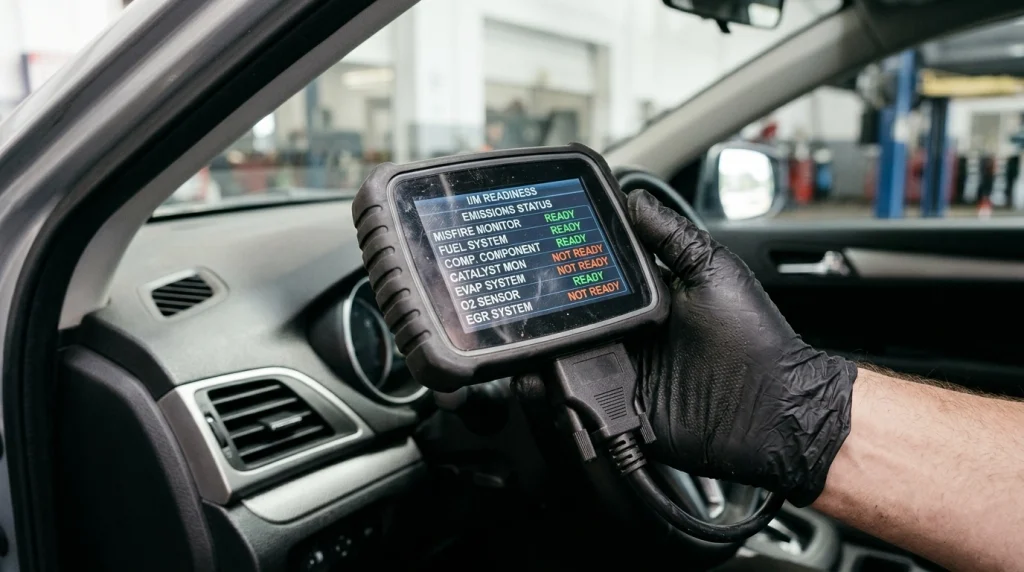
A readiness monitor is a self-test run by the car’s computer for one emissions-related system, such as the catalyst, oxygen sensors, evaporative system, or exhaust gas recirculation system. Each monitor reports whether its test has finished. “Ready” or “Complete” means the test ran and a result is available. “Not Ready” or “Incomplete” means the test has not finished, so the computer has no result yet.
It does not mean the system failed. It means the system has not been evaluated since the last reset. That is why a scanner can show no trouble codes at the same time as several monitors are “Not Ready.” No codes and a completed test are two different pieces of information.
Some monitors run almost continuously, including misfire and fuel system checks. Others need specific conditions: steady cruising for the catalyst, warm-up and varied driving for oxygen sensors, and a particular fuel level and temperature range for the evaporative test, which is often last to run.
What Clearing Codes Actually Resets
When you use a scanner’s clear or erase function, the car clears stored trouble codes and related learned data, including freeze frame data. It also clears the readiness status. The monitors return to “Not Ready” and must run again from the start.
Disconnecting the battery can have a similar effect, but it is blunt: it can also reset the clock, radio presets, and other learned settings, and it does not repair anything. A scanner clear is cleaner and lets you record the codes first.
Clearing does not erase every kind of code in the same way. A permanent trouble code is designed to stay until the car itself confirms the fault is gone through its own tests. That is another reason a quick clear cannot be used as a shortcut to a passing inspection.
Before clearing anything, write down the codes, freeze frame data, and monitor status. If the same code returns later, that record helps separate a one-off event from a fault that was never repaired.
How to Reset Monitors to “Not Ready” With a Scanner
Use this sequence only after a repair, or when you understand that you will need driving time before an inspection. Clearing codes right before a test is usually the worst time to do it.
- Park safely, turn the ignition on, and connect the scanner to the diagnostic port, usually under the driver-side dashboard.
- Read and record all stored and pending codes, plus the current readiness status, before changing anything.
- Repair the underlying fault first when a code points to a real problem. Clearing a code does not fix a sensor, leak, or catalyst fault.
- Choose the scanner’s clear, erase, or reset function and confirm it. Menu wording varies by tool, but the function is normally near “Read Codes.”
- Recheck readiness. The monitors should now show “Not Ready” or “Incomplete,” even if the check engine light is off.
At this point the reset is done, but the car has not yet proved its emissions systems are working. That proof comes only from driving.
Warning
Do not clear codes as a way to hide a fault before an emissions test. The reset itself makes the monitors “Not Ready,” and inspectors check that status. You trade a visible code for a rejection for incomplete readiness, and you still need the repair and the drive cycle afterward.
How to Set Monitors Back to “Ready” Again
There is no universal drive cycle for every make and model; manufacturers publish their own procedures, and exact speeds and times vary. Most monitors still need the same broad ingredients: a cold start, warm-up, steady cruising, city driving, and deceleration.
A practical sequence that covers those ingredients looks like this:
- Start with a cold engine, ideally after the car has sat for several hours overnight, and keep the fuel tank roughly one-quarter to three-quarters full. Many evaporative tests will not run outside that range.
- Idle for a couple of minutes without heavy electrical loads, then drive gently until the engine reaches normal operating temperature.
- Drive at a steady highway speed for 10 to 20 minutes. This helps catalyst and oxygen sensor tests, which need stable, warm operation.
- Mix in normal city driving with stops, gentle acceleration, and coasting to a lower speed without hard braking. That variety helps tests that need load changes and deceleration.
- Park, let the car cool, and repeat the pattern over several trips rather than trying to force everything into one long drive.
Normal mixed driving over several days often completes most monitors without a formal cycle. Use the manufacturer’s procedure when one monitor stays incomplete, instead of repeating random highway miles and hoping the missing test runs.
Do not judge progress by distance alone. Fifty steady highway miles may set some monitors and never trigger an evaporative test that needs a cold start and a specific fuel level.
How to Check Whether the Reset Worked
Use the scanner’s I/M readiness screen, not just the code screen. It lists each supported monitor as ready, not ready, or not supported. “Not supported” is normal for equipment the car does not have and should not be counted as incomplete.
When your scanner offers two views, use “Since DTCs cleared” after a reset. “This drive cycle” shows only the current trip, so it can look worse after a short drive.
Recheck after each day of mixed driving and note which monitors change. Continuous monitors should set quickly. If a noncontinuous monitor stays incomplete after several varied trips, that is a clue to check its specific conditions, such as fuel level, temperature, or a fault that is blocking the test. A scanner that can check emissions readiness makes this progress easy to follow without guessing from the light alone.
Why Monitors Stay “Not Ready” After Driving
A monitor that will not set is not always a sign of a broken part. Often, the test simply has not had its required conditions yet. Common reasons include only short trips, a fuel tank that is too full or too empty for the evaporative test, a cold start that was not cold enough, or a repair that left a related fault active.
A fault can also block a test. If the computer detects a problem in a system the monitor depends on, it may not run that monitor until the fault is repaired, so clearing the same code repeatedly rarely helps.
For a fuller sequence, see why OBD2 monitors stay not ready. A reset explains why monitors start as “Not Ready,” but not why one refuses to finish days later.
Tip
Take a photo or screenshot of the readiness screen before clearing and after each driving day. The pattern — which monitors set, which stay put, and whether a code returns — is more useful than a single “ready or not” check on test day.
When a Reset Helps, and When It Hurts
A reset helps after a genuine repair, when you need a clean baseline to confirm the fix. Watch for monitors completing with no new codes, which supports a successful repair, or the same code returning, which points back to the fault.
A reset hurts when it is done just before an inspection, after a battery change with no driving time left, or as a substitute for diagnosis. In those cases, the car may need days of driving before it is testable again. Whether a code comes back after clearing depends on whether the fault is still present, so a reset without a repair often only delays the same result.
Timing also matters for a used-car check. A car with no light and no codes but monitors still “Not Ready” has not completed its self-tests, whether after a clear or a battery change, so a blank code screen is not a clean bill of health.
How Many Monitors Can Stay “Not Ready” for a Test?
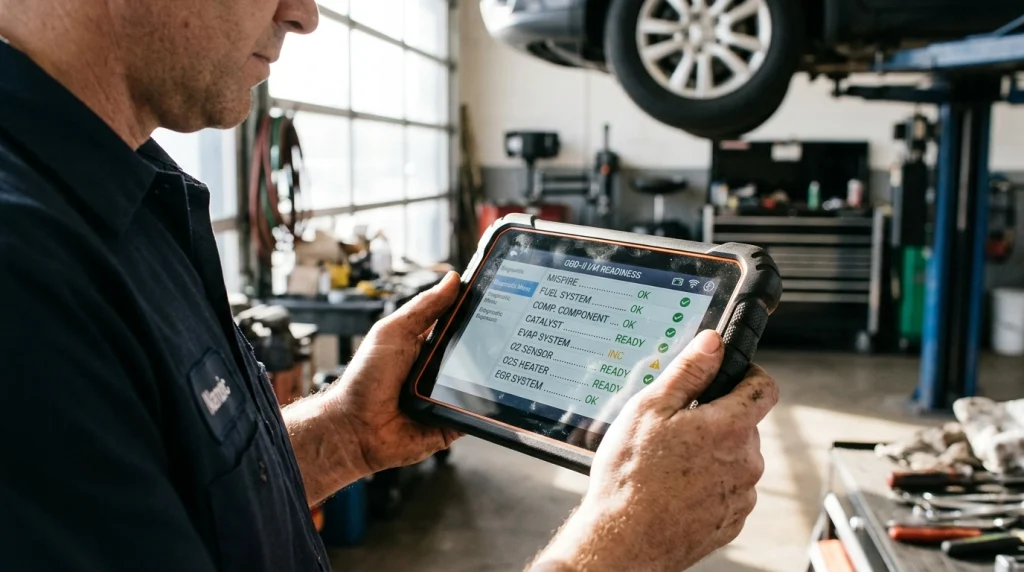
Inspection rules vary by state and program, so check the local rule before booking a test. As a widely used federal guideline, the EPA’s vehicle inspection and maintenance information sits behind state programs that commonly allow one incomplete noncontinuous monitor for 2001 and newer vehicles and two for 1996 to 2000 vehicles. Some states apply stricter limits, especially for the catalyst monitor on a retest.
Continuous monitors should be ready; an incomplete one is a stronger warning sign. For the exact allowance, see how many OBD2 monitors can be incomplete and confirm it against your state’s current rules.
Do not book the test until the scanner shows the required monitors ready, the light is off, and no new codes appeared during the drive cycle.
Related Product
OBD2 Scanner With I/M Readiness Display
A scanner with a clear readiness screen lets you check each monitor after a reset without guessing from the check engine light alone.
As an Amazon Associate, we earn from qualifying purchases.
Frequently Asked Questions
Can a scanner force readiness monitors to “Ready” instantly?
No. A scanner can clear codes, which resets monitors to “Not Ready,” but it cannot run the car’s self-tests for it. The monitors change to “Ready” only when the car completes each test under the right driving conditions.
How long does it take for monitors to reset to “Ready”?
It varies by vehicle and driving pattern. Many cars complete most monitors over several days of mixed driving, often after 50 to 100 miles, but that is a guide, not a guarantee. The evaporative monitor is commonly last.
Does disconnecting the battery reset readiness monitors?
Yes, it can, in the same way as clearing codes: monitor history is lost and the tests must run again. It is not a better shortcut, because it can also reset other settings and does not repair the fault that caused a code.
Will my monitors reset if I clear a code after a repair?
Yes. Clearing after a repair is the normal reason to reset them, because it gives the car a clean baseline. Drive through varied conditions afterward and confirm the monitors complete without the code returning before treating the repair as verified.
Can I pass an inspection with one monitor “Not Ready”?
Possibly, depending on your state, vehicle year, and which monitor is incomplete. A common guideline allows one incomplete noncontinuous monitor for 2001 and newer vehicles and two for 1996 to 2000 vehicles, but state rules vary. Check local rules first.
Do I need the manufacturer’s exact drive cycle, or will normal driving work?
Normal mixed driving often works over several days with cold starts, steady cruising, and city stops. Use the manufacturer’s exact cycle when a specific monitor stays incomplete, because it targets the conditions that monitor needs.
Conclusion
Resetting readiness monitors is a two-part job, not a single scanner command. Clearing codes resets them to “Not Ready,” and driving sets them back to “Ready.” Repair first, record the codes, clear only when you have driving time to spare, then follow a varied drive cycle and check the readiness screen before an inspection.

I’m Alex Rahman, a car enthusiast and automotive writer focused on practical solutions, car tools, and real-world driving advice. I share simple and honest content to help everyday drivers make better decisions.
