How to Tell If Your Car Is OBD2 Compatible
Quick Answer
To know if your car is OBD2 compatible, check its model year and original sales market, locate the 16-pin diagnostic port, and inspect the emissions label under the hood. Most gasoline passenger cars sold new in the United States from model year 1996 onward are OBD2 compatible. The most reliable practical confirmation is successfully connecting a compatible OBD2 scanner and reading vehicle data.
Finding a diagnostic connector under your dashboard is encouraging, but it does not automatically mean your vehicle supports standard OBD2 diagnostics.
Some older vehicles use similar-looking connectors with manufacturer-specific communication systems. Others support OBD2 but require a scanner capable of recognizing their communication protocol.
Before buying a diagnostic tool or investigating a check engine light, follow these checks to determine what your vehicle supports.
1. Check Your Car’s Model Year and Country of Sale
The fastest starting point is identifying your vehicle’s model year and the market where it was originally sold new.
OBD2 requirements were introduced at different times around the world. A vehicle manufactured in Japan but originally sold in the United States may follow different requirements from an otherwise similar vehicle sold domestically in Japan.
For that reason, the manufacturing country alone cannot establish OBD2 compatibility.
The following table provides common starting points for passenger vehicles.
| Original Sales Market | Vehicle Type | Common OBD2 Starting Point |
|---|---|---|
| United States | Gasoline passenger cars and light trucks | 1996 model year |
| United States | Light-duty diesel vehicles | 1997 model year under applicable federal requirements |
| European Union | Most standard gasoline passenger cars | 2001 registration |
| European Union | Most standard diesel passenger cars | 2004 registration |
These dates describe common regulatory milestones, not a universal guarantee for every vehicle category. Heavy vehicles, imported cars, specialty vehicles, and certain commercial models may follow different rules.
The U.S. Environmental Protection Agency’s OBD requirements guidance provides further details about the American implementation schedule.
Can a car manufactured before 1996 support OBD2?
Yes. Some vehicles introduced OBD2 equipment before it became broadly mandatory.
However, a 1994 or 1995 vehicle should not be assumed compatible based on its production year alone. Early implementations and regulatory exceptions make individual verification necessary.
Does the same rule apply to imported cars?
Not necessarily. The original market specification matters more than the country where the car is currently registered.
For example, a vehicle originally sold in the United States may have standardized OBD2 functionality that an equivalent model originally sold in another region did not include at that time.
2. Locate the OBD2 Diagnostic Port
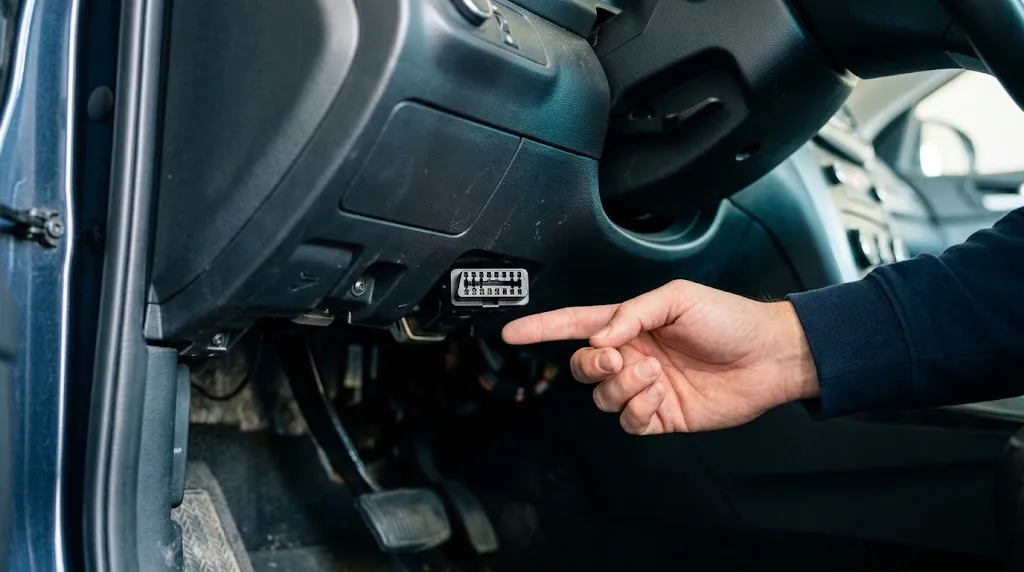
Most OBD2-equipped passenger vehicles have a diagnostic connector inside the cabin, generally near the driver’s seating position.
It is commonly located beneath the dashboard, often near the steering column or lower instrument panel.
Other possible locations include:
- Behind a small removable dashboard cover.
- Near the driver’s side fuse panel.
- Below the instrument panel near the center console.
- Inside a lower dashboard storage compartment.
- Near the lower edge of the center dashboard.
If you cannot find the connector, check the owner’s manual for terms such as Data Link Connector (DLC), diagnostic connector, or OBD port.
What does an OBD2 port look like?
A standard passenger-car OBD2 connector is approximately trapezoidal, with space for 16 electrical contact positions arranged in two rows of eight.
The connector may be black, gray, or another color. Not every contact position must contain a metal terminal.
The shape helps identify the connector type, but it does not prove that the vehicle supports standardized OBD2 communication.
Key Insight
A 16-pin diagnostic connector and OBD2 compatibility are not the same thing. Some vehicles use the standard connector shape while communicating through proprietary systems that a generic OBD2 scanner cannot understand.
3. Look for an OBD2 Statement on the Emissions Label
On many vehicles originally sold in the United States, an under-hood emissions label provides another useful compatibility check.
The label is generally called the Vehicle Emission Control Information label, often abbreviated VECI.
According to the EPA’s guidance on locating vehicle emissions labels, light-duty vehicle labels are placed under the hood or elsewhere in the engine compartment.
Check common locations such as the underside of the hood, radiator support, firewall, or surrounding engine-bay panels.
Look for wording such as:
- OBD II Certified
- OBD II Compliant
- Other manufacturer statements identifying the applicable onboard diagnostic certification.
An explicit OBD2 certification statement provides stronger evidence than connector shape alone.
However, not every emissions label uses identical wording. A missing or unreadable statement does not automatically establish incompatibility.
On older or imported vehicles, inspect the service documentation or contact the manufacturer with the vehicle identification number for clarification.
4. Test the Connection With a Compatible OBD2 Scanner
A successful diagnostic connection is one of the clearest practical ways to confirm compatibility.
A standard OBD2 scan tool communicates with the vehicle’s electronic control systems through the diagnostic connector, primarily to retrieve emissions-related information.
Use the following procedure:
- Locate the connector. Find the diagnostic port and inspect it for damaged terminals, dirt, or physical obstructions.
- Check the scanner’s instructions. Confirm that the scanner supports the vehicle’s year, market, and applicable OBD2 protocols.
- Connect the scanner. With the ignition off, insert the connector carefully without forcing it.
- Switch on the ignition. Follow the scanner manufacturer’s procedure, commonly using the ignition-on, engine-off position.
- Start communication. Select automatic vehicle detection or the appropriate diagnostic mode.
- Read diagnostic information. Look for a successful connection displaying supported data such as engine trouble codes, vehicle parameters, or emissions readiness information.
If the scanner successfully communicates using a standardized OBD2 mode, it confirms that the vehicle supports that connection.
If the tool cannot connect, do not immediately conclude that the car is incompatible. The scanner, power supply, communication protocol, or vehicle electronics may be responsible.
Warning
Do not force a scanner connector into a damaged or unfamiliar socket. Avoid connecting unverified adapters or probing diagnostic terminals with wires. Incorrect connections can damage electrical components.
5. Verify Compatibility Using the VIN and Manufacturer Information
If the model year and physical checks leave uncertainty, verify the vehicle’s exact specification.
The vehicle identification number, or VIN, helps identify the manufacturer, model year, vehicle configuration, and other details relevant to finding correct documentation.
You can usually find it at the lower windshield area, on a driver’s door-jamb label, or in registration documents.
Use the VIN to locate the appropriate owner’s manual, manufacturer service information, or dealer support.
Ask specifically whether the vehicle supports standardized OBD2 or EOBD emissions diagnostics, rather than merely whether it has a diagnostic connector.
A VIN by itself is not proof of OBD2 compliance. Its value is helping identify the correct vehicle specification so the manufacturer or documentation can confirm the system.
What If Your Car Has an OBD2 Port but the Scanner Won’t Connect?
A communication failure can happen even when the vehicle is OBD2 compatible.
Before replacing the tool, check the likely problems in a practical order.
Scanner has no power
If the scanner display remains off, check whether it needs separate power or receives power through the diagnostic connector.
On many vehicles, a blown fuse can interrupt power to the diagnostic port. The owner’s manual or service information can identify the relevant circuit.
Scanner powers on but cannot communicate
Verify that the ignition is in the position specified by the scanner manufacturer.
Next, confirm support for the vehicle’s communication protocol. Older compliant vehicles may use ISO 9141-2, ISO 14230, or SAE J1850 rather than CAN.
A scanner limited to certain protocols may fail even though a different compatible tool works correctly.
Bluetooth adapter connects to the phone but not the car
Bluetooth pairing confirms communication between the phone and adapter, not necessarily between the adapter and vehicle.
Check the diagnostic app’s vehicle connection status, adapter settings, and compatibility documentation.
If a known-good scanner also fails, professional diagnosis may be needed to identify connector power, wiring, or module communication faults.
Does OBD2 Compatibility Mean Every Vehicle System Can Be Scanned?
No. Standard OBD2 functionality primarily covers emissions-related diagnostics.
A basic compatible scanner can commonly retrieve standardized engine-related diagnostic trouble codes, emissions readiness information, and supported live data.
It does not necessarily provide access to every vehicle control module.
Advanced systems may require manufacturer-specific software or an enhanced diagnostic tool, particularly for:
- Anti-lock braking system diagnostics.
- Airbag and supplemental restraint system faults.
- Body control module functions.
- Transmission-specific data and procedures.
- Electronic parking brake service functions.
This distinction matters because a scanner may work perfectly for standard OBD2 diagnostics while displaying limited information about other systems.
Compatibility with the vehicle’s connector is only one part of choosing the correct diagnostic equipment. The scanner must also support the particular operation you want to perform.
A Simple Decision Guide for Checking Your Car
Use these conditions to determine what to do next without relying on one uncertain clue.
| What You Find | What It Means | Next Step |
|---|---|---|
| U.S.-market gasoline car, 1996 or newer | Generally required to support OBD2 | Check port and scanner compatibility |
| Older car with 16-pin connector | Compatibility uncertain | Check emissions label or manufacturer documentation |
| Scanner successfully reads standard OBD2 data | Standardized communication confirmed | Proceed with supported diagnostic functions |
| Scanner fails to connect | Incompatibility or communication fault possible | Check ignition, scanner protocol, and connector power |
The strongest practical conclusion comes from combining documentation with an actual successful connection, particularly for older or imported vehicles.
Related Tool: Basic OBD2 Code Reader
A basic OBD2 code reader can help verify standardized diagnostic communication and retrieve supported engine trouble codes. Check the tool’s vehicle and protocol compatibility before purchasing, especially for older or imported cars.
As an Amazon Associate, we earn from qualifying purchases.
Frequently Asked Questions
Can I use an OBD2 scanner on a 1995 car?
Possibly. Some 1995 vehicles support early OBD2 functionality, while others use older diagnostic systems. Check the vehicle’s emissions certification and manufacturer documentation before assuming a generic OBD2 scanner will work.
Is OBD2 the same as EOBD?
EOBD is the European implementation of standardized onboard diagnostics. The systems share standardized diagnostic functions, and many OBD2 scanners support EOBD vehicles, subject to the vehicle and scanner specifications.
Can an OBD2 scanner work without the check engine light being on?
Yes. A compatible scanner may retrieve supported live data, readiness information, and stored or pending diagnostic trouble codes even when the check engine light is off.
Are electric cars OBD2 compatible?
Compatibility varies by vehicle, market, and diagnostic system. An electric car may have a familiar diagnostic connector without providing all the standardized data expected by a conventional engine-focused scanner. Check manufacturer and tool support.
Can I identify OBD2 compatibility from the VIN alone?
Not conclusively. A VIN helps identify the vehicle specification and obtain correct documentation, but it does not by itself demonstrate that a generic scanner can communicate with the vehicle.
Does a 16-pin diagnostic socket guarantee OBD2 compatibility?
No. Some older vehicles use a 16-pin connector for manufacturer-specific diagnostics. Confirm compliance through documentation or a successful standardized OBD2 connection.
Conclusion
To determine whether your car is OBD2 compatible, begin with its model year and original sales market, locate the diagnostic connector, and check the manufacturer’s emissions information.
For uncertain cases, especially older or imported vehicles, confirm the specification using manufacturer documentation and a compatible scanner. A successful standardized diagnostic connection provides much stronger evidence than connector shape alone.

I’m Alex Rahman, a car enthusiast and automotive writer focused on practical solutions, car tools, and real-world driving advice. I share simple and honest content to help everyday drivers make better decisions.
