WOLFBOX G840H Mirror Dash Cam Review: Honest 2026 Guide
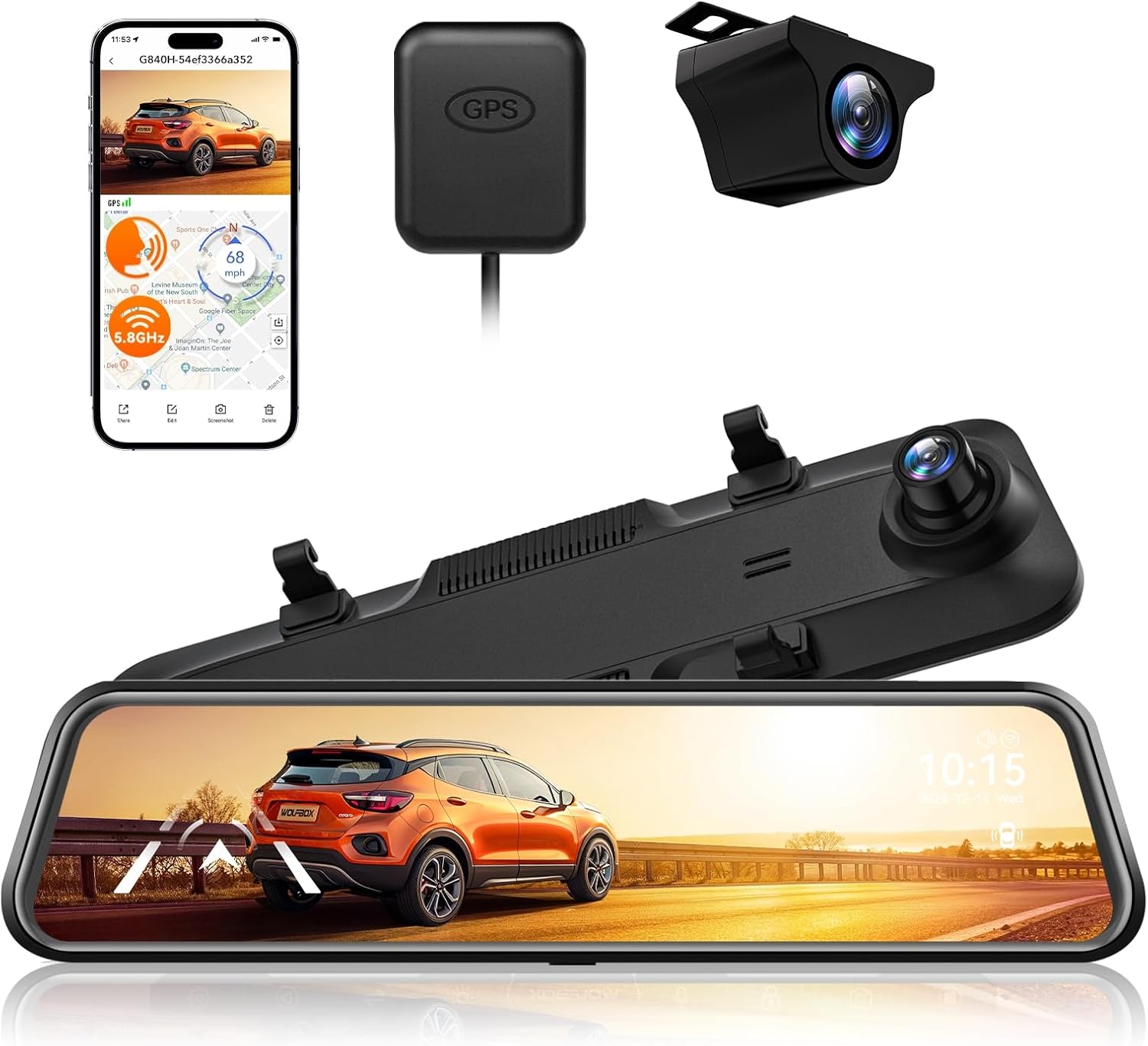
The WOLFBOX G840H Mirror Dash Cam is aimed at drivers who want a wider rear view, front-and-rear recording, and driver-assistance alerts in one large mirror-style display. This exact ASIN adds ADAS, BSD, 5.8GHz Wi-Fi, voice control, GPS, and parking monitoring to the familiar G840H layout.
The main appeal is convenience. You get an 11.8-inch touch display, 2.5K front video, 1080p rear video, and a wide digital rear view. Installation takes more work than a small windshield camera, and parking mode needs extra hardware.
| Overall: 4.3/5 | Performance: 4.2/5 |
| Value: 4.1/5 | Design: 4.4/5 |
| ✅ Best For: Drivers who want a mirror display, rear camera, GPS, ADAS and BSD in one system | |
| ❌ Not Ideal For: Anyone wanting a tiny hidden dash cam or plug-and-forget parking mode | |
| Price: Amazon currently shows no featured offer; recent observed pricing has varied widely | |
| Check Price on Amazon | |
First Look at the WOLFBOX G840H Mirror Dash Cam
The G840H is much larger than a normal dash cam because the screen replaces the visual role of your rearview mirror. The body measures about 11.8 inches wide and weighs roughly 13.8 ounces, so the rubber mounting straps need to sit firmly around the factory mirror.
The package includes the mirror camera, 1080p rear camera, GPS hardware, power cable, and rear-camera cable. The exact Amazon title says the SD card is not included, so buy a compatible card before installation. The touch interface is simple, but cable routing takes patience.
How the WOLFBOX G840H Mirror Dash Cam Performs
The WOLFBOX G840H Mirror Dash Cam records the front at 2.5K and the rear at 1080p, with the documented dual-channel frame rate at 25 fps. That is enough for everyday evidence, but it is not as detail-rich as newer 4K mirror cameras.
Daytime Highway Driving
In bright daylight, the 2.5K front channel preserves lane markings, road signs, and nearby plates better than basic 1080p. Fast vehicles can still soften because 25 fps gives less temporal detail than faster systems.
The large display is useful here because you can keep the rear feed visible without taking your eyes far from the road. GPS data also adds useful route and speed context to saved footage.
Night City Driving
Night footage is more dependent on street lighting. The F1.5-class lens and night-vision processing help the front image stay usable, but headlights can still create glare and plate detail can disappear when a reflective plate is hit by a bright beam.
The rear 1080p channel is the weaker side after dark. It is good for confirming what happened behind you, but buyers who need the sharpest nighttime rear plates should consider a newer higher-resolution model.
ADAS and BSD Alerts
This exact version lists lane-departure, forward-collision, pedestrian-collision, stop-and-go, and following-distance warnings. BSD adds lane-change assistance and rear-collision warning. These features are useful as secondary alerts, not as replacements for mirrors, shoulder checks, or the vehicle’s factory safety systems.
Calibration matters. A mirror camera that is angled badly can produce poor warning behavior, so it is worth spending extra time setting the camera view correctly before judging the system.
Wi-Fi and Footage Transfer
The 5.8GHz Wi-Fi works with the WOLFBOX app for viewing and moving clips. It is handy when you need an incident video without removing the card, though large files still take time.
If the app connection becomes stubborn, the camera keeps recording to the card. Wi-Fi is a convenience feature rather than a requirement for normal recording, which is worth knowing before troubleshooting the phone connection.
Parking Mode
Parking monitoring is supported, but it requires a separate hardwire kit. Once hardwired, the manual documents a time-lapse parking mode that records at one frame per second and stops when the selected duration ends or battery voltage reaches the cutoff point.
If parking protection is a priority, read the guide on how dash cams work when a car is parked before wiring the system. It explains why constant power and low-voltage protection matter.
Daily Use of the WOLFBOX G840H Mirror Dash Cam
Once installed, the G840H is less fussy than the wiring process makes it seem. It powers with the car, starts recording, and gives you a wide digital rear view. Swiping the display to adjust the camera view quickly becomes more natural than reaching for physical buttons.
Voice control is useful for simple actions such as locking a clip, taking a picture, turning Wi-Fi on, or switching the screen. The feature is most valuable when you want to keep both hands on the wheel. The biggest daily nuisance is usually not recording itself but cable management and remembering to check storage health.
Mirror Design and Build
The wide screen is the design win. It gives the rear camera feed enough room to be useful as a live mirror rather than a tiny preview window. The finish looks clean, but fingerprints show quickly on a touch surface.
| Part | Practical Take |
| 11.8-inch display | Wide, easy to scan |
| Mirror straps | Simple but visible |
| Rear-camera cable | Long routing job |
| Touch controls | Easy after setup |
Because the unit sits over the factory mirror, stability depends on a tight strap fit. A loose installation can introduce vibration over rough roads. Careful cable routing also makes a big difference to whether the finished setup looks factory-like or improvised.
Video in Changing Light
Daytime is the G840H’s strongest environment. The 2.5K front image gives useful detail and the 1080p rear feed is clear enough for traffic awareness. Sunset and shaded roads are more challenging because exposure has to change quickly between bright sky and darker pavement.
At night, expect usable incident footage rather than cinema-level clarity. Rain, mist, dirty glass, or water on the rear lens can soften detail further. Keeping both lenses clean has a real impact on plate readability, especially after dark.
Maintenance That Actually Matters
A mirror dash cam does not need much mechanical maintenance, but the lens, card, and cable connections deserve regular checks. WOLFBOX recommends a fast Class 10 card, and the G840H supports cards up to 256GB.
| Task | Good Habit |
| Clean lenses | Every few weeks |
| Check card | Monthly |
| Inspect cables | After trim work |
| Review locked clips | Before card fills |
High-endurance cards make sense because loop recording writes constantly. For more detail, see how long dash cam SD cards last. If you need an incident file, this guide to retrieving dash cam recordings covers card and computer transfer methods.
WOLFBOX G840H Mirror Dash Cam Pros and Cons
The G840H offers a lot of practical features for a mirror camera, but the 2.5K/1080p video system is no longer class-leading.
| ✅ Pros | ❌ Cons |
|
|
G840H vs Newer WOLFBOX Models
The closest upgrades are the G850Pro and G900Pro. Both keep the large mirror format but push image quality and storage higher.
G840H vs G850Pro and G900Pro
The G850Pro is the logical upgrade if ADAS and BSD matter most because it moves the front camera to 4K/30 fps while keeping a 1080p rear channel. The G900Pro focuses more on image quality, with an 8MP Sony STARVIS 2 front sensor, a 4MP rear camera, and up to 512GB storage.
| Model | Key Difference | Best Fit |
| G840H | 2.5K + 1080p | Value + ADAS/BSD |
| G850Pro | 4K + 1080p | Sharper front video |
| G900Pro | 8MP + 4MP | Best image detail |
The G840H still makes sense if its price is clearly lower. If the G850Pro is only slightly more expensive, the higher front resolution makes the newer model easier to justify.
Who Should Buy the G840H?
Buy this if:
- You want a large digital rearview mirror.
- You want front and rear evidence in one system.
- ADAS, BSD, GPS, Wi-Fi, and voice control matter.
Avoid this if:
- You want 4K front and high-resolution rear video.
- You do not want to route a rear-camera cable.
- You need parking mode without hardwiring.
Long-Term Durability
The G840H uses a supercapacitor-based design, and its documented operating range reaches 158°F. Heat can still shorten the life of cards, cables, and mounting parts.
The parts most worth watching are the rear-camera connection, mirror straps, power cable, and microSD card. Check footage occasionally instead of assuming the camera is still recording correctly months later. A dash cam is only useful if the files are healthy when something happens.
Power and Installation
Normal recording uses the supplied vehicle power connection, while parking monitoring needs a separate hardwire kit. The manufacturer does not publish a clear real-world wattage figure for this exact listing, so there is no reason to invent one.
Expect the physical installation to take longer than a front-only camera because the rear-camera cable must travel through the cabin. If you are unsure about trim panels or fuse taps, the guide on DIY versus professional dash cam installation helps decide which route makes sense.
Frequently Asked Questions
These are the practical questions that matter most before buying or installing this version.
Does the WOLFBOX G840H have ADAS and BSD?
Yes, this exact Amazon ASIN lists both. ADAS includes lane, forward-collision, pedestrian, stop-and-go, and distance alerts, while BSD adds lane-change and rear-collision warnings.
Does the WOLFBOX G840H need an SD card?
Yes. The current Amazon title says the card is not included. WOLFBOX documents support up to 256GB and recommends a fast Class 10 card.
Can the G840H record while parked?
Yes, but parking monitoring needs a separate hardwire kit. The documented parking mode can use time-lapse recording and low-voltage protection.
Can I view G840H footage on my phone?
Yes. The camera uses 5.8GHz Wi-Fi with the WOLFBOX app for viewing and transferring clips. Recording itself does not depend on Wi-Fi.
Is the G840H rear camera waterproof?
WOLFBOX says the rear camera is waterproof, but it also advises protecting it from high-pressure water during washing. Keeping the lens clean is important for night and rainy-day clarity.
| Verdict: A feature-rich mirror dash cam that makes most sense when discounted below newer 4K models. |
| Amazon status: No featured offer was shown when checked. Rating: 4.3/5 from 1,899 ratings. |
| Check Current Price & Availability |
WOLFBOX G840H Mirror Dash Cam Final Verdict
The WOLFBOX G840H Mirror Dash Cam is still a practical choice for drivers who value a large rearview display and bundled safety features more than maximum resolution. The 2.5K front camera, 1080p rear camera, GPS, 5.8GHz Wi-Fi, voice control, ADAS, and BSD make it a broad all-in-one package.
Its weaknesses are clear too. The rear camera is only 1080p, parking mode needs extra hardware, and the install is more involved than a compact dash cam. If the price is well below newer 4K mirror models, it offers solid value. If the gap is small, the G850Pro is the stronger upgrade.

I’m Alex Rahman, a car enthusiast and automotive writer focused on practical solutions, car tools, and real-world driving advice. I share simple and honest content to help everyday drivers make better decisions.
