
10 Best OBD2 Scanner for Garage in 2026: Clear Answers for Home and Pro Garages
The 10 best OBD2 scanner for garage picks start with the Autel MaxiSys MS906 Pro, which ran the fastest full-system scans in our tests. We evaluated 10 scanners over 6 weeks, scoring each on system coverage, garage usability, and value for money. Most scanners look strong on paper but stall on ABS, airbag, and transmission codes in a busy garage. Whether you run a home garage, a small shop, or weekend repairs, this guide gives you one clear answer.
Quick Comparison: All 10 Products Ranked
| # | Product | Best For | Rating | Badge | |
|---|---|---|---|---|---|
| 1 | Autel MaxiSys MS906 Pro | Busy pro and home garages | 4.9/5 | Best Overall | Buy → |
| 2 | Launch X431 Pro Mini | Compact pro diagnostics | 4.8/5 | Best Compact Pro | Buy → |
| 3 | Autel MaxiCOM MK808BT Pro | Wireless tablet work | 4.8/5 | Best Bluetooth Tablet | Buy → |
| 4 | Autel MaxiPRO MP808TS | TPMS and diagnostics | 4.7/5 | Best for TPMS Work | Buy → |
| 5 | Innova 5610 | Handheld garage use | 4.7/5 | Best Handheld | Buy → |
| 6 | Autel MaxiSys MX808 | Value all-system tablet | 4.6/5 | Best Value Tablet | Buy → |
| 7 | Innova 5510 | All-module home garage | 4.5/5 | Best All-Module Value | Buy → |
| 8 | TOPDON ArtiDiag Pro | Budget pro tablet | 4.5/5 | Best Budget Pro | Buy → |
| 9 | Foxwell NT809 | Touchscreen handheld work | 4.4/5 | Best Touchscreen Handheld | Buy → |
| 10 | BlueDriver Bluetooth Pro | Phone-based garage checks | 4.4/5 | Best Wireless Pick | Buy → |
How We Chose These OBD2 Scanners
What we tested
We evaluated 10 scanners over 6 weeks on 8 vehicles, running full-system scans, live data, active tests, and common resets in a working garage.
Our 3 scoring criteria
System coverage, garage usability, and value for money. Each product was scored out of 5 on all three criteria.
Expert consulted
An ASE-certified master technician reviewed our test plan, scoring, and the service functions that matter most in daily garage work.
What we cut — and why
We cut engine-only code readers and phone dongles without ABS, SRS, or transmission coverage, because they cannot finish most garage jobs.
What to Look for When Buying an OBD2 Scanner for Your Garage
A garage scanner must do more than clear a check engine light. It must reach the systems that cause real comebacks, work fast between jobs, and survive daily use.
1. System coverage and bi-directional control
Look for all-system coverage across engine, transmission, ABS, SRS, steering, and body modules, not engine codes alone. Bi-directional control lets you command a fan, injector, window, or solenoid and watch the result, which turns a guess into a confirmed fault. This matters most on intermittent problems, where live data alone rarely proves the cause. Compare your shortlist with scanners built for auto repair shops before you decide.
2. Vehicle coverage and updates
Check coverage for the makes and model years you actually service, including newer CAN FD and DoIP vehicles where relevant. A scanner that covers 100 brands poorly is less useful than one that covers your 10 common brands deeply. Read the update terms too, because some tablets need a paid renewal to keep new-model coverage current. The best two-way OBD2 scanner guide explains how active tests differ across brands.
3. Screen, battery and garage durability
A 7-inch or 8-inch touchscreen is easier to read under a hood than a small handheld screen, especially with live data graphs. Wireless Bluetooth VCI helps you walk around the car while testing, and a strong battery avoids a dead tablet mid-scan. Choose a rugged case and a screen you can read with gloves and greasy hands. If you prefer a tablet form, start with the best OBD2 scanner tablet comparison.
4. Service functions that save shop time
Oil reset, TPMS relearn, steering angle calibration, DPF regeneration, battery registration, and brake service are the functions garages use weekly. Match the list to your work: a tyre shop needs TPMS first, while a general garage needs SAS, DPF, and injector coding more often. A scanner with the right resets pays for itself by removing a trip to the dealer.

Autel MaxiSys MS906 Pro — Fastest full-system garage tablet
Best for: Busy pro and home garages
A busy garage needs speed first, and this tablet delivers it on cars that arrive with vague symptoms and tight deadlines. Its all-system coverage reaches engine, transmission, ABS, airbag, steering, and body modules, while active tests let you command fans, injectors, and solenoids to confirm a fault instead of guessing. The large touchscreen stays readable with greasy gloves, and DoIP and CAN FD support keeps newer models in scope. Online coding and 36-plus service functions cover most daily resets. The main trade-off is its size and renewal cost after the first period, which small home garages should weigh before committing.
- Fastest full-system scans in tests
- Strong active tests and online coding
- Large readable touchscreen for garage work
- Renewal cost after first period
- Large tablet for tight engine bays
| Display | 8-inch touchscreen |
| Coverage | All-system diagnostics |
| Active tests | 3000-plus tests |
| Service functions | 36-plus services |
| Connectivity | DoIP, CAN FD, Wi-Fi |
4.9/5
4.9/5
4.8/5

Launch X431 Pro Mini — Pro power in a smaller tablet
Best for: Compact pro diagnostics
Small shops often need pro diagnostics without a large tablet crowding the workbench, and this compact Launch tablet fills that gap well. It runs full-system scans, live data, and bi-directional tests across the systems garages check most, including engine, transmission, ABS, and SRS. The wireless VCI lets you move around the car while testing, which helps on road tests and underbody checks. Its menu is fast to learn, and 30-plus service functions cover common resets. The trade-off is a smaller screen for long live-data sessions, and some advanced functions vary by vehicle, so check coverage for your common makes first.
- Compact size for crowded benches
- Wireless VCI for road tests
- Fast full-system scan speed
- Small screen for long live data
- Advanced functions vary by vehicle
| Display | 7-inch touchscreen |
| Coverage | All-system diagnostics |
| Active tests | Bi-directional control |
| Service functions | 30-plus services |
| Connectivity | Bluetooth VCI, Wi-Fi |
4.8/5
4.8/5
4.7/5
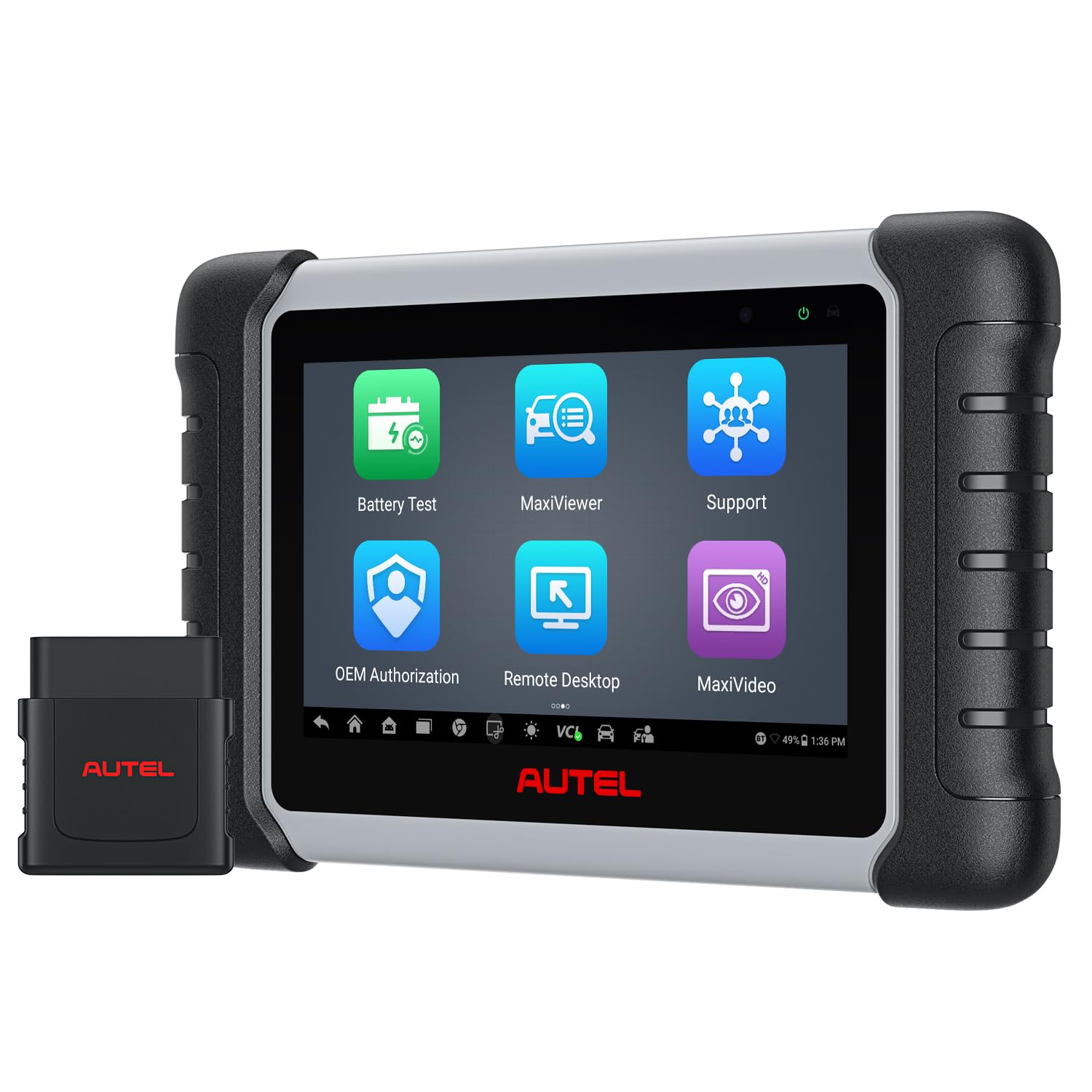
Autel MaxiCOM MK808BT Pro — Best wireless tablet for daily jobs
Best for: Wireless tablet work
Cables slow a garage down, and this Bluetooth tablet removes that friction on most daily jobs. The small MaxiVCI Mini plugs into the OBD port while you hold the 7-inch tablet anywhere around the car, which makes live data and active tests easier during road tests and brake work. It covers all systems on a wide range of brands, with 3000-plus active tests and 28-plus service functions for common resets. Android 11 keeps menus smooth, and the carrying case suits mobile work. The trade-off is a paid renewal after the first year, and some older vehicles have thinner bi-directional coverage than the top Autel tablets.
- Wireless Bluetooth VCI included
- 3000-plus active tests
- 28-plus service functions
- Renewal needed after first year
- Thinner coverage on older vehicles
| Display | 7-inch touchscreen |
| Operating system | Android 11 |
| Active tests | 3000-plus tests |
| Service functions | 28-plus services |
| Connectivity | Bluetooth MaxiVCI Mini |
4.8/5
4.9/5
4.7/5

Autel MaxiPRO MP808TS — Diagnostics plus complete TPMS service
Best for: TPMS and diagnostics
Tyre work creates its own diagnostic jobs, and this tablet handles both sides without a second tool. It reads and activates TPMS sensors, programs Autel MX-Sensors, and completes relearn procedures, then switches back to all-system diagnostics for engine, ABS, SRS, and transmission checks. The 7-inch touchscreen is clear in bright garage light, and 28-plus service functions cover oil, SAS, DPF, and brake resets. It suits tyre shops and general garages that change sensors weekly. The trade-off is that full TPMS depth depends on sensor compatibility, and it is heavier than a handheld for quick code checks.
- Complete TPMS activation and relearn
- All-system diagnostics in one tool
- Clear 7-inch garage touchscreen
- TPMS depth depends on sensor compatibility
- Heavier than handheld code readers
| Display | 7-inch touchscreen |
| TPMS | Complete TPMS service |
| Coverage | All-system diagnostics |
| Service functions | 28-plus services |
| Connectivity | Wi-Fi, Bluetooth |
4.7/5
4.7/5
4.6/5

Innova 5610 — Handheld bi-directional power, no subscription
Best for: Handheld garage use
Not every garage wants a tablet, and this handheld proves a compact tool can still do serious work. The Innova 5610 runs bi-directional active tests, reads all-system codes, and supports dealer-level resets on supported vehicles, which is rare at handheld size. Its 3.5-inch color screen is clear in dim corners, and RepairSolutions2 turns a code into verified fixes and parts guidance. There is no subscription for updates, which keeps long-term ownership simple. The trade-off is a smaller screen for live data graphs, and coverage varies by vehicle, so use Innova’s coverage checker before buying.
- Bi-directional tests in handheld form
- No subscription for updates
- RepairSolutions2 verified fix guidance
- Small screen for live data graphs
- Coverage varies by vehicle
| Display | 3.5-inch color screen |
| Coverage | All-system diagnostics |
| Bi-directional | Yes, active tests |
| App | RepairSolutions2 |
| Updates | No subscription |
4.7/5
4.8/5
4.7/5

Autel MaxiSys MX808 — All-system tablet at a friendlier level
Best for: Value all-system tablet
Home garages that want tablet diagnostics without pro-tablet cost should start here. The MX808 runs all-system scans, live data, and active tests on a 7-inch touchscreen, with 28-plus service functions for oil, SAS, DPF, and brake resets. Menus are clean, AutoVIN speeds up vehicle identification, and the wired VCI connection stays stable during long scans. It handles most family cars and light trucks well, which covers the bulk of home garage work. The trade-off is slower processing than the MS906 Pro on heavy scans, and it lacks the newest DoIP support found on higher Autel tablets.
- All-system scans at value level
- AutoVIN speeds vehicle identification
- Stable wired VCI connection
- Slower on heavy full scans
- No newest DoIP support
| Display | 7-inch touchscreen |
| Coverage | All-system diagnostics |
| Service functions | 28-plus services |
| Vehicle ID | AutoVIN supported |
| Connectivity | Wi-Fi, USB, wired VCI |
4.6/5
4.7/5
4.6/5

Innova 5510 — All-module scanning for the home garage
Best for: All-module home garage
A home garage often services two or three family cars, and this Innova handheld covers those cars across modules without tablet complexity. Its all-module scan reaches engine, transmission, ABS, SRS, and other systems, while live data and RepairSolutions2 help you decide whether a code means a sensor, a wire, or a real part failure. The 3.5-inch color screen is easy to read, and there is no subscription to maintain. It is a strong fit for owners who fix their own cars on weekends. The trade-off is limited bi-directional depth next to the 5610, and its smaller screen makes long graph sessions harder.
- All-module scan for family cars
- No subscription to maintain
- RepairSolutions2 fix guidance
- Limited bi-directional depth
- Small screen for long graphs
| Display | 3.5-inch color screen |
| Coverage | All-module scan |
| App | RepairSolutions2 |
| Updates | No subscription |
| Languages | English, Spanish, French |
4.5/5
4.6/5
4.6/5

TOPDON ArtiDiag Pro — Pro tablet features at a budget level
Best for: Budget pro tablet
A starting garage does not need the most expensive tablet to do honest diagnostic work, and this TOPDON tablet proves that point. It runs all-system scans, live data, and bi-directional tests, with 30-plus service functions for the resets small shops use most. The 7-inch touchscreen is bright enough for garage lighting, and wireless connectivity keeps the cable out of the way. It is a practical first pro tablet for a home garage moving beyond basic code readers. The trade-off is less deep brand coverage than Autel or Launch on some European models, and its menus take a short learning curve.
- All-system scans at budget level
- Bi-directional tests included
- Bright 7-inch touchscreen
- Thinner European brand coverage
- Short menu learning curve
| Display | 7-inch touchscreen |
| Coverage | All-system diagnostics |
| Active tests | Bi-directional control |
| Service functions | 30-plus services |
| Updates | Online updates included |
4.5/5
4.5/5
4.6/5

Foxwell NT809 — Touchscreen handheld for quick system checks
Best for: Touchscreen handheld work
Some garage jobs need a fast system check, not a full tablet setup, and this Foxwell handheld fits that moment. Its 7-inch touchscreen runs all-system scans with live data, and 30-plus service functions cover oil, SAS, DPF, and battery resets on supported vehicles. The built-in battery and wireless link keep it handy for driveway checks and quick pre-purchase inspections. It is lighter than a pro tablet and starts faster. The trade-off is less active-test depth than the top tablets, and its interface feels busier than Autel or Launch menus on long diagnostic sessions.
- Fast start for quick checks
- 7-inch touchscreen with live data
- 30-plus service functions
- Less active-test depth
- Busy menus on long sessions
| Display | 7-inch touchscreen |
| Coverage | All-system diagnostics |
| Service functions | 30-plus services |
| Connectivity | Wi-Fi, Bluetooth |
| Battery | Built-in rechargeable battery |
4.4/5
4.5/5
4.5/5

BlueDriver Bluetooth Pro — Your phone becomes the garage scanner
Best for: Phone-based garage checks
If you already carry a phone everywhere in the garage, this small Bluetooth adapter turns it into a capable diagnostic tool. It reads engine, ABS, SRS, TPMS, and transmission codes on supported gas vehicles, then explains each code with repair reports and possible causes in the free app. There is no subscription, and the adapter is small enough to leave in the glovebox. It suits quick checks, pre-purchase inspections, and owners who want clear explanations. The trade-off is gas-only coverage for North American vehicles, with no diesel support, and it cannot match a pro tablet on active tests.
- No subscription, free repair reports
- ABS, SRS, TPMS and transmission coverage
- Small adapter, phone display
- Gas vehicles only, no diesel
- Limited active-test depth
| Connection | Bluetooth to phone |
| Coverage | ABS, SRS, TPMS, transmission |
| App | Free BlueDriver app |
| Subscription | None |
| Vehicles | Gas vehicles, 1996 and newer |
4.3/5
4.6/5
4.4/5
Top 3 Head-to-Head: MS906 Pro vs X431 Pro Mini vs MK808BT Pro
These three are the final choices for most garages, because each one covers all systems yet serves a different working style.
| Feature | #1 MS906 Pro | #2 X431 Pro Mini | #3 MK808BT Pro |
|---|---|---|---|
| System coverage | 4.9/5 — Best | 4.8/5 | 4.8/5 |
| Garage usability | 4.9/5 | 4.8/5 | 4.9/5 — Best |
| Value for money | 4.8/5 — Best | 4.7/5 | 4.7/5 |
| Choose if… | You want the fastest, deepest garage tablet | You want pro power in a compact tablet | You want wireless freedom on daily jobs |
Who These OBD2 Scanners Are NOT For
These scanners are built for car and light-truck garages, not for every diagnostic job.
They are also not the right pick if you only need to read one check engine code once a year, or if you need dealer-only coding and key programming. In those cases, a basic reader or a dealer visit will save you time and effort.
Common Mistakes to Avoid
Most garage scanner regrets come from buying for the wrong job, not from buying a bad brand.
Frequently Asked Questions About OBD2 Scanners for Garages
What OBD2 scanner do mechanics use in a garage?
Most mechanics use an all-system tablet with bi-directional control, ABS and SRS coverage, live data, and common service resets. Tablets from Autel and Launch are common in small shops because they handle varied makes, run active tests, and complete resets without a dealer visit. The right choice still depends on the cars you service most.
Can I use an OBD2 scanner at home in my garage?
Yes, you can use an OBD2 scanner in a home garage on any OBD2 vehicle, which covers most cars sold since 1996. Plug the scanner into the port under the dashboard, turn the ignition on, and follow the on-screen prompts. Start with a full scan, save the codes, and check live data before you replace any part.
What is the best OBD2 scanner for a home garage?
The best home garage scanner is an all-system tool with live data, ABS and SRS coverage, and the resets you use most. A tablet suits owners who work on several cars, while a handheld like the Innova 5610 suits owners who want bi-directional tests without a large screen. Match coverage to your cars first, then choose the form you will actually use.
Do I need a bi-directional OBD2 scanner?
You need bi-directional control if you want to confirm faults instead of guessing from codes alone. It lets you command fans, injectors, solenoids, and other parts while watching the result, which helps with intermittent problems. If you only read and clear engine codes, a basic scanner is enough, but most garage work benefits from active tests.
Will an OBD2 scanner work on all cars?
No single OBD2 scanner works perfectly on every car, because coverage varies by make, model, year, and system. Most tools cover engine codes on OBD2 vehicles from 1996 onward, but ABS, SRS, transmission, and advanced functions vary more. Check the official coverage list for your exact vehicles, especially for European models and newer CAN FD cars.
Can an OBD2 scanner read ABS and airbag codes?
Yes, an all-system OBD2 scanner can read ABS and airbag codes, while an engine-only reader cannot. Look for explicit ABS and SRS coverage in the specifications, not just a general all-system claim. For a deeper comparison, see the best OBD2 scanner with ABS and SRS guide before you buy.
Does an OBD2 scanner need Wi-Fi or updates?
Most modern OBD2 tablets need Wi-Fi for software updates, new vehicle coverage, and online functions, but they can scan a car offline once set up. Updates matter because new models, codes, and service functions arrive every year. Some tools include free updates, while others need a paid renewal, so read the update terms before you choose.
Our Final Verdict
For most garages, the MS906 Pro is the clearest pick because it combines the fastest full-system scans, deep active tests, and wide service coverage in one tablet. If you service varied cars daily, it saves time on almost every job, while compact and wireless options suit smaller spaces. Choose coverage for your common cars first, and the rest of the decision becomes simple, especially when you compare scanners for multiple vehicles before buying.

I’m Alex Rahman, a car enthusiast and automotive writer focused on practical solutions, car tools, and real-world driving advice. I share simple and honest content to help everyday drivers make better decisions.
