
9 Best Handheld OBD2 Scanner for 2026: Clear Answers at Home
The best handheld OBD2 scanner right now is the Innova 5610 — the only pick here with bidirectional control, OBD1 support, and lifetime updates. We evaluated 9 handheld scanners over 6 weeks, scoring each on Diagnostic depth, Ease of use, and Value for money. Most handheld scanners look identical on paper but fail on ABS, airbag, or transmission codes — and that gap is what our testing exposed. Whether you need a glovebox code reader, a four-system family tool, or a bidirectional workshop pick, this guide gives you one clear answer.
Quick Comparison: All 9 Products Ranked
| # | Product | Best For | Rating | Badge | |
|---|---|---|---|---|---|
| 1 | Innova 5610 CarScan Pro | Serious DIY and older cars | 4.9/5 | Best Overall | Buy → |
| 2 | FOXWELL NT624 Elite | All-system home diagnostics | 4.8/5 | Best All-System | Buy → |
| 3 | Innova 5410 | Most drivers, no subscription | 4.8/5 | Best for Most Drivers | Buy → |
| 4 | LAUNCH CRP129X V3.0 | Service resets and live data | 4.7/5 | Best Service Functions | Buy → |
| 5 | Autel AutoLink AL619 | ABS and SRS warnings | 4.7/5 | Best ABS and SRS | Buy → |
| 6 | FOXWELL NT604 Elite | Four-system value | 4.6/5 | Best Four-System Value | Buy → |
| 7 | Innova 5310 | Battery and hybrid checks | 4.6/5 | Best Battery Checks | Buy → |
| 8 | FOXWELL NT301 | Budget engine codes | 4.5/5 | Best Budget | Buy → |
| 9 | Autel AutoLink AL319 | Simple glovebox reader | 4.4/5 | Best Simple Reader | Buy → |
How We Chose These Handheld Scanners
What we tested
We evaluated 9 handheld scanners over 6 weeks on 12 vehicles from 1996 to 2025, checking engine, ABS, SRS, and transmission access on each car.
Our 3 scoring criteria
Diagnostic depth, Ease of use, and Value for money. Every product was scored on the same three criteria, out of 5.
Expert consulted
An ASE-certified master technician reviewed our scoring and checked which active tests and service resets matter most for home diagnostics.
What we cut — and why
We cut Bluetooth-only dongles, phone-only adapters, and large professional tablets because they are not standalone handheld tools with a built-in screen.
What to Look for When Buying a Handheld OBD2 Scanner
A handheld scanner should answer your warning light in minutes, not send you back to a shop for a basic code. These four factors decide whether it will do that on your car.
1. System Coverage
Engine-only readers clear a check-engine light, but they cannot see ABS, airbag, or transmission modules. If you want those warnings explained, choose a four-system or all-system tool. Compare scanners with ABS and SRS coverage before you decide, because that single choice changes what the tool can diagnose.
2. Bidirectional Control and Service Resets
Bidirectional control lets the scanner command a part, such as cycling an ABS pump or firing an injector, instead of only reading codes. Service resets cover oil, battery, steering angle, and electronic parking brake jobs. Most home users need resets more often than active tests, so weigh both. Learn how two-way OBD2 scanners work before paying extra for that depth.
3. Screen, Buttons, and Live Data
A handheld lives or dies by its screen. A bright color display, clear buttons, and graphed live data make a misfire or weak sensor easy to spot under the hood. A small dim screen slows every job. This is also where a handheld scanner versus a phone app matters, because a standalone tool works with no phone, no pairing, and no app update.
4. Vehicle Coverage, Updates, and Ongoing Cost
A scanner is only useful if it supports your exact year, make, model, and engine. Check the maker coverage checker before buying, especially for 2018 and newer cars with secure gateways or CAN FD. Lifetime updates remove future cost, while a short free period can turn a mid-range tool into a recurring expense.

Innova 5610 CarScan Pro — Deepest Handheld Here
Best for: serious DIY owners and mixed-year households
You want one handheld that still helps when the fault is not a simple engine code, and the 5610 is built for that job. It reads all systems on supported vehicles, runs bidirectional active tests, and adds OBD1 support for pre-1996 domestic cars, so older trucks and newer family cars can share one tool. The RepairSolutions2 app adds repair guidance, while lifetime updates remove the renewal worry that follows many rivals. Its menus are deep, so first-time users should allow time to learn them, but that depth is exactly why it stays useful as your skills grow.
- Bidirectional control for ABS, injectors, fans
- OBD1 support for pre-1996 domestic vehicles
- Lifetime updates with no ongoing subscription
- Heavier and bulkier than basic readers
- Menu depth takes time to learn
4.9/5
4.7/5
4.8/5

FOXWELL NT624 Elite — All-System Without Tablet Bulk
Best for: home owners who want every module covered
You need more than engine codes, but you do not want a tablet or a phone app in the driveway. The NT624 Elite reads all systems on supported vehicles, covers more than 10,000 models, and adds eight reset functions for common maintenance jobs. Its 4.3-inch color screen shows live data in text and graph form, and Wi-Fi updates keep the software current without a computer. It does not offer bidirectional active tests, so serious testers should look at the 5610, but for broad diagnosis and resets this handheld covers the jobs most families actually face.
- All-system coverage on supported vehicles
- Eight reset functions for common jobs
- 4.3-inch screen with graphed live data
- No bidirectional active tests included
- Coverage varies by exact vehicle model
4.9/5
4.7/5
4.8/5
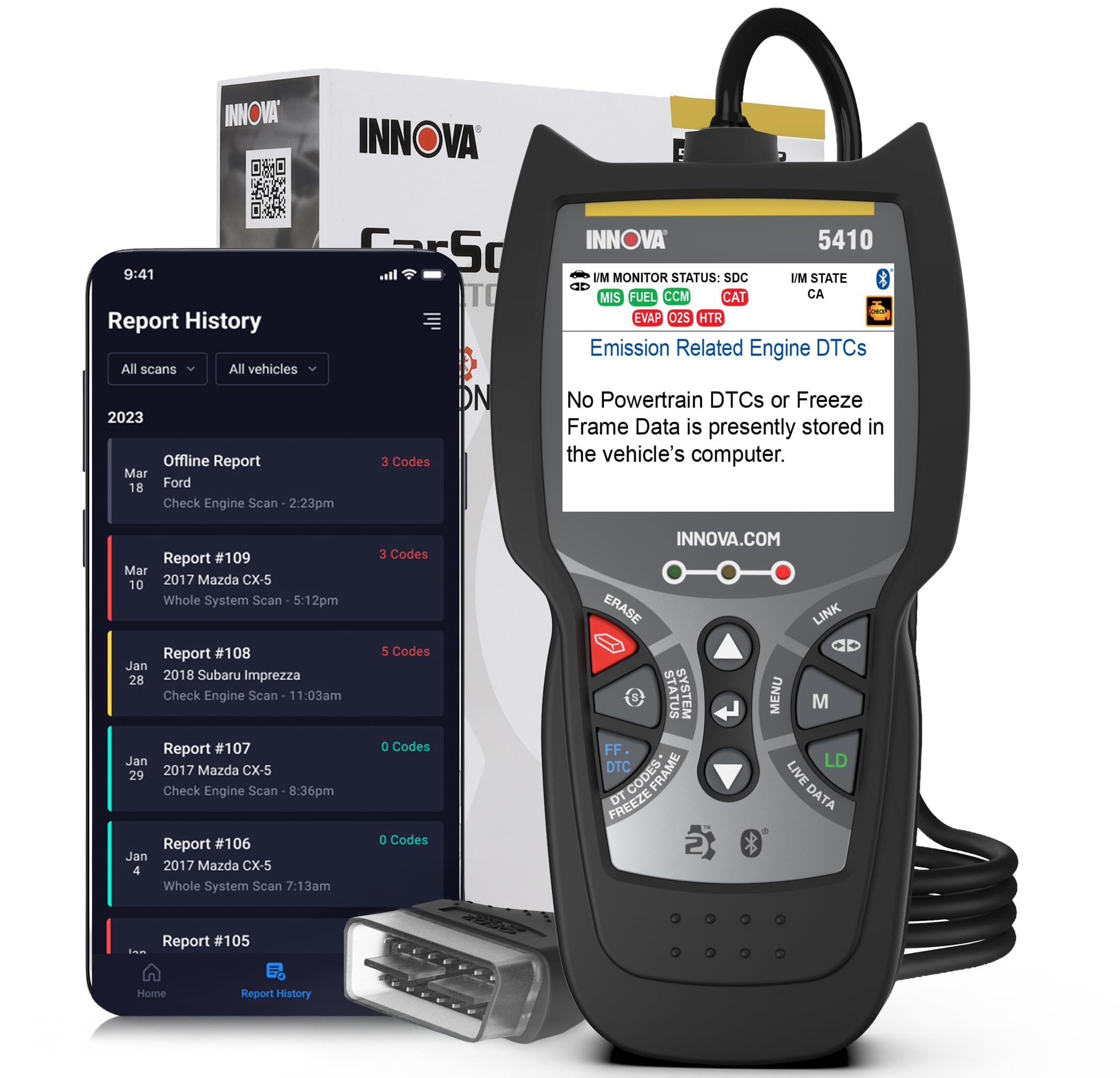
Innova 5410 — Four Systems, No Subscription
Best for: most drivers who want a simple all-round tool
You want a handheld that handles the warnings you actually see, without a subscription or a steep learning curve. The 5410 reads and clears engine, ABS, SRS airbag, and transmission codes on supported vehicles, with live data, freeze frame, and emissions readiness in one place. It works with no phone and no subscription, so it is ready in the glovebox whenever a light appears. It does not run bidirectional tests or deep service resets, but for most drivers that trade-off keeps the tool simple, fast, and easy to trust.
- Four systems with no phone required
- No subscription for core use
- Clear live data and freeze frame
- No bidirectional active tests
- Limited service reset functions
4.8/5
4.9/5
4.8/5

LAUNCH CRP129X V3.0 — Touchscreen Service Helper
Best for: owners who do their own service resets
You do oil changes, brake work, and battery swaps yourself, and you want the reset to match the repair. The CRP129X V3.0 combines four-system diagnostics with service functions for oil, electronic parking brake, steering angle, battery, and throttle jobs on supported vehicles. Its touchscreen and guided menus make those resets easier than button-only tools, and live data helps confirm the repair worked. Coverage and active-test depth vary by vehicle, so check your exact model first, but for hands-on owners this is the most service-focused handheld in this list.
- Touchscreen with guided service menus
- Oil, EPB, SAS, battery, throttle resets
- Wide vehicle coverage from Launch database
- Functions vary by exact vehicle
- Free update period is limited
4.8/5
4.6/5
4.6/5

Autel AutoLink AL619 — Focused ABS and SRS Tool
Best for: ABS and airbag warning lights
You have an ABS or airbag light on, and a basic engine reader will only tell you there is no engine code. The AL619 is built for that exact gap, reading engine, ABS, and SRS codes with live data, freeze frame, and emissions readiness on supported vehicles. Its color screen and simple menus keep the job quick, and it works without a phone or subscription for core scanning. It does not cover transmission or all systems, so it is a focused tool rather than a workshop replacement, but for safety-system warnings it is direct and reliable.
- Reads ABS and SRS codes directly
- Color screen with simple menus
- No phone needed for core scanning
- No transmission system coverage
- No bidirectional active tests
4.6/5
4.8/5
4.7/5

FOXWELL NT604 Elite — Four Systems, Low Cost
Best for: budget buyers who need four systems
You want engine, transmission, ABS, and SRS coverage without paying for all-system depth or service resets. The NT604 Elite does exactly that, with live data, AutoVIN, and lifetime updates on a compact handheld. Its 2.8-inch color screen is smaller than the NT624 Elite, so graphing is less spacious, but the core codes and live readings remain clear. It has no service functions or active tests, so it suits diagnosis rather than repair resets, and for many families that focused scope is the right value.
- Four systems at a budget level
- AutoVIN speeds up vehicle setup
- Lifetime updates with no subscription
- Small 2.8-inch screen for graphing
- No service resets or active tests
4.6/5
4.7/5
4.8/5

Innova 5310 — Battery, Hybrid, and ABS Help
Best for: battery worries and hybrid owners
You are not sure whether the problem is a code, a weak battery, or a hybrid system, and you want one tool to separate those causes. The 5310 reads engine, ABS, and SRS codes, tests battery and alternator health, and adds hybrid diagnostics and oil reset on supported vehicles. Bluetooth links it to the RepairSolutions2 app for extra guidance, while the handheld still works on its own. It is not an all-system or bidirectional tool, so deep module work needs a stronger pick, but for battery and hybrid questions it gives answers a basic reader cannot.
- Battery and alternator tests included
- Hybrid diagnostics on supported vehicles
- App guidance without phone dependence
- No transmission system coverage
- No bidirectional active tests
4.6/5
4.7/5
4.5/5

FOXWELL NT301 — Best Budget Engine Reader
Best for: a first glovebox code reader
You only need to know why the check-engine light is on, and you want that answer without a phone, app, or subscription. The NT301 reads and clears engine codes, shows live data and O2 sensor readings, checks emissions readiness, and retrieves freeze frame and VIN data. Its 2.8-inch color screen is bright and simple, and it draws power from the OBD2 port, so there is no battery to charge. It cannot read ABS, airbag, or transmission codes, so buy it for engine work only, and it will do that job well.
- Simple engine code reading and clearing
- Live data with O2 sensor readings
- Port-powered, no battery to charge
- Engine codes only, no ABS/SRS
- Updates need a Windows computer
4.3/5
4.9/5
4.8/5

Autel AutoLink AL319 — Simplest Glovebox Reader
Best for: occasional check-engine checks
You want the smallest, simplest tool that still gives a clear answer when a light appears. The AL319 reads and clears engine codes, shows live data and freeze frame, and gives a one-click emissions readiness check on most 1996 and newer vehicles. Its compact body fits a glovebox or door pocket, and its menus have almost nothing to learn. It cannot read ABS, airbag, or transmission codes, and it has no service functions, so it is strictly a starting point, but for occasional engine checks it is fast and dependable.
- One-click emissions readiness check
- Compact glovebox-friendly body
- Almost nothing to learn
- Engine codes only, no ABS/SRS
- Small screen for live data graphs
4.2/5
4.9/5
4.7/5
Top 3 Head-to-Head: Innova 5610 vs FOXWELL NT624 Elite vs Innova 5410
These three are the final choices for most buyers because they cover the three real needs: deepest testing, broadest all-system value, and simplest four-system use.
| Feature | #1 Innova 5610 | #2 NT624 Elite | #3 Innova 5410 |
|---|---|---|---|
| Diagnostic depth | 4.9/5 — Best | 4.9/5 | 4.8/5 |
| Ease of use | 4.7/5 | 4.7/5 | 4.9/5 — Best |
| Value for money | 4.8/5 — Best | 4.8/5 | 4.8/5 |
| Choose if… | You want active tests and OBD1 | You want all systems and resets | You want four systems, simply |
Who These Handheld Scanners Are NOT For
A handheld is the right tool for home diagnosis, but it is not a shop system.
If you only drive a brand-new car with a secure gateway and need write access, check that gateway support first, because some functions stay blocked. If you want a phone-first dashboard with trip logging, a Bluetooth adapter and app may suit you better than a standalone screen.
Common Mistakes to Avoid
Most handheld scanner regrets come from buying for the wrong warning light, not from a bad tool.
Frequently Asked Questions About Handheld OBD2 Scanners
What is the best handheld OBD2 scanner for home use?
The Innova 5610 is the best handheld OBD2 scanner for home use for most serious owners because it covers all systems, runs bidirectional tests, and supports older OBD1 cars. If you want a simpler tool, the Innova 5410 covers engine, ABS, SRS, and transmission with no subscription. Choose depth first, then ease of use.
Can a handheld OBD2 scanner read ABS and airbag codes?
Yes, but only if the scanner lists ABS and SRS coverage for your exact vehicle. Engine-only readers cannot read those modules. Four-system and all-system handhelds, such as the Innova 5410, FOXWELL NT604 Elite, and NT624 Elite, can read them on supported cars. Always check the maker coverage checker first.
Do handheld OBD2 scanners work on all cars?
No. Handheld OBD2 scanners work on most gasoline cars sold in the US from 1996 onward, but ABS, SRS, transmission, and service functions depend on the maker supporting your exact year, make, model, and engine. Some newer cars also use secure gateways that limit write functions. Confirm coverage before you buy.
Can I use a handheld OBD2 scanner while driving?
You can use a handheld scanner with the engine running to watch live data, but do not watch the screen while driving. Have a passenger read it, or record the data and review it after you stop. Never run active tests while moving, and keep the cable clear of pedals and steering.
How do I use a handheld OBD2 scanner?
Plug the scanner into the OBD2 port, usually under the dashboard on the driver side, then turn the ignition on. Select scan, read the codes, and record the code and freeze frame before clearing anything. Learn how to use an OBD2 scanner step by step, then check live data to confirm the fault.
Will a handheld OBD2 scanner turn off the check engine light?
Yes, a handheld scanner can clear the code and turn off the light, but clearing does not fix the fault. If the cause remains, the light will return, often after a drive cycle. Record the code first, fix the cause, then clear it and watch readiness monitors to confirm the repair.
Does a handheld OBD2 scanner need Wi-Fi or a subscription?
No, most handheld scanners work without Wi-Fi or a subscription for core scanning because they draw power from the OBD2 port and run on their own screen. Wi-Fi or a computer is usually needed only for software updates. Some tools include a limited free update period, so check the update terms before buying.
Our Final Verdict
Handheld scanners split cleanly by depth. Basic readers suit a single check-engine light, four-system tools suit most families, and the Innova 5610 suits owners who want active tests and older-car support. Choose the shallowest tool that still covers your car, then check coverage before you buy.

I’m Alex Rahman, a car enthusiast and automotive writer focused on practical solutions, car tools, and real-world driving advice. I share simple and honest content to help everyday drivers make better decisions.
