
Why Your Scanner Shows Fewer Codes Than a Pro Tool
Quick Answer
Your scanner usually shows fewer codes because it reads only the standard, emissions-related powertrain codes every car must share. A professional tool also reads manufacturer-specific codes and codes stored in other modules, such as transmission, ABS, airbag, body and network modules, so its list is longer even when both tools work correctly.
Seeing one code on your scanner and six on a shop scan can feel like your tool is broken. Usually it is not: the two tools ask different questions, and the gap is about access, not accuracy.
Two Tools Are Asking Different Questions
A code reader pulls and clears the standard trouble codes linked to the check-engine light. A diagnostic tool talks to the whole car, reads live data from many systems, runs tests and reads the extra codes a maker keeps behind its own software.
OBD-II was created to monitor emissions, not to service every system in a modern car. Since the 1996 model year in the United States, cars have had to share a standard set of powertrain and emissions codes through the same 16-pin port, so any compliant scanner can read them. That shared set is only one slice of what the car stores.
Your Scanner Usually Talks to One Computer, Not the Whole Car

A modern car is a network of modules: engine, transmission, ABS and stability control, airbag, steering, body control, climate control and driver assistance. Each module can store its own faults, and many faults never reach the engine computer at all.
A basic scanner usually talks mainly to the engine control module, and sometimes to the transmission in a limited way. That is enough for a misfire, a lean fuel mixture or a catalytic converter code. It is not enough for an ABS wheel-speed fault, an airbag fault, a body-control fault, or a communication fault between two modules.
A professional tool performs an all-system scan, polling each module in turn, so its report often looks like several short lists grouped by system. The extra codes are faults from places your scanner did not visit. That is why an ABS light can be on while your scanner says no codes found. See our guide to whether an OBD2 scanner can diagnose an ABS warning light.
Generic Codes vs Manufacturer-Specific Codes
The code itself tells you which world it belongs to. A trouble code has five characters. The first letter names the system: P for powertrain, B for body, C for chassis and U for network. The second character is the key detail. In the powertrain range, 0 usually means generic and 1 usually means manufacturer-specific.
Generic codes are defined by SAE J2012 and mean the same thing on every brand. P0300 is a random misfire, and P0420 is catalyst efficiency below threshold on bank 1. Any compliant scanner should read them. Manufacturer-specific codes, such as P1xxx, use ranges the maker reserves for its own systems. The same number can mean different things on different brands, and a basic scanner may show it with no description or skip it entirely.
The SAE J2012 standard for diagnostic trouble code definitions sets out this split between standard codes and manufacturer-controlled codes. It is the reason a low-cost reader and a dealer-level tool can plug into the same port and still report different counts.
| Code type | What it covers | Who can usually read it |
|---|---|---|
| Generic, P0xxx | Standard powertrain and emissions faults | Almost any OBD-II scanner |
| Manufacturer-specific, P1xxx | Maker-defined powertrain faults | Capable or OEM-level tools |
| Body, B1xxx | Airbag, lighting, locks, comfort | All-system or OEM-level tools |
| Chassis, C1xxx | ABS, steering, suspension | All-system or OEM-level tools |
| Network, U1xxx | Lost communication between modules | All-system or OEM-level tools |
If a code starts with 1 in the second position, or starts with B, C or U, a basic reader is far more likely to miss it. See our guide to whether an OBD2 scanner can read manufacturer codes.
Stored, Pending, Permanent and History Codes Change the Count
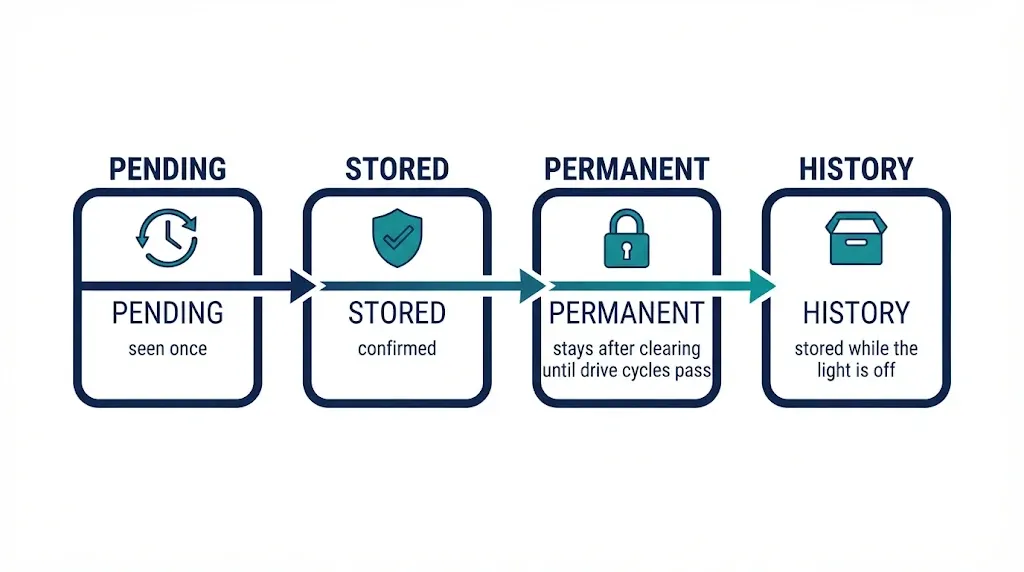
Even when two tools talk to the same module, they can report different numbers because they treat code types differently. A stored code, sometimes called a confirmed code, is a fault the car has seen often enough to record as a real problem. A pending code is an early warning: the fault was seen once, but the car has not yet confirmed it. Many basic scanners show pending codes in a separate menu, or not at all.
A permanent code is a confirmed emissions fault that stays in memory after the light is cleared, until the car completes the drive cycles that prove the fault is gone. A basic clear command does not erase it, and a scanner that does not show permanent codes separately can make it look as if the code vanished when it has not.
History codes, sometimes called shadow codes on some European brands, are faults a module has stored even though the warning light is off. They can point to an intermittent problem, a low-voltage event or a communication glitch. A professional tool often lists them; a basic reader usually does not. Timing matters too: after clearing codes or disconnecting the battery, the car may not have run the self-tests that set the code again.
Other Reasons the Lists Do Not Match
Software and coverage come next. A capable scanner often needs a brand-specific pack, a paid update or a coverage download for your exact year and model. Without it, the tool may connect in generic mode only, even though the hardware could do more. An out-of-date tool can also lack the definitions for newer codes.
Protocol, connection and scan mode can also limit the result. Most US cars since 2008 use CAN, but older cars, some imports, diesels and hybrids use different protocols or extra networks. Some scanners also default to a quick scan that checks only stored powertrain codes. A full or all-system scan takes longer because it polls every module, and it must be selected on purpose.
Finally, some problems leave no code at all. A worn bearing, a weak fuel pump under load, a vacuum leak inside the expected range, or a mechanical fault with no sensor watching it can cause symptoms without setting a code. See our guides to engine problems an OBD2 scanner cannot detect and how accurate OBD2 scanners are.
What to Check Before You Assume the Scanner Is Broken
Work through these checks in order. Most take a minute, and they separate a normal coverage gap from a real tool or car problem.
- Check the scan type. Look for stored, pending, permanent and history menus, and run a full or all-system scan if your tool offers one.
- Check the connection. Scan with the ignition on, or with the engine running if the tool asks for it. A loose plug or low battery voltage can cut the session short.
- Check vehicle coverage. Confirm the scanner lists your year, make, model and engine.
- Check for updates. Install the latest software and any brand pack for your car.
- Note the warning lights. If the ABS, airbag, traction or transmission light is on, expect codes outside the engine.
- Do not clear codes yet. Clearing erases freeze frame and pending-code history. Note the codes and conditions first.
- Compare like with like. Ask the shop which systems were scanned and whether the list includes pending, permanent and history codes.
Tip
Before a shop visit, write down your codes, warning lights, when the fault happens, and whether you cleared anything.
When Fewer Codes Is Normal, and When to Get a Deeper Scan
Fewer codes are normal when the fault is a standard powertrain problem and your scanner already shows it clearly. A single P0171 lean code, a P0302 cylinder 2 misfire or a P0455 large EVAP leak can be enough to start a focused check, even if a shop tool later adds a related manufacturer code with more detail. The extra code does not make your first code wrong.
Get a deeper scan sooner when the symptoms and the code list do not line up. That includes a warning light with no codes, a car that stalls, shifts badly or loses power with only one generic code, repeated codes that return after a repair, or a fault that appears only in certain conditions. In those cases the missing information is often in another module, in a pending or history code, or in live data your tool cannot show.
Safety systems deserve a lower threshold for a deeper scan. ABS, airbag, steering and stability-control faults affect braking and crash protection, and they are the systems a basic reader is most likely to miss. If any of those lights are on, do not rely on a “no codes” result from a generic scan. Before buying parts, get a deeper scan: a code names a circuit, not a failed part. P0420 can come from a converter, an oxygen sensor, an exhaust leak or a misfire. Generic OBD-II was designed for emissions, as the Motronix guide to generic scanner limits on European cars explains.
Related Product
All-System OBD2 Scanner With Manufacturer-Code Coverage
If your current reader only shows generic powertrain codes, an all-system scanner that lists ABS, SRS, transmission and body coverage for your make can close the most common gap in this article.
As an Amazon Associate, we earn from qualifying purchases.
Frequently Asked Questions
Does a scanner showing fewer codes mean it is broken?
Not usually. A basic scanner reads generic powertrain codes, while a professional tool also reads manufacturer-specific codes and codes from other modules. If it reads the standard codes correctly, the shorter list is most often a coverage limit, not a fault.
Why does my scanner say no codes when the ABS light is on?
The ABS fault is stored in the ABS module, which many basic scanners cannot open. Generic OBD-II covers mainly the engine and emissions, so an ABS, airbag or traction fault can be present while the engine list is empty.
Can a cheap scanner miss a serious problem?
Yes. It can miss problems stored outside the engine, manufacturer-specific codes without a clear description, and pending or history codes it does not display. It can still help with standard powertrain faults, but it should not be the only check when symptoms point elsewhere.
What is the difference between pending and stored codes?
A pending code means the fault was seen once but has not yet been confirmed. A stored code means the car has seen it often enough to record it as a confirmed fault. Some scanners hide pending codes in a separate menu, which makes the main list look shorter.
Will clearing codes make the scanner and the shop tool match?
No, clearing usually makes the difference worse. It erases stored codes and freeze frame data, while permanent codes can remain until the car completes its drive cycles. Note the codes first, then clear only to test whether the fault returns.
Do I need a professional scan if my scanner already shows a code?
Not always. If the code matches the symptom and points to a clear next check, you can start there. Get a deeper scan if the code returns after a repair, if other warning lights are on, or if the fault involves ABS, airbags, transmission or network communication.
Conclusion
Your scanner shows fewer codes because it sees a smaller part of the car. It reads the standard powertrain codes OBD-II requires every car to share, while a professional tool also reads maker-specific codes and faults stored in transmission, ABS, airbag, body and network modules, plus pending, permanent and history codes. Check your scan type, coverage and updates first, note the codes before clearing them, and get an all-system scan when warning lights, symptoms and the code list do not line up.

I’m Alex Rahman, a car enthusiast and automotive writer focused on practical solutions, car tools, and real-world driving advice. I share simple and honest content to help everyday drivers make better decisions.
