Why ELM327 Works on Android but Not Windows Explained
Quick Answer
Usually the adapter is not broken. Android apps handle the Bluetooth serial link inside the app, while Windows adds extra steps: pair the adapter, confirm a usable COM port, and select that route in supporting software. If any step is missing, Windows can show it as paired while the app still reports no adapter.
The vehicle side has not changed. Android lets you pair a classic Bluetooth adapter once, open an app such as Torque or Car Scanner, and let the app open the serial link. Windows is more flexible, and that flexibility is the trap: it can use classic Bluetooth, Bluetooth Low Energy, USB, and Wi-Fi, but each route needs a different setting.
Android hides the serial link, Windows exposes it
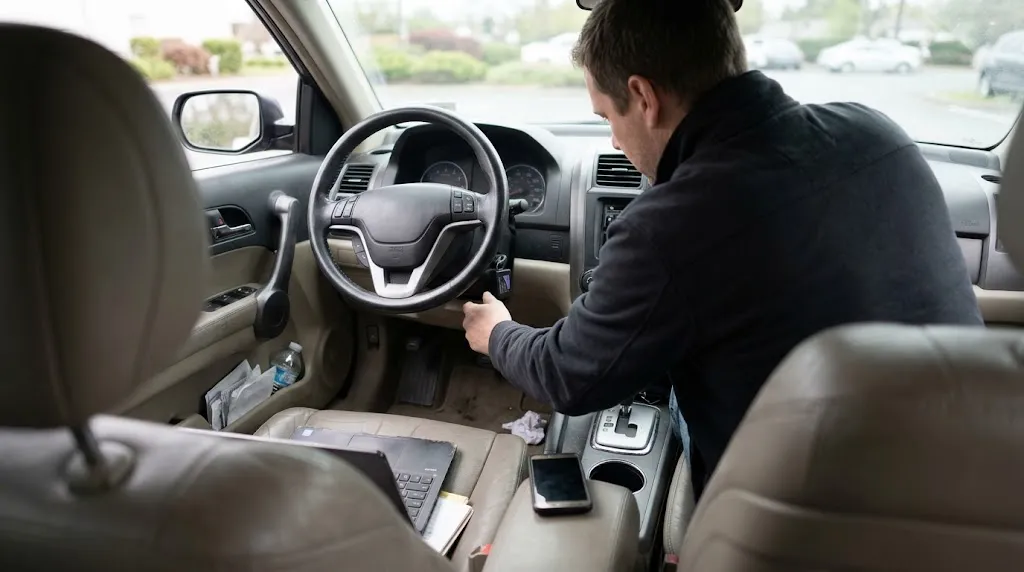
An ELM327 adapter is a translator. It turns vehicle protocols such as CAN, KWP2000, ISO 9141-2, and J1850 into a serial stream of commands and replies. The phone or computer talks to the adapter, and the adapter talks to the car.
On Android, a classic Bluetooth adapter uses the Serial Port Profile, or SPP. The app opens that serial channel after pairing. On Windows, SPP becomes visible: pairing can create incoming and outgoing virtual COM ports, and wired-style diagnostic software usually needs the outgoing port. If the app is set to the wrong port, to automatic detection that misses Bluetooth ports, or to a different transport, it will not find the adapter.
So “paired” is a misleading success signal on Windows. It proves Bluetooth credentials were exchanged, not that a COM port was created, that the port is free, or that the app is looking at that port.
The five breaks behind most Windows failures
1. The Bluetooth type does not match the app
Classic Bluetooth and Bluetooth Low Energy, or BLE, are not interchangeable. A classic adapter presents a serial link; a BLE adapter presents services over GATT, and the app must know how to use them. Microsoft’s Windows 11 Bluetooth profile support lists both SPP and GATT, so the operating system alone does not settle the question. The app must support the adapter’s type.
Dual-mode adapters can show two names, one for classic and one for BLE. Choosing the wrong name can pair the device in a mode the Windows app does not use.
2. Windows paired the adapter but made no usable COM port
This is the most common classic Bluetooth failure. The adapter appears under Bluetooth devices, yet Device Manager shows no new port, or only an incoming port. Some apps need the outgoing port specifically, and some cannot use a high number, so COM14 may need reassignment to a lower number. A port held open by another program can also block the next app.
3. The USB driver is missing or wrong
USB adapters do not all use the same chip. Common chips include FTDI, CH340, CP2102, and PL2303, and Windows needs the driver for that chip, not a generic “ELM327 driver.” A counterfeit chip, an interrupted update, or a wrong-chip driver can leave the adapter with a warning, or missing from Ports altogether. If Windows cannot see a clean COM port, the app has nothing to open.
4. The Windows app does not support that transport
Some Android apps have no Windows version, and some Windows programs support USB but not Bluetooth, or Bluetooth but not Wi-Fi. Vehicle-specific Windows software can be stricter still, requiring a particular adapter or bus setting. FORScan’s Windows setup guide makes the same practical point: confirm Windows sees the adapter and its COM port before opening the diagnostic software.
5. The adapter is busy, asleep, or not fully powered
An adapter still connected to a phone will often refuse a second connection, because these adapters generally handle one host at a time. A sleeping adapter, or one in a port live only with the ignition on, can sit in a stale paired list while refusing a fresh connection. A loose plug can do the same.
Android and Windows at a glance
| Step | Android, usually | Windows, usually |
|---|---|---|
| Pairing | Pair once, then choose the adapter in the app. | Pair, then confirm a COM port or app-visible device. |
| Serial link | Opened by the app, largely hidden. | Exposed as a COM port for classic Bluetooth and USB. |
| BLE link | Found inside the app, often without system pairing. | Found inside the app only if the app supports BLE. |
| Driver work | Rarely needed for Bluetooth. | Common for USB, sometimes needed for Bluetooth radios. |
Windows is not worse; it asks you to name the transport, while Android often lets the app name it.
Isolate the layer before changing everything
Changing the app, driver, and adapter at once hides what fixed the problem. Work in this order instead.
- Confirm vehicle power. Seat the adapter firmly, turn the ignition on, and check its power light.
- Disconnect the phone. Close the Android app and make sure no other host is holding the adapter.
- Confirm Windows can see it. For Bluetooth, check Bluetooth devices. For USB, check Device Manager under Ports (COM & LPT). If nothing appears, the problem is pairing, radio, cable, or driver work, not the app.
- Note the exact port and type. For classic Bluetooth, note the outgoing COM port. For BLE, confirm the app itself lists the adapter.
- Test the adapter separately. A serial terminal check can separate an adapter fault from an app setting. Our guide to how to test an ELM327 adapter explains what such a test can prove and what it cannot.
- Open the app last. Set its connection type to match the transport you confirmed, then set the port or device to match it exactly.
Tip
If Windows creates two Bluetooth COM ports, try the outgoing port first. The incoming port is for a device connecting to the computer, not for diagnostic software connecting out to the adapter.
Fix classic Bluetooth and USB on Windows
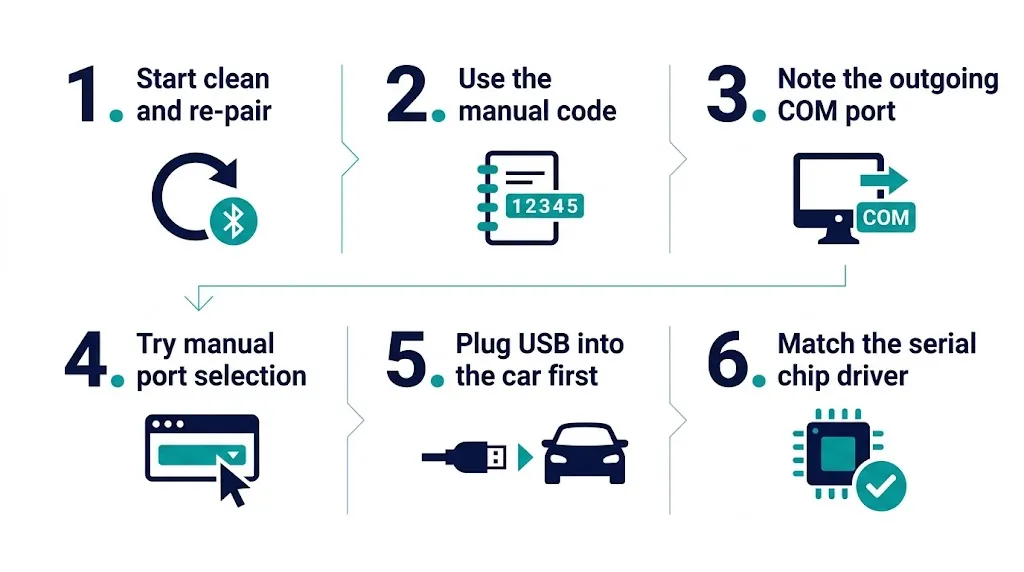
For classic Bluetooth, start clean: remove the adapter from Windows Bluetooth devices, unplug it, plug it back in, and pair it using the code in its manual. Common codes are 1234 and 0000, but the manual is safer. Then note the outgoing COM port in Device Manager and select it manually.
If the adapter pairs but no port appears, suspect the Bluetooth radio or its driver, and update it from the laptop maker rather than installing a generic package. If pairing itself keeps failing, our guide to a Bluetooth OBD2 scanner that will not pair covers power, distance, stale pairings, and competing hosts.
USB is often the simplest Windows route, because it removes pairing from the chain. Plug the adapter into the car first, then connect USB. If it appears under Other Devices or with a warning, identify its serial chip and install that chip’s driver from the chip or adapter maker, not from a random bundle. A wrong driver can hide the real chip and create a conflicting COM port.
Fix BLE and Wi-Fi on Windows
BLE failures look different. The adapter may not appear in Windows Bluetooth settings at all, and that can be normal: many BLE apps discover it inside the app, and pairing it in Windows first can interfere. Choose Bluetooth Low Energy in the app if that option exists and let the app scan. If the app has no BLE option, it will not use a BLE adapter.
Wi-Fi follows a similar rule. The computer must join the adapter’s network, and the app must use the correct address and port. Many adapters use 192.168.0.10 and port 35000 as defaults, but check the manual, because that is not universal. Joining that network can also cut internet access, which is expected for this design.
Key Insight
On Windows, “Bluetooth” is not one connection. Classic Bluetooth, BLE, USB, and Wi-Fi are four different routes to the same adapter, and the app must be set to the route the adapter actually uses.
When the problem is not Windows at all
A clone adapter may support only a subset of vehicle protocols, or answer identification commands in a way one app tolerates and another rejects, so a successful Android scan does not prove it is fully genuine. Our guide on how to identify a genuine ELM327 explains the checks that matter, without treating a version string alone as proof.
Identical-looking adapters can also differ in chip, Bluetooth type, bus support, and app support. Are all OBD2 adapters the same draws that distinction clearly. If a scan starts and then drops, the cause may be power, a loose port, sleep behaviour, or interference. Our guide to an OBD2 scanner that keeps disconnecting separates those causes from a failure to connect in the first place.
A practical decision rule
If the goal is a quick code read, staying on Android is reasonable. For deeper logging or Windows-only software, choose that software first, check whether it supports classic Bluetooth, BLE, USB, or Wi-Fi, and only then choose an adapter for that route.
Related Product
ELM327 USB Adapter for Windows
A USB adapter can simplify Windows setup by replacing Bluetooth pairing with a visible COM port that Windows diagnostic software can select directly.
As an Amazon Associate, we earn from qualifying purchases.
Frequently Asked Questions
Does Windows support ELM327 Bluetooth at all?
Yes. Windows supports the underlying profiles, including Serial Port Profile for classic adapters and GATT for BLE adapters. That does not guarantee a particular app supports a particular adapter type, so the app’s connection options are decisive.
Why does Windows show my adapter as paired but the app says no adapter found?
Pairing only proves Bluetooth credentials were exchanged. The app still needs a usable route: an outgoing COM port, BLE discovery inside the app, or a Wi-Fi address and port. If it is set to a different route, it will report no adapter.
Do I need a driver for a Bluetooth ELM327 adapter on Windows?
Usually not a separate ELM327 driver for Bluetooth, because the radio driver handles the link and Windows creates the virtual COM port. USB adapters differ: they normally need the driver for their serial chip, such as FTDI, CH340, CP2102, or PL2303.
Why does Torque work on Android but not on Windows?
Torque is an Android app, so it cannot simply be moved to Windows. The Windows replacement must be chosen separately and must support the adapter’s transport: manual COM port selection for classic Bluetooth, or BLE support for a BLE adapter.
Can I use the same ELM327 adapter on both Android and Windows?
Often yes, but only one host at a time and only with software that supports its transport. Disconnect it from the phone before connecting from Windows, and do not assume Android success proves every Windows app will accept it.
Should I switch to USB or Wi-Fi if Bluetooth keeps failing on Windows?
USB is usually the simplest fallback, because it gives Windows a visible COM port and removes the radio from the chain. Wi-Fi can also work, but only if the Windows app supports Wi-Fi and is set to the adapter’s address and port.
Conclusion
An ELM327 that works on Android but not on Windows is usually a transport mismatch, not a dead adapter. Check power and competing hosts first, confirm what Windows actually sees, then match the app to that exact route. When Bluetooth keeps adding layers, a USB adapter with a manual COM port choice is often the clearest way forward.

I’m Alex Rahman, a car enthusiast and automotive writer focused on practical solutions, car tools, and real-world driving advice. I share simple and honest content to help everyday drivers make better decisions.
