OBD2 Scanner Keeps Disconnecting? Causes & Fixes
Quick Answer
Most OBD2 scanner disconnections come down to an intermittent power or ground fault at the diagnostic link connector, a loose or corroded pin, a protocol mismatch, or wireless interference and phone power-saving settings. Start by checking pin 16 voltage and the physical condition of the port before assuming the scanner itself is failing.
A scanner that drops its connection halfway through a scan is more than an annoyance. It can leave you without freeze-frame data, interrupt a live-data session, or make you repeat a readiness check. The cause is usually one of a handful of electrical or communication issues, and most can be narrowed down with a few basic checks.
The Most Common Reasons an OBD2 Scanner Disconnects
Disconnections rarely happen because the scanner software is “bad.” They usually trace back to one of these conditions:
- Unstable power at pin 16 — the diagnostic port’s battery feed drops or fluctuates.
- Poor ground at pin 4 or pin 5 — corrosion or a loose chassis ground interrupts the data circuit.
- Blown fuse — the OBD2 port often shares a fuse with the cigarette lighter or accessory socket.
- Loose or damaged connector pins — vibration or repeated plugging weakens contact.
- Low vehicle battery voltage — control modules may stop communicating to protect themselves.
- Protocol mismatch — the scanner is set to the wrong communication protocol for the vehicle.
- Bluetooth or Wi-Fi interference — crowded 2.4 GHz spectrum or USB 3.0 noise disrupts the wireless link.
- Phone battery optimization — the operating system suspends the diagnostic app in the background.
That list is intentionally broad because “OBD2 scanner” covers wired handhelds, USB adapters, Bluetooth dongles, and Wi-Fi bridges. The first checks are the same for all of them: power, ground, and physical contact.
Check Power and Ground at the Diagnostic Link Connector
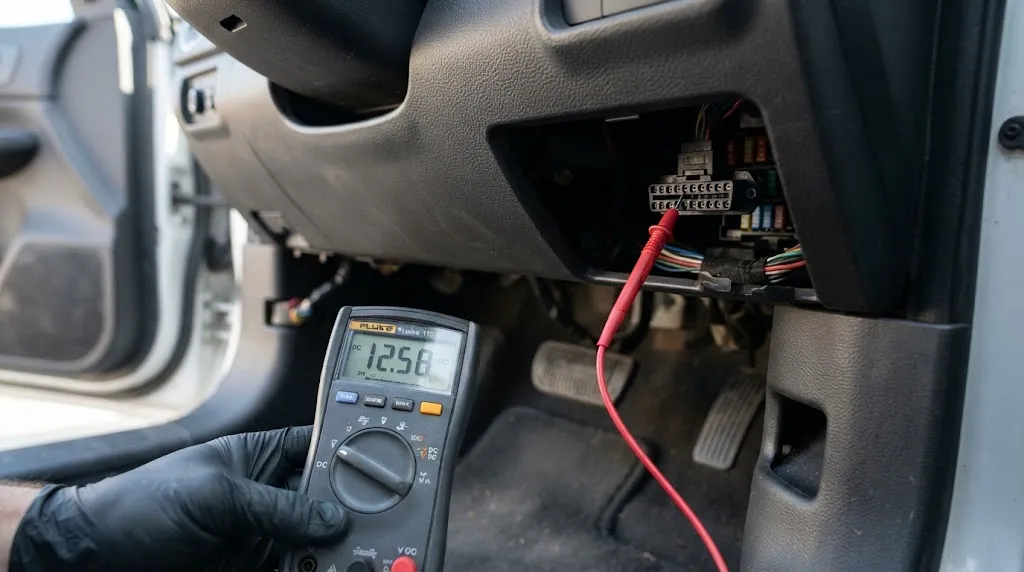
The standard 16-pin OBD2 connector supplies battery power on pin 16 and ground on pins 4 and 5. If the scanner powers on but drops out when the engine cranks, or if the connection cuts in and out while driving, measure voltage at pin 16 with a multimeter.
A healthy battery at rest typically reads about 12.2 to 12.6 volts. With the engine running, charging voltage should be roughly 13.5 to 14.5 volts. If pin 16 reads significantly lower—or if voltage dips below about 10 volts during cranking—the adapter may reboot mid-session. Many adapters are sensitive to short voltage sags, and a weak battery or failing alternator can cause exactly that symptom.
Fuse condition matters too. On many vehicles, the OBD2 port’s power circuit shares a fuse with the cigarette lighter or accessory outlet. A fuse can fail in a way that still allows a test light to glow faintly while the adapter cannot draw enough current to stay connected. Check the fuse labeled for the DLC, OBD2, ECU, or accessory socket in both the interior and under-hood fuse boxes.
Ground integrity is just as important. Corrosion at the port, a loose dash ground, or a failing engine ground strap can let power pass while digital data fails. If the adapter behaves differently when you wiggle the plug, the ground or pin contact is suspect. For a deeper walkthrough of power-present-but-no-communication symptoms, see this guide to OBD2 scanners that have power but no communication.
Inspect the Connector and Cable for Physical Faults
A connector that feels loose or gritty is a common culprit. Repeated plugging, under-dash vibration, and age can spread the female terminals inside the vehicle’s OBD2 port. The adapter may sit at a slight angle, or the pins may lose tension and make intermittent contact.
Unplug the adapter and inspect both sides with a light. Look for bent, pushed-back, or corroded pins. Do not probe with a metal tool while the ignition is on; a slip can short 12-volt power against a data pin and damage a control module. A short OBD2 extension cable can relieve strain if the adapter hangs heavily from the port, but a loose port itself still needs repair.
If the scanner is wired, flex the cable gently while watching the live-data screen. A connection that cuts out when the cable is moved points to a broken conductor or a failing strain relief. For Bluetooth adapters, the same wiggle test can reveal a failing USB or OBD-side connector.
Rule Out a Protocol Mismatch
OBD2 is not a single protocol. It is a family of standards covered by SAE J1979, and different vehicles use different physical and data-link layers. Modern cars typically use ISO 15765-4 CAN, while older vehicles may use ISO 9141-2, KWP2000, or SAE J1850.
Most scanners auto-detect the protocol, but auto-detection can fail on some vehicles, especially when aftermarket electronics are present or the adapter is a low-cost clone. A scanner that connects for a few seconds and then drops may be repeatedly attempting the wrong protocol. Open the app or menu and try selecting the protocol manually. If the vehicle is a 2008 or newer model sold in the United States, CAN is the most likely choice; older vehicles may need ISO 9141-2 or KWP2000.
Protocol handling can also explain a scanner that connects with the engine off but disconnects when the engine starts. Electrical noise from the ignition system can disrupt a marginal data link, and some adapters filter that noise better than others.
Wireless Interference and Bluetooth Dropouts
Bluetooth OBD2 adapters operate in the 2.4 GHz band, which is shared by Wi-Fi, cordless phones, dash cams, and USB 3.0 ports. A strong Wi-Fi hotspot inside the cabin, a streaming dash camera, or a poorly shielded USB 3.0 drive can raise the noise floor enough to break the Bluetooth link.
The symptom is often random: the adapter works for twenty minutes, drops, reconnects, and drops again. If the disconnects happen more often in traffic or near a shopping center, interference is a reasonable suspect. Try turning off Wi-Fi on the phone or tablet, unplugging USB accessories, and moving the phone to a different location in the cabin. For a focused look at wireless-specific causes, see why Bluetooth OBD2 adapters disconnect.
Wired USB and serial scanners have their own version of this problem: a loose USB port, an unpowered hub, or a cable routed near ignition wiring can cause dropouts. The fix is usually a shorter, shielded cable and a direct connection to the tablet or laptop.
Phone and Tablet Power Management
Mobile operating systems aggressively manage background apps to save battery. If the diagnostic app is suspended while the screen is locked or while you switch to another app, the Bluetooth or Wi-Fi link may time out even though the adapter is still powered.
On Android, set the diagnostic app to “unrestricted” battery use and disable adaptive battery for that app. On iOS, allow background app refresh and avoid low-power mode during long sessions. Some apps have a built-in “stay awake” or “keep screen on” setting; enable it during live-data logging. This one change resolves a surprising number of “random” wireless disconnects.
Firmware, App Version, and Adapter Health
Adapter firmware and app versions matter more than many owners expect. A firmware bug can cause repeated handshake failures, and an app update can change how the adapter is polled. Check the manufacturer’s support site for firmware updates and app release notes.
If the adapter has a reset button, a factory reset is worth trying after you record any custom settings. Test the adapter on a second vehicle before condemning it. If it disconnects on two different cars with two different apps, the adapter itself is the likely fault. If it works flawlessly on another vehicle, the problem is in the first vehicle’s port, wiring, or protocol behavior.
Vehicle-Side Electrical Noise and Voltage Sags
Some vehicles are simply noisier on the power bus than others. Alternator ripple, ignition noise, and electric cooling fans can inject interference that a basic adapter cannot filter. This is more common on older vehicles with aging grounds or on vehicles with aftermarket electrical accessories.
If the scanner disconnects only when the engine is running, check the battery and charging system first. A marginal battery can pass a no-load test and still sag when the starter engages. Clean and tighten the battery terminals and the main ground connections. If the problem persists and the vehicle has a known noisy electrical system, a higher-quality adapter with better power filtering may be the practical solution.
How to Isolate the Fault Systematically
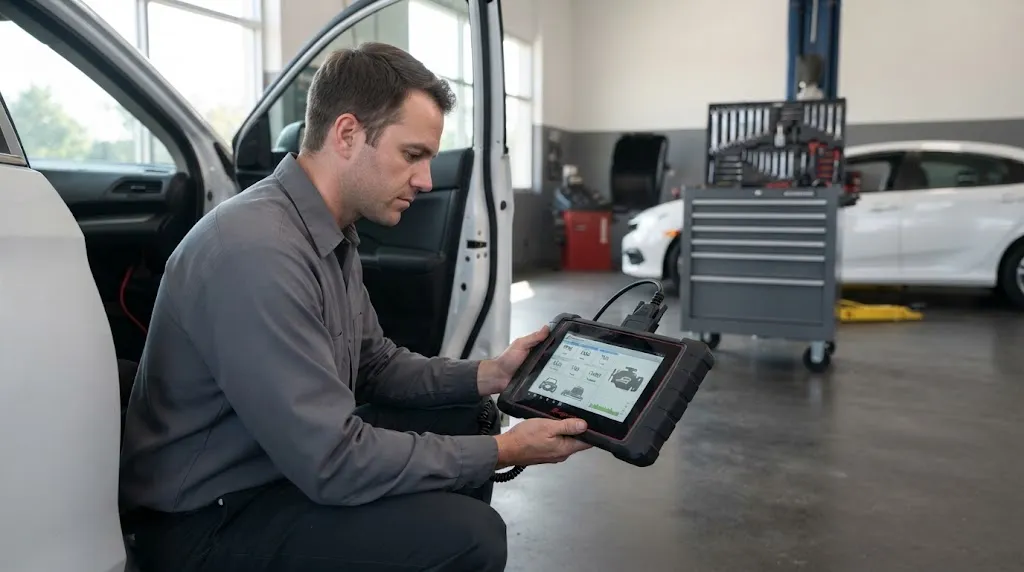
Work from the simplest check to the most involved. This order prevents replacing parts that are not faulty.
- Measure pin 16 voltage at rest and while cranking. A significant sag points to the battery or charging system.
- Check the OBD2 fuse and any fuse shared with the accessory socket.
- Inspect the port pins for corrosion, bending, or looseness; try a gentle wiggle test.
- Test the adapter on another vehicle to separate adapter faults from vehicle faults.
- Try a different scanner on the same vehicle to confirm whether the port can communicate at all.
- Set the protocol manually if auto-detection fails or the connection is unstable.
- For wireless adapters, remove interference sources and disable phone battery optimization.
- Update firmware and app, then perform a factory reset if the problem continues.
If the scanner still disconnects after these steps, the fault is likely inside the vehicle’s wiring or a control module, not in the adapter or app.
When to Stop DIY Troubleshooting
Stop and get professional help if pin 16 voltage is abnormal, a fuse blows repeatedly, the OBD2 port is physically damaged, or multiple known-good scanners fail to communicate. These symptoms can involve the ECU, CAN bus, or safety systems, and probing the wrong wire can cause expensive damage.
A mechanic with a factory-level scan tool and wiring diagrams can check for communication codes, measure CAN bus resistance, and inspect the harness without risking the modules. For an intermittent disconnect that only happens while driving, a professional may need to reproduce the fault with a scope or data logger.
Related Product
OBD2 Extension Cable
A short extension cable can relieve strain on a worn port and reduce intermittent contact caused by a heavy adapter hanging from the connector.
As an Amazon Associate, we earn from qualifying purchases.
Frequently Asked Questions
Why does my OBD2 scanner disconnect when the engine starts?
The most likely cause is a voltage sag during cranking. The starter draws a large current, and battery voltage can briefly drop below the adapter’s minimum operating threshold. A weak battery, corroded terminals, or a failing ground can make the sag worse. Measure voltage at pin 16 while cranking; if it drops below roughly 10 volts, address the battery or charging system first.
Can a blown fuse cause an OBD2 scanner to disconnect?
Yes. The OBD2 port often shares a fuse with the cigarette lighter or accessory socket. A partially failed fuse or a circuit with high resistance can let the scanner power on but drop out under load. Check the fuse labeled for the DLC, OBD2, or accessory outlet in both fuse boxes.
Why does my Bluetooth OBD2 scanner keep disconnecting?
Bluetooth disconnects usually involve 2.4 GHz interference, phone battery optimization, or a failing adapter. Wi-Fi hotspots, dash cams, and USB 3.0 devices can crowd the band. Disable battery restrictions for the diagnostic app, unpair and re-pair the adapter through the app rather than the phone’s Bluetooth menu, and test the adapter on another vehicle.
How do I know if the problem is the scanner or the car?
Test the scanner on a different vehicle. If it disconnects there too, the adapter or app is the likely fault. If it works normally on the second vehicle, the original car’s port, wiring, voltage, or protocol behavior is the cause. Testing a known-good scanner on the original vehicle confirms the direction.
What voltage should the OBD2 port have?
With the engine off, pin 16 should read approximately 12.2 to 12.6 volts on a healthy 12-volt battery. With the engine running, expect roughly 13.5 to 14.5 volts. A reading below about 11 volts at rest, or a significant dip during cranking, can cause communication timeouts.
Will an OBD2 extension cable fix disconnections?
It can help if the disconnects are caused by a heavy adapter straining a worn port or by a cable that is too short and under tension. An extension cable will not fix a blown fuse, low battery voltage, a failed adapter, or a protocol mismatch. Use it as a strain-relief measure after the electrical checks are complete.
Conclusion
An OBD2 scanner that keeps disconnecting is usually telling you something about power, contact, or communication—not that the tool is useless. Check pin 16 voltage, inspect the port pins, verify the fuse, and test the adapter on another vehicle before replacing anything. For wireless adapters, treat interference and phone battery settings as primary suspects. Once you isolate whether the fault is in the vehicle, the adapter, or the app, the fix is usually straightforward and inexpensive.

I’m Alex Rahman, a car enthusiast and automotive writer focused on practical solutions, car tools, and real-world driving advice. I share simple and honest content to help everyday drivers make better decisions.
