Do Fault Codes Have Timestamps? OBD2 Explained
Quick Answer
Usually, no. A standard OBD2 fault code does not carry a calendar date and time of its own. It tells you which fault was detected, while the closest thing to “when” is often a freeze-frame snapshot of engine conditions, a mileage or counter reading, or a date added later by a manufacturer system or scanner app.
That distinction matters for a practical question: did this fault happen yesterday, last month, or before you bought the car? A code alone rarely settles it. The answer depends on whether you are looking at generic OBD2 data, a manufacturer-enhanced system, or a record created by your own scanner app.
What a generic OBD2 code actually stores
A diagnostic trouble code, or DTC, is a short identifier for a detected condition, such as a misfire or a sensor reading outside its expected range. When the control unit confirms the fault, it stores the code and, for many emissions-related faults, may also turn on the check engine light.
What it does not normally store alongside that code is a clock reading such as “14 March at 09:42.” Generic OBD2 was designed to standardise fault identification, live data, and emissions checks across makes, not to act as a dated event log. That is why a basic scan can leave the timing question unanswered.
This is also different from code status. A stored fault code means the fault was confirmed and kept in memory; it does not, by itself, prove when it first occurred. A pending fault code usually reflects a fault seen once but not yet confirmed over a second drive cycle.
Why there is usually no calendar timestamp
The simplest reason is that the generic OBD2 data set has no standard “date and time of fault” field. A scanner requests codes through a standard service, and the response is essentially a list of codes. If a date field were part of that response, every compliant scanner would show it in the same place.
Many control units also have no need for wall-clock time. They work in drive cycles, warm-up cycles, engine run time, and test results: has this monitor run, did it pass or fail, and has the fault repeated? Those counters can show sequence and recency, but not a calendar date. A fault three drive cycles ago could have happened yesterday on a commuter car or weeks ago on a rarely driven one.
Freeze frame helps, but it does not close the gap. It is a snapshot of conditions when a fault was set, such as engine speed, coolant temperature, vehicle speed, and calculated load. As OBD Europe’s freeze-frame guide explains, that snapshot shows driving conditions at the time, not the calendar date.
What can look like a timestamp, but is not one

Several values are easy to mistake for a timestamp. Each needs careful interpretation.
| What you see | What it actually means | What it cannot prove |
|---|---|---|
| Freeze-frame snapshot | Conditions at the moment a fault was set | The calendar date of that moment |
| Distance since codes were cleared | How far the car has travelled since the last clear | When the current fault first appeared |
| Engine run time or warm-up cycles | How much the car has been used since an event | A date, without other records |
| Date shown by a scanner app | When the app first recorded or saved that scan | That the fault first occurred on that date |
The last row causes the most confusion. If you scan a car today and your app saves today’s date, that is the scan date, not necessarily the fault date. The fault could have been stored days or weeks earlier. Treating a scan date as a fault date can make an old problem look new, or a recurring problem look like a one-off.
When a real date and time can appear
Some vehicles do provide dated fault information, but usually outside generic OBD2. Depending on the make, model, and control unit, an enhanced record may include mileage at the time of the fault, a frequency counter showing how often the fault condition was seen, and, on some systems, a date and time from the vehicle’s own clock.
That date is only as reliable as the clock that supplied it. If the vehicle’s date and time were never set, were set incorrectly, or were cleared during instrument-cluster programming, an enhanced timestamp can be wrong. Service information for some vehicles has described fault timestamps showing implausible early years when the vehicle clock was not set. A precise-looking timestamp is not automatically accurate.
Access also varies. A generic scanner may show the code and freeze frame but not the manufacturer’s dated event record. A dealer-level or make-specific tool is more likely to reach those extra fields, but coverage is not universal: some modules store detailed event data, others store only the code and basic status.
Key Insight
Do not ask only “does this car timestamp codes?” Ask “does this car, this module, and this scanner show a timestamp for this fault?” The answer can change across all three.
Scanner apps, telematics, and your own scan history
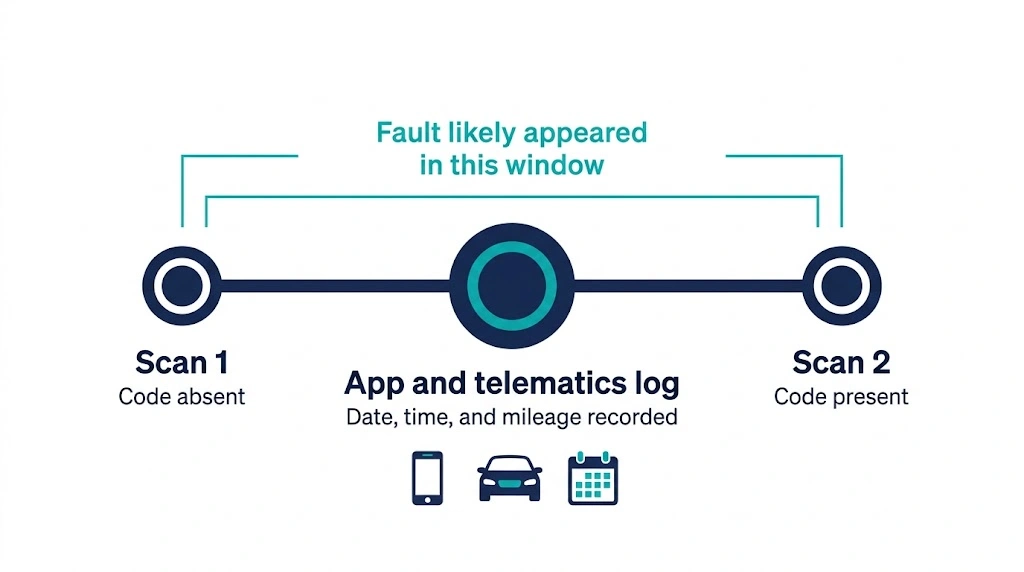
A second source of timestamps sits outside the car altogether. Many Bluetooth adapters and phone apps log each scan with the phone’s date and time, and some fleet or telematics systems log faults as they are reported, with time and mileage. Those logs help you spot patterns and see whether a code keeps returning after clearing.
The limit is the same: an app timestamp proves when the app saw or saved the code, not when the control unit first detected the fault. If the adapter was not connected when the fault occurred, the app cannot backdate the event. Label it in your notes as a scan date, not a fault date.
Regular scanning gives you a window instead: absent on one scan, present on a later one, so the fault most likely appeared between them.
Time clues you can use when no timestamp exists
When no calendar timestamp is available, combine the clues generic OBD2 does provide. None is a date on its own, but together they can narrow the story.
- Freeze frame: A fault set at high load and high speed points to a different situation from one set at idle after a cold start. Can an OBD2 scanner display freeze frame data explains what a capable scanner can show.
- Code status: Pending, confirmed, stored, and permanent codes describe different stages, not dates. A permanent code remains until its monitor passes, so it says more about unresolved emissions history than about a single day.
- Distance and cycles since clearing: A very low value points to a recent clear. A high value means the code has survived substantial driving since the last clear.
- Readiness monitors: Monitors still not ready after clearing also point to a recent reset, because the car has not yet completed the tests needed to set them ready.
- Your own records: Repair invoices, previous scans, and notes about when a warning light first appeared often give a better timeline than the car’s memory alone.
Not every code has a freeze frame: whether every DTC has freeze frame data depends on the fault, vehicle, and system.
How to check for a timestamp on your car

Use this order to avoid drawing a conclusion from the first date you see.
- Run a full scan and save the code list, freeze frame, and code status before clearing anything. Clearing first destroys the best timing clues you have.
- Look for a separate “history,” “event,” or “fault details” screen, not just the main code list. A timestamp, mileage, or frequency counter, if present, usually lives there.
- Note whether any date shown matches the scan date or phone date. If it matches today exactly and you have only just scanned the car, treat it as a scan date until you have other evidence.
- Compare the distance and cycles since clearing with what you know about recent driving and repairs.
- If timing matters for a purchase, warranty claim, or dispute, get an enhanced scan for that make first. A generic scan with no timestamp does not prove none exists elsewhere in the car.
That last step matters most when the question is “when did this happen?” rather than “what is wrong?” A full sequence, as set out in how to diagnose a check engine light with OBD2, starts with the code and its context, not with a single date field.
Mistakes that make timing look clearer than it is
The most common mistake is copying the app’s scan date into a repair note as the fault date. Another is assuming that a code cleared long ago must be old: clearing only removes the stored record, and the fault can return the next time its monitor runs. A third is treating a single freeze-frame value, such as coolant temperature, as proof of when a fault happened, when it only proves conditions at that moment.
Warning
Do not clear codes just to see whether a timestamp reappears. Clearing also erases freeze frame and the distance and cycle counters that help place the fault in time.
Finally, an absent timestamp does not mean the fault is unimportant, and a dated record does not prove a part has failed. A timestamp records when a condition was logged; diagnosis still requires checking live data, wiring, and the system behind the code.
Related Product
OBD2 scanner with freeze frame and fault history
A scanner that shows freeze frame, code status, and saved scan history makes it easier to place a fault in time, even when generic OBD2 gives no calendar date.
As an Amazon Associate, we earn from qualifying purchases.
Frequently Asked Questions
Do all OBD2 fault codes have a date and time?
No. Generic OBD2 codes do not normally include a calendar date and time. Some enhanced systems may store a date, mileage, or frequency counter, but coverage varies by vehicle, module, and scanner.
Is the date in my scanner app the date the fault happened?
Not necessarily. That date usually shows when the app scanned or saved the code. The fault may have been stored earlier, so record it as a scan date unless you have other evidence.
Can freeze frame tell me when a fault occurred?
Freeze frame shows engine conditions when a fault was set, such as speed, temperature, and load, but no calendar date in generic OBD2. It explains the driving situation, not the day it happened.
Why does my enhanced scan show a strange or very old date?
The vehicle’s own clock may have been unset, incorrect, or cleared during programming. Cross-check a dated record against mileage, service records, and scan history before relying on it.
Can I tell whether a code is old from distance since clearing?
Only in broad terms. A low distance points to a recent reset, while a high distance shows the code has survived substantial driving since the last clear. Neither gives a calendar date for the original fault.
Does clearing a fault code erase its timestamp?
Clearing normally erases the stored code, its freeze frame, and related counters on a generic scan. An enhanced history record may survive in some systems, so save freeze frame and code status before clearing anything important.
Conclusion
For most drivers, a fault code itself has no timestamp. Generic OBD2 gives you the fault, its status, and often a freeze-frame snapshot, while a real calendar date, when it exists, usually comes from a manufacturer system, a telematics log, or your own scan history. Save the code, freeze frame, and counters before clearing, and note scan dates as scan dates.

I’m Alex Rahman, a car enthusiast and automotive writer focused on practical solutions, car tools, and real-world driving advice. I share simple and honest content to help everyday drivers make better decisions.
