Can OBD2 Calculate Distance to Empty? Real Capabilities Explained
Quick Answer
Standard OBD2 diagnostic scanners cannot directly calculate or display the “Distance to Empty” (DTE) value on their own. While an OBD2 port provides access to live fuel level percentages, fuel trim, and vehicle speed, the actual distance-to-empty calculation is performed internally by the vehicle’s instrument cluster or powertrain control module (PCM) using proprietary algorithms, historical fuel consumption, and fuel tank sending unit data. Advanced diagnostic apps connected to an OBD2 adapter can estimate range, but they rely on external math rather than a native OBD2 Parameter ID (PID) for DTE.
Understanding OBD2 Protocols and Fuel Data Limitations
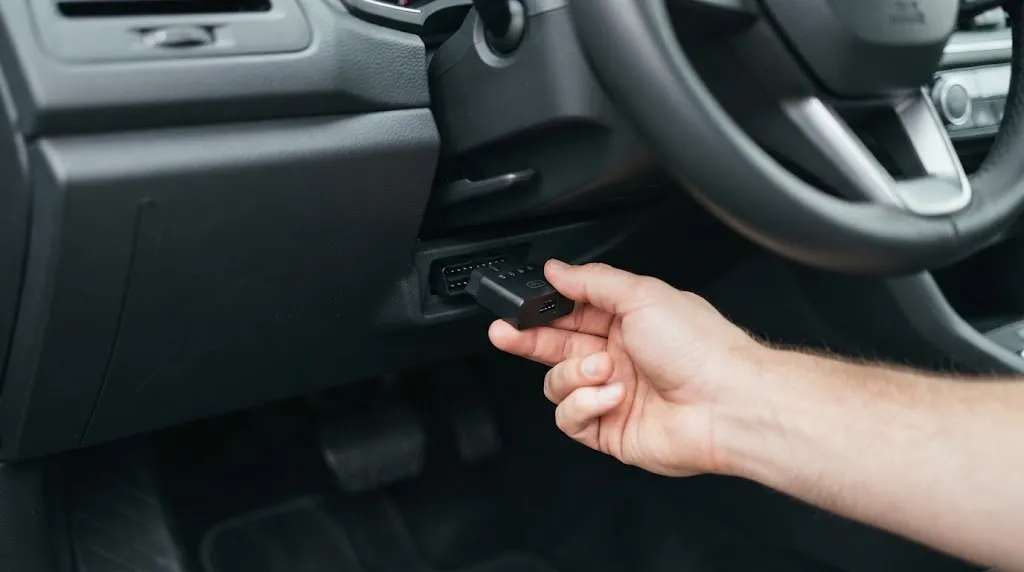
When car owners plug an OBD2 (On-Board Diagnostics II) scanner into their vehicle’s under-dash port, they often expect access to every single metric displayed on the dashboard. From engine coolant temperature and engine RPM to throttle position and fuel pressure, the OBD2 system streams a wealth of diagnostic data. However, drivers frequently assume that vehicle range—commonly known as distance to empty—is a standard metric broadcasted continuously across the generic OBD2 data stream.
The reality of automotive network architecture is more nuanced. Standardized OBD2 protocols were created primarily for emissions compliance, powertrain monitoring, and universal diagnostic troubleshooting. Standard parameter IDs, or PIDs, are mandated by government regulations to ensure that any generic code reader can pull basic engine health metrics regardless of the vehicle’s make, model, or manufacturing year.
Distance to empty, on the other hand, is an auxiliary convenience feature rather than a mandated emissions parameter. Because vehicle manufacturers design their own instrument clusters, dashboard computers, and proprietary software algorithms, range calculations often live outside the standardized OBD2 protocol set. Recognizing this distinction helps clarify why plugging in a basic code reader will not immediately populate a countdown meter telling you how many miles you can drive before running out of gas.
How Distance to Empty (DTE) Is Actually Calculated by Your Car
To understand why a generic OBD2 scanner cannot simply read distance to empty off the wire, it helps to examine how modern vehicles compute this metric internally. Distance to empty is not a static measurement taken directly from a single sensor. Instead, it is a dynamic, continuously updated mathematical estimation generated by the instrument cluster or body control module.
The calculation typically combines several key inputs:
- Fuel Tank Level: Measured by the fuel level sensor or sending unit inside the gas tank, usually expressed as a percentage or voltage signal.
- Fuel Economy Rolling Average: The vehicle’s computer tracks fuel consumption over a rolling window—often the last several miles or an average since the last trip reset.
- Driving Conditions: Modern algorithms factor in instantaneous fuel flow, vehicle speed, engine load, and sometimes even idle time.
- Calibration Constants: Tank capacity and fuel reserve margins hardcoded by the manufacturer to prevent drivers from getting stranded the exact moment the gauge reads zero.
Because these variables change constantly, two cars with identical fuel levels can show drastically different distance-to-empty readouts. A vehicle driven conservatively on a highway will calculate a much higher remaining range than the same vehicle navigating heavy stop-and-go city traffic, even if both gas tanks are exactly half full.
Key Insight
Distance to empty is an estimated projection based on past driving efficiency and current tank volume, not a fixed physical measurement obtained by a dedicated sensor.
What Standard OBD2 PIDs Can Show About Your Fuel System
Although generic OBD2 scanners cannot pull a ready-made distance-to-empty value, they can access several useful fuel-related data points through standard Parameter IDs. These metrics allow DIY mechanics and tech-savvy drivers to monitor fuel system health and manually estimate fuel dynamics.
Common fuel-related parameters available on most OBD2 compliant vehicles include:
- Fuel Level Input (PID 2F): Reports the calculated fuel tank level as a percentage from 0% to 100%.
- Short Term and Long Term Fuel Trim (PIDs 06, 07, 08, 09): Shows how the engine computer is adjusting fuel delivery to maintain an optimal air-fuel ratio.
- Fuel Rail Pressure (PID 23 or 59): Displays the pressure within the fuel rail, particularly important for direct-injection gasoline and modern diesel engines.
- Intake Air Temp and Engine Load: Helps calculate real-time engine efficiency and fuel consumption rates.
By observing the fuel level percentage alongside real-time fuel flow rates, advanced users can gain deep insight into how efficiently their engine is burning fuel. However, translating these raw percentages into an accurate mileage-to-empty figure requires processing power and software algorithms that generic OBD-II dongles do not inherently possess.
Why Basic OBD2 Scanners Fail to Display Distance to Empty
Many drivers purchase a budget handheld code reader, plug it into their vehicle, navigate through the live data menu, and express frustration when they cannot find a range or distance-to-empty readout. This limitation stems from the design parameters of basic diagnostic hardware.
Standardized OBD2 code readers are engineered strictly to communicate with the Engine Control Module (ECM) or Powertrain Control Module (PCM) regarding emissions, sensor readings, and diagnostic trouble codes (DTCs). The instrument cluster—the hardware module responsible for driving the speedometer, odometer, and digital range displays—often operates on a separate internal communication bus, such as the body CAN bus or manufacturer-specific sub-networks.
Furthermore, generic scanners lack access to manufacturer-specific enhanced PIDs. While a car’s factory dealership software or high-end professional scan tool can query the instrument cluster directly to read internal configuration data and calculated cluster values, cheap Bluetooth dongles and basic code readers are restricted to standard OBD2 parameters. Consequently, the information stream stops at basic fuel level percentages and engine sensor readings.
How Smartphone Apps and Advanced Adapters Estimate Range
While standard hardware falls short, modern smartphone-based OBD2 applications—such as Torque Pro, OBD Fusion, or Car Scanner ELM OBD2—bridge the gap by performing external calculations. These apps connect to an OBD2 Bluetooth or Wi-Fi adapter and pull raw data streams in real time.
Advanced diagnostic apps allow users to input specific vehicle parameters manually, including:
- Total fuel tank capacity in gallons or liters.
- Estimated fuel economy (miles per gallon or kilometers per liter).
- Tank reserve thresholds.
Once configured, the software monitors the live fuel level percentage PID broadcasted by the ECM. By combining the remaining fuel percentage with the user-defined tank capacity and live fuel consumption data, the application calculates an estimated distance to empty on the fly. While this workaround provides a functional range estimate on vehicles that lack a working factory dashboard display, it remains an approximation dependent on accurate user inputs and consistent driving habits.
Warning
Never rely entirely on third-party app range estimations during long road trips or in remote areas. Always monitor your physical fuel gauge and low fuel warning light as primary safety indicators.
Troubleshooting Inaccurate Fuel Readings and Range Errors
If your vehicle’s dashboard displays erratic distance-to-empty figures or your OBD2 scanner reports inconsistent fuel level percentages, the issue usually points to a physical hardware fault rather than a software glitch. Diagnosing these anomalies requires systematic troubleshooting.
Common culprits behind faulty fuel calculations include:
- Stuck or Worn Fuel Sending Unit: The resistive strip inside the gas tank can degrade over time, sending erratic voltage signals to the computer.
- Instrument Cluster Calibration Drift: Software corruption or electrical voltage drops can cause the cluster to misinterpret fuel sensor data.
- Aftermarket Fuel Pump Replacements: Incompatible aftermarket fuel sending units often have different resistance ranges, confusing the vehicle’s fuel computer.
- Disconnected Battery or ECU Resets: Disconnecting the vehicle’s battery wipes the rolling fuel economy average, causing the distance-to-empty display to fluctuate wildly until the computer recalibrates.
When troubleshooting these issues, technicians often use an advanced bidirectional scan tool to command the instrument cluster gauges to sweep and verify that the dashboard hardware is functioning correctly before dropping the fuel tank to inspect the sending unit.
Practical Methods for Monitoring Fuel Efficiency Without DTE Readouts

If your car lacks a functioning factory range computer or you are driving an older vehicle where the instrument cluster display has failed, you can still track fuel efficiency and estimate remaining range effectively using basic tools and math.
A reliable manual tracking method involves the full-to-full technique:
- Fill your gas tank completely until the fuel nozzle clicks off automatically.
- Reset your trip odometer to zero.
- Drive normally until your fuel level is low.
- Refill the tank completely and record the exact number of gallons added.
- Divide the total miles driven on the trip odometer by the gallons required for the refill to calculate your exact miles per gallon (MPG).
Multiplying your calculated MPG by your remaining fuel percentage and total tank capacity gives you a highly accurate, customized distance-to-empty figure tailored to your exact driving conditions.
Relevant Product
OBD2 Bluetooth Diagnostic Scanner Adapter
Monitor live fuel percentages, engine performance data, and real-time fuel trim metrics directly on your smartphone.
As an Amazon Associate, we earn from qualifying purchases.
Frequently Asked Questions
Can a standard OBD2 scanner show how many miles of fuel I have left?
No, standard generic OBD2 scanners only display raw data parameters such as fuel tank percentage levels and engine load. They do not calculate distance to empty natively because range computations are handled internally by the vehicle’s instrument cluster.
Why does my distance to empty change dramatically while driving?
Distance to empty is dynamic and recalculates continuously based on your recent fuel economy. If you accelerate aggressively or transition from highway cruising to heavy city traffic, your instantaneous fuel consumption spikes, causing the projected remaining range to drop quickly.
Can smartphone apps calculate distance to empty using an OBD2 adapter?
Yes, advanced diagnostic apps like Torque Pro or OBD Fusion can estimate distance to empty. They achieve this by reading the live fuel level percentage from the OBD2 port and combining it with user-configured tank capacity and fuel economy settings.
What PID corresponds to fuel level in an OBD2 system?
The standard generic OBD2 Parameter ID for fuel tank level input is PID 2F (expressed in hexadecimal). When queried successfully, it returns a percentage value representing the volume of fuel remaining in the tank relative to total capacity.
Why is my fuel gauge percentage different from my dashboard range?
The fuel gauge percentage reflects the physical fuel level sensor reading in the tank, whereas distance to empty is an algorithm-based projection factoring in historical driving efficiency and fuel consumption trends.
Can clearing diagnostic trouble codes reset my distance to empty?
Clearing engine trouble codes resets the ECM memory and adaptive fuel strategies. While this rarely erases permanent instrument cluster range data immediately, it can reset rolling fuel economy averages, causing the vehicle to recalibrate its estimated range over the next few driving cycles.
Conclusion
Understanding the boundaries of your vehicle’s diagnostic port prevents frustration when seeking specific convenience metrics like distance to empty. While standard OBD2 scanners are invaluable tools for monitoring emissions readiness, clearing engine codes, and tracking live sensor data such as fuel level percentages and fuel trim, they do not possess the native algorithms required to calculate vehicle driving range.
By recognizing that range calculations are managed internally by the vehicle’s instrument cluster or through auxiliary app configurations, drivers can better utilize diagnostic tools to maintain their vehicles and understand real-time fuel system performance.

I’m Alex Rahman, a car enthusiast and automotive writer focused on practical solutions, car tools, and real-world driving advice. I share simple and honest content to help everyday drivers make better decisions.
