
Can an OBD Reader Drain My Car Battery? What to Do
Quick Answer
Yes, an OBD reader can drain a car battery, but a short scan does not. The risk comes from a reader left plugged in while the car sits for days, with no sleep mode, on a port that stays powered.
- A handheld reader unplugged after use draws no power after disconnection.
- A wireless dongle that never sleeps keeps drawing current around the clock.
- A reader that keeps the car network awake can drain a battery far faster.
- Unplug the reader if the car will sit for more than 48 hours.
You left a code reader plugged in, and now the car cranks slowly or will not start. That worry is common, and the answer depends on the reader type, the car, and how long the car sat. This guide explains where the power goes, how fast a battery can fall, and how to test your own reader.
In this article
- Why Does an OBD Reader Draw Power When the Car Is Off?
- How Much Power Does an OBD Reader Use?
- Which OBD Readers Drain a Battery Fastest?
- Can an OBD Reader Keep Your Car Awake?
- How Long Can You Leave an OBD Reader Plugged In?
- How Can You Tell If Your Reader Is the Drain?
- How Can You Stop an OBD Reader Draining Your Battery?
Why Does an OBD Reader Draw Power When the Car Is Off?
An OBD reader draws power when the car is off because the diagnostic port can stay live after the key is out. Pin 16 of the 16-pin OBD2 port supplies battery voltage in many cars, with no relay or timer in between. That design lets a tool read stored codes from a car that will not start.
The port sits under the dash on the driver side in most cars. A reader plugs straight into that port, so it has a direct path to the battery. If the port stays powered, the reader can draw current all night, even with the engine off and the doors locked.
Some cars cut power to the port when the ignition turns off. On those cars, a plugged-in reader draws nothing while parked, whatever its sleep mode. The fastest check is a light test, covered in the test section below.
What is parasitic draw?
Parasitic draw is the small current a parked car pulls from its battery. A healthy car still feeds its clock, alarm, keyless entry receiver, and module memory while it sits. Steer puts that normal parked draw at roughly 25 to 50 milliamps once every module has gone to sleep.
A reader adds its own draw on top of that baseline. A small addition may not matter on a daily driver. The same addition can matter a lot on a car that sits for a week, or on a weak or old battery.
How Much Power Does an OBD Reader Use?
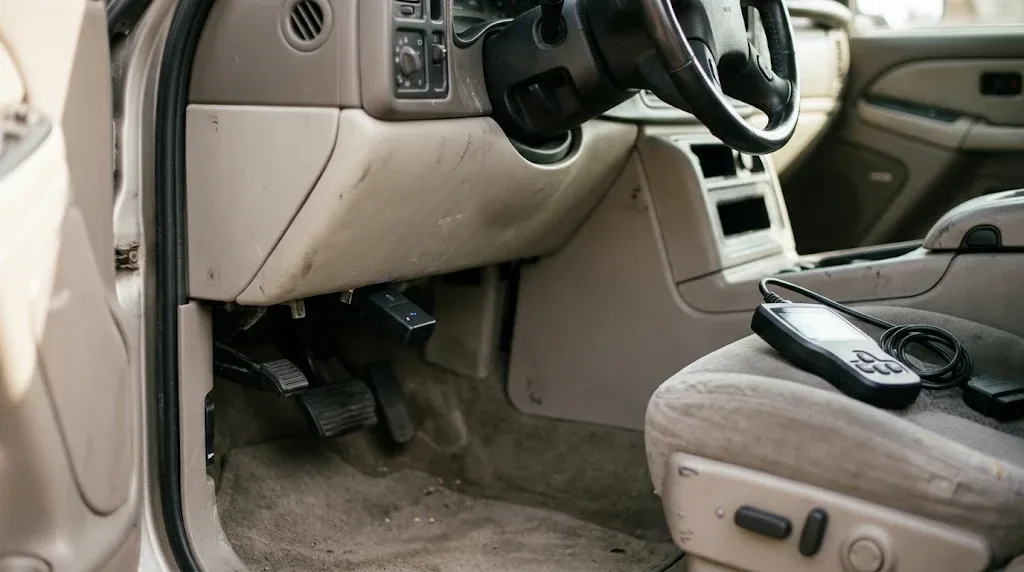
How much power an OBD reader uses depends on its type and its sleep mode. A handheld reader used for one scan and then unplugged uses no power after disconnection. A wireless dongle left in the port can use a few milliamps, tens of milliamps, or far more if it keeps other modules awake.
OBD2 Scout lists budget clone adapters at 25 to 60 milliamps idle, with no sleep mode and constant polling. It lists mid-range adapters at 10 to 20 milliamps idle, and premium adapters at 3 to 12 milliamps idle, under 1 milliamp in sleep mode. Those figures show why two readers can behave so unlike each other in the same car.
The table below uses figures from the Steer guide to leaving a scanner plugged in. It shows standing draw, what it means, and how long a car may stand before it will not crank.
| Standing draw | What it means | Time before a no-start |
|---|---|---|
| 25 to 50 mA | Normal parked car, no reader | Three to six weeks |
| Plus about 5 mA | Reader that sleeps well | Barely changes |
| Plus 25 to 40 mA | Dongle with a radio that never sleeps | Roughly half that time |
| Plus 100 mA or more | Reader that also keeps modules awake | Under a week |
The table gives a clear rule. A sleeping reader adds almost nothing. A reader that never sleeps cuts standing time in half. A reader that wakes the whole car can cut it far more.
Battery size and health change the math. Steer notes a mid-size battery holds around 60 amp-hours, with about 20 usable amp-hours before it can no longer crank the engine. At 40 milliamps, that is about 500 hours, or three weeks. Cold weather and an old battery shrink that figure fast.
Which OBD Readers Drain a Battery Fastest?
Wireless dongles that stay plugged in drain a battery fastest, while handheld readers used for one scan drain it least. The gap comes from how long each tool stays in the port, and whether it sleeps. A tool that is unplugged cannot drain anything.
The three reader types below cover most cases. Match your tool to one of them before you decide whether to leave it in.
Handheld code reader
Best for: one scan, then unplug
- Draw after unplug: zero
- Sleep mode: not needed
- Risk when parked: none
Bluetooth dongle, no sleep
Best for: short trips only
- Draw: 25 to 60 milliamps
- Sleep mode: none
- Risk when parked: high over days
Bluetooth dongle, with sleep
Best for: daily drivers
- Draw in sleep: under 1 milliamp
- Sleep mode: stops polling
- Risk when parked: low
A cheap ELM327 clone is the usual case in drain stories. It polls the car bus at fixed gaps, whatever the car state. It keeps its Bluetooth or Wi-Fi radio on, so a phone near the car can keep the link alive. That link stops the reader from resting.
Bluetooth and Wi-Fi add draw on their own. Foxwell notes that scanners with Bluetooth or Wi-Fi draw more power than plain models, and may stay active even when the car is off. A plain corded reader has no radio to feed, so it has less to drain.
Insurance trackers and fleet dongles sit in the same group. They stay in the port for weeks, and they talk to a phone network or a satellite link. A good one sleeps between trips. A poor one does not, and the car pays for it.
Choice of tool shape matters too. A corded and Bluetooth scanners comparison shows the trade-off: a corded tool is unplugged after use, while a Bluetooth dongle is made to stay in. That convenience is the drain risk.
Can an OBD Reader Keep Your Car Awake?
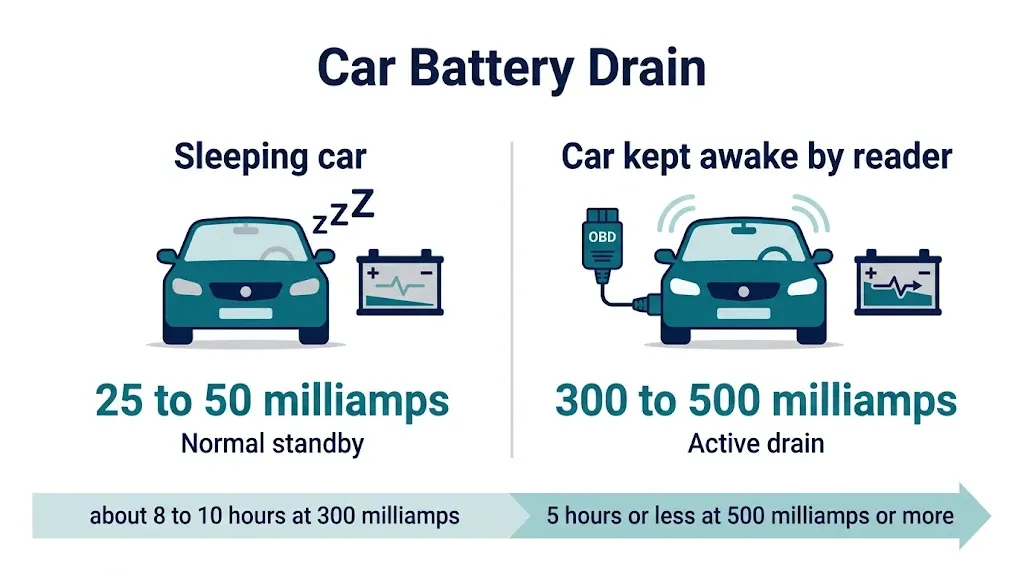
Yes, an OBD reader can keep your car awake by polling the CAN bus after shutdown. The CAN bus is the network that lets car computers talk to each other. When the car parks, those computers run a shutdown sequence and then sleep.
A reader that keeps asking for live data breaks that sequence. The computers hear traffic on the bus, so they stay awake to answer it. The bus never goes quiet, so the sleep sequence never ends.
That effect is larger than the reader draw alone. OBD2 Scout puts the bus-awake draw at 300 to 500 milliamps, against a normal parked draw of 25 to 50 milliamps. At 300 milliamps, a battery can reach a low level in about 8 to 10 hours. At 500 milliamps or more, it can take 5 hours or less.
The OBD2 Scout drain guide makes the point plain: the adapter draw is not the story, and the bus-awake effect is the story. A reader that draws 30 milliamps on its own can cause a 300 milliamp total draw by waking the car.
Signs of a bus-awake drain look unlike a weak battery. The car starts fine after daily use, then cranks slowly after a weekend parked. The reader feels warm after hours parked. A Bluetooth name for the reader still shows up on a phone long after the car is locked.
Warning
Unplug the reader before a jump start. A jump can send a voltage spike through the port and harm the reader or the car computers.
A warm reader is a useful clue. Heat means current is flowing, and a sleeping reader should feel cool. If the reader stays warm overnight, pull it out and watch the next few mornings.
How Long Can You Leave an OBD Reader Plugged In?
How long you can leave an OBD reader plugged in depends on its sleep mode and how often you drive. A reader with a true sleep mode can stay in a daily driver with little risk. A reader with no sleep mode should come out if the car will sit for more than 48 hours.
Use 24 to 48 hours as a simple rule for an unknown reader. If you do not know whether your reader sleeps, treat it as one that does not. Pull it out before a weekend trip or a long park, and put it back when you drive again.
Daily driving changes the picture. A short drive puts charge back into the battery, and a sleeping reader uses far less than the drive restores. Steer notes that 20 minutes of driving replaces far more than a sleeping device uses overnight. The risk on a daily driver is low.
Long parking changes it back. A car parked for a week, a second car, or a car stored over winter has no drive to top up the battery. Steer advises unplugging a reader that does not sleep when the car will sit for more than about a week. A battery maintainer helps for storage, but it does not fix a reader that wakes the car.
Cold weather and age shorten every figure here. A four-year-old battery in cold weather holds far less usable charge than a new one in mild weather. That is why the first slow crank often shows up on a cold morning after a long weekend.
Repeated deep discharge also harms the battery itself. A battery that falls flat again and again loses capacity, so the next drain comes sooner. Stopping the drain protects both the next start and the battery life.
How Can You Tell If Your Reader Is the Drain?
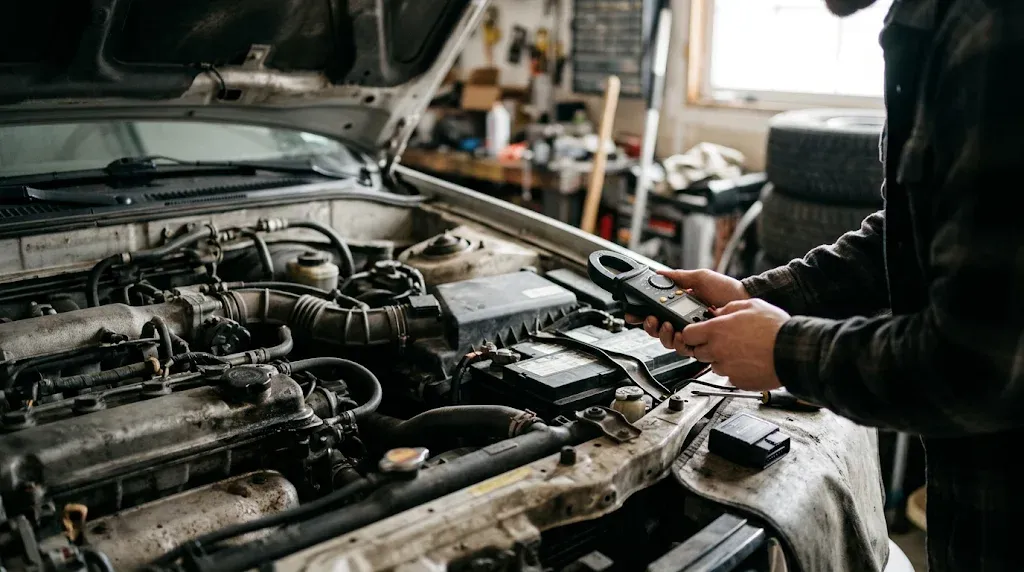
You can tell if your reader is the drain by testing the port, the voltage, and the draw with the reader in and out. The tests below take little time, and they give a clear answer for your car and your reader. Do them in order.
Step 1
Check if the port stays live
Plug the reader in, turn the car off, remove the key, and wait five minutes. If its light is still on, Pin 16 stays live and the reader can draw power while parked.
Step 2
Check the resting voltage
Measure the battery after a night parked. Steer lists 12.4 to 12.6 volts as healthy, 12.2 volts as half discharged, and below 12.0 volts as a sign that something is taking too much.
Step 3
Watch the crank pattern
Note whether the car starts fine on weekdays and cranks slowly after a weekend parked. That pattern points to a drain, not a bad starter.
Step 4
Measure the draw, then pull the reader
Use a clamp meter on the negative cable 30 to 60 minutes after locking the car, so every module has gone to sleep. Read the total, pull the reader, and read it again. The gap is your reader.
Step 5
Run a week without the reader
Leave the reader out for a week and watch the starts. If the slow cranks stop, you have your answer and no further test is needed.
A draw above about 10 milliamps from the reader alone is worth acting on for a car that stands. That figure comes from Steer, and it fits the math: a small extra draw adds up over days, and a large one adds up over hours.
Low voltage can also set false codes. A battery that falls low during cranking can trigger low-voltage codes across modules, and clearing those codes does not fix the drain. The guide to low-voltage codes explains why a dead battery can leave codes behind after a charge.
A low battery can also turn on the check engine light with no clear code on a plain reader. The fault may sit in a second module, or the voltage dip may have wiped part of the memory. Fix the drain first, then scan again.
How Can You Stop an OBD Reader Draining Your Battery?
You can stop an OBD reader draining your battery by unplugging it, by using a reader that sleeps, or by cutting power with a switch. The right choice depends on how you use the reader. A reader you use once a week needs a plain habit. A reader you use each day needs a sleep mode you can trust.
Unplug the reader after each use. That is the simplest fix, and it works for any reader. It takes seconds, and it removes both the draw and the bus-awake risk. Keep the reader in the glove box so it is there for the next scan.
Use a switched extension cable if the port is hard to reach. A short cable with a rocker switch lets you cut power without pulling the reader each time. Flip the switch off when you park, and on when you drive.
Choose a reader with a stated sleep mode if you want to leave one in. Look for a sleep current under 1 milliamp, and for a note that it stops polling when the bus goes quiet. Foxwell notes that auto shutoff and sleep modes cut power use when the car is not in use. The Foxwell drain prevention guide lists unplugging, auto shutoff, and low-power choice as the three plain steps.
Keep the phone away from the car when parked. A phone in range can keep a Bluetooth link alive, and that link can keep the reader awake. Move the phone inside, or turn off Bluetooth when you do not need the link.
Check battery health on a regular basis. Foxwell lists 12.6 volts with the engine off and 13.7 to 14.7 volts with the engine running as healthy figures. A weak battery will fall faster under the same reader draw, so test it before you blame the reader alone.
Tip
Unplug any reader you cannot confirm sleeps before the car sits for more than 48 hours, and test it with the five-minute light check first.
If the car still dies with the reader out, the drain is elsewhere. A stuck relay, a glove box light, or a failing module can pull the same current. At that point, a shop can run a full parasitic draw test and find the circuit.
OBD2 Code Reader
A code reader with a stated sleep mode lets you scan codes and check voltage without leaving a reader that never sleeps in the port.
Frequently Asked Questions
Can an OBD reader drain a battery in one night?
An OBD reader can drain a battery in one night only if it keeps the car network awake. A reader that draws 25 to 60 milliamps alone needs days, not hours, to flatten a healthy battery. A bus-awake draw of 300 to 500 milliamps can do it overnight.
Does unplugging the reader stop the drain right away?
Unplugging the reader stops its own draw right away, and it lets the car modules finish their sleep sequence. The battery still needs a charge or a drive to recover the charge it lost. A flat battery will not refill itself by unplugging alone.
Will a reader drain the battery on a car driven daily?
A reader with a true sleep mode will not drain the battery on a car driven daily. The drive puts back far more charge than a sleeping reader uses overnight. A reader with no sleep mode can still add up over a long weekend parked.
Can an insurance tracker drain a car battery?
An insurance tracker can drain a car battery if it stays awake while the car sits for weeks. A good tracker sleeps between trips and uses only a few milliamps when parked. A tracker with no sleep mode, or a weak battery, makes a dead start more likely.
Should I leave a reader plugged in during winter storage?
You should not leave a reader plugged in during winter storage unless you can confirm it sleeps and the battery has a maintainer. Cold weather cuts battery capacity, and weeks parked give even a small draw time to add up. Pull the reader out and use a maintainer for storage.
Does a dead battery from a reader damage the battery?
A dead battery from a reader can shorten battery life if deep discharge happens again and again. One flat battery, recharged at once, rarely ruins a new and healthy battery. Repeated deep discharge sulfates the plates and cuts capacity for good.
Conclusion
Can an OBD reader drain my car battery? Yes, when it stays plugged in, never sleeps, and the car sits for days. If your car will sit for more than 48 hours, unplug the reader first.

I’m Alex Rahman, a car enthusiast and automotive writer focused on practical solutions, car tools, and real-world driving advice. I share simple and honest content to help everyday drivers make better decisions.
