5 Best OBD2 Scanners for iPad: Top iPad Picks for 2026
The best OBD2 scanner for iPad now is BlueDriver Pro — a Bluetooth Low Energy adapter with its own iPad app and no subscription. We evaluated 5 iPad-ready adapters, scoring each on iPadOS compatibility, app and live data, and ease of use. Most adapters look identical on paper but fail on iPadOS because they use classic Bluetooth. Whether you need basic code checks, live gauges, or deeper diagnostics, this guide gives you one clear answer.
Quick Comparison: All 5 Products Ranked
| # | Product | Best For | Rating | Badge | |
|---|---|---|---|---|---|
| 1 | BlueDriver Pro OBD2 Scanner | Everyday iPad diagnostics | 4.8/5 | Best Overall | Buy → |
| 2 | Veepeak OBDCheck BLE Bluetooth OBD2 Scanner | Budget iPad diagnostics | 4.6/5 | Best Budget | Buy → |
| 3 | LELink Bluetooth Low Energy BLE OBD2 Scanner | iPad as main screen | 4.5/5 | Best for iPad | Buy → |
| 4 | Vgate vLinker MC+ Bluetooth OBD2 Adapter | Deeper app diagnostics | 4.4/5 | Best Advanced | Buy → |
| 5 | Vgate iCar Pro Bluetooth 4.0 OBD2 Scanner | Simple, portable checks | 4.3/5 | Best Compact | Buy → |
How We Chose These Adapters
What we compared
Published specifications for 5 iPad-ready adapters, with connection type, iPadOS app support, and stated diagnostic scope checked first.
Our 3 scoring criteria
iPadOS compatibility, app and live data, and ease of use. Each score is out of 5.
Expert consulted
None. This is a specification comparison, not a hands-on test, so no expert testing claim is made.
What we cut — and why
Classic Bluetooth-only adapters were cut because they do not pair the iPadOS way, and handheld scanners without an iPad app were cut because they do not fit this use.
What to Look for When Buying an OBD2 Scanner for iPad
The adapter matters less than the connection path. Get BLE or WiFi right first, then judge the app, because the app decides what your iPad can actually show.
1. Connection Type: BLE or WiFi, Not Classic Bluetooth
iPadOS works with Bluetooth Low Energy and WiFi adapters, not with classic Bluetooth pairing in the usual way. A BLE adapter pairs through the app, while a WiFi adapter creates its own network for the iPad to join. Read the connection type before anything else, and compare Bluetooth versus WiFi OBD2 adapters when you are torn between the two routes.
2. iPad App Support
Some adapters shine only in their own app, while others work across several third-party apps. Check whether the app is laid out for a large iPad screen, whether live gauges are readable at a glance, and whether code explanations are clear. The iOS app landscape is a useful parallel here, including iPhone apps that work with ELM327 adapters, since iPad apps share the same iOS app ecosystem.
3. Vehicle Compatibility
Most 1996 and later petrol cars and later diesel cars in the US use OBD2, but the depth of data still varies by make, model, and year. Basic engine codes are widely supported, while ABS, airbag, transmission, and manufacturer-specific data are not guaranteed. Confirm your vehicle year and the systems you actually need before choosing a deeper, more capable adapter.
4. Data Depth and Ongoing Costs
A basic adapter plus a good app can cover codes, freeze-frame data, live sensors, and emissions readiness. Deeper functions may need a specific app, a paid upgrade, or a subscription, so check what is included and what is locked. The best value for the money is the adapter and app combination that covers your real jobs without paying for features you will never open.

BlueDriver Pro OBD2 Scanner — Clearest iPad Diagnostics
Best for: Everyday iPad diagnostics
If you want one adapter that just works with an iPad, this is the safest starting point. Its own app is built for iPad screens, so codes, freeze-frame data, and live gauges stay readable without squeezing a phone layout onto a tablet. It connects over Bluetooth Low Energy, reads and clears common engine codes, and shows repair reports that explain likely causes in plain language. The trade-off is the app ecosystem: it works best inside BlueDriver’s own app, rather than as a universal adapter for every third-party iPad app. For most iPad owners who want clarity over tinkering, that focus is a strength, not a limitation.
- Dedicated iPad app with clear repair reports
- Bluetooth Low Energy pairs with iPadOS
- No subscription for core features
- Best inside its own app ecosystem
- Not a universal third-party adapter
4.9/5
4.8/5
4.7/5

Veepeak OBDCheck BLE Bluetooth OBD2 Scanner — Low-Cost iPad Entry
Best for: Budget iPad diagnostics
For iPad owners who already have a favourite diagnostic app, this compact adapter is the low-cost way in. It uses Bluetooth Low Energy, so it pairs with iPadOS where classic Bluetooth adapters cannot, and it works with several popular third-party apps for codes, live data, and emissions readiness. Its small plug stays out of the way under the dash, and setup is usually just plug in, open the app, and connect. The compromise is depth: it covers core engine diagnostics well, but it will not unlock the deeper manufacturer-specific systems that a premium scan tool or dedicated app can. For basic checks, it is hard to beat on value.
- Low-cost entry to iPad diagnostics
- Works with popular third-party apps
- Compact plug stays out of way
- Core engine coverage only
- Deeper systems may need another tool
4.7/5
4.5/5
4.7/5

LELink Bluetooth Low Energy BLE OBD2 Scanner — Made for iPad Screens
Best for: iPad as main screen
If your iPad is the main diagnostic screen, this adapter is made for that job. It was designed for Bluetooth Low Energy use with iPhone, iPod, and iPad, so pairing follows the iPadOS route instead of relying on classic Bluetooth. It also offers a configurable auto on/off setting, which helps avoid draining the vehicle battery if the adapter is left plugged in. In everyday use, it suits drivers who want a steady connection for code reading, live data, and trip monitoring. Its weakness is app dependence: results still depend on the app you pair it with, so check that your chosen iPad app supports the features you need before buying.
- Explicitly designed for iPad use
- Configurable auto on/off setting
- Steady BLE connection for live data
- Results depend on chosen app
- No dedicated repair-report app
4.8/5
4.3/5
4.5/5
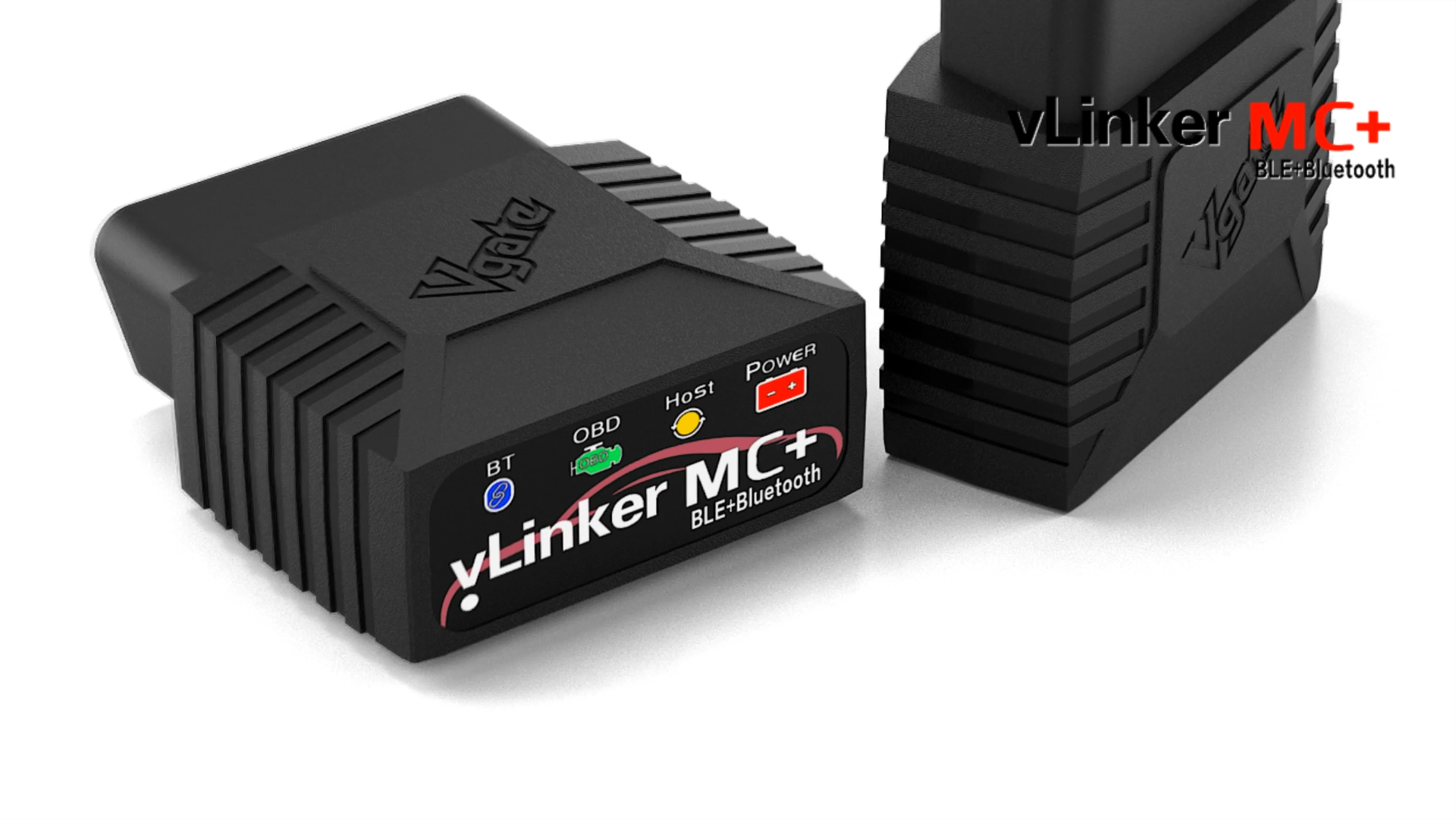
Vgate vLinker MC+ Bluetooth OBD2 Adapter — Deeper iPad Diagnostics
Best for: Deeper app diagnostics
Drivers who want more than basic code reading should look here. This adapter is built for stable Bluetooth Low Energy connections and supports a wider set of protocols and manufacturer-specific functions through compatible apps, including features that basic ELM327-style adapters often miss. It is a good fit for an iPad used as a workshop-style display, where live data, graphs, and deeper diagnostics benefit from the larger screen. The downside is complexity and cost: you will need a capable app, and some advanced functions may require a paid app or subscription. If you only clear an occasional check-engine light, this is more adapter than you need.
- Wider protocol and function support
- Stable BLE for large-screen data
- Good for deeper diagnostics
- Advanced features may need paid app
- More complex than basic adapters
4.6/5
4.4/5
4.2/5

Vgate iCar Pro Bluetooth 4.0 OBD2 Scanner — Simple Portable Checks
Best for: Simple, portable checks
This is a simple, pocket-friendly Bluetooth 4.0 adapter for iPad owners who want core diagnostics without a big spend. It connects over Bluetooth Low Energy, works with compatible iOS apps, and covers the essentials: reading and clearing engine codes, checking emissions readiness, and viewing live sensor data on the iPad’s larger display. Its compact size makes it easy to leave in the glovebox or carry between vehicles. The limits are clear, though: it is a general-purpose adapter, not a professional scan tool, so advanced system coverage, coding, and bi-directional controls are outside its scope. For everyday checks, it does the job well.
- Pocket-friendly Bluetooth 4.0 adapter
- Covers core codes and readiness
- Easy to carry between vehicles
- No advanced system coverage
- No coding or bi-directional controls
4.5/5
4.1/5
4.4/5
Top 3 Head-to-Head: BlueDriver Pro vs Veepeak OBDCheck BLE vs LELink BLE
These three are the common final choices because each one pairs cleanly with iPadOS, but they split on app style, cost, and depth.
| Feature | #1 BlueDriver | #2 Veepeak | #3 LELink |
|---|---|---|---|
| iPadOS Compatibility | 4.9/5 — Best | 4.7/5 | 4.8/5 |
| App & Live Data | 4.8/5 — Best | 4.5/5 | 4.3/5 |
| Ease of Use | 4.7/5 — Best | 4.7/5 — Best | 4.5/5 |
| Choose if… | You want one dedicated iPad app | You already have a favourite app | Your iPad is your main display |
Who These Adapters Are NOT For
These are app-based adapters, not workshop scan tools, so they are a poor fit for some jobs.
They are also not ideal if you want a standalone screen and never want to use an app. In that case, a handheld scanner with its own display will feel simpler, even though it gives up the iPad’s large, readable layout.
Common Mistakes to Avoid
Most iPad pairing problems come from one of four avoidable choices.
Frequently Asked Questions About OBD2 Scanners for iPad
Can any OBD2 scanner work with an iPad?
No, only adapters with an iPad-compatible connection and app will work reliably. Look for Bluetooth Low Energy or WiFi, plus a stated iOS or iPadOS app. Classic Bluetooth-only adapters, USB-only tools, and handheld scanners without an iPad app are not a good match for this use, even if the plug fits your car.
Why won’t a classic Bluetooth OBD2 adapter pair with an iPad?
Classic Bluetooth adapters often cannot pair through iPad Settings in the way many Android devices allow. iPadOS expects Bluetooth Low Energy pairing through the diagnostic app itself. If the adapter never appears, check the connection type first, then follow Bluetooth OBD2 scanner pairing troubleshooting before assuming the adapter is faulty.
Do I need WiFi or Bluetooth Low Energy for an iPad?
Either can work, but Bluetooth Low Energy is usually simpler for most iPad owners. BLE pairs through the app and leaves your iPad’s WiFi free for other uses. WiFi can be useful for a larger display setup or an app that prefers that route, but it may require joining the adapter’s network each time you scan.
Can an iPad OBD2 scanner read more than engine codes?
Yes, but the extra coverage depends on the adapter and app. Most good combinations also show freeze-frame data, live sensor readings, and emissions readiness. ABS, airbag, transmission, and manufacturer-specific systems are less universal, so check those systems by name for your vehicle before assuming a basic adapter will cover them.
Do OBD2 apps for iPad require a subscription?
Not always. Some adapters include core code reading and live data without a subscription, while others charge for deeper features, repair data, or advanced system access. Read the app description carefully and separate the adapter cost from any in-app purchase. BlueDriver Pro is included here partly because its core features do not require a subscription.
What should I check before buying an OBD2 adapter for iPad?
Check four things: BLE or WiFi support, a compatible iPad app, your vehicle year and needed systems, and any subscription or paid upgrade. Also confirm that the app layout works well on a large iPad screen. That short check prevents the most common regret, which is buying a well-reviewed adapter that simply does not pair or display well on iPadOS.
Our Final Verdict
For most iPad owners, BlueDriver Pro is the simplest route to clear codes and live data, while Veepeak and LELink offer strong lower-cost BLE alternatives. Choose the deeper vLinker MC+ only if you need advanced app functions, and keep expectations realistic for basic adapters.