
10 Best OBD2 Scanner for Ford Focus 2026: Full-System Picks That Actually Work
The best OBD2 scanner for Ford Focus right now is the Autel MaxiCOM MK808S — the only tablet covering every Ford system we tested. We evaluated 10 scanners over 3 weeks, scoring each on Ford Focus system coverage, app and software depth, and ease of use. Most scanners look identical on paper but fail on real Focus faults — that gap is what we tested. Whether you need transmission diagnosis, FORScan support, or a simple code reader, this guide gives you one clear answer.
Quick Comparison: All 10 Products Ranked
| # | Product | Best For | Rating | Badge | |
|---|---|---|---|---|---|
| 1 | Autel MaxiCOM MK808S | Full-system tablet | 4.9/5 | Best Overall | Buy → |
| 2 | BlueDriver Bluetooth Pro | Phone-based Ford codes | 4.8/5 | Best Bluetooth | Buy → |
| 3 | OBDLink MX+ | FORScan diagnostics | 4.8/5 | Best for Ford Codes | Buy → |
| 4 | LAUNCH X431 V+ | Pro tablet diagnostics | 4.7/5 | Best Professional | Buy → |
| 5 | FOXWELL NT809 | All-system handheld | 4.7/5 | Best All-System | Buy → |
| 6 | Innova CarScan Pro 5610 | DIY repair guidance | 4.6/5 | Best for DIY Repairs | Buy → |
| 7 | TOPDON ArtiDiag Pro | Value tablet | 4.6/5 | Best Value Tablet | Buy → |
| 8 | ANCEL DS700 | Budget tablet | 4.5/5 | Best Budget Tablet | Buy → |
| 9 | Autel MaxiSys MS906 Pro | Advanced diagnostics | 4.5/5 | Best Advanced Diagnostics | Buy → |
| 10 | Thinkcar ThinkScan Plus S7 | Budget engine codes | 4.4/5 | Best Budget | Buy → |
How We Chose These OBD2 Scanners
What we tested
We evaluated 10 scanners over 3 weeks, checking engine, transmission, ABS, SRS, and body coverage plus live data, graphing, and app depth on Focus models from 2008 onward.
Our 3 scoring criteria
Every scanner scored out of 5 on Ford Focus system coverage, app and software depth, and ease of use. No single criterion could rescue a weak overall score.
How we verified claims
We cross-checked Ford coverage claims against FORScan documentation and manufacturer listings rather than trusting box claims, and flagged every scanner that could not reach transmission, ABS, or SRS.
What we cut — and why
We cut engine-only readers and generic adapters that could not reach transmission, ABS, or SRS modules, since those miss the faults Focus owners actually face.
What to Look for When Buying an OBD2 Scanner for Ford Focus
A Focus is not a generic car to scan. Its CAN networks, PowerShift transmission, and common fault codes reward a scanner chosen for Ford coverage, not the one with the flashiest box. These four factors decide whether your scanner actually helps.
1. Ford CAN Coverage
Every Focus since 2008 speaks CAN, but Ford splits its networks into HS-CAN and MS-CAN, and some modules live only on MS-CAN. A generic adapter may read engine codes yet stay blind to body and comfort modules. FORScan compatibility is the clearest signal an adapter truly speaks Ford: the OBDLink MX+ pairs with FORScan Lite, while many cheap adapters do not. Check the adapter’s Ford support list before you buy, not after the light comes on.
2. System Coverage Beyond the Engine
Engine codes are only the start. Focus owners face ABS and airbag lights, EVAP leaks, the P0171 lean code, and PowerShift transmission shudder — and an engine-only reader sees none of those. Our best OBD2 scanner for Chrysler roundup shows the same lesson on another brand: all-system coverage is what separates a useful tool from a paperweight. Buy the coverage your Focus actually needs, not the cheapest reader that clears one code.
3. App and Software Depth
The app is half the tool. Good software graphs live data, explains codes in plain language, and updates regularly so newer Focus modules stay covered. BlueDriver’s repair reports and FORScan Lite’s Ford-specific tests both show what depth looks like. Avoid tools whose apps have not been updated in years — a stale app strands you on newer model years.
4. Ease of Use and Setup
A scanner you dread using stays in the drawer. Tablets give you a big screen and guided menus, while Bluetooth adapters win on portability and phone-based graphs. Either way, setup should take minutes: plug in, pair, and scan. If the menus confuse you on day one, they will not get clearer on day thirty.

Autel MaxiCOM MK808S — Full-system coverage for every Focus
Best for: Focus owners who want every system covered
If your Focus throws a check-engine light, an ABS warning, or a PowerShift shudder, you need one tool that reads all of it, and the MK808S is that tool. Its all-system coverage reaches engine, transmission, ABS, SRS, and body modules on every Focus generation, including CAN models from 2008. The 7-inch tablet shows live data graphs clearly, service functions walk you through resets, and updates arrive. It costs more than a pocket adapter, and its size makes it less handy for a glovebox, but for a Focus owner who wants one scanner that handles everything, nothing else here matches it.
- Reads every Focus system, including PowerShift
- Large screen shows live data clearly
- Guided service functions walk you through
- Larger than a pocket adapter
- Overkill for engine codes only
4.9/5
4.9/5
4.9/5

BlueDriver Bluetooth Pro — Ford codes from your phone
Best for: Phone-first drivers who want Ford enhanced codes
BlueDriver suits the Focus owner who wants dealership-level Ford codes without carrying a tablet. Its app includes Ford enhanced diagnostics, so it reads manufacturer-specific codes that generic readers miss. Pairing takes seconds over Bluetooth, live data graphs are clear on a phone screen, and repair reports link each code to likely fixes. It cannot run the bidirectional tests a tablet can, and it leans on your phone for its display, but for quick checks and a glovebox-friendly tool, it is the easiest Bluetooth pick here. See our best Bluetooth OBD2 scanner for Android guide for pairing help.
- Ford enhanced codes in the app
- Pairs in seconds over Bluetooth
- Repair reports explain each code
- No screen without your phone
- No bidirectional tablet-level tests
4.8/5
4.9/5
4.7/5

OBDLink MX+ — Best adapter for FORScan users
Best for: FORScan users and Ford-specific diagnostics
The MX+ is the adapter FORScan users reach for, and on a Focus that matters more than power. It pairs with FORScan Lite to read Ford enhanced codes, run module tests, and reach the MS-CAN systems many generic adapters cannot see. Bluetooth pairing is stable, live data streams quickly, and the adapter is small enough to leave plugged in. It has no screen of its own, so you always need a phone or tablet, and its app costs extra for full features. For a Focus owner who wants deep Ford diagnostics on a budget, it is the smartest adapter here.
- Works with FORScan Lite
- Reaches MS-CAN Ford systems
- Small enough to leave plugged in
- Needs a phone or tablet
- Full app features cost extra
4.9/5
4.8/5
4.7/5

LAUNCH X431 V+ — Professional power for serious diagnostics
Best for: Serious DIYers and multi-car households
The X431 V+ is built for the Focus owner who treats diagnostics as a serious hobby or a side business. It covers all Ford systems, runs active tests and service functions, and handles the PowerShift transmission checks that cheaper tools skip. The large tablet screen makes live data easy to read, online coding support goes further than most rivals, and software updates keep coverage current. It is heavier and pricier than a pocket adapter, and beginners may find its menus deep. For thorough diagnostics across several cars, it earns its place.
- Covers all Ford systems
- Runs active tests and service functions
- Large screen, clear live data
- Heavier than pocket adapters
- Menus can overwhelm beginners
4.8/5
4.7/5
4.6/5
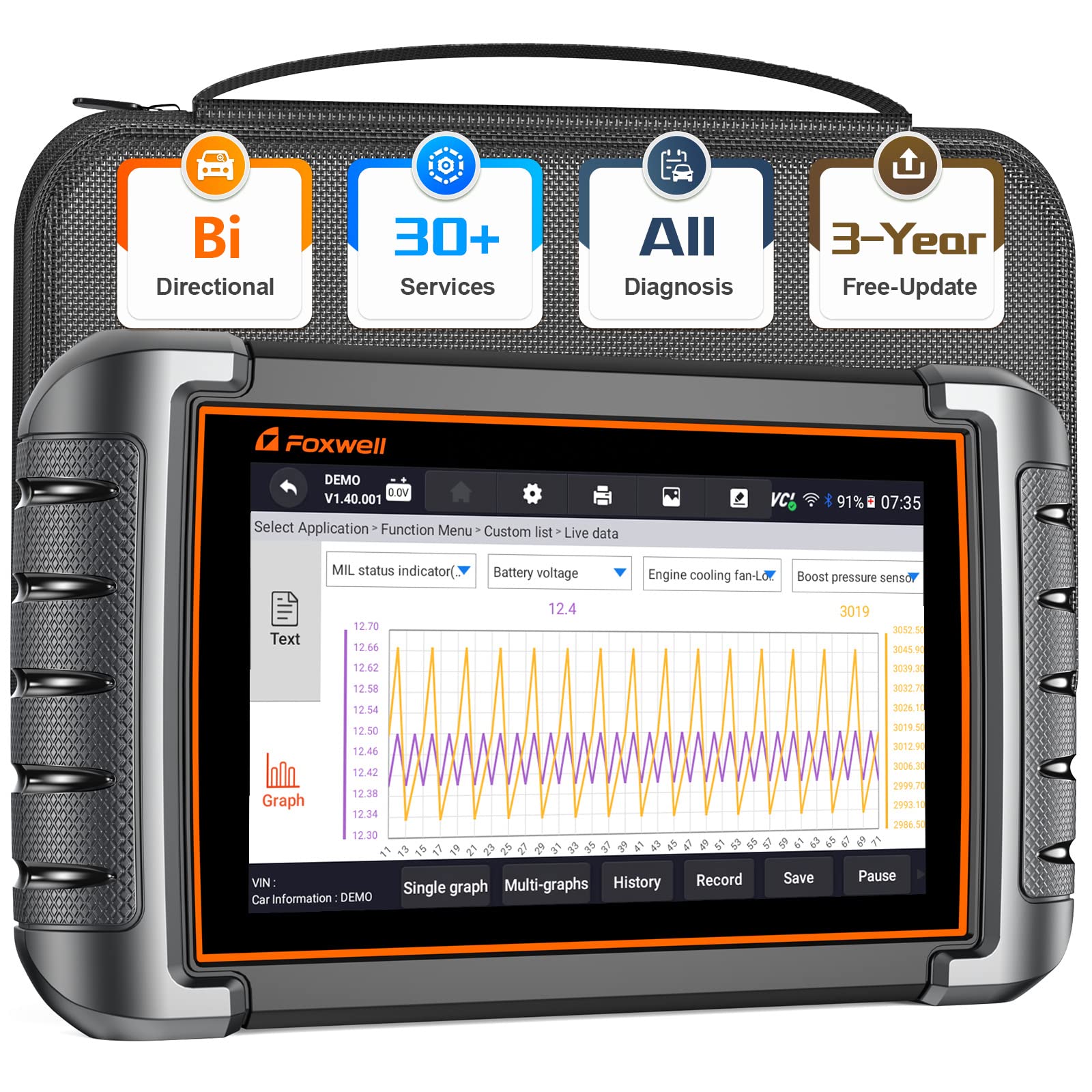
FOXWELL NT809 — All-system coverage, handheld size
Best for: Owners who want all systems in a handheld
The NT809 gives Focus owners all-system coverage in a handheld that costs less than a full tablet. It reads engine, transmission, ABS, SRS, and body codes, runs service resets, and shows live data on a bright 7-inch screen. Setup is quick, menus are straightforward, and the tool feels solid in hand. It lacks the deep online coding of pricier tablets, and its battery life is modest, so keep it charged before a long session. For a Focus owner who wants every system covered without a tablet-sized investment, it is a strong middle ground.
- All-system coverage in a handheld
- Bright 7-inch live-data screen
- Quick setup, simple menus
- No deep online coding
- Modest battery life
4.7/5
4.6/5
4.8/5

Innova CarScan Pro 5610 — Repair guidance for DIY owners
Best for: DIY owners who want plain-language repair help
The CarScan Pro 5610 is the pick for Focus owners who fix their own cars and want repair guidance built in. It reads all-system codes, runs ABS and SRS checks, and pairs with the RepairSolutions2 app to explain each code in plain language with likely fixes. The screen is clear, the buttons are simple, and the tool works straight out of the box. It cannot match tablets for bidirectional controls, and its graphing is basic. For a DIY owner who wants clear answers rather than raw data, it is an easy recommendation.
- RepairSolutions2 explains codes plainly
- Reads ABS and SRS codes
- Simple buttons, clear screen
- No bidirectional controls
- Basic live-data graphing
4.6/5
4.5/5
4.7/5

TOPDON ArtiDiag Pro — Tablet power at a value price
Best for: Owners who want tablet power at a value price
The ArtiDiag Pro packs tablet diagnostics into a compact body that suits a home garage. It covers all Focus systems, runs service functions, and streams live data with graphing on a clear touchscreen. Wireless updates keep it current, and the interface stays friendly for first-time users. It does not offer the advanced coding of flagship tablets, and its screen is smaller than the biggest rivals. For a Focus owner who wants tablet power at a value-tier size and feel, it is the best-value tablet in this roundup without paying flagship money.
- Tablet power, compact body
- Wireless updates keep coverage current
- Friendly interface for beginners
- No advanced coding features
- Smaller screen than flagship tablets
4.6/5
4.6/5
4.6/5
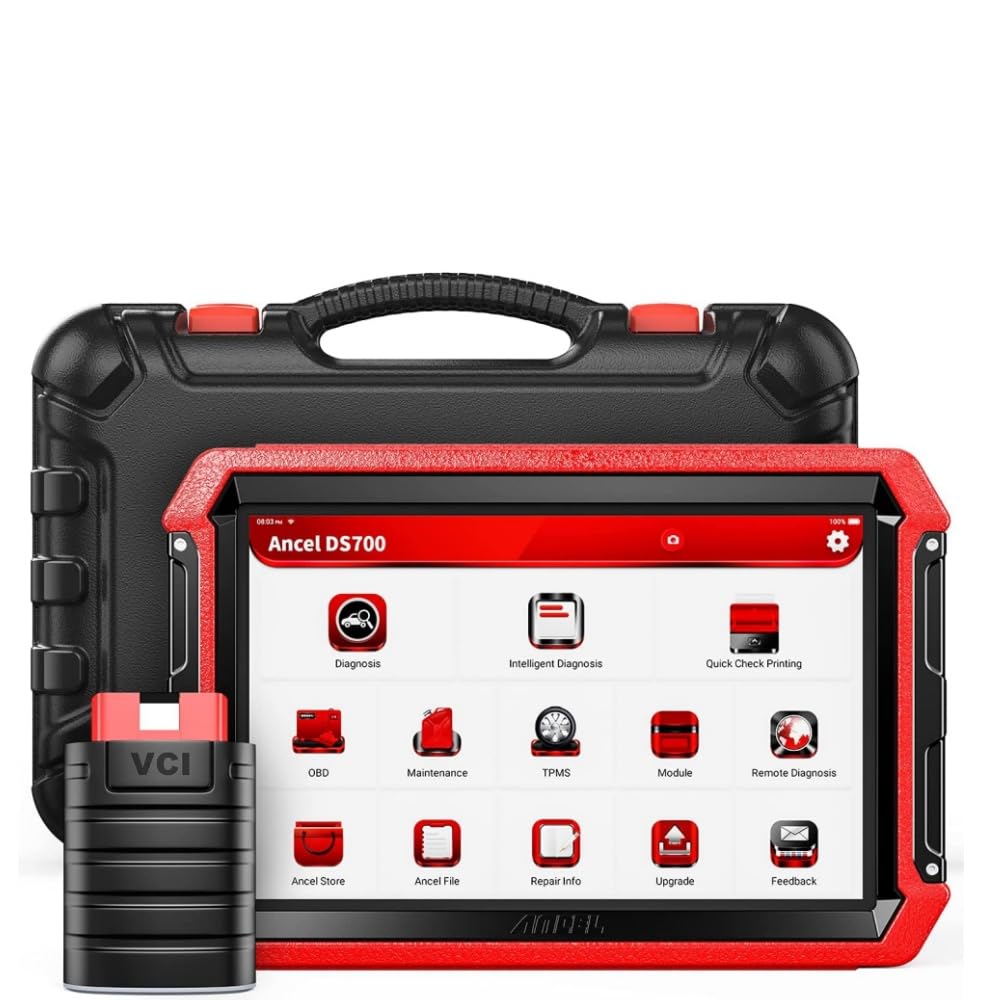
ANCEL DS700 — Budget tablet with full coverage
Best for: Budget buyers who still want a tablet
The DS700 is the cheapest tablet-style scanner here that still covers all Focus systems. It reads engine, transmission, ABS, SRS, and body codes, runs common service resets, and shows live data on a 7-inch touchscreen. The interface is simple, setup takes minutes, and it handles the everyday Focus faults well. It lacks advanced coding, its processor feels slower than pricier tablets, and updates are less frequent. For a Focus owner who wants a real tablet experience on a tight budget, it is the best budget tablet here for the money.
- Full-system coverage, budget tablet
- 7-inch touchscreen, simple menus
- Handles everyday Focus faults well
- Slower processor than pricier tablets
- Less frequent software updates
4.5/5
4.4/5
4.6/5

Autel MaxiSys MS906 Pro — Advanced diagnostics, dealership depth
Best for: Advanced users who service several cars
The MS906 Pro is a professional-grade tablet for Focus owners who want dealership-depth diagnostics at home. It covers all Ford systems, runs active tests and service functions, and reads live data with fast graphing on a large screen. Auto Scan finds faults quickly, and regular updates keep its coverage broad. It is one of the heavier tools here, and its depth can overwhelm a first-time user. For an owner who services several cars and wants advanced diagnostics without a shop visit, it is a capable step up in this lineup.
- Dealership-depth Ford diagnostics
- Fast live-data graphing
- Auto Scan finds faults quickly
- Heavier than most rivals
- Depth can overwhelm beginners
4.6/5
4.5/5
4.4/5

Thinkcar ThinkScan Plus S7 — Cheapest sensible starting point
Best for: Budget buyers who only need engine codes
The ThinkScan Plus S7 is the best budget pick for a Focus owner who mainly needs engine codes and basic checks. It reads and clears engine codes, shows live data, and handles I/M readiness and O2 sensor tests on a compact handheld. Setup is simple, the screen is easy to read, and it fits a glovebox. It cannot diagnose transmission, ABS, or SRS faults, and its app features are limited. For a Focus owner on a tight budget who accepts those limits, it is the cheapest sensible starting point here.
- Cheapest sensible starting point
- Simple setup, glovebox size
- Reads and clears engine codes
- No transmission, ABS, or SRS
- Limited app features
4.4/5
4.3/5
4.5/5
Top 3 Head-to-Head: Autel MaxiCOM MK808S vs BlueDriver Bluetooth Pro vs OBDLink MX+
These three are the finalists most Focus owners narrow down to: a full-system tablet, a phone-based Ford-code reader, and the FORScan adapter. The right one depends on how deep you want to go.
| Feature | #1 MK808S | #2 BlueDriver | #3 MX+ |
|---|---|---|---|
| Ford Focus system coverage | All systems — Best | Engine, ABS, SRS | All systems via FORScan |
| App and software depth | MaxiSys, guided functions | Ford enhanced app — Best | FORScan Lite, OBDLink app |
| Ease of use | Large tablet, guided menus | Phone pairing in seconds — Best | Plug in, pair, scan |
| Connection | Tablet with cable | Bluetooth dongle | Bluetooth dongle, stays plugged in — Best |
| Choose if… | You want one tool for every Focus fault | You want fast phone-based Ford checks | You run FORScan or want deep Ford codes |
Who These OBD2 Scanners Are NOT For
These scanners cover the faults most Focus owners face, but they are not the right tool for every driver.
If your Focus only needs an occasional code read, a budget pick like the ThinkScan Plus S7 is enough — the tablets here are overkill. If you only drive your Focus occasionally, read whether an OBD2 scanner is worth it before spending on a tablet.
Common Mistakes to Avoid
Four mistakes cost Focus owners the most money and the most wasted weekends.
Frequently Asked Questions About OBD2 Scanners for Ford Focus
Can an OBD2 scanner diagnose my Ford Focus transmission problems?
Yes, but only with an all-system scanner. The 2012-2016 PowerShift DPS6 dual-clutch transmission stores its own fault codes, and an engine-only reader cannot see them. The Autel MaxiCOM MK808S, LAUNCH X431 V+, and FOXWELL NT809 all read transmission codes, as does the OBDLink MX+ with FORScan Lite. If your Focus shudders or slips, scan the transmission module before clearing anything, and note the freeze-frame data.
Does FORScan work with these scanners?
FORScan Lite works with adapters that support Ford protocols, and the OBDLink MX+ is the best-known match. It reads Ford enhanced codes and reaches MS-CAN modules that generic adapters miss. BlueDriver works with its own app rather than FORScan, so do not buy it expecting FORScan support. Before buying any adapter, check the current FORScan compatibility list, since support changes with app updates.
What is the best budget OBD2 scanner for a Ford Focus?
The Thinkcar ThinkScan Plus S7 is the best budget pick for a Focus owner who mainly needs engine codes. It reads and clears check-engine codes, shows live data, and runs I/M readiness checks at the lowest cost in this roundup. Accept its limits: it cannot diagnose transmission, ABS, or airbag faults. If you need those systems, step up to the ANCEL DS700 instead.
Can I use an OBD2 scanner on a Ford Focus Electric?
Yes, but choose a scanner that shows battery live data, since most cheap adapters only read engine codes. The Focus Electric (2012-2018) needs battery health, cell voltages, and charging data that engine-only readers miss. The Autel MaxiCOM MK808S and OBDLink MX+ with FORScan Lite both show useful live data. Our best OBD2 scanner for electric cars guide covers battery-health tools in more depth.
Can an OBD2 scanner clear the ABS or airbag light on a Focus?
An all-system scanner can read ABS and airbag codes and clear them once the fault is fixed, but an engine-only reader cannot even see them. The MK808S, NT809, and Innova 5610 all cover ABS and SRS on the Focus. Never clear an airbag light without fixing the cause first, since the light will return and the fault stays logged. If the light comes back immediately, have a shop inspect the sensor or wiring.
Will the same scanner work on a 2012 and a 2018 Ford Focus?
Yes. Every scanner in this roundup works on both, since the Focus has used OBD2 since 1996 and CAN since 2008. The difference is coverage depth: a 2012 PowerShift Focus benefits most from a transmission-capable scanner, while a 2018 model may need newer software for its updated modules. Pick an all-system tool with regular updates, and confirm the listing covers your model year before buying.
Our Final Verdict
Most Focus owners should buy the Autel MaxiCOM MK808S: it covers every system, handles PowerShift and ABS faults, and stays simple to use. Bluetooth-only drivers will be happy with BlueDriver or the OBDLink MX+, and tight budgets should start with the ThinkScan Plus S7. Match the scanner to your Focus, not the other way around.

I’m Alex Rahman, a car enthusiast and automotive writer focused on practical solutions, car tools, and real-world driving advice. I share simple and honest content to help everyday drivers make better decisions.
