10 Best OBD2 Bluetooth Scanners for Android 2026: Clear Phone Diagnostics
The best obd2 bluetooth scanner for android right now is OBDLink MX+ — a Classic Bluetooth adapter with broad Android app support. We compared 10 adapters, scoring each on Android App Compatibility, Bluetooth Stability, and Diagnostic Coverage. Most adapters look identical on paper but fail on pairing, permissions, or app support — and that gap is what this guide exposes. Whether you need simple code checks, live-data monitoring, or service reminders, this guide gives you one clear answer.
Quick Comparison: All 10 Products Ranked
| # | Product | Best For | Rating | Badge | |
|---|---|---|---|---|---|
| 1 | OBDLink MX+ Bluetooth OBD2 Scanner | All-round Android diagnostics | 4.9/5 | Best Overall | Buy → |
| 2 | BlueDriver Bluetooth Pro OBDII Scan Tool for iPhone & Android | Clear code reports | 4.8/5 | Best Code Reports | Buy → |
| 3 | Veepeak OBDCheck BLE+ Bluetooth OBD2 Scanner | Easy BLE setup | 4.8/5 | Best BLE Pick | Buy → |
| 4 | Vgate vLinker FS Bluetooth OBD2 Adapter | Compact everyday adapter | 4.7/5 | Best Compact | Buy → |
| 5 | FIXD OBD2 Professional Bluetooth Scan Tool | Maintenance reminders | 4.7/5 | Best Reminders | Buy → |
| 6 | BAFX Products Bluetooth OBD2 Scanner | Low-cost Android pairing | 4.6/5 | Best Budget | Buy → |
| 7 | Veepeak Mini Bluetooth OBD2 Scanner | Simple Classic pairing | 4.6/5 | Best Simple Classic | Buy → |
| 8 | Carista Bluetooth OBD2 Adapter | Service features | 4.5/5 | Best Service Features | Buy → |
| 9 | OBDLink LX Bluetooth OBD2 Adapter | Third-party app pairing | 4.5/5 | Best App Pairing | Buy → |
| 10 | Panlong Bluetooth OBD2 Scanner | Basic code reading | 4.4/5 | Best Basic Reader | Buy → |
How We Chose These Adapters
What we compared
We compared 10 Bluetooth adapters for Android phones, checking listed Bluetooth type, Android app listings, protocol support, and sleep behaviour.
Our 3 scoring criteria
Android App Compatibility, Bluetooth Stability, and Diagnostic Coverage. Scores are editorial ratings based on listed specs, not lab test results.
Expert consulted
We did not name a single expert for this roundup. We cross-checked manufacturer listings and Android app descriptions instead of relying on one credential.
What we cut — and why
We cut Wi-Fi-only adapters, handheld-only readers, and iPhone-only BLE models, because they do not fit an Android Bluetooth shortlist.
What to Look for When Buying a Bluetooth OBD2 Scanner for Android
Android gives you more Bluetooth choice than iPhone, but that choice only helps if the adapter, app, and car agree. Start with the Bluetooth type, then check the exact app before you buy.
1. Pick the Right Bluetooth Type for Your Android Phone
Android phones can use both Classic Bluetooth and Bluetooth Low Energy, but the pairing steps are different. Classic adapters usually pair in Android system settings and may ask for a PIN, while BLE adapters often connect inside the app. Check the listing for the exact type, because an app that expects one type will not reliably find the other. The ELM327 Bluetooth pairing code guide explains the common defaults to try first.
2. Check Android App Compatibility, Not Just the Port
Every car in this guide has the same 16-pin port, so the port alone tells you almost nothing. What matters is whether your chosen Android app lists your exact adapter model and supports the functions you want. Some adapters work only with their own app, while others work with popular third-party apps for gauges and logging. Confirm this before ordering, and allow the Bluetooth and nearby-device permissions the app requests. See how to connect a Bluetooth OBD2 scanner step by step.
3. Diagnostic Depth and Live Data
A basic adapter reads and clears generic powertrain codes, which is enough for a simple check-engine check. Deeper coverage adds freeze frame, readiness monitors, live sensor graphs, and, on some cars and apps, manufacturer-specific systems. If you want to watch fuel trim or coolant temperature while driving, prioritise stable live data and a clear graph view over a long feature list. Read what makes scanners good for live data before choosing.
4. Setup, Sleep Mode, and Everyday Use
A good Android adapter should reconnect quickly after you open the app, without forcing you to re-pair it every time. Check whether it has a documented sleep or low-power mode, especially if you plan to leave it plugged in. Adapters without sleep behaviour can draw power while parked and, on some cars, keep vehicle modules awake. The OBD-II device battery drain guide explains why sleep behaviour matters more than the Bluetooth label alone.

OBDLink MX+ Bluetooth OBD2 Scanner — Strongest Android All-Rounder
Best for: All-round Android diagnostics
For Android drivers who want one adapter that stays useful beyond basic code checks, the MX+ is the strongest choice. It uses Classic Bluetooth, so it pairs in Android system settings, and it works with a wide range of Android diagnostic apps for codes, freeze frame, and live data. Its fast protocol handling keeps graphs smoother when you watch several sensors at once, and its documented sleep mode makes it easier to leave plugged in between checks. The trade-off is that manufacturer-specific features still depend on the app and vehicle.
- Classic Bluetooth pairs in Android settings
- Broad Android app support listed
- Documented low-power sleep mode
- Advanced features vary by vehicle
- Larger than ultra-mini adapters
4.8/5
4.9/5
4.9/5

BlueDriver Bluetooth Pro OBDII Scan Tool for iPhone & Android — Clearest Code Explanations
Best for: Clear code reports
For Android drivers who want a code explained in plain language before they decide on a repair, BlueDriver is the easiest report to read. Its companion app turns a generic code into a clear description, likely causes, and repair context, which helps new drivers avoid guessing from a code number alone. It also covers live data, freeze frame, and readiness monitors for everyday checks. The main limit is that it works with its own app, so drivers who prefer a third-party gauge app may find that restriction frustrating for everyday driving and routine maintenance.
- Plain-language code explanations included
- Readiness and freeze frame covered
- Simple Android app setup
- Tied to its own app
- Advanced systems vary by vehicle
4.9/5
4.7/5
4.8/5

Veepeak OBDCheck BLE+ Bluetooth OBD2 Scanner — Easiest BLE Setup
Best for: Easy BLE setup
For Android drivers who prefer app-based pairing without a system Bluetooth PIN, the OBDCheck BLE+ is the smoothest BLE option here. It connects through a compatible app, which avoids the classic pairing prompt and keeps setup short for drivers who switch phones often. It covers generic codes, live data, and readiness checks, and its compact body sits neatly in the port. The limit to accept is that app choice matters more with BLE, so you should confirm your preferred Android app lists BLE+ support before buying for your car and phone.
- App-based BLE pairing, no PIN
- Compact, low-profile body
- Live data and readiness covered
- App choice matters more
- Not a Classic Bluetooth adapter
4.7/5
4.8/5
4.6/5

Vgate vLinker FS Bluetooth OBD2 Adapter — Neat Everyday Adapter
Best for: Compact everyday adapter
For Android drivers who want an adapter that stays out of the way under the dashboard, the vLinker FS is a tidy everyday choice. Its small body is less likely to catch a knee or a cable, and it still covers generic codes, live data, and readiness for routine checks. It pairs well with popular Android apps for gauges and logging, which makes it a practical second choice for drivers who already know their app. The compromise is that its compact design does not add the deeper manufacturer-specific coverage some larger adapters offer.
- Small, low-profile body
- Works with popular Android apps
- Routine codes and live data
- Limited deeper system coverage
- App setup varies by phone
4.7/5
4.6/5
4.7/5

FIXD OBD2 Professional Bluetooth Scan Tool — Best Maintenance Reminders
Best for: Maintenance reminders
For Android drivers who want the app to do more of the remembering, FIXD is the most reminder-focused pick here. It reads codes in plain language, tracks maintenance intervals, and gives a simple severity guide so a new driver can tell an urgent fault from a routine note. It also covers live data and readiness for everyday checks, which keeps it useful beyond the first warning light. The trade-off is that some deeper features sit behind the app experience, so drivers who want open third-party app choice should check that limit first.
- Maintenance reminders included
- Simple severity guide
- Plain-language code results
- App-centred feature set
- Deeper coverage varies
4.8/5
4.6/5
4.5/5

BAFX Products Bluetooth OBD2 Scanner — Best Budget Android Pairing
Best for: Low-cost Android pairing
For Android drivers who only need reliable code reading without paying for advanced features, BAFX is the budget pick that still pairs cleanly. It uses Classic Bluetooth, so it pairs in Android settings, and it works with popular third-party Android apps for codes and basic live data. That combination makes it a sensible first adapter for a single car or an occasional check. The limit is clear: it is a basic reader at heart, so it will not match the deeper coverage, graphing, or sleep features of the higher-ranked adapters here.
- Classic Bluetooth Android pairing
- Works with popular Android apps
- Good value for basic checks
- Basic coverage only
- No documented sleep mode
4.6/5
4.5/5
4.6/5

Veepeak Mini Bluetooth OBD2 Scanner — Simple Classic Pairing
Best for: Simple Classic pairing
For Android drivers who want the smallest possible step from box to first scan, the Veepeak Mini keeps the process short. It uses Classic Bluetooth, pairs in Android settings, and works with common Android diagnostic apps for codes and basic live data. Its mini body is easy to carry in a glovebox and easy to move between cars. The trade-off is that it is built for simple checks first, so drivers who want detailed graphs, service functions, or documented sleep behaviour should look higher in this list for deeper coverage and graphs.
- Short Classic Bluetooth setup
- Very portable mini body
- Basic codes and live data
- Simple checks only
- No service functions promised
4.5/5
4.6/5
4.5/5
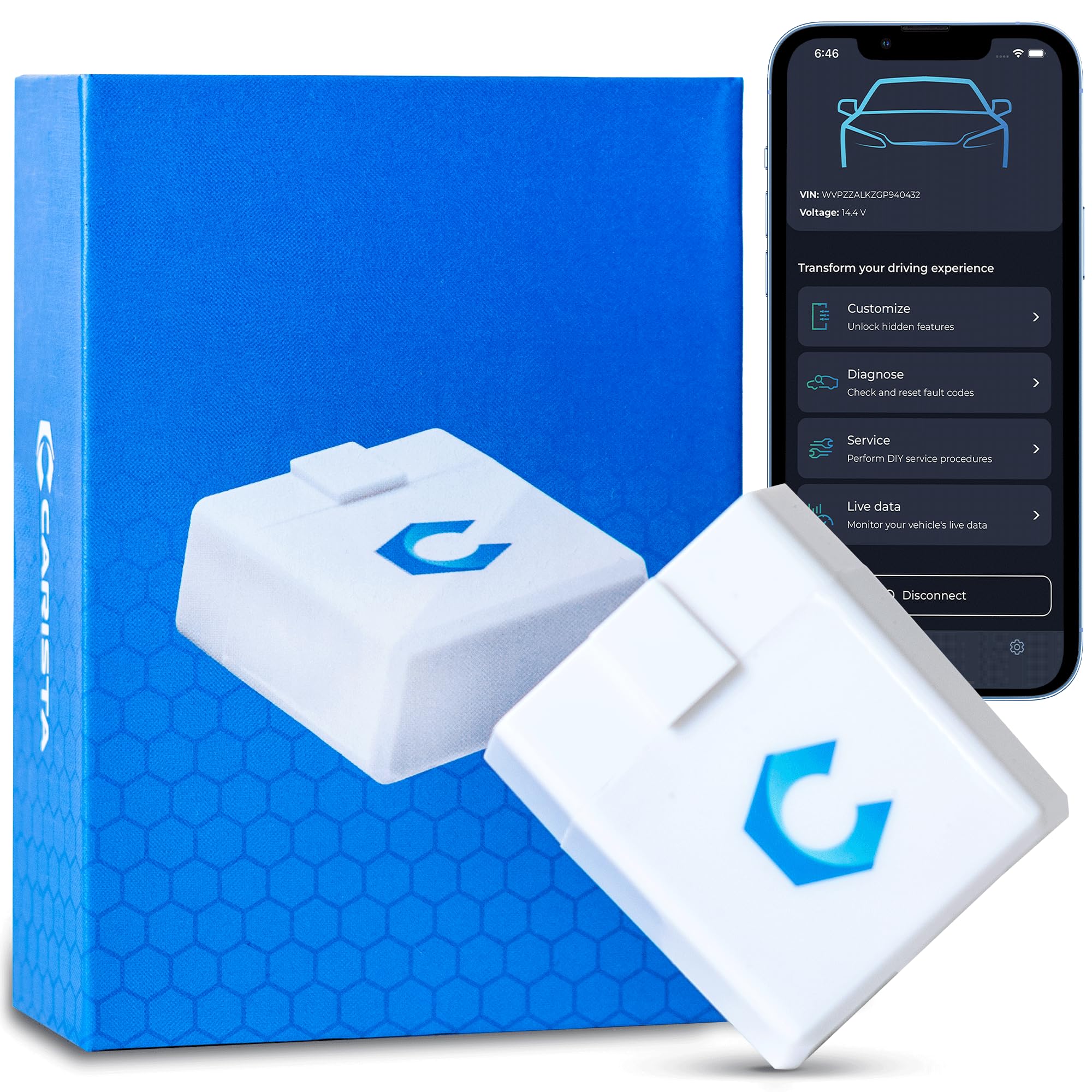
Carista Bluetooth OBD2 Adapter — Best Service Features
Best for: Service features
For Android drivers who want more than a code reader, Carista adds service and customisation options on supported vehicles, which makes it useful for owners who maintain one car regularly. Its app can handle basic diagnostics plus selected service functions and settings changes, which suits drivers who already know their car is supported. It also covers live data and readiness for routine checks. The main caution is support: service functions vary sharply by make, model, and year, so you should confirm your exact vehicle in the app before expecting a specific function.
- Service functions on supported cars
- Customisation options included
- Routine codes and live data
- Support varies by vehicle
- Some features need subscription
4.7/5
4.4/5
4.5/5

OBDLink LX Bluetooth OBD2 Adapter — Best Third-Party App Pairing
Best for: Third-party app pairing
For Android drivers who already have a favourite gauge or logging app, the OBDLink LX is the cleaner third-party pairing choice. It uses Classic Bluetooth, pairs in Android settings, and is listed by popular Android apps for codes, live data, and custom dashboards. That openness makes it easy to keep a workflow you already like, rather than learning a new companion app. The trade-off is that it lacks the MX+ sleep and speed advantages, so drivers who want the strongest all-round package should choose the top pick instead for the strongest package.
- Classic Bluetooth Android pairing
- Popular third-party app support
- Custom dashboards supported
- Below MX+ on speed
- Sleep features less documented
4.6/5
4.5/5
4.4/5

Panlong Bluetooth OBD2 Scanner — Basic Code Reader
Best for: Basic code reading
For Android drivers who want the simplest possible reader for a one-off warning light, Panlong does the basic job without extra setup or a complicated app to learn. It pairs over Classic Bluetooth, works with common Android apps, and reads and clears generic codes for a quick check before a garage visit. That simplicity is also its ceiling: live-data depth, graphing, and advanced coverage are limited, and it is best unplugged after use rather than left in the port. Choose it only if a basic, low-cost check is all you need.
- Simple Classic Bluetooth setup
- Reads and clears generic codes
- Low-cost basic reader
- Limited live-data depth
- Best unplugged after use
4.4/5
4.3/5
4.4/5
Top 3 Head-to-Head: OBDLink MX+ vs BlueDriver vs Veepeak BLE+
These three are the common final choices because they cover the three Android paths: Classic Bluetooth all-rounder, companion-app reports, and BLE setup.
| Feature | #1 OBDLink MX+ | #2 BlueDriver | #3 Veepeak BLE+ |
|---|---|---|---|
| Android App Compatibility | 4.8/5 | 4.9/5 — Best | 4.7/5 |
| Bluetooth Stability | 4.9/5 — Best | 4.7/5 | 4.8/5 |
| Diagnostic Coverage | 4.9/5 — Best | 4.8/5 | 4.6/5 |
| Choose if… | You want one all-round Android adapter | You want the clearest code reports | You want app-based BLE pairing |
Who These Adapters Are NOT For
Bluetooth adapters are not the right tool for every driver, even on Android.
They also fall short if you need a screen on the tool itself, or if you dislike phone permissions and app setup. In those cases, a wired or handheld reader with its own display is simpler.
Common Mistakes to Avoid
Most Android pairing problems come from a small setup error, not a faulty adapter.
Frequently Asked Questions About Bluetooth OBD2 Scanners for Android
Do Bluetooth OBD2 scanners work with Android phones?
Yes, Bluetooth OBD2 scanners work with Android phones when the adapter type and app match. Android supports both Classic Bluetooth and Bluetooth Low Energy, so you can pair a Classic adapter in system settings or connect a BLE adapter inside a compatible app. Always check that your exact adapter model is listed by the app before buying.
Should I choose Classic Bluetooth or BLE for Android?
Choose Classic Bluetooth if you want system-settings pairing and broad third-party app support on Android. Choose BLE if you prefer app-based pairing and your chosen app lists BLE support. The better type is the one your app expects, not the newer label, so confirm app compatibility first and do not assume one type works everywhere.
Why will my Bluetooth OBD2 scanner not pair with Android?
Pairing usually fails because the Bluetooth type, app, or permission does not match. Classic adapters need system pairing and sometimes a PIN, while BLE adapters need app-based discovery and nearby-device permission. Check that the ignition is on, the adapter is seated, no other app holds the connection, and the app lists your exact adapter model.
Can I use Torque Pro with these Bluetooth adapters?
Yes, many Classic Bluetooth adapters in this list work with Torque Pro on Android, including OBDLink models and other adapters listed for third-party apps. Companion-app-only adapters may not work with Torque Pro, so check the adapter listing for third-party support. In the app, select the paired Bluetooth adapter and confirm live data appears before relying on custom gauges.
Will leaving a Bluetooth adapter plugged in drain my battery?
It can, especially if the adapter has no documented sleep mode or keeps vehicle modules awake. Adapters with low-power sleep behaviour draw far less while parked, but sleep does not reduce draw to zero. For basic adapters without sleep documentation, unplug after use, and for long parking periods, remove any adapter you do not need.
Can a Bluetooth OBD2 scanner read ABS or airbag codes on Android?
Sometimes, but only when the adapter, app, and vehicle all support that system. Generic Bluetooth adapters reliably read powertrain codes, while ABS, airbag, and other manufacturer-specific systems need extra support that varies by car and app. Check the app listing for your exact make, model, and system before buying for that purpose.
Our Final Verdict
Android drivers get the widest Bluetooth choice, but the winning trade-off is simple: confirm the app first, then pick the Bluetooth type it expects. OBDLink MX+ gives the broadest package, while BlueDriver and BLE+ suit clearer reports and app-based pairing.

I’m Alex Rahman, a car enthusiast and automotive writer focused on practical solutions, car tools, and real-world driving advice. I share simple and honest content to help everyday drivers make better decisions.
