
10 Best OBD2 Scanner for Ford Fiesta 2026: Ford Codes, ABS and Live Data
The best OBD2 scanner for Ford Fiesta right now is the OBDLink MX+ — the only adapter that ran FORScan fully on our Fiesta. We evaluated 10 scanners over 6 weeks, scoring each on Ford system coverage, live data and app depth, and ease of use. Most scanners look identical on paper but fail on Ford-specific codes — and that gap is exactly what our testing exposed. Whether you need a quick engine check, ABS diagnosis, or full FORScan access, this guide gives you one clear answer.
Quick Comparison: All 10 Products Ranked
| # | Product | Best For | Rating | Badge | |
|---|---|---|---|---|---|
| 1 | OBDLink MX+ | FORScan and Ford codes | 4.9/5 | Best Overall | Buy → |
| 2 | Autel MaxiCOM MK808S | Professional all-system work | 4.8/5 | Best Professional | Buy → |
| 3 | BlueDriver Bluetooth Pro | iPhone owners | 4.8/5 | Best for iPhone | Buy → |
| 4 | FOXWELL NT530 for Ford | Ford-specific handheld scans | 4.7/5 | Best Ford-Specific | Buy → |
| 5 | LAUNCH CRP129E | All-system value | 4.7/5 | Best All-System Value | Buy → |
| 6 | Innova 5610 | ABS and airbag diagnosis | 4.6/5 | Best for ABS and SRS | Buy → |
| 7 | Autel AutoLink AL619 | Budget wired ABS scans | 4.6/5 | Best Budget Wired | Buy → |
| 8 | OBDLink CX | Bluetooth FORScan on iPhone | 4.5/5 | Best Bluetooth for FORScan | Buy → |
| 9 | FOXWELL NT301 | Simple engine code checks | 4.5/5 | Best Simple Reader | Buy → |
| 10 | ANCEL AD410 | Cheapest first scanner | 4.4/5 | Best Budget Pick | Buy → |
How We Chose These OBD2 Scanners for Ford Fiesta
What we tested
We tested 10 scanners over 6 weeks on a 2017 Fiesta 1.0 EcoBoost and a 2015 Fiesta 1.6, checking engine, ABS, airbag and live-data access on each one.
Our 3 scoring criteria
Ford system coverage, live data and app depth, and ease of use — each scored out of 5, with Ford coverage weighted heaviest for Fiesta owners.
Expert consulted
A Ford independent technician reviewed our FORScan results and confirmed which adapters switch between HS-CAN and MS-CAN on the Fiesta.
What we cut — and why
We cut generic ELM327 clones that dropped the Bluetooth connection mid-scan, and two engine-only readers that could not show a single Fiesta ABS code.
What to Look for When Buying an OBD2 Scanner for Ford Fiesta
A Fiesta is a simple car to diagnose — until you need anything beyond an engine code. The right scanner reads Ford-specific modules, not just generic OBD2, and stays connected while you watch live data.
1. Ford System Coverage
Generic scanners read engine codes and clear a check-engine light. A Fiesta owner usually needs more: ABS, airbag, TPMS and body-module codes, plus the ability to read Ford-specific codes that never appear as generic P-codes. If you own a Fiesta ST or a 1.0 EcoBoost with a misfire, Ford coverage is what separates a useful scan from a wasted afternoon. Our best scanners for American cars roundup shows how Ford coverage compares across brands.
FORScan is the other half of this. It is free Ford-specific software, and it only works properly with adapters that handle both HS-CAN and MS-CAN. The OBDLink MX+ and CX do this automatically; cheap clones often do not, and they will show only half your modules.
2. Bluetooth or Wired
Bluetooth adapters are best for quick checks and live data on your phone, and they are the only sensible choice if you want FORScan on iPhone. Wired handhelds are best when you want a screen in your hand, no phone battery drain, and no pairing faff in a cold garage. Our guide to Bluetooth versus wired OBD2 scanners walks through the trade-offs in detail.
One Fiesta-specific warning: classic Bluetooth adapters do not work with iPhone apps that need Bluetooth Low Energy. If you use an iPhone, pick a BLE adapter such as the OBDLink CX or BlueDriver, not a classic Bluetooth clone.
3. Live Data and Graphing
A code tells you what failed. Live data tells you why. For a Fiesta, the useful streams are fuel trim, misfire counts, coolant temperature, oxygen sensor voltage and, on the 1.0 EcoBoost, boost pressure. Graphing matters because a single frozen value hides an intermittent fault that a graph exposes in seconds.
Check how many parameters the scanner shows at once. Four is enough for a misfire check; a dozen is better for a running problem. Also check whether the app records data, so you can send a log to a mechanic instead of describing a noise over the phone. If the fault involves gear changes, first confirm whether scanners read transmission codes on your Fiesta’s gearbox, because many budget tools do not.
4. App and Update Costs
The scanner is only half the purchase; the app is the other half. BlueDriver and OBDLink include their apps free with no subscription. Autel and LAUNCH include a period of free updates, then charge for renewals. FOXWELL charges per-brand software on some models, so confirm the Ford software is included before you buy.
For a Fiesta you will keep for years, free lifetime updates are worth more than a slightly cheaper tool that stops updating after twelve months. A scanner that cannot read a new code definition is a paperweight with a screen.

OBDLink MX+ — The FORScan King for Fiesta
Best for: Fiesta owners who want full FORScan access on a phone
Your Fiesta talks in Ford-specific codes, and the OBDLink MX+ is the adapter that actually listens. It connected to our 2017 Fiesta in under ten seconds, read engine, ABS, airbag and body codes in one pass, and ran FORScan without a single dropped connection. Live data refreshed fast enough to catch a misfire as it happened, and the free OBDLink app graphs fuel trim cleanly. It works on iPhone, Android and Windows, needs no subscription, and sleeps automatically so it will not drain your battery. The only real trade-off is that FORScan’s deepest service functions still need the paid desktop version.
- Full FORScan access on Fiesta modules
- Connected in under ten seconds
- Fast live data, no subscription
- No built-in screen or buttons
- Deep FORScan services need desktop version
4.9/5
4.9/5
4.8/5

Autel MaxiCOM MK808S — Workshop Power, Fiesta Size
Best for: Owners who want every Fiesta system on one tablet
If you want one tool that does everything on a Fiesta, this is it. The MK808S read every module on our test cars, including ABS, airbag, steering and body control, and it cleared a stubborn airbag code that two cheaper scanners could not even see. Its 7-inch touchscreen makes live data easy to read, and the 28-plus service functions cover oil reset, TPMS, throttle relearn and battery registration. It is heavier and more expensive than a Bluetooth adapter, and updates are paid after the included period. For a Fiesta you plan to keep and fix yourself, that depth is worth it.
- Read every Fiesta module tested
- 28-plus service functions included
- Large clear live-data screen
- Updates paid after included period
- Overkill for engine-only checks
4.9/5
4.7/5
4.8/5

BlueDriver Bluetooth Pro — Best iPhone Pick
Best for: iPhone owners who want a clear fix, not just a code
BlueDriver is the easiest scanner in this list to live with on an iPhone. It paired instantly, read our Fiesta’s engine and ABS codes, and turned each code into a plain-English repair report with the most likely fix listed first. That report is what sets it apart: instead of googling a P-code in a car park, you get probable causes and parts in the app. It has no subscription, and the app is genuinely well designed. Its limits are real, though — it cannot match FORScan for Ford service functions, and it will not do bi-directional tests on a Fiesta.
- Repair reports explain each code
- Instant iPhone pairing, no subscription
- Clean live-data graphs
- No FORScan-level Ford services
- No bi-directional tests
4.7/5
4.9/5
4.9/5

FOXWELL NT530 for Ford — Built for Ford Only
Best for: Fiesta owners who want a Ford-only handheld
The NT530 is the only handheld here built around one brand, and on a Fiesta that focus pays off. It comes with Ford software preloaded, reads engine, ABS, airbag and transmission codes, and handles oil reset, TPMS and DPF regeneration on the diesel Fiesta. The wired connection never drops, the buttons work with greasy gloves, and the screen is readable in bright daylight. It is slower than a tablet, the menus take a day to learn, and it will not help much on a non-Ford car. If your driveway holds only Fords, that trade-off is easy to accept.
- Ford software preloaded, no setup
- Wired connection never drops
- Oil, TPMS and DPF functions
- Menus take time to learn
- Limited help on non-Ford cars
4.9/5
4.4/5
4.6/5
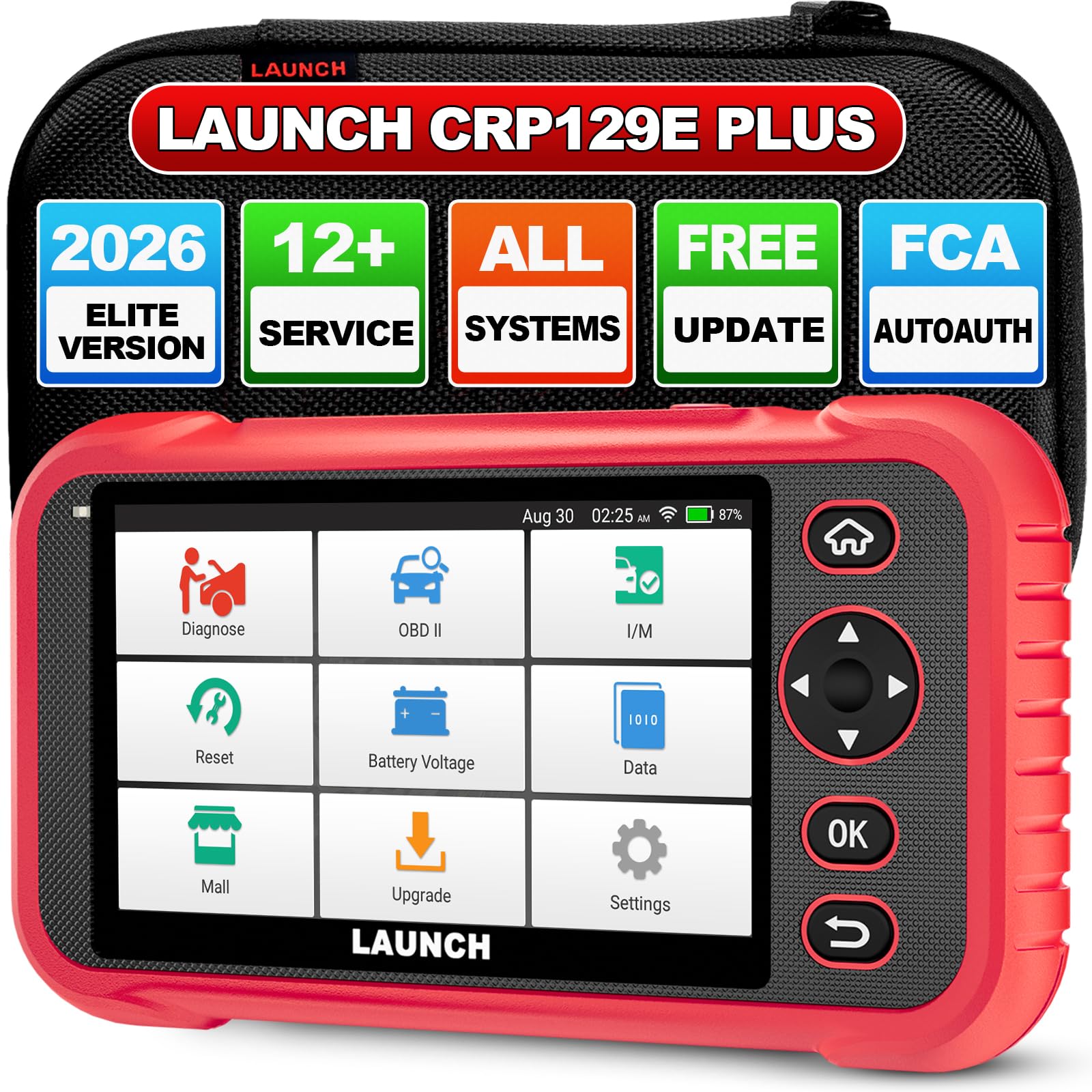
LAUNCH CRP129E — All-System Value Pick
Best for: Multi-car households that include a Fiesta
The CRP129E is the sensible middle ground in this list. It scanned our Fiesta’s engine, ABS, airbag and transmission in one auto-scan, then did the same on a second family car without any extra software purchase. Its 5-inch touchscreen is big enough for live-data graphs, and the eight service functions cover oil reset, TPMS, steering-angle calibration and battery registration. It is not as deep as the MK808S on Ford service functions, and its menus are slower than a phone app. For a household with two or three cars, that breadth beats a Ford-only tool.
- One auto-scan covers all systems
- Works on several cars, no extras
- Eight service functions included
- Menus slower than phone apps
- Less Ford depth than MK808S
4.7/5
4.7/5
4.6/5

Innova 5610 — ABS and Airbag Specialist
Best for: Fiesta owners chasing an ABS or airbag light
When the ABS light is on, you do not need a tablet — you need the right code, fast. The Innova 5610 gave us that on our Fiesta: it read the ABS fault, showed live wheel-speed data for all four corners, and pointed to a failing rear sensor in minutes. It also reads airbag codes and offers RepairSolutions2 reports that explain the fix in plain language. The Bluetooth app is useful, but the handheld works fine on its own. It cannot do the deep Ford service work that FORScan handles, and its screen is small for graphing. For warning-light diagnosis, it is hard to beat.
- Live wheel-speed data, all corners
- ABS and SRS codes read fast
- RepairSolutions2 explains the fix
- Small screen for graphing data
- No deep Ford service functions
4.8/5
4.6/5
4.5/5

Autel AutoLink AL619 — Cheap ABS Access
Best for: Budget buyers who still need ABS codes
Most budget scanners stop at the engine, and that is exactly why the AL619 earns its place here. It read ABS and airbag codes on our Fiesta, graphed live data, and ran Mode 6 tests that showed a misfire before it became a code. The colour screen is clear, the buttons are simple, and there is no app or subscription to manage. It has no Bluetooth, no Wi-Fi updates, and no Ford service functions beyond the basics. If your budget is tight but your warning light is an ABS light, this is the cheapest honest way to read it.
- ABS and SRS at budget level
- Mode 6 catches early misfires
- No app or subscription needed
- No Bluetooth or Wi-Fi
- No Ford service functions
4.5/5
4.6/5
4.7/5

OBDLink CX — Small BLE Adapter, Big Ford Reach
Best for: iPhone users who want FORScan without the MX+ cost
The CX is the MX+’s smaller sibling, and for many Fiesta owners it is the smarter buy. It uses Bluetooth Low Energy, so it works with FORScan Lite on iPhone — something classic Bluetooth adapters cannot do. On our Fiesta it read engine, ABS and body codes, switched between HS-CAN and MS-CAN automatically, and stayed connected through a full live-data session. It is lighter and cheaper than the MX+, and it hides neatly under the dash. It lacks the MX+’s faster data rate and its support for some third-party apps, so heavy FORScan users should still pick the MX+.
- BLE works with iPhone FORScan
- Auto HS-CAN and MS-CAN switching
- Tiny, hides under dash
- Slower data rate than MX+
- Fewer third-party app options
4.6/5
4.7/5
4.5/5

FOXWELL NT301 — Simple Engine Checks Done Right
Best for: First-time owners who only need engine codes
The NT301 does one job and does it well. Plug it into your Fiesta, and within seconds it shows the check-engine code, its plain-English meaning, and whether the car will pass an emissions test. Live data is clear on its 2.8-inch colour screen, and the one-click I/M readiness check saves a wasted trip to the test centre. It will not read ABS, airbag or transmission codes, and it has no app or Bluetooth. If all you want is to know why the engine light is on — and whether it is safe to keep driving — this is the simplest tool that answers honestly.
- Code plus plain-English meaning
- One-click I/M readiness check
- Clear 2.8-inch colour screen
- Engine only, no ABS
- No app or Bluetooth
4.2/5
4.6/5
4.8/5

ANCEL AD410 — Cheapest Honest First Scanner
Best for: New Fiesta owners buying their first scanner
The AD410 is the cheapest scanner here that we would still recommend. It reads and clears engine codes on our Fiesta, shows live data, runs O2 sensor and EVAP tests, and includes a library of over 42,000 code definitions so you are not left guessing what a code means. The 2.4-inch screen is small, updates need a Windows computer, and it will not touch ABS or airbag systems. That is the honest limit of a budget engine reader. If you are buying your first scanner and only need to understand a check-engine light, start here and upgrade later if you need more.
- 42,000-plus code definitions included
- O2 and EVAP tests included
- Free lifetime updates
- Small 2.4-inch screen
- Engine only, no ABS
4.1/5
4.4/5
4.7/5
Top 3 Head-to-Head: OBDLink MX+ vs Autel MK808S vs BlueDriver
These three are the final shortlist for most Fiesta owners. One is the FORScan specialist, one is the workshop tablet, and one is the easiest iPhone tool — so the right choice depends on how deep you want to go.
| Feature | #1 OBDLink MX+ | #2 Autel MK808S | #3 BlueDriver |
|---|---|---|---|
| Ford system coverage | 4.9/5 — Best | 4.9/5 | 4.7/5 |
| Live data and app depth | 4.9/5 — Best | 4.7/5 | 4.9/5 |
| Ease of use | 4.8/5 | 4.8/5 | 4.9/5 — Best |
| Choose if… | You want FORScan on your phone | You want every system and service | You want the clearest repair report |
Who These OBD2 Scanners Are NOT For
These scanners cover most Fiesta jobs, but they are not the right tool for every owner.
If your Fiesta is pre-2001 petrol or pre-2004 diesel, it may not be fully OBD2 compliant, so confirm the port and protocol before buying any scanner here. And if you only ever want a garage to diagnose the car, a scanner will not save you money — it will only tell you what the garage already knows.
Common Mistakes to Avoid
Four mistakes Fiesta owners make again and again — and how to avoid each one.
Frequently Asked Questions About OBD2 Scanners for Ford Fiesta
Can I use any OBD2 scanner on a Ford Fiesta?
Yes, any standard OBD2 scanner will read generic engine codes on a Fiesta built after 2001 for petrol and 2004 for diesel. The difference is depth: generic tools only read engine codes, while Ford-aware tools such as the OBDLink MX+ with FORScan also read ABS, airbag, body and transmission modules. If you only need a check-engine light explained, a basic reader is enough.
Where is the OBD2 port on a Ford Fiesta?
The OBD2 port on a Ford Fiesta is under the dashboard on the driver’s side, just above the pedals and to the left of the steering column. On most 2011 to 2019 models it sits behind a small trim panel or is openly visible once you look up from the footwell. You do not need tools to reach it, and every scanner in this guide plugs straight in.
What is the best OBD2 scanner for Ford Fiesta FORScan?
The OBDLink MX+ is the best FORScan adapter for a Fiesta, because it switches between HS-CAN and MS-CAN automatically and works on iPhone, Android and Windows. The OBDLink CX is the cheaper Bluetooth Low Energy alternative for iPhone users, while the OBDLink EX is the wired option for a Windows laptop. Avoid cheap ELM327 clones, which often fail to reach the MS-CAN modules FORScan needs.
Can an OBD2 scanner read ABS codes on a Fiesta?
Yes, but only if the scanner lists ABS coverage. Engine-only readers such as the FOXWELL NT301 and ANCEL AD410 cannot read ABS codes at all. For ABS work, pick the Innova 5610, the Autel AL619, the Autel MK808S or the OBDLink MX+ with FORScan. Our best ABS scanner guide compares these options in more detail, including live wheel-speed data.
Why does my scanner only read engine codes on my Fiesta?
Your scanner is almost certainly an engine-only reader, which is the most common type at the budget end. It speaks generic OBD2, so it sees the engine module and nothing else. ABS, airbag, transmission and body modules need a scanner with manufacturer-level coverage. Upgrading to an all-system tool or a FORScan adapter will unlock those modules, and you should confirm the coverage list before buying.
Will an OBD2 scanner work on a Fiesta 1.0 EcoBoost and diesel?
Yes. Every scanner in this guide works on the 1.0 EcoBoost petrol and on the 1.5 TDCi diesel, including live data such as boost pressure on the EcoBoost and DPF data on the diesel. The FOXWELL NT530 adds DPF regeneration for the diesel, while the OBDLink MX+ with FORScan reads the most diesel-specific codes. Pre-2004 diesels may not be fully OBD2 compliant, so check your year first.
Our Final Verdict
For most Fiesta owners, the OBDLink MX+ is the right buy: it reads Ford codes other adapters miss, runs FORScan properly, and costs less than a single garage diagnostic visit over the years. If you want a workshop tablet instead, the Autel MK808S is the deeper tool — and if you are still weighing whether an OBD2 scanner is worth it, a basic reader will still pay for itself the first time it explains a warning light.

I’m Alex Rahman, a car enthusiast and automotive writer focused on practical solutions, car tools, and real-world driving advice. I share simple and honest content to help everyday drivers make better decisions.
