10 Best OBD2 Scanner for Airbag Light 2026: Clear SRS Codes Safely
The best OBD2 scanner for airbag light is the Autel MaxiCOM MK808S — it reads SRS codes and live SRS data. We evaluated 10 scanners, scoring each on Airbag System Coverage, Diagnostic Depth, and Ease of Use. Most scanners look identical on paper but cannot reach the SRS module — and that gap is exactly what this guide exposes. Whether you need a budget SRS reader, a touchscreen all-system tool, or a phone-based scanner, this guide gives you one clear answer.
Quick Comparison: All 10 Products Ranked
| # | Product | Best For | Rating | Badge | |
|---|---|---|---|---|---|
| 1 | Autel MaxiCOM MK808S | serious DIY owners who need all-system SRS coverage | 4.9/5 | Best Overall | Buy → |
| 2 | FOXWELL NT630 Plus | drivers who want focused ABS and SRS diagnosis | 4.8/5 | Best for SRS Diagnostics | Buy → |
| 3 | Launch CRP123X V3.0 | drivers who want a fast touchscreen SRS reader | 4.8/5 | Best Touchscreen | Buy → |
| 4 | Innova 5610 CarScan Pro | US-car owners who want guided SRS repairs | 4.7/5 | Best for US Cars | Buy → |
| 5 | FOXWELL NT604 Elite | budget buyers who need basic SRS reading | 4.7/5 | Best Budget | Buy → |
| 6 | BlueDriver Bluetooth Pro | phone-first drivers who want SRS reads | 4.6/5 | Best Phone Scanner | Buy → |
| 7 | Autel AutoLink AL619 | beginners who want a simple SRS reader | 4.6/5 | Best Simple SRS Reader | Buy → |
| 8 | Autel MaxiDiag MD808 Pro | DIY owners who want all-system SRS coverage | 4.5/5 | Best All-System Value | Buy → |
| 9 | FOXWELL NT614 Elite | owners who want SRS plus common resets | 4.5/5 | Best Value With Resets | Buy → |
| 10 | OBDMATE OM901 | buyers who only need SRS and ABS codes | 4.4/5 | Best SRS-Only Value | Buy → |
How We Chose These Scanners
These are editorial picks, not a user-supplied list. Ratings are editorial ratings based on listed SRS coverage, specifications, and compatibility information, not lab or hands-on test results.
How we rated
We compared 10 SRS-capable scanners on listed SRS coverage, diagnostic depth, and ease of use, using manufacturer specifications and published coverage information.
Our 3 scoring criteria
Airbag System Coverage, Diagnostic Depth, and Ease of Use. Each product is scored out of 5 on the same three criteria.
How ratings work
Scores are editorial ratings from listed specifications. No test period is claimed, and no hands-on test result is presented as measured data.
What we cut — and why
We cut engine-only readers, including the FOXWELL NT301, because they cannot read SRS codes. An airbag light needs a tool that lists SRS coverage by name.
What to Look for When Buying an OBD2 Scanner for Airbag Light
An airbag light is not a check-engine light. The right scanner must reach the SRS module, name the fault, and let you clear it only after a repair.
1. SRS Coverage: Read Versus Clear
Look for a scanner that lists SRS or airbag coverage by name, not just “all-system” on the box. Reading a code tells you the fault; clearing it only works after the cause is fixed. If you are unsure why a scanner cannot read SRS codes, check the coverage list for your exact make, model, and year before you buy.
2. Vehicle Compatibility
SRS coverage is brand-specific, so a tool that works well on one make may miss the SRS module on another. Check the manufacturer coverage list for your vehicle, including the year range, and confirm whether enhanced SRS functions need a paid update. A scanner that covers your car today is worth more than a broader tool that skips it.
3. Crash-Data Limits
A standard SRS scanner can clear ordinary fault codes, but it generally cannot clear crash data stored after an airbag deployment. That record needs specialist equipment or a module service. Before you buy, learn whether a generic scanner can read airbag codes and what it cannot erase, so a post-crash light does not surprise you.
4. Screen, Connection, and Updates
A handheld with a built-in screen works without a phone, while a Bluetooth adapter is smaller but needs an app. Wired tools avoid pairing problems; touchscreen tablets show more live data at once. Check update terms too, because SRS coverage for newer models often arrives through updates, and some tools charge after an included period.

Autel MaxiCOM MK808S — All-system SRS coverage in one tablet
An airbag light that stays on is stressful, because the car may have disabled its airbags, and this tablet gives you a clear next step instead of a guess. It reads SRS codes, live SRS data, and ABS, engine, and transmission codes, so you can trace the fault to a seat sensor, clock spring, wiring issue, or low-voltage event. Its large touchscreen and AutoVIN make the SRS section easier to reach than on a small handheld. It suits serious DIY owners and small shops best, though its size and paid updates after the included period are real trade-offs to weigh.
- Reads SRS codes and live SRS data
- All-system coverage beyond engine codes
- Large touchscreen with AutoVIN
- Paid updates after included period
- Bulky for a glovebox tool
4.9/5
4.9/5
4.8/5
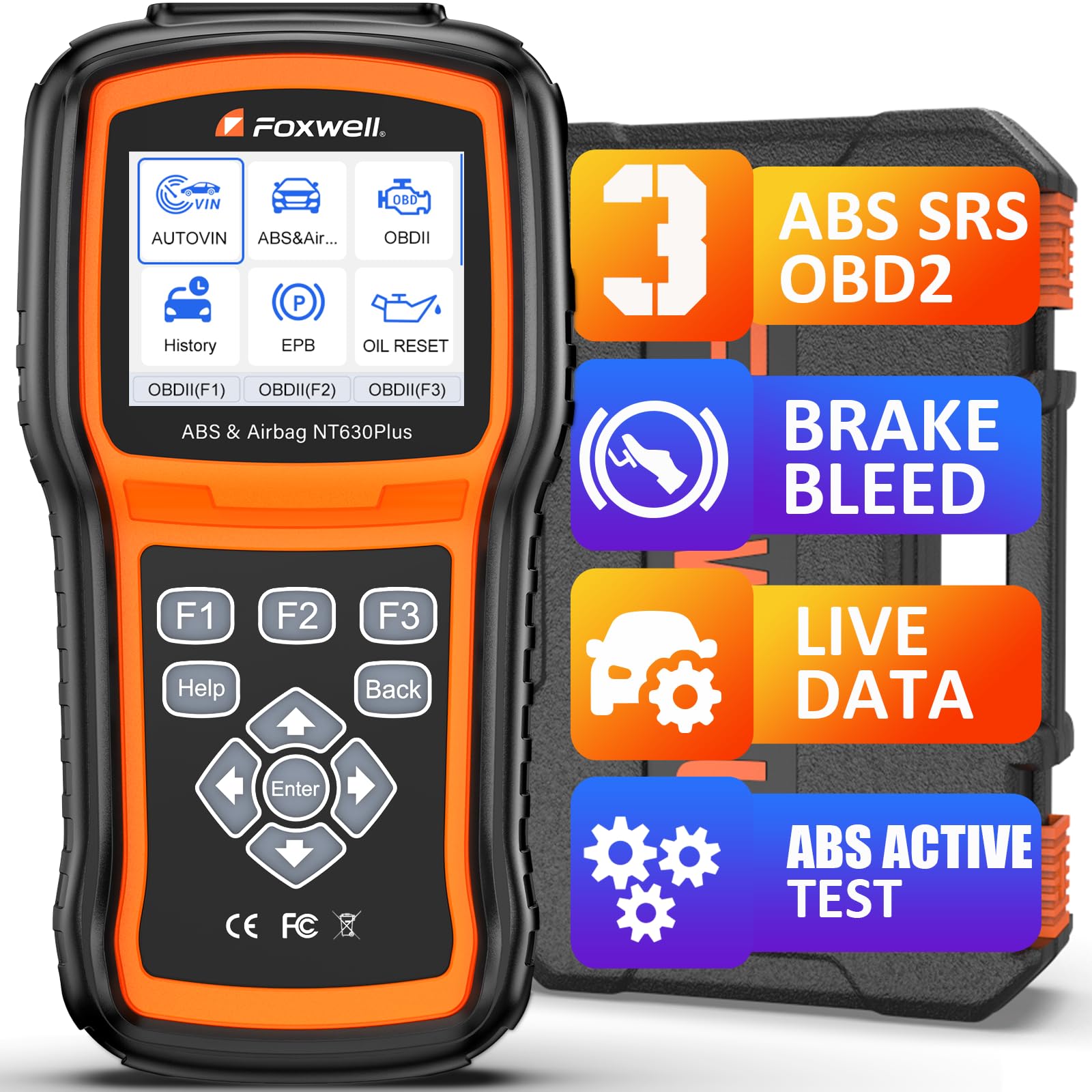
FOXWELL NT630 Plus — Focused ABS and SRS tool with bleeding
A lit airbag light often points to one module, and this focused tool is built for that job. It reads and clears ABS and SRS codes, shows live ABS and SRS data, and supports ABS bleeding and steering-angle calibration on supported vehicles. The buttons are simple, the screen is easy to read, and you need no phone or app to start a scan. It is a strong fit when SRS and ABS are your main concern, though it is narrower than an all-system tablet and its menu feels dated beside newer touchscreens.
- Reads and clears ABS and SRS codes
- ABS bleeding on supported vehicles
- Simple buttons, no phone needed
- Narrower than all-system tablets
- Dated menu and screen
4.9/5
4.7/5
4.7/5

Launch CRP123X V3.0 — Fast touchscreen with four-system SRS coverage
When the SRS light appears before a long drive, you want answers quickly, and this touchscreen reader is designed for that moment. It covers engine, transmission, ABS, and SRS, reads and clears SRS codes, and shows live data and freeze-frame information to help you judge whether a fault is active or intermittent. AutoVIN, Wi-Fi updates, and a bright colour screen keep setup short, and its reset services cover common maintenance jobs. It is best for home users who prefer touch controls, though deeper bidirectional tests are limited and SRS coverage still varies by make.
- Four-system coverage including SRS
- Bright touchscreen with AutoVIN
- Wi-Fi updates and live data
- Limited bidirectional active tests
- SRS coverage varies by make
4.8/5
4.7/5
4.9/5

Innova 5610 CarScan Pro — Guided SRS help for popular US models
An SRS code alone does not tell you what to fix, and this handheld tries to close that gap for popular US vehicles. It reads and clears SRS, ABS, engine, and transmission codes, records live data, and links codes to repair guidance through its companion app on supported models. The handheld works without a phone for a basic scan, while the app adds extra context when you want it. It suits owners of GM, Ford, Chrysler, Hyundai, Nissan, and Toyota vehicles best, though full enhanced coverage ends at 2017 for some FCA models and the screen is small.
- SRS, ABS, engine and transmission codes
- Repair guidance on supported models
- Works without a phone
- Small screen for live data
- Some FCA coverage ends 2017
4.7/5
4.7/5
4.6/5

FOXWELL NT604 Elite — Budget four-system reader that reaches SRS
Many cheap readers stop at the engine, which is exactly why an airbag light can leave you stuck, and this budget handheld reaches further. It reads and clears engine, ABS, SRS, and transmission codes, shows live data, and includes AutoVIN to identify the vehicle quickly. The wired connection is reliable, the buttons are simple, and there is no app or subscription to manage before a scan. It is best for budget buyers who mainly need to read and clear SRS codes, though it has no service resets, no bidirectional control, and a smaller screen than tablets.
- Reads and clears SRS codes
- Four systems for a budget tool
- No app or subscription needed
- No service resets included
- Smaller screen than tablets
4.8/5
4.5/5
4.8/5

BlueDriver Bluetooth Pro — Phone-based SRS reads with repair reports
If you already diagnose everything from your phone, carrying a separate screen can feel like a step backward, and this small Bluetooth adapter fits that habit. It plugs into the OBD2 port, pairs with its app, and reads and clears enhanced codes including SRS, ABS, and transmission on supported vehicles, with repair reports drawn from verified fixes. There is no subscription for the core app, and the adapter is small enough to leave in the car. It is best for phone-first drivers, though it has no standalone screen and no broad bidirectional control.
- Enhanced SRS reads on supported vehicles
- Repair reports with no subscription
- Tiny adapter, easy to carry
- No standalone screen
- No broad bidirectional control
4.7/5
4.5/5
4.7/5

Autel AutoLink AL619 — Simple wired reader for SRS and ABS
A confusing menu can turn a simple airbag fault into a longer job, and this wired reader keeps the process short. It reads and clears ABS and SRS codes plus engine codes, shows live data, and uses a colour screen with clear buttons that suit first-time users. Because it is wired, there is no pairing, app, or battery charging step before you plug it in. It is best for beginners who want a dependable SRS reader for occasional use, though it covers fewer systems than all-system tools and has no service resets or bidirectional tests.
- Reads and clears ABS and SRS codes
- Clear colour screen and buttons
- No pairing or app needed
- Fewer systems than all-system tools
- No service resets included
4.6/5
4.4/5
4.8/5

Autel MaxiDiag MD808 Pro — All-system handheld with SRS and services
When one warning light leads to another, a four-system reader can run out of answers, and this all-system handheld covers more ground. It reads all major systems including SRS, ABS, engine, and transmission, and adds seven service functions such as oil, EPB, SAS, DPF, BMS, throttle, and air-fuel adjustment on supported vehicles. The 4.0-inch screen and wired connection keep it portable and reliable in a garage. It suits DIY owners who want broad coverage without a tablet, though its older hardware feels slow and its coverage is strongest on models up to 2014 or 2015.
- All-system coverage including SRS
- Seven service functions included
- Portable wired handheld design
- Older hardware feels slow
- Strongest on models to 2015
4.6/5
4.5/5
4.4/5

FOXWELL NT614 Elite — Four-system SRS reader with five resets
An airbag fault is rarely the only maintenance job on an older car, and this reader pairs SRS coverage with useful resets. It reads and clears engine, transmission, ABS, and SRS codes, shows live data, and adds five service resets including oil, EPB, ABS bleeding, SAS, and throttle relearn on supported vehicles. The rugged handheld design suits garage use, and lifetime free updates remove one ongoing cost. It is best for owners who want SRS diagnosis plus routine resets, though it is not a full all-system tablet and its screen is modest.
- SRS coverage plus five resets
- Rugged handheld for garage use
- Lifetime free updates included
- Not a full all-system tablet
- Modest screen size
4.6/5
4.5/5
4.4/5

OBDMATE OM901 — Low-cost handheld focused on SRS and ABS
If your only goal is to find out why the airbag light is on, paying for a full workshop tablet can feel wasteful, and this low-cost handheld stays focused. It diagnoses and resets fault lights for ABS, SRS, transmission, and engine systems, with a straightforward menu that does not ask you to learn a tablet interface. The wired design is simple to use, and the compact body fits a glovebox or toolbox easily. It is best for buyers who want a focused SRS and ABS reader, though it lacks advanced coding, deeper all-system tests, and the polish of larger brands.
- Diagnoses and resets SRS faults
- Simple menu for focused use
- Compact and easy to store
- No advanced coding support
- No deeper all-system tests
4.5/5
4.3/5
4.5/5
Top 3 Head-to-Head: Autel MaxiCOM MK808S vs FOXWELL NT630 Plus vs Launch CRP123X V3.0
These three are the common final choices because they cover SRS in different ways: a full all-system tablet, a focused ABS and SRS tool, and a fast touchscreen reader.
| Feature | #1 MK808S | #2 NT630 Plus | #3 CRP123X V3.0 |
|---|---|---|---|
| Airbag System Coverage | All-system SRS — Best | Focused ABS and SRS | Four-system SRS |
| Diagnostic Depth | All-system plus active tests — Best | ABS and SRS depth | Four-system depth |
| Ease of Use | Large touchscreen | Simple buttons | Fast touchscreen — Best |
| Choose if… | You want the widest SRS coverage | You mainly need ABS and SRS | You prefer a fast touchscreen |
Who These Scanners Are NOT For
These scanners are for reading and clearing ordinary SRS faults after a repair. They are not a substitute for professional airbag work.
If your light is on because an airbag deployed, a seatbelt pretensioner fired, or the module itself is faulty, do not rely on clearing the code. Learn what scanner is good for ABS work separately, because ABS and SRS are different systems with different tools and limits.
Common Mistakes to Avoid
Most airbag-light mistakes come from using the wrong tool or clearing a code before fixing the cause.
Frequently Asked Questions About OBD2 Scanners for Airbag Light
Can a basic OBD2 scanner read airbag codes?
No. A basic OBD2 reader usually talks only to the engine computer, so it cannot see the SRS module that stores airbag codes. Airbag faults use manufacturer-specific body codes, and they need a scanner that lists SRS or airbag coverage for your make and model year. Check that coverage list before you buy, because a four-system claim on the box does not guarantee SRS access on every vehicle.
Can an OBD2 scanner reset the airbag light?
Yes, but only if the scanner supports SRS and the underlying fault has been fixed. Connect the tool, open the SRS menu, read the code, repair the cause, such as a loose seat connector or faulty clock spring, and then clear the code. If the fault is still present, the light will return at the next ignition cycle. Clearing a code never repairs a broken sensor or wiring fault.
Why does my airbag light stay on after clearing the code?
The light usually stays on because the fault is still present, or the code was stored in non-volatile memory and the repair was incomplete. Common causes include a faulty seat occupancy sensor, clock spring, impact sensor, damaged wiring, or low system voltage. Read the code again, fix the cause it names, and clear it once more. If the same code returns immediately, get a professional diagnosis.
Can an OBD2 scanner clear crash data after an accident?
No, a standard OBD2 scanner generally cannot clear stored crash data. After deployment, the airbag module stores a crash record that needs specialist bench equipment or a module reset service, and in some cases a replacement module. A handheld scanner can read the fault and clear ordinary SRS codes, but it cannot erase that crash record. Do not drive with a deployed system until it is repaired properly.
Is it safe to drive with the airbag light on?
No, it is not safe to assume the car is protected. On most vehicles a lit SRS light means the airbags and seatbelt pretensioners may be disabled until the fault is fixed. The car will usually still drive, but that does not make it safe in a crash. Read the code as soon as you can, avoid long trips until you know the cause, and get professional help if the cause is unclear.
What should I check first when the airbag light comes on?
First, check the simple causes: a loose connector under a front seat, a seatbelt buckle fault, or a recent battery or fuse issue. Then use an SRS-capable scanner to read the exact code, because the code narrows the fault to a sensor, circuit, or module. Note the code, check whether it returns after clearing, and do not replace parts at random. If the code points to the module itself, seek professional help.
Our Final Verdict
Low-cost handheld focused on SRS and ABS

I’m Alex Rahman, a car enthusiast and automotive writer focused on practical solutions, car tools, and real-world driving advice. I share simple and honest content to help everyday drivers make better decisions.
