10 Best BMW Bluetooth OBD2 Scanners for 2026: Clear BMW Diagnostics That Connect
The 10 Best BMW Bluetooth OBD2 Scanners list starts with the Vgate vLinker BM+ — the BMW-focused adapter built for BimmerLink and BimmerCode use. We compared 10 Bluetooth adapters, scoring each on BMW app compatibility, diagnostic coverage, and Bluetooth stability. Most adapters look identical on paper but fail on BMW pairing — and that gap is what this comparison exposes. Whether you need simple code reading, BMW coding, or steady live data, this guide gives you one clear answer.
Quick Comparison: All 10 Products Ranked
| # | Product | Best For | Rating | Badge | |
|---|---|---|---|---|---|
| 1 | Vgate vLinker BM+ Bluetooth Adapter for BMW | BMW owners using BimmerLink or BimmerCode | 4.9/5 | Best Overall | Buy → |
| 2 | OBDLink CX Bluetooth OBD Adapter for BMW | iPhone owners who want stable BLE | 4.8/5 | Best BMW App Support | Buy → |
| 3 | Carly OBD2 Bluetooth Adapter for BMW | Owners wanting coding and service checks | 4.8/5 | Best Coding Features | Buy → |
| 4 | BlueDriver Bluetooth Pro OBDII Scan Tool for iPhone & Android | Owners who want a polished app | 4.7/5 | Best App Experience | Buy → |
| 5 | Veepeak OBDCheck BLE+ Bluetooth OBD2 Scanner | Budget buyers who want BLE | 4.7/5 | Best Budget | Buy → |
| 6 | OBDLink MX+ Bluetooth OBD2 Scanner | Multi-car households needing broad coverage | 4.6/5 | Best All-Round Coverage | Buy → |
| 7 | Autel AP200 Bluetooth OBD2 Scanner | Owners wanting extra service functions | 4.6/5 | Best Service Functions | Buy → |
| 8 | FIXD Bluetooth OBD2 Scanner | First-time scanner buyers | 4.5/5 | Easiest for Beginners | Buy → |
| 9 | Vgate iCar Pro Bluetooth 4.0 OBD2 Adapter | Owners wanting a tiny leave-in adapter | 4.5/5 | Best Compact Adapter | Buy → |
| 10 | BAFX Products Bluetooth OBD2 Scanner | Android owners wanting simple scanning | 4.4/5 | Best Simple Android Pick | Buy → |
How We Chose These Bluetooth Adapters
What we compared
10 Bluetooth adapters for BMW use, judged on app fit, coverage, and connection stability, with BMW-specific apps weighted first.
Our 3 scoring criteria
BMW App Compatibility, Diagnostic Coverage, and Bluetooth Stability, each scored out of 5 as an editorial rating based on listed specifications.
How we checked compatibility
We checked manufacturer compatibility pages and app adapter lists, rather than relying on a single listing claim, before ranking an adapter for BMW use.
What we cut — and why
We cut wired-only scanners, Wi-Fi-only adapters, and classic-only adapters marketed for iPhone, because they do not fit a BMW Bluetooth brief.
What to Look for When Buying a BMW Bluetooth OBD2 Scanner
A BMW Bluetooth adapter is only useful if the app, the Bluetooth type, and the car all agree. Check those three things before you worry about extra features.
1. BMW App and Coding Support
Start with the app you actually want to use. BimmerLink and BimmerCode, Carly, and general diagnostic apps do not support the same adapters, and BMW coding needs a compatible app plus adapter, not just any Bluetooth dongle. If coding matters, confirm the exact adapter model on the app’s adapter list first, because a generic adapter may read codes while offering no coding at all.
2. Bluetooth Type: BLE, Classic, and iPhone Support
Bluetooth is not one standard for this job. Bluetooth Low Energy adapters usually connect inside the app on both iPhone and Android, while classic Bluetooth adapters often work on Android but not on iPhone. That difference alone explains many failed BMW setups, so read the listing for BLE or MFi wording, and follow how to connect a Bluetooth scanner in the order that Bluetooth type expects.
3. BMW Model and System Coverage
Generic OBD2 covers standard engine codes on most modern BMWs, but deeper systems, service functions, and BMW-specific data vary by model, year, and app. Do not assume one adapter covers every BMW system just because it plugs in. Check the app’s vehicle list for your model and generation, and treat broad compatibility claims as a starting point, not a guarantee.
4. Live Data, Service Functions, and Updates
For ongoing BMW ownership, live data and service functions matter more than a long feature list. A good adapter should stream the parameters you need without constant drops, and a service-capable app should clearly state functions such as battery registration for BMW models where your BMW requires it. Also check whether the app needs regular updates, because BMW coverage can change with app versions. For smoother troubleshooting, choose a scanner good for live data with fast, stable streaming.
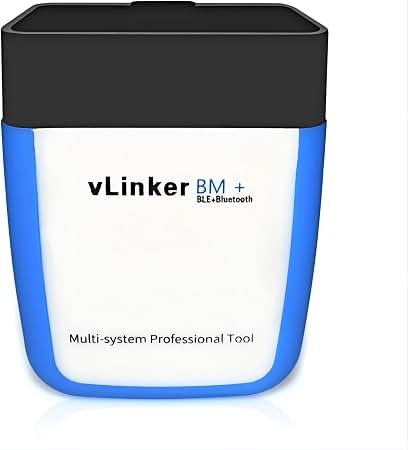
Vgate vLinker BM+ Bluetooth Adapter for BMW — BMW-focused adapter, smoothest app pairing
For most BMW owners, this is the adapter to buy first, because it is built around the apps BMW owners actually use. It connects to BimmerLink and BimmerCode without the trial-and-error pairing that ruins cheaper generic adapters, and it keeps the link steady while you read codes or check live data. The compact body sits neatly in the footwell port, and setup is usually plug in, open the app, and connect. Its weakness is scope: it is a phone adapter, not a full workshop tool, so deep manufacturer service work still needs a more capable system.
- Built for BimmerLink and BimmerCode
- Steady Bluetooth Low Energy link
- Compact, tidy footwell fit
- Not a full workshop tool
- Phone app still required
4.9/5
4.8/5
4.9/5

OBDLink CX Bluetooth OBD Adapter for BMW — Stable BLE link, strong BMW app support
If you use an iPhone, this adapter removes the biggest BMW Bluetooth headache: the wrong Bluetooth type. It uses Bluetooth Low Energy, so it connects inside a compatible app instead of fighting iOS pairing rules, and its BMW app support is clearly documented. Once linked, it reads codes, shows live data, and handles routine checks without frequent drops. It is less appealing if you want the widest possible third-party app choice, because the best experience comes from the apps it officially supports. For a clean iPhone-first BMW setup, that trade-off is worth it.
- BLE pairing suits iPhone well
- Clearly documented BMW app support
- Reliable routine code checks
- Best with supported apps only
- Not the cheapest adapter
4.9/5
4.7/5
4.8/5

Carly OBD2 Bluetooth Adapter for BMW — Coding-friendly adapter, clear BMW features
Carly makes sense when a generic code reader feels too thin for a BMW, because its app is designed around BMW checks, coding options, and service functions. The adapter itself is simple to fit, and the app walks you through health checks in plain language rather than leaving you with a bare code number. That guidance is the real value here, especially for owners who want to check a used BMW or monitor recurring warnings. The catch is ongoing app access: the full feature set depends on the Carly app and its subscription terms, so check those before you buy.
- BMW health checks in app
- Coding and service features
- Plain-language fault guidance
- Full features need app access
- Subscription terms vary
4.8/5
4.7/5
4.8/5

BlueDriver Bluetooth Pro OBDII Scan Tool for iPhone & Android — Polished app, strong generic coverage
BlueDriver is the polished generalist in this list, and that polish matters if you want diagnostics without learning BMW-specific software. Its app explains codes clearly, tracks repair history, and presents live data in a readable layout, which makes it easy to use on a BMW and on other cars too. It reads the standard systems well and rarely feels like a bare-bones adapter. The trade-off is BMW depth: it is not a BimmerLink or BimmerCode replacement for BMW-specific coding, so enthusiasts who need that should pair their expectations accordingly.
- Clear, polished diagnostic app
- Good repair history tracking
- Works beyond BMW too
- Not a BMW coding replacement
- BMW depth is limited
4.6/5
4.8/5
4.7/5

Veepeak OBDCheck BLE+ Bluetooth OBD2 Scanner — Affordable BLE adapter, easy setup
This is the budget pick that does not force you into the classic Bluetooth trap on an iPhone. It uses Bluetooth Low Energy, connects inside a compatible app, and covers the core jobs most BMW owners need: reading codes, checking readiness, and watching live data. The small adapter is easy to leave fitted for short checks, and setup is straightforward once you choose a supported app first. It will not match BMW-specific apps for depth or coding, and its app experience depends heavily on the software you pair it with. For simple, affordable scanning, it is hard to beat.
- BLE works with iPhone apps
- Affordable core scanning
- Small, easy to fit
- Limited BMW-specific depth
- App quality varies by app
4.6/5
4.6/5
4.7/5

OBDLink MX+ Bluetooth OBD2 Scanner — Broad coverage, fast and stable link
The MX+ is the adapter to choose when your BMW is not your only car, because its broad vehicle and app support makes it useful across a household fleet. It connects over Bluetooth, delivers fast live data, and works with several well-known diagnostic apps, so you are not locked into one software route. On a BMW it handles standard diagnostics confidently, and its build feels more substantial than ultra-cheap adapters. It is larger and less BMW-specific than the top picks here, so pure BMW coding buyers may still prefer a dedicated BMW adapter first.
- Broad vehicle and app support
- Fast live-data delivery
- Solid, substantial build
- Less BMW-specific than top picks
- Larger than compact adapters
4.7/5
4.8/5
4.6/5

Autel AP200 Bluetooth OBD2 Scanner — Extra service functions, app-led setup
Autel’s AP200 stands out because it goes beyond basic code reading and adds service functions that many Bluetooth adapters skip. Through its app, you can reach more systems and service routines than a simple generic reader offers, which is useful for BMW owners doing routine maintenance checks. Setup is app-led and guided, so you do not need a separate handheld tool. The main limitation is that advanced functions vary by vehicle and app version, so you should confirm your exact BMW model and function before assuming full coverage. For its scope, it is a strong value choice.
- More service functions included
- App-led guided setup
- Good routine maintenance checks
- Advanced coverage varies by model
- Function list needs checking
4.6/5
4.7/5
4.5/5

FIXD Bluetooth OBD2 Scanner — Simplest start, clear warnings explained
FIXD is the least intimidating way to start scanning a BMW, because its app translates a warning light into plain language and tells you how urgent it looks. You plug in the adapter, open the app, and get a simple explanation instead of a raw code list, which suits owners who mainly want to know whether to drive, book a repair, or monitor a fault. It is not built for BMW coding or deep system work, and enthusiasts will outgrow it quickly. As a first scanner for everyday BMW checks, though, its clarity is a genuine strength.
- Plain-language warning explanations
- Very simple first setup
- Good urgency guidance
- Not for BMW coding
- Limited deep system work
4.5/5
4.4/5
4.6/5

Vgate iCar Pro Bluetooth 4.0 OBD2 Adapter — Tiny adapter, reliable basic scanning
The iCar Pro is best thought of as a tiny, dependable bridge between your BMW and your phone, rather than a feature-packed diagnostic system. Its small size means it can stay fitted without getting in the way, and it pairs with several popular third-party apps for code reading and live data. That flexibility is useful if you already have a favourite app. The downside is that you must choose the app carefully, because BMW-specific depth, coding, and service functions depend entirely on the software, not on this adapter alone. For basic scanning, it is neat and reliable.
- Very small, unobtrusive size
- Works with popular apps
- Reliable basic code reading
- Depth depends on chosen app
- No BMW coding built in
4.4/5
4.5/5
4.5/5

BAFX Products Bluetooth OBD2 Scanner — Simple Android adapter, solid basics
BAFX is a straightforward Android-first choice for BMW owners who want basic scanning without a complicated setup. It pairs over classic Bluetooth on Android, reads codes, and shows live data in compatible apps, and its simple design has made it a familiar entry-level adapter. That simplicity is also its limit: iPhone owners should avoid classic-only adapters like this, because iOS does not support that route in the usual way, and BMW-specific coding is out of scope. If you are on Android and want the basics done well, it remains a sensible, low-fuss pick.
- Simple Android setup
- Solid basic code reading
- Familiar entry-level design
- Classic Bluetooth, Android-first
- Not suitable for iPhone use
4.3/5
4.4/5
4.4/5
Top 3 Head-to-Head: Vgate vLinker BM+ vs OBDLink CX vs Carly Adapter
These three are the common final choices because each solves a different BMW problem: dedicated BMW app fit, iPhone-friendly stability, or coding-led ownership.
| Feature | #1 Vgate BM+ | #2 OBDLink CX | #3 Carly |
|---|---|---|---|
| BMW App Compatibility | 4.9/5 — Best | 4.9/5 | 4.8/5 |
| Diagnostic Coverage | 4.8/5 | 4.7/5 | 4.7/5 |
| Bluetooth Stability | 4.9/5 — Best | 4.8/5 | 4.8/5 |
| Choose if… | You use BimmerLink or BimmerCode | You use an iPhone first | You want coding and health checks |
Who These Bluetooth Adapters Are NOT For
These adapters are not for every BMW job, and buying one for the wrong job is the fastest way to be disappointed.
They are also not a substitute for a mechanic when a fault affects brakes, airbags, or drivability. Use the adapter to gather codes and data, then get professional help for safety-critical work.
Common Mistakes to Avoid
Most BMW Bluetooth failures are setup mistakes, not broken adapters.
Frequently Asked Questions About BMW Bluetooth OBD2 Scanners
What is the best Bluetooth OBD2 scanner for a BMW?
The best Bluetooth OBD2 scanner for a BMW is usually a BMW-focused BLE adapter, such as the Vgate vLinker BM+, because it is built for the apps BMW owners use most. It pairs more smoothly with BimmerLink and BimmerCode than a generic adapter, and it covers code reading and live data well. If you mainly want coding, a Carly adapter may suit you better, while iPhone owners should prioritise a BLE adapter with documented app support.
Do Bluetooth OBD2 scanners work with BimmerLink and BimmerCode?
Yes, but only with a compatible adapter. BimmerLink and BimmerCode list supported adapters, and BMW-focused adapters such as the Vgate vLinker BM+ and OBDLink CX are designed around that support. A generic adapter may connect for basic codes yet offer no BMW-specific functions, so check the exact adapter model on the app’s compatibility list before you buy, rather than trusting a general Bluetooth claim.
Will a Bluetooth OBD2 scanner work on an iPhone with a BMW?
Yes, if you choose the right Bluetooth type. An iPhone normally needs a Bluetooth Low Energy adapter with a BLE-compatible app, or an MFi-certified adapter for classic Bluetooth. A classic-only adapter that works on Android will usually not work reliably on an iPhone, even if it powers on. For BLE adapters, connect inside the app, not from phone Settings first.
Can a Bluetooth OBD2 scanner code a BMW?
Some can, but coding depends on the app, not the adapter alone. Carly, BimmerCode, and similar BMW apps offer coding options when paired with a supported adapter, while general code readers offer no coding at all. Always confirm the exact coding function, your BMW model, and any app access terms before buying, because coding coverage varies widely and some changes should be left to experienced users.
Does a Bluetooth OBD2 scanner work without internet?
Yes, for core diagnostics. The Bluetooth link between adapter and phone is local, so reading codes, checking readiness, and viewing live data do not need internet once the app is installed and set up. Internet may still be needed for app updates, code databases, cloud features, or account activation. For the full distinction, see the guide to a Bluetooth scanner without internet access and set the app up online first for the smoothest offline use.
Which Bluetooth OBD2 scanner is best for BMW live data?
The best choice for BMW live data is an adapter with a stable Bluetooth link and an app that graphs the parameters you need, rather than the cheapest adapter available. BMW-focused and well-supported adapters tend to drop fewer samples during longer sessions, which matters for fuel trims, temperatures, and intermittent faults. Keep the parameter list short, because watching too many values at once can slow even a good adapter.
Our Final Verdict
Most BMW owners should start with a BMW-focused BLE adapter, not the cheapest generic dongle, because app fit and Bluetooth type decide whether the scan works at all. The Vgate BM+ is the clearest all-round BMW pick, with the OBDLink CX best for iPhone-first use and Carly best for coding-led ownership.

I’m Alex Rahman, a car enthusiast and automotive writer focused on practical solutions, car tools, and real-world driving advice. I share simple and honest content to help everyday drivers make better decisions.
