
Autel MaxiCheck MX808S Review: All-System Diagnostics, Active Tests & 28+ Services
The Autel MaxiCheck MX808S is an Android-based all-system OBD2 diagnostic tablet with bidirectional active tests and 28+ service functions.
Its primary use is dealer-style diagnosis and routine service work on most 1996 and newer OBD2 vehicles, and this Autel MaxiCheck MX808S review explains whether it fits an advanced DIY owner or a small workshop.
Quick Verdict
Reviewed Product
Autel MaxiCheck MX808S
A wired all-system diagnostic tablet for advanced DIY owners and small workshops.
Rating: ★★★★☆ 4/5
Best For: Advanced DIY owners and small workshops that need all-system scans, active tests, and common service resets.
Key Specs
Android 11 • Rockchip RK3566 • 4GB RAM / 64GB storage • 7-inch 1024×600 touchscreen • 28+ service functions
Key Advantage
All-system diagnostics plus bidirectional tests in a modern Android 11 tablet.
Main Trade-off
Wired connection, modest screen resolution, and paid updates after the first year.
Bottom Line
The MX808S is a strong service-level tool for its intended buyer. Its value falls if wireless freedom, a sharper display, or full TPMS programming is essential.
At a Glance
- All-system diagnostics for engine, transmission, ABS, airbag, body, and other available modules.
- Bidirectional active tests let the tablet command supported components during diagnosis.
- 28+ service functions cover oil reset, EPB, SAS, DPF, battery registration, and more.
- Android 11, Rockchip RK3566, 4GB RAM, and 64GB storage support faster navigation.
- One year of free software updates and a one-year warranty are listed by Autel.
- Functions remain vehicle-dependent, so check coverage by make, model, and year.
Verified Specifications & Buyer Implications
| Attribute | Verified Detail | Why It Matters |
|---|---|---|
| Operating system | Android 11 | A modern system supports faster boot-up and current Autel software. |
| Processor | Rockchip RK3566 quad-core, 1.8 GHz | The faster processor makes menus, AutoVIN, and scans more responsive. |
| Memory | 4GB RAM and 64GB storage | More memory leaves room for vehicle software, reports, and updates. |
| Display | 7-inch LCD capacitive touchscreen, 1024×600 | Large enough for live-data graphs, but modest for a current tablet. |
| Battery | 3.7 V / 5,000 mAh; about 7 hours of continuous use | Supports a working session away from a charger, depending on use. |
| Coverage | 80+ makes, 1996 and newer OBD2 vehicles | Broad coverage suits mixed vehicles, but not every function fits every model. |
| Connectivity | Mini USB 2.0, USB 2.0, Wi-Fi 2.4 and 5 GHz, HDMI, microSD up to 32GB | Dual-band Wi-Fi supports updates, while the wired link avoids Bluetooth pairing problems. |
| Size and weight | 270.8 × 176.0 × 36.0 mm; 885 g | Portable for a workshop, yet larger than a pocket code reader. |
Autel lists one year of free updates and a one-year warranty. After that period, continued updates require a paid subscription, so a buyer should confirm the renewal terms before purchase.
Design & Build Quality
The MX808S uses a rugged-looking black tablet body with protective side grips and a carrying case. Its design is built for workshop handling rather than a slim consumer tablet.
The 7-inch touchscreen is the main control surface, with menus for Diagnostics, Service, Data Manager, Settings, and Update. A physical cable connects the tablet to the vehicle OBD2 port.
At 885 g, the unit feels stable in hand. The display is the clearest compromise, because graphs remain readable but are less crisp than on newer 8-inch 1280×800 tablets.
Setup & Ease of Use
- Connect the main cable to the tablet and the vehicle OBD2 port.
- Power the tablet, connect to Wi-Fi, and register the device through Autel.
- Download the vehicle software and updates included in the first year.
- Select Diagnostics or Service, then use AutoVIN or choose the vehicle manually.
- Run a full-system scan, review codes and live data, and save the report.
The menu layout follows Autel’s familiar tablet workflow, although first-time users should allow time for the initial setup and downloads.
How This Review Was Researched
This review evaluates the product using verified specifications, manufacturer documentation, current product information, and relevant comparison context. No personal hands-on testing is claimed unless testing evidence was actually provided.
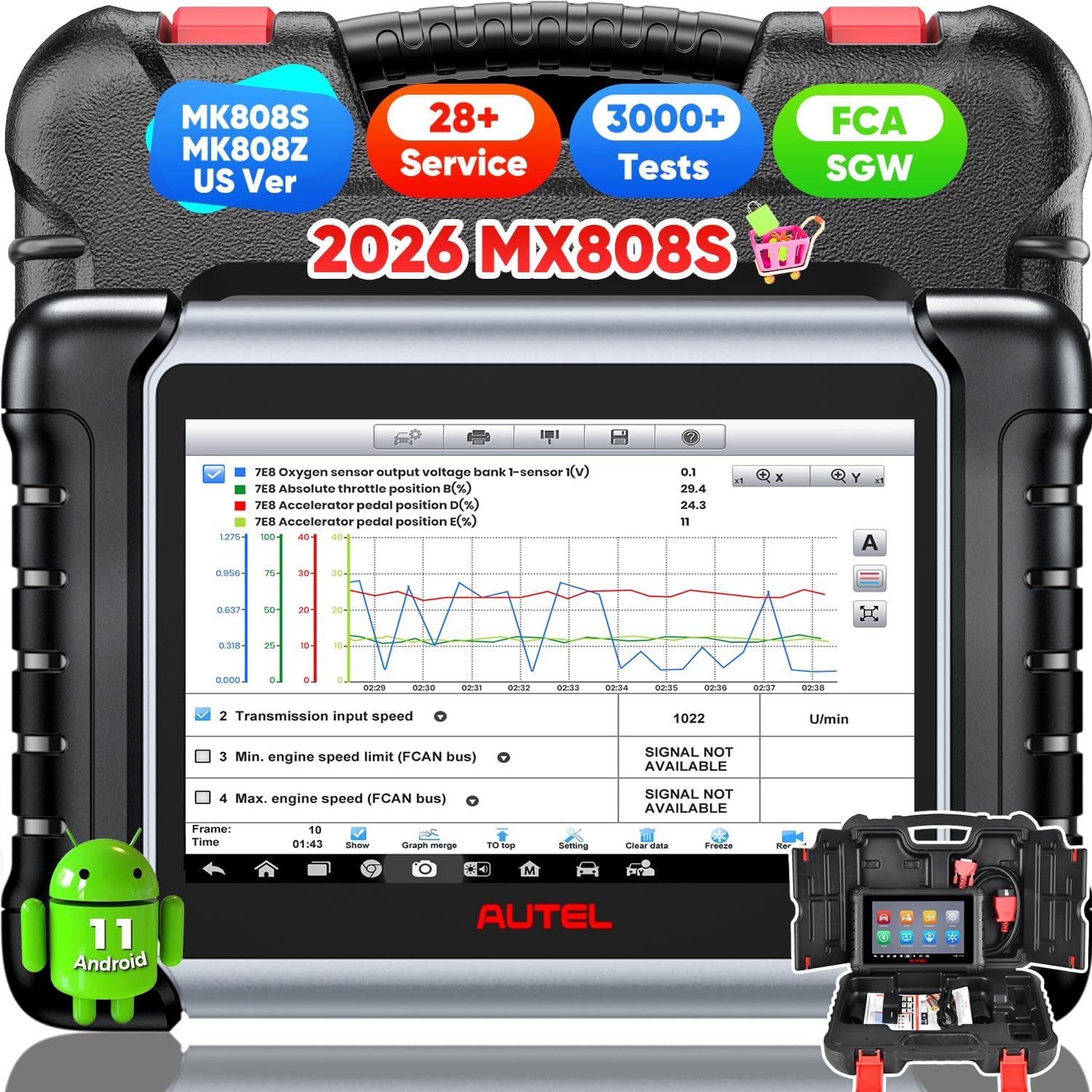
The supplied image was checked first because the request used the short name “MX808.” The image clearly shows “2026 MX808S,” Android 11, and 28+ service functions, and Autel’s official store page for that model name also now presents the MX808S.
Category-Specific Performance
All-System Diagnostic Coverage
Autel lists OE-level access to all available systems, including engine, transmission, ABS, airbag, body, steering, suspension, lighting, and HVAC modules. The tablet can read and clear codes, view freeze-frame data, and retrieve ECU information.
That breadth is the main reason to choose it over a basic engine-only reader.
Bidirectional Active Tests
Bidirectional control lets the tablet send commands to supported actuators, including ABS components, windows, doors, solenoids, valves, and wipers.
Seller listings describe 3,000+ active tests, but that is an attributed seller claim, not a figure on Autel’s official store page. In practice, active tests can confirm a faulty part before replacement when the vehicle supports the test.
Live Data and Reporting
Live data can be viewed in text, graph, or analog form. The supplied image shows graphed oxygen-sensor, throttle, and accelerator-pedal values alongside transmission input speed.
Graphing helps spot a sensor that drops out or responds slowly. Saved reports also help compare scans before and after a repair.
Service Function Depth
The MX808S lists 28+ service functions, including oil reset, EPB, SAS calibration, DPF regeneration, battery registration, ABS bleeding, injector coding, throttle adaptation, and TPMS reset.
Coverage is still vehicle-dependent. A listed function may be absent or restricted on a particular make, model year, or module.
Expert Insight
The MX808S is best judged as a service tablet, not a coding platform. Its strongest workflow is scan, test the suspect component, complete the service reset, and recheck the system, rather than changing module settings.
Key Features Explained
AutoVIN Vehicle Identification
AutoVIN can identify the vehicle make, model, and year automatically after connection. That reduces manual selection errors and speeds up a scan, although it does not work on every vehicle.
28+ Service Functions
The service menu groups resets and calibrations used after maintenance, including oil and service-interval resets, EPB pad relearn, SAS calibration, DPF regeneration, and battery registration.
For buyers who need battery registration after a replacement, this menu is a central buying factor. The exact procedure still depends on the vehicle system.
FCA AutoAuth Support
Autel lists AutoAuth support for modern FCA vehicles through its latest software update. That access can unlock diagnostics and active tests on protected FCA models.
FCA charges a separate AutoAuth subscription, according to seller listings. Buyers working on 2018 and newer Chrysler, Dodge, Jeep, or Fiat vehicles should confirm that cost.
Real-World Usability & Maintenance
The wired connection is stable during a scan, but it limits movement around the vehicle. A technician working under the hood may prefer a wireless VCI model.
Wi-Fi updates are straightforward once the tablet is registered. Keeping the software current matters because new model years arrive through updates.
Pros & Cons
Pros
- All-system diagnostics beyond engine codes
- Bidirectional active tests for component checks
- 28+ useful service and reset functions
- Modern Android 11 and faster processor
Cons
- Wired vehicle connection limits mobility
- Modest 1024×600 screen resolution
- Paid software updates after year one
Common Issues & Fixes
A Service Function Is Missing for a Vehicle
Cause: The function is vehicle-dependent and may not be supported for that model year, module, or region.
Fix: Check Autel coverage by VIN before purchase and confirm the exact function after updating the tablet.
AutoVIN Does Not Identify the Vehicle
Cause: AutoVIN is not supported on every vehicle or may fail with an incomplete software package.
Fix: Select the vehicle manually and update the relevant manufacturer software before retrying.
What to Know Before You Buy
Confirm the exact model in the listing before ordering. The original MX808 used Android 4.4.4 and a Cortex-A9 processor, while the MX808S uses Android 11 and the RK3566.
Check coverage by VIN for the vehicles and functions that matter most. “All-system” describes access to available systems, not a promise that every function works on every car.
TPMS support is mainly reset and relearn, not full sensor programming. Buyers who need to activate or program new sensors should choose a TPMS-specific Autel model instead.
Advanced coding is also limited. The MX808S can perform supported adaptations, but it is not a full coding tool for module replacement.
Finally, budget for the update subscription after the first year. Without updates, its coverage will fall behind newer vehicles.
Who Should Consider It / Who Should Look Elsewhere
Who Should Consider It
- Advanced DIY owners with several vehicles
- Small workshops needing service resets
- Buyers replacing an older MX808 or MK808
Who Should Look Elsewhere
- Owners needing only engine codes
- Buyers needing full TPMS programming
- Users needing wireless VCI mobility
Alternatives to Consider
The MX808S shares its core platform with the MK808S, while the MX900 adds a larger screen and more service functions.
Reviewed Product
Autel MaxiCheck MX808S
Best For: Wired all-system diagnosis and service work
Key Specs: Android 11, RK3566, 7-inch 1024×600, 28+ services
Advantage: Stable wired connection and strong service menu
Trade-off: No wireless VCI and modest screen resolution
Alternative A
Autel MaxiCOM MK808S
Best For: Buyers who want wireless Bluetooth VCI
Key Specs: Android 11, RK3566, 7-inch 1024×600, 28+ services
Advantage: Wireless VCI for easier under-hood work
Trade-off: Same modest screen and update subscription model
Alternative B
Autel MaxiCheck MX900
Best For: Buyers who want a larger, sharper display
Key Specs: Android 11, RK3566, 8-inch 1280×800, 40+ services
Advantage: Larger screen, bigger battery, and more services
Trade-off: Larger size and usually a higher price
Is It Worth It?
The MX808S is worth considering when all-system diagnosis and service resets are regular needs. A basic code reader cannot perform the same EPB, SAS, DPF, or battery work after a repair.
Its value is strongest for an advanced DIY owner or a small workshop with mixed makes.
The MX900 may make more sense for screen clarity and service depth. The MK808S may make more sense for wireless movement.
Final Verdict
The Autel MaxiCheck MX808S is best suited to advanced DIY owners and small workshops that need all-system scans, active tests, and common service resets. Its strongest feature is the combination of modern Android 11 hardware and a broad 28+ service menu.
Its most important limitation is that functions remain vehicle-dependent. Buyers who need wireless access, full TPMS programming, or a larger display should consider the alternatives above.
Frequently Asked Questions
Is the Autel MX808S the same as the original MX808?
No, the MX808S is the newer replacement model. The original used Android 4.4.4 and a Cortex-A9 processor, while the MX808S uses Android 11 and a Rockchip RK3566 processor.
Does the MX808S work on all 1996 and newer vehicles?
It supports most 1996 and newer OBD2 vehicles, but functions vary by vehicle. Coverage depends on make, model year, engine, and module, so a VIN check is the safest step.
Can the MX808S perform bidirectional active tests?
Yes, on supported vehicles. Those tests can command components such as windows, valves, solenoids, and ABS parts to help confirm a fault.
Does the MX808S program TPMS sensors?
No, it does not provide full TPMS sensor programming. It supports TPMS reset and relearn, but sensor programming needs a TPMS-specific model.
How long are software updates included?
Autel lists one year of free software updates. After that, continued updates require a paid subscription.
Is the MX808S wired or wireless?
The MX808S uses a wired main cable to the vehicle. Buyers who want Bluetooth VCI freedom should compare the Autel MaxiCOM MK808S instead.
Affiliate disclosure: LeadFoot Automotive earns a small commission when you purchase through links on this page — at no extra cost to you. Our editorial process is independent: affiliate relationships never influence which products we recommend or how we rank them.

I’m Alex Rahman, a car enthusiast and automotive writer focused on practical solutions, car tools, and real-world driving advice. I share simple and honest content to help everyday drivers make better decisions.
