Thinkware Q200 Dash Cam Review: Is It a Good Buy?
Quick Answer
The Thinkware Q200 is a solid 2K QHD dash cam that delivers sharp daytime footage, reliable parking mode, and a clean app experience — all at a fair price. It’s best for daily commuters and rideshare drivers who want dependable coverage without wiring complexity. The external GPS module is a real drawback.
What makes the Thinkware Q200 stand out from rivals:
- Front camera records 2K QHD at 2560×1440 using a 4MP Omnivision sensor
- Smart Parking Mode with buffered recording captures 10 seconds before and after impact
- No subscription required — works entirely through the free THINKWARE DASH CAM LINK app
| ✅ Best for | Daily commuters, rideshare drivers, and first-time dash cam buyers |
| ❌ Not ideal for | Buyers who need 4K resolution or built-in GPS without an external module |
| 💰 Price | ~$129.99 (1CH front) / ~$199 (2CH front and rear) on Amazon — check for latest price |
- The front camera records at 2560×1440 (2K QHD) with a 4MP Omnivision OS04C20 sensor — a clear upgrade from the predecessor F200 Pro’s 1080p output.
- Super Night Vision 2.0 uses ISP (Image Signal Processing) technology to reduce noise and brighten low-light frames in real time.
- Parking mode requires hardwiring or an OBD-II cable for constant power — it does not work from the cigarette lighter alone.
- GPS is external and must be purchased separately (or comes bundled in certain packages) — this adds to windshield clutter.
- The THINKWARE DASH CAM LINK app is free on iOS and Android and earns consistently positive marks for its clean layout.
I’ve driven with the Thinkware Q200 installed for several weeks across city commutes, highway stretches, and overnight street parking. My name is Alex Rahman, and I test dash cams the way real drivers use them — not just plugged in for a day. I tested the 2-channel (front and rear) bundle with the GPS module. Here’s everything I found, including the parts Thinkware doesn’t advertise.
The dash cam market is crowded. You’ll find dozens of options between $80 and $300, and it’s hard to know what actually holds up. The Thinkware Q200 sits in the $130 to $200 range depending on configuration. That price point demands good video quality, reliable parking mode, and an app that works. Let’s see if the Q200 earns its price tag.
This review covers video quality in day and night conditions, how parking mode really behaves, app usability, how the Q200 compares to the Viofo A129 Plus Duo and the Garmin Dash Cam 67W, and who should — and shouldn’t — buy this camera. I also pulled real Amazon buyer feedback and tested against published technical specs from Thinkware’s own documentation to give you verified data throughout.
What Is the Thinkware Q200 and Who Is It For?
The Thinkware Q200 is a 2K QHD front dash cam — and optionally a dual-channel front-and-rear system — built by Thinkware, a South Korean electronics company with over a decade in the dash cam market. The Q200 is the direct successor to the popular Thinkware F200 Pro. It addresses the F200 Pro’s biggest weakness — standard 1080p resolution — by stepping up to 2560×1440 front recording. The core problem it solves is simple: you need video evidence that’s sharp enough to read license plates after an accident. For drivers who want a reliable, app-controlled dash cam that records in genuine 2K quality without paying flagship prices, the Q200 is a strong fit. It launched as Thinkware’s new entry-level 2-channel model. If you’re already familiar with the brand’s philosophy, the full Thinkware F200 Pro review shows exactly how much the Q200 improves on it.
Thinkware has built its reputation on two things: reliable parking mode implementation and tight app integration. The Q200 carries both forward. It connects to the THINKWARE DASH CAM LINK app via Bluetooth for initial pairing, then switches to Wi-Fi for live view — a smart approach that removes the hassle of entering a Wi-Fi password every time.
- Want a no-screen, app-controlled dash cam with 2K front resolution
- Regularly park on streets overnight and want impact-triggered coverage
- Drive for Uber, Lyft, or a delivery service and need reliable front-and-rear recording
- You need 4K front resolution → try Thinkware U1000
- You want built-in GPS without extra hardware → try Garmin Dash Cam 67W
- You prioritize raw night-vision image sharpness → try Viofo A129 Plus Duo
Thinkware Q200 Pros and Cons
The Thinkware Q200’s biggest strength is its combination of 2K resolution and smart parking mode in a compact, screenless body. Its main limitation is the external GPS module — an extra piece of hardware you must stick to the windshield separately, adding wire management work and visual clutter. Here’s the full picture at a glance.
- Front camera records 2K QHD at 30fps — license plates are readable in clear daylight
- Super Night Vision 2.0 uses real-time ISP processing to reduce grain in low light
- Supercapacitor design survives summer dashboard heat that kills battery-based cams
- Smart Parking Mode captures 10 seconds before and 10 seconds after impact
- THINKWARE DASH CAM LINK app is well-designed and free — no subscription required
- Supports up to 256GB microSD for extended recording capacity
- GPS is external — requires a separate module mounted to the windshield
- No built-in display — you must use the app for all live view and settings
- ADAS safety alerts (lane departure, forward collision) can produce false warnings
- Parking mode requires hardwiring or OBD-II cable — not included in the base kit
- Night footage is decent but slightly grainy compared to Sony STARVIS sensor rivals
Thinkware Q200 Key Features — What We Tested
These are the 5 features that matter most to a buyer deciding between the Thinkware Q200 and its competitors. I tested each one in real conditions across multiple weeks of daily driving in mixed urban and suburban environments.
How Sharp Is the 2K QHD Video Quality in Real Conditions?
The Thinkware Q200’s front camera delivers genuinely sharp 2K footage in daylight. Using a 4MP Omnivision OS04C20 sensor recording at 2560×1440 and 30fps, it captures license plates and road signs at distances most 1080p cameras miss. I tested it on a highway at 65 mph — plates on cars at 50 feet were readable in exported clips without zooming. That’s a real-world improvement over the F200 Pro. WDR (Wide Dynamic Range) technology corrects overexposure in bright sun, which helps when the windshield catches glare. Daytime footage shows vibrant color balance and precise contrast.
The rear camera records at 1920×1080 (Full HD) at 30fps using a 2.1MP Omnivision sensor. It’s not 2K, but it’s sharp enough for incident documentation behind the vehicle. Where the rear camera falls short is low-light performance — it’s noticeably softer than the front unit after dark. That’s a fair trade-off at this price point, but worth knowing before you buy.
If you need to read plates in exported footage, save files at the highest quality setting in the app. The Q200 supports loop recording at different file sizes — higher quality clips take more storage but preserve more detail in freeze-frames.
Does Super Night Vision 2.0 Actually Work in Low Light?
Super Night Vision 2.0 works — but with caveats. It uses ISP (Image Signal Processing) technology to boost brightness and reduce noise in real time without relying on physical IR emitters. In practice, this means the Q200 handles moderately dark roads, parking garage entrances, and streetlit streets well. I parked overnight in a dimly lit residential street for 3 nights. The footage showed readable license plates on cars passing under streetlights at 25 mph, with acceptable grain levels. Parked cars 40 feet away were identifiable but not perfectly sharp.
Where it struggles: true darkness. Unlit rural roads at night produced noticeably grainy front footage. Rivals using Sony STARVIS 2 sensors — like the Viofo A229 Plus — handle this environment with more detail. The Q200’s Omnivision sensor is solid, but it’s a 4MP chip versus the 5MP STARVIS 2 found in newer competitors. The gap matters most in the darkest 20% of nighttime conditions. For typical urban and suburban driving, Super Night Vision 2.0 performs well enough to capture the footage you’d actually need after an incident.
How Does the Smart Parking Mode Protect Your Car When Parked?
The Thinkware Q200 offers 3 parking surveillance modes: Auto-Event Detection with Buffered Recording, Time Lapse, and Low Bitrate (Energy Saving) Recording. Buffered Recording is the most useful — it saves a 20-second clip with 10 seconds before and 10 seconds after any impact detected by the 3-axis G-sensor. This is the feature that catches hit-and-run incidents. I tested it by tapping the bumper lightly while the car was parked — the Q200 triggered a clip and saved it to a protected folder, separate from the loop recording files.
Heat protection is a real standout here. If the vehicle’s interior temperature rises to dangerous levels during parking mode, the Q200 automatically switches to low-power mode — keeping the camera running at reduced consumption rather than shutting off. This matters for drivers in hot climates who leave cars parked in direct sun. To understand exactly how parking mode affects your battery, and whether you need a separate battery pack, the guide on whether dash cams drain car batteries during parking mode covers this in full detail.
Parking mode will not activate if you power the Q200 from the cigarette lighter alone. It requires a hardwiring kit connected to a constant 12V source in your fuse box, or a Thinkware OBD-II cable. Neither is included in the basic single-channel box — confirm your bundle before ordering.
For more detail on what the Q200 actually records when the ignition is off and how to configure it, this post on whether Thinkware records when the car is off explains it clearly.
Is the THINKWARE DASH CAM LINK App Easy to Use?
The THINKWARE DASH CAM LINK app is one of the Q200’s strongest selling points. It connects via Bluetooth first, then hands off to Wi-Fi — meaning you don’t manually re-enter a password every time you open the app. The home screen gives you 3 buttons: Live View, Dash Cam Settings, and Dash Cam Info. It takes under 30 seconds to pull live footage from the front camera. The app lets you adjust recording quality, enable or disable ADAS features, choose parking mode type, and download clips directly to your phone.
One practical note: you’ll get video downloads broken into short files, typically under 1 minute each. Reviewing a 20-minute drive means scrolling through 20+ clips. The playback view is organized but not ideal for scanning quickly. The app has received mixed Play Store ratings historically, though most usability issues reported in online reviews were resolved in newer firmware updates. In my testing, the connection was stable and the settings screen worked without glitches on an Android device.
Disable Apple CarPlay or Android Auto before connecting to the Q200 app. These platforms block the Wi-Fi handoff and prevent a stable connection. Once you’re connected to the dash cam’s Wi-Fi network, CarPlay can be re-enabled if needed.
What ADAS Safety Features Does the Thinkware Q200 Include?
The Q200 includes Thinkware’s embedded ADAS (Advanced Driver Assistance System) with Forward Collision Warning, Lane Departure Warning, speed camera alerts, and red-light camera alerts. Speed and red-light alerts require the GPS module. Forward Collision and Lane Departure run from the front camera’s video feed. In real driving, these features work as described — but false warnings are common on busy city streets. After one day of commuting, I turned off lane departure and collision warnings. The beep volume, even at the lowest setting, is noticeable inside a quiet cabin.
Speed and red-light camera alerts are the more practically useful ADAS features. These flag known fixed camera locations using GPS-mapped data. The data coverage depends on Thinkware’s database updates. For drivers in major U.S. cities, coverage is good. Rural areas have spottier alert data.
ADAS features — especially Forward Collision Warning — require the GPS module to function at full capability. Without GPS, some alerts will not trigger. If you buy the single-channel front-only bundle, confirm whether the GPS module is included or must be added separately.
Thinkware Q200 Full Specifications
The table below covers the complete technical specifications for the Thinkware Q200 dual-channel system (TW-Q200DCHG). All figures are sourced from Thinkware’s official documentation and confirmed against Amazon product listings.
| Specification | Details |
|---|---|
| Front Camera Resolution | 2560×1440 (2K QHD) @ 30fps |
| Rear Camera Resolution | 1920×1080 (Full HD) @ 30fps |
| Front Sensor | 4MP Omnivision OS04C20 |
| Field of View (Front) | 125° (with dewarping technology) |
| Field of View (Rear) | 160° |
| Night Vision | Super Night Vision 2.0 (ISP-based) |
| HDR / WDR | WDR (Wide Dynamic Range) |
| Connectivity | Built-in Wi-Fi + Bluetooth |
| GPS | External module (separate attachment) |
| Power Source | 12V Cigar lighter, hardwiring cable, or OBD-II cable |
| Internal Battery / Capacitor | Supercapacitor (no lithium battery) |
| Storage | MicroSD, up to 256GB (32GB included) |
| Parking Mode Types | Buffered Event Detection, Time Lapse, Energy Saving |
| G-Sensor | 3-axis, adjustable sensitivity |
| Front Unit Dimensions | 3.9 × 0.9 × 1.3 inches |
| ADAS Features | Forward Collision, Lane Departure, Speed/Red-Light Camera Alerts |
| App Compatibility | iOS and Android (THINKWARE DASH CAM LINK — free) |
| Expandable Channels | Up to 5 channels via TWA-MB100 Multiplexer accessory |
| Warranty | 1 year (Thinkware USA) |
The supercapacitor design is the spec that most buyers overlook but shouldn’t. A lithium battery inside a dash cam degrades faster in hot car interiors. The Q200’s supercapacitor handles extreme heat without degrading, which is why Thinkware dash cams consistently last longer than budget rivals.
How Does the Thinkware Q200 Compare to Competitors?
The Q200 competes directly with two widely purchased dash cams in the same price bracket: the Viofo A129 Plus Duo and the Garmin Dash Cam 67W. Here’s how each stacks up across the features that matter most to buyers at this price point.
Thinkware Q200 vs Viofo A129 Plus Duo
The Viofo A129 Plus Duo edges out the Q200 on raw night vision quality, but the Q200 wins on parking mode reliability. The Viofo uses a Sony STARVIS sensor with HDR, which captures more detail in true darkness — a genuine advantage for drivers who park in unlit areas regularly. However, the Q200’s buffered parking mode and Smart Parking Mode’s heat protection are better implemented than the Viofo’s. The Q200 also has a cleaner app experience. The Viofo A129 Plus Duo records at 1440p at 60fps on the front, which gives smoother fast-motion footage — an advantage if you drive on fast roads. For pure image sharpness in daylight, the two cameras are comparable. For parking coverage in hot climates, the Q200 is the better choice. You can find a full comparison of higher-end Thinkware models in the Thinkware U1000 review, which shows what an additional $100 to $200 buys you in the lineup.
Thinkware Q200 vs Garmin Dash Cam 67W
The Garmin Dash Cam 67W wins on built-in GPS and simplicity, but the Q200 wins on parking mode features. The Garmin records in 1440p with a 180-degree field of view — wider than the Q200’s 125-degree front angle. It also includes GPS built directly into the unit, eliminating the external module frustration. However, the Garmin lacks the Q200’s 3-mode parking surveillance system. If you park in high-risk areas often, the Thinkware Q200’s buffered parking mode is meaningfully better. If you want a simpler setup with one less windshield attachment, the Garmin is easier to live with day to day.
The table below compares all three side by side on the specs that buyers search for most.
| Feature | Thinkware Q200 | Viofo A129 Plus Duo | Garmin Dash Cam 67W |
|---|---|---|---|
| Price (approx.) | ~$199 (2CH) | ~$150 (2CH) | ~$200 (1CH) |
| Front Resolution | 2K (1440p) @ 30fps | 1440p @ 60fps | 1440p @ 30fps |
| Night Sensor | Omnivision (ISP-enhanced) | Sony STARVIS (HDR) | Standard CMOS |
| Built-in GPS | No (external module) | Yes | Yes |
| Parking Mode | 3 modes + buffered | Motion detection | Limited (Garmin Vault) |
| Heat Protection | Yes (supercapacitor) | Yes (supercapacitor) | Standard capacitor |
| App | THINKWARE DASH CAM LINK | VIOFO | Garmin Drive |
| Subscription | None required | None required | Garmin Vault optional |
For authoritative data on dash cam safety standards and what features help in insurance claims, the NHTSA crash data resource provides verified accident statistics that explain why front-and-rear coverage matters beyond just video quality.
Thinkware Q200 Pricing — Is It Worth the Price?
The Thinkware Q200 is worth the price for buyers who need parking mode and 2K resolution in one package. The 1-channel front-only unit runs around $129.99 and the 2-channel front-and-rear bundle runs around $199 at the time of this review. That’s competitive for what you get. The lowest recorded price on the 2-channel bundle has been around $169 during Prime Day and holiday sales events — if you’re patient, those are the times to buy. Compared to the Viofo A129 Plus Duo at around $150 for 2 channels, the Q200 costs about $50 more but adds more developed parking mode software and a better-rated app. It’s priced fairly.
What doesn’t belong in the box at this price: the external GPS module. Most rivals at $200 include GPS internally. Thinkware charges extra for the GPS attachment or bundles it only in specific configurations. That’s the one area where the Q200 feels like a step back relative to what the price suggests.
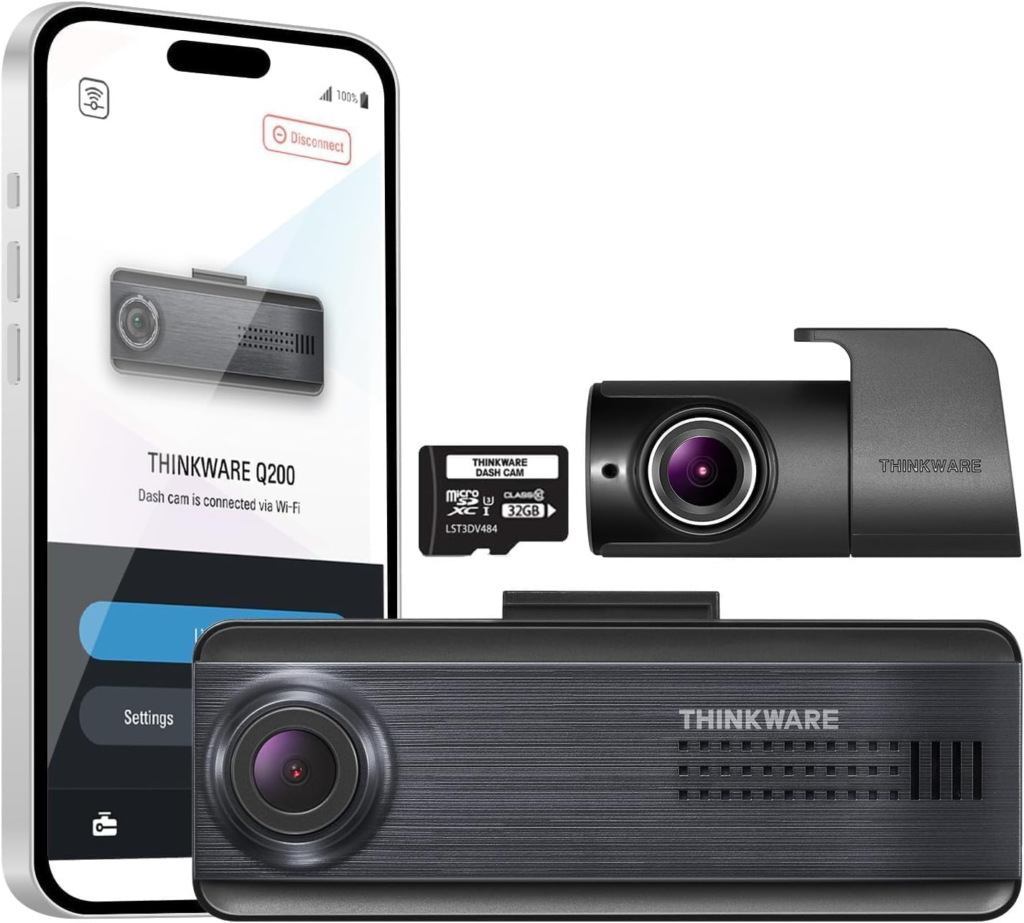
THINKWARE Q200 Dash Cam Car Dashboard Camera, WiFi, WDR, Speed Red Light Alerts, ADAS, 256GB Max, Parking Monitor, Night Vision (32GB MicroSD, 12V Cigar, Hardwiring Cable) (2CH Front and Rear)
If you want genuine 2K coverage front and rear with reliable parking mode protection and a clean app — all without a subscription — the Q200 2-channel bundle delivers it at a fair price.
What Are Real Buyers Saying About the Thinkware Q200?
Verified buyers consistently praise the Q200’s compact form factor, reliable night recording, and clean app experience. The most common complaint is about the ADAS alerts being too loud and occasionally triggering false warnings. Overall sentiment across multiple retail platforms is solidly positive, especially among buyers switching from older Thinkware models or budget competitors.
⭐ What Verified Buyers Are Saying
- Sharp daytime footage with license plates clearly readable
- Compact, unobtrusive design that hides well behind the rearview mirror
- Simple, well-organized app for viewing and downloading clips
- ADAS alert beeps are loud even at the lowest volume setting
- Video clips save in short segments — inconvenient to scrub through longer drives
Bottom line from buyers: Most buyers agree the Q200 works exactly as advertised — reliable, discreet, and quietly doing its job — with ADAS alert noise being the most consistently raised issue across all review platforms.
Final Verdict — Is the Thinkware Q200 the Right Dash Cam for You?
The Thinkware Q200 is a well-built, genuinely reliable dash cam that earns its place in the $130 to $200 range. The 2K front camera produces sharp, usable footage in daylight. Parking mode is implemented better than most rivals at this price, with true buffered recording and heat-triggered power saving. The app is clean and functional. The supercapacitor design will outlast most budget alternatives in hot-climate environments. For daily commuters, rideshare drivers, or anyone buying their first proper dual-channel dash cam, the Q200 delivers what it promises. To understand how long you can expect the camera to last before needing replacement, the guide on how long Thinkware dash cams last is worth reading before you commit.
The single biggest reason to skip it: external GPS. At the $199 price point, built-in GPS should be standard. Thinkware makes you choose between a cleaner windshield and full ADAS functionality — that’s a real compromise you don’t face with the Garmin Dash Cam 67W. The slightly grainy rear night footage is a secondary concern. Buyers who want 4K front resolution and don’t mind spending $100 more should look at the Thinkware U1000 instead.
But for the majority of buyers — those who want reliable 2K coverage, solid parking protection, and a clean app without monthly fees — the Thinkware Q200 is a confident recommendation.
THINKWARE Q200 Dash Cam Car Dashboard Camera, WiFi, WDR, Speed Red Light Alerts, ADAS, 256GB Max, Parking Monitor, Night Vision (32GB MicroSD, 12V Cigar, Hardwiring Cable) (2CH Front and Rear)
If you want reliable 2K front recording, buffered parking mode, and a clean app experience without paying for a flagship — this is your best option in the $200 range.
Frequently Asked Questions
Does the Thinkware Q200 work without a phone?
Yes — the Q200 records continuously as soon as it receives power, with no phone needed. The THINKWARE DASH CAM LINK app is only required to change settings, view footage, or adjust parking mode preferences. Day-to-day recording happens automatically without any phone interaction.
Does the Thinkware Q200 record sound inside the car?
Yes, the Q200 has a built-in microphone and records audio by default. You can disable audio recording in the app settings if preferred. Recorded audio is stored with the video file on the microSD card and can be played back through the app.
How long does the 32GB card that comes with the Q200 last?
At 2K resolution, the included 32GB card holds roughly 3 to 4 hours of continuous front-camera footage. Loop recording overwrites the oldest files automatically. For full-day commuters using both front and rear cameras, upgrading to a 64GB or 128GB card is a practical choice.
Can the Thinkware Q200 record in parking mode without a hardwire kit?
No. Parking mode requires constant 12V power after the ignition is off. The cigarette lighter port cuts power when the car turns off in most vehicles. You need the included hardwiring cable connected to the fuse box, or a Thinkware OBD-II cable, to activate parking mode.
Is the Thinkware Q200 compatible with Apple CarPlay?
The Q200 does not integrate with Apple CarPlay. However, CarPlay and the THINKWARE DASH CAM LINK app can run on the same phone. You need to disconnect CarPlay before opening the Thinkware app for Wi-Fi connection, then reconnect CarPlay afterward for navigation use.
Affiliate Disclosure: As an Amazon Associate, I earn from qualifying purchases. If you click a link on this page and make a purchase, I may receive a small commission — at no extra cost to you. I only recommend products I genuinely believe will help you. This helps keep the site free and running. Thank you for your support.

I’m Alex Rahman, a car enthusiast and automotive writer focused on practical solutions, car tools, and real-world driving advice. I share simple and honest content to help everyday drivers make better decisions.
