Why Does an OBD2 Scanner Freeze? Causes & Fixes
Quick Answer
An OBD2 scanner freezes during a scan primarily due to a faulty or loose data link connector (DLC) pin, incompatible vehicle communication protocols, firmware crashes within the diagnostic tool itself, or severe electrical interference caused by aftermarket accessories or low vehicle battery voltage.
Why OBD2 Scanners Lock Up During Diagnostics
Connecting an OBD2 code reader or scan tool to a vehicle’s computer port is usually a straightforward process. However, freezing or locking up midway through reading live data, clearing trouble codes, or performing a system readiness check can instantly disrupt troubleshooting. When a diagnostic tool stops responding, the freeze generally stems from a breakdown in the communication loop between the vehicle’s control modules and the handheld scanner’s microprocessor.
Understanding the exact mechanics of vehicle communication helps isolate why a scan tool hangs up. Modern vehicles rely on standardized digital communication networks—such as Controller Area Network (CAN) bus lines—to transmit sensor data across multiple electronic control units (ECUs). If data packets become corrupted, if voltage fluctuates, or if the hardware interface struggles to process high-speed data streams, the scanning software can easily stall.
1. Poor Connection or Damaged DLC Pins

The physical interface between the vehicle and the scan tool is the 16-pin Data Link Connector (DLC) located beneath the dashboard. Over time, these metal pins can accumulate dirt, become bent, or lose their tension grip.
When pin alignment is compromised, momentary vibrations or slight cable movements can cause micro-interruptions in power or data transmission. If power drops for a millisecond, the scanner’s processor may reset or enter an unresponsive state. Similarly, corrosion inside the port introduces electrical resistance, scrambling data signals sent over the CAN-High and CAN-Low lines.
2. Low Battery Voltage and Power Fluctuations
Diagnostic tools draw their operating power directly from the vehicle’s OBD2 port (specifically Pin 16, which supplies battery voltage). During a comprehensive system scan—especially when querying multiple modules like the Powertrain Control Module (PCM), Anti-lock Braking System (ABS), and Body Control Module (BCM)—the vehicle’s electrical system experiences a sustained electrical draw.
If the vehicle battery is weak, or if the alternator is failing, system voltage can dip below the operating threshold required by the scanner. When voltage sags, the microchip inside the diagnostic tool may freeze or reboot unexpectedly. Checking battery health with a multimeter prior to running deep diagnostic routines prevents this common pitfall.
3. Protocol Incompatibility and Software Glitches
Automotive communication has evolved through various protocols, including ISO 9141-2, SAE J1850 (PWM and VPW), and modern high-speed CAN protocols. When an OBD2 scanner attempts to auto-detect the correct communication protocol, it cycles through different pin configurations and baud rates.
If the scanner’s firmware encounters an unexpected response from a modified ECU, an aftermarket radio, or a malfunctioning sensor module, the auto-detection routine can become trapped in an infinite loop, resulting in a frozen screen. Outdated tool firmware also struggles to interpret newer manufacturer-specific data streams, making periodic software updates essential for advanced diagnostic tools.
4. CAN Bus Interference and Aftermarket Electronics
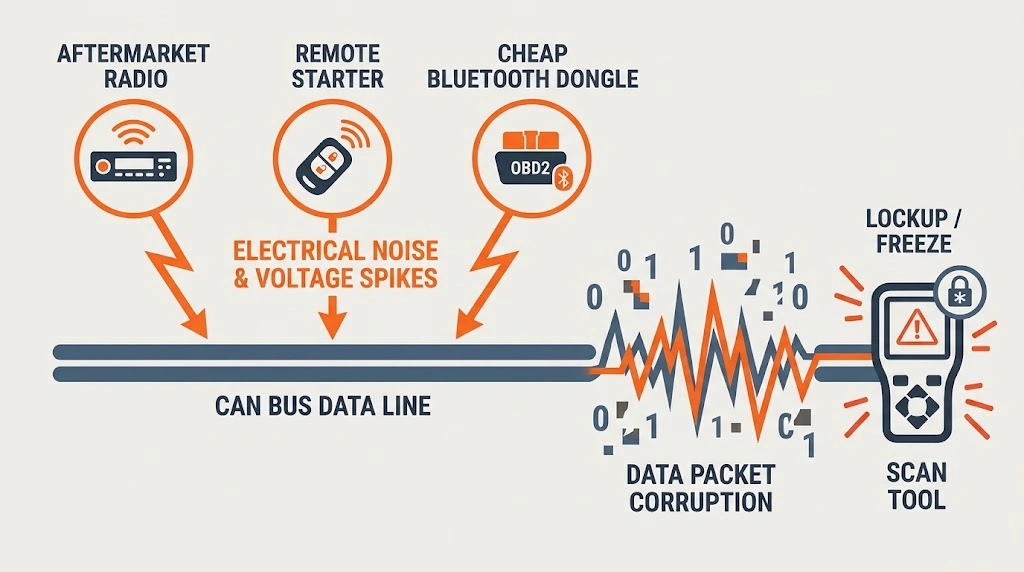
The CAN bus network operates on precise voltage differentials to transmit data. Aftermarket electronics—such as remote start systems, custom stereo head units, cheap Bluetooth OBD2 dongles, or poorly wired trailer lighting modules—can introduce electrical noise or ground loops onto the network.
When erratic electrical signals or voltage spikes flood the data lines, the diagnostic tool receives corrupted data packets. Unable to parse the chaotic data stream, the scanner’s software can lock up entirely. Displugging aftermarket accessories is often a necessary troubleshooting step when persistent freezing occurs.
Frequently Asked Questions
Can a bad car battery cause an OBD2 scanner to freeze?
Yes. A weak battery or dropping system voltage can starve the scanner of stable power during heavy module queries, causing the device to lock up or reboot.
What should I do immediately if my scanner freezes?
Unplug the scanner from the OBD2 port to cut power, wait 10 seconds, ensure the vehicle ignition is turned to the ON position, and reconnect the tool.
Why does my scanner freeze only when reading live data?
Live data streaming requires continuous, high-speed packet processing. If the vehicle’s computer sends corrupted data or if the scanner has limited memory, the processor can stall.
Can aftermarket radios interfere with OBD2 scans?
Yes. Improperly wired aftermarket head units can tap into data lines or introduce electrical noise onto the vehicle’s communication network, disrupting external scanners.
How do I know if my OBD2 scanner needs a firmware update?
If the tool freezes on newer vehicle models or fails to communicate with specific modules while functioning fine on older cars, visiting the manufacturer’s website for a software update is recommended.
Could a blown fuse cause diagnostic tool lockups?
A blown cigarette lighter or accessory fuse often powers the OBD2 port’s auxiliary circuit (Pin 16). While a dead fuse usually prevents the scanner from turning on entirely, partial shorts can cause unstable power and freezing.
Related Product
OBD2 Diagnostic Scan Tools
An upgraded diagnostic scanner with reliable hardware and regular firmware updates helps prevent communication freezes during deep vehicle scans.
As an Amazon Associate, we earn from qualifying purchases.
Conclusion
When an OBD2 scanner freezes mid-scan, it is usually a sign of an interruption in electrical power, a physical connection flaw at the data port, or a data communication bottleneck between the vehicle’s computer network and the diagnostic tool. By verifying stable battery voltage, inspecting the DLC pins for wear or corrosion, and ensuring your scanner’s firmware is up to date, you can resolve most lockup issues and complete your vehicle diagnosis smoothly.

I’m Alex Rahman, a car enthusiast and automotive writer focused on practical solutions, car tools, and real-world driving advice. I share simple and honest content to help everyday drivers make better decisions.
