Can a Dash Cam Drain Your Car Battery — And How Do You Stop It?
Yes, a dash cam can drain your car battery — but only under specific conditions. Normal driving use is safe. The real risk comes from parking mode, which keeps the camera recording while your engine is off. A hardwire kit with a low-voltage cutoff set at 12V or above prevents battery damage completely.
I came back from a five-day work trip to a completely dead car battery. No warning. No drama. Just silence when I turned the key.
My dash cam had been sitting in the airport car park, running parking mode the entire time. I had no idea it could do that.
I’m Alex Rahman, and I’ve been testing and writing about dash cams and car electronics for years. After that airport disaster, I got obsessed with understanding exactly how dash cams interact with car batteries — and how to prevent what happened to me from happening to you.
The answer is not as simple as “yes” or “no.” It depends entirely on how your dash cam gets its power and whether you use parking mode. Let me break it all down.
- A dash cam draws very little power while driving — typically 200–500mA — and poses almost no drain risk.
- Parking mode is the main culprit. It keeps the dash cam active with the engine off, slowly pulling from your battery.
- A standard 45Ah car battery can power a parking mode dash cam for roughly 40–70 hours before it drops to a dangerous level.
- A hardwire kit with a low-voltage cutoff is the single best way to use parking mode safely.
- AGM batteries handle repeated partial discharges far better than standard lead-acid batteries for dash cam users.
What Does a Dash Cam Actually Do to Your Car Battery?
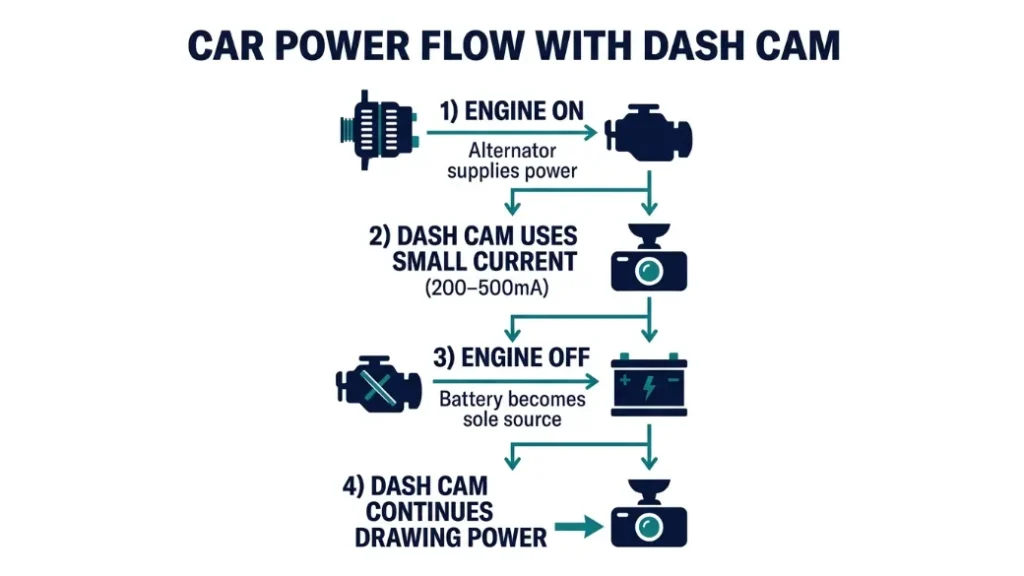
A dash cam takes a small, steady amount of electrical power from your car’s 12V system and uses it to record, process, and store video footage. While your engine runs, your alternator generates more than enough power to run the dash cam without touching battery reserves at all.
Think of it like a phone charger plugged into your wall. It draws power, but the wall supply is so large that you never notice. Your alternator is the wall — and a running engine keeps it feeding the system constantly.
The problem starts the moment you switch the engine off.
How Much Power Does a Dash Cam Draw While Driving?
Most dash cams consume between 200mA and 500mA (milliamps) during normal recording. That is roughly 2.4 to 6 watts — less than most phone chargers. Popular models like the Garmin Dash Cam Mini 2 draw around 200mA, while feature-rich options like the BlackVue DR900X can reach 500mA at peak use.
Your alternator produces 50 to 100 amps while the engine runs. A 500mA dash cam is less than 1% of that output. The battery never even feels it.
So while driving, your dash cam creates essentially zero battery drain risk. The danger comes from a completely different scenario.
Why Does the Real Problem Start When You Park the Car?
When the engine stops, the alternator stops. Your 12V car battery becomes the only power source. Any device still drawing current — including your dash cam — pulls directly from that fixed reserve.
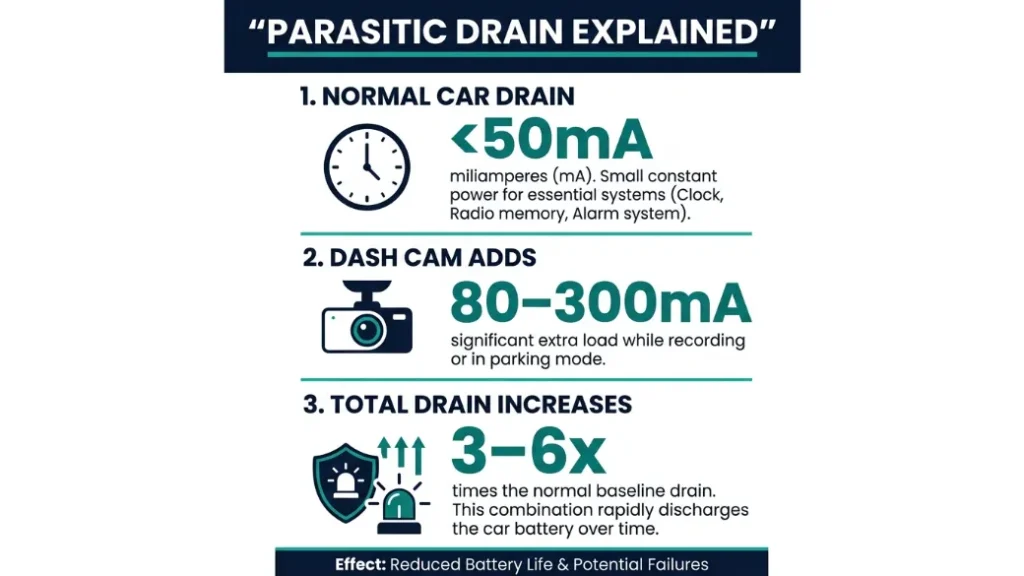
This is called parasitic drain. Every car has some level of it. Your clock, your alarm system, your key fob receiver — they all draw tiny amounts constantly. A typical car’s acceptable parasitic drain is under 50mA.
A dash cam in parking mode draws 80mA to 300mA on top of that. That is three to six times the normal background draw. Over hours and days, it chips away at your battery until there is not enough voltage left to start the engine.
Discharging a lead-acid battery below 11.6V causes permanent sulfation damage. Sulfation reduces battery capacity and can make the battery unreliable or completely dead within a few months. This is not reversible with a standard charger.
What Is Parking Mode and Why Does It Put Your Battery at Risk?
Parking mode is a feature that keeps your dash cam recording — or on standby ready to record — even after you turn your engine off. It exists to capture hit-and-run incidents, vandalism, and break-ins while your car sits unattended.
Brands like Nextbase, Vantrue, and BlackVue all offer parking mode on their mid-range and premium cameras. The BlackVue DR900X-2CH, for example, uses motion-triggered parking mode that activates the camera only when it detects movement — saving significant power compared to always-on recording.
Three types of parking mode exist, and each draws power differently:
- Continuous recording: Camera records 24/7 while parked. Highest power draw. Drains battery fastest.
- Motion detection: Camera wakes up when it detects movement. Lower average draw. Much safer on battery.
- Time-lapse: Camera captures one frame per second or per few seconds. Lowest draw. Most battery-friendly option.
How Long Can Parking Mode Run Before Your Battery Dies?
A standard 45Ah car battery holds about 45,000mAh of usable energy. You should never drain it below 50% — that is around 22,500mAh — without risking damage to a standard lead-acid battery.
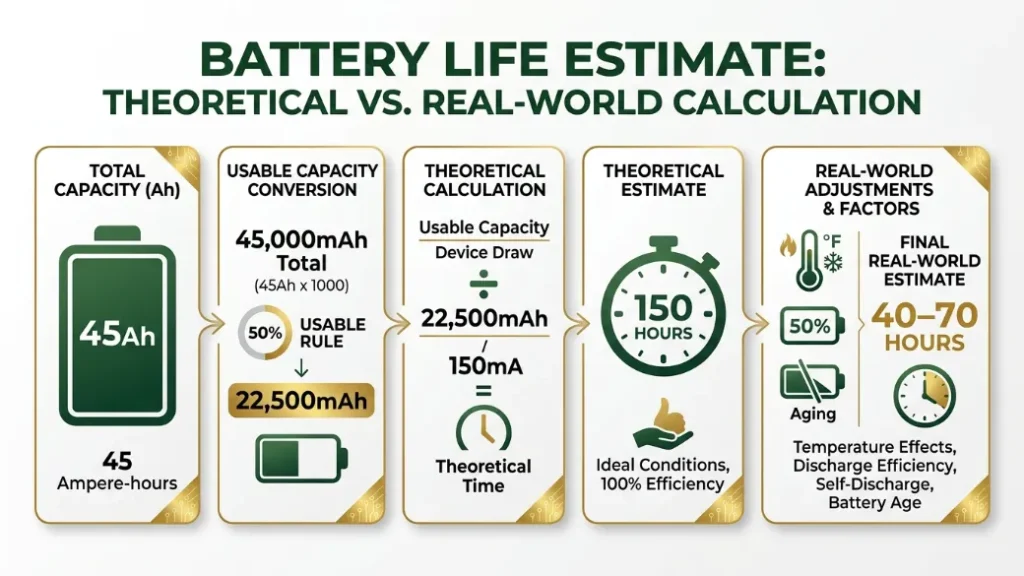
Here is the math for a motion-detection parking mode dash cam drawing 150mA:
22,500mAh ÷ 150mA = 150 hours of theoretical run time.
But real-world conditions cut that number significantly. Cold weather reduces battery capacity. Battery age reduces it further. Add the car’s own parasitic draw of 30–50mA and you lose another chunk.
Realistically, expect 40 to 70 hours of safe parking mode on a healthy standard battery. That is about two to three days — not five.
A healthy 45Ah battery in a modern car can safely power a motion-detection parking mode dash cam for roughly 40–70 hours. Continuous recording mode cuts that to 20–35 hours. Always-on recording for 5+ days without a cutoff system will kill most standard car batteries.
What Happens to a Car Battery That Gets Fully Drained?
A fully discharged lead-acid battery does not just go flat and recover. The plates inside the battery react with sulfate crystals in a process called sulfation. Those crystals reduce the surface area available for the chemical reaction that stores energy.
The result: your battery holds less charge after each deep discharge. One or two deep discharges can permanently cut your battery capacity by 20–40%, according to battery research published by the Battery University.
A battery damaged this way may still start your car — until one cold morning when it cannot. This is exactly why preventing the drain matters so much.
How Does a Dash Cam Get Its Power — and Which Method Is Safest?
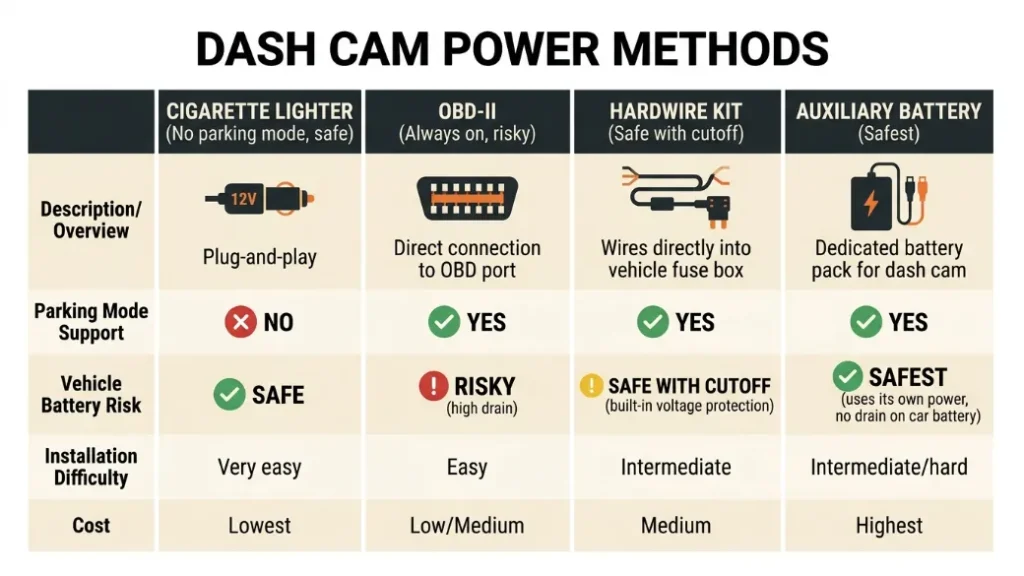
Your dash cam can connect to your car’s electrical system in four main ways. Each one behaves differently when the engine is off, and that difference determines your battery drain risk.
Cigarette Lighter Port: Convenient but Limited
The 12V cigarette lighter socket is the most common way people power a dash cam. It is plug-and-play, requires no installation, and works immediately. But most cigarette lighter sockets cut power automatically when you remove the key from the ignition.
This makes it the safest option for battery protection — because the dash cam simply switches off when you park. The downside is zero parking mode capability. No engine, no power, no recording.
Some older vehicles keep the cigarette lighter socket live even with the key out. In those cars, a dash cam will draw power indefinitely. Check your vehicle’s manual or test with a multimeter if you are unsure.
OBD-II Port: Easy to Install but Has Hidden Risks
The OBD-II port — that diagnostic plug under your dashboard — stays live 24 hours a day in most vehicles. Some dash cams and hardwire adapters use it for always-on power. It is simple to install but dangerous for parking mode because it has no built-in voltage protection whatsoever.
If you use a dash cam powered through the OBD-II port with parking mode on, nothing stops it from draining your battery to zero. It will run until the battery is dead.
Never use an OBD-II power adapter for parking mode without a separate low-voltage cutoff device. The OBD-II port has no protection built in. It will drain your battery completely if left unattended.
Hardwire Kit: The Safest Way to Power a Dash Cam
A hardwire kit connects your dash cam directly to your car’s fuse box. This gives the camera access to both switched power (on when the engine runs) and constant power (on even when parked). The critical difference: a quality hardwire kit includes a low-voltage cutoff module.
That module monitors the battery voltage in real time. The moment the voltage drops to your preset threshold — typically 11.8V to 12.2V — the module cuts power to the dash cam automatically. Your battery never drops into the danger zone.
Brands like Vantrue and Cellink make hardwire kits specifically designed for parking mode safety. The Vantrue Hardwire Kit (Type-C) lets you set cutoff points at 11.6V, 11.8V, or 12V directly on the device.
| Power Method | Parking Mode | Battery Protection | Installation |
|---|---|---|---|
| Cigarette Lighter | No (usually) | Automatic (cuts off) | Plug and play |
| OBD-II Port | Yes (risky) | None built in | Simple plug-in |
| Hardwire Kit | Yes (safe) | Low-voltage cutoff | Fuse box wiring |
| Auxiliary Battery | Yes (safest) | Completely isolated | Professional install |
What Is Low-Voltage Cutoff and Why Should You Care?
Low-voltage cutoff is a safety threshold built into hardwire kits that automatically disconnects your dash cam when the battery voltage falls below a set point. It is the single most important feature for anyone who uses parking mode.
Without it, a dash cam in parking mode runs until the battery is completely dead. With it, the camera shuts itself off before any damage occurs — and your car starts normally in the morning.
Think of it as a circuit breaker for your battery. It does not matter how long your car sits parked. Once the voltage hits the cutoff point, the camera stops drawing power. Simple. Automatic. Essential.
What Voltage Setting Should You Use for Your Cutoff?
Most hardwire kits offer multiple cutoff settings. Here is what each one means in practice:
- 12.2V: Conservative. Cuts off early. Maximum battery protection. Best for older batteries or cold climates.
- 12.0V: Balanced. Gives a few extra hours of parking mode. Safe for a healthy battery in normal conditions.
- 11.8V: Aggressive. Pushes the battery closer to its limit. Only use with a new, full-capacity battery.
- 11.6V: Very aggressive. Risks sulfation damage. Not recommended for regular use.
I set my own hardwire kit to 12.0V. It gives me solid parking mode coverage overnight and for weekend trips without ever stressing my battery.
If your car is older than three years or you live somewhere that gets below freezing in winter, set your voltage cutoff at 12.2V. Cold temperatures reduce battery capacity by up to 20%, so the safety margin matters more.
Does Cold Weather Make Battery Drain Worse for Dash Cam Users?
Yes — cold weather is one of the biggest factors that makes dash cam battery drain dangerous. A lead-acid car battery loses up to 20% of its capacity at 0°C (32°F) and up to 40% at -18°C (0°F), according to AAA’s battery research.
That means your 45Ah battery in winter might only deliver 27–36Ah of usable power. Run parking mode on that reduced capacity with a 12.0V cutoff and you have significantly less time before the cutoff triggers.
Cold weather also increases the power the dash cam needs. The camera’s processor and lens heating elements work harder in low temperatures. Some cameras draw 30–50% more current in sub-zero conditions.
If you park overnight in winter regularly, set your cutoff to 12.2V, consider upgrading to an AGM battery, and use motion-detection parking mode instead of continuous recording. This combination protects your battery even in the worst conditions.
Which Dash Cams Are Best at Using Less Power While Parked?
Not all dash cams draw the same amount of power in parking mode. Choosing an efficient model reduces strain on your battery significantly.
The Garmin Dash Cam Mini 2 is one of the most efficient options at under 200mA in normal recording. The Vantrue N4 offers a sophisticated low-power parking mode that drops to around 80mA in motion-detection standby. The BlackVue DR900X-2CH draws around 180mA in motion detection mode despite being a 4K dual-camera system.
Compare that to some older continuous-recording cameras that pull 400–500mA in parking mode. Over 24 hours, the difference between 80mA and 450mA is the difference between a healthy battery and a dead one.
Capacitor vs Battery Dash Cams — Which Is Safer for Your Car?
Dash cams store a small amount of internal energy in one of two ways: an internal battery (lithium-ion) or a supercapacitor. This internal storage is different from your car battery — it is just used for the camera to save footage safely when power is suddenly cut.
Capacitor-based dash cams — like the Thinkware U1000 — do not have a lithium battery inside that can swell or fail in heat. They charge and discharge in seconds rather than hours, and they work reliably in temperatures up to 85°C inside a parked car.
Neither type draws more or less power from your car battery in parking mode — the internal storage only affects what happens when power cuts. But capacitor models tend to last longer and tolerate heat stress better, which matters if your car sits in the sun all day.
If you park in a hot climate — think summer in Texas or the Middle East — choose a capacitor-based dash cam. Lithium batteries inside cameras can swell and fail above 60°C, which is easily reached inside a parked car on a hot day. Capacitors handle that heat without issue.
Step-by-Step: How to Set Up Your Dash Cam Without Draining the Battery
Setting up your dash cam correctly from day one prevents every battery problem covered in this article. Here is the exact process I recommend after years of testing different setups.
- Choose a dash cam with a low-power parking mode (under 150mA in motion detection).
- Purchase a quality hardwire kit designed for your dash cam’s connector type (USB-A, USB-C, or mini-USB).
- Locate your car’s fuse box — typically under the dashboard on the driver’s side.
- Connect the hardwire kit to a switched fuse (power on when engine runs) and a constant fuse (always live).
- Ground the kit to a clean metal bolt on the chassis.
- Set the low-voltage cutoff to 12.0V for normal conditions, or 12.2V for older batteries and cold climates.
- Enable motion-detection parking mode in the dash cam’s settings — not continuous recording.
- Test by letting the car sit overnight and checking the battery voltage in the morning with a multimeter.
If the fuse box wiring feels beyond your comfort level, any auto electrician can do this installation in under 30 minutes. The cost is typically $30–$60 for labour, and it is absolutely worth it for the peace of mind.
Use a free app like Torque with a Bluetooth OBD-II reader to monitor your battery voltage from your phone. You can see exactly how much voltage remains after a full night of parking mode — without touching a multimeter.
Should You Upgrade Your Car Battery If You Use Parking Mode?
If you use parking mode regularly — especially overnight or for multi-day periods — upgrading to an AGM (Absorbent Glass Mat) battery is one of the best investments you can make for your car.
AGM batteries handle partial discharges far better than standard lead-acid batteries. A standard flooded lead-acid battery degrades noticeably after 30–50 partial discharge cycles. An AGM battery can handle 300–500 cycles to the same depth without significant capacity loss.
AGM batteries also recharge faster when you start the car. After a night of parking mode draw, your alternator restores the AGM to full charge in 20–30 minutes of driving. A standard battery takes 45–60 minutes or more.
The downside is cost. AGM batteries run $150–$250 compared to $80–$130 for standard batteries. But if you plan to use parking mode long-term, the AGM pays for itself in avoided battery replacements within two to three years.
Brands like Optima (RedTop and YellowTop series), Odyssey, and Bosch make excellent AGM batteries designed for vehicles with high electrical demand — exactly the situation a parking mode dash cam creates.
Frequently Asked Questions
Can I leave my dash cam plugged into the cigarette lighter overnight?
In most modern cars, yes — the cigarette lighter socket cuts power when you remove the key, so the dash cam switches off automatically. However, some older vehicles keep that socket live permanently. Test yours with a multimeter or by checking whether your dash cam stays on after removing the key. If it stays on, unplug it before leaving the car overnight.
How long will my car battery last with parking mode on?
A healthy 45Ah car battery can safely run a motion-detection parking mode dash cam for 40–70 hours before the voltage drops to a risky level. Continuous recording mode cuts that to 20–35 hours. Cold weather, an older battery, or a higher-draw camera can reduce these figures by up to 40%.
Does a dash cam drain the battery while I am driving?
No — while your engine runs, the alternator provides all the power your car needs and then some. A dash cam draws 200–500mA, which is less than 1% of your alternator’s output. Normal driving use creates essentially zero battery drain risk from a dash cam.
What voltage cutoff should I set on my hardwire kit?
Set your cutoff at 12.0V for normal conditions with a healthy battery. Use 12.2V if your battery is older than three years, if you park in freezing temperatures regularly, or if your battery is below full capacity. Avoid setting the cutoff below 11.8V — it risks sulfation damage to a standard lead-acid battery.
Will a dash cam drain my battery if my car sits unused for a week?
Yes, very likely — if the dash cam stays powered with parking mode active and no low-voltage cutoff. Even without a dash cam, most car batteries lose enough charge after 2–4 weeks of sitting to cause starting problems. Add a parking mode dash cam with no cutoff and that window shrinks to 1–3 days depending on battery capacity and camera draw.
Is a capacitor dash cam better for my battery than one with an internal battery?
Neither type draws more power from your car battery — the internal storage only affects what happens when power is suddenly cut. Capacitor models handle heat better and last longer in hot climates, but both types require the same hardwire kit and low-voltage cutoff setup to protect your car battery during parking mode.
The Bottom Line on Dash Cams and Battery Drain
A dash cam does not drain your battery while you drive. The alternator handles that with power to spare. The real risk is parking mode — and that risk is entirely preventable with the right setup.
A quality hardwire kit with a low-voltage cutoff, set to 12.0V or above, gives you full parking mode protection without ever putting your battery at risk. Pair it with a motion-detection parking mode setting and an AGM battery if you park long-term, and you have a system that works reliably for years.
I set my own dash cam up this way after my airport battery disaster, and I have not had a single problem since. The setup took about an hour at a local auto electrician and cost less than a replacement battery would have.
If you have questions about your specific dash cam or car setup, drop them in the comments. I read every one.

I’m Alex Rahman, a car enthusiast and automotive writer focused on practical solutions, car tools, and real-world driving advice. I share simple and honest content to help everyday drivers make better decisions.
