How to Test an ELM327 Adapter (Step-by-Step)
Quick Answer
To test an ELM327 adapter, confirm that it powers on, connect it to a compatible phone or computer, send basic AT commands such as ATZ and ATI through a terminal app, and then request supported OBD2 data from the vehicle using 0100. A successful response to the AT commands confirms basic adapter communication, while a valid vehicle response confirms that the adapter can also communicate with the car’s diagnostic system.
Testing an ELM327 adapter involves checking three separate functions: electrical power, communication with your phone or computer, and communication with the vehicle’s onboard diagnostic system. Passing one check does not automatically mean the other two are working.
The most useful approach is to test each connection in order, starting with the adapter’s power supply and ending with a real OBD2 data request. This helps distinguish a defective adapter from a Bluetooth problem, an incompatible app, or a vehicle-side communication fault.
What Do You Need to Test an ELM327 Adapter?
You can perform a basic test with the adapter, a compatible phone or computer, a diagnostic application, and an OBD2-compliant vehicle. A terminal application that accepts manual commands is particularly useful because it lets you test the adapter without relying entirely on an app’s automatic connection process.
- ELM327 adapter: Bluetooth, Bluetooth Low Energy (BLE), Wi-Fi, or USB, depending on your device.
- Compatible terminal or diagnostic app: One that supports your adapter’s connection type and allows manual AT commands if you want to test the command interface.
- Vehicle with a compatible OBD2 system: The vehicle provides the diagnostic network needed for the final communication test.
- Optional digital multimeter: Useful for investigating the vehicle’s diagnostic-port power supply if the adapter does not turn on.
For background on the adapter’s function and supported communication protocols, consult the ELM Electronics OBD interpreter documentation. Keep in mind that inexpensive products marketed as ELM327 adapters may use different hardware or incomplete firmware, so their behavior can vary.
How Do You Test an ELM327 Adapter Step by Step?
Step 1: Check Whether the Adapter Powers On
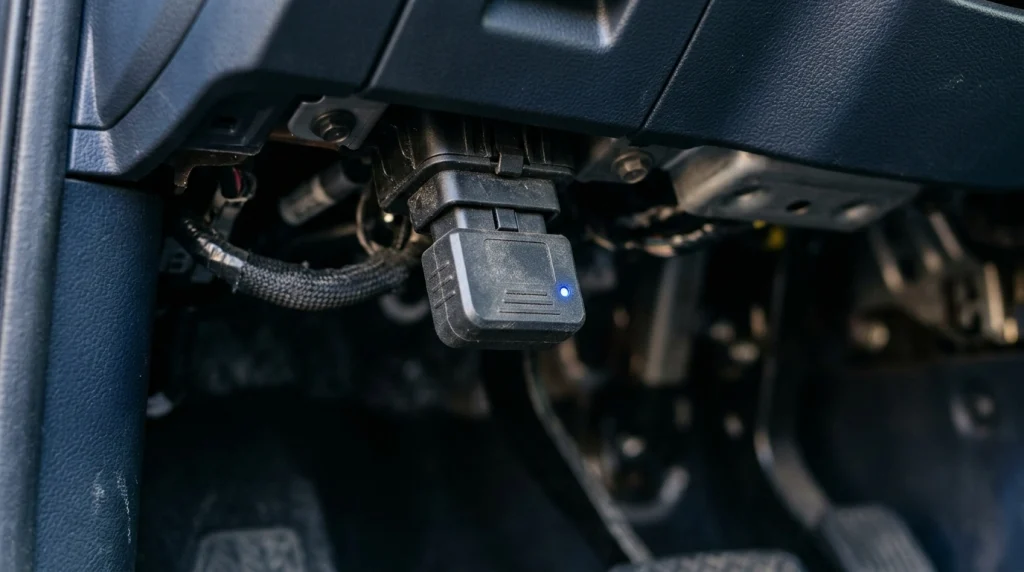
Park the vehicle, apply the parking brake, and locate the OBD2 diagnostic connector, commonly found underneath the dashboard. Insert the adapter firmly without forcing it or bending its pins.
Look for an indicator light if the adapter has one. Some models illuminate immediately, while others use indicators that flash only during startup or communication.
What the result means: An illuminated LED suggests that the adapter is receiving power, but it does not prove that its internal electronics or data connections work correctly. If there is no light, check the vehicle’s ignition requirements, connector seating, and relevant fuse before assuming the adapter is defective.
Step 2: Connect the Adapter to Your Phone or Computer
Enable the correct connection method for your adapter. Classic Bluetooth devices may require pairing through the phone’s settings, while BLE adapters often connect directly through a compatible app. Wi-Fi models require joining the adapter’s network, and USB models require a compatible data connection.
Open the diagnostic or terminal application and select the correct device. Close other diagnostic apps that may already be using the adapter, then attempt to connect again.
What the result means: If the adapter appears and the application establishes a connection, the wireless or wired communication path is working at least at a basic level. It does not yet prove that the adapter can interpret the vehicle’s OBD2 protocol.
Step 3: Send Basic AT Commands
An ELM327-style interface accepts AT commands that control its own settings and report information about its operation. Use a terminal that sends a carriage return after each command, and wait for the response before entering the next one.
Try these commands individually:
ATZ— resets the interface. A compatible implementation normally returns a startup message and a prompt.ATI— requests the interface identification string. The response may identify a version or describe the device.ATE0— turns command echo off, making the returned text easier to read.ATDP— describes the current OBD protocol, if one has been selected.
A prompt character (>) generally indicates that the interface is ready to accept another command. Exact startup messages and supported commands vary by firmware.
If ATZ and ATI produce sensible responses, you have evidence that the terminal can communicate with the adapter and that its command interpreter is responding. However, these results alone do not prove that the device contains a genuine ELM327 chip or supports every advertised function.
Step 4: Test Communication With the Vehicle
Turn the ignition to the ON position, usually with the engine off, so the vehicle’s control modules can respond. If the vehicle’s manufacturer specifies a different procedure, follow its instructions.
In the terminal, send ATSP0 to select automatic protocol detection on a compatible ELM327 implementation. Then send 0100, which requests supported Mode 01 data in the first parameter-ID group.
A responding vehicle may return a hexadecimal data message containing a response that begins with 41 00, sometimes displayed without spaces or with additional protocol headers. The response indicates that the vehicle has replied to the request; the remaining bytes describe supported parameter IDs.
If the adapter returns NO DATA, UNABLE TO CONNECT, or a similar error, the test has not confirmed vehicle communication. Check the ignition state, vehicle compatibility, connector seating, and protocol selection before condemning the adapter.
Step 5: Verify the Connection in a Diagnostic App
After the terminal test, open a compatible OBD2 app and try reading supported live data or diagnostic trouble codes. If the app can retrieve real vehicle information, the adapter has passed a more practical end-to-end test.
For example, an app may display engine speed when the engine is running or coolant temperature when that parameter is supported. A successful request for supported data is stronger evidence than an adapter LED or a Bluetooth connection alone.
Do not clear diagnostic trouble codes simply to test the adapter. Read-only requests are sufficient for basic communication testing, and recording any existing codes before making changes helps preserve useful diagnostic information.
How Can You Interpret the Test Results?
The location of the failure is more useful than a single pass-or-fail judgment. Use this table to identify which part of the connection needs further investigation.
| Test result | Likely meaning | Next step |
|---|---|---|
| No indicator or startup | Power, connection, or hardware issue | Check the port, ignition requirements, and fuse. |
| Adapter not detected | Wireless, USB, or app compatibility problem | Verify the connection method and permissions. |
| AT commands work; 0100 fails | Vehicle-side communication is unconfirmed | Check ignition, protocol, and OBD2 compatibility. |
| Vehicle data returns correctly | Basic end-to-end communication works | Test other supported functions if needed. |
| Works on one car only | Vehicle compatibility or a vehicle-specific fault is possible | Compare results using another known-compatible vehicle. |
A failed response does not automatically mean the adapter is bad. The vehicle, diagnostic application, connection method, and adapter all form part of the same communication chain.
What Should You Check if the ELM327 Fails?
Check the OBD2 Port’s Power and Ground
If the adapter does not power on, inspect the connector for visible damage or corrosion. Many standard OBD2 installations provide battery power at pin 16 and ground at pins 4 and 5, but confirm the correct procedure for your vehicle before taking electrical measurements.
A multimeter can help verify supply voltage and ground when used correctly. Avoid bridging pins with metal probes, forcing a connector into place, or probing unfamiliar terminals. If the port has no power, consult the vehicle’s fuse diagram and service information.
Separate Adapter Problems From Vehicle Problems
If possible, test the ELM327 on another vehicle known to support standard OBD2 diagnostics. If it communicates with the second vehicle but not the first, investigate the original vehicle’s connector, power supply, protocol, and diagnostic network.
If it fails on multiple compatible vehicles, despite a working phone connection and correct setup, the adapter’s firmware or hardware becomes a stronger suspect. Comparing it with a known-good scan tool provides an additional check.
For more troubleshooting steps, see our guide to an OBD2 scanner that has power but no communication. If the main issue is the physical connection rather than the test itself, our ELM327 connection guide covers the setup process.
Understand What AT Command Errors Mean
A question mark (?) commonly means the interface did not understand the command as entered or does not support it. Check spelling, send one command at a time, and confirm that the terminal uses the correct line ending.
A command response is not the same as a successful vehicle response. ELM327 documentation explains that the interpreter can transmit a diagnostic request without determining whether the vehicle understood or answered it. This is why the separate 0100 test matters.
What Can This Test Prove—and What Can It Not Prove?

A successful sequence of AT commands and a valid OBD2 response demonstrates that the adapter can perform basic interface communication and exchange at least one diagnostic request with the vehicle. It is a useful functional check, not a complete hardware certification.
It cannot establish that every advertised feature works, that the firmware is genuine, or that the adapter can access manufacturer-specific systems such as ABS, airbags, transmission modules, or body electronics. Those capabilities depend on the adapter hardware, supported protocols, software, and vehicle.
Likewise, receiving no trouble codes does not prove that the vehicle is free of faults. A generic ELM327 setup may only access standard emissions-related diagnostics, and some faults require additional diagnostic coverage.
For the technical basis of the command tests, the ELM327 data sheet describes the interface’s command-and-response behavior. Its documented behavior is a useful reference, but inexpensive adapters that imitate the interface may not behave identically.
Frequently Asked Questions
1. How do I know if my ELM327 adapter is working?
Check that it powers on, responds to commands such as ATZ and ATI, and retrieves supported vehicle data with a request such as 0100. The last test confirms more than an indicator light or wireless connection alone.
2. What does it mean if my ELM327 responds to ATZ but not 0100?
The terminal can communicate with the adapter, but vehicle communication has not been confirmed. Check the ignition position, OBD2 compatibility, protocol detection, and diagnostic-port condition.
3. Can I test an ELM327 adapter without a car?
Yes. If you have a compatible connection and terminal application, you can test startup and basic AT commands without connecting to a vehicle. However, you cannot verify actual vehicle communication without a compatible diagnostic system to answer OBD2 requests.
4. Does an illuminated LED prove that an ELM327 is good?
No. An LED usually indicates that power is present, but it does not confirm that the command interpreter, wireless connection, or vehicle communication circuitry works properly.
5. Is an ELM327 adapter that reports version 2.1 genuine?
Not necessarily. A version string alone cannot authenticate the internal chip or establish full compatibility. Compare the device’s behavior against documented commands and supported functions rather than relying only on its reported version.
6. Should I clear fault codes to test an ELM327?
No. Reading supported codes or live data is enough for a basic functional test. Save existing codes and relevant diagnostic information before considering any clearing operation, because clearing codes can erase useful evidence and reset emissions-readiness monitors.
Conclusion
The most reliable way to test an ELM327 adapter is to check power, confirm communication with your phone or computer, test the command interpreter, and then request actual OBD2 data from a compatible vehicle. Each stage identifies a different possible failure, making it easier to determine whether the adapter, software, or vehicle needs attention.
If the adapter answers AT commands but cannot retrieve vehicle data, investigate the ignition state, protocol, and diagnostic port before replacing hardware. A successful vehicle-data response confirms basic functionality, although it does not guarantee every advanced diagnostic feature will work.

I’m Alex Rahman, a car enthusiast and automotive writer focused on practical solutions, car tools, and real-world driving advice. I share simple and honest content to help everyday drivers make better decisions.
