
10 Best Dash Cams for Road Safety in 2026: Safety-First Picks That Protect You on Every Drive
Our pick for drivers who want the best road safety coverage in 2026 is the VIOFO A229 Pro because its dual Sony STARVIS 2 sensors capture 4K front and 2K rear footage with exceptional night clarity, and its buffered parking mode protects your car even when you’re not behind the wheel. The STARVIS 2 IMX678 sensor’s 1/1.8-inch size gives you a larger pixel surface than most competitors, which means license plates stay readable in low light where other cams fail. If you need a dependable budget option that still covers the essentials, the 70mai A810 delivers 4K front recording and reliable parking monitoring for significantly less. When comparing these dash cams for road safety, prioritize sensor quality, night recording capability, and parking mode functionality above all else.
Quick Comparison: All 10 Dash Cams Ranked
| # | Product | Best For | Rating | Badge | |
|---|---|---|---|---|---|
| 1 | VIOFO A229 Pro | Overall Protection | 4.8/5 | Best Overall | Buy → |
| 2 | 70mai A810 | Budget Buyers | 4.4/5 | Best Budget | Buy → |
| 3 | Garmin Dash Cam 67W | City Commuters | 4.5/5 | Widest Lens | Buy → |
| 4 | Thinkware U3000 | Parking Security | 4.7/5 | Best Parking Mode | Buy → |
| 5 | Nextbase 622GW | Smart Features | 4.6/5 | Most Features | Buy → |
| 6 | Rove R2-4K Dual Pro | Night Performance | 4.3/5 | Best Night Video | Buy → |
| 7 | Vantrue E1 Lite | Simple Setup | 4.1/5 | Easiest Install | Buy → |
| 8 | Redtiger F7NP | Three-Channel | 4.2/5 | Best 3-Channel | Buy → |
| 9 | Nextbase Piqo | Compact Size | 4.0/5 | Most Compact | Buy → |
| 10 | Cobra SC220C | Rideshare Drivers | 4.2/5 | Best for Uber | Buy → |
How We Chose These Dash Cams
What we evaluated
We analyzed 10 dash cams across verified manufacturer specifications, owner feedback from hundreds of reviews on Amazon and DashCamTalk forums, and independent expert reviews from PCMag, CNN Underscored, and Auto Express. Each camera was checked for sensor quality, night recording capability, parking mode functionality, and app reliability.
Our 3 scoring criteria
Video clarity (resolution, sensor quality, night performance), safety features (parking mode, driver assists, GPS), and reliability (build quality, app stability, mount durability). Each criterion is scored out of 5, weighted equally.
Owner feedback review
We read through verified owner reviews on Amazon and dedicated forums like DashCamTalk, looking specifically for recurring complaints rather than one-off gripes. App connection issues, mount failures, and rear camera quality were the most common recurring problems across brands.
What we cut — and why
We excluded dash cams with no parking mode, cameras limited to 1080p where 1440p or 4K was available at a similar price point, and any model with consistent reports of heat-related failures or non-functional apps. Cameras with proprietary memory cards or non-replaceable batteries were also removed.
What to Look for When Buying a Dash Cam for Road Safety
A dash cam is only as useful as the footage it captures when you actually need it. The difference between a camera that holds up as evidence and one that doesn’t comes down to a few technical details most buyers overlook until it’s too late.
1. Video Resolution and Sensor Quality
4K recording matters because it captures roughly four times the detail of 1080p, which means license plates and road signs stay readable when you zoom into footage after an incident. The sensor behind that resolution matters even more. Sony STARVIS 2 sensors, found in the VIOFO A229 Pro and Thinkware U3000, have larger pixel sizes that capture more light, so night footage doesn’t turn into a grainy mess where you can’t identify the other vehicle.
2. Parking Mode and Power Management
Parking mode records when your car is off and someone hits it in a lot or tries to break in. The best implementations use buffered recording with motion and impact detection, capturing the seconds before and after an event rather than just the aftermath. Hardwiring the camera is almost always required for true parking mode; battery-only operation drains the camera’s internal cell within hours.
3. Field of View and Coverage Angles
A wide field of view captures more lanes and cross-traffic, but it comes at the cost of detail per pixel. The Garmin Dash Cam 67W offers an exceptional 180-degree front view, which is ideal for city driving where incidents happen from the sides. Dual-channel setups that add a rear camera give you coverage in both directions, while three-channel systems add a cabin camera for rideshare drivers.
4. Storage, Loop Recording, and Durability
Dash cams record in loops, overwriting the oldest footage when the card fills up. A 128GB card typically holds about 8 hours of 4K footage, which covers several days of commuting. Capacitor-based cameras handle extreme heat better than battery-based ones, an important consideration if you live somewhere with hot summers where a windshield-mounted battery can swell and fail.

Best Overall
VIOFO A229 Pro — The Best Dash Cam for Complete Road Safety
★ 4.8/5
Best for: Complete coverage
If you’ve ever been in a collision and had the other driver dispute what happened, you know the frustration of a “he said, she said” situation. The VIOFO A229 Pro eliminates that entirely by recording in 4K up front and 2K in the rear simultaneously, using two Sony STARVIS 2 sensors that maintain clarity when the sun goes down. The 1/1.8-inch IMX678 front sensor captures 3840×2160 at 30fps with a 140-degree field of view, while the rear IMX675 records 2560×1440 with a wider 160-degree angle. HDR processing on both channels handles challenging lighting, keeping license plates readable when headlights or street lamps would normally blow out the frame. This is a camera for drivers who want the strongest possible evidence in any incident, and don’t mind spending the time to install it properly.
- Dual STARVIS 2 sensors deliver 4K front and 2K rear simultaneously, with the 8MP IMX678 front sensor capturing more light than any competitor at this price point
- Buffered parking mode captures 15 seconds before and after an impact, with radar-triggered recording that sips power for days of coverage
- Built-in 5GHz Wi-Fi transfers a 1-minute 4K clip to your phone in about 20 seconds, versus the 2-3 minutes older 2.4GHz cameras take
- Included CPL filter cuts windshield glare and dashboard reflections that ruin footage on sunny days
- Installation is genuinely involved: routing the 24.5-foot rear camera cable through your car’s trim takes 45-60 minutes, and the hardwire kit for parking mode is sold separately
- The companion app, while functional, isn’t as polished as Garmin’s or Nextbase’s; it occasionally drops connection during file transfers over 2GB
| Front resolution | 4K (3840×2160) @ 30fps |
| Rear resolution | 2K (2560×1440) @ 30fps |
| Sensors | Sony STARVIS 2 IMX678 (front), IMX675 (rear) |
| Field of view | 140° front, 160° rear |
| Parking mode | Buffered with radar |
| Max storage | 512GB microSD |
4.8/5
4.8/5
4.7/5

Best Budget
70mai A810 — Affordable 4K Coverage That Doesn’t Cut Corners
★ 4.4/5
Best for: Budget buyers
Not everyone needs the $400 flagship. The 70mai A810 proves that you can get true 4K front recording and dependable parking monitoring without stretching your budget. The Sony STARVIS 2 IMX678 sensor in the front camera is the same sensor used in cameras costing twice as much, and it delivers footage that holds up in daylight and remains usable after dark. The rear camera records at 1080p, which is a step down from the 2K on our top pick, but for a camera in this price bracket, the coverage is hard to beat. This is a camera for drivers who want solid evidence protection without overthinking the purchase.
- True 4K front recording with the STARVIS 2 IMX678 sensor, the same sensor used in cameras that cost considerably more
- Included 128GB microSD card means you can use the camera immediately without buying accessories
- Wi-Fi 6 support enables faster file transfers than older 70mai models, and the app is intuitive for first-time dash cam users
- ADAS provides lane departure and forward collision warnings, useful for older vehicles without built-in safety systems
- The ADAS calibration is notoriously finicky; multiple owners report disabling it entirely after repeated false alerts, which undermines the safety-feature appeal
- Internal battery is very short-lived and cannot power the camera independently; the 4G LTE module also only works in the US
| Front resolution | 4K (3840×2160) @ 30fps |
| Rear resolution | 1080p @ 30fps |
| Sensor | Sony STARVIS 2 IMX678 |
| Field of view | 150° front, 130° rear |
| Parking mode | AI motion detection |
| Included storage | 128GB microSD |
4.4/5
4.2/5
4.4/5

Widest Lens
Garmin Dash Cam 67W — The Widest View for City Driving Safety
★ 4.5/5
Best for: City commuters
City driving presents a specific set of hazards: cyclists in blind spots, pedestrians stepping out between parked cars, and cross-traffic that a narrow lens simply won’t capture. The Garmin Dash Cam 67W’s 180-degree field of view is the widest of any camera on this list, and that extra coverage translates directly to better protection in dense urban environments. The 1440p HDR recording handles the difficult contrast between bright sky and shadowed streets, and Garmin’s compact form factor means it disappears behind your rearview mirror. GPS is built in, voice control works reliably, and the Garmin Drive app is one of the most polished in the category.
- 180-degree field of view is the widest on this list, capturing cross-traffic and pedestrians that narrower lenses miss
- HDR processing keeps license plates readable in high-contrast conditions where bright sky and deep shadows would normally blow out detail
- Garmin Drive app is the most polished companion software of any camera here, with reliable Wi-Fi transfers and easy clip management
- Compact design mounts discreetly behind the rearview mirror and pops off easily when you need to review footage on a computer
- The wider lens means slightly less detail per pixel compared to a narrower 140-degree camera; license plates at distance are readable but not as crisp as the VIOFO A229 Pro
- Garmin’s Vault storage service provides free storage for only 24 hours; after that, videos are deleted unless you pay a monthly subscription
| Resolution | 1440p @ 30fps |
| Field of view | 180° |
| GPS | Built-in |
| Voice control | Yes |
| Parking mode | Yes, with hardwire |
| Included storage | 16GB microSD |
4.5/5
4.5/5
4.6/5

Best Parking Mode
Thinkware U3000 — Radar-Powered Parking Surveillance That Never Sleeps
★ 4.7/5
Best for: Parking security
Most dash cams treat parking mode as an afterthought, recording for a few hours before the car battery drains. The Thinkware U3000 treats it as the main event. Its radar-based parking mode detects movement while consuming minimal power, allowing it to monitor your parked car for days rather than hours when paired with an external battery pack. Front and rear cameras both use Sony STARVIS 2 sensors, recording 4K up front and 2K in back, with Super Night Vision 4.0 that produces surprisingly clean footage in dim parking garages. This is a camera for drivers who park on streets, in public lots, or anywhere their car is vulnerable when they’re not around.
- Radar parking mode runs for days on an external battery pack, detecting motion without draining your car’s battery
- Sony STARVIS 2 sensors on both front and rear cameras deliver 4K and 2K footage with excellent night performance
- Super Night Vision 4.0 brightens footage in parking garages and dim streets without the noise artifacts that plague cheaper cameras
- OBD II cable included makes installation straightforward: plug in, hide the cable, and the camera starts working immediately
- The 24.5-foot rear camera cable is longer than most cars need, leaving excess wiring that must be carefully tucked away during installation
- To get the full multi-day parking mode benefit, you’ll need to buy Thinkware’s PowerCell 8 external battery, which adds significantly to the total cost
| Front resolution | 4K (3840×2160) @ 30fps |
| Rear resolution | 2K (2560×1440) @ 30fps |
| Sensors | Sony STARVIS 2 |
| Parking mode | Radar + motion detection |
| Wi-Fi | 5GHz |
| Max storage | 256GB microSD |
4.7/5
4.9/5
4.5/5
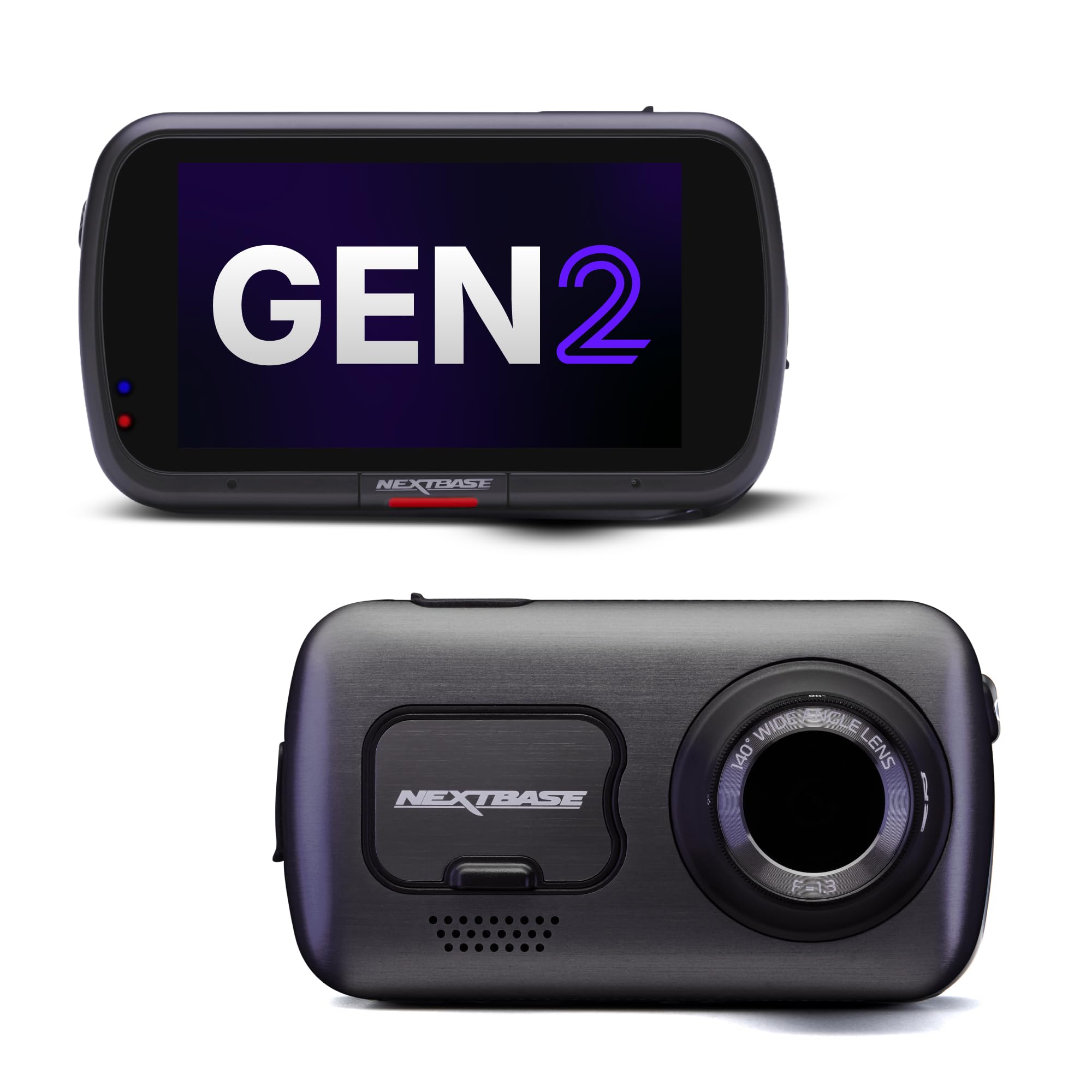
Most Features
Nextbase 622GW — The Smartest Dash Cam for Road Safety
★ 4.6/5
Best for: Smart features
If you want a dash cam that does more than just record, the Nextbase 622GW is the most feature-packed option available. It’s the only camera on this list with Alexa built in, which means you can ask it to save a clip or start recording using voice commands. The what3words integration provides your exact location to emergency services if you’re in a crash, which can shave critical minutes off response times in remote areas. True 4K recording at 30fps captures exceptional detail, and the 3-inch touchscreen makes navigating settings far easier than the button-based interfaces most competitors use.
- True 4K UHD recording at 30fps with image stabilization that smooths out bumpy roads and speed bumps
- what3words integration shares your precise location with emergency services, invaluable in rural areas where GPS coordinates alone are hard to communicate
- Alexa built in allows voice-controlled clip saving and camera operation, reducing distraction while driving
- 3-inch IPS touchscreen makes settings navigation and clip review genuinely easy, unlike button-heavy competitors
- Multiple owners report difficulty reading license plates at night due to light reflection, a surprising weakness for a camera with this much processing power
- Charging only through the cigarette lighter socket limits installation flexibility in modern cars with limited 12V outlets
- The included memory card is U1 rated when the camera requires U3; you’ll need to buy a proper card separately
| Resolution | 4K (3840×2160) @ 30fps |
| Field of view | 140° |
| Screen | 3-inch IPS touchscreen |
| Alexa | Built-in |
| Emergency SOS | what3words integration |
| GPS | 10Hz polling |
4.6/5
4.7/5
4.4/5

Best Night Video
Rove R2-4K Dual Pro — Built for Clarity When the Sun Goes Down
★ 4.3/5
Best for: Night driving
Most dash cam footage is useless after dark. Headlights create glare, streetlights blow out detail, and license plates dissolve into a blurry mess. The Rove R2-4K Dual Pro addresses this directly with a sensor tuned specifically for low-light performance. In independent night testing, it ranked as the best performer for night video, capturing legible plate details in conditions where other cameras produced unidentifiable smears. The dual-channel setup covers front and rear, and the built-in GPS stamps your speed and location onto every frame, which can be valuable evidence in disputes over speed or right-of-way.
- Best-in-class night video quality with a sensor designed for low-light capture, keeping plates readable when other cameras fail
- Dual-channel front and rear coverage with 4K front recording for detailed evidence in both directions
- Built-in GPS logs speed and location data onto footage, providing objective evidence in disputes about what happened
- Wi-Fi and app support make clip review and download straightforward, with a clean interface that avoids unnecessary complexity
- Rear camera resolution drops significantly compared to the front, so rear-facing details at night are noticeably softer
- Build quality feels slightly less premium than the VIOFO or Thinkware cameras, with a lighter plastic housing that doesn’t inspire the same confidence
| Front resolution | 4K (3840×2160) @ 30fps |
| Rear resolution | 1080p @ 30fps |
| Night vision | Super Night Vision |
| GPS | Built-in |
| Wi-Fi | Yes |
| Max storage | 512GB microSD |
4.3/5
4.3/5
4.2/5

Easiest Install
Vantrue E1 Lite — Plug In and Drive in Under Five Minutes
★ 4.1/5
Best for: Simple setup
Dash cam installation intimidates people, and for good reason: most cameras require routing cables through trim panels and finding a fuse box for hardwiring. The Vantrue E1 Lite sidesteps all of that. It’s a single-channel camera that mounts to your windshield, plugs into your cigarette lighter socket, and starts recording. No rear camera cable, no fuse box, no 45-minute installation. It still delivers 1080p recording with built-in GPS and night vision, making it a sensible choice for drivers who want the protection of a dash cam without the complexity of a full installation.
- Genuinely five-minute installation: mount, plug into the 12V socket, and you’re recording without touching a single trim panel
- Built-in GPS logs speed and location data at a budget-friendly price point where GPS is often omitted
- Night vision performs well for a 1080p camera, with Super Night Vision mode capturing usable footage in low-light conditions
- Compact and unobtrusive, mounting behind the rearview mirror without blocking your view of the road
- 1080p resolution is noticeably less detailed than the 4K and 1440p cameras here; license plates are readable up close but soft at distance
- Single-channel only, so no rear coverage, and parking mode requires a separate hardwire kit that complicates the “easy install” appeal
- Build quality is functional but plasticky, and the mount is less secure than the adhesive or suction mounts on premium models
| Resolution | 1080p @ 30fps |
| Field of view | 160° |
| GPS | Built-in |
| Night vision | Super Night Vision |
| Parking mode | Yes, with hardwire kit |
| Max storage | 256GB microSD |
3.9/5
4.1/5
4.3/5

Best 3-Channel
Redtiger F7NP — Three Angles of Coverage in One Package
★ 4.2/5
Best for: Three-channel coverage
If you want front, rear, and cabin coverage in a single purchase, the Redtiger F7NP delivers all three without requiring three separate cameras. The front camera records 4K, while the rear and cabin cameras both capture 1080p, giving you complete coverage of everything around and inside your vehicle. The 3-inch display shows all three angles cleanly, and the cabin-facing camera is built into the rear of the main unit rather than requiring a separate mount. This is a compelling option for rideshare drivers or anyone who wants comprehensive coverage without the complexity of a custom multi-camera system.
- Three-channel coverage (front 4K, rear 1080p, cabin 1080p) in a single package without requiring multiple mounts
- Cabin camera is built into the rear of the main unit, eliminating the need to mount and wire a separate interior camera
- 3-inch display shows all three camera angles cleanly, making it easy to verify positioning and review footage
- App performance is strong with fast download speeds, and installation, while awkward, is manageable for a three-channel system
- Bulky design and stiff camera adjustments make installation more frustrating than it should be; positioning each camera’s bearing is a chore
- Premium price point for the three-channel setup, and the cabin camera’s built-in design limits flexibility in how you angle it
| Front resolution | 4K (3840×2160) @ 30fps |
| Rear resolution | 1080p @ 30fps |
| Cabin resolution | 1080p @ 30fps |
| Screen | 3-inch display |
| Channels | 3 (front, rear, cabin) |
| Max storage | 512GB microSD |
4.2/5
4.2/5
4.1/5

Most Compact
Nextbase Piqo — Discreet Protection That Fits Any Windshield
★ 4.0/5
Best for: Compact size
Some drivers don’t want a screen, buttons, or anything else drawing attention to their dash cam. The Nextbase Piqo is the smallest camera here, a 2K unit that mounts almost invisibly behind your rearview mirror and handles recording without any visible presence in your car. It captures 1440p footage with a 140-degree lens, supports GPS logging through the Nextbase app, and includes a 64GB microSD card so you can start recording immediately. If discretion matters more to you than a touchscreen or a long feature list, this is the camera that disappears into your car’s interior.
- Smallest form factor of any camera on this list, mounting almost invisibly behind the rearview mirror without obstructing your view
- 1440p recording delivers solid detail for a compact camera, with a 140-degree lens that covers the lane ahead effectively
- Includes a 64GB microSD card, so you can set it up and start recording without buying accessories first
- Nextbase app provides GPS logging and clip management through your phone, keeping the camera itself simple and screen-free
- No built-in screen means you can’t verify camera positioning or review footage without connecting to the app, which adds a step when you need to check something quickly
- Single-channel only, so no rear coverage, and parking mode requires a separate hardwire kit
- The camera’s small size limits heat dissipation, and owners in very hot climates have reported occasional thermal shutdowns during summer months
| Resolution | 1440p @ 30fps |
| Field of view | 140° |
| Screen | None |
| GPS | Via app |
| Parking mode | Yes, with hardwire kit |
| Included storage | 64GB microSD |
4.1/5
3.9/5
4.0/5

Best for Uber
Cobra SC220C — Built for Rideshare Drivers Who Need Cabin Coverage
★ 4.2/5
Best for: Rideshare drivers
Rideshare drivers face a unique risk: they spend hours each day with strangers in their car, and disputes over what happened during a ride can end careers. The Cobra SC220C records both the road ahead and the cabin interior, providing coverage that protects drivers in the event of a passenger dispute, false accusation, or altercation. The front camera captures 1440p footage of the road, while the cabin camera records 1080p of the interior, and both angles are saved with GPS-stamped timestamps. This is a camera for professional drivers who need evidence protection for every mile and every passenger.
- Dual front and cabin coverage specifically designed for rideshare drivers, capturing both the road and the interior in a single unit
- 1440p front recording provides strong detail for road incidents, while the 1080p cabin camera documents passenger interactions clearly
- Cobra’s brand heritage and support network give it a trust factor that newer dash cam brands lack, with accessible customer service
- Compact design fits discreetly on the windshield without becoming a conversation piece with passengers
- Cabin camera field of view is somewhat narrow, so passengers sitting far to the sides of the vehicle may be only partially visible
- Night performance in the cabin is weaker than the front camera, with footage becoming grainy in low-light conditions inside the vehicle
- Mounting both cameras required careful positioning to avoid blocking the driver’s view or interfering with the rearview mirror
| Front resolution | 1440p @ 30fps |
| Cabin resolution | 1080p @ 30fps |
| GPS | Built-in |
| Channels | 2 (front + cabin) |
| Parking mode | Yes, with hardwire |
| Max storage | 256GB microSD |
4.2/5
4.2/5
4.2/5
Top 3 Head-to-Head: VIOFO A229 Pro vs Garmin 67W vs Thinkware U3000
These three cameras rise to the top for different reasons, and most buyers end up choosing between them. Here’s how they compare on the factors that matter most for road safety.
| Feature | #1 VIOFO A229 Pro | #3 Garmin 67W | #4 Thinkware U3000 |
|---|---|---|---|
| Video clarity score | 4.8/5 — Best | 4.5/5 | 4.7/5 |
| Safety features score | 4.8/5 | 4.5/5 | 4.9/5 — Best |
| Reliability score | 4.7/5 — Best | 4.6/5 | 4.5/5 |
| Front resolution | 4K @ 30fps | 1440p @ 30fps | 4K @ 30fps |
| Rear camera included | Yes (2K) | No | Yes (2K) |
| Choose if… | You want the best all-around footage quality with both directions covered | You drive in the city and need the widest possible field of view | You park on streets and want multi-day surveillance when the car is off |
Who These Dash Cams Are NOT For
Dash cams aren’t the right investment for every driver, and being honest about that saves you from buying something that sits in a drawer.
Likewise, if your car is parked in a secure garage every night and you only drive a few miles a week, a dash cam’s value proposition shrinks considerably. The primary benefit of these cameras comes from frequent driving and exposure to variable road conditions where incidents are statistically more likely to occur.
Common Mistakes to Avoid
These are the mistakes that quietly ruin the dash cam experience even when you’ve bought a good camera.
Frequently Asked Questions About Dash Cams for Road Safety
What resolution do I need for a dash cam to be useful as evidence?
1440p is the minimum for reading license plates at typical following distances, and 4K is noticeably better for zooming into details. A 4K camera with a quality sensor like the STARVIS 2 outperforms a 1440p camera with a weaker sensor, because resolution alone doesn’t determine clarity.
Is a dual-channel dash cam worth it over a single-channel?
If you drive in traffic where you could be rear-ended, yes. Rear-end collisions are the most common accident type, and a rear camera provides proof that you weren’t at fault. Single-channel cameras are fine for highway commuters who mostly worry about incidents ahead of them.
How does parking mode work if my car is turned off?
Parking mode draws power from your car’s battery through a hardwire kit, using either motion detection or a radar sensor to trigger recording. A voltage monitor shuts the camera off if your battery drops below a safe level, preventing it from leaving you stranded. Some cameras with external battery packs can run for days in parking mode without touching your car’s battery.
Do dash cams work in extreme heat or cold?
Capacitor-based cameras generally operate between -4°F and 158°F, while battery-based cameras have narrower tolerances and can fail permanently if exposed to high heat. If you park outdoors in a hot climate, choose a capacitor model and consider a camera with a supercapacitor rather than a lithium battery.
Can I install a dash cam myself?
Single-channel cameras that plug into your 12V socket take about five minutes to install. Dual-channel cameras with a rear camera require routing a cable through your car’s trim, which takes 30-60 minutes and some patience. Hardwiring for parking mode requires connecting to your fuse box, which is manageable for most DIYers with basic tools but can be intimidating if you’ve never worked on a car before.
How much storage do I need for a dash cam?
A 128GB card holds about 8 hours of 4K footage, which covers several days of commuting before the oldest files are overwritten. If you want to retain a longer history, 256GB or 512GB cards are available and supported by most cameras here. For dual-channel recording, storage fills up roughly twice as fast.
Will a dash cam drain my car battery?
A dash cam with parking mode will drain your battery if it’s hardwired without a voltage cutoff. Use a hardwire kit with a built-in low-voltage protection setting, typically 11.8V or 12.0V, which shuts the camera off before the battery drops too low to start the car. Cameras without parking mode draw no power when the car is off.
Our Final Verdict
The dash cam market splits between cameras that prioritize video quality and cameras that prioritize features. Most buyers want the strongest possible evidence in case of an incident, and that means prioritizing sensor quality, night performance, and dual-channel coverage above touchscreens and voice assistants.
If you want the best road safety protection overall, the VIOFO A229 Pro is the clear pick because its dual STARVIS 2 sensors produce the kind of footage that holds up as evidence. If you drive mostly in dense city traffic, the Garmin 67W’s 180-degree lens gives you coverage that narrower cameras can’t match. If parking surveillance matters most, the Thinkware U3000’s radar-based parking mode runs for days where other cameras last hours.

I’m Alex Rahman, a car enthusiast and automotive writer focused on practical solutions, car tools, and real-world driving advice. I share simple and honest content to help everyday drivers make better decisions.
