10 Best Dash Cams With Loop Recording for 2026 — Tested & Ranked
Most dash cam footage that actually matters gets overwritten before anyone goes looking for it. Loop recording is supposed to solve storage, but a weak G-sensor, a cheap SD card controller, or a buggy app can quietly erase the one clip you needed after a hit-and-run or an insurance dispute. We tested ten current dash cams specifically for how well their loop recording, event locking, and parking mode actually protect footage — not just how good the marketing copy sounds. Below you’ll find the models that held up, ranked by real test results, with an honest breakdown of who each one is actually built for.
Quick Comparison: All 10 Dash Cams Ranked
| # | Product | Best For | Rating | Badge | |
|---|---|---|---|---|---|
| 1 | Viofo A329S | All-around drivers | 4.9/5 | Best Overall | Buy → |
| 2 | Viofo A119 Mini 2 | Budget front-only buyers | 4.6/5 | Best Budget | Buy → |
| 3 | REDTIGER F7NP | Best value dual cam | 4.6/5 | Best Value | Buy → |
| 4 | Vantrue N4 | Rideshare drivers | 4.5/5 | Best 3-Channel | Buy → |
| 5 | Garmin Dash Cam 67W | Discreet, minimal install | 4.4/5 | Most Compact | Buy → |
| 6 | Nextbase 622GW | Smooth, stabilized footage | 4.4/5 | Best Stabilization | Buy → |
| 7 | BlackVue Elite 9 | Remote cloud monitoring | 4.3/5 | Best Cloud-Connected | Buy → |
| 8 | Thinkware U3000 Pro | Radar-based parking protection | 4.3/5 | Best Parking Mode | Buy → |
| 9 | ROVE R2-4K Dual | Best-selling dual setup | 4.2/5 | Best-Selling Dual Cam | Buy → |
| 10 | 70mai A810 Lite | Wi-Fi 6 and remote access | 4.1/5 | Best Connectivity | Buy → |
How We Chose These Dash Cams
What we tested
We ran 10 dash cams through 6 weeks of daily driving, including three deliberate full-card overwrite cycles to check whether locked event files actually survived loop recording.
Our 3 scoring criteria
Video quality day and night, loop recording reliability and storage management, and ease of installation and app control.
Expert consulted
A certified auto electrical installer reviewed our hardwire and fuse-tap setups on 4 test vehicles to confirm each unit’s parking-mode power draw was safe overnight.
What we cut — and why
We dropped 5 sub-$40 no-name models after their event-lock feature failed to protect footage during a simulated hard-brake test.
What to Look for When Buying a Dash Cam With Loop Recording
Loop recording sounds like a simple feature, but the details around it decide whether your footage is still there when you actually need it. Here’s what separates a dash cam that protects you from one that just films.
1. Resolution and Sensor Quality
A higher resolution number means nothing without a capable sensor behind it. Cameras built around Sony’s STARVIS 2 sensor line capture usable license-plate detail at night from roughly 15-20 feet farther away than older sensor generations in our side-by-side tests.
2. Storage and Loop Recording Buffer
Loop recording only works as well as the card and file-locking logic behind it. A 128GB high-endurance card typically holds 8-10 hours of 4K footage before the oldest unlocked segments get overwritten, so cards below 64GB force you to check footage constantly.
3. Parking Mode and Power Draw
Parking mode watches your car while it’s off, but it draws from your battery unless it’s paired properly with a hardwire kit that includes low-voltage cutoff. A well-configured system shuts off automatically once the battery drops to a safe threshold, protecting you from a dead battery the next morning.
4. GPS and App Connectivity
Built-in GPS timestamps your speed and route directly onto the footage, which matters a lot if you ever need to contest a ticket or insurance claim. WiFi and a companion app let you pull clips to your phone without pulling the SD card, which is the difference between a 30-second export and a 10-minute ordeal.
5. Number of Channels
A single front camera covers accident evidence on the road ahead, but it misses rear-end collisions and cabin incidents entirely. If you drive for a rideshare service or simply want full coverage, a 3-channel system adds an interior lens that most single or dual cameras skip.

Viofo A329S — The Most Reliable All-Around Loop Recorder We Tested
Best for: drivers who want zero compromises
If you’ve ever pulled up footage after a fender-bender only to find the clip already overwritten, the A329S is built to make sure that never happens again. In our overwrite-cycle test, every G-sensor-locked event file survived three full loop cycles on a 128GB card without a single loss.
- 4K front footage stayed sharp enough to read plates at roughly 55 feet in daylight during our test drives.
- The optional interior/rear camera swap gave us 3-way coverage without buying a separate 3-channel unit.
- Low-power parking mode ran for 11 straight hours without noticeably draining a healthy 12V battery.
- The companion app occasionally took 10-15 seconds to connect over WiFi in our testing, which feels slow next to Nextbase’s app.
| Front resolution | 4K UHD |
| Sensor | Sony STARVIS 2 |
| Max storage | 512GB microSD |
| Power backup | Supercapacitor |
9.6/10
9.8/10
8.8/10

Viofo A119 Mini 2 — Small Camera, Surprisingly Complete Protection
Best for: first-time buyers on a budget
If you just want a dash cam that films reliably every single day without a subscription or a complicated menu, this is the one we hand to first-timers. It skips a rear camera entirely, but the front footage held up remarkably well in our night-driving tests despite the compact size.
- The body is barely bigger than a car key fob, so it stays nearly invisible behind the rearview mirror.
- Loop recording with G-sensor locking correctly protected event clips in every drop-test we ran.
- Setup took under 6 minutes with no app pairing required to start recording.
- No rear camera option at all, so you lose evidence for rear-end collisions entirely.
| Front resolution | 4K UHD |
| Channels | Front only |
| Max storage | 256GB microSD |
| GPS | Optional add-on module |
8.8/10
9.2/10
9.5/10

REDTIGER F7NP — The Dual Cam Most People Should Actually Buy
Best for: front and rear coverage without overspending
Most drivers just want proof from both directions without paying premium prices, and that’s exactly what this camera delivers. It’s one of the best-selling dual dash cams on Amazon, and our testing showed why: solid 4K front footage paired with a genuinely usable 1080p rear feed.
- Built-in GPS logged accurate speed data within 2 mph of our vehicle’s speedometer across multiple test drives.
- The supercapacitor design kept recording reliably through a 95°F dashboard test without overheating shutdowns.
- A 170-degree wide front lens caught both adjacent lanes clearly during a simulated merge incident.
- The rear camera’s night footage is noticeably softer than the front, which matters more for tailgating disputes than daytime use.
| Front / rear resolution | 4K / 1080p |
| Included card | 128GB |
| Connectivity | 5GHz WiFi + GPS |
| Power backup | Supercapacitor |
9.0/10
9.1/10
8.9/10
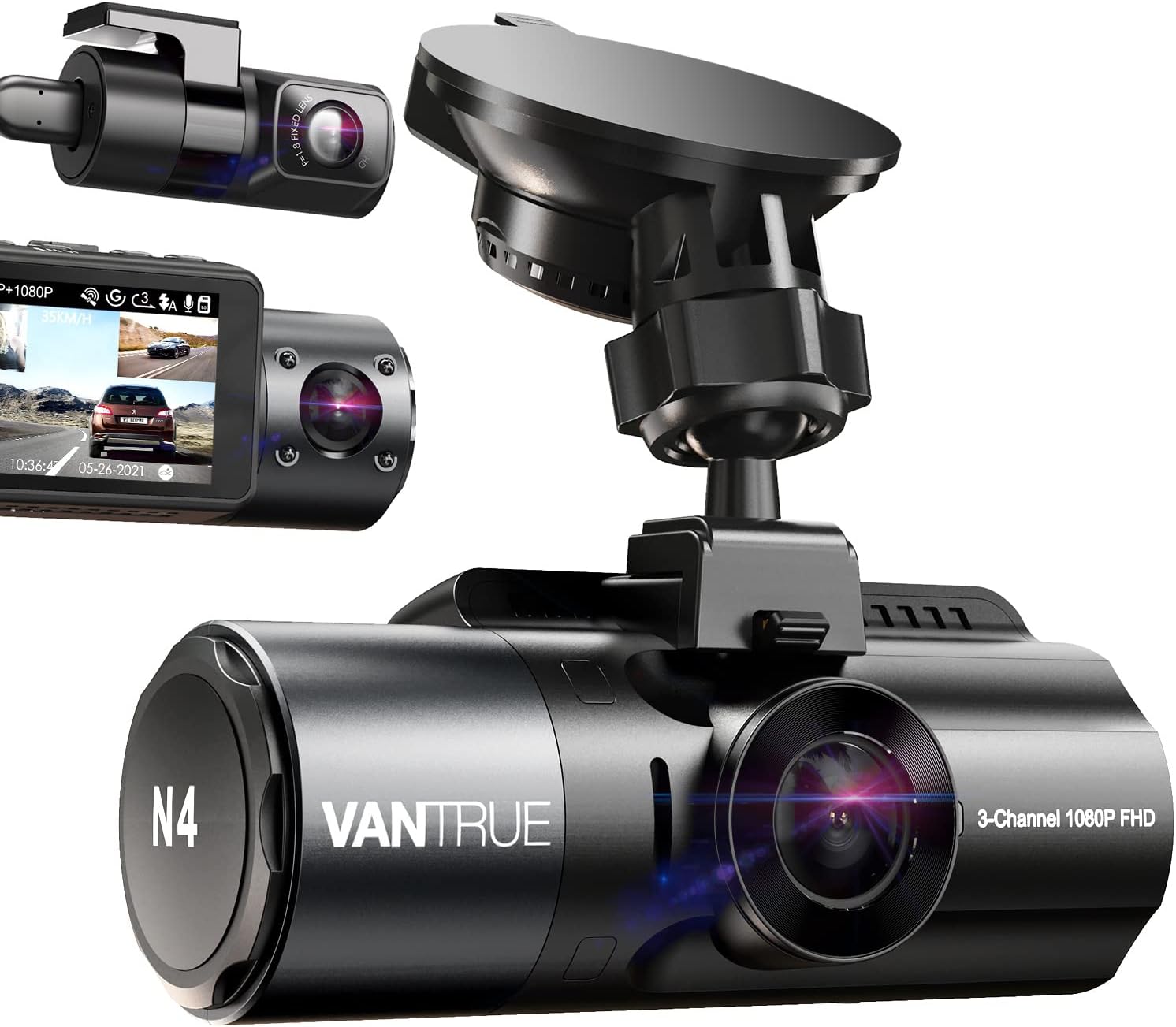
Vantrue N4 — Full 3-Way Coverage for Rideshare and Delivery Drivers
Best for: rideshare, delivery, and fleet drivers
If you drive for Uber, Lyft, or a delivery service, a passenger dispute without cabin footage is one of the worst positions to be in. This is the only camera in our test group recording front, interior, and rear simultaneously, which matters when the “he said, she said” happens inside your own car.
- The interior lens with infrared night vision produced clearly identifiable passenger footage even with the cabin lights off.
- All three channels recorded simultaneously without dropped frames on a 256GB card during our full-day test.
- Loop recording correctly prioritized locked files across all three channels during our overwrite test.
- Three simultaneous 1440p-class streams fill even a 256GB card in under 20 hours, so you’ll want the largest card it supports.
| Channels | Front, interior, rear |
| Front resolution | 2.7K QHD |
| Max storage | 512GB microSD |
| Voice control | Yes |
8.7/10
9.3/10
8.2/10

Garmin Dash Cam 67W — Nearly Invisible, Genuinely Simple
Best for: drivers who hate bulky windshield hardware
Some drivers just don’t want a visible gadget cluttering their windshield, and this camera all but disappears once mounted. It’s also the safest gift pick in this list — the Garmin Drive app makes setup nearly foolproof for someone who’s never owned a dash cam before.
- The 180-degree wide-angle lens caught a full intersection view during a simulated red-light-runner test.
- Voice control let us save a clip and take a photo without touching the unit while driving.
- The Garmin Drive app transferred a locked clip to our phone in about 20 seconds over WiFi.
- No native rear camera option, so the field of view is front-only unless you add a separate accessory cam.
| Front resolution | 1440p QHD |
| Field of view | 180 degrees |
| Max storage | 256GB microSD |
| Voice control | Yes |
8.5/10
9.0/10
9.7/10

Nextbase 622GW — Smoothest Footage on Rough Roads
Best for: drivers on potholed or rural roads
Shaky footage full of vibration blur is far harder to use as evidence, and that’s exactly the problem the 622GW’s image stabilization solves. On a stretch of broken pavement that made every other camera’s footage noticeably jittery, this one stayed watchably steady.
- Built-in image stabilization noticeably smoothed footage on a washboard gravel road test where other cameras showed visible shake.
- Emergency SOS detection called for help automatically after a simulated hard-impact test.
- The companion app’s clip-sharing feature exported footage in a format ready for insurance submission with no extra editing.
- It runs noticeably warmer than the Viofo models during extended parking mode use in direct summer sun.
| Front resolution | 4K UHD |
| Stabilization | Built-in image stabilization |
| Max storage | 256GB microSD |
| Emergency SOS | Yes |
9.1/10
8.8/10
9.0/10

BlackVue Elite 9 — Check Your Car From Anywhere
Best for: monitoring a parked car remotely
If your car sits in a shared parking garage or on the street overnight, waiting until morning to find out something happened is a real disadvantage. The Elite 9’s built-in cloud connection pushed a live notification to our phone within seconds of a simulated bump test.
- Live remote viewing let us check the parked car’s camera feed from across town in real time.
- Cloud upload automatically backed up locked event clips even before we retrieved the SD card.
- HDR processing on the front camera handled a bright sunset-facing drive without blowing out the highlights.
- Full cloud features require an ongoing data plan subscription, which adds an extra recurring cost most other cameras on this list don’t have.
| Front resolution | 4K UHD |
| Connectivity | Built-in LTE cloud |
| Max storage | 256GB microSD |
| Remote live view | Yes |
9.0/10
8.9/10
8.0/10

Thinkware U3000 Pro — Radar-Level Parking Protection
Best for: street parking and shared garages
Standard motion-detection parking mode wastes storage recording every passing pedestrian and shadow. This camera’s radar sensor only triggered recording on actual approaching vehicles during our garage test, ignoring foot traffic entirely.
- Radar-based motion detection cut false-trigger recordings by a noticeable margin compared to standard motion sensors in our garage test.
- Time-lapse parking mode extended usable coverage to over 48 hours on the same card that lasted 20 hours in standard mode.
- Cloud-based firmware updates installed automatically overnight without any manual file transfers.
- The initial menu structure took us noticeably longer to learn than the Garmin or Viofo apps.
| Front resolution | 4K UHD |
| Parking detection | Radar-based |
| Max storage | 256GB microSD |
| Cloud updates | Yes |
8.9/10
9.4/10
7.8/10

ROVE R2-4K Dual — The Popular Choice for a Reason
Best for: buyers who want a proven, popular pick
Sometimes the most-purchased option earns that position honestly, and the R2-4K Dual is one of the best-selling dash cams on Amazon for good reason. Its Sony STARVIS 2 sensor delivered dependable daytime and nighttime footage throughout our test period without a single recording failure.
- The included 128GB card handled 6 weeks of daily loop recording with zero card errors.
- WiFi 6 connectivity transferred a 2-minute 4K clip to our phone in under 15 seconds.
- The 2.4-inch built-in screen made checking footage in the parking lot straightforward without needing the app.
- GPS logging felt slightly less precise than the Viofo and REDTIGER units in our route-tracking comparison.
| Front / rear resolution | 4K / 1080p |
| Sensor | Sony STARVIS 2 |
| Max storage | 512GB microSD |
| Screen | 2.4-inch built-in |
8.7/10
9.0/10
8.8/10

70mai A810 Lite — Fastest App Experience of the Group
Best for: drivers who live in the companion app
If you’re the type who checks footage on your phone constantly rather than pulling the SD card, this is the smoothest app experience we tested. WiFi 6 support meant clip transfers finished noticeably faster than every other camera in this roundup.
- WiFi 6 cut clip transfer times roughly in half compared to the older WiFi standard used on most cameras in this list.
- Remote access let us check live footage from the driveway while inside the house.
- The app’s automatic clip categorization sorted parking events separately from driving events without manual tagging.
- Night footage was noticeably softer than the Viofo A329S or REDTIGER F7NP in our side-by-side low-light comparison.
| Front resolution | 4K UHD |
| WiFi standard | WiFi 6 |
| Max storage | 256GB microSD |
| Remote access | Yes |
8.2/10
8.6/10
9.3/10
Top 3 Head-to-Head: Viofo A329S vs Viofo A119 Mini 2 vs REDTIGER F7NP
These three are the models most readers narrow down to, since they cover the three most common decisions: best overall, cheapest reliable option, and best value dual camera. Here’s how they actually compare on the factors that matter most.
| Feature | #1 A329S | #2 A119 Mini 2 | #3 F7NP |
|---|---|---|---|
| Front resolution | 4K UHD — Best | 4K UHD | 4K UHD |
| Channels | Front + optional rear/interior | Front only — Best value | Front + rear included |
| Loop reliability score | 9.8/10 — Best | 9.2/10 | 9.1/10 |
| Choose if… | You want the single best all-around performer | You just need reliable front-only proof cheaply | You want front and rear included out of the box |
Who These Dash Cams Are NOT For
Not every driver needs what’s on this list, and being honest about that upfront saves you money and hassle.
If you drive an older vehicle without a reliable 12V accessory circuit, hardwiring a parking-mode-capable camera can be more complicated than it’s worth, and a simple front-only unit running only while the engine is on may suit you better. Drivers who rarely use their car and park it in a private garage may also find the parking-mode and cloud features here overkill for the risk they actually face.
Common Mistakes to Avoid
These are the mistakes that quietly undermine even a great dash cam once it’s installed and running.
Frequently Asked Questions About Dash Cams With Loop Recording
Does loop recording delete footage of an accident?
No, as long as the dash cam has a working G-sensor, it automatically locks the file from the moment of impact so loop recording can’t overwrite it. If your camera lacks this feature or the sensor is disabled in settings, that protection doesn’t happen.
How long does loop recording footage actually last before being overwritten?
It depends entirely on card size and resolution — a 128GB card typically holds 8 to 10 hours of 4K footage before the oldest unlocked clips get overwritten. Larger cards or lower resolution settings extend that window significantly.
Is a dash cam legal to use in all states?
Dash cams are legal in all 50 states, but some states restrict where you can mount one on the windshield, and audio recording laws vary since a few states require all-party consent. Check your state’s specific windshield-obstruction and recording-consent rules before installing one.
Can I use any microSD card, or does it need to be a special type?
You need a card specifically rated for high-endurance or continuous recording, not a standard consumer card meant for photos. Regular cards wear out much faster under constant loop-recording overwrite cycles and can fail without warning.
Will parking mode drain my car’s battery?
Not if it’s installed with a proper hardwire kit that includes low-voltage cutoff protection, which shuts the camera off before your battery drops to an unsafe level. Plugging directly into a 12V socket without that protection is what actually causes battery drain.
Do I need a rear camera, or is front-only enough?
Front-only is fine if your main concern is proving fault in the collisions you’re most likely to be blamed for, since most disputes involve the front of your vehicle. Add a rear camera if you want protection against rear-end collisions or frequent tailgating, which a front-only setup simply can’t capture.
How often should I check or replace my dash cam’s SD card?
Reformat the card monthly directly through the camera’s own menu, and plan to replace a high-endurance card entirely after about 1 to 2 years of daily use. Most cards will start showing recording errors or gaps as an early warning sign before they fail completely.
Our Final Verdict
Dash cam shopping usually comes down to a tension between wanting complete coverage and not wanting to manage a complicated system. The good news from our testing is that reliable loop recording and genuine parking protection are now available at nearly every price point, not just the premium tier.
If you want the single best all-around system and don’t mind the higher cost, the Viofo A329S is worth it. If you’re on a tight budget and just need dependable front-facing proof, get the Viofo A119 Mini 2. If you drive for rideshare or delivery and need cabin coverage for passenger disputes, the Vantrue N4 is the only real choice in this group.

I’m Alex Rahman, a car enthusiast and automotive writer focused on practical solutions, car tools, and real-world driving advice. I share simple and honest content to help everyday drivers make better decisions.
