
10 Best Dash Cam With Built-In Screen for 2026: Clear Footage Without Phone Dependence
A dash cam with a built-in screen lets you aim the camera, change settings, confirm recording, and review an important clip without reaching for your phone. The harder part is finding a model whose screen does not come at the expense of video clarity, dependable storage, or parking protection. For this guide, I prioritized current screen-equipped cameras with useful controls, strong recording specifications, and features that matter after an accident. You will find options for simple front recording, front-and-rear coverage, rideshare use, touchscreen control, and high-resolution footage.
Quick Comparison: 10 Dash Cams With Screens Ranked
| # | Product | Best For | Rating | Badge | |
|---|---|---|---|---|---|
| 1 | Garmin Dash Cam X310 | Everyday premium use | 4.8/5 | Best Overall | Buy → |
| 2 | REDTIGER F7N Touch | Touchscreen value | 4.6/5 | Best Value | Buy → |
| 3 | VIOFO A329S | Video quality | 4.7/5 | Best Video | Buy → |
| 4 | Vantrue N4 Pro | Rideshare drivers | 4.6/5 | Best 3-Channel | Buy → |
| 5 | VIOFO A229 Pro | Front-rear detail | 4.6/5 | Best Dual | Buy → |
| 6 | 70mai A810 | Feature balance | 4.4/5 | Best Balanced | Buy → |
| 7 | Nextbase 622GW | Large touchscreen | 4.3/5 | Best Controls | Buy → |
| 8 | ROVE R2-4K PRO | Simple 4K setup | 4.2/5 | Easy Setup | Buy → |
| 9 | Vantrue E1 Pro | Compact screen | 4.3/5 | Best Compact | Buy → |
| 10 | Vantrue Element 3 | Cabin coverage | 4.1/5 | Versatile | Buy → |
How We Chose These Dash Cams
What we researched
We compared 10 screen-equipped models using current manufacturer specifications and recent independent dash-cam testing rather than claiming hands-on testing we did not perform. Independent 2026 testing confirms that models such as the Garmin X310, VIOFO A329S, and Vantrue E1 Pro remain competitive current choices. :contentReference[oaicite:0]{index=0}
Our 3 scoring criteria
Video evidence quality, screen and control usability, and everyday feature value were applied consistently. Resolution alone was not treated as proof of superior footage.
Evidence standard
No expert interview is invented for this roundup. Recommendations are an editorial synthesis of published specifications and independent testing, with extra weight given to screen usefulness, image quality, storage support, GPS, parking options, and installation practicality.
What we cut
Screenless cameras were excluded even when their recording quality was strong. That matters because the target buyer here specifically wants immediate on-device status, framing, settings, or playback rather than complete dependence on a phone app.
What to Look for When Buying a Dash Cam With Built-In Screen
A screen is useful, but it should not become the feature that distracts you from the camera’s actual job: preserving usable evidence. These four factors separate a convenient dash cam from one you may regret installing.
1. Screen Size and Control Layout
A small display is enough for checking whether the lens is aimed correctly and confirming that recording has started. A larger touchscreen becomes more valuable if you regularly review clips or change settings inside the car. The trade-off is windshield space: a large display can become distracting or obstructive when mounted poorly.
2. Video Quality After Dark
A 4K label does not automatically mean readable plates in every situation. Sensor quality, HDR processing, exposure, windshield reflections, movement, and available light all affect usable detail. Look beyond the headline resolution and give more weight to cameras with credible independent daytime and nighttime testing.
3. Number of Camera Channels
Front-only recording is simpler and requires less wiring. A front-and-rear system adds useful evidence if another vehicle hits you from behind, while a three-channel system adds cabin recording for rideshare, taxi, or delivery work. Extra channels also increase storage requirements and installation complexity.
4. Parking Mode, Storage, and Power
Parking recording usually requires more than switching on a menu setting. Many cameras need a compatible hardwire kit or another constant-power solution, and high-resolution multi-channel recording can consume storage quickly. Lead Foot Automotive’s guide to recording when the car is off explains why continuous power is central to parking protection. :contentReference[oaicite:1]{index=1}

Garmin Dash Cam X310 — Best All-Round Screen Experience
If you want a dash cam screen that feels integral rather than added as an afterthought, the X310 is the strongest starting point. It combines 4K recording with a 2.4-inch touchscreen, GPS, voice features, and Garmin’s established dash-cam ecosystem. Independent 2026 testing continues to include the X310 among notable current models. :contentReference[oaicite:2]{index=2}
- 4K front recording
- 2.4-inch touchscreen simplifies settings and playback
- Built-in GPS and voice control add daily convenience
- Front-only configuration is less comprehensive than dual- or three-channel systems
| Video | 4K front |
| Display | 2.4-inch touchscreen |
| GPS | Built in |
| Channels | Front |
Video evidence: 9.4/10 | Screen usability: 9.6/10 | Feature value: 9.1/10
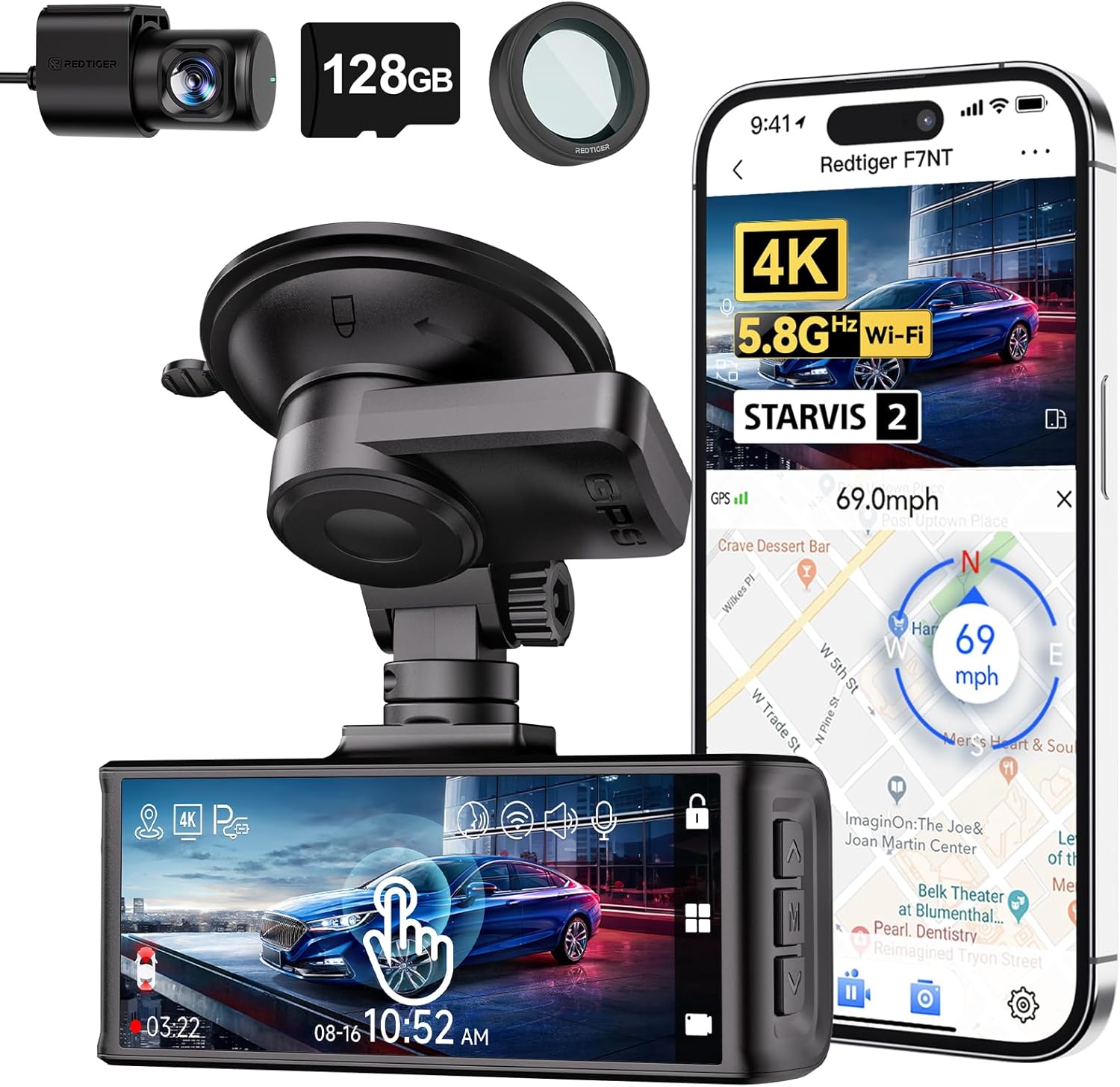
#2 REDTIGER F7N Touch — Best Touchscreen Value
For drivers who specifically want a larger touchscreen and front-and-rear coverage, the F7N Touch makes a compelling case. Its interface is easier to operate directly from the windshield than tiny button-driven cameras, while its dual-camera format covers incidents behind the vehicle as well as ahead. The compromise is that the overall ecosystem and image processing are not as polished as the strongest premium choices.
- Strong screen-first design
- Front-and-rear recording
- GPS and wireless connectivity on supported configuration
- Parking features require correct power setup
Scores: Video evidence 8.7/10 | Screen usability 9.5/10 | Feature value 9.3/10

#3 VIOFO A329S — Best for Video Quality
Choose the A329S when the screen is important but footage quality still sits at the top of your priority list. Recent independent testing praised its 4K detail and HDR performance, making it particularly attractive when identifying signs, vehicles, and other small road details matters. :contentReference[oaicite:3]{index=3} The weakness is simple: buyers focused mainly on a big, touch-friendly interface can find more screen-centric designs elsewhere.
Scores: Video evidence 9.8/10 | Screen usability 8.3/10 | Feature value 9.2/10

#4 Vantrue N4 Pro — Best for Rideshare Drivers
A normal front-and-rear dash cam leaves one major blind spot for rideshare drivers: the cabin. The N4 Pro addresses that with front, cabin, and rear recording while retaining an integrated display for setup and status checks. That extra coverage means more cables and more storage demand, but for Uber, Lyft, taxi, and delivery work the cabin channel can be far more valuable than a cleaner two-camera installation.
Scores: Video evidence 9.3/10 | Screen usability 8.6/10 | Feature value 9.1/10

#5 VIOFO A229 Pro — Best Front-and-Rear Detail
If evidence from behind the vehicle matters nearly as much as footage from the front, the A229 Pro remains a strong dual-channel option. Its 4K front and higher-resolution rear approach is more evidence-focused than systems that put most of their specification budget into the front camera. It is a better fit for drivers who value footage quality over a large entertainment-style touchscreen.
Scores: Video evidence 9.6/10 | Screen usability 8.1/10 | Feature value 9.0/10

#6 70mai A810 — Best Balance of Features
The A810 suits buyers who want modern 4K recording, an integrated display, GPS-related features, and optional rear coverage without jumping immediately to the most specialized premium systems. Its screen is useful for framing and settings, while the broader feature set covers the needs of a typical commuter. App dependence for some advanced functions keeps it from ranking higher for a buyer whose main priority is completely phone-free operation.
Scores: Video evidence 9.0/10 | Screen usability 8.5/10 | Feature value 9.1/10

#7 Nextbase 622GW — Best Large Touchscreen Controls
The 622GW makes sense when direct interaction with the camera matters more than having the smallest possible windshield footprint. Its touchscreen-oriented interface makes playback and menu navigation easier than button-heavy compact cameras. The trade-off is that newer competitors have become extremely strong on sensors, wireless transfers, and overall value, so this pick is primarily about interface preference rather than simply chasing the newest specification sheet.
Scores: Video evidence 8.8/10 | Screen usability 9.4/10 | Feature value 8.1/10

#8 ROVE R2-4K PRO — Best for Straightforward 4K Recording
Not everyone needs three cameras or an elaborate driver-assistance system. The R2-4K PRO is better suited to someone who wants a recognizable screen, 4K-class front recording, GPS/Wi-Fi conveniences, and familiar loop-recording operation. It loses ground to higher-ranked models when low-light detail and multi-channel evidence become the main priorities.
Scores: Video evidence 8.4/10 | Screen usability 8.5/10 | Feature value 8.8/10

#9 Vantrue E1 Pro — Best Compact Dash Cam With Screen
Large displays are convenient until they start occupying too much windshield space. The E1 Pro takes the opposite approach with a compact body and a small 1.54-inch display that still gives you immediate recording status and basic on-device control. Car and Driver’s 2026 testing highlighted its true 4K recording, compact installation, GPS, fast Wi-Fi, and support for large memory cards, while also noting that the tiny screen and buttons are genuine compromises. :contentReference[oaicite:4]{index=4}
Scores: Video evidence 9.2/10 | Screen usability 7.6/10 | Feature value 9.0/10
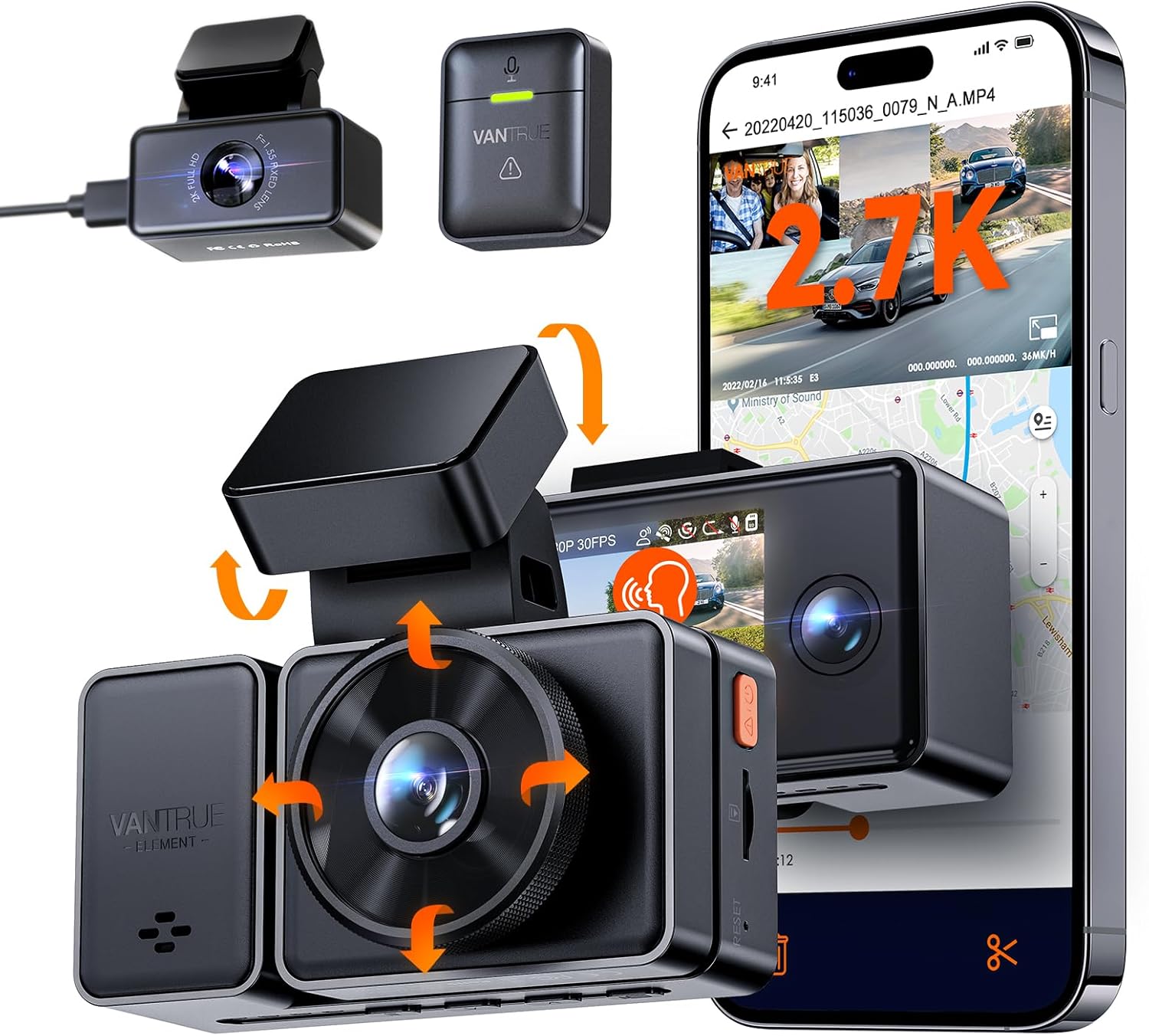
#10 Vantrue Element 3 — Best Versatile Three-Channel Alternative
The Element 3 is useful when you want front, cabin, and rear recording but do not need the N4 Pro’s stronger emphasis on maximum front resolution. Lead Foot Automotive’s detailed review lists a 2.45-inch LCD, 2.7K front recording, 1080p cabin and rear channels, GPS, dual-band Wi-Fi, voice control, and microSD support up to 512GB. :contentReference[oaicite:5]{index=5} Its main weakness is that drivers focused on maximum plate detail can get stronger front-camera performance elsewhere.
Scores: Video evidence 8.2/10 | Screen usability 8.5/10 | Feature value 8.8/10
Top 3 Head-to-Head: Garmin X310 vs REDTIGER F7N Touch vs VIOFO A329S
| Factor | Garmin X310 | REDTIGER F7N Touch | VIOFO A329S |
|---|---|---|---|
| Main strength | Polished touchscreen | Large-screen value | Footage quality |
| Coverage | Front | Front + rear | Configuration dependent |
| Best fit | Driver wanting simple premium controls | Driver wanting screen and dual coverage | Driver prioritizing recorded detail |
Who These Dash Cams Are NOT For
Not every driver benefits from putting a display on the windshield.
Likewise, a built-in screen should not be your main criterion if you need professional multi-camera fleet coverage or cloud-based remote monitoring. Those use cases require a different feature hierarchy.
Common Mistakes to Avoid
Choosing a Big Screen Instead of Better Footage
A large display does not improve the evidence saved to your memory card. Prioritize sensor performance and useful footage first, then choose the screen size you can comfortably operate.
Assuming Parking Mode Works Automatically
Many installations lose power when the ignition switches off. Confirm the camera’s parking-mode power requirements and use the correct hardwire or supported constant-power solution; this parking-mode recording guide explains the relationship between power and recording duration. :contentReference[oaicite:6]{index=6}
Using the Wrong Memory Card
Dash cams repeatedly write and overwrite video. Use a compatible endurance-oriented card and follow the camera maker’s capacity and formatting requirements rather than assuming any spare microSD card will remain reliable.
Mounting the Screen in Your Main Sightline
A useful display can become an unnecessary obstruction when installed too low or too centrally. Position the camera so the lens has a clear view while the body interferes as little as possible with normal driving visibility.
Never Checking Saved Footage
A recording icon does not guarantee that every saved file is healthy. Periodically play back a recent clip, verify the timestamp, and confirm that loop recording is functioning before you actually need evidence.
Frequently Asked Questions
Is a dash cam with a screen better than one without a screen?
It is more convenient for aiming the lens, checking recording status, changing settings, and reviewing clips inside the car. Screenless models can be smaller and less distracting, so the better design depends on how much you value direct controls.
Do I still need an app if my dash cam has a screen?
Not necessarily for basic operation. However, Wi-Fi and an app can make downloading or sharing clips much faster than removing the memory card or reviewing everything on a small display.
Should I buy a touchscreen dash cam?
A touchscreen is useful if you frequently change settings or review recordings in the vehicle. Physical buttons can still be preferable when you want controls that are easy to locate by feel.
Does a dash cam record when the car is turned off?
Only when the model supports parking recording and receives the power required for that mode. Depending on the camera and vehicle, that may mean installing a hardwire kit or another supported constant-power solution. :contentReference[oaicite:7]{index=7}
Is 4K necessary for a dash cam?
No. Higher resolution can preserve more detail, but sensor quality, HDR, bitrate, lighting, exposure, motion, and compression also influence whether a plate or road sign is actually readable.
Final Verdict
The right choice comes down to what you expect the screen to do for you. A display can make a dash cam dramatically easier to live with, but recording quality and coverage still matter more when an incident actually happens.

I’m Alex Rahman, a car enthusiast and automotive writer focused on practical solutions, car tools, and real-world driving advice. I share simple and honest content to help everyday drivers make better decisions.
